technical specifications Seat Ibiza 5D 2012 Workshop Manual
[x] Cancel search | Manufacturer: SEAT, Model Year: 2012, Model line: Ibiza 5D, Model: Seat Ibiza 5D 2012Pages: 280, PDF Size: 3.66 MB
Page 105 of 280
103
Lights and visibility
For the sake of the environment
The heated rear window should be switched off as soon as the glass is dem-
isted. By saving electrical power you can also save fuel.
Note
To avoid possible damage to the battery, an automatic temporary discon-
nection of this function is possible, coming back on when normal operating
conditions are re-established.
Hazard warning lights
The hazard warning lights are used to draw the attention of
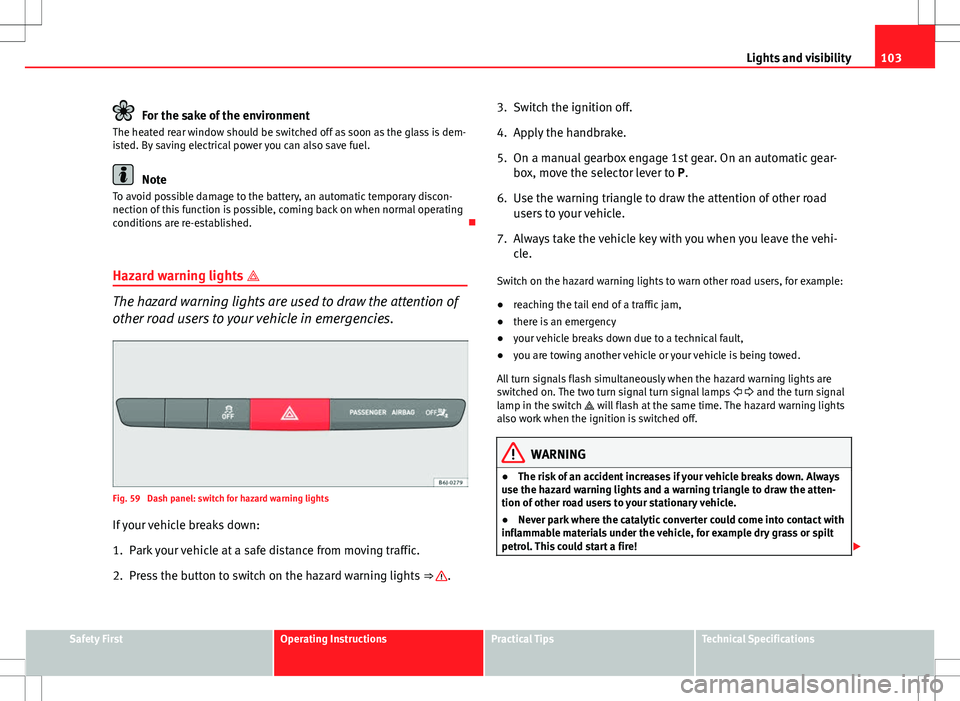
other road users to your vehicle in emergencies.
Fig. 59 Dash panel: switch for hazard warning lights
If your vehicle breaks down:
1. Park your vehicle at a safe distance from moving traffic.
2. Press the button to switch on the hazard warning lights ⇒
.3. Switch the ignition off.
4. Apply the handbrake.
5. On a manual gearbox engage 1st gear. On an automatic gear-
box, move the selector lever to P.
6. Use the warning triangle to draw the attention of other road users to your vehicle.
7. Always take the vehicle key with you when you leave the vehi- cle.
Switch on the hazard warning lights to warn other road users, for example:
● reaching the tail end of a traffic jam,
● there is an emergency
● your vehicle breaks down due to a technical fault,
● you are towing another vehicle or your vehicle is being towed.
All turn signals flash simultaneously when the hazard warning lights are
switched on. The two turn signal turn signal lamps and the turn signal
lamp in the switch will flash at the same time. The hazard warning lights
also work when the ignition is switched off.
WARNING
● The risk of an accident increases if your vehicle breaks down. Always
use the hazard warning lights and a warning triangle to draw the atten-
tion of other road users to your stationary vehicle.
● Never park where the catalytic converter could come into contact with
inflammable materials under the vehicle, for example dry grass or spilt
petrol. This could start a fire!
Safety FirstOperating InstructionsPractical TipsTechnical Specifications
Page 107 of 280
105
Lights and visibility
Note
● The turn signals only work when the ignition is switched on. The corre-
sponding warning lamp or flashes in the instrument panel. The control
lamp flashes when the turn signals are operated, provided a trailer is
correctly attached and connected to the vehicle. If a turn signal bulb is de-
fective, the control lamp flashes at double speed. If the trailer turn signal
bulbs are damaged, control lamp does not light up. Change the bulb.
● The main beam headlights can only be switched on if the dipped beam
headlights are already on. The warning lamp then comes on in the instru-
ment panel.
● The headlight flasher comes on for as long as you pull the lever – even if
no other lights are switched on. The warning lamp then comes on in the
instrument panel.
● When the parking lights are switched on, the headlight and the tail light
on the corresponding side of the vehicle light up. The parking lights will on-
ly work if the key is removed from the ignition. If the lights are switched on,
an audible warning will be emitted while the driver door is open.
● If the turn signal lever is left on after the key has been taken out of the
ignition lock, an acoustic signal sounds when the driver door is opened.
This is a reminder to switch off the turn signal, unless of course you wish to
leave the parking light on. Interior lights
Front interior light
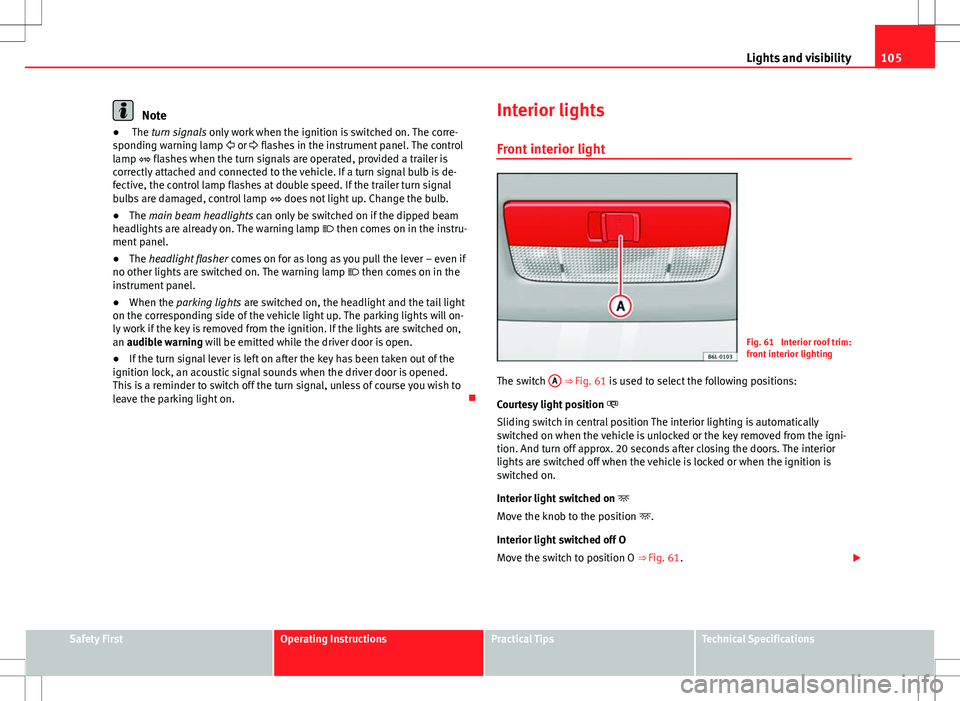
Fig. 61 Interior roof trim:
front interior lighting
The switch A
⇒ Fig. 61 is used to select the following positions:
Courtesy light position
Sliding switch in central position The interior lighting is automatically
switched on when the vehicle is unlocked or the key removed from the igni-
tion. And turn off approx. 20 seconds after closing the doors. The interior
lights are switched off when the vehicle is locked or when the ignition is
switched on.
Interior light switched on
Move the knob to the position .
Interior light switched off O
Move the switch to position O ⇒ Fig. 61.
Safety FirstOperating InstructionsPractical TipsTechnical Specifications
Page 109 of 280
107
Lights and visibility
The sun visors for the driver and the front passenger can be pulled out of
their central supports and turned towards the doors in the direction of the
arrow ⇒ Fig. 63. Never pull them downwards.
The driver sun visor has compartments for cards, and the passenger sun vi-
sor has a vanity mirror with a cover*.
Note
Incorrect use of the sun visors (e.g. pulling them downwards once they are
open) may result in broken hinges. This damage is not covered by the vehi-
cle warranty.
Windscreen wipers
Front windscreen wipers
The window wiper lever controls the windscreen wipers and
the automatic wash and wipe.
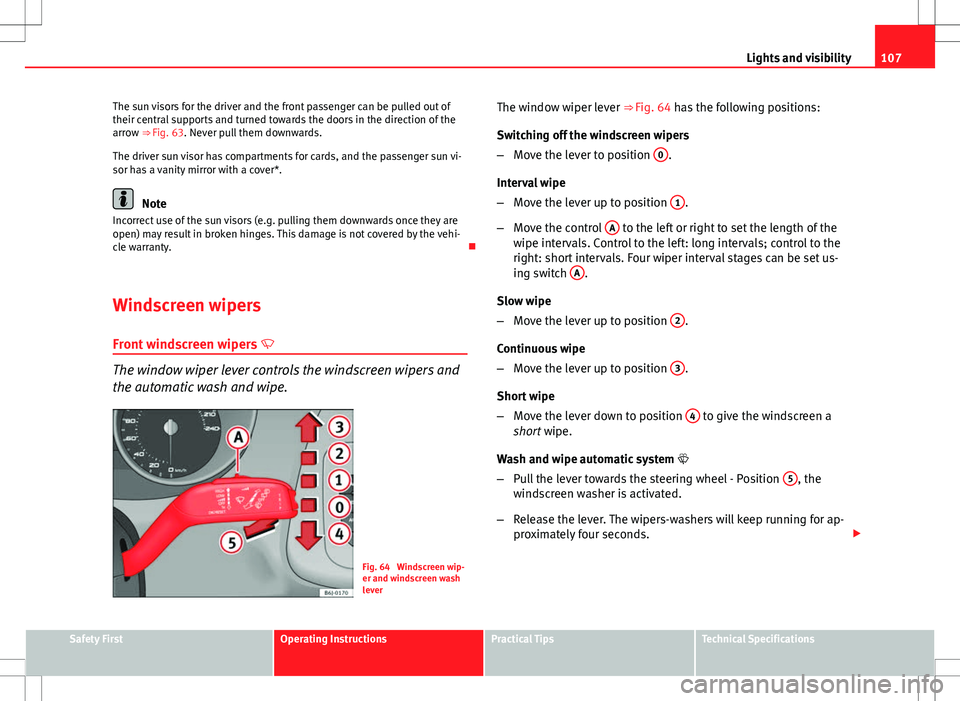
Fig. 64 Windscreen wip-
er and windscreen wash
leverThe window wiper lever ⇒ Fig. 64 has the following positions:
Switching off the windscreen wipers
–
Move the lever to position 0
.
Interval wipe
– Move the lever up to position 1
.
– Move the control A
to the left or right to set the length of the
wipe intervals. Control to the left: long intervals; control to the
right: short intervals. Four wiper interval stages can be set us-
ing switch A
.
Slow wipe
– Move the lever up to position 2
.
Continuous wipe
– Move the lever up to position 3
.
Short wipe
– Move the lever down to position 4
to give the windscreen a
short wipe.
Wash and wipe automatic system
– Pull the lever towards the steering wheel - Position 5
, the
windscreen washer is activated.
– Release the lever. The wipers-washers will keep running for ap-
proximately four seconds.
Safety FirstOperating InstructionsPractical TipsTechnical Specifications
Page 111 of 280
109
Lights and visibility
Note
● Do not put stickers on the windscreen in front of the rain sensor. This
may cause sensor disruption or faults.
Rear window wiper
The window wiper lever operates the windscreen wiper and
the wash and wipe system for the rear window.
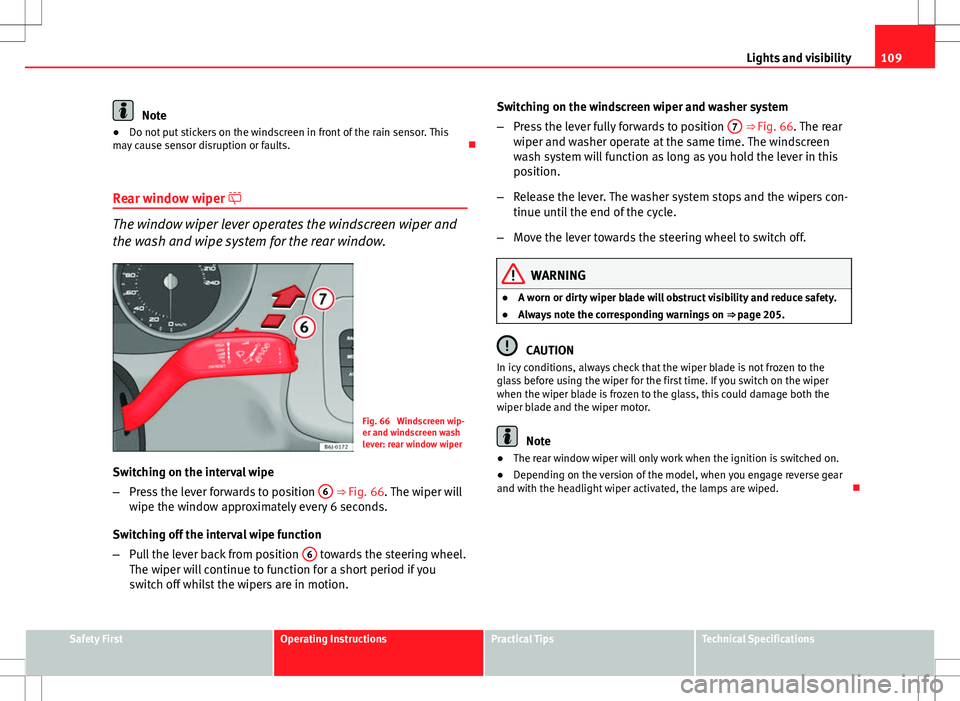
Fig. 66 Windscreen wip-
er and windscreen wash
lever: rear window wiper
Switching on the interval wipe
– Press the lever forwards to position 6
⇒
Fig. 66. The wiper will
wipe the window approximately every 6 seconds.
Switching off the interval wipe function
– Pull the lever back from position 6
towards the steering wheel.
The wiper will continue to function for a short period if you
switch off whilst the wipers are in motion. Switching on the windscreen wiper and washer system
–
Press the lever fully forwards to position 7
⇒ Fig. 66. The rear
wiper and washer operate at the same time. The windscreen
wash system will function as long as you hold the lever in this
position.
– Release the lever. The washer system stops and the wipers con-
tinue until the end of the cycle.
– Move the lever towards the steering wheel to switch off.
WARNING
● A worn or dirty wiper blade will obstruct visibility and reduce safety.
● Always note the corresponding warnings on ⇒ page 205.
CAUTION
In icy conditions, always check that the wiper blade is not frozen to the
glass before using the wiper for the first time. If you switch on the wiper
when the wiper blade is frozen to the glass, this could damage both the
wiper blade and the wiper motor.
Note
● The rear window wiper will only work when the ignition is switched on.
● Depending on the version of the model, when you engage reverse gear
and with the headlight wiper activated, the lamps are wiped.
Safety FirstOperating InstructionsPractical TipsTechnical Specifications
Page 113 of 280
111
Lights and visibility
Switching on the anti-dazzle function
– Press button A
⇒ Fig. 67. Control lamp is lit.
Anti-dazzle function
The anti-dazzle function is activated every time the ignition is switched on.
The green indicator lamp lights up in the rear vision mirror housing.
When the anti-dazzle function is enabled, the interior rear vision mirror will
darken automatically according to the amount of light it receives. The anti-
dazzle function is cancelled if reverse gear is engaged.
Note
● The automatic anti-dazzle function will only work properly if the sun
blind* for the rear window is retracted and there are no other objects pre-
venting light from reaching the interior rear vision mirror.
● If you have to stick any type of sticker on the windscreen, do not do so in
front of the sensors. Doing so could prevent the anti-dazzle function from
working well or even from working at all.
Folding in the exterior mirrors
The exterior mirrors of the vehicle may be folded in. For this, press the mir-
ror housing towards the vehicle.
Note
Before washing the vehicle with an automatic car wash, fold in the exterior
mirrors to avoid damage. Electric exterior mirrors*
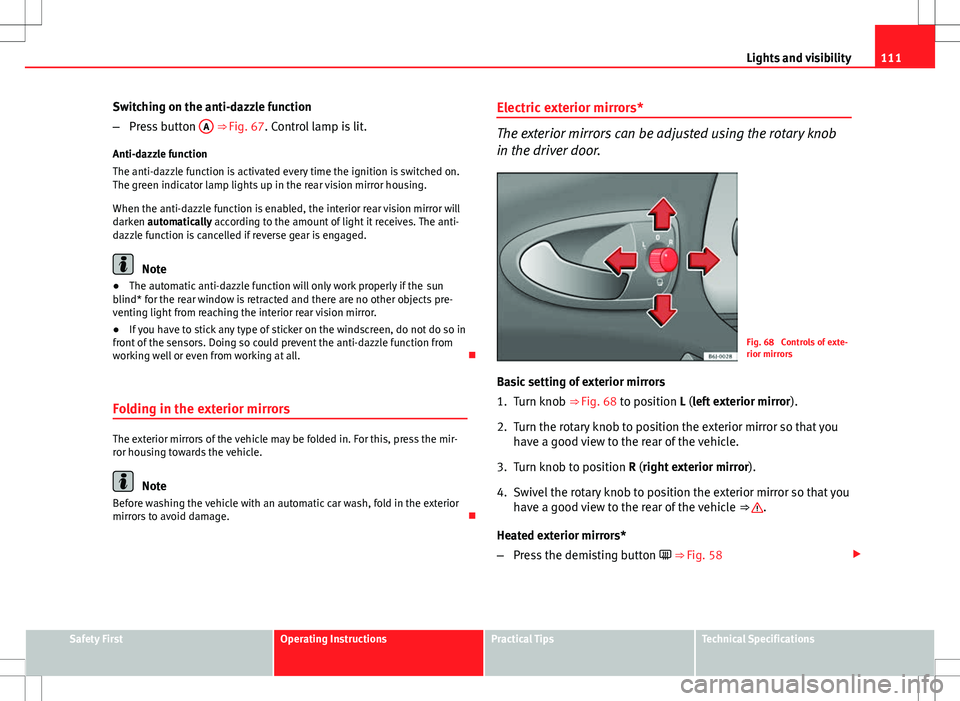
The exterior mirrors can be adjusted using the rotary knob
in the driver door.
Fig. 68 Controls of exte-
rior mirrors
Basic setting of exterior mirrors
1. Turn knob ⇒ Fig. 68 to position L (left exterior mirror ).
2. Turn the rotary knob to position the exterior mirror so that you have a good view to the rear of the vehicle.
3. Turn knob to position R (right exterior mirror ).
4. Swivel the rotary knob to position the exterior mirror so that you have a good view to the rear of the vehicle ⇒
.
Heated exterior mirrors*
– Press the demisting button ⇒ Fig. 58
Safety FirstOperating InstructionsPractical TipsTechnical Specifications
Page 115 of 280
113
Seats and storage compartments
Seats and storage compartments The importance of correct seat adjustment
Proper seat adjustment optimises the level of protection of-
fered by seat belts and airbags.
Your vehicle has five seats, two in the front and three in the rear. Each seat
is equipped with a three-point seat belt.
The driver seat and the front passenger seat can be adjusted in many ways
to suit the physical requirements of the vehicle occupants. The correct seat
position is very important for:
● a fast and easy operation of all controls on the instrument panel,
● a relaxed posture which does not cause drowsiness,
● a safe driving ⇒ page 7,
● ensuring that the seat belts and airbag system provide maximum pro-
tection ⇒ page 18.
WARNING
● If the driver and passengers assume improper sitting positions, they
may sustain critical injuries.
● Never transport more than the permitted amount of people in your ve-
hicle.
● Every vehicle occupant must properly fasten and wear the seat belt
belonging to his or her seat. Children must be protected with an appro-
priate child restraint system ⇒ page 42, Child safety.
● The front seats and all head restraints must always be adjusted to
body size and the seat belt must always be properly adjusted to provide
you and your passengers with optimum protection.
WARNING (Continued)
● Always keep your feet on the footwell when the vehicle is moving;
never rest them on the dash panel, out of the window or on the seat. This
is also applied to passengers. An incorrect sitting position exposes you
to an increased risk of injury in case of a sudden braking or an accident.
If the airbag is triggered, you could sustain severe injuries due to an in-
correct sitting position.
● It is important for the driver and front passenger to keep a distance of
at least 25 cm from the steering wheel and dash panel. Failure to respect
the minimum distance means that the airbag will not protect you. Risk of
fatal injury. The distance between the driver and the steering wheel or
between the front passenger and the dash panel should always be as
great as possible.
● Adjust the driver or front passenger seat only when the vehicle is sta-
tionary. Otherwise, your seat could move unexpectedly while the vehicle
is moving. This could increase the risk of an accident and therefore, in-
jury. In addition, while adjusting your seat, you will assume an incorrect
sitting position. Risk of fatal accidents.
● Special guidelines apply to installing a child seat on the front passen-
ger seat. When installing a child seat, please observe the warnings de-
scribed in ⇒ page 42, Child safety.
Safety FirstOperating InstructionsPractical TipsTechnical Specifications
Page 117 of 280
115
Seats and storage compartments
Removing or adjusting head restraints
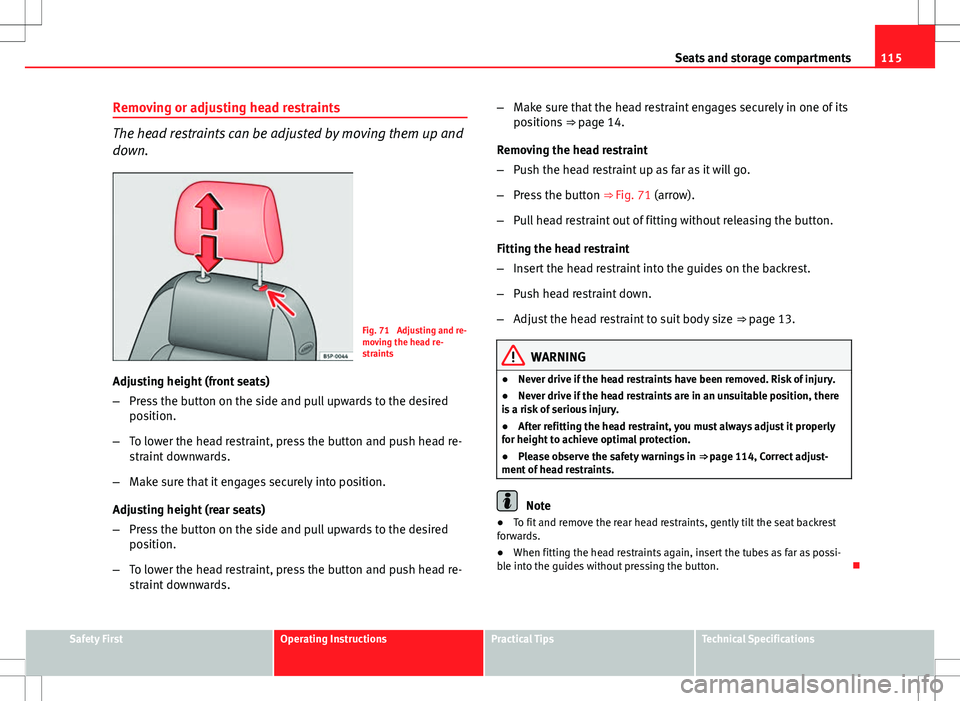
The head restraints can be adjusted by moving them up and
down.
Fig. 71 Adjusting and re-
moving the head re-
straints
Adjusting height (front seats)
– Press the button on the side and pull upwards to the desired
position.
– To lower the head restraint, press the button and push head re-
straint downwards.
– Make sure that it engages securely into position.
Adjusting height (rear seats)
– Press the button on the side and pull upwards to the desired
position.
– To lower the head restraint, press the button and push head re-
straint downwards. –
Make sure that the head restraint engages securely in one of its
positions ⇒ page 14.
Removing the head restraint
– Push the head restraint up as far as it will go.
– Press the button ⇒ Fig. 71 (arrow).
– Pull head restraint out of fitting without releasing the button.
Fitting the head restraint
– Insert the head restraint into the guides on the backrest.
– Push head restraint down.
– Adjust the head restraint to suit body size ⇒ page 13.
WARNING
● Never drive if the head restraints have been removed. Risk of injury.
● Never drive if the head restraints are in an unsuitable position, there
is a risk of serious injury.
● After refitting the head restraint, you must always adjust it properly
for height to achieve optimal protection.
● Please observe the safety warnings in ⇒ page 114, Correct adjust-
ment of head restraints.
Note
● To fit and remove the rear head restraints, gently tilt the seat backrest
forwards.
● When fitting the head restraints again, insert the tubes as far as possi-
ble into the guides without pressing the button.
Safety FirstOperating InstructionsPractical TipsTechnical Specifications
Page 119 of 280
117
Seats and storage compartments
Heated seats*
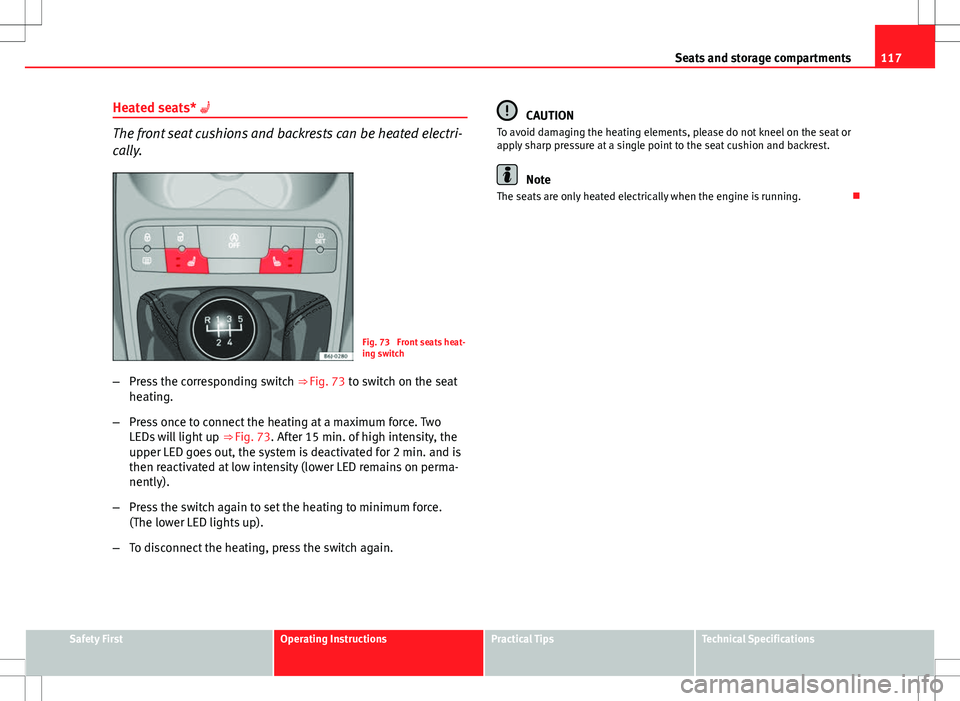
The front seat cushions and backrests can be heated electri-
cally.
Fig. 73 Front seats heat-
ing switch
– Press the corresponding switch ⇒ Fig. 73 to switch on the seat
heating.
– Press once to connect the heating at a maximum force. Two
LEDs will light up ⇒ Fig. 73. After 15 min. of high intensity, the
upper LED goes out, the system is deactivated for 2 min. and is
then reactivated at low intensity (lower LED remains on perma-
nently).
– Press the switch again to set the heating to minimum force.
(The lower LED lights up).
– To disconnect the heating, press the switch again.
CAUTION
To avoid damaging the heating elements, please do not kneel on the seat or
apply sharp pressure at a single point to the seat cushion and backrest.
Note
The seats are only heated electrically when the engine is running.
Safety FirstOperating InstructionsPractical TipsTechnical Specifications
Page 121 of 280
119
Seats and storage compartments
On split rear seats 1)
the backrest and cushion can be lowered and raised re-
spectively in two sections.
WARNING
● Please be careful when folding back the backrest! Injuries can be
caused if the seat height is adjusted without due care and attention.
● Do no trap or damage seat belts when raising the backrest.
● After raising the backrest, check it has engaged properly in position.
Do this by pulling on the central seat belt or directly on the backrest and
check that the position lever is in the neutral position.
● The three point automatic seat belt only works correctly when the
backrest of the central seat is correctly engaged.
1) Optional equipment
Safety FirstOperating InstructionsPractical TipsTechnical Specifications
Page 123 of 280
121
Seats and storage compartments
Navigator mount on dash panel*
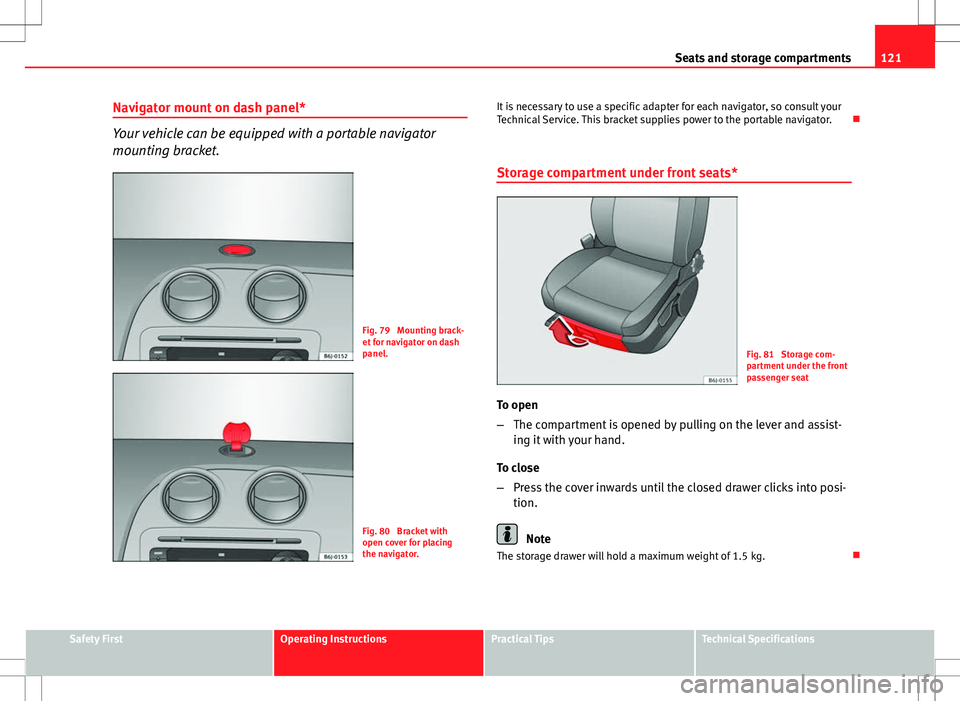
Your vehicle can be equipped with a portable navigator
mounting bracket.
Fig. 79 Mounting brack-
et for navigator on dash
panel.
Fig. 80 Bracket with
open cover for placing
the navigator. It is necessary to use a specific adapter for each navigator, so consult your
Technical Service. This bracket supplies power to the portable navigator.
Storage compartment under front seats*
Fig. 81 Storage com-
partment under the front
passenger seat
To open
– The compartment is opened by pulling on the lever and assist-
ing it with your hand.
To close
– Press the cover inwards until the closed drawer clicks into posi-
tion.
Note
The storage drawer will hold a maximum weight of 1.5 kg.
Safety FirstOperating InstructionsPractical TipsTechnical Specifications