tow Seat Ibiza 5D 2013 User Guide
[x] Cancel search | Manufacturer: SEAT, Model Year: 2013, Model line: Ibiza 5D, Model: Seat Ibiza 5D 2013Pages: 294, PDF Size: 4.05 MB
Page 112 of 294
110Lights and visibility
Luggage compartment light*
The light is activated when the rear lid is open, even when the ignition and
lights are turned off. For this reason, ensure that the rear lid is always
closed.
Glove compartment light
When opening the glove compartment on the passenger side, the glove
compartment light will automatically turn on and will turn off upon closure.
Footwell lights*
The lights in the footwell area below the dash (driver and front passenger)
will come on when the doors are open and will go out while driving. Visibility
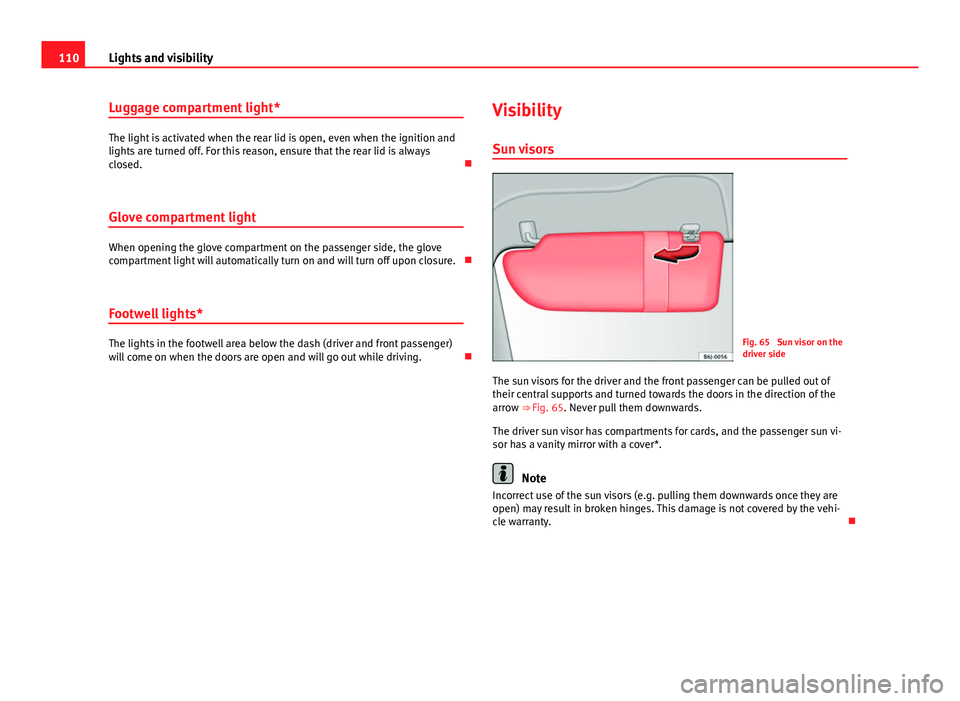
Sun visorsFig. 65 Sun visor on the
driver side
The sun visors for the driver and the front passenger can be pulled out of
their central supports and turned towards the doors in the direction of the
arrow ⇒ Fig. 65. Never pull them downwards.
The driver sun visor has compartments for cards, and the passenger sun vi-
sor has a vanity mirror with a cover*.
Note
Incorrect use of the sun visors (e.g. pulling them downwards once they are
open) may result in broken hinges. This damage is not covered by the vehi-
cle warranty.
Page 113 of 294
111
Lights and visibility
Windscreen wipers
Front windscreen wipers
The window wiper lever controls the windscreen wipers and
the automatic wash and wipe.
Fig. 66 Windscreen wip-
er and windscreen wash
lever
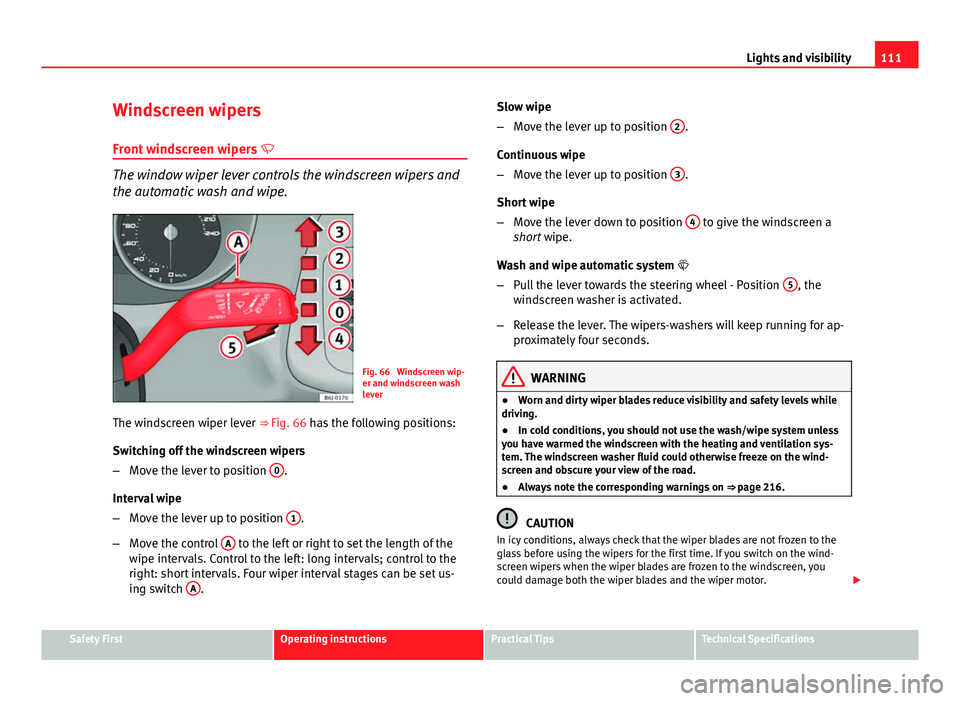
The windscreen wiper lever ⇒ Fig. 66 has the following positions:
Switching off the windscreen wipers
– Move the lever to position 0
.
Interval wipe
– Move the lever up to position 1
.
– Move the control A
to the left or right to set the length of the
wipe intervals. Control to the left: long intervals; control to the
right: short intervals. Four wiper interval stages can be set us-
ing switch A
. Slow wipe
–
Move the lever up to position 2
.
Continuous wipe
– Move the lever up to position 3
.
Short wipe
– Move the lever down to position 4
to give the windscreen a
short wipe.
Wash and wipe automatic system
– Pull the lever towards the steering wheel - Position 5
, the
windscreen washer is activated.
– Release the lever. The wipers-washers will keep running for ap-
proximately four seconds.
WARNING
● Worn and dirty wiper blades reduce visibility and safety levels while
driving.
● In cold conditions, you should not use the wash/wipe system unless
you have warmed the windscreen with the heating and ventilation sys-
tem. The windscreen washer fluid could otherwise freeze on the wind-
screen and obscure your view of the road.
● Always note the corresponding warnings on ⇒ page 216.
CAUTION
In icy conditions, always check that the wiper blades are not frozen to the
glass before using the wipers for the first time. If you switch on the wind-
screen wipers when the wiper blades are frozen to the windscreen, you
could damage both the wiper blades and the wiper motor.
Safety FirstOperating instructionsPractical TipsTechnical Specifications
Page 115 of 294
113
Lights and visibility
Rear window wiper
The window wiper lever operates the windscreen wiper and
the wash and wipe system for the rear window.
Fig. 68 Windscreen wip-
er and windscreen wash
lever: rear window wiper
Switching on the interval wipe
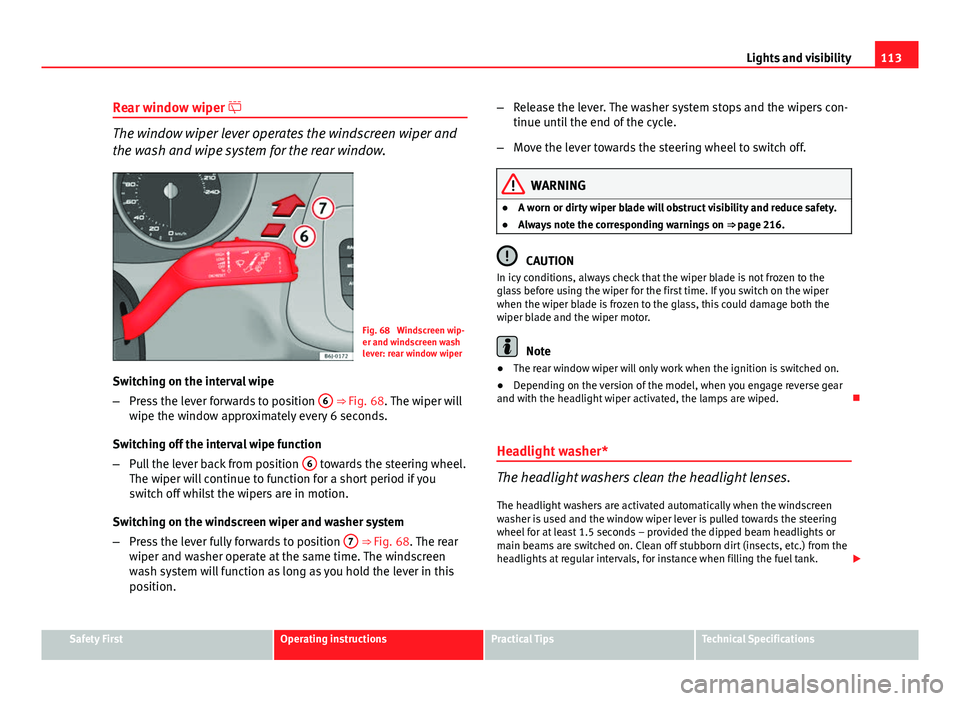
– Press the lever forwards to position 6
⇒ Fig. 68. The wiper will
wipe the window approximately every 6 seconds.
Switching off the interval wipe function
– Pull the lever back from position 6
towards the steering wheel.
The wiper will continue to function for a short period if you
switch off whilst the wipers are in motion.
Switching on the windscreen wiper and washer system
– Press the lever fully forwards to position 7
⇒ Fig. 68. The rear
wiper and washer operate at the same time. The windscreen
wash system will function as long as you hold the lever in this
position. –
Release the lever. The washer system stops and the wipers con-
tinue until the end of the cycle.
– Move the lever towards the steering wheel to switch off.
WARNING
● A worn or dirty wiper blade will obstruct visibility and reduce safety.
● Always note the corresponding warnings on ⇒ page 216.
CAUTION
In icy conditions, always check that the wiper blade is not frozen to the
glass before using the wiper for the first time. If you switch on the wiper
when the wiper blade is frozen to the glass, this could damage both the
wiper blade and the wiper motor.
Note
● The rear window wiper will only work when the ignition is switched on.
● Depending on the version of the model, when you engage reverse gear
and with the headlight wiper activated, the lamps are wiped.
Headlight washer*
The headlight washers clean the headlight lenses. The headlight washers are activated automatically when the windscreen
washer is used and the window wiper lever is pulled towards the steering
wheel for at least 1.5 seconds – provided the dipped beam headlights or
main beams are switched on. Clean off stubborn dirt (insects, etc.) from the
headlights at regular intervals, for instance when filling the fuel tank.
Safety FirstOperating instructionsPractical TipsTechnical Specifications
Page 117 of 294
115
Lights and visibility
Note
● The automatic anti-dazzle function will only work properly if the sun
blind* for the rear window is retracted and there are no other objects pre-
venting light from reaching the interior rear vision mirror.
● If you have to stick any type of sticker on the windscreen, do not do so in
front of the sensors. Doing so could prevent the anti-dazzle function from
working well or even from working at all.
Folding in the exterior mirrors
The exterior mirrors of the vehicle may be folded in. For this, press the mir-
ror housing towards the vehicle.
Note
Before washing the vehicle with an automatic car wash, fold in the exterior
mirrors to avoid damage. Electric exterior mirrors*
The exterior mirrors can be adjusted using the rotary knob
in the driver door.
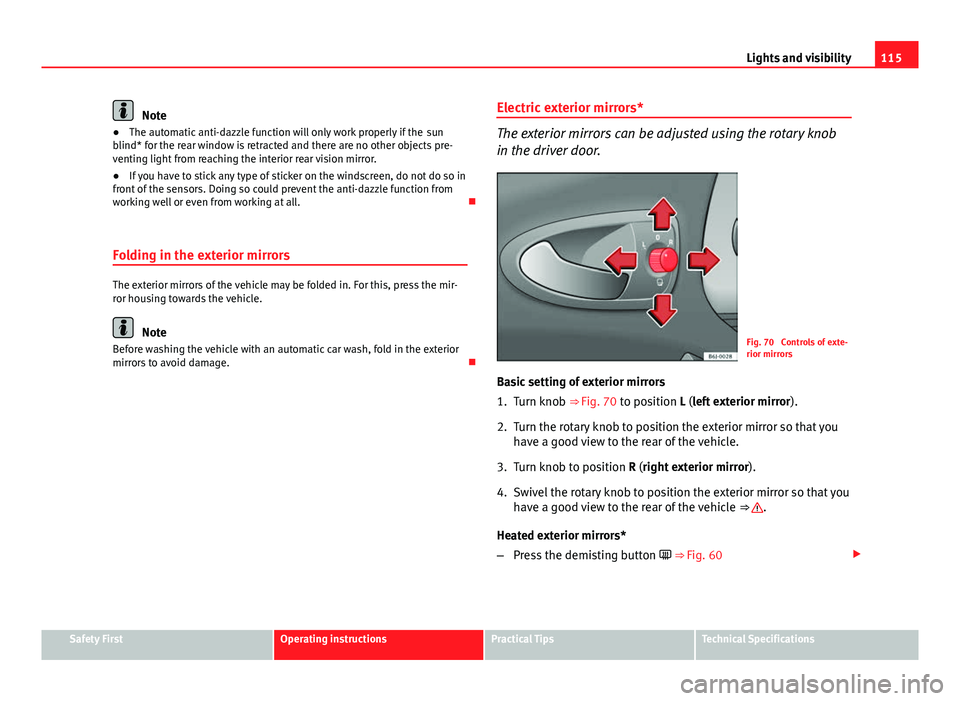
Fig. 70 Controls of exte-
rior mirrors
Basic setting of exterior mirrors
1. Turn knob ⇒ Fig. 70 to position L (left exterior mirror ).
2. Turn the rotary knob to position the exterior mirror so that you have a good view to the rear of the vehicle.
3. Turn knob to position R (right exterior mirror ).
4. Swivel the rotary knob to position the exterior mirror so that you have a good view to the rear of the vehicle ⇒
.
Heated exterior mirrors*
– Press the demisting button ⇒ Fig. 60
Safety FirstOperating instructionsPractical TipsTechnical Specifications
Page 139 of 294
137
Air conditioning
Air conditioning Heating
Controls
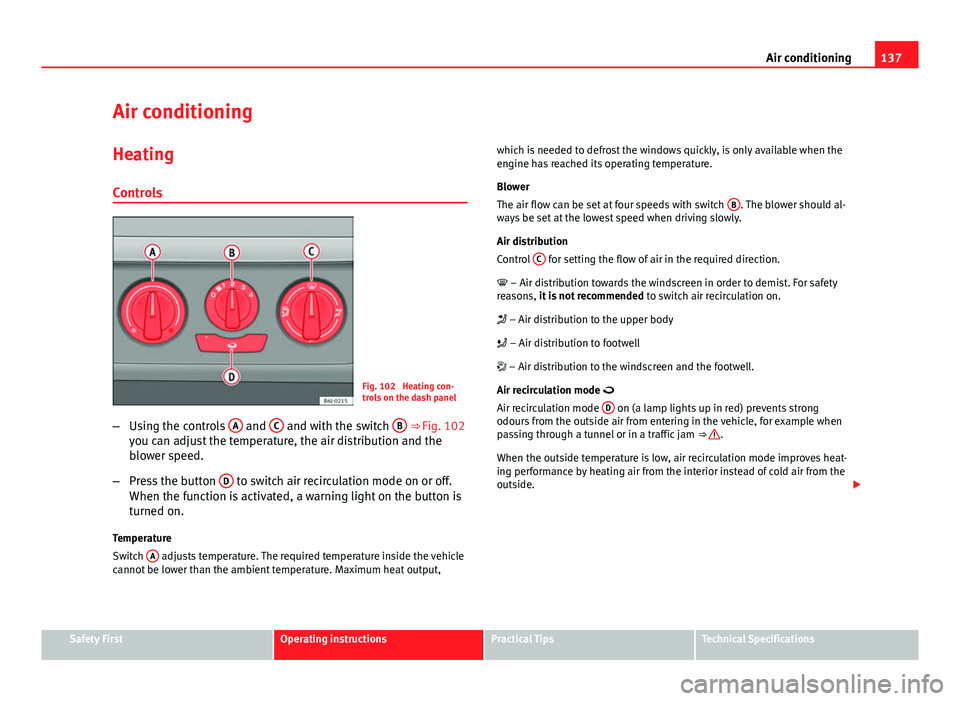
Fig. 102 Heating con-
trols on the dash panel
– Using the controls A
and C and with the switch B ⇒ Fig. 102
you can adjust the temperature, the air distribution and the
blower speed.
– Press the button D
to switch air recirculation mode on or off.
When the function is activated, a warning light on the button is
turned on.
Temperature
Switch A
adjusts temperature. The required temperature inside the vehicle
cannot be lower than the ambient temperature. Maximum heat output, which is needed to defrost the windows quickly, is only available when the
engine has reached its operating temperature.
Blower
The air flow can be set at four speeds with switch
B
. The blower should al-
ways be set at the lowest speed when driving slowly.
Air distribution
Control C
for setting the flow of air in the required direction.
– Air distribution towards the windscreen in order to demist. For safety
reasons, it is not recommended to switch air recirculation on.
– Air distribution to the upper body
– Air distribution to footwell
– Air distribution to the windscreen and the footwell.
Air recirculation mode
Air recirculation mode D
on (a lamp lights up in red) prevents strong
odours from the outside air from entering in the vehicle, for example when
passing through a tunnel or in a traffic jam ⇒
.
When the outside temperature is low, air recirculation mode improves heat-
ing performance by heating air from the interior instead of cold air from the
outside.
Safety FirstOperating instructionsPractical TipsTechnical Specifications
Page 140 of 294
138Air conditioning
WARNING
● For your safety, the windows should never be fogged up or covered
with snow or ice. This is essential to ensure good visibility. Please famili-
arise yourself with the correct operation of the heating and ventilation
system, including the demist/defrost functions for the windows.
● In air recirculation mode, no cold air from the outside enters the vehi-
cle interior. The windows can quickly fog over if the heating is switched
off. Therefore, never leave the air recirculation mode switched on for a
long time (risk of accident).
Note
● Please consider the general notes ⇒ page 145.
Vehicle ventilation or heating
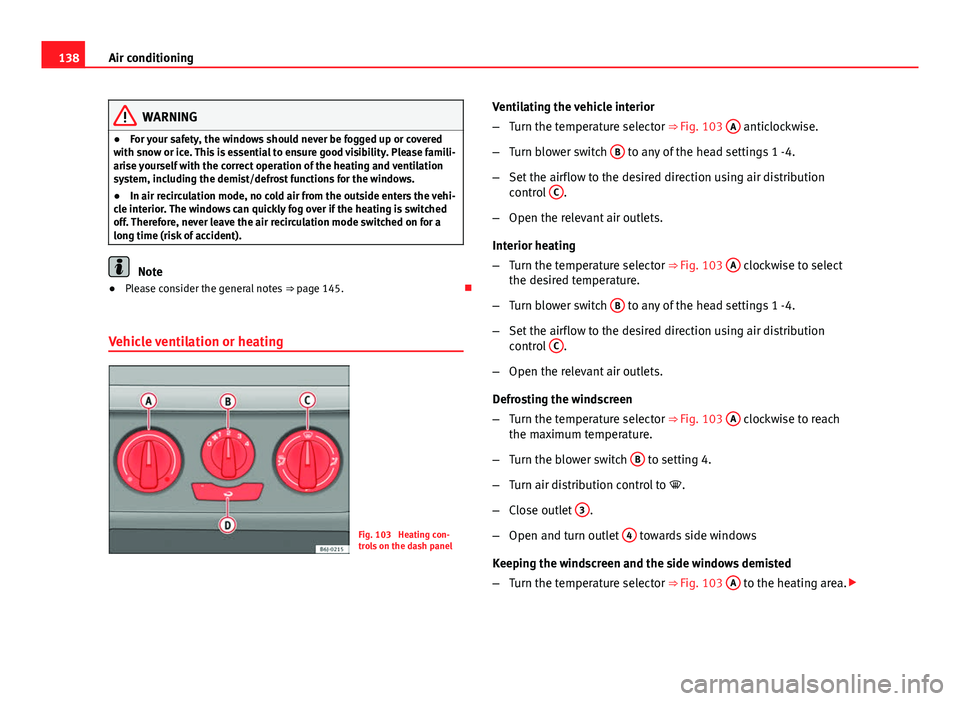
Fig. 103 Heating con-
trols on the dash panel Ventilating the vehicle interior
–
Turn the temperature selector ⇒ Fig. 103 A
anticlockwise.
– Turn blower switch B
to any of the head settings 1 -4.
– Set the airflow to the desired direction using air distribution
control C
.
– Open the relevant air outlets.
Interior heating
– Turn the temperature selector ⇒ Fig. 103 A
clockwise to select
the desired temperature.
– Turn blower switch B
to any of the head settings 1 -4.
– Set the airflow to the desired direction using air distribution
control C
.
– Open the relevant air outlets.
Defrosting the windscreen
– Turn the temperature selector ⇒ Fig. 103 A
clockwise to reach
the maximum temperature.
– Turn the blower switch B
to setting 4.
– Turn air distribution control to .
– Close outlet 3
.
– Open and turn outlet 4
towards side windows
Keeping the windscreen and the side windows demisted
– Turn the temperature selector ⇒ Fig. 103 A
to the heating area.
Page 141 of 294
139
Air conditioning
– Turn blower switch B
to any of the head settings 2 -3.
– Turn air distribution control to .
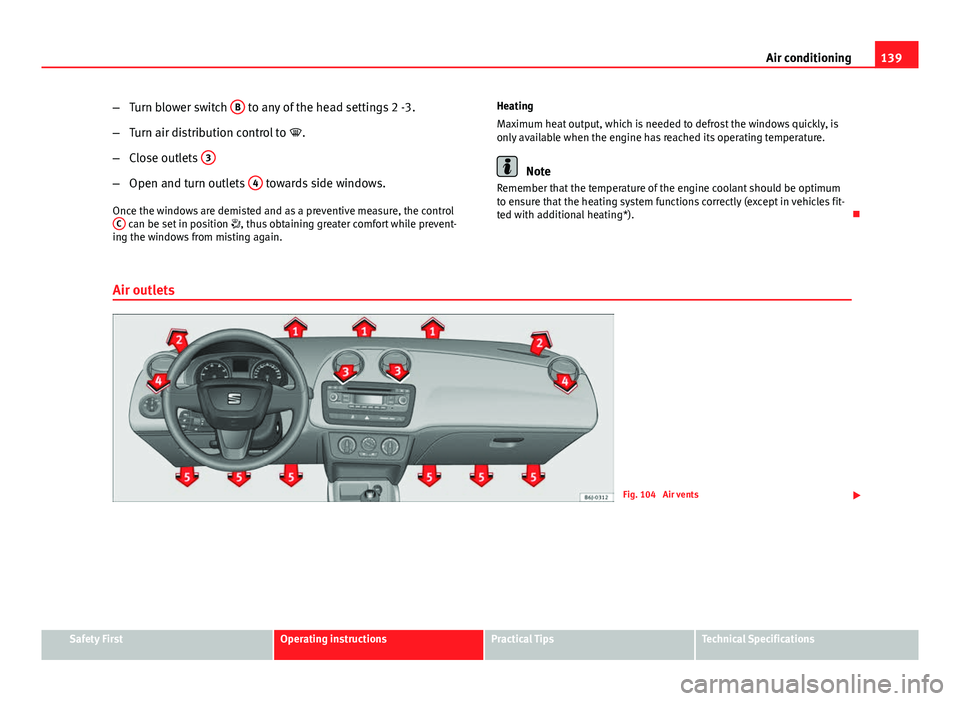
– Close outlets 3
–
Open and turn outlets 4 towards side windows.
Once the windows are demisted and as a preventive measure, the control C
can be set in position , thus obtaining greater comfort while prevent-
ing the windows from misting again. Heating
Maximum heat output, which is needed to defrost the windows quickly, is
only available when the engine has reached its operating temperature.
Note
Remember that the temperature of the engine coolant should be optimum
to ensure that the heating system functions correctly (except in vehicles fit-
ted with additional heating*).
Air outlets
Fig. 104 Air vents
Safety FirstOperating instructionsPractical TipsTechnical Specifications
Page 142 of 294
140Air conditioning
Air distribution C
Switch on symbolMain air output through outlets:
1,2
5
1, 2, 5
3, 4
Outlets 3 and 4 can be closed or opened separately and the air flow di-
rected as required.
Air conditioning* Controls
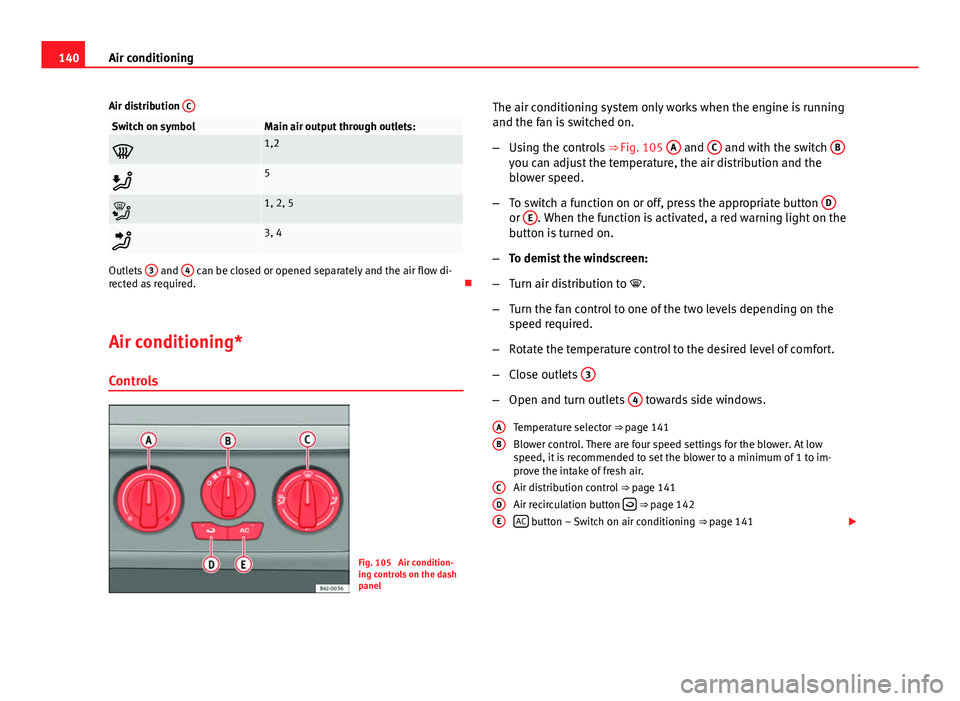
Fig. 105 Air condition-
ing controls on the dash
panel The air conditioning system only works when the engine is running
and the fan is switched on.
–
Using the controls ⇒ Fig. 105 A
and C and with the switch Byou can adjust the temperature, the air distribution and the
blower speed.
– To switch a function on or off, press the appropriate button D
or E. When the function is activated, a red warning light on the
button is turned on.
– To demist the windscreen:
– Turn air distribution to .
– Turn the fan control to one of the two levels depending on the
speed required.
– Rotate the temperature control to the desired level of comfort.
– Close outlets 3
–
Open and turn outlets 4 towards side windows.
Temperature selector ⇒ page 141
Blower control. There are four speed settings for the blower. At low
speed, it is recommended to set the blower to a minimum of 1 to im-
prove the intake of fresh air.
Air distribution control ⇒ page 141
Air recirculation button
⇒ page 142
AC button – Switch on air conditioning ⇒ page 141
A
B
CDE
Page 143 of 294
141
Air conditioning
WARNING
For your safety, the windows should never be fogged up or covered with
snow or ice. This is essential to ensure good visibility. Please familiarise
yourself with the correct operation of the heating and ventilation system,
including the demist/defrost functions for the windows.
Note
Please consider the general notes.
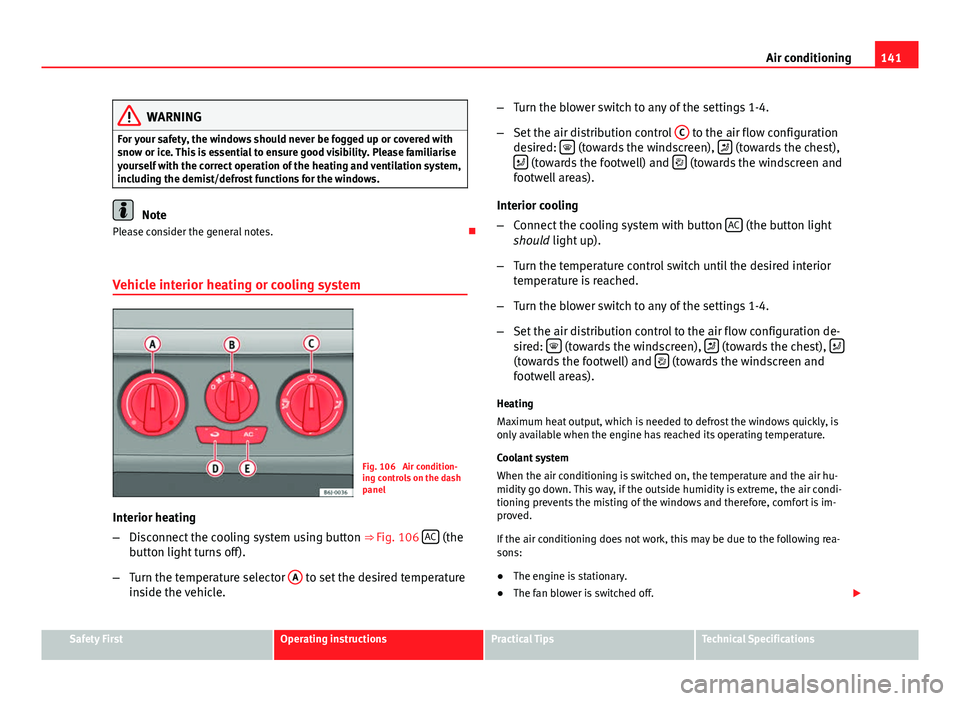
Vehicle interior heating or cooling system
Fig. 106 Air condition-
ing controls on the dash
panel
Interior heating
– Disconnect the cooling system using button ⇒ Fig. 106 AC
(the
button light turns off).
– Turn the temperature selector A
to set the desired temperature
inside the vehicle. –
Turn the blower switch to any of the settings 1-4.
– Set the air distribution control C
to the air flow configuration
desired: (towards the windscreen), (towards the chest),
(towards the footwell) and (towards the windscreen and
footwell areas).
Interior cooling
– Connect the cooling system with button AC
(the button light
should light up).
– Turn the temperature control switch until the desired interior
temperature is reached.
– Turn the blower switch to any of the settings 1-4.
– Set the air distribution control to the air flow configuration de-
sired:
(towards the windscreen), (towards the chest), (towards the footwell) and (towards the windscreen and
footwell areas).
Heating
Maximum heat output, which is needed to defrost the windows quickly, is
only available when the engine has reached its operating temperature.
Coolant system
When the air conditioning is switched on, the temperature and the air hu-
midity go down. This way, if the outside humidity is extreme, the air condi-
tioning prevents the misting of the windows and therefore, comfort is im-
proved.
If the air conditioning does not work, this may be due to the following rea-
sons:
● The engine is stationary.
● The fan blower is switched off.
Safety FirstOperating instructionsPractical TipsTechnical Specifications
Page 149 of 294
147
Driving
Driving SteeringAdjusting the steering wheel position
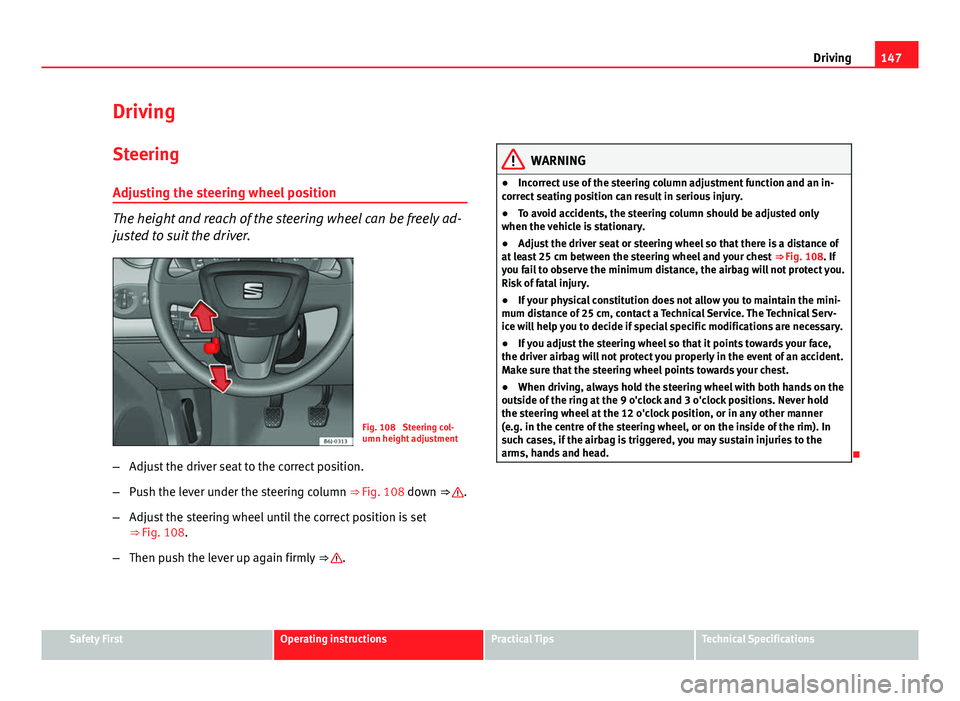
The height and reach of the steering wheel can be freely ad-
justed to suit the driver.
Fig. 108 Steering col-
umn height adjustment
– Adjust the driver seat to the correct position.
– Push the lever under the steering column ⇒ Fig. 108 down ⇒
.
– Adjust the steering wheel until the correct position is set
⇒ Fig. 108.
– Then push the lever up again firmly ⇒
.
WARNING
● Incorrect use of the steering column adjustment function and an in-
correct seating position can result in serious injury.
● To avoid accidents, the steering column should be adjusted only
when the vehicle is stationary.
● Adjust the driver seat or steering wheel so that there is a distance of
at least 25 cm between the steering wheel and your chest ⇒ Fig. 108. If
you fail to observe the minimum distance, the airbag will not protect you.
Risk of fatal injury.
● If your physical constitution does not allow you to maintain the mini-
mum distance of 25 cm, contact a Technical Service. The Technical Serv-
ice will help you to decide if special specific modifications are necessary.
● If you adjust the steering wheel so that it points towards your face,
the driver airbag will not protect you properly in the event of an accident.
Make sure that the steering wheel points towards your chest.
● When driving, always hold the steering wheel with both hands on the
outside of the ring at the 9 o'clock and 3 o'clock positions. Never hold
the steering wheel at the 12 o'clock position, or in any other manner
(e.g. in the centre of the steering wheel, or on the inside of the rim). In
such cases, if the airbag is triggered, you may sustain injuries to the
arms, hands and head.
Safety FirstOperating instructionsPractical TipsTechnical Specifications