eco mode Seat Ibiza 5D 2015 User Guide
[x] Cancel search | Manufacturer: SEAT, Model Year: 2015, Model line: Ibiza 5D, Model: Seat Ibiza 5D 2015Pages: 248, PDF Size: 4.77 MB
Page 147 of 248
Air conditioning
so as to maintain good visibility of everything
outs
ide.
● The m
aximum heat output required to de-
fros
t windows as quickly as possible is only
available when the engine has reached its
normal running temperature. Only drive when
you have good visibility.
● Always ensure that you use the heating
syst
em, fresh air system, air conditioner and
the heated rear window to maintain good visi-
bility to the outside.
● Never leave the air recirculation on for a
long period of time. If
the cooling system is
switched off and air recirculation mode
switched on, the windows can mist over very
quickly, considerably limiting visibility.
● Switch air recirculation mode off when it is
not requir
ed. WARNING
Stuffy or used air will increase fatigue and re-
duce driv er c
oncentration possibly resulting
in a serious accident.
● Never leave the fresh air fan turned off or
use the air rec
irculation for long periods of
time; the air in the vehicle interior will not be
refreshed. CAUTION
● If y
ou suspect that the air conditioner is
damaged, switch it off with the A/C button to prevent further damage and have it checked
by
a s
pecialised workshop.
● Repairs to the air conditioner require spe-
cia
list knowledge and special tools. There-
fore, we recommend you to take the vehicle
to a specialised workshop. Note
● If the humidity and t
emperature outside the
vehicle are high, condensation can drip off
the evaporator in the cooling system and
form a pool underneath the vehicle. This is
normal and does not indicate a leak.
● Keep the air intake slots in front of the
winds
creen free of snow, ice and leaves to en-
sure heating and cooling are not impaired,
and to prevent the windows from misting
over.
● The air from the vents flows through the ve-
hicle int
erior and is extracted by slots in the
luggage compartment designed for this pur-
pose. Therefore, you should avoid obstruct-
ing these slots with any kind of object.
● The air conditioner operates most effective-
ly with the w
indows and the sliding/tilting
sunroof* closed. However, if the temperature
inside the vehicle is excessive because of the
sun, the air inside can be cooled faster by
opening the windows for a short time.
● Do not smoke while air recirculation mode
is on, a
s smoke drawn into the air condition- ing system leaves residue on the evaporator,
produc
in
g a permanent unpleasant odour.
● At low outside temperatures, the compres-
sor switc
hes off automatically and cannot be
switched on even with the AUTO button.
● It is advisable to turn on the air condition-
ing at l
east once a month, to lubricate the
system gaskets and prevent leaks. If a de-
crease in the cooling capacity is detected, a
Technical Service should be consulted to
check the system.
● To ensure correct operation, the grilles on
both sides
of the screen must not be obstruc-
ted
● When the engine is under extreme strain,
switc
h off the compressor for a moment. Economic use of the air conditioning
When the air conditioning is switched on, the
c
ompr
e
ssor consumes engine power and has
influence on fuel consumption. Consider the
following points in order to have the system
operating in the minimum possible time.
● If the vehicle interior has overheated due to
an exc
essive solar radiation, it is best to
open the windows or doors to allow the hot
air to escape.
● While in motion, the air conditioning
should not
be switched on if the windows or
the sunroof* are open.
145
Technical data
Advice
Operation
Emergencies
Safety
Page 149 of 248
Air conditioning
Blower
The air flo w c
an be set
at four speeds with
switch B . The blower should always be set
at the lo
w
est speed when driving slowly.
Air distribution
Control C for setting the flow of air in the re-
quir ed dir
ection.
– Air distribution towards the windscreen
in order to demist. For safety reasons, it is
not recommended to switch air recirculation
on.
– Air distribution to upper body.
– Air distribution to footwell
– Air distribution to the windscreen and
the footwell. WARNING
● For y
our safety, the windows should never
be fogged up or covered with snow or ice.
This is essential to ensure good visibility.
Please familiarise yourself with the correct
operation of the heating and ventilation sys-
tem, including the demist/defrost functions
for the windows. Note
● Ple a
se consider the general notes
››› page 144. Air recirculation
Air recirculation prevents unpleasant smells
from ent
erin
g the interior.
Connecting the recirculation
In any position of rotary switch C except
tha w:
● Pr
ess button D
››› Fig. 165 and the l
amp in
the button will illuminate.
Disconnecting the recirculation
● If the lamp is on, press button D and the
l amp w
i
ll go off, indicating that the entry of
outside air has been activated.
If the rotary switch C
› ›
›
Fig. 165 is in the
thaw position, the recirculation flap will al-
ways be open and air will always enter from
the outside.
If the rotary switch C is switched from any
po s
ition t
o the thaw position, recirculation
will be automatically deactivated. WARNING
● In air rec ir
culation mode, no cold air from
the outside enters the vehicle interior. The
windows can quickly fog over if the heating is
switched off. Therefore, never leave the air re-
circulation mode switched on for a long time
(risk of accident). Vehicle ventilation or heating
Ventilating the vehicle interior
– Turn the temperature selector ›››
Fig. 165
A anticlockwise.
– Turn blower switch B to any of the head
setting s
1 -4.
– Set the airflow to the desired direction us-
ing air dis
tribution control C .
– Open the relevant air outlets.
Interior he atin
g
– Turn the temperature selector ›››
Fig. 165
A clockwise to select the desired tempera-
t ur
e.
– T
urn blower switch B to any of the head
settin g
s
1 -4.
– Set the airflow to the desired direction us-
ing air dis
tribution control C .
– Open the relevant air outlets.
D efr
o
sting the windscreen
– Turn the temperature selector ›››
Fig. 165
A clockwise to reach the maximum tem-
per at
ur
e.
– Turn the blower switch B to setting 4.
– Turn air distribution control to .
– Close outlet 3 .
»
147
Technical data
Advice
Operation
Emergencies
Safety
Page 153 of 248
Air conditioning
Climatronic description
C oo
lin
g only works if the following conditions
are met:
● The engine is running
● the outside temperature is above +2°C
(+36°F);
● A/C
18
› ››
Fig. 167
sw
itched on.
Starting the Climatronic
The corresponding function will be switched
on when a button is pressed, turning on the
air conditioniNG if it was switched off, with
the exception of button 17
› ›
› Fig. 167
(recir-
culation)
Switching off the Climatronic
● Turn control 10 to the left until the seg-
ments of
c
olumn 9
› ›
› Fig. 167 switch off.
● After 1 second has elapsed, turn the control
again t
o switch off the display.
In order to ensure engines subject to heavy
loads are cooled, the air conditioning com-
pressor is switched off in the event of high
coolant temperatures.
Recommended setting for all seasons of the
year
● Set the required temperature. We recom-
mend +22 °C (72°F).
● Pre
ss the AUTO button
13
› ›
› Fig. 167
.●
Adjust
vents 3 and 4 ››› page 146 so that
the air flow is directed slightly upwards.
Change between degrees Centigrade and de-
grees Fahrenheit
Keep the AUTO and
A/C
› ››
Fig. 167
b
uttons
held down for 2 seconds at the same time.
The data is displayed on the screen in the
units required. Note
● A v i
sit to the specialised service once a
year is recommended to clean the Climatronic
system.
● The interior temperature sensor 11 ›››
Fig. 167 is at
the bottom. Do not cover it
with stickers or the like, as this could have a
negative effect on Climatronic operations. Automatic mode
Automatic mode is used to maintain a con-
s
t
ant
temperature and demist the windows
inside the vehicle.
Switching on automatic mode
● Set the interior temperature between +16°C
(+64°F) and +29°C (+84°F).
● Adjus
t vents 3 and 4 ›››
page 146 so that
the air flow is directed slightly upwards. ●
Pres
s the AUTO button
13
› ››
Fig. 167
and
AUTO di
splayed on the screen.
Automatic mode is switched off by pressing
the air distribution buttons or increasing or
decreasing the blower speed. However, the
temperature remains regulated.
Adjusting the temperature ●
When you switch on the ignition, control 1 ›››
Fig. 167 can be u sed t
o set the required in-
terior temperature.
It is possible to select interior temperatures
from +16°C (+64°F) to +29°C (+84°F). In this
range the temperature is regulated automati-
cally. If a temperature below +16°C (+64°F) is
selected, “LO” is displayed on the screen. If a
temperature above +29°C (+84°F) is selected,
“HI” is displayed on the screen. At both ex-
tremes, Climatronic works at maximum cool-
ing or heating power, respectively. The tem-
perature is not regulated.
In the event of prolonged, irregular distribu-
tion of the air flow from the outlets (particu-
larly the footwells) and significant differen-
ces in temperature, e.g. on leaving the vehi-
cle, sensitive people may catch cold.
151
Technical data
Advice
Operation
Emergencies
Safety
Page 161 of 248
Driving
Manual gearbox Driv in
g w
ith manual gearboxRead the additional information carefully
›› ›
page 37
Certain versions of the model may include a
6-speed manual gearbox, and its diagram is
shown on the gearbox lever.
The reverse gear can only be engaged when
the car is stationary. When the engine is run-
ning and before engaging this gear, wait
about 6 seconds with the clutch pressed
down thoroughly in order to protect the gear-
box.
The reverse lights switch on when the reverse
gear is selected and the ignition is on. WARNING
● When the engine i s
running, the vehicle
will start to move as soon as a gear is engag-
ed and the clutch released.
● Never select the reverse gear when the ve-
hicle i
s in motion. Risk of accident. Note
● Do not r e
st your hand on the gear lever
while driving. The pressure of your hand
could cause premature wear on the selector
forks in the gearbox. ●
When ch an
ging gear, you should always
depress the clutch fully to avoid unnecessary
wear and damage.
● Do not “slip” the clutch to hold the vehicle
on a hill
. This causes premature wear and
damage to the clutch.
● Do not leave your foot on the clutch pedal;
although the pre
ssure may seem insignifi-
cant, it can cause the premature wear of the
clutch plate. Use the foot rest when you do
not need to change gear. Gear-change indicator
3 V
alid for vehicles: with a manual gearbox
The r
ecommended gear for saving fuel is in-
dicated on the dash screen of certain vehi-
cles during driving.
DisplayMeaning
The optimal gear is selected.
Changing to a higher gear is recommended.
Changing to a lower gear is recommended.
Information regarding the “cleanliness” of
the die
sel
p
articulate filter
The exhaust system manager detects that the
diesel particulate filter is nearly saturated
and contributes to self-cleaning by recom-
mending the optimal gear. For this purpose, it might be necessary to drive momentarily
with a high rpm
››
› page 101. WARNING
The gear change indicator is only an auxiliary
fu nction and in no c
ase should be a substi-
tute for careful driving.
● The responsibility of choosing the correct
gear dependin
g on the situation (e.g. over-
taking, driving up or down a slope or towing a
trailer) lies with the driver. For the sake of the environment
Selecting the correct gear can help to save
fuel . Note
The recommended gear display is switched
off when the c lut
ch pedal is pressed. Automatic gearbox*
Driv ing pr
ogrammes Read the additional information carefully
› ›
›
page 38
The automatic gearbox has got two gearbox
programmes. »
159
Technical data
Advice
Operation
Emergencies
Safety
Page 162 of 248
Operation
Selecting the normal programme
– Put the selector lever into position D.
Sel ectin
g the s
port programme
– Put the selector lever into position S.
If y
ou select the normal programme, D, you
will drive in the economy mode, i.e. the pro-
gramme is designed to reduce fuel consump-
tion. The gearbox changes up into a higher
gear as soon as possible and down into a
lower gear as late as possible.
If you select the sport programme, S, you will
drive in a sporty mode, i.e. a programme in
which shifts into high gears are postponed in
order to use the full power of the engine.
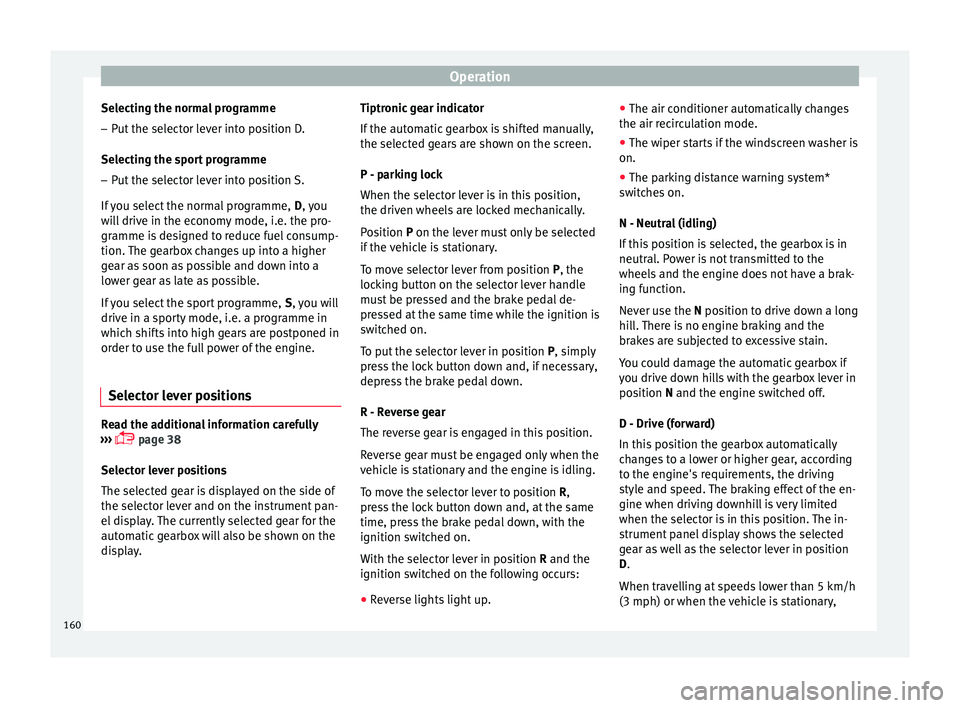
Selector lever positions Read the additional information carefully
› ›
›
page 38
Selector lever positions
The selected gear is displayed on the side of
the selector lever and on the instrument pan-
el display. The currently selected gear for the
automatic gearbox will also be shown on the
display. Tiptronic gear indicator
If the autom
atic gearbox is shifted manually,
the selected gears are shown on the screen.
P - parking lock
When the selector lever is in this position,
the driven wheels are locked mechanically.
Position P on the lever must only be selected
if the vehicle is stationary.
To move selector lever from position P, the
locking button on the selector lever handle
must be pressed and the brake pedal de-
pressed at the same time while the ignition is
switched on.
To put the selector lever in position P, simply
press the lock button down and, if necessary,
depress the brake pedal down.
R - Reverse gear
The reverse gear is engaged in this position.
Reverse gear must be engaged only when the
vehicle is stationary and the engine is idling.
To move the selector lever to position R,
press the lock button down and, at the same
time, press the brake pedal down, with the
ignition switched on.
With the selector lever in position R and the
ignition switched on the following occurs:
● Reverse lights light up. ●
The air conditioner autom atically changes
the air recirculation mode.
● The wiper starts if the windscreen washer is
on.
● The parking distance warning system*
switc
hes on.
N - Neutral (idling)
If this position is selected, the gearbox is in
neutral. Power is not transmitted to the
wheels and the engine does not have a brak-
ing function.
Never use the N position to drive down a long
hill. There is no engine braking and the
brakes are subjected to excessive stain.
You could damage the automatic gearbox if
you drive down hills with the gearbox lever in
position N and the engine switched off.
D - Drive (forward)
In this position the gearbox automatically
changes to a lower or higher gear, according
to the engine's requirements, the driving
style and speed. The braking effect of the en-
gine when driving downhill is very limited
when the selector is in this position. The in-
strument panel display shows the selected
gear as well as the selector lever in position
D.
When travelling at speeds lower than 5 km/h
(3 mph) or when the vehicle is stationary,
160
Page 164 of 248
Operation
The selector lever lock is released as follows: – Switch the ignition on.
– Press and hold the brake pedal and press
the sel ect
or l
ever lock on the left of the se-
lector lever at the same time ››› Fig. 170.
The warning lamp on the instrument panel
lights up when the brake pedal should be ap-
plied. This is essential when the selector lev-
er is taken from the P or N positions.
Level lock only engages with the vehicle sta-
tionary at a speed of up to 5 km/h (3 mph).
At speeds of over 5 km/h (3 mph) the selec-
tor lever lock is automatically deactivated in
position N.
The selector lever lock is not engaged if the
selector lever is moved quickly through posi-
tion N (e.g. when shifting from R to D). This
makes it possible, for instance, to “rock” the
vehicle backwards and forwards if it is stuck
in snow or mud. The selector lever lock en-
gages automatically if the brake pedal is not
depressed and the lever is in position N for
more than about 1second. Selecting gears manually with Tip-
tronic mode
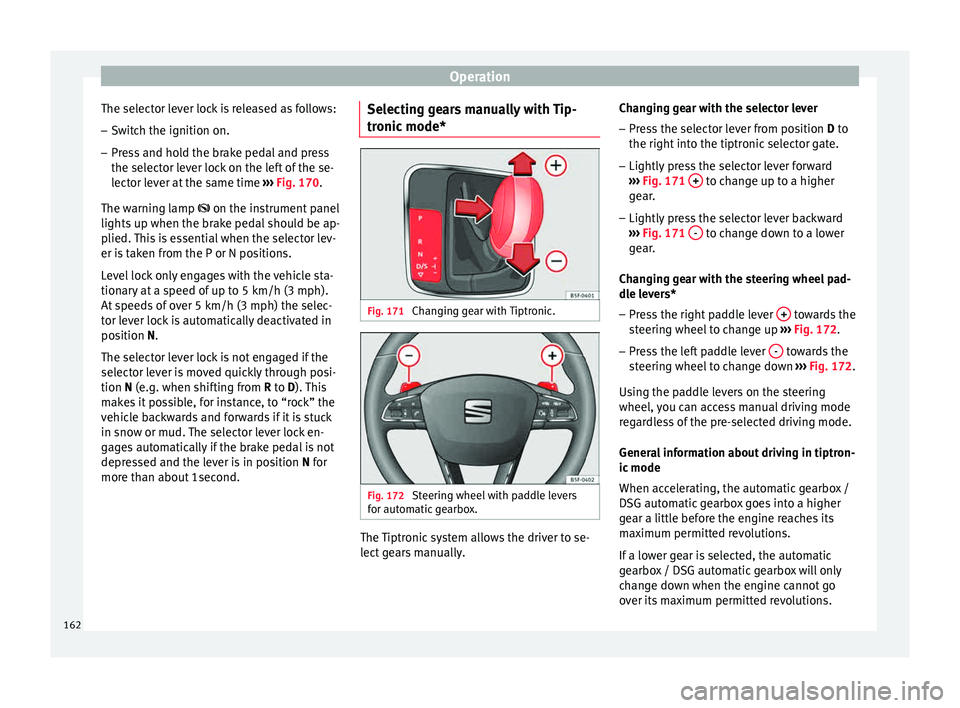
* Fig. 171
Changing gear with Tiptronic. Fig. 172
Steering wheel with paddle levers
f or aut
om
atic gearbox. The Tiptronic system allows the driver to se-
l
ect
g
ears manually. Changing gear with the selector lever
– Press the selector lever from position D to
the right int
o the tiptronic selector gate.
– Lightly press the selector lever forward
›››
Fig. 171 + to change up to a higher
g e
ar
.
– Lightly press the selector lever backward
›››
Fig. 171 - to change down to a lower
g e
ar
.
Changing gear with the steering wheel pad-
dle levers*
– Press the right paddle lever + towards the
s t
eerin
g wheel to change up ››› Fig. 172.
– Press the left paddle lever - towards the
s t
eerin
g wheel to change down ››› Fig. 172.
Using the paddle levers on the steering
wheel, you can access manual driving mode
regardless of the pre-selected driving mode.
General information about driving in tiptron-
ic mode
When accelerating, the automatic gearbox /
DSG automatic gearbox goes into a higher
gear a little before the engine reaches its
maximum permitted revolutions.
If a lower gear is selected, the automatic
gearbox / DSG automatic gearbox will only
change down when the engine cannot go
over its maximum permitted revolutions.
162
Page 165 of 248
Driving
If “tiptronic” is selected whilst the vehicle is
in motion and the aut om
atic
gearbox / DSG
automatic gearbox is in third gear and selec-
tor lever position D, “tiptronic” mode will
then also be in third gear.
Changing gears in the normal or sport pro-
gramme using the steering wheel paddle lev-
ers
If the paddle levers ››› Fig. 172 are used in
the normal or sport programme, the system
switches temporarily to “tiptronic” mode. To
exit “Tiptronic” mode again, press the right
paddle lever + towards the steering wheel
f or ap
pr
oximately one second. You will also
leave “tiptronic” mode if the paddle levers
are not moved for a certain time. Note
● The ge ar p
addle levers on the steering
wheel can be operated with the selector lever
in any position and with the vehicle in mo-
tion. Driving tips
The gearbox changes gear ratios automatical-
ly
a
s
the vehicle moves.
Starting
– Start the engine with the selector lever in
position
P or N. Driving
– Press and hold the brake pedal.
– Holding down the lock button (button on
the selector l
ever), select R or D.
– Release the lever and wait a little for the
gearbo
x to engage the gear (a slight move-
ment can be felt).
– Release the brake and press the accelerator
›››
in Selector lever positions on
p ag
e 161
.
Stopping briefly – If stopping for a short time, keep the vehi-
cle s
tationary by pressing the foot brake
hard to prevent the vehicle moving back-
wards on a slope or “creeping” forwards,
e.g. at traffic lights. The selector lever does
not need to be put into the positions P or N
for this.
– Do not press the accelerator.
Parkin
g
– Press and hold the brake pedal until the ve-
hicle c
omes to a standstill ››› in Selector
l ev
er po
sitions on page 161.
– Apply the handbrake.
– By pressing the lock button down, move
the selector l
ever to P and release the lock
button. Driving up and down hills
–
Press the selector lever from position “D”
to the right int
o the tiptronic selector gate.
– Lightly press the selector lever back to
chan
ge down.
Holding the car on a hill
– The brake must be always pressed down to
prevent
the vehicle from “rolling back-
wards” ››› in Selector lever positions on
p ag
e 161
. Do not try to prevent the vehicle
from “rolling backwards” by increasing the
engine speed while a range of gears is se-
lected.
Starting the vehicle up hills
– Apply the handbrake.
– With a selected gear, accelerate slowly and
at the same time, r
elease the handbrake.
The steeper the slope, the lower the needed
gear. This increases the braking effect of the
engine. For example, when driving down a
very steep slope in third gear. If the engine
brake effect is not enough, the vehicle will
speed up. The automatic gearbox automati-
cally changes up to prevent the engine over-
revving. Use the foot brake to reduce speed
and change into 3rd gear using Tiptronic*
››› in Selector lever positions on page 161.
Y our
v
ehicle has an automatic interlock
which prevents the selector lever from being »
163
Technical data
Advice
Operation
Emergencies
Safety
Page 169 of 248
Driving
must perform a cleaning cycle, as indicated
in ››
›
page 101. WARNING
● The diesel en
gine particulate filter may
reach extremely high temperatures; the vehi-
cle should be parked so that the exhaust pipe
does not come into contact with flammable
materials underneath the vehicle. Otherwise
there is a risk of fire. CAUTION
● Your v
ehicle is not designed to use biodie-
sel fuel. Never, under any circumstances re-
fuel with biodiesel. The use of biodiesel fuel
could damage the engine and the fuel sys-
tem. The addition of biodiesel to diesel by
the diesel producer in accordance with stand-
ard EN 590 is authorised and will not cause
damage to the engine or the fuel system.
● Using diesel fuel with a high sulphur con-
tent m
ay significantly reduce the useful life of
the diesel particulate filter. Your Technical
Service will be able to tell you which coun-
tries have diesel with a high sulphur content. Ecological and environmentally-
friendly
driv
in
gFuel consumption, environmental pollution
and w
e
ar t
o the engine, brakes and tyres de-
pends in large part on your driving style. By
adopting an economical driving style and an- ticipating the traffic situation ahead, you can
eas
ily reduce fuel consumption by 10-15%.
Some tips on how to help you reduce pollu-
tion while saving money are listed below.
Active cylinder management (ACT ®
)
Depending on the equipment, the vehicle
may have active cylinder management
(ACT ®
).
The active cylinder management (ACT ®
) may
automatically deactivate some of the engine
cylinders if the driving situation does not re-
quire too much power. When it is switched
off, no fuel is injected into these cylinders,
hence total fuel consumption may be re-
duced. The number of active cylinders can be
seen on the instrument panel display
››› page 30.
Drive anticipating the traffic situation
A vehicle uses most fuel when accelerating.
When you anticipate situations, you have to
brake less often and, thus, accelerate less. If
it is possible, let the vehicle roll with a gear
engaged, for example, if you see a red light
ahead. The braking effect achieved in this
way helps to reduce the wear of brakes and
tyres; emissions and fuel consumption are
reduced to zero (disconnection due to iner-
tia). Change gear early to save energy
An effective w
ay of saving fuel is to change
up quickly through the gears. Running the
engine at high rpm in the lower gears uses
an unnecessary amount of fuel.
Manual gearbox: shift up from first to second
gear as soon as possible. We recommend
that, whenever possible, you change to a
higher gear upon reaching 2000 rpm. Follow
the “recommended gear” indication that ap-
pears on the instrument panel ››› page 159.
Avoid driving at high speed
We advise you not to drive at the top speed
permitted by the vehicle. Fuel consumption,
exhaust emissions and noise levels all in-
crease very rapidly at higher speeds. Driving
at moderate speeds will help to save fuel.
Avoid idling
It is worthwhile switching off the engine
when waiting in a traffic jam, at level cross-
ings or at traffic lights with a long red phase.
The fuel saved after only 30 - 40 seconds is
greater than the amount of fuel needed to re-
start the engine.
The engine takes a long time to warm up
when it is idling. Mechanical wear and pollu-
tant emissions are also especially high dur-
ing this initial warm-up phase. It is therefore
best to drive off immediately after starting »
167
Technical data
Advice
Operation
Emergencies
Safety
Page 185 of 248
Driver assistance systems
● Use de-ic
in
g spray to remove any ice. CAUTION
● Never u se abr
asive cleaning products to
clean the camera lens.
● Do not use hot or warm water to remove ice
or snow fr
om the camera lens. Doing so could
damage the camera. Parking and manoeuvring with the
re
ar a
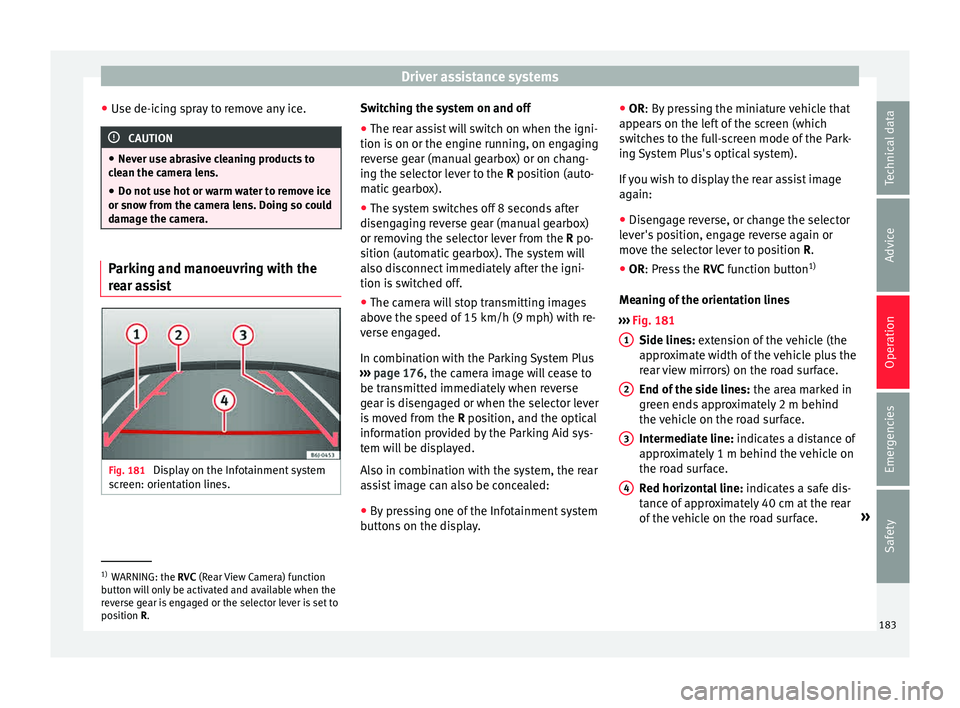
ssist Fig. 181
Display on the Infotainment system
s cr
een: orientation lines. Switching the system on and off
●
The rear assist will switch on when the igni-
tion i s
on or the en
gine running, on engaging
reverse gear (manual gearbox) or on chang-
ing the selector lever to the R position (auto-
matic gearbox).
● The system switches off 8 seconds after
diseng
aging reverse gear (manual gearbox)
or removing the selector lever from the R po-
sition (automatic gearbox). The system will
also disconnect immediately after the igni-
tion is switched off.
● The camera will stop transmitting images
above the s
peed of 15 km/h (9 mph) with re-
verse engaged.
In combination with the Parking System Plus
››› page 176, the camera image will cease to
be transmitted immediately when reverse
gear is disengaged or when the selector lever
is moved from the R position, and the optical
information provided by the Parking Aid sys-
tem will be displayed.
Also in combination with the system, the rear
assist image can also be concealed:
● By pressing one of the Infotainment system
button
s on the display. ●
OR: By pr
essing the miniature vehicle that
appears on the left of the screen (which
switches to the full-screen mode of the Park-
ing System Plus's optical system).
If you wish to display the rear assist image
again:
● Disengage reverse, or change the selector
lever's
position, engage reverse again or
move the selector lever to position R.
● OR: Press the RVC fu
nction button1)
Meaning of the orientation lines
››› Fig. 181
Side lines: extension of the vehicle (the
approximate width of the vehicle plus the
rear view mirrors) on the road surface.
End of the side lines: the area marked in
green ends approximately 2 m behind
the vehicle on the road surface.
Intermediate line: indicates a distance of
approximately 1 m behind the vehicle on
the road surface.
Red horizontal line: indicates a safe dis-
tance of approximately 40 cm at the rear
of the vehicle on the road surface. »
1 2
3
4
1)
WARNING: the RVC (Rear
View Camera) function
button will only be activated and available when the
reverse gear is engaged or the selector lever is set to
position R. 183
Technical data
Advice
Operation
Emergencies
Safety
Page 188 of 248
Operation
Selecting the system setting
● If necessary, switch on the ignition.
● To select SPORT mode, press the
›››
Fig. 183 b utt
on u ntil it lights up.
The CONVENIENCE mode is active when the button is not lit. The set mode remains
sel ect
ed af
ter the ignition is switched off.
CUPRA vehicle version
The modes of operation for the CUPRA are
Normal and Sport rather than Comfort and
Sport. The vehicle always starts up in Nor-
mal. The last selection does not remain once
the vehicle is turned off. WARNING
Adjusting the “SEAT Drive Profile” modifies
drivin g pr
operties. The “SEAT Drive Profile”
system should never encourage you to take
risks.
● Adapt your speed and driving style at all
times t
o suit visibility, weather, road and traf-
fic conditions. WARNING
If the warning lamps and the corresponding
mes s
ages are ignored when they light up, the
vehicle may stall in traffic and cause acci-
dents and severe injuries.
● Never ignore the warning lamps or messag-
es. ●
Stop the v
ehicle at the next opportunity
and in a safe place. CAUTION
Failure to heed the control lamps and corre-
s pondin g t
ext messages when they light up
may result in damage to the vehicle. Note
If the “SEAT Drive Profile” system presents a
fau lt, the
symbol appears on the instrument
panel, with the message Fault: Damping
setting . Indication on the display and warning
l
amp
There is a fault in the “SEAT Drive Pro-
file” suspension.
See a specialised workshop immediately and have the
“SEAT Drive Profile” suspension checked.
If the yellow warning lamp does not light up again after
the engine is restarted and the vehicle has travelled a
short distance, you do not need to take it to a special-
ised workshop. Some warning and indication lamps will light
up briefly
when the ignition i
s
switched on to
check certain functions. They will switch off
after a few seconds. WARNING
If the warning lamps and the corresponding
mes s
ages are ignored when they light up, the
vehicle may stall in traffic and cause acci-
dents and severe injuries.
● Never ignore the warning lamps or messag-
es. WARNING
Changing the “SEAT Drive Profile” settings
whil e the
vehicle is in motion can distract you
from the road and lead to accidents. CAUTION
Failure to heed the control lamps when they
light up and the c orr
esponding messages
may result in damage to the vehicle. Note
If the “SEAT Drive Profile” system does not
work a
s described in this chapter, have it
checked immediately by a specialised work-
shop. 186