fuel Seat Ibiza SC 2012 Owner's manual
[x] Cancel search | Manufacturer: SEAT, Model Year: 2012, Model line: Ibiza SC, Model: Seat Ibiza SC 2012Pages: 280, PDF Size: 3.67 MB
Page 6 of 280
Accessories, replacement of parts and
modifications . . . . . . . . . . . . . . . . . . . . . . . . . . . . . 183
Accessories and spare parts . . . . . . . . . . . . . . . . 183
Technical modifications . . . . . . . . . . . . . . . . . . . . 183
Roof aerial* . . . . . . . . . . . . . . . . . . . . . . . . . . . . . . 184
Mobile telephones and two-way radios . . . . . . . . 184
Fitting a towing bracket* . . . . . . . . . . . . . . . . . . . 185
Checking and refilling levels . . . . . . . . . . . . . . . 187
Refuelling . . . . . . . . . . . . . . . . . . . . . . . . . . . . . . . 187
LPG system* . . . . . . . . . . . . . . . . . . . . . . . . . . . . . 189
Petrol . . . . . . . . . . . . . . . . . . . . . . . . . . . . . . . . . . . 192
Diesel . . . . . . . . . . . . . . . . . . . . . . . . . . . . . . . . . . . 192
Working in the engine compartment . . . . . . . . . . 193
Engine oil . . . . . . . . . . . . . . . . . . . . . . . . . . . . . . . . 196
Coolant . . . . . . . . . . . . . . . . . . . . . . . . . . . . . . . . . 200
Washer fluid and windscreen wiper blades . . . . 202
Brake fluid . . . . . . . . . . . . . . . . . . . . . . . . . . . . . . . 206
Vehicle battery . . . . . . . . . . . . . . . . . . . . . . . . . . . 207
Wheels . . . . . . . . . . . . . . . . . . . . . . . . . . . . . . . . . . 209
If and when . . . . . . . . . . . . . . . . . . . . . . . . . . . . . . . 216
Vehicle tools, spare wheel . . . . . . . . . . . . . . . . . . 216
Wheel change . . . . . . . . . . . . . . . . . . . . . . . . . . . . 217
Tyre repair kit (Tyre-Mobility-System)* . . . . . . . . . 222
Fuses . . . . . . . . . . . . . . . . . . . . . . . . . . . . . . . . . . . 224
Bulb change . . . . . . . . . . . . . . . . . . . . . . . . . . . . . 227
Single headlight bulb change . . . . . . . . . . . . . . . 229
Double headlight bulb change . . . . . . . . . . . . . . . 231
Changing the bulbs of AFS headlights . . . . . . . . 235
Changing the fog light bulbs . . . . . . . . . . . . . . . . 236
Changing the rear, side and interior light bulbs . 237
Jump-starting . . . . . . . . . . . . . . . . . . . . . . . . . . . . . 241
Towing and tow-starting . . . . . . . . . . . . . . . . . . . . 244 Technical Specifications
. . . . . . . . . . . 247
Description of specifications . . . . . . . . . . . . . . . 247
Important information . . . . . . . . . . . . . . . . . . . . . 247
Information on fuel consumption . . . . . . . . . . . . 249
Towing a trailer . . . . . . . . . . . . . . . . . . . . . . . . . . . 249
Wheels . . . . . . . . . . . . . . . . . . . . . . . . . . . . . . . . . . 250
Technical specifications . . . . . . . . . . . . . . . . . . . . 251
Checking fluid levels . . . . . . . . . . . . . . . . . . . . . . . 251
Petrol engine 1.2 44 kW (60 PS) . . . . . . . . . . . . . 252
Petrol engine 1.2 51 kW (70 PS) . . . . . . . . . . . . . 253
Petrol engine 1.2 TSI 63 kW (85 PS) . . . . . . . . . . 254
Petrol engine/LPG 1.6 60 kW (81 PS) . . . . . . . . . 255
Petrol engine 1.4 63 kW (85 PS) . . . . . . . . . . . . . 256
Petrol engine 1.2 TSI 77 kW (105 PS) . . . . . . . . . 257
Petrol engine 1.2 TSI 77 kW (105 PS) Start-Stop 258
Petrol engine 1.6 77 kW (105 PS) . . . . . . . . . . . . 259
Petrol engine 1.4 110 kW (150 PS) . . . . . . . . . . . 260
Petrol engine 1.4 132 kW (180 PS) - Cupra . . . . . 261
Diesel engine 1.2 TDI CR 55 kW (75 PS) DPF
Start-Stop Ecomotive . . . . . . . . . . . . . . . . . . . . . . 262
Diesel engine 1.2 TDI CR 55 kW (75 PS) DPF . . . . 263
Diesel engine 1.6 TDI CR 66 kW (90 PS) DPF . . . . 264
Diesel engine 1.6 TDI CR 77 kW (105 PS) with/
without DPF . . . . . . . . . . . . . . . . . . . . . . . . . . . . . . 265
Diesel engine 2.0 TDI CR 105 kW (143 PS) DPF . 266
Dimensions and capacities . . . . . . . . . . . . . . . . . 267
Index . . . . . . . . . . . . . . . . . . . . . . . . . . . . . . . . . . . 269
4Table of Contents
Page 58 of 280
56Cockpit
Rev counter
The rev counter displays the engine speed in revolutions per
minute.
The start of the red zone ⇒ Fig. 30 1
indicates the maximum engine speed
operating at service temperature. However, it is advisable to change up into
a higher gear, move the selector lever to D or lift your foot off the accelerator
before the needle reaches the red zone.
CAUTION
To prevent possible engine malfunctions, the rev counter needle should not
reach the red zone. The start of the red zone on the dial is different for some
engine versions.
For the sake of the environment
Changing up into higher gears sooner, following the recommended gear in-
dications ⇒ Fig. 33 will help you to reduce fuel consumption, emissions and
also engine noise.
Speedometer
The speedometer is equipped with a digital odometer and a trip recorder, in
addition to a service intervals display.
During the running-in period, the instructions shown on ⇒ page 167
should be followed. LPG system*
LPG gauge
Fig. 31 Instrument pan-
el: gas gauge.
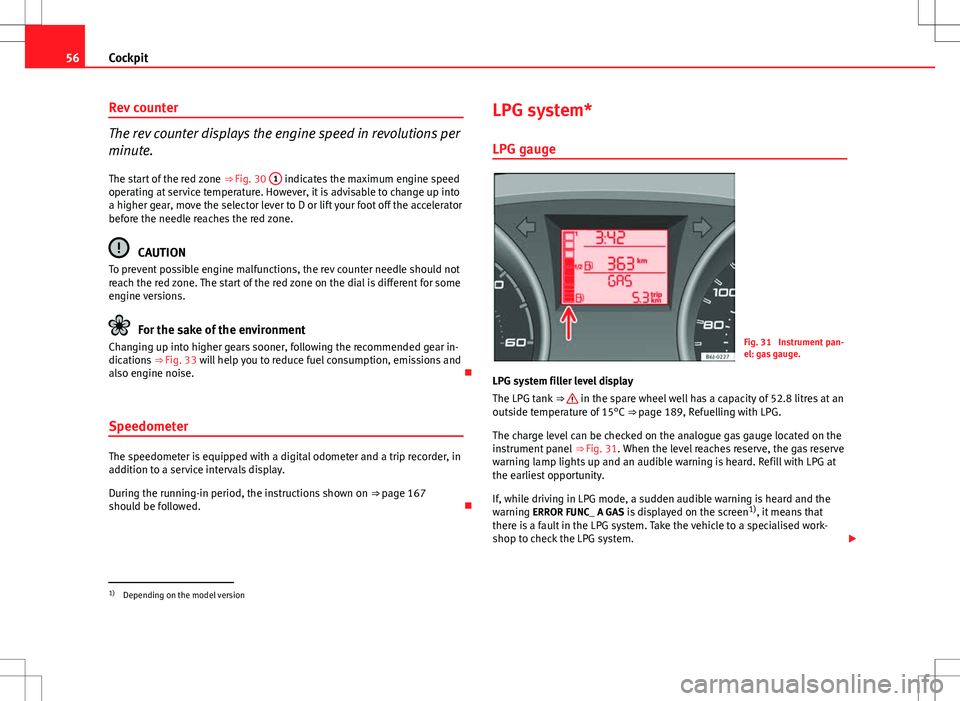
LPG system filler level display
The LPG tank ⇒
in the spare wheel well has a capacity of 52.8 litres at an
outside temperature of 15°C ⇒ page 189, Refuelling with LPG.
The charge level can be checked on the analogue gas gauge located on the
instrument panel ⇒ Fig. 31. When the level reaches reserve, the gas reserve
warning lamp lights up and an audible warning is heard. Refill with LPG at
the earliest opportunity.
If, while driving in LPG mode, a sudden audible warning is heard and the
warning ERROR FUNC_ A GAS is displayed on the screen 1)
, it means that
there is a fault in the LPG system. Take the vehicle to a specialised work-
shop to check the LPG system.
1)
Depending on the model version
Page 59 of 280
57
Cockpit
WARNING
LPG is a highly explosive and inflammable substance. It may cause se-
vere burns and other injury.
● Due care must be taken to avoid any risk of fire or explosion.
● When parking the vehicle in a closed area (for example in a garage),
make sure that there is adequate ventilation, either natural or mechani-
cal, to neutralise the LPG in the event of a leak.
Note
● The values shown in the average fuel consumption and distance to emp-
ty indications on the multifunction display (MFI) 1)
on the instrument panel 2)
are approximate values only.
● Two different consumption values are given on the MFI, depending on
whether the vehicle is running in GAS or Petrol mode.
● Please check the fuel level on the fuel level gauge on the instrument
panel ⇒ page 57
● If frequent short journeys are made, especially when the outside tem-
perature is low, the vehicle will tend to run on petrol more often than on
LPG. Therefore, the petrol tank may empty before the LPG tank. Digital instrument panel display
Fuel gauge and reserve indicator
Fig. 32 Fuel gauge
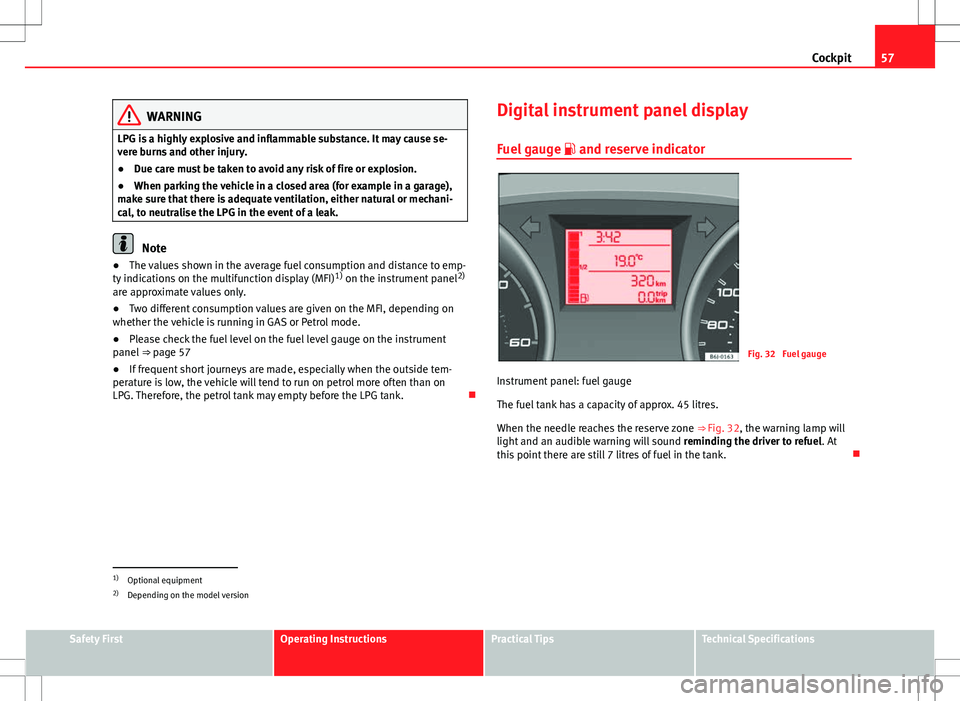
Instrument panel: fuel gauge
The fuel tank has a capacity of approx. 45 litres.
When the needle reaches the reserve zone ⇒ Fig. 32, the warning lamp will
light and an audible warning will sound reminding the driver to refuel. At
this point there are still 7 litres of fuel in the tank.
1)
Optional equipment
2) Depending on the model version
Safety FirstOperating InstructionsPractical TipsTechnical Specifications
Page 60 of 280
58Cockpit
Digital clock*
–To set the hour, press button 4 ⇒ Fig. 30. The “hour” option
flashes on the digital display and is set using button 5 “set”
⇒ Fig. 30.
– To set the minutes, press button 4
again and select the mi-
nute option. Set from button 5 “set”.
Once the operation has been carried out, the system memorises the time.
Outside temperature indicator
The outside temperature is displayed when the ignition is
switched on. In addition to the outside temperature display, an ice crystal is displayed
and, if vehicle speed is over 10 km/h (6 mph), a warning tone is heard at
temperatures dropping from between +4°C and -7°C and at temperatures
rising from -5°C up to +6°C.
The lighting of the crystal symbol aims to warn the driver of the risk of ice,
so that he/she proceeds with due care.
When the vehicle is stationary or travelling at very low speeds, the tempera-
ture displayed may be slightly higher than the actual outside temperature
as a result of heat coming from the engine. Recommended gear display*
This display helps to save fuel.
Fig. 33 Gear display
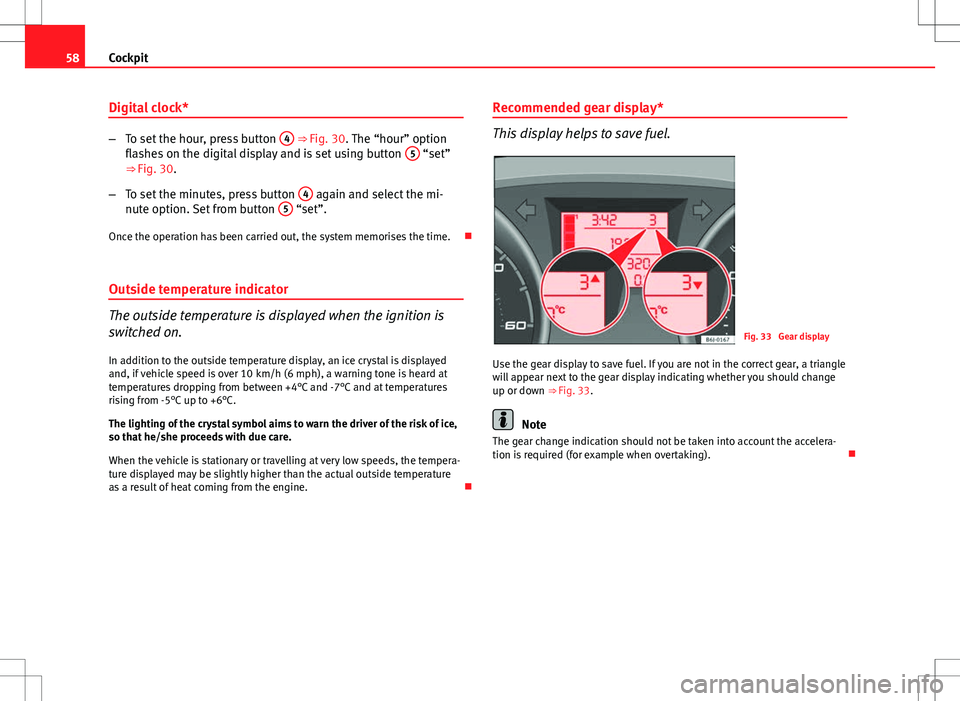
Use the gear display to save fuel. If you are not in the correct gear, a triangle
will appear next to the gear display indicating whether you should change
up or down ⇒ Fig. 33.
Note
The gear change indication should not be taken into account the accelera-
tion is required (for example when overtaking).
Page 61 of 280
59
Cockpit
Multifunction display (MFI)*
The multifunction display (MFI) shows you information on
the journey and fuel consumption.
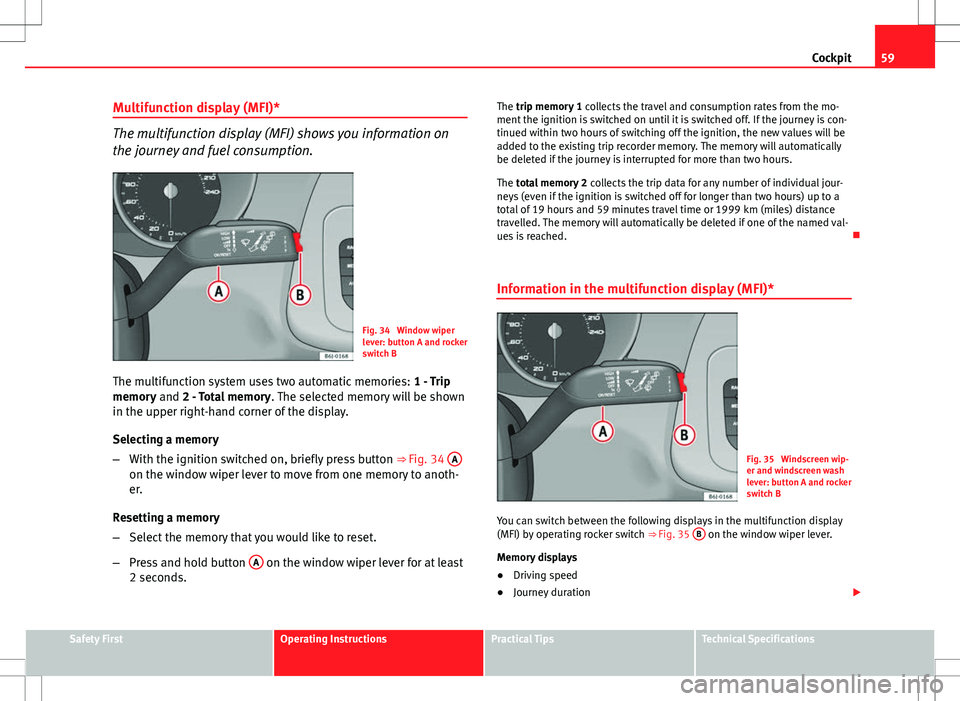
Fig. 34 Window wiper
lever: button A and rocker
switch B
The multifunction system uses two automatic memories: 1 - Trip
memory and 2 - Total memory . The selected memory will be shown
in the upper right-hand corner of the display.
Selecting a memory
– With the ignition switched on, briefly press button ⇒ Fig. 34 A
on the window wiper lever to move from one memory to anoth-
er.
Resetting a memory
– Select the memory that you would like to reset.
– Press and hold button A
on the window wiper lever for at least
2 seconds. The trip memory 1
collects the travel and consumption rates from the mo-
ment the ignition is switched on until it is switched off. If the journey is con-
tinued within two hours of switching off the ignition, the new values will be
added to the existing trip recorder memory. The memory will automatically
be deleted if the journey is interrupted for more than two hours.
The total memory 2 collects the trip data for any number of individual jour-
neys (even if the ignition is switched off for longer than two hours) up to a
total of 19 hours and 59 minutes travel time or 1999 km (miles) distance
travelled. The memory will automatically be deleted if one of the named val-
ues is reached.
Information in the multifunction display (MFI)*
Fig. 35 Windscreen wip-
er and windscreen wash
lever: button A and rocker
switch B
You can switch between the following displays in the multifunction display
(MFI) by operating rocker switch ⇒ Fig. 35 B
on the window wiper lever.
Memory displays
● Driving speed
● Journey duration
Safety FirstOperating InstructionsPractical TipsTechnical Specifications
Page 62 of 280
60Cockpit
● Average speed
● Distance
● Fuel range
● Average fuel consumption
● Current fuel consumption
● Outside temperature indicator
● Speed warning
Km/h (mph) - Driving speed
Driving speed is digitally shown in the display.
min - Journey duration The display shows the amount of time which has elapsed since the ignition
was switched on.
The maximum display value in both memories is 19 hours and 59 minutes.
The memory will automatically be deleted once this value has been
reached.
Ø km/h (mph) - Average speed
The average speed will be shown after running a distance of approximately
100 metres. Until then dashes will appear in the display. The display will be
updated every 5 seconds while the vehicle is in motion.
km (miles) - Distance travelledThe display shows the distance travelled since the ignition was switched on.
The maximum display value in both memories is 1999 km (miles). The
memory will automatically be deleted once this value has been reached. Km (miles) - Fuel range
The fuel range is calculated using the figures for tank content and current
fuel consumption. It shows how far the vehicle can travel using the same
conditions as a reference.
Ø ltr/100 km - Average fuel consumption
The average fuel consumption will be shown after having travelled approxi-
mately 100 metres. Until then dashes will appear in the display. The display
will be updated every 5 seconds while the vehicle is in motion. The amount
of fuel used will not be shown.
l/100 km or l/h - Current fuel consumption The display will show the current fuel consumption in litre/km whilst the ve-
hicle is in motion or in litre/hour when the vehicle is in a stationary position
with the engine running.
Using this display you can see how your driving style affects fuel consump-
tion ⇒ page 169.
Outside temperature indicator
The measurement range extends from -45°C to +58°C. At temperatures be-
low +4°C, an ice crystal symbol is displayed and a “gong” warning sounds if
the vehicle is moving at more than 10 km/h (6 mph) (ice danger warning).
This symbol will flash for about 10 seconds and remains lit until the outside
temperature rises above +4°C or does not rise above 6°C when on the move
if it was already lit.
Set speed indicator
When the required speed has been reached, enter the “Speed warning”
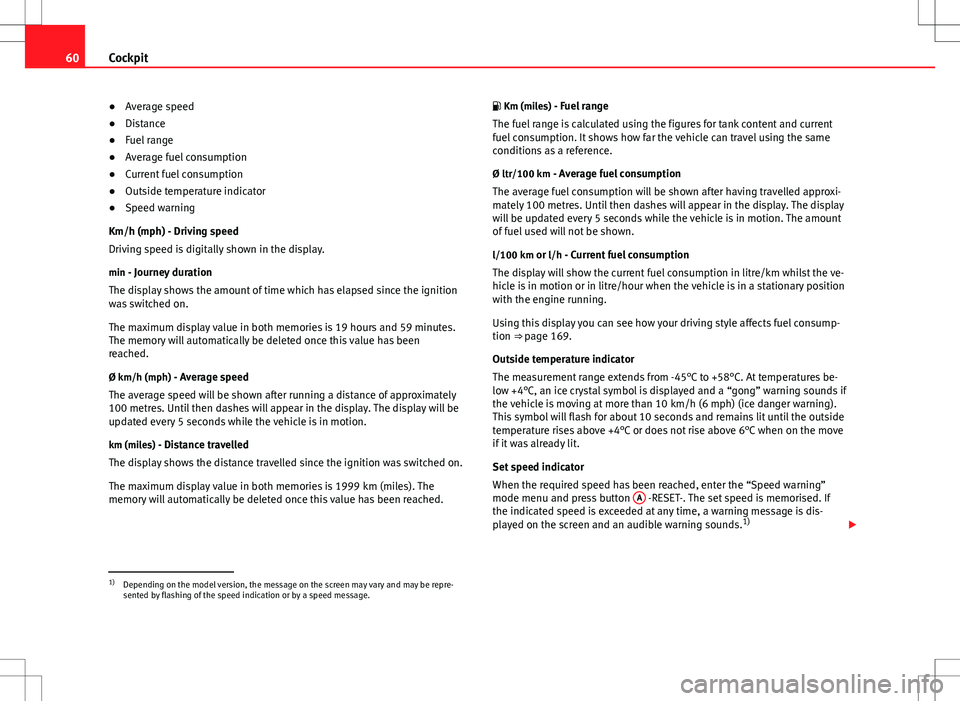
mode menu and press button A
-RESET-. The set speed is memorised. If
the indicated speed is exceeded at any time, a warning message is dis-
played on the screen and an audible warning sounds. 1)
1)Depending on the model version, the message on the screen may vary and may be repre-
sented by flashing of the speed indication or by a speed message.
Page 66 of 280
64Cockpit
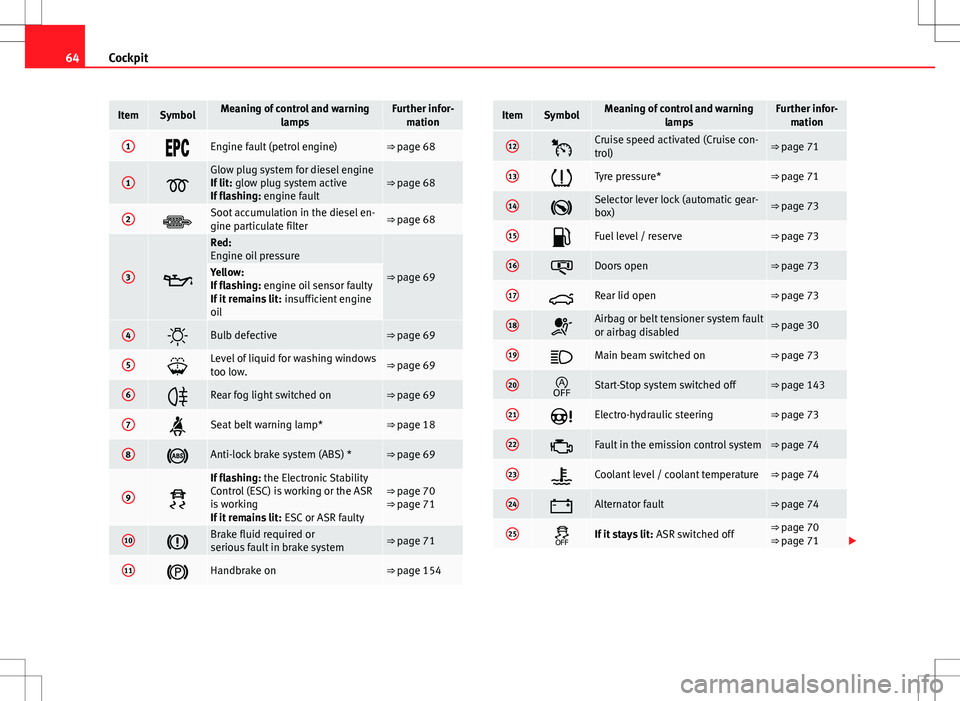
ItemSymbolMeaning of control and warning
lampsFurther infor-mation
1Engine fault (petrol engine)⇒ page 68
1
Glow plug system for diesel engine
If lit: glow plug system active
If flashing: engine fault⇒ page 68
2Soot accumulation in the diesel en-
gine particulate filter⇒ page 68
3
Red:
Engine oil pressure
⇒ page 69Yellow:
If flashing: engine oil sensor faulty
If it remains lit: insufficient engine
oil
4Bulb defective⇒ page 69
5Level of liquid for washing windows
too low.⇒ page 69
6Rear fog light switched on⇒ page 69
7Seat belt warning lamp*⇒ page 18
8Anti-lock brake system (ABS) *⇒ page 69
9
If flashing: the Electronic Stability
Control (ESC) is working or the ASR
is working
If it remains lit: ESC or ASR faulty⇒ page 70
⇒ page 71
10Brake fluid required or
serious fault in brake system⇒ page 71
11Handbrake on⇒ page 154
ItemSymbolMeaning of control and warning
lampsFurther infor-mation
12Cruise speed activated (Cruise con-
trol)⇒ page 71
13Tyre pressure*⇒ page 71
14Selector lever lock (automatic gear-
box)⇒ page 73
15Fuel level / reserve⇒ page 73
16Doors open⇒ page 73
17Rear lid open⇒ page 73
18Airbag or belt tensioner system fault
or airbag disabled⇒ page 30
19Main beam switched on⇒ page 73
20Start-Stop system switched off⇒ page 143
21Electro-hydraulic steering⇒ page 73
22Fault in the emission control system⇒ page 74
23Coolant level / coolant temperature⇒ page 74
24Alternator fault⇒ page 74
25If it stays lit: ASR switched off⇒ page 70
⇒ page 71
Page 69 of 280
67
Cockpit
If several priority 1 faults are detected at the same time, the symbols will be
displayed one after the other for about 2 seconds at a time and will contin-
ue until the fault is corrected.
No menus will be shown in the display for the duration of a priority 1 warn-
ing message.
Examples of priority 1 warning messages (red)
● Brake system symbol with the warning message STOP BRAKE FLUID
INSTRUCTION MANUAL or STOP BRAKE FAULT INSTRUCTION MANUAL .
● Coolant symbol with the warning message STOP SEE COOLANT IN-
STRUCTION MANUAL.
● Engine oil pressure symbol with the warning message STOP ENGINE
OIL PRESSURE LOW! INSTRUCTION MANUAL .
Warning messages, Priority 2 (yellow)
If one of these faults occurs, the warning lamp lights up, and is accompa-
nied by one audible warning. Check the corresponding function as soon as
possible although the vehicle may be used without risk.
If several priority 2 warning messages are detected at the same time, the
symbols are displayed one after the other for about 2 seconds at a time. Af-
ter a set time, the information text will disappear and the symbol will be
shown as a reminder at the side of the display.
Priority 2 warning messages will not be shown until all Priority 1 warning
messages have been dealt with!
Examples of priority 2 warning messages (yellow): 1)
● Fuel warning light with the information text PLEASE REFUEL. Information messages displayed on the screen*
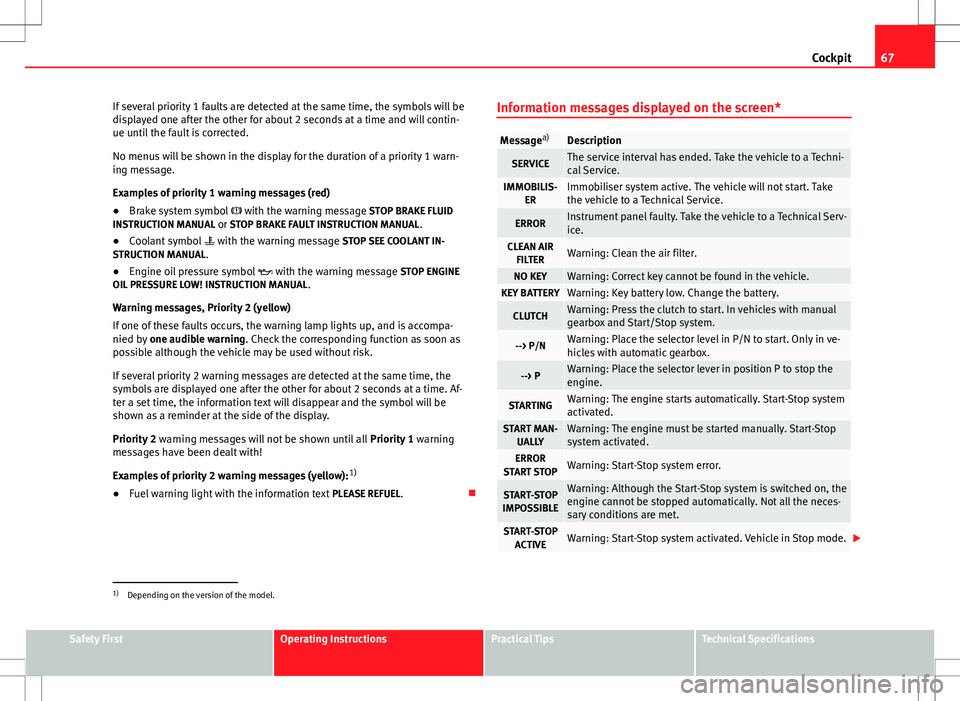
Message
a)Description
SERVICEThe service interval has ended. Take the vehicle to a Techni-
cal Service.
IMMOBILIS-
ERImmobiliser system active. The vehicle will not start. Take
the vehicle to a Technical Service.
ERRORInstrument panel faulty. Take the vehicle to a Technical Serv-
ice.
CLEAN AIRFILTERWarning: Clean the air filter.
NO KEYWarning: Correct key cannot be found in the vehicle.KEY BATTERYWarning: Key battery low. Change the battery.
CLUTCHWarning: Press the clutch to start. In vehicles with manual
gearbox and Start/Stop system.
--> P/NWarning: Place the selector level in P/N to start. Only in ve-
hicles with automatic gearbox.
--> PWarning: Place the selector lever in position P to stop the
engine.
STARTINGWarning: The engine starts automatically. Start-Stop system
activated.
START MAN- UALLYWarning: The engine must be started manually. Start-Stop
system activated.
ERROR
START STOPWarning: Start-Stop system error.
START-STOP
IMPOSSIBLEWarning: Although the Start-Stop system is switched on, the
engine cannot be stopped automatically. Not all the neces-
sary conditions are met.
START-STOP ACTIVEWarning: Start-Stop system activated. Vehicle in Stop mode.
1)
Depending on the version of the model.
Safety FirstOperating InstructionsPractical TipsTechnical Specifications
Page 71 of 280
69
Cockpit
WARNING
● Always drive according to the road weather conditions, the terrain
and traffic. Driving recommendations should never lead to illegal ma-
noeuvres in surrounding traffic.
● The diesel engine particulate filter may reach extremely high temper-
atures; it should not enter into contact with flammable materials under-
neath the vehicle. Otherwise there is a risk of fire.
Engine oil pressure
If this warning lamp is red it indicates that the engine oil
pressure is too low.
If this warning symbol starts to flash, and is accompanied by three audible
warnings, switch off the engine and check the oil level. If necessary, add
more oil ⇒ page 199.
If the symbol flashes although the oil level is correct, do not drive on. Do
not even run the engine at idle speed! Obtain technical assistance.
Checking the oil level
If the warning lamp is yellow the engine oil level should be checked as
soon as possible. Top up the oil ⇒ page 199 at the next opportunity.
Oil level sensor faulty*
If the yellow warning lamp flashes, take the vehicle to a specialised
workshop to have the oil level sensor checked. Until then it is advisable to
check the oil level every time you refuel. Bulb defect*
The indicator lights up when a bulb is not functioning.
The warning lamp lights up when there is a fault on the turn signals,
headlights, side lights and fog lights.
Washer fluid
This warning lamp lights up to indicate that the windscreen
washer level is too low. This serves as a reminder to fill up the reservoir at the earliest opportunity
⇒ page 202.
Rear fog light*
This warning lamp lights up when the rear fog light is switched on . For
further information see ⇒ page 97.
Anti-lock brake system (ABS)*
A control lamp monitors the ABS.
The control lamp should light up for a few seconds when the ignition is
switched on. It goes out again after the system has run through an automat-
ic test sequence.
Safety FirstOperating InstructionsPractical TipsTechnical Specifications
Page 74 of 280
72Cockpit
Tyre pressure*
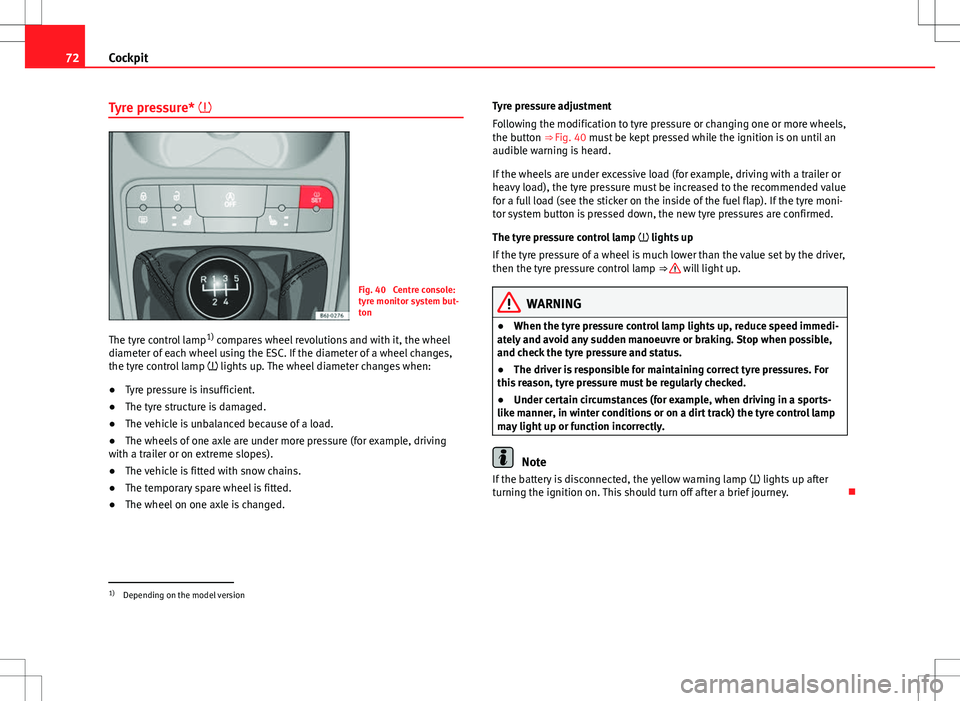
Fig. 40 Centre console:
tyre monitor system but-
ton
The tyre control lamp 1)
compares wheel revolutions and with it, the wheel
diameter of each wheel using the ESC. If the diameter of a wheel changes,
the tyre control lamp lights up. The wheel diameter changes when:
● Tyre pressure is insufficient.
● The tyre structure is damaged.
● The vehicle is unbalanced because of a load.
● The wheels of one axle are under more pressure (for example, driving
with a trailer or on extreme slopes).
● The vehicle is fitted with snow chains.
● The temporary spare wheel is fitted.
● The wheel on one axle is changed. Tyre pressure adjustment
Following the modification to tyre pressure or changing one or more wheels,
the button ⇒ Fig. 40 must be kept pressed while the ignition is on until an
audible warning is heard.
If the wheels are under excessive load (for example, driving with a trailer or
heavy load), the tyre pressure must be increased to the recommended value
for a full load (see the sticker on the inside of the fuel flap). If the tyre moni-
tor system button is pressed down, the new tyre pressures are confirmed.
The tyre pressure control lamp
lights up
If the tyre pressure of a wheel is much lower than the value set by the driver,
then the tyre pressure control lamp ⇒
will light up.
WARNING
● When the tyre pressure control lamp lights up, reduce speed immedi-
ately and avoid any sudden manoeuvre or braking. Stop when possible,
and check the tyre pressure and status.
● The driver is responsible for maintaining correct tyre pressures. For
this reason, tyre pressure must be regularly checked.
● Under certain circumstances (for example, when driving in a sports-
like manner, in winter conditions or on a dirt track) the tyre control lamp
may light up or function incorrectly.
Note
If the battery is disconnected, the yellow warning lamp lights up after
turning the ignition on. This should turn off after a brief journey.
1)
Depending on the model version