display Seat Ibiza ST 2011 User Guide
[x] Cancel search | Manufacturer: SEAT, Model Year: 2011, Model line: Ibiza ST, Model: Seat Ibiza ST 2011Pages: 280, PDF Size: 4.01 MB
Page 67 of 280
65
Cockpit
ItemSymbolMeaning of warning and indicator
lampsFurther infor-mation
Turn signals in operation⇒ page 74
SAFEElectronic immobiliser⇒ page 74
⇒ page 79
WARNING
● Failure to observe warning lamps and warning messages can result in
serious personal injuries or damage to your vehicle.
● The risk of an accident increases if your vehicle breaks down. Use a
warning triangle to draw the attention of other road users in order to pre-
vent danger to third parties.
● The engine compartment is a dangerous area! Before you open the
bonnet to work on the engine or in the engine compartment, you must
switch the engine off and allow it to cool to reduce the risk of scalding or
other injuries. Read and observe the relevant warnings ⇒ page 199.
Note
● The appropriate warning lamp for a fault will light up in vehicles without
warning or information messages in the display.
● In vehicles with warning or information texts on the screen, the appro-
priate warning lamp for a fault will light up and a warning or information
message will also appear on the screen. Overview of indicator and warning lamps (vehicles with
LPG)
The warning lamps indicate a number of different functions
and possible faults.
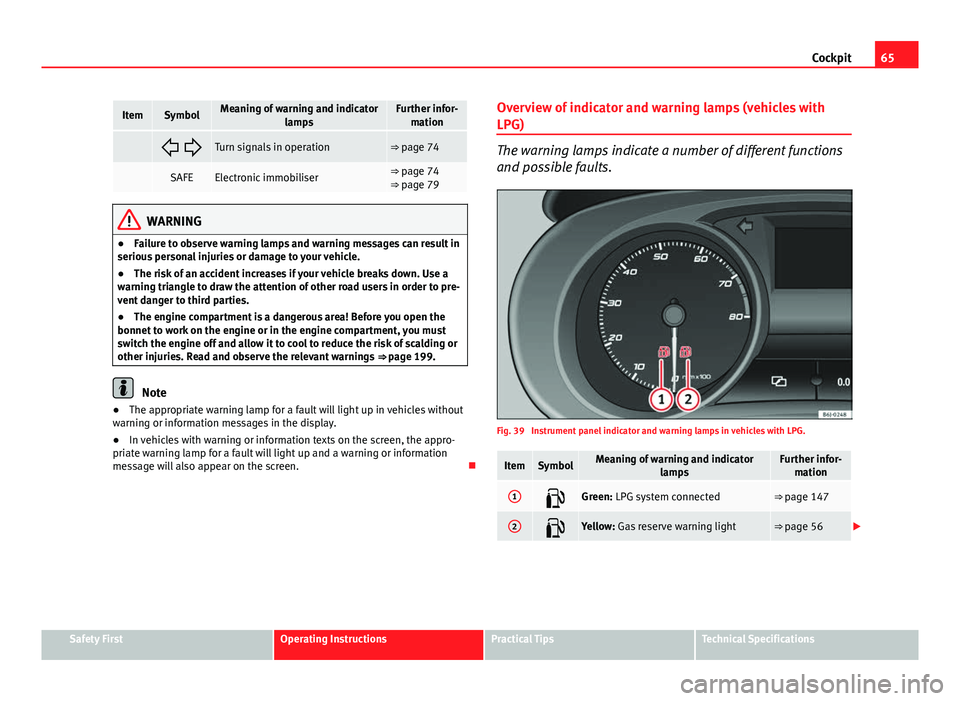
Fig. 39 Instrument panel indicator and warning lamps in vehicles with LPG.
ItemSymbolMeaning of warning and indicator
lampsFurther infor-mation
1Green: LPG system connected⇒ page 147
2Yellow: Gas reserve warning light⇒ page 56
Safety FirstOperating InstructionsPractical TipsTechnical Specifications
Page 68 of 280
66Cockpit
WARNING
● Failure to observe warning lamps and warning messages can result in
serious personal injury or damage to your vehicle.
● The risk of an accident increases if your vehicle breaks down. Use a
warning triangle to draw the attention of other road users in order to pre-
vent danger to third parties.
● The engine compartment is a dangerous area! Before you open the
bonnet to work on the engine or in the engine compartment, you must
switch the engine off and allow it to cool to reduce the risk of scalding or
other injuries. Read and observe the relevant warnings ⇒ page 199.
Note
● The appropriate warning lamp for a fault will light up in vehicles without
warning or information messages in the display.
● In vehicles with warning or information texts on the screen, the appro-
priate warning lamp for a fault will light up and a warning or information
message will also appear on the screen.
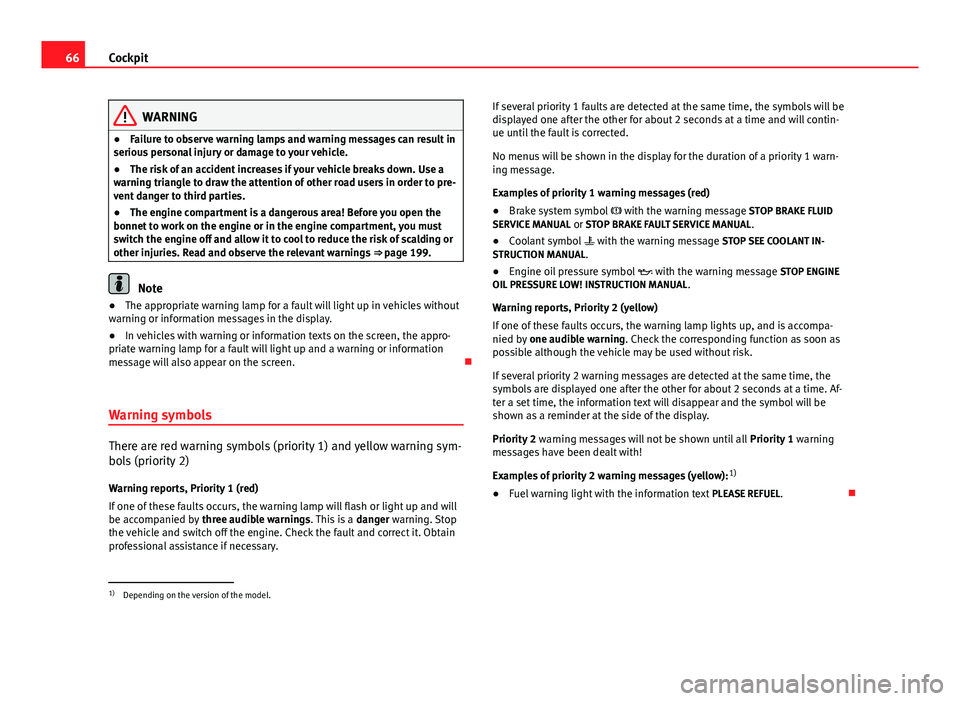
Warning symbols
There are red warning symbols (priority 1) and yellow warning sym-
bols (priority 2) Warning reports, Priority 1 (red)
If one of these faults occurs, the warning lamp will flash or light up and will
be accompanied by three audible warnings. This is a danger warning. Stop
the vehicle and switch off the engine. Check the fault and correct it. Obtain
professional assistance if necessary. If several priority 1 faults are detected at the same time, the symbols will be
displayed one after the other for about 2 seconds at a time and will contin-
ue until the fault is corrected.
No menus will be shown in the display for the duration of a priority 1 warn-
ing message.
Examples of priority 1 warning messages (red)
●
Brake system symbol with the warning message STOP BRAKE FLUID
SERVICE MANUAL or STOP BRAKE FAULT SERVICE MANUAL .
● Coolant symbol with the warning message STOP SEE COOLANT IN-
STRUCTION MANUAL.
● Engine oil pressure symbol with the warning message STOP ENGINE
OIL PRESSURE LOW! INSTRUCTION MANUAL .
Warning reports, Priority 2 (yellow)
If one of these faults occurs, the warning lamp lights up, and is accompa-
nied by one audible warning. Check the corresponding function as soon as
possible although the vehicle may be used without risk.
If several priority 2 warning messages are detected at the same time, the
symbols are displayed one after the other for about 2 seconds at a time. Af-
ter a set time, the information text will disappear and the symbol will be
shown as a reminder at the side of the display.
Priority 2 warning messages will not be shown until all Priority 1 warning
messages have been dealt with!
Examples of priority 2 warning messages (yellow): 1)
● Fuel warning light with the information text PLEASE REFUEL.
1)
Depending on the version of the model.
Page 69 of 280
67
Cockpit
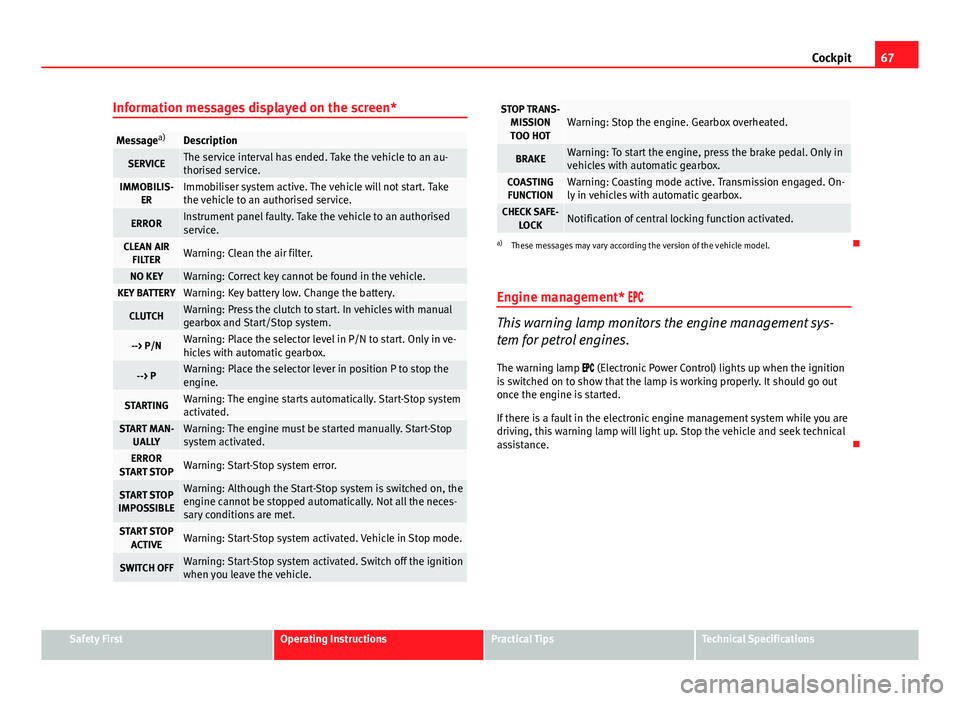
Information messages displayed on the screen*
Message a)Description
SERVICEThe service interval has ended. Take the vehicle to an au-
thorised service.
IMMOBILIS-
ERImmobiliser system active. The vehicle will not start. Take
the vehicle to an authorised service.
ERRORInstrument panel faulty. Take the vehicle to an authorised
service.
CLEAN AIRFILTERWarning: Clean the air filter.
NO KEYWarning: Correct key cannot be found in the vehicle.KEY BATTERYWarning: Key battery low. Change the battery.
CLUTCHWarning: Press the clutch to start. In vehicles with manual
gearbox and Start/Stop system.
--> P/NWarning: Place the selector level in P/N to start. Only in ve-
hicles with automatic gearbox.
--> PWarning: Place the selector lever in position P to stop the
engine.
STARTINGWarning: The engine starts automatically. Start-Stop system
activated.
START MAN- UALLYWarning: The engine must be started manually. Start-Stop
system activated.
ERROR
START STOPWarning: Start-Stop system error.
START STOP
IMPOSSIBLEWarning: Although the Start-Stop system is switched on, the
engine cannot be stopped automatically. Not all the neces-
sary conditions are met.
START STOP ACTIVEWarning: Start-Stop system activated. Vehicle in Stop mode.
SWITCH OFFWarning: Start-Stop system activated. Switch off the ignition
when you leave the vehicle.
STOP TRANS-MISSIONTOO HOTWarning: Stop the engine. Gearbox overheated.
BRAKEWarning: To start the engine, press the brake pedal. Only in
vehicles with automatic gearbox.
COASTING FUNCTIONWarning: Coasting mode active. Transmission engaged. On-
ly in vehicles with automatic gearbox.
CHECK SAFE- LOCKNotification of central locking function activated.
a)These messages may vary according the version of the vehicle model.
Engine management*
This warning lamp monitors the engine management sys-
tem for petrol engines.
The warning lamp (Electronic Power Control) lights up when the ignition
is switched on to show that the lamp is working properly. It should go out
once the engine is started.
If there is a fault in the electronic engine management system while you are
driving, this warning lamp will light up. Stop the vehicle and seek technical
assistance.
Safety FirstOperating InstructionsPractical TipsTechnical Specifications
Page 76 of 280
74Cockpit
If the warning lamp lights up again after driving on for a short distance,
stop the vehicle and switch the engine off . Contact an Authorised Service
Centre or a specialised workshop.
Coolant level too low
If the warning light comes on, stop the vehicle, switch off the engine and
wait for it to cool down . First check the coolant level. If the level of the cool-
ant is below the “MIN” mark, top up with coolant liquid ⇒
.
WARNING
● If your vehicle is immobilised for technical reasons, move it to a safe
distance from traffic. Turn the engine off, turn the hazard lights on and
place the warning triangle.
● Never open the bonnet if you can see or hear steam or coolant escap-
ing from the engine compartment. Risk of scalding. Wait until you can no
longer see or hear escaping steam or coolant.
● The engine compartment is a dangerous area! Before carrying out any
work in the engine compartment, switch off the engine and allow it to
cool down. Always note the corresponding warnings ⇒ page 199.
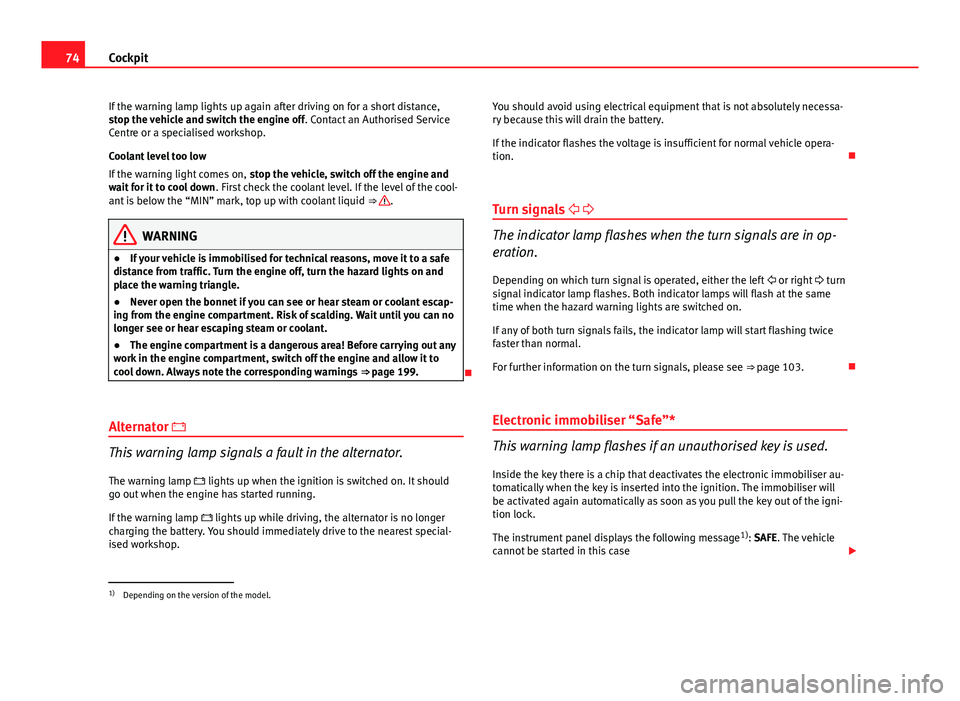
Alternator
This warning lamp signals a fault in the alternator.
The warning lamp lights up when the ignition is switched on. It should
go out when the engine has started running.
If the warning lamp lights up while driving, the alternator is no longer
charging the battery. You should immediately drive to the nearest special-
ised workshop. You should avoid using electrical equipment that is not absolutely necessa-
ry because this will drain the battery.
If the indicator flashes the voltage is insufficient for normal vehicle opera-
tion.
Turn signals
The indicator lamp flashes when the turn signals are in op-
eration.
Depending on which turn signal is operated, either the left or right turn
signal indicator lamp flashes. Both indicator lamps will flash at the same
time when the hazard warning lights are switched on.
If any of both turn signals fails, the indicator lamp will start flashing twice
faster than normal.
For further information on the turn signals, please see ⇒ page 103.
Electronic immobiliser “Safe”*
This warning lamp flashes if an unauthorised key is used.
Inside the key there is a chip that deactivates the electronic immobiliser au-
tomatically when the key is inserted into the ignition. The immobiliser will
be activated again automatically as soon as you pull the key out of the igni-
tion lock.
The instrument panel displays the following message 1)
: SAFE. The vehicle
cannot be started in this case
1)
Depending on the version of the model.
Page 140 of 280
138Air conditioning
Climatronic
Controls
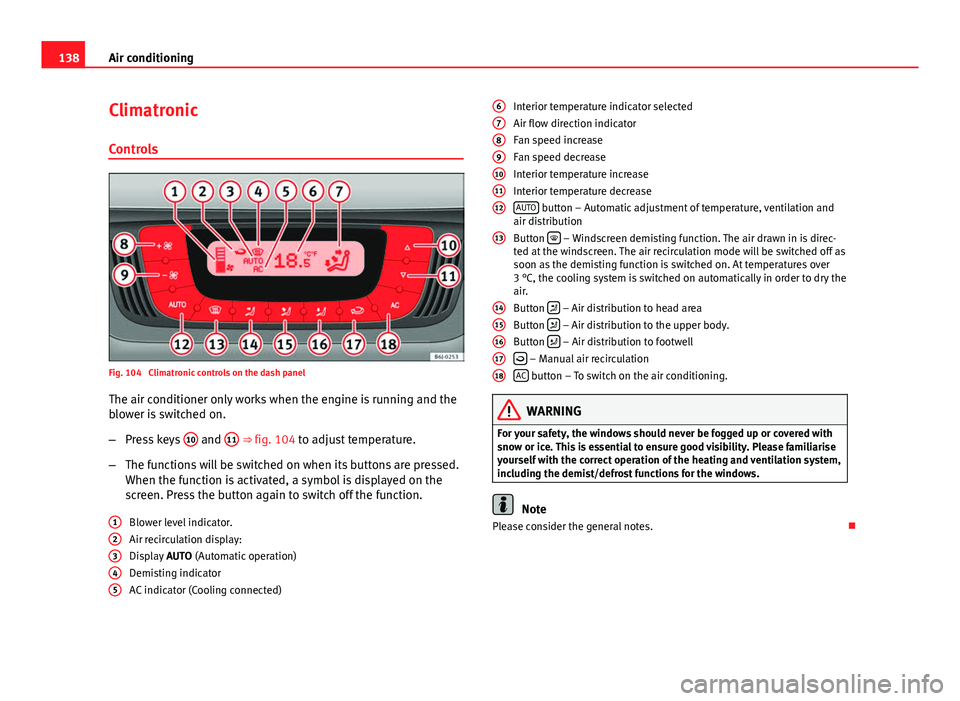
Fig. 104 Climatronic controls on the dash panelThe air conditioner only works when the engine is running and the
blower is switched on.
– Press keys 10
and 11 ⇒ fig. 104 to adjust temperature.
– The functions will be switched on when its buttons are pressed.
When the function is activated, a symbol is displayed on the
screen. Press the button again to switch off the function.
Blower level indicator.
Air recirculation display:
Display AUTO (Automatic operation)
Demisting indicator
AC indicator (Cooling connected)
1
2345
Interior temperature indicator selected
Air flow direction indicator
Fan speed increase
Fan speed decrease
Interior temperature increase
Interior temperature decrease
AUTO
button – Automatic adjustment of temperature, ventilation and
air distribution
Button
– Windscreen demisting function. The air drawn in is direc-
ted at the windscreen. The air recirculation mode will be switched off as
soon as the demisting function is switched on. At temperatures over
3 °C, the cooling system is switched on automatically in order to dry the
air.
Button
– Air distribution to head area
Button – Air distribution to the upper body.
Button – Air distribution to footwell
– Manual air recirculation
AC button – To switch on the air conditioning.
WARNING
For your safety, the windows should never be fogged up or covered with
snow or ice. This is essential to ensure good visibility. Please familiarise
yourself with the correct operation of the heating and ventilation system,
including the demist/defrost functions for the windows.
Note
Please consider the general notes.
6
789101112
13
1415161718
Page 141 of 280
139
Air conditioning
Automatic mode
In automatic mode air temperature, air flow and distribution
are automatically regulated so that a specified temperature
is attained as quickly as possible, and then maintained. Switching on automatic mode
– Press the button AUTO
. The indication
⇒ fig. 104 7 is visible.
– Press keys 10
and 11 ⇒ fig. 104 to adjust the desired tempera-
ture inside the vehicle. We recommend 22 °C (72 °F).
A comfortable interior climate is quickly reached when a temperature of
+22 °C (72 °F) is set in automatic mode. Therefore, we recommend you not
to change this adjustment, except as necessary to suit individual preferen-
ces or particular circumstances. It is possible to select interior temperatures
from +18 °C (64 °F) to +29 °C (86 °F). If a lower or higher temperature is se-
lected, LO or HI are respectively displayed on the screen. These are approxi-
mate temperatures which may slightly vary depending on the outside condi-
tions.
Climatronic maintains a constant temperature. To do it, it automatically reg-
ulates the supplied air temperature, the blower speed and the air distribu-
tion. The system also considers the sunlight radiation, so there is no need
for manual readjustment. Therefore, automatic mode almost always pro-
vides the best comfort for the vehicle occupants throughout the year.
Automatic mode is switched off whenever an adjustment is made using the
buttons for the air distribution, blower or AC
. The temperature continues to
self-regulate. Manual mode
In manual mode the air temperature, flow, and the desired
air distribution can be adjusted.
Switching on manual mode
– Press one of the buttons ⇒ fig. 104 14
to 16 or press the blower
control 8 and 9 down. The indicator is switched off 3.
Temperature
It is possible to select interior temperatures from +18 °C (64 °F) to +29 °C
(86 °F). These are approximate temperatures which may slightly vary de-
pending on the outside conditions.
If a temperature below 18 °C (64 °F) is selected, the screen will show LO. In
this setting the system runs at maximum cooling output and the tempera-
ture is not regulated.
If a temperature above 29 °C (86 °F) is selected, the screen will show HI. In
this setting the system runs at maximum heating output and the tempera-
ture is not controlled.
Blower
The blower can be adjusted with buttons 8
and 9 ⇒ fig. 104. If the blower
is off (level 1 is not shown on the screen) and button 9 is kept pressed
down, the Climatronic switches off. Then OFF is displayed on the screen.
Air distribution
The air distribution is adjusted using the buttons
, and . It is also
possible to open and close some of the air outlets separately.
Switching the air conditioning on and off
Pressing the button AC
the air cooling system can be switched off in order
to save fuel. The temperature continues to self-regulate. The set tempera-
ture can then only be reached if it is higher than the outside temperature.
Safety FirstOperating InstructionsPractical TipsTechnical Specifications
Page 142 of 280

140Air conditioning
Air recirculation mode
Air recirculation mode prevents fumes or unpleasant smells
from coming from the outside.
– Press the button
to switch air recirculation mode on or off.
This is ON if the symbol ⇒ fig. 104 is displayed on the
screen.
Air recirculation mode prevents strong odours in the ambient air from enter-
ing the vehicle interior, for example when passing through a tunnel or in a
traffic jam.
When the outside temperature is low, air recirculation mode improves heat-
ing performance by heating air from the interior instead of cold air from the
outside.
When the outside temperature is high, air recirculation mode improves cool-
ing performance by cooling air from the interior instead of warm air from
outside.
For safety reasons, the air recirculation should not be switched on when the
air distribution control is set to the windscreen setting .
WARNING
In air recirculation mode, no cold air from the outside enters the vehicle
interior. If the air conditioner is switched off, the windows can quickly
mist over. Therefore, never leave the air recirculation mode switched on
for a long time (risk of accident).
Note
When engaging reverse gear, the air recirculation is connected automatical-
ly to prevent the entrance of exhaust fumes in the vehicle on travelling back-
wards. In this case the symbol
for air recirculation is not displayed. General notes
Pollution filter
The pollution filter (a combined particulate filter and active carbon filter)
serves as a barrier against impurities in the outside air, including dust and
pollen.
For the air conditioner to work with maximum efficiency, the pollution filter
must be replaced at the specified intervals in the Maintenance Programme.
If the filter loses efficiency prematurely due to use in areas reaching very
high pollution levels, the pollen filter must be changed more frequently
than stated in the Service Schedule.
CAUTION
● If you suspect that the air conditioner is damaged, switch it off with but-
ton AC
to prevent further damage and have it checked by a specialised
workshop.
● Repairs to the air conditioner require specialist knowledge and special
tools. Therefore, we recommend you to take the vehicle to a specialised
workshop.
Note
● If the humidity and temperature outside the vehicle are high, condensa-
tion can drip off the evaporator in the cooling system and so forming a pud-
dle underneath the vehicle. This is completely normal and there is no need
to suspect a leak.
● Keep the air intake slots in front of the windscreen free of snow, ice and
leaves to ensure heating and cooling are not impaired, and to prevent the
windows from misting over.
● The air from the vents flows through the vehicle interior and is extracted
by slots designed for this purpose. Therefore, do not cover these slots with
items of clothing or other objects.
Page 149 of 280
147
Driving
temperature increases due to the heat accumulated in the engine compart-
ment or due to its prolonged exposure to solar radiation.
WARNING
● Never switch the engine off until the vehicle is completely stationary.
● The brake servo works only when the engine is running. With the en-
gine switched off, more strength is needed to brake. As normal brake op-
eration cannot be performed, risk of accidents and serious injury may ex-
ist.
● The steering lock can be immediately blocked once the key is re-
moved from the ignition. The vehicle cannot be steered. Risk of accident.
CAUTION
When the engine has been running under a heavy load for a long period,
heat can accumulate in the engine compartment and cause engine damage.
For this reason, you should idle the engine for approx. 2 minutes before you
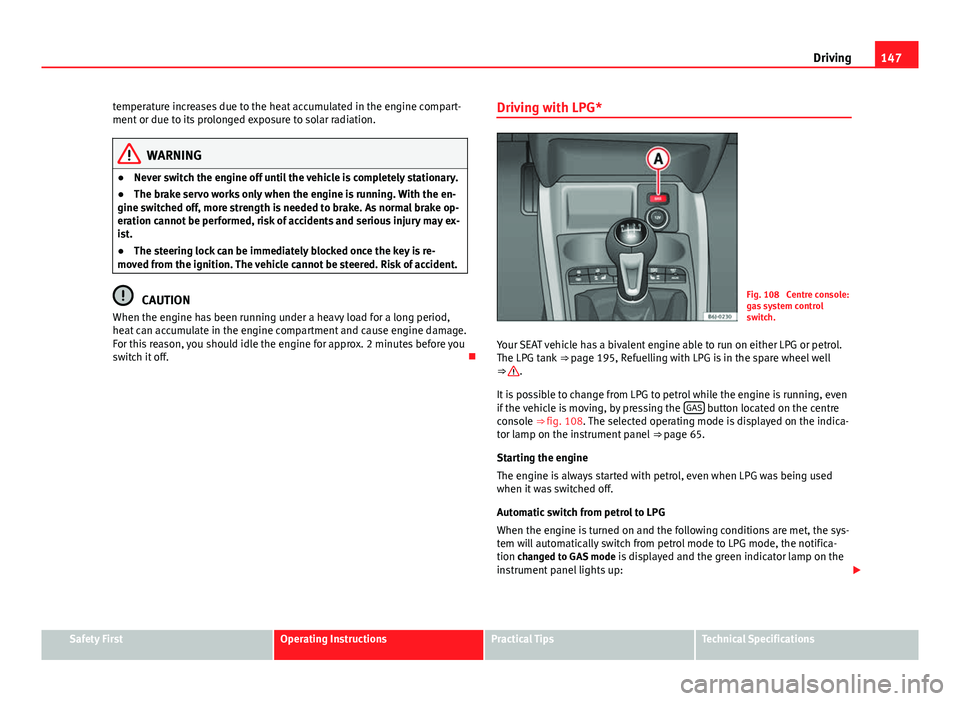
switch it off. Driving with LPG*Fig. 108 Centre console:
gas system control
switch.
Your SEAT vehicle has a bivalent engine able to run on either LPG or petrol.
The LPG tank ⇒ page 195, Refuelling with LPG is in the spare wheel well
⇒
.
It is possible to change from LPG to petrol while the engine is running, even
if the vehicle is moving, by pressing the GAS
button located on the centre
console ⇒ fig. 108. The selected operating mode is displayed on the indica-
tor lamp on the instrument panel ⇒ page 65.
Starting the engine
The engine is always started with petrol, even when LPG was being used
when it was switched off.
Automatic switch from petrol to LPG
When the engine is turned on and the following conditions are met, the sys-
tem will automatically switch from petrol mode to LPG mode, the notifica-
tion changed to GAS mode is displayed and the green indicator lamp on the
instrument panel lights up:
Safety FirstOperating InstructionsPractical TipsTechnical Specifications
Page 150 of 280
148Driving
● There is enough LPG in the tank.
● The temperature of the vehicle coolant is above 30 °C.
● Engine speed while driving is above 1200 rpm.
Automatic switch from LPG to petrol
When the vehicle is operating in LPG mode and one of these conditions is
met, the system automatically switches to petrol mode, the notification changed to petrol mode is displayed and the green indicator lamp on the in-
strument panel goes out:
● When the engine is started.
● If the LPG tank is empty.
● If there is a fault in the LPG system.
● At very low temperatures, below 10 °C.
Manual switch from petrol to LPG
Press the GAS
button on the centre console ⇒
fig. 108 to change mode. The
notification changed to GAS mode is displayed. When the following condi-
tions are met, the system switches to LPG mode, the green indicator lamp
on the instrument panel lights up and the notification displayed changes to changed to GAS mode .
● There is enough LPG in the tank.
● The temperature of the vehicle coolant is above 30 °C.
● Engine speed while driving is above 1200 rpm.
Manual switch from LPG to petrol
Press the GAS
button on the centre console ⇒
fig. 108 to change mode. The
green lamp on the instrument panel goes out and the notification changed
to petrol mode is displayed.
Running on petrol
Run the engine with petrol for short journeys at regular intervals to avoid
problems in the petrol system.
WARNING
LPG is a highly explosive and inflammable substance. It may cause se-
vere burns and other injury.
● Due care must be taken to avoid any risk of fire or explosion.
● When parking the vehicle in a closed area (for example in a garage),
make sure that there is adequate ventilation, either natural or mechani-
cal, to neutralise the LPG in the event of a leak.
Note
● If frequent short journeys are made, especially when the outside tem-
perature is low, the vehicle will tend to run on petrol more often than on
LPG. Therefore, the petrol tank may empty before the LPG tank.
● The notification LPG mode not possible may be displayed.
Start-Stop function* Description and operation
The Start-Stop function stops the engine when the vehicle is stop-
ped and starts it automatically when required.
– When the vehicle is stopped, put it in neutral and release the
clutch pedal. The engine will stop.
– When the clutch pedal is pressed, the engine starts again.
– The instrument panel screen displays information about the sta-
tus of the Start-Stop function ⇒
fig. 110.
Page 151 of 280
149
Driving
Start-Stop function conditions
● The driver seat belt must be buckled.
● The engine hood must be closed.
● The engine must be at operating temperature
● The steering wheel must be straight.
● The vehicle must be on flat ground.
● The vehicle must not be in reverse.
● A trailer must not be connected.
● The temperature of the passenger compartment must be within the con-
venience limits ( AC
button should be selected).
● The windscreen de-mist function must be off.
● If in an increase in airflow is not requested.
● The temperature must not be set to HI or LO.
● The driver door must be closed.
● The diesel particulate filter must not be in regeneration mode, for diesel
engines.
● The battery charge must not be low for the next start.
● The battery temperature must be between -1 °C and 55 °C.
Start-Stop function interruption
In the following situations, the Start-Stop function will be interrupted and
the engine will automatically start:
● The vehicle starts moving.
● The brake pedal is pressed several times in a row.
● The battery has been discharged excessively.
● The Start-Stop System is manually deactivated.
● The windscreen de-mist function is turned on.
● The temperature of the passenger compartment exceeds the conven-
ience limits ( AC
button).
● If the airflow is increased by more than 3 presses. ●
Temperature setting HI or LO is selected.
● The engine coolant temperature is insufficient.
● The alternator is faulty, for example the V-belt has ruptured.
● If any of the conditions described in the previous section are not fulfil-
led.
WARNING
Never allow the vehicle to move with the engine off for any reason. You
could lose control of your vehicle. This could cause an accident and seri-
ous injury.
● The brake servo does not work with the engine off. You need more
force to stop the vehicle.
● Power steering does not work when the engine is not running. That is
why it is much more difficult to turn the steering wheel.
● Disconnect the Start-Stop system when driving through water (ford-
ing streams, etc.).
Note
● For vehicles with the Start-Stop function and a manual gearbox, when
the engine is started, the clutch must be pressed.
● When the conditions for the Start-Stop function are not fulfilled, the in-
strument panel displays the Start-Stop indicator dimmed.
● If the steering wheel is turned more than 270°, it will not be possible to
start the vehicle again. To start the vehicle, straighten the steering wheel so
that it is turned less than 270°.
Safety FirstOperating InstructionsPractical TipsTechnical Specifications