windscreen Seat Ibiza ST 2014 User Guide
[x] Cancel search | Manufacturer: SEAT, Model Year: 2014, Model line: Ibiza ST, Model: Seat Ibiza ST 2014Pages: 240, PDF Size: 4.89 MB
Page 61 of 240
Dash panel
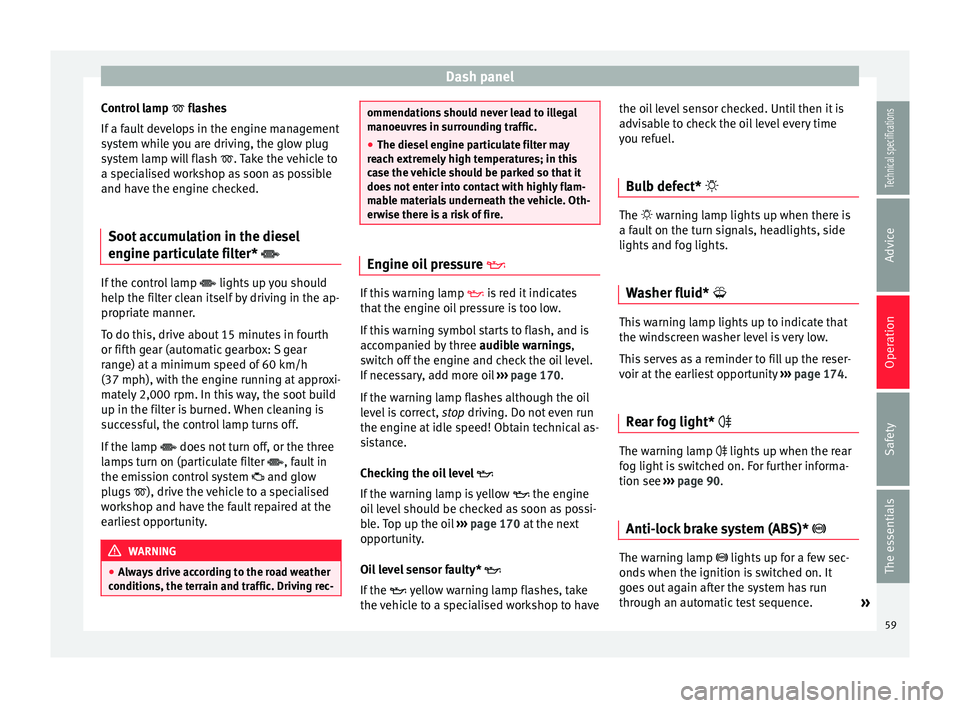
Control lamp flashes
If a f
ault develops in the engine management
system while you are driving, the glow plug
system lamp will flash
. Take the vehicle to
a specialised workshop as soon as possible
and have the engine checked.
Soot accumulation in the diesel
engine particulate filter* If the control lamp
lights up you should
help the filter clean itself by driving in the ap-
propriate manner.
To do this, drive about 15 minutes in fourth
or fifth gear (automatic gearbox: S gear
range) at a minimum speed of 60 km/h
(37 mph), with the engine running at approxi-
mately 2,000 rpm. In this way, the soot build
up in the filter is burned. When cleaning is
successful, the control lamp turns off.
If the lamp does not turn off, or the three
lamps turn on (particulate filter , fault in
the emission control system and glow
plugs ), drive the vehicle to a specialised
workshop and have the fault repaired at the
earliest opportunity. WARNING
● Always drive according to the road weather
conditions, the terrain and traffic. Driving rec- ommendations should never lead to illegal
manoeuvres in surrounding traffic.
●
The diesel engine particulate filter may
reach extremely high temperatures; in this
case the vehicle should be parked so that it
does not enter into contact with highly flam-
mable materials underneath the vehicle. Oth-
erwise there is a risk of fire. Engine oil pressure
If this warning lamp
is red it indicates
that the engine oil pressure is too low.
If this warning symbol starts to flash, and is
accompanied by three audible warnings,
switch off the engine and check the oil level.
If necessary, add more oil ››› page 170.
If the warning lamp flashes although the oil
level is correct, stop driving. Do not even run
the en gine at
idle speed! Obtain technical as-
sistance.
Checking the oil level
If the warning lamp is yellow the engine
oil level should be checked as soon as possi-
ble. Top up the oil ››› page 170 at the next
opportunity.
Oil level sensor faulty*
If the yellow warning lamp flashes, take
the vehicle to a specialised workshop to have the oil level sensor checked. Until then it is
advisable to check the oil level every time
you refuel.
Bulb defect* The
warning lamp lights up when there is
a f
ault on the turn signals, headlights, side
lights and fog lights.
Washer fluid* This warning lamp lights up to indicate that
the windscreen washer level is very low.
This serves as a reminder to fill up the reser-
voir at the earliest opportunity
›››
page 174.
Rear fog light* The warning lamp
lights up when the rear
fog light is switched on. For further informa-
tion see ›››
page 90 .
Anti-loc k
brake system (ABS)* The warning lamp lights up for a few sec-
onds when the ignition is switched on. It
goes out again after the system has run
through an automatic test sequence.
»
59
Technical specifications
Advice
Operation
Safety
The essentials
Page 67 of 240
Dash panel
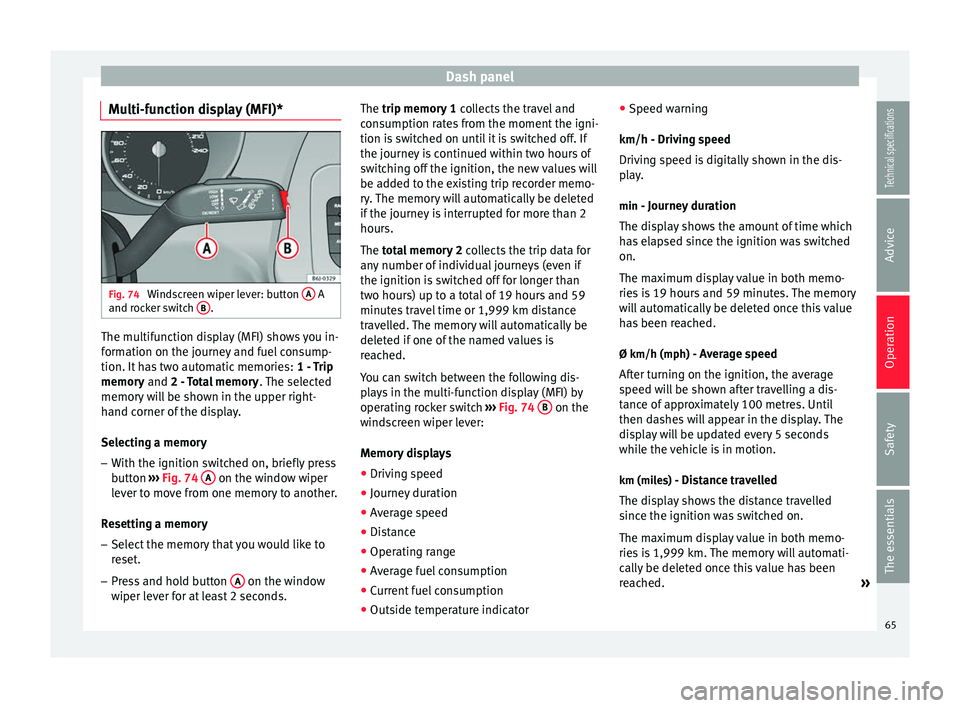
Multi-function display (MFI)* Fig. 74
Windscreen wiper lever: button A A
and rocker switch B .
The multifunction display (MFI) shows you in-
formation on the journey and fuel consump-
tion. It has two automatic memories:
1 - Trip
memory and
2 - Total memory . The selected
memory will be shown in the upper right-
hand corner of the display.
Selecting a memory
– With the ignition switched on, briefly press
button ››› Fig. 74 A on the window wiper
lever to move from one memory to another.
Resetting a memory
– Select the memory that you would like to
reset.
– Press and hold button A on the window
wiper lever for at least 2 seconds. The trip memory 1
collects the travel and
consumption rates from the moment the igni-
tion is switched on until it is switched off. If
the journey is continued within two hours of
switching off the ignition, the new values will
be added to the existing trip recorder memo-
ry. The memory will automatically be deleted
if the journey is interrupted for more than 2
hours.
The total memory 2
c
o
llects the trip data for
any number of individual journeys (even if
the ignition is switched off for longer than
two hours) up to a total of 19 hours and 59
minutes travel time or 1,999 km distance
travelled. The memory will automatically be
deleted if one of the named values is
reached.
You can switch between the following dis-
plays in the multi-function display (MFI) by
operating rocker switch ››› Fig. 74
B on the
windscreen wiper lever:
Memory displays
● Driving speed
● Journey duration
● Average speed
● Distance
● Operating range
● Average fuel consumption
● Current fuel consumption
● Outside temperature indicator ●
Speed warning
km/h - Driving speed
Driving speed is digitally shown in the dis-
play. min - Journey duration
The display shows the amount of time which
has elapsed since the ignition was switched
on.
The maximum display value in both memo-
ries is 19 hours and 59 minutes. The memory
will automatically be deleted once this value
has been reached.
Ø km/h (mph) - Average speed After turning on the ignition, the average
speed will be shown after travelling a dis-
tance of approximately 100 metres. Until
then dashes will appear in the display. The
display will be updated every 5 seconds
while the vehicle is in motion.
km (miles) - Distance travelledThe display shows the distance travelled
since the ignition was switched on.
The maximum display value in both memo-
ries is 1,999 km. The memory will automati-
cally be deleted once this value has been
reached. »
65
Technical specifications
Advice
Operation
Safety
The essentials
Page 93 of 240
Lights and visibility
and to ensure that other road users are able
to see you. Always use your dipped beam
headlights if it is dark or if visibility is poor.
Note
● The dipped beam headlights will only work
with the ignition on. The side lights come on
automatically when the ignition is turned off.
● If the lights are left on after the key has
been taken out of the ignition lock, an audi-
ble warning sounds while the driver door re-
mains open. This is a reminder to switch the
lights off.
● The rear fog light is so bright that it can
dazzle drivers behind you. You should use
the rear fog light only when visibility is very
poor.
● The use of the lighting described here is
subject to the relevant statutory require-
ments. Automatic lighting*
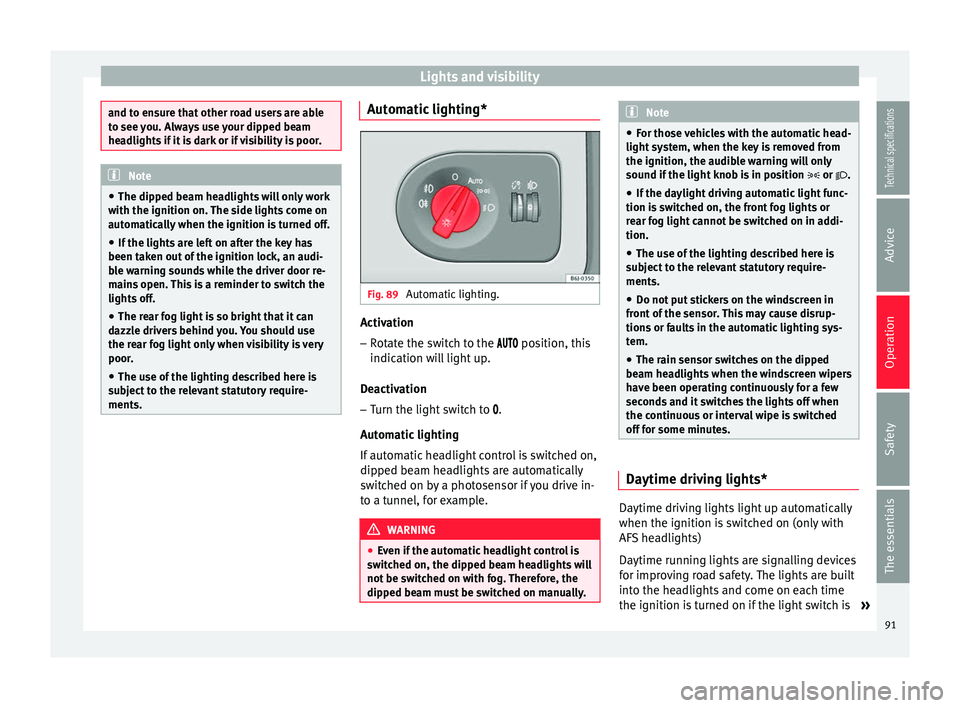
Fig. 89
Automatic lighting. Activation
– Rotate the switch to the position, this
indication will light up.
Deactivation – Turn the light switch to .
Automatic lighting
If automatic headlight control is switched on,
dipped beam headlights are automatically
switched on by a photosensor if you drive in-
to a tunnel, for example. WARNING
● Even if the automatic headlight control is
switched on, the dipped beam headlights will
not be switched on with fog. Therefore, the
dipped beam must be switched on manually. Note
● For those vehicles with the automatic head-
light system, when the key is removed from
the ignition, the audible warning will only
sound if the light knob is in position or .
● If the daylight driving automatic light func-
tion is switched on, the front fog lights or
rear fog light cannot be switched on in addi-
tion.
● The use of the lighting described here is
subject to the relevant statutory require-
ments.
● Do not put stickers on the windscreen in
front of the sensor. This may cause disrup-
tions or faults in the automatic lighting sys-
tem.
● The rain sensor switches on the dipped
beam headlights when the windscreen wipers
have been operating continuously for a few
seconds and it switches the lights off when
the continuous or interval wipe is switched
off for some minutes. Daytime driving lights*
Daytime driving lights light up automatically
when the ignition is switched on (only with
AFS headlights)
Daytime running lights are signalling devices
for improving road safety. The lights are built
into the headlights and come on each time
the ignition is turned on if the light switch is
»
91Technical specifications
Advice
Operation
Safety
The essentials
Page 99 of 240
Lights and visibility
function is possible, coming back on when
normal operating conditions are re-establish-
ed.
Sun visors
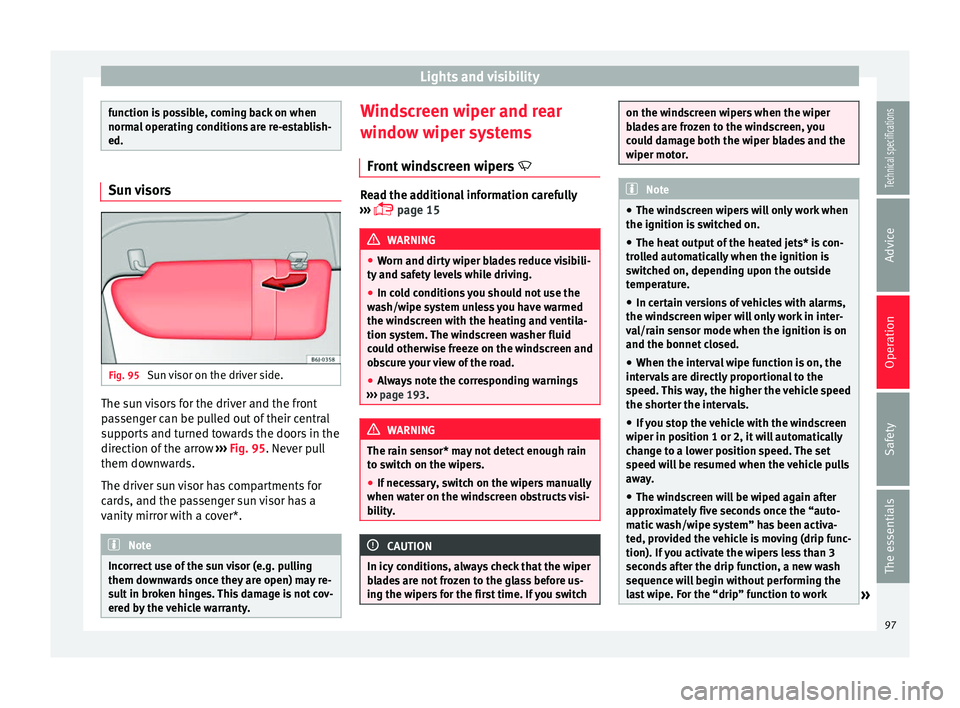
Fig. 95
Sun visor on the driver side. The sun visors for the driver and the front
passenger can be pulled out of their central
supports and turned towards the doors in the
direction of the arrow
››› Fig. 95 . Never pull
them do wn
wards.
The driver sun visor has compartments for
cards, and the passenger sun visor has a
vanity mirror with a cover*. Note
Incorrect use of the sun visor (e.g. pulling
them downwards once they are open) may re-
sult in broken hinges. This damage is not cov-
ered by the vehicle warranty. Windscreen wiper and rear
window wiper systems
Front windscreen wipers Read the additional information carefully
››› page 15 WARNING
● Worn and dirty wiper blades reduce visibili-
ty and safety levels while driving.
● In cold conditions you should not use the
wash/wipe system unless you have warmed
the windscreen with the heating and ventila-
tion system. The windscreen washer fluid
could otherwise freeze on the windscreen and
obscure your view of the road.
● Always note the corresponding warnings
››› page 193. WARNING
The rain sensor* may not detect enough rain
to switch on the wipers.
● If necessary, switch on the wipers manually
when water on the windscreen obstructs visi-
bility. CAUTION
In icy conditions, always check that the wiper
blades are not frozen to the glass before us-
ing the wipers for the first time. If you switch on the windscreen wipers when the wiper
blades are frozen to the windscreen, you
could damage both the wiper blades and the
wiper motor.
Note
● The windscreen wipers will only work when
the ignition is switched on.
● The heat output of the heated jets* is con-
trolled automatically when the ignition is
switched on, depending upon the outside
temperature.
● In certain versions of vehicles with alarms,
the windscreen wiper will only work in inter-
val/rain sensor mode when the ignition is on
and the bonnet closed.
● When the interval wipe function is on, the
intervals are directly proportional to the
speed. This way, the higher the vehicle speed
the shorter the intervals.
● If you stop the vehicle with the windscreen
wiper in position 1 or 2, it will automatically
change to a lower position speed. The set
speed will be resumed when the vehicle pulls
away.
● The windscreen will be wiped again after
approximately five seconds once the “auto-
matic wash/wipe system” has been activa-
ted, provided the vehicle is moving (drip func-
tion). If you activate the wipers less than 3
seconds after the drip function, a new wash
sequence will begin without performing the
last wipe. For the “drip” function to work » 97
Technical specifications
Advice
Operation
Safety
The essentials
Page 100 of 240
Operation
again, you have to turn the ignition off and
then on again.
● Do not put stickers on the windscreen in
front of the rain sensor*. This may cause sen-
sor disruption or faults. Rear window wiper
Fig. 96
Windscreen wiper lever: rear window
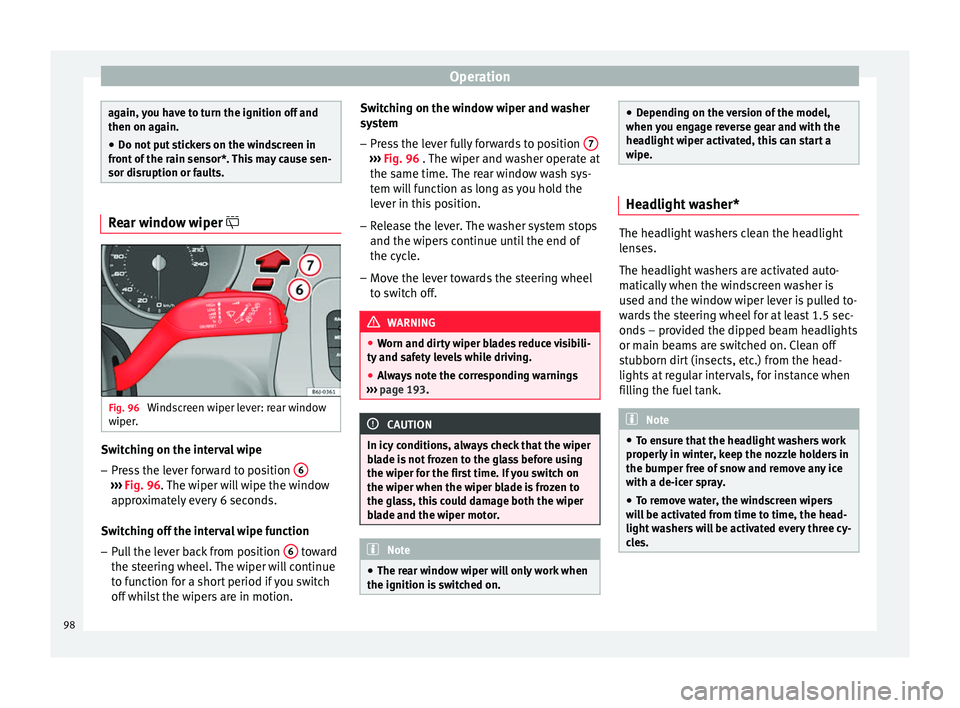
wiper. Switching on the interval wipe
– Press the lever forward to position 6›››
Fig. 96 . The wiper will wipe the window
ap pr
oximately every 6 seconds.
Switching off the interval wipe function
– Pull the lever back from position 6 toward
the steering wheel. The wiper will continue
to function for a short period if you switch
off whilst the wipers are in motion. Switching on the window wiper and washer
system
– Press the lever fully forwards to position 7 ›››
Fig. 96 . The wiper and washer operate at
the s ame time.
The rear window wash sys-
tem will function as long as you hold the
lever in this position.
– Release the lever. The washer system stops
and the wipers continue until the end of
the cycle.
– Move the lever towards the steering wheel
to switch off. WARNING
● Worn and dirty wiper blades reduce visibili-
ty and safety levels while driving.
● Always note the corresponding warnings
››› page 193. CAUTION
In icy conditions, always check that the wiper
blade is not frozen to the glass before using
the wiper for the first time. If you switch on
the wiper when the wiper blade is frozen to
the glass, this could damage both the wiper
blade and the wiper motor. Note
● The rear window wiper will only work when
the ignition is switched on. ●
Depending on the version of the model,
when you engage reverse gear and with the
headlight wiper activated, this can start a
wipe. Headlight washer*
The headlight washers clean the headlight
lenses.
The headlight washers are activated auto-
matically when the windscreen washer is
used and the window wiper lever is pulled to-
wards the steering wheel for at least 1.5 sec-
onds – provided the dipped beam headlights
or main beams are switched on. Clean off
stubborn dirt (insects, etc.) from the head-
lights at regular intervals, for instance when
filling the fuel tank.
Note
● To ensure that the headlight washers work
properly in winter, keep the nozzle holders in
the bumper free of snow and remove any ice
with a de-icer spray.
● To remove water, the windscreen wipers
will be activated from time to time, the head-
light washers will be activated every three cy-
cles. 98
Page 101 of 240
Lights and visibility
Rear view mirrors Interior rear vision mirror It is dangerous to drive if you cannot see
clearly through the rear window.
Manual anti-dazzle function for interior rear
vision mirror
In the basic mirror position, the lever at the
bottom edge of the rear vision mirror should
be at the front. Pull the lever to the back to
select the anti-dazzle function.
Automatic anti-dazzle interior rear
vision mirror* Read the additional information carefully
››› page 13
Anti-dazzle function
The anti-dazzle function is activated every
time the ignition is switched on. The green
warning lamp lights up in the rear vision mir-
ror housing.
When the anti-dazzle function is enabled, the
interior rear vision mirror will darken auto-
matically according to the amount of light it
r ec
eives. The anti-dazzle function is cancel-
led if reverse gear is engaged. Note
● The automatic anti-dazzle function will only
work properly if the sun blind* for the rear
window is retracted and there are no other
objects preventing light from reaching the in-
terior rear vision mirror.
● If you have to stick any type of sticker on
the windscreen, do not do so in front of the
sensors. Doing so could prevent the anti-daz-
zle function from working well or even from
working at all. Folding in the exterior mirrors
The exterior mirrors of the vehicle may be fol-
ded in. For this, press the mirror housing to-
wards the vehicle.
Note
Before washing the vehicle with an automatic
car wash, fold in the exterior mirrors to avoid
damage. Electric exterior mirrors*
Fig. 97
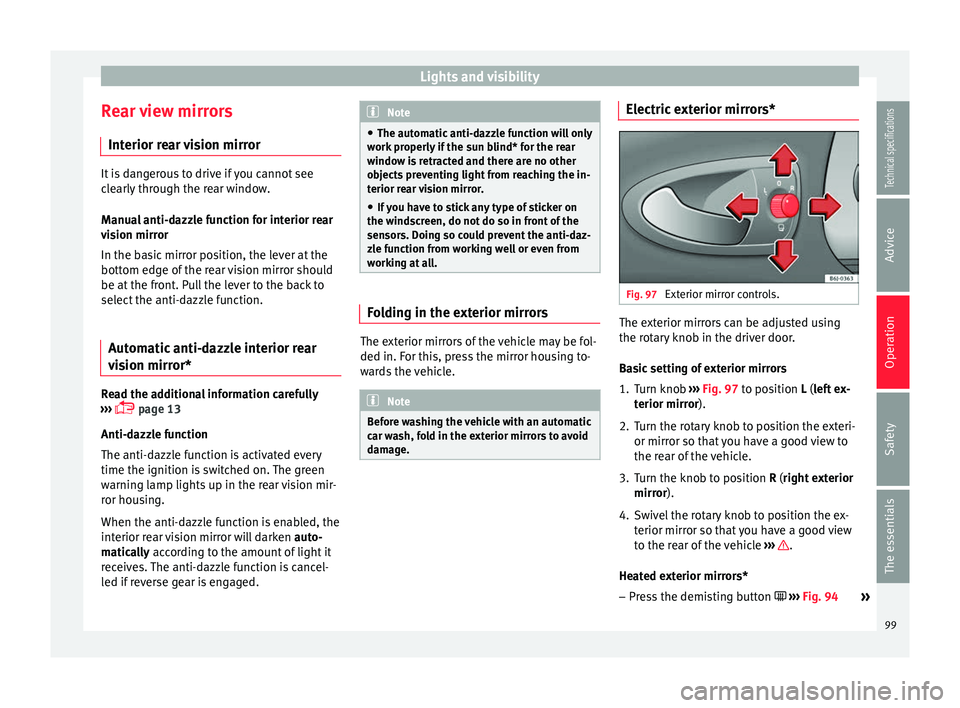
Exterior mirror controls. The exterior mirrors can be adjusted using
the rotary knob in the driver door.
Basic setting of exterior mirrors
1. Turn knob
››› Fig. 97 to position L (left ex-
t erior mirr
or).
2. T
urn the rotary knob to position the exteri-
or mirror so that you have a good view to
the rear of the vehicle.
3. Turn the knob to position R (right exterior mirror
).
4. Swivel the rotary knob to position the ex- terior mirror so that you have a good view
to the rear of the vehicle ››› .
Heated exterior mirrors* – Press the demisting button ››› Fig. 94
»
99
Technical specifications
Advice
Operation
Safety
The essentials
Page 115 of 240
Air conditioning
Note
Always read the assembly instructions that
come with the crossbars and the roof carrier
system carefully and keep them in the vehi-
cle. Air conditioning
General notes The pollution filter
The pollution filter (a combined particulate
filter and active carbon filter) serves as a bar-
rier against impurities in the outside air, in-
cluding dust and pollen.
For the climate control system to work with
maximum efficiency, the pollution filter must
be replaced at the specified intervals in the
Maintenance Programme.
If the filter loses efficiency prematurely due
to use in areas reaching very high pollution
levels, the pollen filter must be changed
more frequently than stated in the Service
Schedule.
CAUTION
● If you suspect that the air conditioner is
damaged, switch it off with the A/C button to
prevent further damage and have it checked
by a specialised workshop.
● Repairs to the air conditioner require spe-
cialist knowledge and special tools. There-
fore, we recommend you to take the vehicle
to a specialised workshop. Note
● If the humidity and temperature outside the
vehicle are high, condensation can drip off
the evaporator in the cooling system and
form a pool underneath the vehicle. This is
normal and does not indicate a leak.
● Keep the air intake slots in front of the
windscreen free of snow, ice and leaves to en-
sure heating and cooling are not impaired,
and to prevent the windows from misting
over.
● The air from the vents flows through the ve-
hicle interior and is extracted by slots in the
luggage compartment designed for this pur-
pose. Therefore, you should avoid obstruct-
ing these slots with any kind of object.
● The air conditioner operates most effective-
ly with the windows and the sliding/tilting
sunroof* closed. However, if the temperature
inside the vehicle is excessive because of the
sun, the air inside can be cooled faster by
opening the windows for a short time.
● Do not smoke while air recirculation mode
is on, as smoke drawn into the air condition-
ing system leaves residue on the evaporator,
producing a permanent unpleasant odour.
● At low outside temperatures, the compres-
sor switches off automatically and cannot be
switched on even with the AUTO button.
● It is advisable to turn on the air condition-
ing at least once a month, to lubricate the
system gaskets and prevent leaks. If a de-
crease in the cooling capacity is detected, a » 113Technical specifications
Advice
Operation
Safety
The essentials
Page 117 of 240
Air conditioning
Blower
The air flow can be set at four speeds with
switch B . The blower should always be set
at the lowest speed when driving slowly.
Air distribution
Control C for setting the flow of air in the re-
quired direction.
– Air distribution towards the windscreen
in or der t
o demist. For safety reasons, it is
not recommended to switch air recirculation
on.
– Air distribution to upper body.
– Air distribution to footwell
– Air distribution to the windscreen and
the footwell. Air recirculation mode
Air rec
irculation mode D on (a lamp lights
up in red) prevents strong odours from out-
side from entering the vehicle, for example
when passing through a tunnel or in a traffic
jam ››› .
When the outside temperature is low, air re-
circulation mode improves heating perform-
ance by heating air from the interior instead
of cold air from the outside. WARNING
● For your safety, the windows should never
be fogged up or covered with snow or ice.
This is essential to ensure good visibility.
Please familiarise yourself with the correct
operation of the heating and ventilation sys-
tem, including the demist/defrost functions
for the windows. ●
In air recirculation mode, no cold air from
the outside enters the vehicle interior. The
windows can quickly fog over if the heating is
switched off. Therefore, never leave the air re-
circulation mode switched on for a long time
(risk of accident). Note
● Please consider the general notes
››› page 113
. 115
Technical specifications
Advice
Operation
Safety
The essentials
Page 118 of 240
Operation
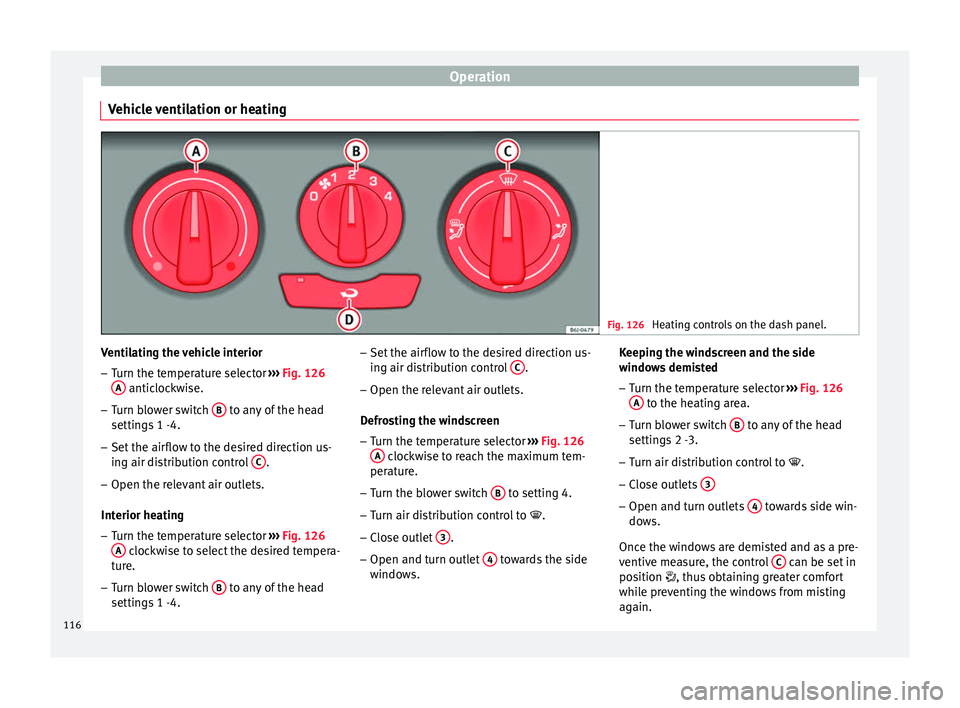
Vehicle ventilation or heating Fig. 126
Heating controls on the dash panel. Ventilating the vehicle interior
– Turn the temperature selector ››› Fig. 126
A anticlockwise.
– Turn blower switch B to any of the head
settings 1 -4.
– Set the airflow to the desired direction us-
ing air distribution control C .
– Open the relevant air outlets.
Interior heating
– Turn the temperature selector ››› Fig. 126
A clockwise to select the desired tempera-
ture.
– Turn blower switch B to any of the head
settings 1 -4. –
Set the airflow to the desired direction us-
ing air distribution control C .
– Open the relevant air outlets.
Defrosting the windscreen
– Turn the temperature selector ››› Fig. 126
A clockwise to reach the maximum tem-
perature.
– Turn the blower switch B to setting 4.
– Turn air distribution control to .
– Close outlet 3 .
– Open and turn outlet 4 towards the side
windows. Keeping the windscreen and the side
windows demisted
–
Turn the temperature selector ››› Fig. 126
A to the heating area.
– Turn blower switch B to any of the head
settings 2 -3.
– Turn air distribution control to .
– Clo
se outlets 3 –
Open and turn outlets 4 towards side win-
dows.
Once the windows are demisted and as a pre-
ventive measure, the control C can be set in
position , thus obtaining greater comfort
while preventing the windows from misting
again.
116
Page 120 of 240
Operation
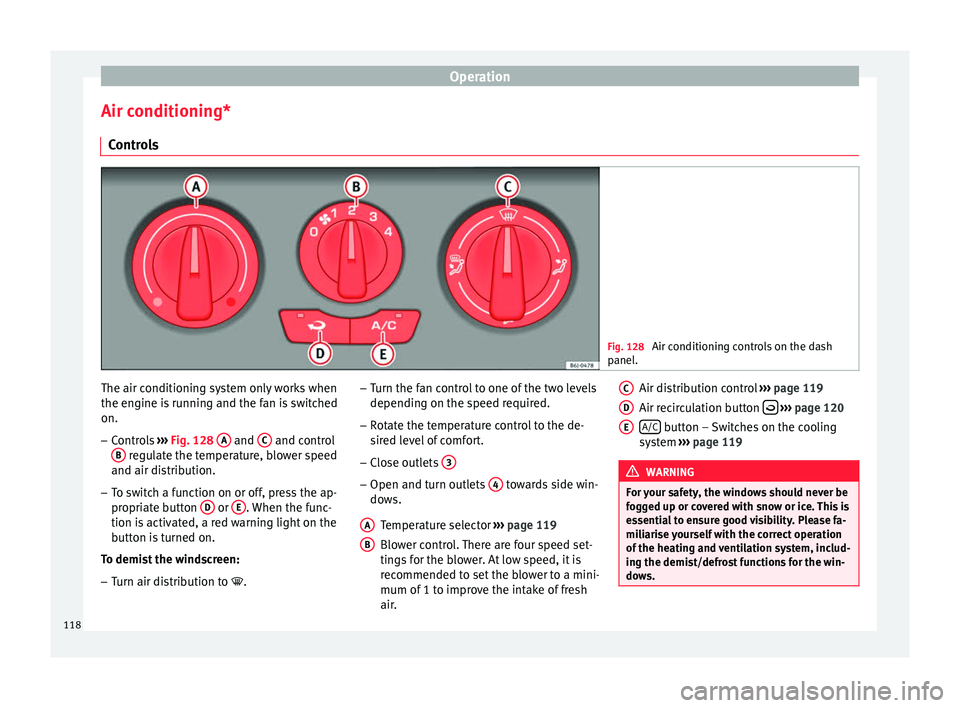
Air conditioning* Controls Fig. 128
Air conditioning controls on the dash
panel. The air conditioning system only works when
the engine is running and the fan is switched
on.
–
Controls ››› Fig. 128 A and
C and control
B regulate the temperature, blower speed
and air distribution.
– To switch a function on or off, press the ap-
propriate button D or
E . When the func-
tion is activated, a red warning light on the
button is turned on.
To demist the windscreen: – Turn air distribution to .–
Turn the fan control to one of the two levels
depending on the speed required.
– Rotate the temperature control to the de-
sired level of comfort.
– Close outlets 3 –
Open and turn outlets 4 towards side win-
dows.
Temperature selector ››› page 119
Blower control. There are four speed set-
tings for the blower. At low speed, it is
recommended to set the blower to a mini-
mum of 1 to improve the intake of fresh
air.
A B Air distribution control
››› page 119
Air recirculation button
››› page 120
A/C button – Switches on the cooling
system ››› page 119 WARNING
For your safety, the windows should never be
fogged up or covered with snow or ice. This is
essential to ensure good visibility. Please fa-
miliarise yourself with the correct operation
of the heating and ventilation system, includ-
ing the demist/defrost functions for the win-
dows. C
D
E
118