ECO mode Seat Ibiza ST 2016 MEDIA SYSTEM PLUS - NAVI SYSTEM - NAVI SYSTEM PLUS
[x] Cancel search | Manufacturer: SEAT, Model Year: 2016, Model line: Ibiza ST, Model: Seat Ibiza ST 2016Pages: 100, PDF Size: 2.53 MB
Page 55 of 100
NavigationFunction button: function
Demo mode start (only when demo mode is active)
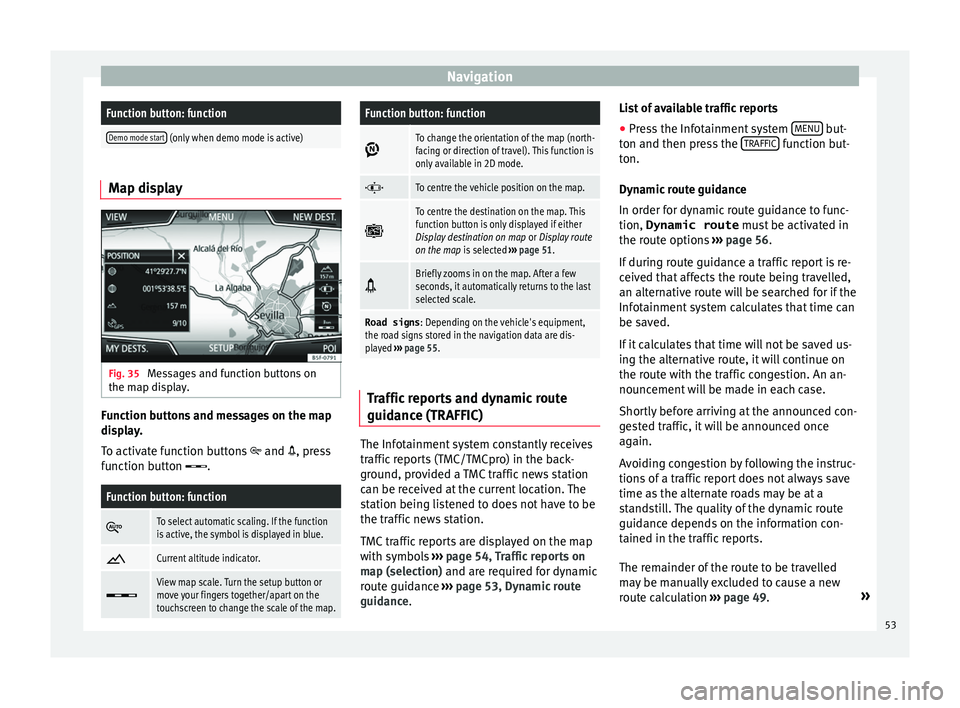
Map display
Fig. 35
Messages and function buttons on
the m ap di
splay. Function buttons and messages on the map
di
s
play.
To activate function buttons
and , press
function button .
Function button: function
To select automatic scaling. If the function
is active, the symbol is displayed in blue.
Current altitude indicator.
View map scale. Turn the setup button or
move your fingers together/apart on the
touchscreen to change the scale of the map.
Function button: function
To change the orientation of the map (north-
facing or direction of travel). This function is
only available in 2D mode.
To centre the vehicle position on the map.
To centre the destination on the map. This
function button is only displayed if either
Display destination on map
or Display route
on the map is selected ››› page 51.
Briefly zooms in on the map. After a few
seconds, it automatically returns to the last
selected scale.
Road signs
: Depending on the vehicle's equipment,
the road signs stored in the navigation data are dis-
played ››› page 55. Traffic reports and dynamic route
guid
anc
e (TRAFFIC) The Infotainment system constantly receives
tr
affic
reports (TMC/TMCpro) in the back-
ground, provided a TMC traffic news station
can be received at the current location. The
station being listened to does not have to be
the traffic news station.
TMC traffic reports are displayed on the map
with symbols ›››
page 54, Traffic reports on
map (selection) and are required for dynamic
route guidance ››› page 53, Dynamic route
guidance. List of available traffic reports
● Press the Infotainment system MENU but-
t on and then pr
ess the TRAFFIC function but-
t on.
D
ynamic route guidance
In order for dynamic route guidance to func-
tion, Dynamic route must be activated in
the route options ››› page 56.
If during route guidance a traffic report is re-
ceived that affects the route being travelled,
an alternative route will be searched for if the
Infotainment system calculates that time can
be saved.
If it calculates that time will not be saved us-
ing the alternative route, it will continue on
the route with the traffic congestion. An an-
nouncement will be made in each case.
Shortly before arriving at the announced con-
gested traffic, it will be announced once
again.
Avoiding congestion by following the instruc-
tions of a traffic report does not always save
time as the alternate roads may be at a
standstill. The quality of the dynamic route
guidance depends on the information con-
tained in the traffic reports.
The remainder of the route to be travelled
may be manually excluded to cause a new
route calculation ››› page 49. »
53
Page 57 of 100
Navigation
Importing Personal POI Importing the Personal POI to a points of in-
t
er
est destination memory
● Insert the data storage device with the stor-
ed Per
sonal POI or connect it to the Infotain-
ment system ››› page 26.
● Press the Infotainment NAV button and
then sel ect
Settings .
● In the Settings menu, pre
ss the
Manage memory function button.
● Press U
pd
ate my POIs and then press
U
pd ateand
Ne
xt to import the Personal POIs.
● Confirm the import notification with the OKfunction button.
The s
t
ored Personal POI are now in the points
of interest destination memory ›››
page 51
and can be used for navigation purposes.
The stored Personal POI can be deleted in the
Navigation Settings menu
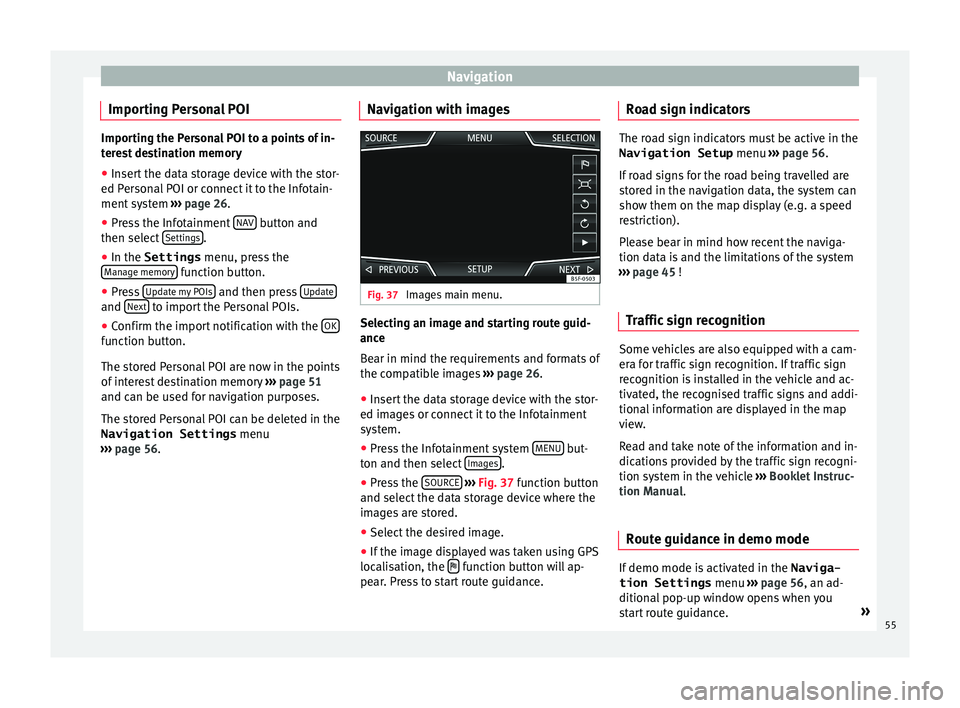
››› page 56. Navigation with images Fig. 37
Images main menu. Selecting an image and starting route guid-
anc
e
B
ear in mind the requirements and formats of
the compatible images ››› page 26.
● Insert the data storage device with the stor-
ed imag
es or connect it to the Infotainment
system.
● Press the Infotainment system MENU but-
t on and then sel
ect Images .
● Press the SOURC
E
› ›
›
Fig. 37 function button
and select the data storage device where the
images are stored.
● Select the desired image.
● If the image displayed was taken using GPS
locali
sation, the function button will ap-
pe ar
. Press to start route guidance. Road sign indicators The road sign indicators must be active in the
Navigation Setup menu ››
› page 56.
If road signs for the road being travelled are
stored in the navigation data, the system can
show them on the map display (e.g. a speed
restriction).
Please bear in mind how recent the naviga-
tion data is and the limitations of the system
››› page 45 !
Traffic sign recognition Some vehicles are also equipped with a cam-
er
a f
or traffic sign recognition. If traffic sign
recognition is installed in the vehicle and ac-
tivated, the recognised traffic signs and addi-
tional information are displayed in the map
view.
Read and take note of the information and in-
dications provided by the traffic sign recogni-
tion system in the vehicle ›››
Booklet Instruc-
tion Manual.
Route guidance in demo mode If demo mode is activated in the
Naviga-
tion Settings menu ››
› page 56, an ad-
ditional pop-up window opens when you
start route guidance. »
55
Page 58 of 100
Navigation
● Pr e
ssing the Demo mode function button
s t
arts a “virtual route guidance” to the desti-
nation you have entered.
● If you press the Normal function button, a
“r e
al route guidance” starts.
The sequence of events and the operations in
virtual route guidance are similar to those in
real route guidance.
Virtual route guidance is repeated when you
reach the fictitious destination and always
starts again from the starting point if not
aborted beforehand.
If the starting point for demo mode has been
defined manually in the Navigation Set-
tings menu, virtual route guidance will start
from the position set.
A manually entered starting point is overwrit-
ten with the current vehicle location if the ve-
hicle moves off. Note
Disable demo mode after use, otherwise you
w i
ll be prompted to choose between virtual
and normal route guidance each time you
start route guidance. Navigation settings
Settin g
s ●
Press the S
ETUP function button in the
m ain
Navigation menu.
Function button: function
Route options: To make adjustments to route calculation.
Suggest 3 alternative routes: After starting route guid-
ance, 3 alternative routes are suggested ››› page 48.
Route: Select the route type.
Economical: The route is calculated by taking into
consideration economic factors.
Fast: The fastest route to the destination.
Short: shortest route to the destination, even if it
results in a longer travelling time.
Most frequent routes: Information on the user's most
frequent routes.
Dynamic route: Dynamic route guidance is activated
when a TMC is received ››› page 53.
Avoid motorways and highways: Motorways will be ex-
cluded from the calculation whenever possible.
Avoid ferries and motorail trains: Ferries and motorail
trains will not be considered in the calculation of the
route whenever possible.
Avoid toll roads: Toll roads will be excluded from the
calculation whenever possible.
Avoid tunnels: Tunnels will be excluded from the cal-
culation whenever possible.
Function button: function
Avoid routes requiring toll stickers (vignette): Routes re-
quiring toll stickers will be excluded from the calcula-
tion whenever possible.
Show available toll stickersa) : To mark the available toll
stickers on the list ( Avoid routes requiring toll stickersmust be active).
Roads requiring toll stickers that have been marked
as having said toll sticker will be taken into account
in the calculation of the route.
Include trailer: Calculate the route and arrival time
for the vehicle with a trailer.
Map: To make adjustments to the visual display of the
map.
Show road signs: The road signs stored in the naviga-
tion data for the road being travelled will be dis-
played during route guidance ››› page 55.
Lane guidance: During route guidance, when driving
and turning on multi-lane roads, an additional dis-
play is shown with lane guidance. This will only ap-
pear if there is information in the database for the
area being driven in.
Show favourites: The stored destinations are shown
on the map as favourites ().
Show POI
Select categories for POI: To select which point of in-
terest categories are displayed on the map
››› page 51.
Show POI flags.: View of category logos of the se-
lected points of interest (e.g. view of petrol station
logos). 56
Page 59 of 100

NavigationFunction button: function
Manage memory: To modify saved destinations.
Sort contacts: To select the sequential order of the en-
tries in the phonebook that have (postal) addresses,
see also ››› page 49.
Define home address: To assign or edit a home address,
see also ››› page 51.
Delete my points of interest (POI): To delete the points of
interest stored in the destination memory ››› page 55.
Update my POIs: To update the stored points of interest
››› page 55.
Import destinations (SD/USB): To import electronic busi-
ness cards (vCards) into the destination memory
››› page 54.
Delete user data: To delete the stored destinations
(e.g., the Last destinations or the Destina-
tion memory ).
Navigation announcements: To make adjustments to naviga-
tion announcements.
Volume: To adjust the volume for driving recommen-
dations.
Entertainment fading (nav. announcements): Adjusting the
volume of the active audio source during navigation
instructions.
Navigation announcementsb) : To adjust driving recom-
mendations during route guidance.
Comprehensive: Detailed driving recommendations
and other directions.
Brief: Some recommendations and directions are
muted.
Function button: function
Congestion only: Recommendations are only given
in the event of congestion along the route (e.g.
traffic jam).
No voice guidance during call: No audible driving in-
structions will be given during a telephone conversa-
tion.
Warning: My points of interest: Audible announcement
when nearing a point of interest.
Fuel options: To make adjustments relating to fuel.
Select preferred fuel station: The selected petrol station
mark will be shown before other points of interest in
the search.
Fuel warning: The warning to refuel is active.
If the fuel level reaches the reserve level, the corre-
sponding warning is generated which permits the
search for petrol stations.
Version information: Information on the stored navigation
data.
Speed limits: Shows the speed limits, depending on the
road, for the current country.
Advanced setup: To make advanced adjustments to the
navigation.
Time display: displayed during route guidance.
Estimated time of arrival: The estimated time of arrival
at the final destination is displayed.
Duration: The estimated travelling time to the final
destination is displayed.
Status line: displayed during route guidance.
Function button: function
Destination: The distance calculated to final desti-
nation is displayed.
Next stopover: The calculated distance until next
stopover is displayed.
Note: National border crossed: Displays the speed lim-
its of the country in question when crossing the bor-
der.
Demo mode: When Demo mode is activated and
route guidance is started, virtual guidance to the en-
tered destination can be initiated ››› page 55.
Define demo mode starting point: if demo mode is acti-
vated, a fictitious starting point for virtual route
guidance can be defined when the vehicle is sta-
tionary.
Waypoint modeb) : To start Offroad navigation.
a) This function depends on the country.
b) Only available for the model: “Navi System Plus”.
Navigation in Offroad mode*
Introduction 3 On
ly
available for the model: Navi System Plus
Offroad* navigation is a function for offroad
driving that provides directions in “non-digi-
tised areas” at low speeds.
Non-digitised areas are areas about which
the system does not have information for the »
57
Page 60 of 100
Navigation
streets or terrain. It does not detect streets,
b ui
ldings or natural limits such as mountains
or rivers, although they may be shown on the
map.
Offroad* navigation is not suitable for driving
on conventional roads as it does not detect
one-way streets, motorway entries or similar.
Offroad Navigation Menu 3 On
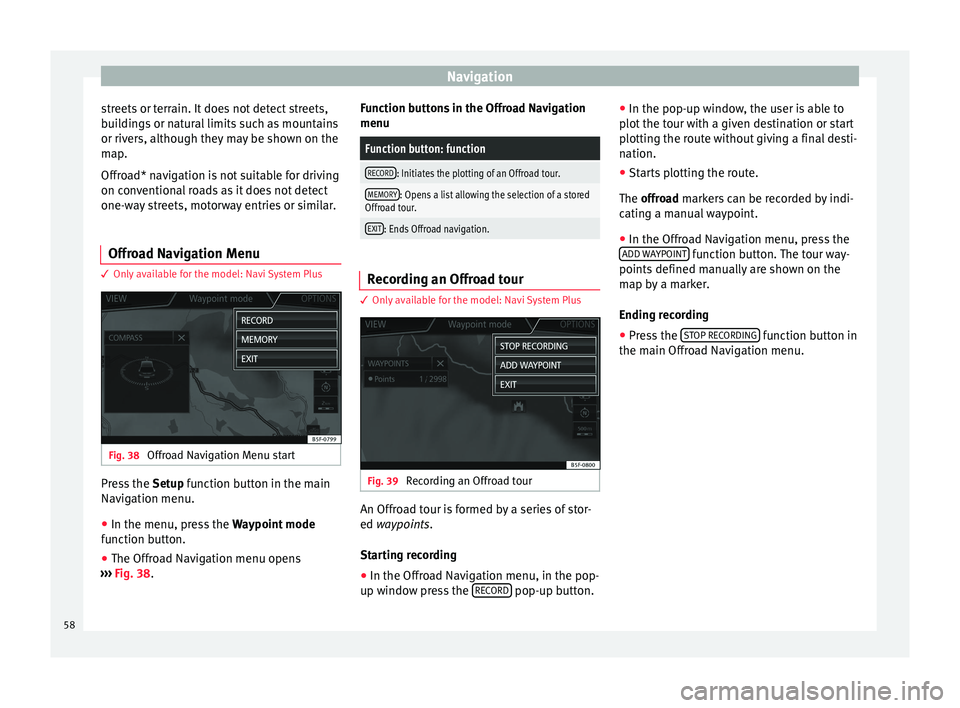
ly available for the model: Navi System Plus Fig. 38
Offroad Navigation Menu start Press the
Setup
function button in the main
Navigation menu.
● In the menu, press the Wa
ypoint mode
function button.
● The Offroad Navigation menu opens
››
› Fig. 38. Function buttons in the Offroad Navigation
menu
Function button: function
RECORD: Initiates the plotting of an Offroad tour.
MEMORY: Opens a list allowing the selection of a stored
Offroad tour.
EXIT: Ends Offroad navigation. Recording an Offroad tour
3 On
ly
available for the model: Navi System Plus Fig. 39
Recording an Offroad tour An Offroad tour is formed by a series of stor-
ed wa
ypoin
ts.
Starting recording
● In the Offroad Navigation menu, in the pop-
up w indo
w press the RECORD pop-up button.●
In the pop-up w indo
w, the user is able to
plot the tour with a given destination or start
plotting the route without giving a final desti-
nation.
● Starts plotting the route.
The offro
ad markers can be recorded by indi-
cating a manual waypoint.
● In the Offroad Navigation menu, press the
ADD W
AYPOINT function button. The tour way-
points defined m
anually are shown on the
map by a marker.
Ending recording
● Press the ST
OP RECORDING function button in
the m ain O
ffroad Navigation menu.
58
Page 61 of 100

Navigation
Managing stored Offroad tours 3 On
ly available for the model: Navi System Plus Fig. 40
Offroad Navigation menu, stored
t our
s ●
Press the MEMORY function button in the
O ffr
oad Navigation menu.
● A list of stored Offroad tours opens, if there
are an
y.
When a tour is selected, the following icons
will appear ››› Fig. 40:
Export the tour to an SD card.
Edit the name of the tour.
Delete the tour.
Load tour
Function button: function
IMPORT: allows the import of an Offroad route in “.GPX”
format.
Loading an Offroad tour
When the O
ffr
oad tour is selected, press Play
and the selected tour will be loaded onto
the Navigation system.
Creating an Offroad tour 3 On
ly available for the model: Navi System Plus Fig. 41
Offroad route guidance mode Start route guidance
● Loads the stored Offroad tour.
● Starting off in a stored route is not detected
b y
the system automatically.
Setup
Function button: function
Invert: Reverses the direction of the stored Offroad tour.
Next point: Starts the Offroad tour from the nearest point.
Function button: function
Start: Starts the complete Offroad tour. When route guidance starts, the system
sw
it
ches to the map view.
Stopping route guidance ● Press the Options button on the screen and
then pr e
ss Stop .
End w a
ypoint navigation
● Press the EXIT function button in the Off-
r o
ad Navigation menu. WARNING
Terrain features are disregarded during route
guid anc
e Drive slowly and following the in-
structions in order to perform the manoeuvre
as far as possible!
● The general direction of travel is indicated
str
aight ahead by direction arrows in the In-
fotainment System pop-up window ››› Fig. 41
A .
Note
If an Offroad tour is being recorded, this is
aut om
atically stored if Offroad navigation is
discontinued. 59
Page 64 of 100

CAR menu
the ignition is switched on to when it is
sw it
ched off.
2. Since refuelling
Display and storage of the values for the jour-
ney and the consumption. By refuelling, the
memory will be erased automatically.
3. Long-term
The memory records the values for a specific
number of partial trips, up to a total of 19
hours and 59 minutes or 99 hours and 59 mi-
nutes, or 1999.9 km (or miles) for 9999 km
(or miles), depending on the model of instru-
ment panel.
When one of these values is reached (de-
pending on the version of the instrument
panel), the memory is automatically deleted
and it starts counting from 0 again. Ecotrainer* Fig. 47
CAR Menu Ecotrainer. Fig. 48
Driving style symbols. Open ECOTRAINER menu
● With the vehicle stopped, press the CAR button on the Infotainment system.
● Press the VIEW function button and then
sel ect
ECOTRAINER . If the corresponding equipment is available,
the EC
OTRAINER will provide information on
driving style. The information on driving style
is only evaluated and displayed when mov-
ing forward.
∅ ECO points: Driving style display
This indicates the driving style since starting
the vehicle on a scale of 0 to 100. The higher
the score displayed, the more efficient the
driving style. To see more information, press
the display. It shows statistics for the last 30
minutes of driving since starting the vehicle.
If the car has not yet been driven for 30 mi-
nutes, it shows values from the last trip in
grey.
∅ l/100 km: Average fuel consumption
Shows the average fuel consumption. The
value is calculated by using the kilometres
covered since starting the vehicle. To see
more information, press the display. It shows
statistics for the last 30 minutes of driving
since starting the vehicle. If the car has not
yet been driven for 30 minutes, it shows val-
ues from the last trip in grey.
ECO tips: Tips on how to save fuel
By pressing the ECO tips function button, you
c an
view tips on how to save fuel. These tips
can only be viewed when the vehicle is stop-
ped.
62
Page 70 of 100
Telephone management system (PHONE)
been accepted in the mobile phone. The du-
r ation of
the loading process depends on the
amount of data stored on the mobile tele-
phone. After loading, the data will be availa-
ble on the Infotainment system.
Pairing and connection of mobile telephones
You can pair up to 20 mobile telephones to
the Infotainment system, but there can only
be two mobile phones simultaneously con-
nected as hands-free, and a third device as
BT audio at any time.
When the Infotainment system is switched
on, it automatically connects to the last con-
nected mobile telephone. If it is not possible
to connect to this mobile telephone, the tele-
phone management system will try to auto-
matically connect to the next mobile tele-
phone on the list of paired devices.
The maximum range of the Bluetooth ®
is ap-
proximate. 10 metres. The active Bluetooth ®
connection disconnects if this distance is ex-
ceeded. The connection is automatically re-
established as soon as the device is once
again within Bluetooth ®
range.
If the maximum number of paired devices is
reached and you wish to pair another one to
the system, it will automatically replace the
one least used recently. If you wish to replace
it with another one, the user must erase it be-
forehand. To do so: ●
Pre ss the Setup button on the device while
in telephone mode.
● Press the function button Bluetooth set
up .
● Activate the P
air
ed devices function button.
● In the list of paired devices, press the function button next to the mobile telephone
t
o be del
eted and then press Delete to con-
firm the process. Note
● It m
ay be necessary to confirm the phone-
book data transfer request on the mobile tel-
ephone.
● Check that there are no requests pending
acc
eptance in your mobile phone. If there are,
this could block some of the functions in the
PHONE menu. Description of the telephone
m
an
agement system
Introduction Some functions and setup can only be per-
f
ormed when the
vehicle is stopped and are
not available on all mobile telephones.
With the help of the telephone manager, up
to 3 mobile telephones can be connected to
the Infotainment system via the Bluetooth
profiles (for example, one used as a Blue- tooth-audio player and/or another two as
hand
s-free telephones). Note
● Us
ing a mobile telephone inside the vehicle
may provoke noise in the speakers.
● Some networks may not recognise all lan-
guage c
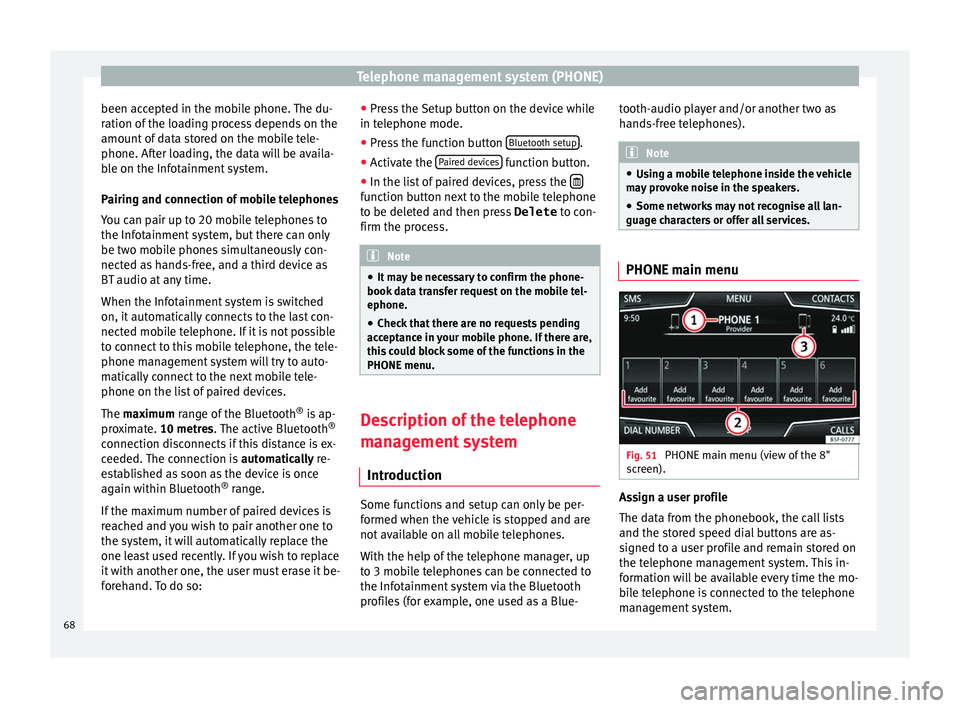
haracters or offer all services. PHONE main menu
Fig. 51
PHONE main menu (view of the 8"
s c
reen). Assign a user profile
The d
at
a from the phonebook, the call lists
and the stored speed dial buttons are as-
signed to a user profile and remain stored on
the telephone management system. This in-
formation will be available every time the mo-
bile telephone is connected to the telephone
management system.
68
Page 72 of 100
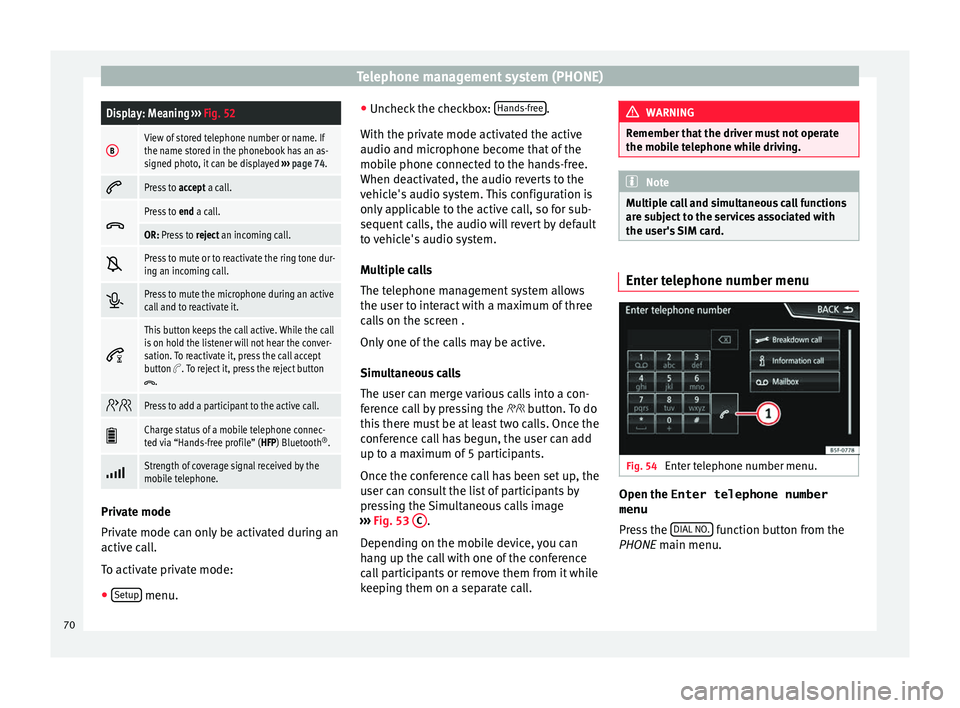
Telephone management system (PHONE)Display: Meaning
››› Fig. 52
BView of stored telephone number or name. If
the name stored in the phonebook has an as-
signed photo, it can be displayed ››› page 74.
Press to
accept a call.
Press to
end a call.
OR: Press to reject an incoming call.
Press to mute or to reactivate the ring tone dur-
ing an incoming call.
Press to mute the microphone during an active
call and to reactivate it.
This button keeps the call active. While the call
is on hold the listener will not hear the conver-
sation. To reactivate it, press the call accept
button
. To reject it, press the reject button.
Press to add a participant to the active call.
Charge status of a mobile telephone connec-
ted via “Hands-free profile” (HFP) Bluetooth
®
.
Strength of coverage signal received by the
mobile telephone.
Private mode
Priv
at
e mode can only be activated during an
active call.
To activate private mode:
● Setup menu. ●
Unc hec
k the checkbox: Hands-free .
W ith the priv
ate mode activated the active
audio and microphone become that of the
mobile phone connected to the hands-free.
When deactivated, the audio reverts to the
vehicle's audio system. This configuration is
only applicable to the active call, so for sub-
sequent calls, the audio will revert by default
to vehicle's audio system.
Multiple calls
The telephone management system allows
the user to interact with a maximum of three
calls on the screen .
Only one of the calls may be active.
Simultaneous calls
The user can merge various calls into a con-
ference call by pressing the button. To do
this there must be at least two calls. Once the
conference call has begun, the user can add
up to a maximum of 5 participants.
Once the conference call has been set up, the
user can consult the list of participants by
pressing the Simultaneous calls image
››› Fig. 53 C .
D ependin
g on the mobile device, you can
hang up the call with one of the conference
call participants or remove them from it while
keeping them on a separate call. WARNING
Remember that the driver must not operate
the mo b
ile telephone while driving. Note
Multiple call and simultaneous call functions
ar e s
ubject to the services associated with
the user's SIM card. Enter telephone number menu
Fig. 54
Enter telephone number menu. Open the
Enter telephone number
menu
Pr e
ss the DIAL NO. function button from the
PHONE m ain menu.
70
Page 88 of 100

Setup
Setup
M enu and sy
stem settings
Main menu System settings
› ›
›
table on page 2
The selection of possible settings will de-
pend on the country, the unit in question and
the vehicle equipment.
● Press the Infotainment system MENU but-
t on and then pr
ess the SETUP function but-
t on.
● T
o adjust the settings for a certain function,
pre
ss the appropriate function button in the
main menu. Changes are automatically stor-
ed when a menu is closed.
Function button: function
Screen: To perform screen setup.
Select display mode: Grid or Carousel.
Switch off screen (in 10 seconds): If this function is ac-
tive and the Infotainment system is not in use, the
screen will switch off after approximately 10 sec-
onds. Pressing the screen or pressing one of the Info-
tainment system buttons will switch the screen back
on.
Brightness: To select the brightness level of the
screen.
Function button: function
Day/Night: To select the display type ( Day, Night or
Automatic ).
Touchscreen tone: Confirmation tone for pressing a
function button is activated.
Proximity sensors: The proximity sensors are activa-
ted. Also see ››› page 13, Proximity sensors .
Show clock in standby mode: In standby mode, the cur-
rent time is shown on the Infotainment system dis-
play.
Date and time: To alter the time and date.
Clock time source: To select the time source (GPS or
manual).
GPS: The date and time can be selected using the
Time zone function button. In this case, the Dateand Time function buttons for manually entering
the data will not be active.
Manually: The date and time can be manually ad-
justed using the Date and Time function buttons.
Time: To manually alter the time.
Automatic summer time (DST)*: The time is set auto-
matically.
Time zone: To change to the desired time zone.
Time format: To select the time display format (12- or
24-hour clock).
Date: To adjust the current time.
Date format: To select the display format for the date
(DD.MM.YYYY , YY-MM-DD or MM-DD-YY ).
Function button: function
Idioma/Language: To select the desired language for the
texts and announcements in the voice control system.
Additional keypad languages: To select the additional key-
pad languages.
Units: To set the measurement units for the vehicle dis-
plays.
Distance , vehicle speed , temperature, volume,
consumption and pressure .
Mobile device data transfer
Data transfer for SEAT apps: Allows the exchange of infor-
mation between the vehicle and SEAT applications.
These are not personal data.
Use apps to operate: Changes the level of interaction
with the applications.
Deactivate: Limits specific functions that require a
higher level of security. Confirm
: Allows 100% functionality of the App but
with certain actions relating to the Infotainment
system requiring confirmation. Allow
: Allows the execution of all the available
functions from the App.
Voice control: To perform the voice control setup
››› page 14.
Remove safely: To eject the data storage device (SD card
1/SD card 2/USB) from the system. After correctly eject-
ing the data storage device from the system, the func-
tion button becomes inactive (grey colour).
Factory settings: When resetting factory settings, all en-
tries and changes made are deleted, depending on the
selected setup. 86