steering Seat Ibiza ST 2016 Owner's Guide
[x] Cancel search | Manufacturer: SEAT, Model Year: 2016, Model line: Ibiza ST, Model: Seat Ibiza ST 2016Pages: 252, PDF Size: 5.56 MB
Page 105 of 252
Communications and multimedia
Communications and multi-
medi a
St eerin g wheel
controls*
General information The steering wheel includes a multifunction
module fr
om wher
e it is possible to control
the audio, telephone and radio/navigation
functions without needing to distract the
driver.
There are two versions of the multifunction
module:
● Audio system + telephone without voice
contro l
version (MID) : for controlling the au-
dio functions available (radio, audio CD,
MP3, iPod ®1)
, USB 1)
, SD 1)
) and Bluetooth sys-
tem from the steering wheel.
● Audio system + telephone with voice con-
trol
version (HIGH) : for controlling the audio
functions available (radio, audio CD, MP3,
iPod ®1)
, USB 1)
, SD 1)
) and Bluetooth system
from the steering wheel. 1)
Depending on the vehicle equipment.
103
Technical data
Advice
Operation
Emergencies
Safety
Page 106 of 252
Operation
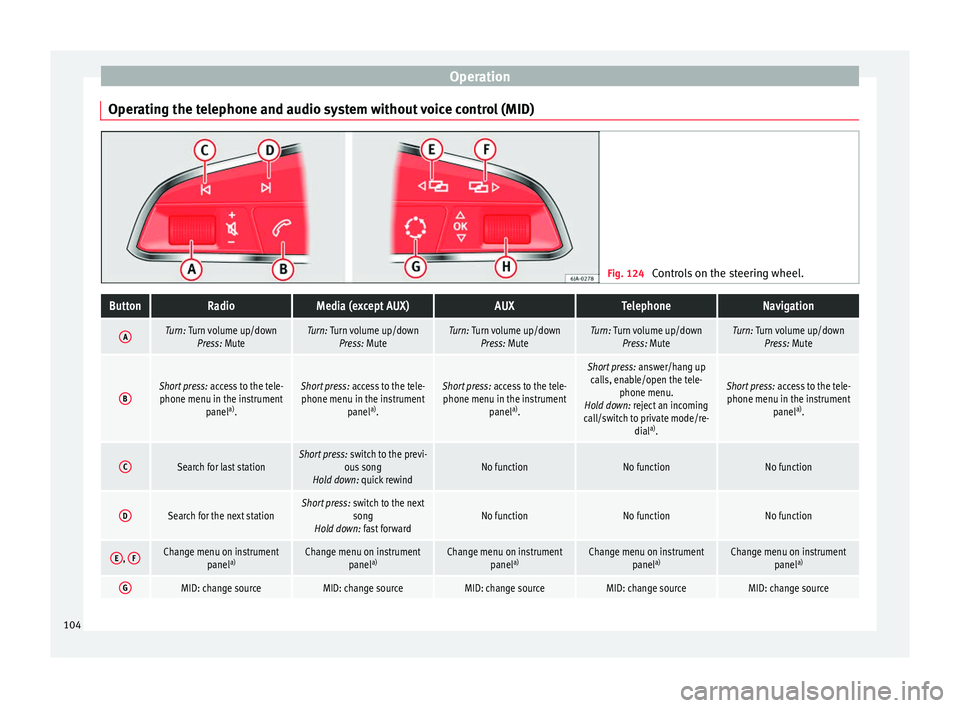
Operating the telephone and audio system without voice control (MID) Fig. 124
Controls on the steering wheel.ButtonRadioMedia (except AUX)AUXTelephoneNavigation
ATurn: Turn volume up/down
Press: MuteTurn: Turn volume up/downPress: MuteTurn: Turn volume up/downPress: MuteTurn: Turn volume up/downPress: MuteTurn: Turn volume up/downPress: Mute
BShort press: access to the tele-
phone menu in the instrument panela)
.Short press: access to the tele-
phone menu in the instrument panela)
.Short press: access to the tele-
phone menu in the instrument panela)
.
Short press: answer/hang up
calls, enable/open the tele- phone menu.
Hold down: reject an incoming
call/switch to private mode/re- diala)
.
Short press: access to the tele-
phone menu in the instrument panela)
.
CSearch for last stationShort press: switch to the previ-
ous song
Hold down: quick rewindNo functionNo functionNo function
DSearch for the next stationShort press: switch to the next
song
Hold down: fast forwardNo functionNo functionNo function
E, FChange menu on instrument
panela)Change menu on instrument
panela)Change menu on instrument
panela)Change menu on instrument
panela)Change menu on instrument
panela)
GMID: change sourceMID: change sourceMID: change sourceMID: change sourceMID: change source104
Page 107 of 252
Communications and multimediaButtonRadioMedia (except AUX)AUXTelephoneNavigation
HTurn: Next/previous preset
b)
Press: Acts on the MFDTurn: Next/previous song b)
Press: Acts on the MFDTurn: No function
Press: Acts on the MFDTurn: Acts on the MFD Press: ConfirmTurn: Changes menu or memory on instrument panel
Press: Operates on instrument panel
a)According to the vehicle's equipment package.
b) Only if the dash panel is in audio menu.
Operating the telephone and audio system with voice control (HIGH) Fig. 125
Controls on the steering wheel.
ButtonRadioMedia (except AUX)AUXTelephone a)Navigation a)
ATurn: Turn volume up/down
Press: MuteTurn: Turn volume up/downPress: MuteTurn: Turn volume up/downPress: MuteTurn: Turn volume up/downPress: MuteTurn: Turn volume up/downPress: Mute
B
Short press: access to the tele-
phone menu on the dash pan- ela)
.
Hold down: redial a)Short press:
access to the tele-
phone menu on the dash pan- ela)
.
Hold down: redial a)Short press:
access to the tele-
phone menu on the dash pan- ela)
.
Hold down: redial a)Short press:
answer/hang up
calls, enable/open the tele- phone menu.
Hold down: reject an incoming call/switch to private/redial modeShort press: access to the tele-
phone menu on the dash pan- ela)
.
Hold down: redial a)
» 105
Technical data
Advice
Operation
Emergencies
Safety
Page 124 of 252
Operation
●
If the ignition key i
s removed while the
lights are on, the lights flash briefly and the
driver door opens, no audible warning is
heard, since with the Coming Home function
on, the lights are automatically switched off
after a period of time (except when the light
switch is in position or . Adaptive headlights* (for driving
round bend
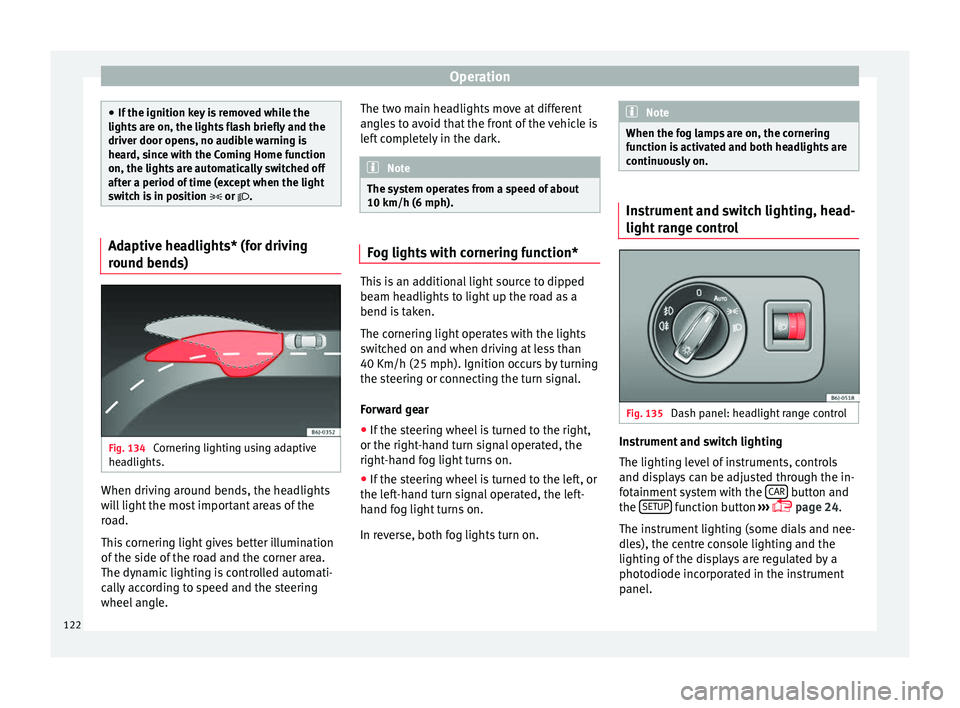
s)Fig. 134
Cornering lighting using adaptive
he a
dlights. When driving around bends, the headlights
w
i
ll
light the most important areas of the
road.
This cornering light gives better illumination
of the side of the road and the corner area.
The dynamic lighting is controlled automati-
cally according to speed and the steering
wheel angle. The two main headlights move at different
angles
to avoid that the front of the vehicle is
left completely in the dark. Note
The system operates from a speed of about
10 km/h (6 mph). Fog lights with cornering function*
This is an additional light source to dipped
beam hea
dlights
to light up the road as a
bend is taken.
The cornering light operates with the lights
switched on and when driving at less than
40 Km/h (25 mph). Ignition occurs by turning
the steering or connecting the turn signal.
Forward gear
● If the steering wheel is turned to the right,
or the right-hand t urn s
ignal operated, the
right-hand fog light turns on.
● If the steering wheel is turned to the left, or
the left-h
and turn signal operated, the left-
hand fog light turns on.
In reverse, both fog lights turn on. Note
When the fog lamps are on, the cornering
function i s
activated and both headlights are
continuously on. Instrument and switch lighting, head-
light ran
g
e control Fig. 135
Dash panel: headlight range control Instrument and switch lighting
The lightin
g l
evel
of instruments, controls
and displays can be adjusted through the in-
fotainment system with the CAR button and
the S
ETUP function button
››
›
p
age 24.
The instrument lighting (some dials and nee-
dles), the centre console lighting and the
lighting of the displays are regulated by a
photodiode incorporated in the instrument
panel.
122
Page 128 of 252
Operation
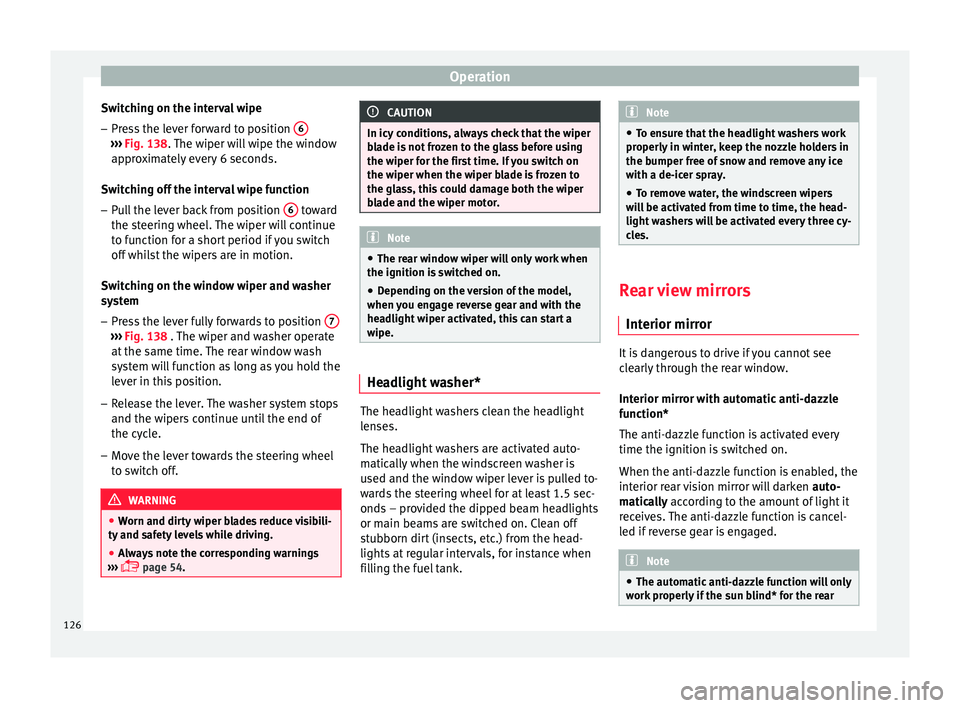
Switching on the interval wipe – Press the lever forward to position 6›››
Fig. 138. The w
iper w i
ll wipe the window
approximately every 6 seconds.
Switching off the interval wipe function
– Pull the lever back from position 6 toward
the s t
eerin g wheel
. The wiper will continue
to function for a short period if you switch
off whilst the wipers are in motion.
Switching on the window wiper and washer
system – Press the lever fully forwards to position 7›››
Fig. 138 . The wiper and w a
sher operate
at the same time. The rear window wash
system will function as long as you hold the
lever in this position.
– Release the lever. The washer system stops
and the wipers c
ontinue until the end of
the cycle.
– Move the lever towards the steering wheel
to switc
h off. WARNING
● Worn and dirty w
iper blades reduce visibili-
ty and safety levels while driving.
● Always note the corresponding warnings
››› p
age 54. CAUTION
In icy conditions, always check that the wiper
bla de i
s not frozen to the glass before using
the wiper for the first time. If you switch on
the wiper when the wiper blade is frozen to
the glass, this could damage both the wiper
blade and the wiper motor. Note
● The rear w indo
w wiper will only work when
the ignition is switched on.
● Depending on the version of the model,
when you eng
age reverse gear and with the
headlight wiper activated, this can start a
wipe. Headlight washer*
The headlight washers clean the headlight
l
en
ses.
The he
adlight washers are activated auto-
matically when the windscreen washer is
used and the window wiper lever is pulled to-
wards the steering wheel for at least 1.5 sec-
onds – provided the dipped beam headlights
or main beams are switched on. Clean off
stubborn dirt (insects, etc.) from the head-
lights at regular intervals, for instance when
filling the fuel tank. Note
● To ens ur
e that the headlight washers work
properly in winter, keep the nozzle holders in
the bumper free of snow and remove any ice
with a de-icer spray.
● To remove water, the windscreen wipers
will
be activated from time to time, the head-
light washers will be activated every three cy-
cles. Rear view mirrors
Int erior mirr
or It is dangerous to drive if you cannot see
c
l
e arly
through the rear window.
Interior mirror with automatic anti-dazzle
function*
The anti-dazzle function is activated every
time the ignition is switched on.
When the anti-dazzle function is enabled, the
interior rear vision mirror will darken auto-
matically according to the amount of light it
receives. The anti-dazzle function is cancel-
led if reverse gear is engaged. Note
● The automatic anti-d
azzle function will only
work properly if the sun blind* for the rear 126
Page 150 of 252
Operation
It is possible, however, to set the blower
s peed t
o suit
requirements.
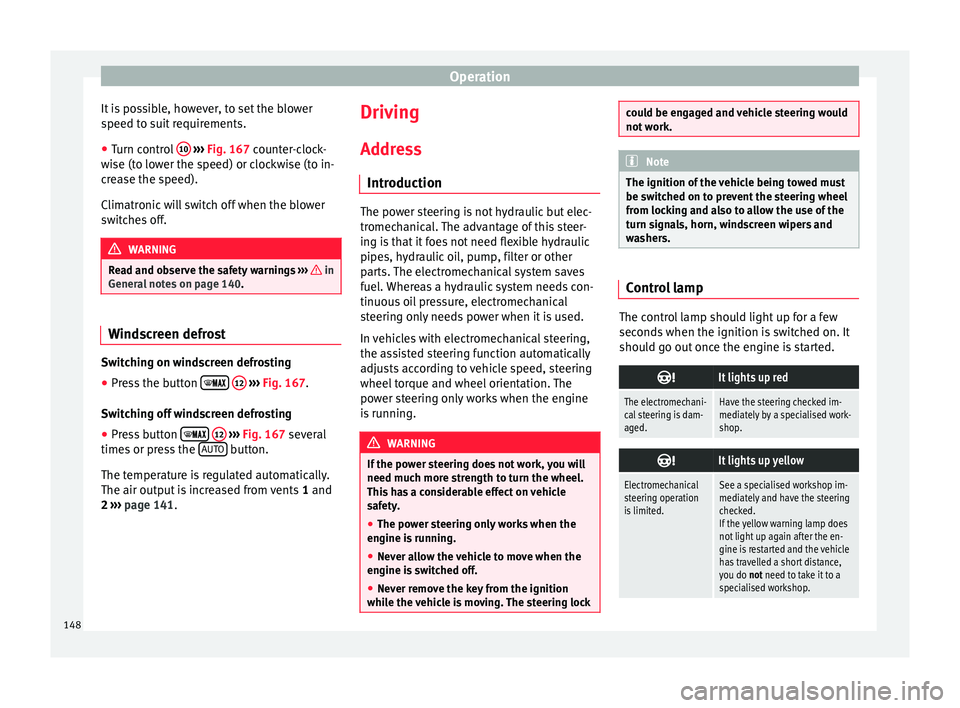
● Turn control 10
› ››
Fig. 167
cou
nter-clock-
wise (to lower the speed) or clockwise (to in-
crease the speed).
Climatronic will switch off when the blower
switches off. WARNING
Read and observe the safety warnings ››› in
General not
es on page 140. Windscreen defrost
Switching on windscreen defrosting
●
Press the button
12
› ›
›
Fig. 167
.
Switching off windscreen defrosting
● Press button
12
› ›
›
Fig. 167
several
times or press the AUTO button.
The t emper
atur
e is regulated automatically.
The air output is increased from vents 1 and
2 ›››
page 141. Driving
Ad dr
es
s
Introduction The power steering is not hydraulic but elec-
tromech
anic
al. The advantage of this steer-
ing is that it foes not need flexible hydraulic
pipes, hydraulic oil, pump, filter or other
parts. The electromechanical system saves
fuel. Whereas a hydraulic system needs con-
tinuous oil pressure, electromechanical
steering only needs power when it is used.
In vehicles with electromechanical steering,
the assisted steering function automatically
adjusts according to vehicle speed, steering
wheel torque and wheel orientation. The
power steering only works when the engine
is running. WARNING
If the power steering does not work, you will
need much more s tr
ength to turn the wheel.
This has a considerable effect on vehicle
safety.
● The power steering only works when the
engine is ru
nning.
● Never allow the vehicle to move when the
engine is sw
itched off.
● Never remove the key from the ignition
while the v
ehicle is moving. The steering lock could be engaged and vehicle steering would
not work.
Note
The ignition of the vehicle being towed must
be sw itched on t
o prevent the steering wheel
from locking and also to allow the use of the
turn signals, horn, windscreen wipers and
washers. Control lamp
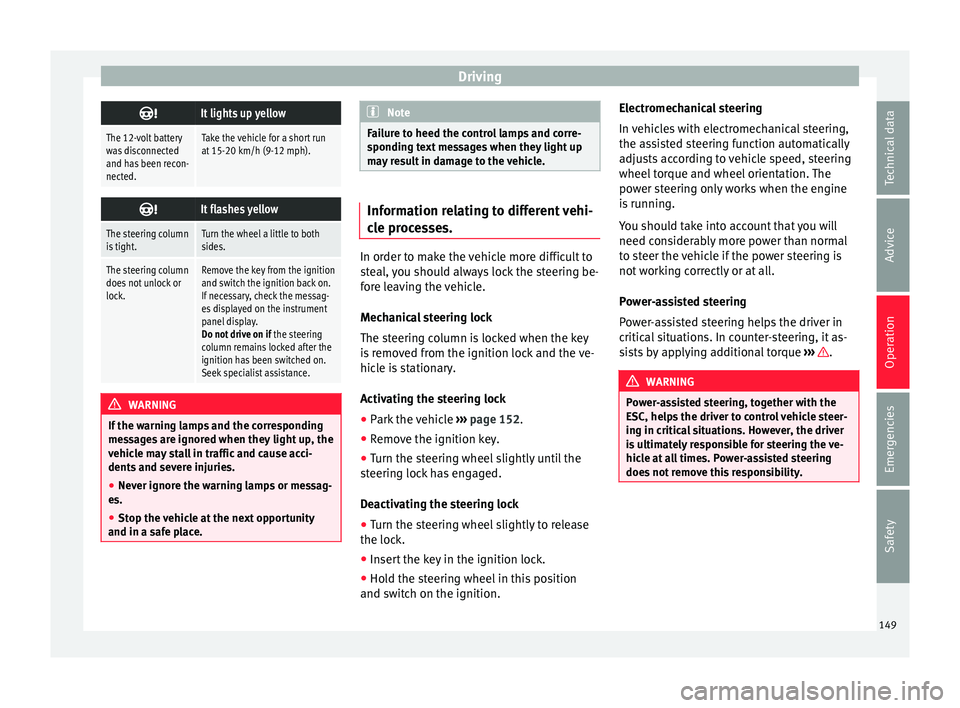
The control lamp should light up for a few
sec
ond
s when the ignition i
s switched on. It
should go out once the engine is started.
It lights up red
The electromechani-
cal steering is dam-
aged.Have the steering checked im-
mediately by a specialised work-
shop.
It lights up yellow
Electromechanical
steering operation
is limited.See a specialised workshop im-
mediately and have the steering
checked.
If the yellow warning lamp does
not light up again after the en-
gine is restarted and the vehicle
has travelled a short distance,
you do not need to take it to a
specialised workshop. 148
Page 151 of 252
Driving
It lights up yellow
The 12-volt battery
was disconnected
and has been recon-
nected.Take the vehicle for a short run
at 15-20 km/h (9-12 mph).
It flashes yellow
The steering column
is tight.Turn the wheel a little to both
sides.
The steering column
does not unlock or
lock.Remove the key from the ignition
and switch the ignition back on.
If necessary, check the messag-
es displayed on the instrument
panel display.
Do not drive on if
the steering
column remains locked after the
ignition has been switched on.
Seek specialist assistance. WARNING
If the warning lamps and the corresponding
mess ag
es are ignored when they light up, the
vehicle may stall in traffic and cause acci-
dents and severe injuries.
● Never ignore the warning lamps or messag-
es.
● Stop the v
ehicle at the next opportunity
and in a safe pl
ace. Note
Failure to heed the control lamps and corre-
sponding t e
xt messages when they light up
may result in damage to the vehicle. Information relating to different vehi-
cle pr
oc
esses. In order to make the vehicle more difficult to
ste
al,
you should always lock the steering be-
fore leaving the vehicle.
Mechanical steering lock
The steering column is locked when the key
is removed from the ignition lock and the ve-
hicle is stationary.
Activating the steering lock
● Park the vehicle ›››
p
age 152.
● Remove the ignition key.
● Turn the steering wheel slightly until the
steering loc
k has engaged.
Deactivating the steering lock
● Turn the steering wheel slightly to release
the lock.
● Insert
the key in the ignition lock.
● Hold the steering wheel in this position
and switch on the ignition. El
ectromechanical steering
In vehicl
es with electromechanical steering,
the assisted steering function automatically
adjusts according to vehicle speed, steering
wheel torque and wheel orientation. The
power steering only works when the engine
is running.
You should take into account that you will
need considerably more power than normal
to steer the vehicle if the power steering is
not working correctly or at all.
Power-assisted steering
Power-assisted steering helps the driver in
critical situations. In counter-steering, it as-
sists by applying additional torque ››› .
WARNING
Power-assisted steering, together with the
ESC, helps the driv
er to control vehicle steer-
ing in critical situations. However, the driver
is ultimately responsible for steering the ve-
hicle at all times. Power-assisted steering
does not remove this responsibility. 149
Technical data
Advice
Operation
Emergencies
Safety
Page 152 of 252
Operation
Starting and stopping the en-
gine Ignition k ey
po s
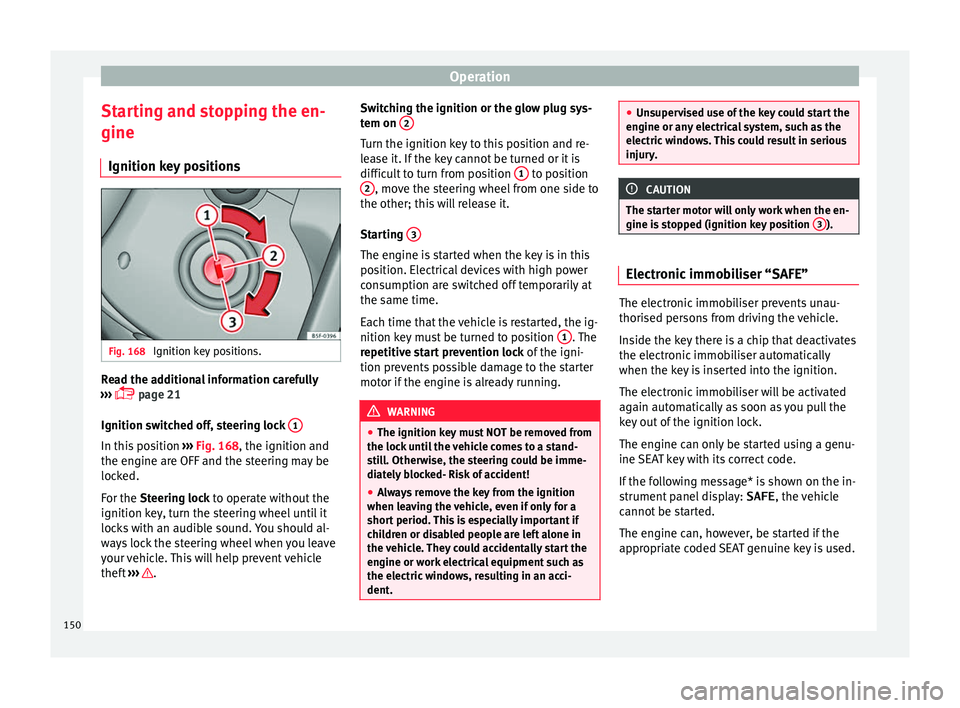
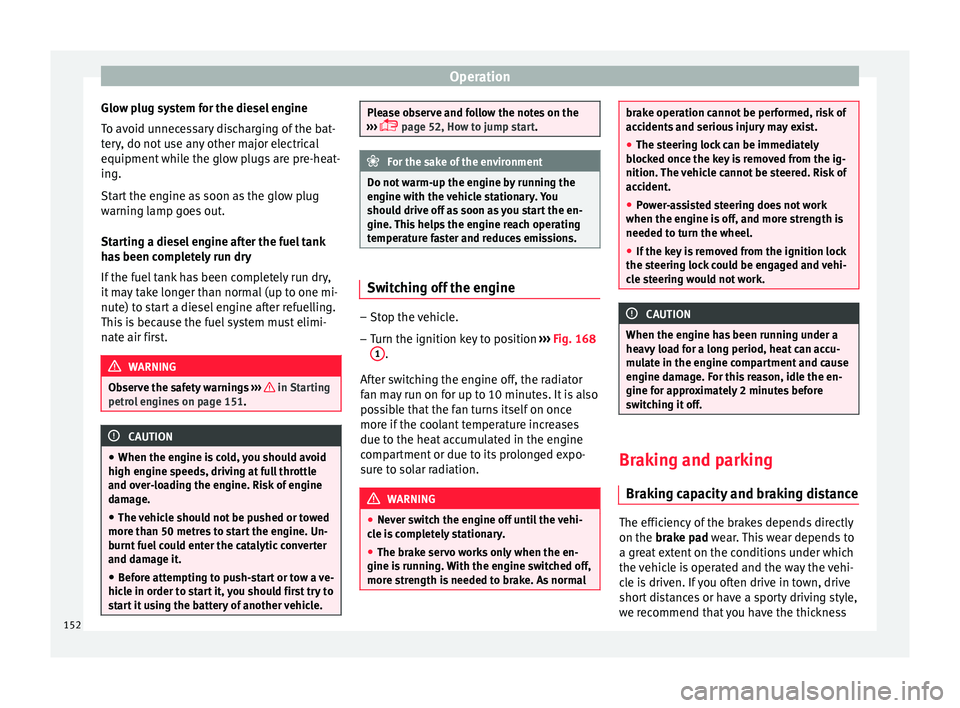
itionsFig. 168
Ignition key positions. Read the additional information carefully
› ›
›
p
age 21
Ignition switched off, steering lock 1In this position
››
›
Fig. 168
, the ignition and
the engine are OFF and the steering may be
locked.
For the Steering lock to operate without the
ignition key, turn the steering wheel until it
locks with an audible sound. You should al-
ways lock the steering wheel when you leave
your vehicle. This will help prevent vehicle
theft ››› . Switching the ignition or the glow plug sys-
t
em on 2 Turn the ignition key to this position and re-
l
e
a se it
. If the key cannot be turned or it is
difficult to turn from position 1 to position
2 , move the steering wheel from one side to
the other; thi s
w i
ll release it.
Starting 3 The engine is started when the key is in this
po
s
ition. El ectric
al devices with high power
consumption are switched off temporarily at
the same time.
Each time that the vehicle is restarted, the ig-
nition key must be turned to position 1 . The
r epetitiv
e st
art prevention lock of the igni-
tion prevents possible damage to the starter
motor if the engine is already running. WARNING
● The ignition key mu s
t NOT be removed from
the lock until the vehicle comes to a stand-
still. Otherwise, the steering could be imme-
diately blocked- Risk of accident!
● Always remove the key from the ignition
when leavin
g the vehicle, even if only for a
short period. This is especially important if
children or disabled people are left alone in
the vehicle. They could accidentally start the
engine or work electrical equipment such as
the electric windows, resulting in an acci-
dent. ●
Unsuper v
ised use of the key could start the
engine or any electrical system, such as the
electric windows. This could result in serious
injury. CAUTION
The starter motor will only work when the en-
gine i s st
opped (ignition key position 3 ).
Electronic immobiliser “SAFE”
The electronic immobiliser prevents unau-
thori
sed per
sons
from driving the vehicle.
Inside the key there is a chip that deactivates
the electronic immobiliser automatically
when the key is inserted into the ignition.
The electronic immobiliser will be activated
again automatically as soon as you pull the
key out of the ignition lock.
The engine can only be started using a genu-
ine SEAT key with its correct code.
If the following message* is shown on the in-
strument panel display: SAFE, the vehicle
cannot be started.
The engine can, however, be started if the
appropriate coded SEAT genuine key is used.
150
Page 154 of 252
Operation
Glow plug system for the diesel engine
T o av
oid u nnec
essary discharging of the bat-
tery, do not use any other major electrical
equipment while the glow plugs are pre-heat-
ing.
Start the engine as soon as the glow plug
warning lamp goes out.
Starting a diesel engine after the fuel tank
has been completely run dry
If the fuel tank has been completely run dry,
it may take longer than normal (up to one mi-
nute) to start a diesel engine after refuelling.
This is because the fuel system must elimi-
nate air first. WARNING
Observe the safety warnings ››› in Starting
petrol en
gines on page 151. CAUTION
● When the engine is c
old, you should avoid
high engine speeds, driving at full throttle
and over-loading the engine. Risk of engine
damage.
● The vehicle should not be pushed or towed
more than 50 metre
s to start the engine. Un-
burnt fuel could enter the catalytic converter
and damage it.
● Before attempting to push-start or tow a ve-
hicle in order t
o start it, you should first try to
start it using the battery of another vehicle. Please observe and follow the notes on the
›››
p
age 52, How to jump start. For the sake of the environment
Do not warm-up the engine by running the
en gine with the v
ehicle stationary. You
should drive off as soon as you start the en-
gine. This helps the engine reach operating
temperature faster and reduces emissions. Switching off the engine
–
Stop the vehicle.
– Turn the ignition key to position ››
›
Fig. 168
1 .
Af t
er sw it
ching the engine off, the radiator
fan may run on for up to 10 minutes. It is also
possible that the fan turns itself on once
more if the coolant temperature increases
due to the heat accumulated in the engine
compartment or due to its prolonged expo-
sure to solar radiation. WARNING
● Never swit c
h the engine off until the vehi-
cle is completely stationary.
● The brake servo works only when the en-
gine is runnin
g. With the engine switched off,
more strength is needed to brake. As normal brake operation cannot be performed, risk of
accident
s
and serious injury may exist.
● The steering lock can be immediately
blocked onc
e the key is removed from the ig-
nition. The vehicle cannot be steered. Risk of
accident.
● Power-assisted steering does not work
when the engine is off
, and more strength is
needed to turn the wheel.
● If the key is removed from the ignition lock
the steering loc
k could be engaged and vehi-
cle steering would not work. CAUTION
When the engine has been running under a
heavy lo a
d for a long period, heat can accu-
mulate in the engine compartment and cause
engine damage. For this reason, idle the en-
gine for approximately 2 minutes before
switching it off. Braking and parking
Br ak
ing c
apacity and braking distance The efficiency of the brakes depends directly
on the br
ak
e p a
d wear. This wear depends to
a great extent on the conditions under which
the vehicle is operated and the way the vehi-
cle is driven. If you often drive in town, drive
short distances or have a sporty driving style,
we recommend that you have the thickness
152
Page 156 of 252
Operation
Applying the handbrake
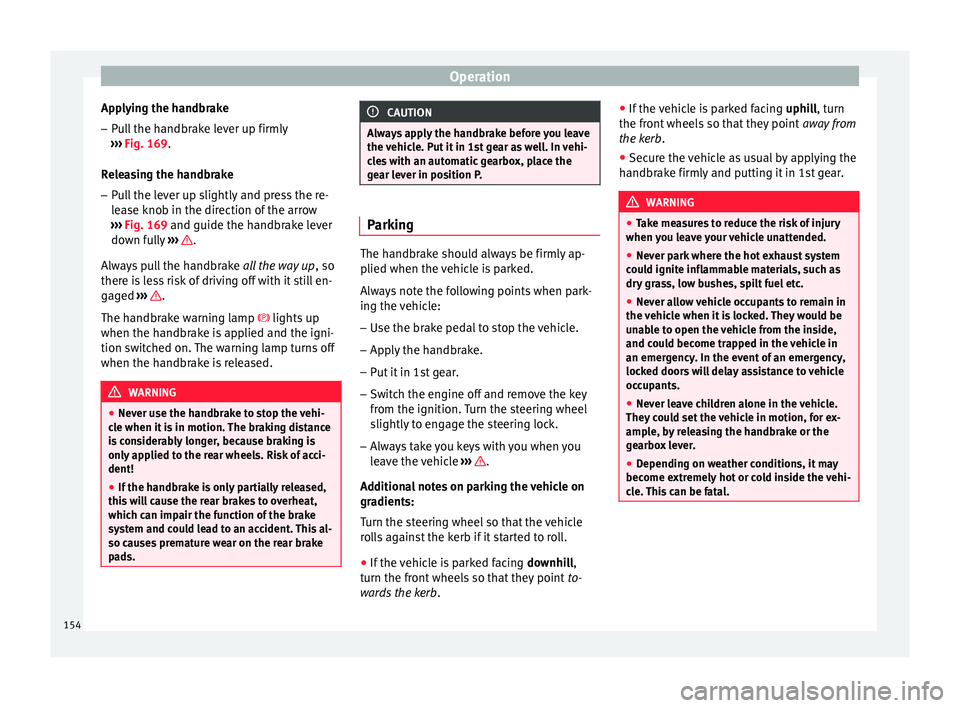
– Pull the handbrake lever up firmly
› ›
›
Fig. 169
.
Releasing the handbrake
– Pull the lever up slightly and press the re-
lease kno
b in the direction of the arrow
››› Fig. 169 and guide the handbrake lever
down fully ››› .
A lw
ay
s pull the handbrake all the way up, so
there is less risk of driving off with it still en-
gaged ››› .
The h andbr
ake w
arning lamp lights up
when the handbrake is applied and the igni-
tion switched on. The warning lamp turns off
when the handbrake is released. WARNING
● Never use the h andbr
ake to stop the vehi-
cle when it is in motion. The braking distance
is considerably longer, because braking is
only applied to the rear wheels. Risk of acci-
dent!
● If the handbrake is only partially released,
this wi
ll cause the rear brakes to overheat,
which can impair the function of the brake
system and could lead to an accident. This al-
so causes premature wear on the rear brake
pads. CAUTION
Always apply the handbrake before you leave
the vehic l
e. Put it in 1st gear as well. In vehi-
cles with an automatic gearbox, place the
gear lever in position P. Parking
The handbrake should always be firmly ap-
plied when the v
ehic
le is parked.
Always note the following points when park-
ing the vehicle: – Use the brake pedal to stop the vehicle.
– Apply the handbrake.
– Put it in 1st gear.
– Switch the engine off and remove the key
from the ignition. T urn the s
teering wheel
slightly to engage the steering lock.
– Always take you keys with you when you
leave the
vehicle ››› .
Ad dition
al
notes on parking the vehicle on
gradients:
Turn the steering wheel so that the vehicle
rolls against the kerb if it started to roll.
● If the vehicle is parked facing downhill
,
turn the front wheels so that they point to-
wards the kerb . ●
If the vehic
le is parked facing uphill, turn
the front wheels so that they point away from
the kerb.
● Secure the vehicle as usual by applying the
handbrake firm
ly and putting it in 1st gear. WARNING
● Take me a
sures to reduce the risk of injury
when you leave your vehicle unattended.
● Never park where the hot exhaust system
could ignit
e inflammable materials, such as
dry grass, low bushes, spilt fuel etc.
● Never allow vehicle occupants to remain in
the vehicl
e when it is locked. They would be
unable to open the vehicle from the inside,
and could become trapped in the vehicle in
an emergency. In the event of an emergency,
locked doors will delay assistance to vehicle
occupants.
● Never leave children alone in the vehicle.
They coul
d set the vehicle in motion, for ex-
ample, by releasing the handbrake or the
gearbox lever.
● Depending on weather conditions, it may
become extremely
hot or cold inside the vehi-
cle. This can be fatal. 154