steering wheel Seat Ibiza ST 2016 Owner's Guide
[x] Cancel search | Manufacturer: SEAT, Model Year: 2016, Model line: Ibiza ST, Model: Seat Ibiza ST 2016Pages: 252, PDF Size: 5.56 MB
Page 167 of 252
Driving
If “tiptronic” is selected whilst the vehicle is
in motion and the aut om
atic g
earbox / DSG
automatic gearbox is in third gear and selec-
tor lever position D, “tiptronic” mode will
then also be in third gear.
Changing gears in the normal or sport pro-
gramme using the steering wheel paddle lev-
ers
If the paddle levers ››› Fig. 172 are used in
the normal or sport programme, the system
switches temporarily to “tiptronic” mode. To
exit “Tiptronic” mode again, press the right
paddle lever + towards the steering wheel
f or ap
pro
ximately one second. You will also
leave “tiptronic” mode if the paddle levers
are not moved for a certain time. Note
● The gear p a
ddle levers on the steering
wheel can be operated with the selector lever
in any position and with the vehicle in mo-
tion. Driving tips
The gearbox changes gear ratios automatical-
ly
a
s the
vehicle moves.
Starting
– Start the engine with the selector lever in
position P
or N. Driving
– Press and hold the brake pedal.
– Holding down the lock button (button on
the selector lev
er), select R or D.
– Release the lever and wait a little for the
gearbox
to engage the gear (a slight move-
ment can be felt).
– Release the brake and press the accelerator
››› in Selector lever positions on
p ag
e 163 .
St
opping briefly
– If stopping for a short time, keep the vehi-
cle st
ationary by pressing the foot brake
hard to prevent the vehicle moving back-
wards on a slope or “creeping” forwards,
e.g. at traffic lights. The selector lever does
not need to be put into the positions P or N
for this.
– Do not press the accelerator.
Parking
– Pr
ess and hold the brake pedal until the ve-
hicle come
s to a standstill ››› in Selector
l ev
er po s
itions on page 163.
– Apply the handbrake.
– By pressing the lock button down, move
the selector lev
er to P and release the lock
button. Driving up and down hills
–
Press the selector lever from position “D”
to the right into the tiptr
onic selector gate.
– Lightly press the selector lever back to
chang
e down.
Holding the car on a hill
– The brake must be always pressed down to
prevent the
vehicle from “rolling back-
wards” ››› in Selector lever positions on
p ag
e 163 . Do not
try to prevent the vehicle
from “rolling backwards” by increasing the
engine speed while a range of gears is se-
lected.
Starting the vehicle up hills
– Apply the handbrake.
– With a selected gear, accelerate slowly and
at the same time, rel
ease the handbrake.
The steeper the slope, the lower the needed
gear. This increases the braking effect of the
engine. For example, when driving down a
very steep slope in third gear. If the engine
brake effect is not enough, the vehicle will
speed up. The automatic gearbox automati-
cally changes up to prevent the engine over-
revving. Use the foot brake to reduce speed
and change into 3rd gear using Tiptronic*
››› in Selector lever positions on page 163.
Y our
vehic
le has an automatic interlock
which prevents the selector lever from being »
165
Technical data
Advice
Operation
Emergencies
Safety
Page 175 of 252
Driver assistance systems
Start-Stop function conditions
● The driver seat belt must be buckled.
● The bonnet must be closed.
● The engine must be at operating tempera-
t ur
e.
● The s t
eering wheel must be straight.
● The vehicle must be on flat ground.
● The vehicle must not be in reverse.
● A trailer must not be connected.
● The temperature of the interior must be
within the comfor
t limits (A/C button should
be sel ect
ed).
● The w ind
screen de-mist function must be
off.
● If in an incr
ease in airflow is not request
ed.
● The temperature must not be set to HI or
LO .
● The driver door must be closed.
● The diesel particulate filter must not be in
regener
ation mode, for diesel engines.
● The battery charge must not be low for the
next st
art.
● Battery temperature must be between -1 °C
(+30 °F) and +55 °C (+131 °F).
Star
t-Stop function interruption
In the following situations, the Start-Stop
function will be interrupted and the engine
will automatically start: ●
The vehicl
e starts moving.
● The brake pedal is pressed several times in
a row.
● The b
attery has been discharged excessive-
ly.
● The Star
t-Stop System is manually deacti-
vated.
● The wind
screen de-mist function is turned
on.
● The temperature of the interior exceeds the
comfort
limits ( A/C button).
● If the airflow is increased by more than 3
pr e
sse
s.
● Temperature setting HI or LO is select
ed.
● The engine coolant temperature is insuffi-
cient.
● The altern
ator is faulty, for example the V-
belt has
ruptured.
● If any of the conditions described in the
previous
section are not fulfilled.
When the engine is turned off by the Start-
Stop function, this is displayed on the instru-
ment panel.
If the Start-Stop system is not switched on,
the warning lamp will appear on the instru-
ment panel. WARNING
Never allow the vehicle to move with the en-
gine off for an y
reason. You could lose control
of your vehicle. This could cause an accident
and serious injury.
● The brake servo does not work with the en-
gine off. You need mor
e force to stop the vehi-
cle.
● Power steering does not work when the en-
gine is not ru
nning. That is why it is much
more difficult to turn the steering wheel.
● Turn off the Start-Stop system when driving
through water (f
ording streams, etc.). Note
● For v ehic
les with the Start-Stop function
and a manual gearbox, when the engine is
started, the clutch must be pressed.
● When the conditions for the Start-Stop
function are not
fulfilled, the instrument pan-
el displays the Start-Stop indicator dimmed.
● If the steering wheel is turned more than
270°, it wil
l not be possible to start the vehi-
cle again. To start the vehicle, straighten the
steering wheel so that it is turned less than
270°.
● There are different versions of the dash
panel; the disp
lay of indications on the
screen may differ. 173
Technical data
Advice
Operation
Emergencies
Safety
Page 177 of 252
Driver assistance systems
making a calculation of tiredness. This is
c on
st
antly compared with the current driving
behaviour. If the system detects that the driv-
er is tired, an audible warning is given with a
sound and an optic warning is shown with a
symbol and complementary message on the
instrument panel display ››› Fig. 175. The
message on the instrument panel display is
shown for approximately 5 seconds, and de-
pending on the case, is repeated. The system
stores the last message displayed.
The message on the instrument panel display
can be switched off by pressing the button on the windscreen wiper lever or the
b
utt
on on the multi function steering
wheel
›
››
page 25.
The message can be recalled to the instru-
ment panel display using the multifunction
display ›››
page 25.
Conditions of operation
Driving behaviour is only calculated on
speeds above about 65 km/h (40 mph) up to
around 200 km/h (125 mph).
Switching on and off
Fatigue detection can be activated or deacti-
vated in the Easy Connect system with the
button and the function button
›››
page 101. A mark indicates that the ad-
ju s
tment has been activated. System limitations
The Fatigue detection h
a
s certain limitations
inherent to the system. The following condi-
tions can limit the Fatigue detection or pre-
vent it from functioning.
● At speeds below 65 km/h (40 mph)
● At speeds above 200 km/h (125 mph)
● When cornering
● On roads in poor condition
● In unfavourable weather conditions
● When a sporty driving style is employed
● In the event of a serious distraction to the
driver
Fatigue detection w
ill be restored when the
vehicle is stopped for more than 15 minutes,
when the ignition is switched off or when the
driver has unbuckled their seat belt and
opened the door.
In the event of slow driving during a long pe-
riod of time (below 65 km/h, 40 mph) the
system automatically re-establishes the tired-
ness calculation. When driving at a faster
speed the driving behaviour will be recalcula-
ted. Parking aid
General inf
ormation Various systems are available to help you
when parkin
g or m
anoeuvring in tight
spaces, depending on the equipment fitted
on your vehicle.
The rear parking aid is an audible assistant
that warns about obstacles located behind
the vehicle ››› page 176.
During parking, Parking System Plus assists
the driver by visually and audibly warning
them about obstacles detected in front and
behind the vehicle ››› page 177. WARNING
● Alwa y
s pay attention, also when looking
straight ahead, to traffic and the vehicle sur-
roundings. The assistance systems are not a
replacement for driver awareness. When in-
serting or removing the vehicle from a park-
ing space, or when performing similar ma-
noeuvres the driver always assumes the re-
sponsibility.
● Adapt your speed and driving style at all
times to s
uit visibility, weather, road and traf-
fic conditions.
● The ultrasound sensors have blind spots in
which obs
tacles and people are not regis-
tered. Pay special attention to children and
animals. » 175
Technical data
Advice
Operation
Emergencies
Safety
Page 181 of 252
Driver assistance systems
If the system has been activated automatical-
ly , an audib
le sou
nd warning will only be giv-
en when obstacles in front are at a distance
of less than 50 cm. CAUTION
The automatic connection of the Parking Aid
only w ork
s when you are driving slowly. If
driving style is not adapted to the circum-
stances, an accident and serious injury or
damage may be caused. Segments of the visual indication
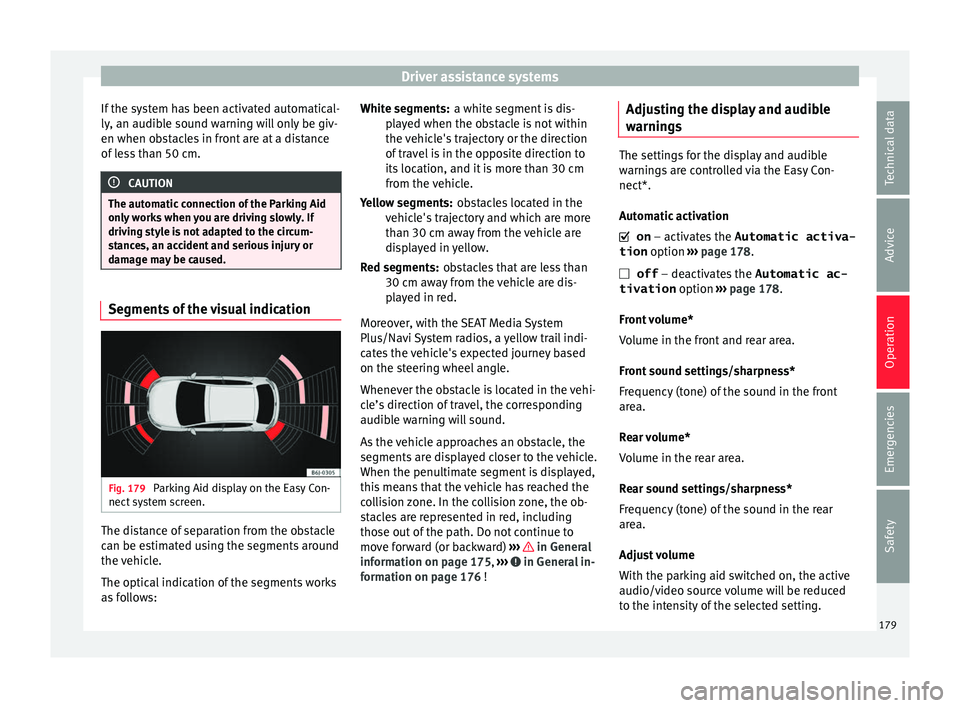
Fig. 179
Parking Aid display on the Easy Con-
nect sy
st
em screen. The distance of separation from the obstacle
c
an be e
stim
ated using the segments around
the vehicle.
The optical indication of the segments works
as follows: a white segment is dis-
play
ed when the obstacle is not within
the vehicle's trajectory or the direction
of travel is in the opposite direction to
its location, and it is more than 30 cm
from the vehicle.
obstacles located in the
vehicle's trajectory and which are more
than 30 cm away from the vehicle are
displayed in yellow.
obstacles that are less than
30 cm away from the vehicle are dis-
played in red.
Moreover, with the SEAT Media System
Plus/Navi System radios, a yellow trail indi-
cates the vehicle's expected journey based
on the steering wheel angle.
Whenever the obstacle is located in the vehi-
cle’s direction of travel, the corresponding
audible warning will sound.
As the vehicle approaches an obstacle, the
segments are displayed closer to the vehicle.
When the penultimate segment is displayed,
this means that the vehicle has reached the
collision zone. In the collision zone, the ob-
stacles are represented in red, including
those out of the path. Do not continue to
move forward (or backward) ››› in General
inf orm
ation on p ag
e 175, ››› in General in-
f orm
ation on p ag
e 176 !
White segments:
Yellow segments:
Red segments:
Adjusting the display and audible
warnings The settings for the display and audible
warning
s
are controlled via the Easy Con-
nect*.
Automatic activation
on – activates the Automatic activa-
tion option ››› page 178.
off – deactivates the Automatic ac-
tivation option ››› page 178.
Front volume*
Volume in the front and rear area.
Front sound settings/sharpness*
Frequency (tone) of the sound in the front
area.
Rear volume*
Volume in the rear area.
Rear sound settings/sharpness*
Frequency (tone) of the sound in the rear
area.
Adjust volume
With the parking aid switched on, the active
audio/video source volume will be reduced
to the intensity of the selected setting. 179
Technical data
Advice
Operation
Emergencies
Safety
Page 185 of 252
Driver assistance systems
Meaning of the orientation lines
› ›
›
Fig. 181
Side line
s: extension of the vehicle (the
approximate width of the vehicle plus the
rear view mirrors) on the road surface.
End of the side lines: the area marked in
green ends approximately 2 m behind
the vehicle on the road surface.
Intermediate line: indicates a distance of
approximately 1 m behind the vehicle on
the road surface.
Red horizontal line: indicates a safe dis-
tance of approximately 40 cm at the rear
of the vehicle on the road surface.
Parking manoeuvre
● Place the vehicle in front of the parking
space and en
gage reverse gear (manual
gearbox) or move the selector to the R posi-
tion (automatic gearbox).
● Reverse slowly, and turn the steering wheel
so that the side orient
ation lines lead to-
wards the parking space.
● Guide the vehicle into the parking space so
that the side orient
ation lines run parallel to
it. 1 2
3
4 Cruise speed* (cruise control -
GRA)
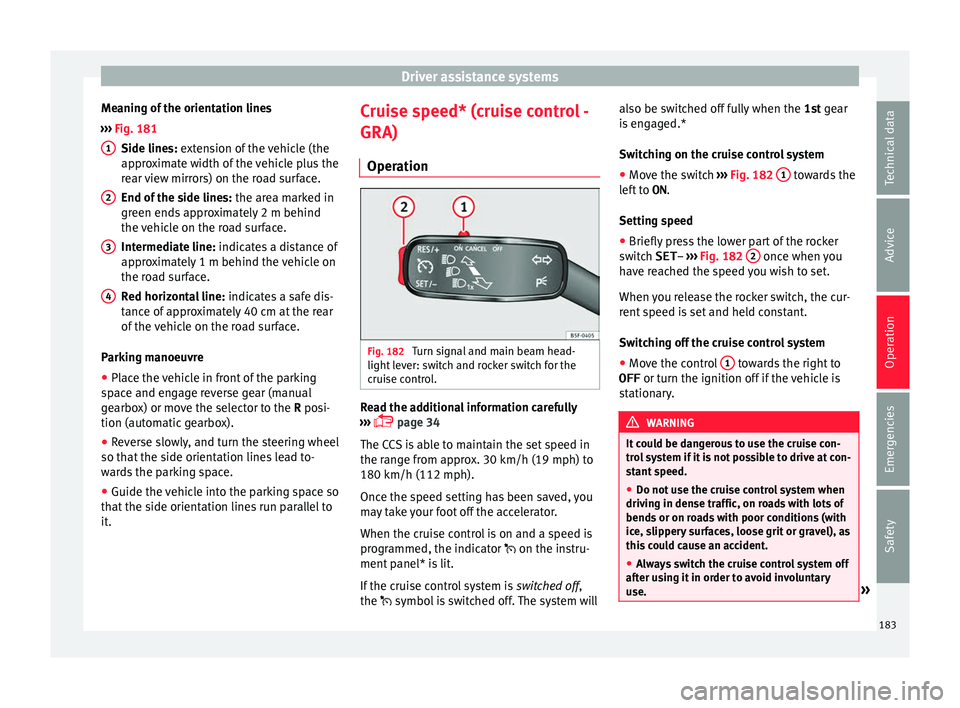
Oper ation Fig. 182
Turn signal and main beam head-
light l
ev er: sw
itch and rocker switch for the
cruise control. Read the additional information carefully
› ›
›
p
age 34
The CCS is able to maintain the set speed in
the range from approx. 30 km/h (19 mph) to
180 km/h (112 mph).
Once the speed setting has been saved, you
may take your foot off the accelerator.
When the cruise control is on and a speed is
programmed, the indicator on the instru-
ment panel* is lit.
If the cruise control system is switched off,
the symbol is switched off. The system will also be switched off fully when the
1st ge
ar
is engaged.*
Switching on the cruise control system
● Move the switch ››› Fig. 182
1 towards the
l ef
t t
o ON .
Setting speed
● Briefly press the lower part of the rocker
switch
SET– ››› Fig. 182 2 once when you
h av
e r e
ached the speed you wish to set.
When you release the rocker switch, the cur-
rent speed is set and held constant.
Switching off the cruise control system
● Move the control 1 towards the right to
OFF or turn the ignition off
if the
vehicle is
stationary. WARNING
It could be dangerous to use the cruise con-
trol sy
stem if it is not possible to drive at con-
stant speed.
● Do not use the cruise control system when
driving in dense tr
affic, on roads with lots of
bends or on roads with poor conditions (with
ice, slippery surfaces, loose grit or gravel), as
this could cause an accident.
● Always switch the cruise control system off
after us
ing it in order to avoid involuntary
use. » 183
Technical data
Advice
Operation
Emergencies
Safety
Page 216 of 252
Advice
Tyre pressure
The c orr
ect ty
re pressure is especially impor-
tant at high speeds. The pressure should
therefore be checked at least once a month
and before starting a journey.
Depending on the vehicle, tyre pressure can
be adjusted to medium load to improve driv-
ing comfort (“comfort” tyre pressure). When
driving with comfort tyre pressure fuel con-
sumption may increase slightly. WARNING
A tyre can easily burst if the pressure is too
low, c au
sing an accident!
● At continuously high speeds, a tyre with in-
sufficient pr
essure flexes more. In this way it
becomes too hot, and this can cause tread
separation and tyre blow-out. Always observe
the recommended tyre pressures.
● If the tyre pressure is too low or too high,
the tyres
will wear prematurely and the vehi-
cle will not handle well. Risk of accident! For the sake of the environment
Under-inflated tyres will increase fuel con-
sumption. Tyre useful life
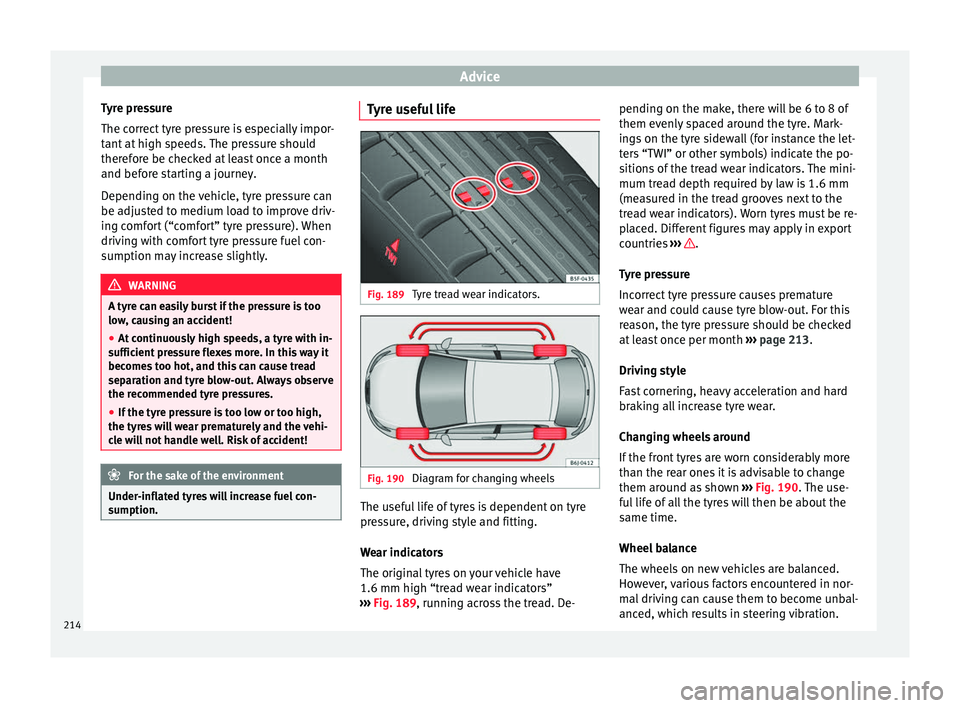
Fig. 189
Tyre tread wear indicators. Fig. 190
Diagram for changing wheels The useful life of tyres is dependent on tyre
pr
e
ss
ure, driving style and fitting.
Wear indicators
The original tyres on your vehicle have
1.6 mm high “tread wear indicators”
››› Fig. 189, running across the tread. De- pending on the make, there will be 6 to 8 of
them evenly s
paced around the tyre. Mark-
ings on the tyre sidewall (for instance the let-
ters “TWI” or other symbols) indicate the po-
sitions of the tread wear indicators. The mini-
mum tread depth required by law is 1.6 mm
(measured in the tread grooves next to the
tread wear indicators). Worn tyres must be re-
placed. Different figures may apply in export
countries ››› .
T y
re pr
essure
Incorrect tyre pressure causes premature
wear and could cause tyre blow-out. For this
reason, the tyre pressure should be checked
at least once per month ››› page 213.
Driving style
Fast cornering, heavy acceleration and hard
braking all increase tyre wear.
Changing wheels around
If the front tyres are worn considerably more
than the rear ones it is advisable to change
them around as shown ››› Fig. 190. The use-
ful life of all the tyres will then be about the
same time.
Wheel balance
The wheels on new vehicles are balanced.
However, various factors encountered in nor-
mal driving can cause them to become unbal-
anced, which results in steering vibration.
214
Page 217 of 252
Wheels
Unbalanced wheels should be rebalanced, as
they other
wi
se cause excessive wear on
steering, suspension and tyres. A wheel must
also be rebalanced when a new tyre is fitted.
Incorrect wheel alignment
Incorrect running gear alignment causes ex-
cessive tyre wear, impairing the safety of the
vehicle. If tyres show excessive wear, you
should have the wheel alignment checked by
a Technical Service. WARNING
There is a serious danger of accidents if a tyre
burs t
s during driving!
● The tyres must be replaced at the latest
when the tread w
ear indicators are worn
››› page 214. Failure to follow this instruction
could result in an accident. Worn tyres do not
grip well at high speeds on wet roads. There
is also a greater risk of “aquaplaning”.
● At continuously high speeds, a tyre with in-
sufficient pr
essure flexes more. This causes it
to overheat. This can cause tread separation
and tyre blow-out. Risk of accident. Always
observe the recommended tyre pressures.
● If tyres show excessive wear, you should
have the runnin
g gear checked by a Technical
Service.
● Keep chemicals such as oil, fuel and brake
fluid away
from tyres.
● Damaged wheels and tyres must be re-
placed immedi
ately! For the sake of the environment
Under-inflated tyres will increase fuel con-
sumption. New tyres and wheels
New tyres and wheels have to be run in.
The tyre
s
and wheel rims are an essential
part of the vehicle's design. Those approved
by SEAT are specially matched to the charac-
teristics of the vehicle and make a major con-
tribution to good road-holding and safe han-
dling ››› .
T y
re
s should be replaced at least in pairs and
not individually (i.e. both front tyres or both
rear tyres together). A knowledge of tyre des-
ignations makes it easier to choose the cor-
rect tyres. Radial tyres have the tyre designa-
tions marked on the sidewall, for example:
195/65 R15 91T
This contains the following information:
Tyre width in mm
Height/width ratio in %
Tyre construction: Radial
Rim diameter in inches
Load rating code
Speed rating
195
65
R
15
91
T The tyres could also have the following infor-
mation:
● A direction of r
otation symbol
● “Reinforced” denotes heavy-duty tyres.
The manufacturin
g date is also indicated on
the tyre sidewall (possibly only on the inner
side of the wheel).
“DOT ... 1103 ...” means, for example, that
the tyre was produced in the 11th week of
2003.
We recommend that work on tyres and
wheels be carried out by a Technical Service.
They are familiar with the procedure and
have the necessary special tools and spare
parts as well as the proper facilities for dis-
posing of the old tyres.
Any technical service has full information on
the technical requirements when installing or
changing tyres, wheels or wheel trims. WARNING
● We rec ommend th
at you use only wheels
and tyres which have been approved by SEAT
for your model. Failure to do so could impair
vehicle handling. Risk of accident.
● Avoid running the vehicle on tyres that are
more than 6 y
ears old. If you have no alterna-
tive, you should drive slowly and with extra
care at all times. » 215
Technical data
Advice
Operation
Emergencies
Safety
Page 239 of 252
Index
Closing . . . . . . . . . . . . . . . . . . . . . . . . . . . . . . . . . 107 bonnet . . . . . . . . . . . . . . . . . . . . . . . . . . . . . . . .
203
ti ltin g p
anoramic roof . . . . . . . . . . . . . . . . . . . . 117
windows . . . . . . . . . . . . . . . . . . . . . . . . . . . . . . 115
Windows . . . . . . . . . . . . . . . . . . . . . . . . . . . . . . 115
Coming Home . . . . . . . . . . . . . . . . . . . . . . . . . . . . 121
Coming Home Function . . . . . . . . . . . . . . . . . . . . 121
Contact key . . . . . . . . . . . . . . . . . . . . . . . . . . . . . . 150
Control and warning lamps alternator . . . . . . . . . . . . . . . . . . . . . . . . . . . . . 211
Anti-lock brake system (ABS) . . . . . . . . . . . . . . 159
ASR . . . . . . . . . . . . . . . . . . . . . . . . . . . . . . . . . . 156
braking system . . . . . . . . . . . . . . . . . . . . . . . . . 153
coolant . . . . . . . . . . . . . . . . . . . . . . . . . . . . . . . 207
diesel particulate filter . . . . . . . . . . . . . . 169, 170
EDL . . . . . . . . . . . . . . . . . . . . . . . . . . . . . . . . . . 158
emission control . . . . . . . . . . . . . . . . . . . . . . . . 171
engine oil . . . . . . . . . . . . . . . . . . . . . . . . . . . . . 205
ESC . . . . . . . . . . . . . . . . . . . . . . . . . . . . . . . . . . 155
instrument panel . . . . . . . . . . . . . . . . . . . . . . . . 37
lights . . . . . . . . . . . . . . . . . . . . . . . . . . . . . . . . . 118
steering column lock . . . . . . . . . . . . . . . . . . . . 148
windscreen washer fluid . . . . . . . . . . . . . . . . . 125
Controls and displays General instrument panel . . . . . . . . . . . . . . . . . 95
Controls on the steering wheel Operating the audio system . . . . . . . . . . . . . . 104
operating the telephone and audio system . . 105
Convenience closing tilting panoramic sunroof . . . . . . . . . . . . . . . . 118
windows . . . . . . . . . . . . . . . . . . . . . . . . . . . . . . 117
Convenience opening windows . . . . . . . . . . . . . . . . . . . . . . . . . . . . . . 117
Coolant checking level . . . . . . . . . . . . . . . . . . . . . . . . . . 208
Coolant level control lamp . . . . . . . . . . . . . . . . . . . . . . . . . . . 207 Coolant temperature
control lamp . . . . . . . . . . . . . . . . . . . . . . . . . . . 207
Safety instructions . . . . . . . . . . . . . . . . . . . . . . 208
cooling system checking coolant . . . . . . . . . . . . . . . . . . . . . . . 208
Cooling system checking coolant . . . . . . . . . . . . . . . . . . . . . . . 207
Coolant temperature gauge . . . . . . . . . . . . . . . . 99
topping up coolant . . . . . . . . . . . . . . . . . 207, 208
Correct position . . . . . . . . . . . . . . . . . . . . . . . . . . . 57
Correct sitting position front passenger . . . . . . . . . . . . . . . . . . . . . . . . . 58
rear seat passengers . . . . . . . . . . . . . . . . . . . . . 59
Cruise control . . . . . . . . . . . . . . . . . . . . . . . . 34, 183 adjusting the stored speed . . . . . . . . . . . . . . . 184
complete deactivation . . . . . . . . . . . . . . . . . . . 184
control lamp . . . . . . . . . . . . . . . . . . . . . . . . . . . 183
temporary deactivation . . . . . . . . . . . . . . . . . . 184
Current . . . . . . . . . . . . . . . . . . . . . . . . . . . . . . . . . 134
D Dangers in not using the seat belt . . . . . . . . . . . . 63
Dash panel . . . . . . . . . . . . . . . . . . . . . . . . . . . . . . . 35
Data sticker . . . . . . . . . . . . . . . . . . . . . . . . . . . . . . 219
Deactivating the front passenger front airbag . . . 15
Deactivation of front airbag . . . . . . . . . . . . . . . . . . 70
Diesel diesel particulate filter . . . . . . . . . . . . . . . . . . . 169
refuelling . . . . . . . . . . . . . . . . . . . . . . . . . . . . . . 201
Diesel engine particulate filter . . . . . . . . . . . . . . 170
Diesel particulate filter malfunction . . . . . . . . . . . . . . . . . . . . . . . . . . . . 169
Digital clock . . . . . . . . . . . . . . . . . . . . . . . . . . . . . . 96
Dimensions . . . . . . . . . . . . . . . . . . . . . . . . . . . . . . 234
Direction of rotation tyres . . . . . . . . . . . . . . . . . . . . . . . . . . . . . . . . . . . 49
Display . . . . . . . . . . . . . . . . . . . . . . . . . . . . . . . 96, 97 Disposal
Seat belt t ensioners . . . . . . . . . . . . . . . . . . . . . . 66
Door handle de-icing . . . . . . . . . . . . . . . . . . . . . . . . . . . . . . . 195
Door lock de-icing . . . . . . . . . . . . . . . . . . . . . . . . . . . . . . . 195
Door lock cylinder de-icing . . . . . . . . . . . . . . . . . . . . . . . . . . . . . . . 195
Door release lever . . . . . . . . . . . . . . . . . . . . . . . . . 95
Doors Childproof locks . . . . . . . . . . . . . . . . . . . . . . . . 110
opening and closing . . . . . . . . . . . . . . . . . . . . . . 9
Double headlight bulbs . . . . . . . . . . . . . . . . . . . . . 85
Driver see Correct sitting position . . . . . . . . . 57, 58, 59
Driver information system additional electrical appliances . . . . . . . . . . . . 31
assist systems . . . . . . . . . . . . . . . . . . . . . . . . . . 29
bonnet, rear lid and doors open . . . . . . . . . . . . 28
engine oil temperature . . . . . . . . . . . . . . . . . . . . 31
gear-change indicator . . . . . . . . . . . . . . . . . . . . 28
journey data . . . . . . . . . . . . . . . . . . . . . . . . . . . . 29
menu . . . . . . . . . . . . . . . . . . . . . . . . . . . . . . . . . . 27
operation . . . . . . . . . . . . . . . . . . . . . . . . . . . . . . . 25
outside temperature . . . . . . . . . . . . . . . . . . . . . . 27
saving tips . . . . . . . . . . . . . . . . . . . . . . . . . . . . . . 31
service intervals . . . . . . . . . . . . . . . . . . . . . . . . . 33
speed warning . . . . . . . . . . . . . . . . . . . . . . . . . . 32
timer . . . . . . . . . . . . . . . . . . . . . . . . . . . . . . . . . . 31
warning and information messages . . . . . . . . . 29
Driving driving abroad . . . . . . . . . . . . . . . . . . . . . . . . . 171
driving through water . . . . . . . . . . . . . . . . . . . . 172
economical driving . . . . . . . . . . . . . . . . . . . . . . 168
With a trailer . . . . . . . . . . . . . . . . . . . . . . . . . . . 187
237
Page 245 of 252
Index
Speed warning device . . . . . . . . . . . . . . . . . . . . . . 32
S por
t Mode
. . . . . . . . . . . . . . . . . . . . . . . . . . . . . . 157
Start-Stop Activating and deactivating . . . . . . . . . . . . . . . 174
function . . . . . . . . . . . . . . . . . . . . . . . . . . . . . . . 172
Start-Stop System . . . . . . . . . . . . . . . . . . . . . . . . . 172
Starting the engine . . . . . . . . . . . . . . . . . . . . . . . 151 after the fuel tank has been run dry . . . . . . . . 152
diesel . . . . . . . . . . . . . . . . . . . . . . . . . . . . . . . . . 151
petrol . . . . . . . . . . . . . . . . . . . . . . . . . . . . . . . . . 151
Starting the vehicle . . . . . . . . . . . . . . . . . . . . . . . . 21
Steel wheel rims cleaning . . . . . . . . . . . . . . . . . . . . . . . . . . . . . . 195
Steering . . . . . . . . . . . . . . . . . . . . . . . . . . . . 58, 150 control lamp . . . . . . . . . . . . . . . . . . . . . . . . . . . 148
electromechanical . . . . . . . . . . . . . . . . . . . . . . 149
power . . . . . . . . . . . . . . . . . . . . . . . . . . . . . . . . 149
power-assisted steering . . . . . . . . . . . . . . . . . . 149
steering column lock . . . . . . . . . . . . . . . . . . . . 149
Steering wheel adjustment . . . . . . . . . . . . . . . . . . . . . . . . . . . . . 14
Steering wheel controls . . . . . . . . . . . . . . . . . . . . 103
Steering wheel height adjustment . . . . . . . . . . . . 58
Storage compartment . . . . . . . . . . . . . . . . . . . . . 137 glove compartment lighting . . . . . . . . . . . . . . 123
of front door panel . . . . . . . . . . . . . . . . . . . . . . 132
on the driver side . . . . . . . . . . . . . . . . . . . . . . . 132
on the front passenger side . . . . . . . . . . . . . . . 131
right front seat . . . . . . . . . . . . . . . . . . . . . . . . . 132
storage pocket in the seat . . . . . . . . . . . . . . . . 132
Storage compartments . . . . . . . . . . . . . . . . . . . . 131
Stretched luggage net . . . . . . . . . . . . . . . . . . . . . 136
Sun visor Sliding/tilting sunroof . . . . . . . . . . . . . . . . . . . 117
Sun visors . . . . . . . . . . . . . . . . . . . . . . . . . . . . . . . 124
Switch hazard warning lights . . . . . . . . . . . . . . . . . . . 123 Switching off the engine . . . . . . . . . . . . . . . . . . . 152
Switchin
g off the lights . . . . . . . . . . . . . . . . . . . . 118
Switching on the lights . . . . . . . . . . . . . . . . . . . . 118
Switching the ignition on and off . . . . . . . . 21, 150
System Easy Connect . . . . . . . . . . . . . . . . . . . . . . 101
T Tail light bulbs . . . . . . . . . . . . . . . . . . . . . . . . . . . . 89
Tail lights access . . . . . . . . . . . . . . . . . . . . . . . . . . . . . . . . . 89
change . . . . . . . . . . . . . . . . . . . . . . . . . . . . . . . . 89
summary . . . . . . . . . . . . . . . . . . . . . . . . . . . . . . . 89
Taking care of your vehicle . . . . . . . . . . . . . . . . . 191
Technical specifications . . . . . . . . . . . . . . . . . . . . 219
Temperature display engine oil . . . . . . . . . . . . . . . . . . . . . . . . . . . . . . 31
outside temperature . . . . . . . . . . . . . . . . . . . . . . 27
Tightening the belt . . . . . . . . . . . . . . . . . . . . . . . . . 65
Tightening torque of wheel bolts . . . . . . . . . . . . 221
Tilting panoramic roof . . . . . . . . . . . . . . . . . . . . . 117 closing . . . . . . . . . . . . . . . . . . . . . . . . . . . . . . . . 117
opening . . . . . . . . . . . . . . . . . . . . . . . . . . . . . . . 117
Tilting panoramic sunroof . . . . . . . . . . . . . . . . . . . 11 convenience closing . . . . . . . . . . . . . . . . . . . . . 118
roll-back function . . . . . . . . . . . . . . . . . . . . . . . 118
Timer . . . . . . . . . . . . . . . . . . . . . . . . . . . . . . . . . . . . 31 lap times . . . . . . . . . . . . . . . . . . . . . . . . . . . . . . . 31
menu . . . . . . . . . . . . . . . . . . . . . . . . . . . . . . . . . . 31
statistics . . . . . . . . . . . . . . . . . . . . . . . . . . . . . . . 31
Tiptronic (automatic gearbox) . . . . . . . . . . . . . . . 161
Tire Mobility Set Inflating a tyre . . . . . . . . . . . . . . . . . . . . . . . . . . . 77
Top speed . . . . . . . . . . . . . . . . . . . . . . . . . . . . . . . . 32
Top Tether . . . . . . . . . . . . . . . . . . . . . . . . . . . . . 18, 20
Top Tether system . . . . . . . . . . . . . . . . . . . . . . . . . 18
Top Tether System . . . . . . . . . . . . . . . . . . . . . . . . . 20
Tow-starting . . . . . . . . . . . . . . . . . . . . . . . . . . . 52, 79 Towing bracket
ball c oupling . . . . . . . . . . . . . . . . . . . . . . . . . . . 187
retrofitting . . . . . . . . . . . . . . . . . . . . . . . . . . . . . 188
Towing bracket device . . . . . . . . . . . . . . . . . . . . . 186
Towing the vehicle . . . . . . . . . . . . . . . . . . . . . . 51, 79
Towline anchorage front . . . . . . . . . . . . . . . . . . . . . . . . . . . . . . . . . . . 80
rear . . . . . . . . . . . . . . . . . . . . . . . . . . . . . . . . . . . 80
Towline anchorages . . . . . . . . . . . . . . . . . . . . . 51, 80
Traction control system . . . . . . . . . . . 155, 156, 157 control lamp . . . . . . . . . . . . . . . . . . . . . . . . . . . 156
Trailer . . . . . . . . . . . . . . . . . . . . . . . . . . . . . . . . . . 186 mode . . . . . . . . . . . . . . . . . . . . . . . . . . . . 186, 220
parking Aid . . . . . . . . . . . . . . . . . . . . . . . . . . . . 180
Trailer turn signals control lamp . . . . . . . . . . . . . . . . . . . . . . . . . . . 120
Trailer weights . . . . . . . . . . . . . . . . . . . . . . . . . . . 220
Transporting children . . . . . . . . . . . . . . . . . . . . . . . 72
Transporting items fastening rings . . . . . . . . . . . . . . . . . . . . . . . . . 136
Transporting objects roof carrier system . . . . . . . . . . . . . . . . . . . . . . 138
roof luggage rack . . . . . . . . . . . . . . . . . . . . . . . 138
Turn signal lever . . . . . . . . . . . . . . . . . . . . . . . . . . 120
Turn signals control lamp . . . . . . . . . . . . . . . . . . . . . . . . . . . 120
Two-way radios . . . . . . . . . . . . . . . . . . . . . . . . . . . 191
Tyre mobility set . . . . . . . . . . . . . . . . . . . . . . . . . . . 46 components . . . . . . . . . . . . . . . . . . . . . . . . . . . . 77
sealing a tyre . . . . . . . . . . . . . . . . . . . . . . . . . . . 77
Tyre Mobility System see Anti-puncture kit . . . . . . . . . . . . . . . . . . . . . 76
Tyre pressure monitoring system . . . . . . . . . . . . 214
Tyre pressures . . . . . . . . . . . . . . . . . . . . . . . . . . . . 221
Tyre profile . . . . . . . . . . . . . . . . . . . . . . . . . . . . . . 214
Tyre repair . . . . . . . . . . . . . . . . . . . . . . . . . . . . . . . . 76
243