radio Seat Leon 5D 2005 User Guide
[x] Cancel search | Manufacturer: SEAT, Model Year: 2005, Model line: Leon 5D, Model: Seat Leon 5D 2005Pages: 280, PDF Size: 8.46 MB
Page 90 of 280

Steering wheel controls
88Steering wheel Audio + Telephone controls
Fig. 54 Controls on the
steering wheel
Fig. 55 Steering wheel
Audio + Telephone
controls
Button Short press
Long press
Radio CD
CD mp3
a)
CDC Radio CD
CD mp3
a)
CDC
Increase the source volume and the navigation message Increa se the source volume and the navigation message continuously
Decrease the source volume and the navigation message Decrease the source volume and the navigation message continuously
Station search. Higher fre-quency. Following track Station search.
Higher fre-quency. Fast forward
Change folder
(forward) Fast forward
Station search. Lower
frequency Previous track Station search.
Lower
frequency Rewind
Change folder
(Back) Rewind
AAABACAD
leon_ingles Seite 88 Donner
stag, 20. Oktober 2005 12:14 12
Page 91 of 280

Steering wheel controls89
Safety First
Operating instructions
Tips and Maintenance
Te c h n i c a l D a t a
Cyclic change of source
Radio - CD / CDC - Radio - ...
When in Navigation mode the system leaves the navigation screen. Repeat the last Navigation instruction
Only if the Navigation function is activated.
Voice recognition activation Press to speak No specified function
Make a call or
Direct access to the phone book or
Accept a call No specified function
Terminate call or
Refuse call or
Quite telephone menu No specified function
a)Only for those Radio-Navigation Systems compatible with the MP3 formatAEAFAGAH
leon_ingles Seite 89 Donner
stag, 20. Oktober 2005 12:14 12
Page 93 of 280
Unlocking and locking91
Safety First
Operating instructions
Tips and Maintenance
Te c h n i c a l D a t a
Unlocking and lockingCentral lockingDescription
The central locking system enables you to lock and unlock all
the doors and the tailgate from one point.Central locking can be activated using any of the following options:•
the key, by inserting it into the driver's door cylinder and rotating manu-
ally,
•
the central locking button , (electronic control) in the passenger compart-
ment ⇒page 95 .
•
the radio frequency remote control , using the buttons on the key
⇒ page 98
Various functions are available to improve the vehicle security:
- Locking system “Safe”
- Auto-locking to prevent involuntary unlocking
- Automatic speed dependent locking and unlocking system
- Emergency unlocking systemNote
For anti-theft security, only the driver's door is fitted with a lock cylinder.
Safety system “Safe”
This is an anti-theft device consisting of a double lock for the
door locks and a deactivation func tion for the boot in order to
make forced entry more difficult.Activation
The “safe” system is activated when the vehicle is locked using the key or the
remote control.
To activate this system with the key, rotate the key once in the door lock
cylinder in the locking direction.
To activate the system using the remote control, press the lock button on the
remote once.
When this system is activated, it is not possible to open the doors normally,
from the outside or the inside. The boot/tailgate may not be opened. The
central locking button does not work.
Voluntary deactivation
The “Safe” system can be deactivated voluntarily by the user.
This is done by locking two times in quick succession (in under 2 seconds).
This double locking can be executed using the key or the remote control.
Using the key, rotate the lock cylinder twice in the locking direction.
To activate the system using the remote control, press the lock button on the
remote twice.
When the “Safe” system is deactivated, the alarm volumetric sensor is also
deactivated.
leon_ingles Seite 91 Donner stag, 20. Oktober 2005 12:14 12
Page 100 of 280
Unlocking and locking
98Radio frequency remote controlLocking and unlocking the vehicle
The remote control key can be used to lock and unlock the
vehicle from a distance.
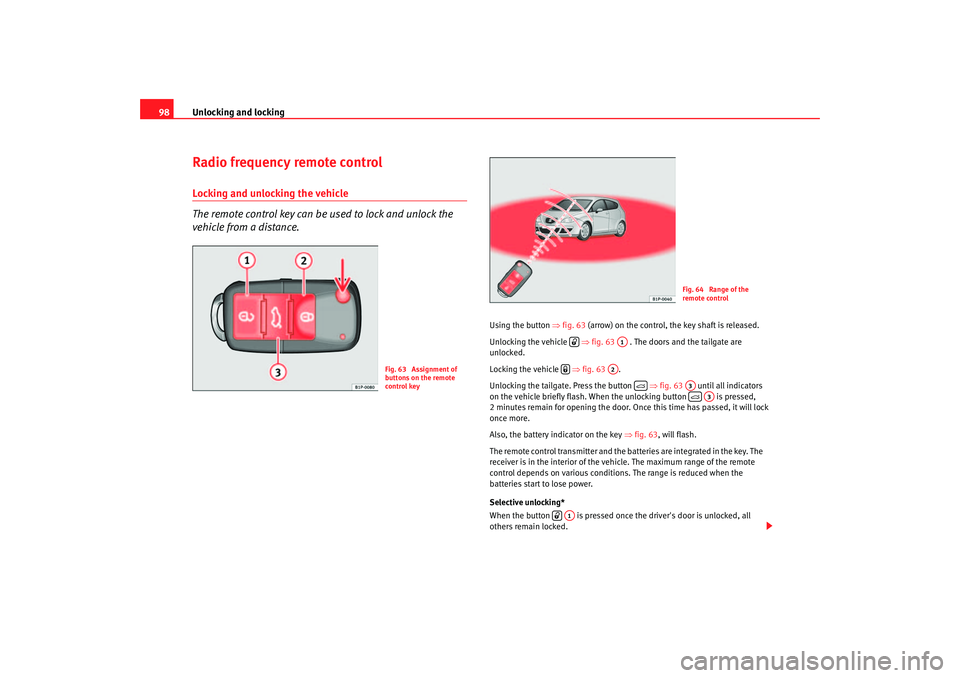
Using the button ⇒fig. 63 (arrow) on the control, the key shaft is released.
Unlocking the vehicle ⇒fig. 63 . The doors and the tailgate are
unlocked.
Locking the vehicle ⇒fig. 63 .
Unlocking the tailgate. Press the button ⇒fig. 63 until all indicators
on the vehicle b riefly f lash. When the unloc king
button is p res se
d,
2 minu
tes remain for open ing the door. Once th is time has passed, it will lo ck
once more.
Also, the battery indicator on the key ⇒fig. 63 , will flash.
The remote control transmitter and the batteries are integrated in the key. The
receiver is in the interior of the vehicle. The maximum range of the remote
control depends on various conditions. The range is reduced when the
batteries start to lose power.
Selective unlocking*
When the button is pressed once the driver's door is unlocked, all
others remain locked.
Fig. 63 Assignment of
buttons on the remote
control key
Fig. 64 Range of the
remote control
A1
A2
A3
A3
A1
leon_ingles Seite 98 Donner stag, 20. Oktober 2005 12:14 12
Page 101 of 280
Unlocking and locking99
Safety First
Operating instructions
Tips and Maintenance
Te c h n i c a l D a t a
Press the button twice to unlock all doors.
WARNING
•
Incorrect use of the key can result in critical injuries.
•
Never leave children or disabled persons in the vehicle; in case of emer-
gency they may not be able to leave the vehicle or look after themselves.
•
Never leave any of the vehicle keys in the vehicle. This could result in
serious injuries, accidents or the theft of your vehicle. Always take the key
with you when you leave the vehicle.
•
Unsupervised use of a key could me an that the engine is started or that
electrical equipment is used (e.g. elec tric windows). Risk of accident. The
vehicle can be locked using the remote control key. This could result in
people being trapped in the vehicle in an emergency.Note
•
The radio-frequency remote control ca n also be programmed so that only
the driver's door is unlocked the first time that the unlocking button on the
radio frequency remote control key is pressed. When the button is pressed
once more, all doors and the tailgate will be unlocked.
•
The remote control functions only when you are in range ⇒page 98,
fig. 64 (red area).
•
If the vehicle is unlocked using th e button, the vehicle will be
locked again automatically if any of the doors or the tailgate are not opened
within 30 seconds of unlocking the vehicle. This function prevents the vehicle
from remaining unlocked if the unlocking button is pressed by mistake.
•
If the vehicle cannot be opened and closed using the remote control, the
remote control key will have to be re-synchronised ⇒page 99.
Changing the batteryIf the battery indicator does not flash when the buttons are pushed, the
battery must be replaced.
Caution
Use of inappropriate batteries may damage the radio frequency remote
control. For this reason, always replac e the dead battery with another of the
same size and power.
For the sake of the environment
The flat batteries must be disposed of in accordance with regulations
governing the protection of the environment.Synchronising the remote control keySynchronising the remote control key
– Use both keys that have been delivered with the vehicle ⇒page 97, fig. 62 , the key fitted with the remote control and
the normal key .
– Unlock the vehicle from the driver side door using the key without the remote.
– Turn the ignition ON using the key without the remote control.
– Lock the vehicle using the driver side door lock with the remote
control key ⇒ page 98, fig. 63.
– In a time of maximum 30 seconds the following operations must
be carried out:
A1
A1
AA
AB
leon_ingles Seite 99 Donner stag, 20. Oktober 2005 12:14 12
Page 102 of 280
Unlocking and locking
100
– Operate the button once for locking on the remote control, the indicators will flash.
– Operate the button once for unlocking on the remote control for more than 2 seconds.
– The key will have been programmed and the vehicle will unlock, confirming at the same time the synchronisation.It is possible that the vehicle could no longer be opened and closed with the
remote control if the button is repeatedly pressed outside of the effective
range of the radio frequency remote cont rol. The remote control key will have
to be resynchronised.
Spare remote control keys are available from Authorised Service Centres, they
must be matched to the locking system.
Up to eight remote control keys can be used.Anti-theft alarm system*Description of anti-theft alarm system*
The anti-theft alarm triggers an alarm if unauthorised move-
ments are detected around the vehicle.The anti-theft alarm makes it more diffi cult to break into the vehicle or steal
it. Audible and visible alarms are triggered if the car is opened using the
mechanical key, or if unauthorised access is gained to the vehicle.
The anti-theft alarm system is automatically switched on when the vehicle is
locked. The system is then primed. When does the system trigger an alarm?
The system triggers an alarm if the fol
lowing unauthorised actions are carried
out when the car is locked:
•
Mechanical opening of the vehicle with the vehicle key
•
Opening a door
•
Opening the bonnet
•
Opening the tailgate
•
Switching on the ignition
•
Movements in the vehicle
•
Undue manipulation of the alarm
•
Battery handling
The horn sounds and the indicators flash for approx. 30 seconds. This may be
repeated up to 10 times depending on the country.
Opening the doors mechanically (emergency opening)
If the remote control function fails, you will have to use the key to unlock the
car. This is done as follows:
•
Unfold the key by pressing the button (arrow).
•
Use the lock on the driver door to un lock the vehicle. The anti-theft alarm
system remains active, but an alarm is not triggered immediately.
•
Switch on the ignition within 15 seconds. When the ignition is switched
on, the electronic immobiliser recognises a valid vehicle key and deactivates
the anti-theft alarm system. If you do not switch on the ignition within 15
seconds, the alarm is triggered.
How is the alarm switched off?
When the vehicle is unlocked via the unlocking button of the remote control
or when the key is inserted in the ignition lock.
leon_ingles Seite 100 Donnerstag, 20. Oktober 2005 12:14 12
Page 189 of 280

Accessories, parts replacement and modifications187
Safety First
Operating instructions
Tips and Maintenance
Te c h n i c a l D a t a
WARNING
Incorrectly performed modifications or other work on your vehicle can lead
to malfunctions and cause accidents.Roof aerial*The vehicle may be fitted with a collapsible roof aerial* with antitheft
system*, which can be folded backwards, when, for example, going through
an automatic carwash.
To f o l d
Unscrew the aerial rod, tilting it backwards into a horizontal position and then
screw in again.
To return to working position
Continue in the reverse order to that given in the previous instruction.Mobile telephones and two-way radiosAn external aerial is required for mobile phones and two-way
radios.SEAT has approved your vehicle for use with mobile telephones and two-way
radios providing the following conditions are observed:•
The correct installation of an external aerial,
•
transmitting power of maximum 10 watts.
An external aerial is needed to give the equipment its optimal range. First consult your Authorised Service Centre if you wish to use a mobile tele-
phone or a two-way radio with a transmitting power in excess of 10 watts.
Here you will receive information concerning the technical possibilities for
retrofitting this equipment.
Mobile telephones and two-way radios
should be fitted only by a qualified
workshop, for example an Authorised Service Centre.
WARNING
•
Always concentrate primarily on driving. If you are distracted while
driving you could have an accident.
•
Never attach the telephone mountings to the surfaces covering the
airbag units or within the range of the airbags, danger of injury if the airbag
is triggered.
•
If you use mobile telephones or two-way radios in the vehicle without
an external aerial, electromagnetic ra diation in the vehicle could exceed
authorised limits. This also applies to external aerials that have not been
correctly installed.Caution
Failure to observe the above conditions could cause the electronics to
malfunction. The most common causes of faults are:•
no external aerial,
•
external aerial incorrectly installed,
•
transmitting power in excess of 10 watts.Note
Please observe the operating instructions of your mobile telephone / two-way
radio.
leon_ingles Seite 187 Donnerstag, 20. Oktober 2005 12:14 12
Page 276 of 280

Index
274PPaintwork
Polishing . . . . . . . . . . . . . . . . . . . . . . . . . . . 180
Waxing . . . . . . . . . . . . . . . . . . . . . . . . . . . . . 179
Parking . . . . . . . . . . . . . . . . . . . . . . . . . . . . . . . . 158
Parking lights . . . . . . . . . . . . . . . . . . . . . . . . . . 113
Parts . . . . . . . . . . . . . . . . . . . . . . . . . . . . . . . . . . 186
Parts replacement . . . . . . . . . . . . . . . . . . . . . . . 186
Pedals . . . . . . . . . . . . . . . . . . . . . . . . . . . . . . 16, 55
Petrol . . . . . . . . . . . . . . . . . . . . . . . . . . . . . . . . . 191 Trips to foreign countries . . . . . . . . . . . . . . 171
Petrol additives . . . . . . . . . . . . . . . . . . . . . . . . . 191
Petrol engines, starting . . . . . . . . . . . . . . . . . . 149
Physical principles of a frontal collision . . . . . . 21
Plastic key tab . . . . . . . . . . . . . . . . . . . . . . . . . . . 97
Plastic parts . . . . . . . . . . . . . . . . . . . . . . . . . . . . 180
Pollen filter . . . . . . . . . . . . . . . . . . . . . . . . . . . . 145RRadio frequency remote control Changing the battery . . . . . . . . . . . . . . . . . . 99
Radio navigation St eering wheel controls
audio + telephone version . . . . . . . . . . . . . . 86
audio version . . . . . . . . . . . . . . . . . . . . . . . . . 86
Radio wave remote control . . . . . . . . . . . . . . . . . 98
Rain sensor* . . . . . . . . . . . . . . . . . . . . . . . . . . . 118
Rear fog light Indication lamp . . . . . . . . . . . . . . . . . . . . . . 109
Warning lamp . . . . . . . . . . . . . . . . . . . . . . . . 75 Rear interior lights . . . . . . . . . . . . . . . . . . . . . . 115
Rear lights . . . . . . . . . . . . . . . . . . . . . . . . . . . . . 235
Rear reading lights . . . . . . . . . . . . . . . . . . . . . . 115
Rear seat bench . . . . . . . . . . . . . . . . . . . . . . . . . 127
Rear window heating
Heating element wires . . . . . . . . . . . . . . . . 181
Rear window wiper . . . . . . . . . . . . . . . . . . . . . . 119
Rear-view mirror . . . . . . . . . . . . . . . . . . . . . . . . 120
Refuelling . . . . . . . . . . . . . . . . . . . . . . . . . . . . . . 190
Registration light . . . . . . . . . . . . . . . . . . . . . . . . 239
Remote control key Buttons . . . . . . . . . . . . . . . . . . . . . . . . . . . . . 98
Synchronising . . . . . . . . . . . . . . . . . . . . . . . . 99
Removing and fitting the wheel . . . . . . . . . . . . 221
Repairs Airbags . . . . . . . . . . . . . . . . . . . . . . . . . . . . . . 32
Replacement keys . . . . . . . . . . . . . . . . . . . . . . . . 97
Rev counter . . . . . . . . . . . . . . . . . . . . . . . . . . . . . 58
Reverse gear Manual gearbox . . . . . . . . . . . . . . . . . . . . . 152
RME fuel (biodiesel) . . . . . . . . . . . . . . . . . . . . . 192
Roll-back function Sliding/tilting roof . . . . . . . . . . . . . . . . . . . 108
Windows . . . . . . . . . . . . . . . . . . . . . . . . . . . 105
Roof aerial* . . . . . . . . . . . . . . . . . . . . . . . . . . . . 187
Roof carrier* . . . . . . . . . . . . . . . . . . . . . . . . . . . 135
Rubber seals . . . . . . . . . . . . . . . . . . . . . . . . . . . 181 Running in
Brake pads . . . . . . . . . . . . . . . . . . . . . . . . . 169
Engine . . . . . . . . . . . . . . . . . . . . . . . . . . . . . 169
Tyres . . . . . . . . . . . . . . . . . . . . . . . . . . . . . . . 169
Running in tyres . . . . . . . . . . . . . . . . . . . . . . . . 169
SSafe driving . . . . . . . . . . . . . . . . . . . . . . . . . . . . . . 7
Safety . . . . . . . . . . . . . . . . . . . . . . . . . . . . . . . . . . . 8
Safety equipment . . . . . . . . . . . . . . . . . . . . . . . . . 7
Safety instructions Coolant temperature . . . . . . . . . . . . . . . . . . . 75
Safety notes Belt tension devices . . . . . . . . . . . . . . . . . . . 28
Curtain airbags . . . . . . . . . . . . . . . . . . . . . . . 43
Disabling front passenger airbag . . . . . . . . 46
Front airbags . . . . . . . . . . . . . . . . . . . . . . . . . 37
Side airbags . . . . . . . . . . . . . . . . . . . . . . . . . 41
Using child seats . . . . . . . . . . . . . . . . . . . . . 48
Using seat belts . . . . . . . . . . . . . . . . . . . . . . 23
Safety system- safe . . . . . . . . . . . . . . . . . . . . . . . 91
Seals . . . . . . . . . . . . . . . . . . . . . . . . . . . . . . . . . 181
Seat adjustment . . . . . . . . . . . . . . . . . . . . 123, 126
Seat belt position Pregnant women . . . . . . . . . . . . . . . . . . . . . . 26
Seat belts . . . . . . . . . . . . . . . . . . . . . . . . . . . . 25
Seat belt release . . . . . . . . . . . . . . . . . . . . . . . . . 27
Seat belt warning lamp . . . . . . . . . . . . . . . . . . . . 19
leon_ingles Seite 274 Donnerstag, 20. Oktober 2005 12:14 12
Page 278 of 280

Index
276Turn signals . . . . . . . . . . . . . . . . . . . . . . . . . . . . 113
Warning lamp . . . . . . . . . . . . . . . . . . . . 75, 114
Two-way radio . . . . . . . . . . . . . . . . . . . . . . . . . . 187
Type plate . . . . . . . . . . . . . . . . . . . . . . . . . . . . . 248
Tyre Mobility-System (Tyre repair kit) . . . . . . . 216
Tyre monitor indicator . . . . . . . . . . . . . . . . . . . . . 78
Tyre pressure . . . . . . . . . . . . . . . . . . . . . . . . . . . 210
Tyre pressures . . . . . . . . . . . . . . . . . . . . . . . . . . 250
Tyre repair kit . . . . . . . . . . . . . . . . . . . . . . . 216, 222
Tyres and wheels Dimensions . . . . . . . . . . . . . . . . . . . . . . . . . 212
Tyres service life . . . . . . . . . . . . . . . . . . . . . . . . 211
Tyres tread depth . . . . . . . . . . . . . . . . . . . . . . . 211
Tyres with directional tread pattern . . . . . . . . . 210UUnderbody sealant . . . . . . . . . . . . . . . . . . . . . . 182
Using the Tiptronic gear system . . . . . . . . . . . . 157VVehicle battery . . . . . . . . . . . . . . . . . . . . . . . . . 207
Vehicle data . . . . . . . . . . . . . . . . . . . . . . . . . . . . 248
Vehicle identification data . . . . . . . . . . . . . . . . 248
Vehicle identification number . . . . . . . . . . . . . 248
Vehicle paint Car care products . . . . . . . . . . . . . . . . . . . . 177
Vehicle tools Storage . . . . . . . . . . . . . . . . . . . . . . . . . . . . 215
Vehicle wallet storage . . . . . . . . . . . . . . . . . . . . 128 Ventilation slits . . . . . . . . . . . . . . . . . . . . . . . . . . 17
Volumetric sensor*
Activation . . . . . . . . . . . . . . . . . . . . . . . . . . . 101
Deactivation . . . . . . . . . . . . . . . . . . . . . . . . 101
WWarning lamp . . . . . . . . . . . . . . . . . . . . . . . . . . . 31
Warning lamps . . . . . . . . . . . . . . . . . . . . . . . . . . 71
Warning reportsRed . . . . . . . . . . . . . . . . . . . . . . . . . . . . . . . . . 64
Yellow . . . . . . . . . . . . . . . . . . . . . . . . . . . . . . . 64
Warning texts in the display . . . . . . . . . . . . . . . . 63
Warning triangle . . . . . . . . . . . . . . . . . . . . . . . . 133
Washer fluid . . . . . . . . . . . . . . . . . . . . . . . . . . . 203
Washing by hand . . . . . . . . . . . . . . . . . . . . . . . 178
Washing the vehicle . . . . . . . . . . . . . . . . . . . . . 178
Washing with high pressure cleaners . . . . . . . 179
Water warning . . . . . . . . . . . . . . . . . . . . . . . . . . . . . 64
Water in the windscreen washer tank . . . . . . . 203
Wear indicators . . . . . . . . . . . . . . . . . . . . . . . . . 211
Wheel bolts . . . . . . . . . . . . . . . . . . . . . . . . 219, 251 Torque . . . . . . . . . . . . . . . . . . . . . . . . . . . . . 213
Wheel change . . . . . . . . . . . . . . . . . . . . . . . . . . 217
Wheel trims . . . . . . . . . . . . . . . . . . . . . . . . . . . . 218
Wheels . . . . . . . . . . . . . . . . . . . . . . . . . . . . 209, 250
Why assume the correct sitting position? . . . . . 30
Why should head restraints be correctly adjusted? 13 Why wear seat belts? . . . . . . . . . . . . . . . . . . 19, 21
Why wear seatbelts? . . . . . . . . . . . . . . . . . . . . . . 30
Windows . . . . . . . . . . . . . . . . . . . . . . . . . . . . . . 104
Windscreen washer fluid
Warning lamp . . . . . . . . . . . . . . . . . . . . . . . . 76
Windscreen wiper blades Cleaning . . . . . . . . . . . . . . . . . . . . . . . . . . . . 181
Windscreen wipers . . . . . . . . . . . . . . . . . . . . . . 116 Changing the front blades . . . . . . . . . . . . . 204
Changing the rear blade . . . . . . . . . . . . . . . 205
Winter driving Diesel engine . . . . . . . . . . . . . . . . . . . . . . . 193
Winter tyres . . . . . . . . . . . . . . . . . . . . . . . . . . . . 213
Wiper/wash automatic function . . . . . . . . . . . 116
Working in the engine compartment . . . . . . . . 193
leon_ingles Seite 276 Donnerstag, 20. Oktober 2005 12:14 12