phone Seat Leon 5D 2006 COMMUNICATION SYSTEM
[x] Cancel search | Manufacturer: SEAT, Model Year: 2006, Model line: Leon 5D, Model: Seat Leon 5D 2006Pages: 30, PDF Size: 0.36 MB
Page 15 of 30
Communication13
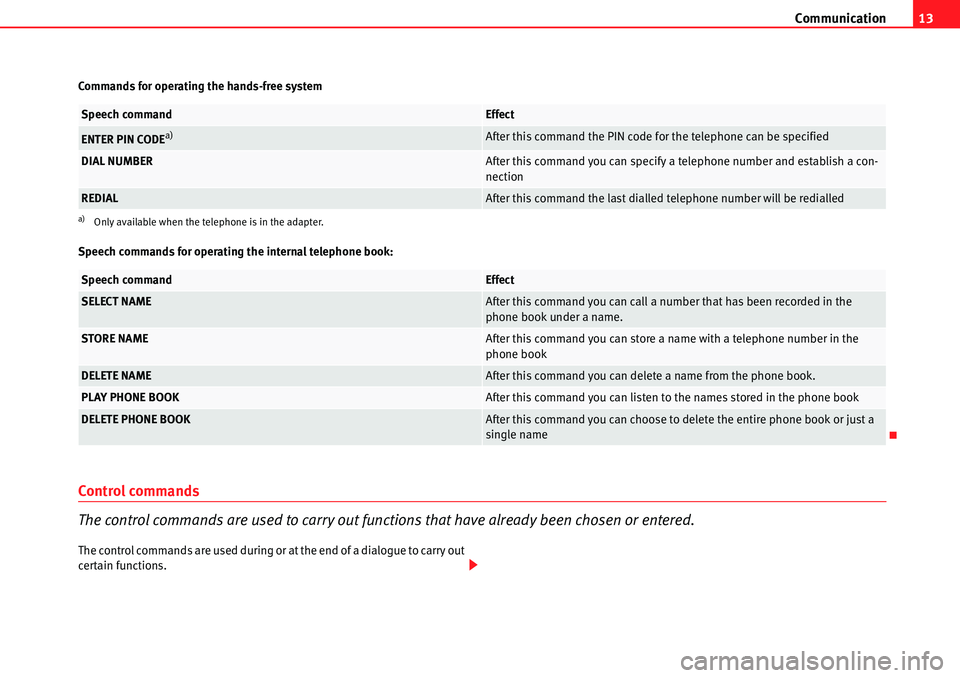
Commands for operating the hands-free system
Speech commands for operating the internal telephone book:
Control commands
The control commands are used to carry out functions that have already been chosen or entered.
The control commands are used during or at the end of a dialogue to carry out
certain functions.
Speech commandEffect
ENTER PIN CODEa)
a)Only available when the telephone is in the adapter.
After this command the PIN code for the telephone can be specified
DIAL NUMBERAfter this command you can specify a telephone number and establish a con-
nection
REDIALAfter this command the last dialled telephone number will be redialled
Speech commandEffect
SELECT NAMEAfter this command you can call a number that has been recorded in the
phone book under a name.
STORE NAMEAfter this command you can store a name with a telephone number in the
phone book
DELETE NAMEAfter this command you can delete a name from the phone book.
PLAY PHONE BOOKAfter this command you can listen to the names stored in the phone book
DELETE PHONE BOOKAfter this command you can choose to dele te the entire phone book or just a
single name
Page 16 of 30
Communication
14
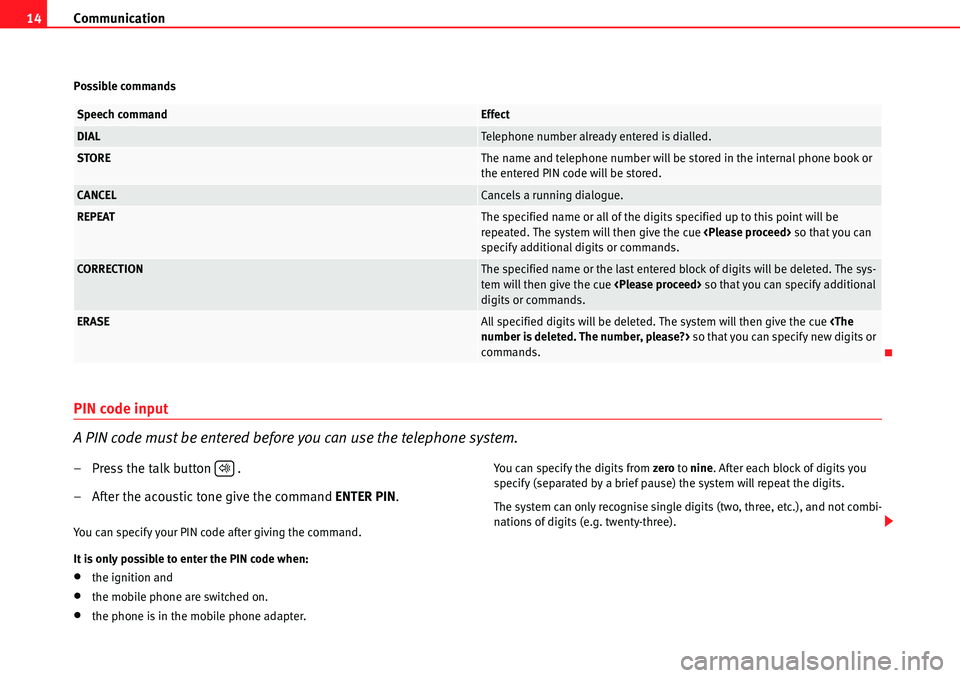
Possible commands
PIN code input
A PIN code must be entered before you can use the telephone system.
– Press the talk button .
– After the acoustic tone give the command ENTER PIN.
You can specify your PIN code after giving the command.
It is only possible to enter the PIN code when:
•the ignition and
•the mobile phone are switched on.
•the phone is in the mobile phone adapter. You can specify the digits from
zero to nine . After each block of digits you
specify (separated by a brief pause) the system will repeat the digits.
The system can only recognise single digits (two, three, etc.), and not combi-
nations of digits (e.g. twenty-three).
Speech commandEffect
DIALTelephone number already entered is dialled.
STOREThe name and teleph one number will be stored in the internal phone book or
the entered PIN code will be stored.
CANCELCancels a running dialogue.
REPEATThe specified name or all of the digits specified up to this point will be
repeated. The system will then give the cue
specify additional digits or commands.
CORRECTIONThe specified name or the last entered block of digits will be deleted. The sys-
tem will then give the cue
digits or commands.
ERASEAll specified digits will be deleted. The system will then give the cue
commands.
.
Page 17 of 30
Communication15
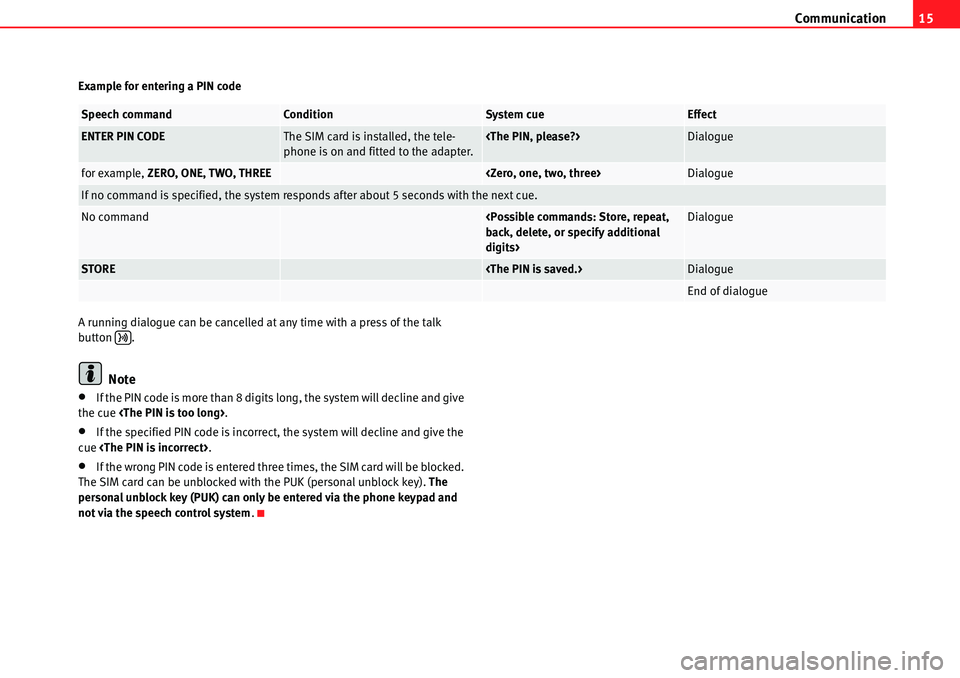
Example for entering a PIN code
A running dialogue can be cancelled at any time with a press of the talk
button .
Note
•If the PIN code is more than 8 digits long, the system will decline and give
the cue
•If the specified PIN code is incorrect, the system will decline and give the
cue
•If the wrong PIN code is entered three times, the SIM card will be blocked.
The SIM card can be unblocked with the PUK (personal unblock key). The
personal unblock key (PUK) can only be entered via the phone keypad and
not via the speech control system .
Speech commandConditionSystem cueEffect
ENTER PIN CODEThe SIM card is installed, the tele-
phone is on and fitted to the adapter.
for example, ZERO, ONE, TWO, THREE
If no command is specified, the system responds after about 5 seconds with the next cue.
No command
digits>Dialogue
STORE
End of dialogue
Page 18 of 30
Communication
16
Dial number
A telephone number can be vocally specified to the system and then dialled.
– Press the talk button . Activation of the system is confirmed
with by a tone.
– After the tone, say the command DIAL NUMBER.
After this command the system will then request that you specify a telephone
number. A connection will then be established to the specified number. The
telephone number can be specified all at once, in blocks of digits (separated
by a brief pause), or as single digits. You can specify the digits from zero to nine
. After each block of digits you specify (separated by a brief pause) the
system will repeat the digits. The system can only recognise single digits
(two, three, etc.), and not combinations of digits (e.g. twenty-three).
Notes on specifying telephone numbers:•If the telephone number has more than 20 digits, the system will decline
and give the cue
•A Plus (+) can also be placed ahead of the 20 digits.
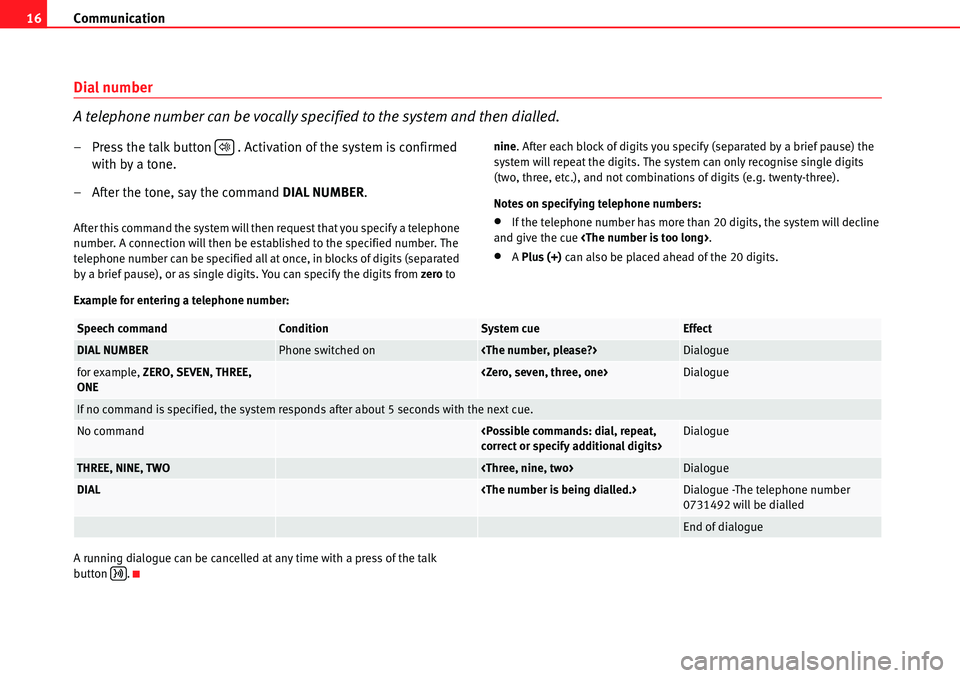
Example for entering a telephone number:
A running dialogue can be cancelled at any time with a press of the talk
button .
.
Speech commandConditionSystem cueEffect
DIAL NUMBERPhone switched on
for example, ZERO, SEVEN, THREE,
ONE
If no command is specified, the system responds after about 5 seconds with the next cue.
No command
THREE, NINE, TWO
DIAL
0731492 will be dialled
End of dialogue
Page 19 of 30
Communication17
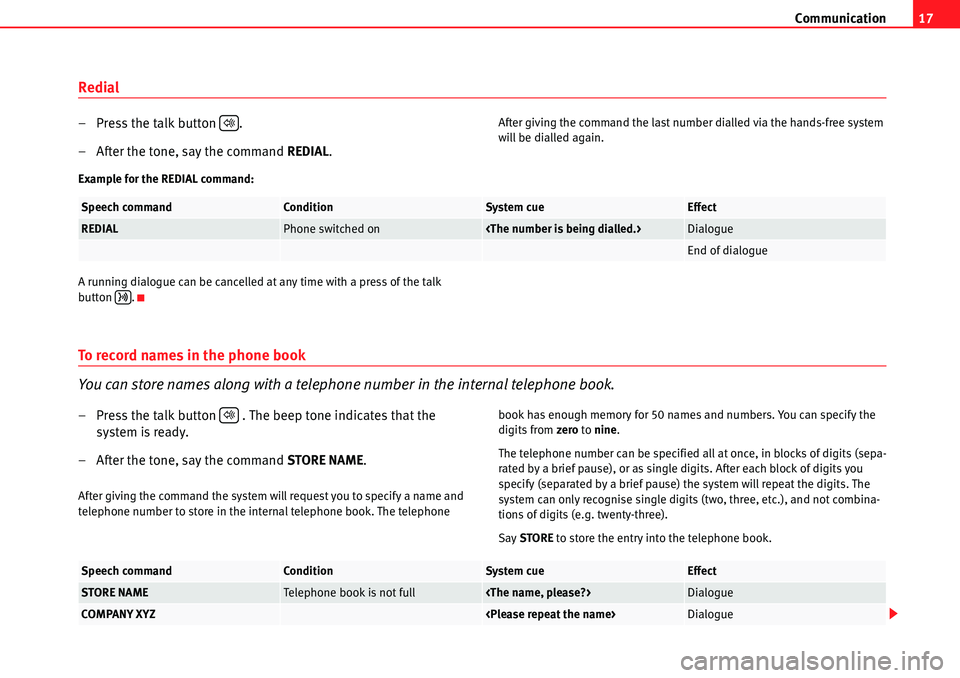
Redial
– Press the talk button .
– After the tone, say the command REDIAL.After giving the command the last number dialled via the hands-free system
will be dialled again.
Example for the REDIAL command:
A running dialogue can be cancelled at any time with a press of the talk
button .
To record names in the phone book
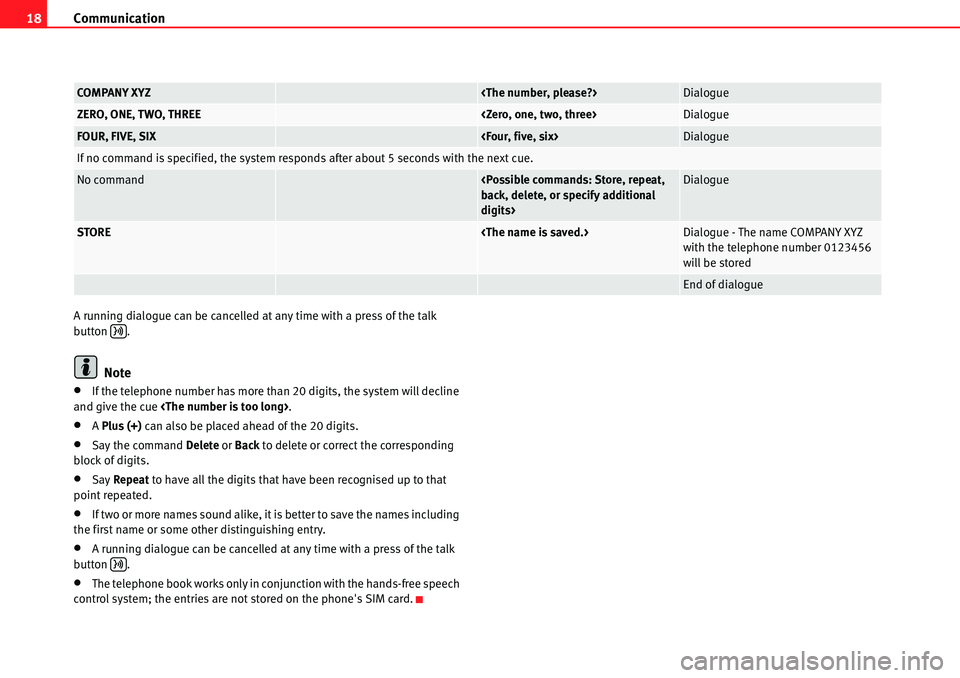
You can store names along with a telephone number in the internal telephone book.
– Press the talk button . The beep tone indicates that the system is ready.
– After the tone, say the command STORE NAME.
After giving the command the system will request you to specify a name and
telephone number to store in the internal telephone book. The telephone book has enough memory for 50 names and numbers. You can specify the
digits from
zero to nine .
The telephone number can be specified all at once, in blocks of digits (sepa-
rated by a brief pause), or as single digits. After each block of digits you
specify (separated by a brief pause) the system will repeat the digits. The
system can only recognise single digits (two, three, etc.), and not combina-
tions of digits (e.g. twenty-three).
Say STORE to store the entry into the telephone book.
.
Speech commandConditionSystem cueEffect
REDIALPhone switched on
End of dialogue
.
Speech commandConditionSystem cueEffect
STORE NAMETelephone book is not full
COMPANY XYZ
Page 20 of 30
Communication
18
A running dialogue can be cancelled at any time with a press of the talk
button .
Note
•If the telephone number has more than 20 digits, the system will decline
and give the cue
•A Plus (+) can also be placed ahead of the 20 digits.
•Say the command Delete or Back to delete or correct the corresponding
block of digits.
•Say Repeat to have all the digits that have been recognised up to that
point repeated.
•If two or more names sound alike, it is better to save the names including
the first name or some other distinguishing entry.
•A running dialogue can be cancelled at any time with a press of the talk
button .
•The telephone book works only in conjunction with the hands-free speech
control system; the entries are not stored on the phone's SIM card.
COMPANY XYZ
ZERO, ONE, TWO, THREE
FOUR, FIVE, SIX
If no command is specified, the system responds after about 5 seconds with the next cue.
No command
digits>Dialogue
STORE
with the telephone number 0123456
will be stored
End of dialogue
Page 21 of 30
Communication19
Calling a name in the phone book
– Press the talk button
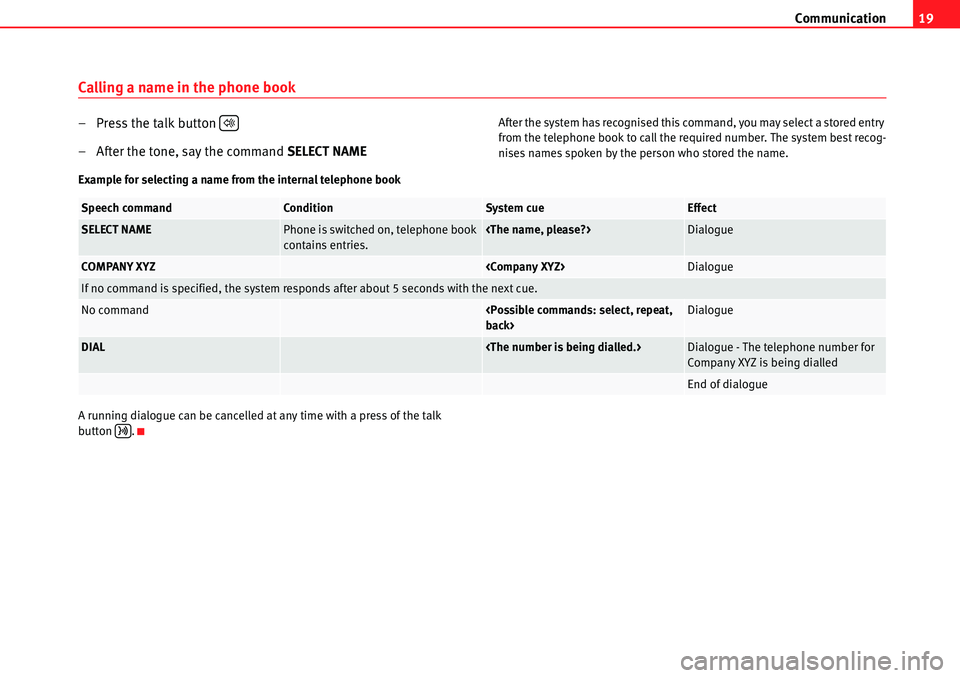
– After the tone, say the command SELECT NAMEAfter the system has recognised this command, you may select a stored entry
from the telephone book to call the required number. The system best recog-
nises names spoken by the person who stored the name.
Example for selecting a name from the internal telephone book
A running dialogue can be cancelled at any time with a press of the talk
button ..
Speech commandConditionSystem cueEffect
SELECT NAMEPhone is switched on, telephone book
contains entries.
COMPANY XYZ
If no command is specified, the system responds after about 5 seconds with the next cue.
No command
DIAL
Company XYZ is being dialled
End of dialogue
Page 22 of 30
Communication
20
Listening to the phone book
You can have the entries stored in the internal telephone book read out to you.
– Press the talk button . The beep tone indicates that the
system is ready.
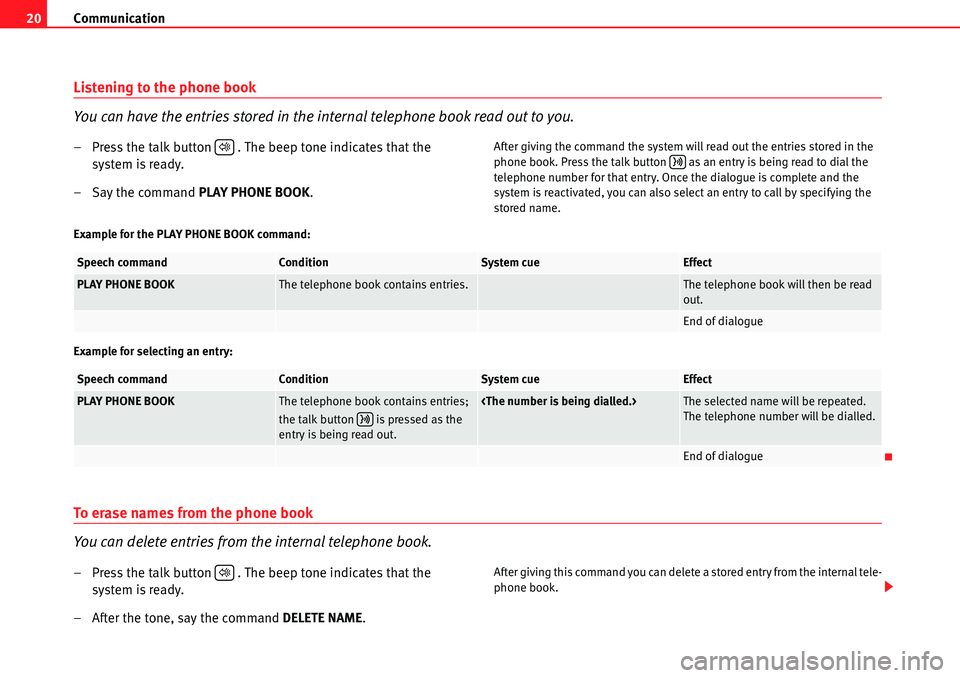
– Say the command PLAY PHONE BOOK.After giving the command the system will read out the entries stored in the
phone book. Press the talk button as an entry is being read to dial the
telephone number for that entry. Once the dialogue is complete and the
system is reactivated, you can also select an entry to call by specifying the
stored name.
Example for the PLAY PHONE BOOK command:
Example for selecting an entry:
To erase names from the phone book
You can delete entries from the internal telephone book.
– Press the talk button . The beep tone indicates that the system is ready.
– After the tone, say the command DELETE NAME.After giving this command you can delete a stored entry from the internal tele-
phone book.
.
Speech commandConditionSystem cueEffect
PLAY PHONE BOOKThe telephone book contains entries.The telephone book will then be read
out.
End of dialogue
Speech commandConditionSystem cueEffect
PLAY PHONE BOOKThe telephone book contains entries;
the talk button is pressed as the
entry is being read out.
The telephone number will be dialled.
End of dialogue
.
Page 23 of 30
Communication21
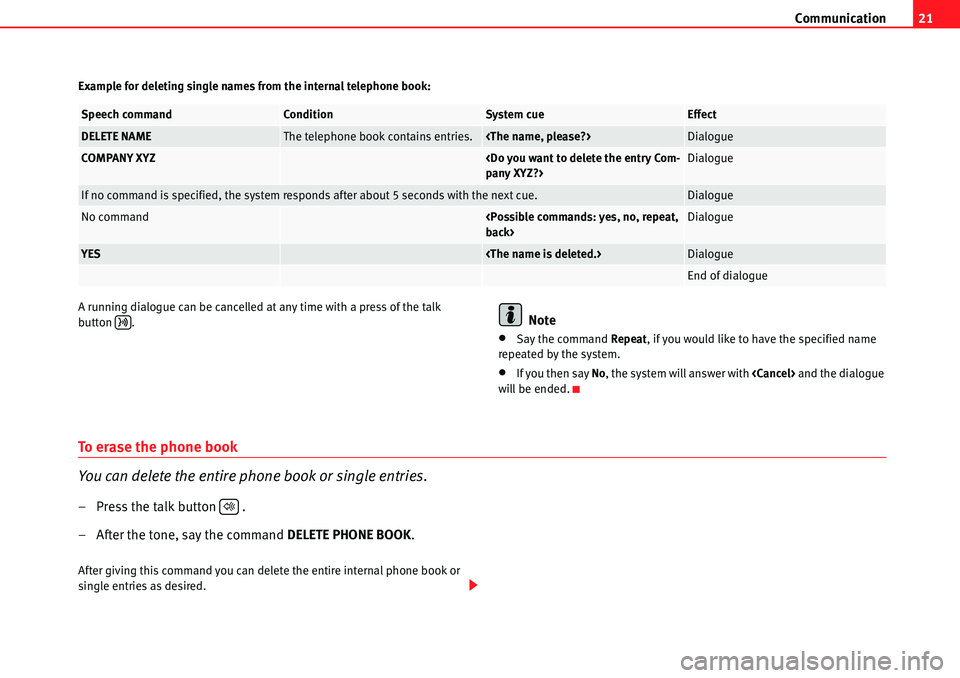
Example for deleting single names from the internal telephone book:
A running dialogue can be cancelled at any time with a press of the talk
button .
Note
•Say the command Repeat, if you would like to have the specified name
repeated by the system.
•If you then say No, the system will answer with
will be ended.
To erase the phone book
You can delete the entire phone book or single entries.
– Press the talk button .
– After the tone, say the command DELETE PHONE BOOK.
After giving this command you can delete the entire internal phone book or
single entries as desired.
Speech commandConditionSystem cueEffect
DELETE NAMEThe telephone book contains entries.
COMPANY XYZ
If no command is specified, the system responds after about 5 seconds with the next cue.Dialogue
No command
YES
End of dialogue
.
Page 24 of 30
Communication
22
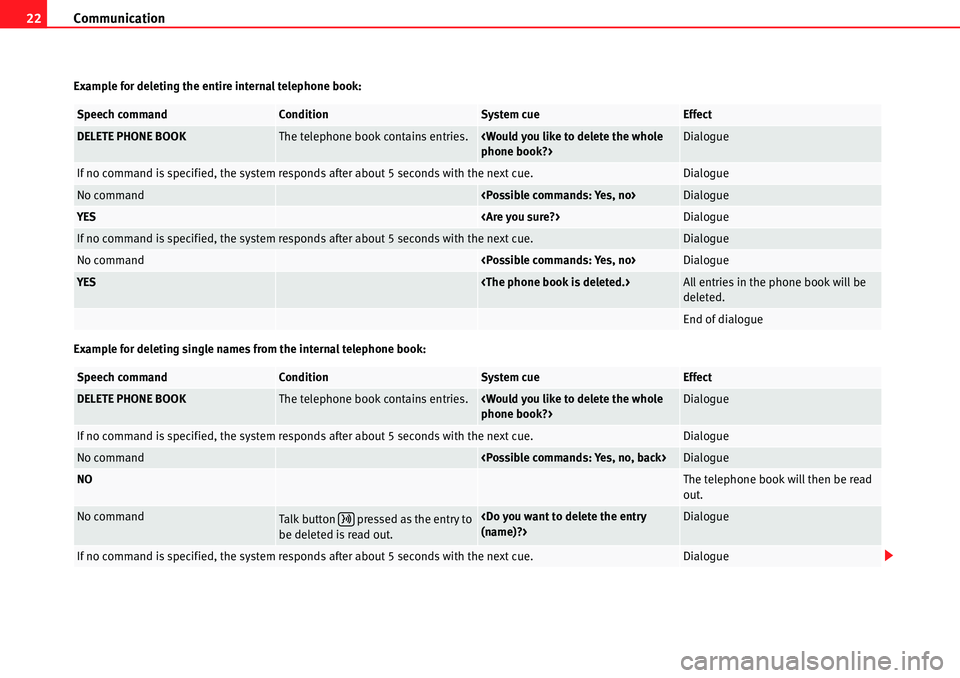
Example for deleting the entire internal telephone book:
Example for deleting single names from the internal telephone book:
Speech commandConditionSystem cueEffect
DELETE PHONE BOOKThe telephone book contains entries.
If no command is specified, the system responds after about 5 seconds with the next cue.Dialogue
No command
YES
If no command is specified, the system responds after about 5 seconds with the next cue.Dialogue
No command
YES
deleted.
End of dialogue
Speech commandConditionSystem cueEffect
DELETE PHONE BOOKThe telephone book contains entries.
If no command is specified, the system responds after about 5 seconds with the next cue.Dialogue
No command
NOThe telephone book will then be read
out.
No commandTalk button pressed as the entry to
be deleted is read out.
If no command is specified, the system responds after about 5 seconds with the next cue.Dialogue