steering wheel Seat Leon 5D 2007 Owner's Guide
[x] Cancel search | Manufacturer: SEAT, Model Year: 2007, Model line: Leon 5D, Model: Seat Leon 5D 2007Pages: 302, PDF Size: 9.14 MB
Page 123 of 302

Lights and visibility121
Safety First
Operating instructions
Tips and Maintenance
Te c h n i c a l D a t a
The windscreen wiper lever ⇒page 120, fig. 82 has the following
positions:
Switching off the wipers
– Move the lever to position .
Intermittent wipe
– Move the lever up to position .
– Move the control to the left or right to set the length of the intervals. Control to the left: long intervals; control to the right:
short intervals. Four wiper interval stages can be set using switch .
Slow wipe
– Move the lever up to position .
Continuous wipe
– Move the lever up to position .
Brief wipe
– Move the lever down to position to give the windscreen a brief
wipe. The wiper will start to move faster if you keep the lever
pressed down for longer than 2 seconds.
Wash and wipe automatic system
– Pull the lever towards the steering wheel - Position . The wash function will start immediately and the wipers will start with a
slight delay. The wash and wipe r systems will function at the
same time at speeds of over 120 km/h. – Release the lever. The wipers will keep running for approximately
four seconds.
Optional heated windscreen in the wiper blade* area (page
In some countries and with some versions, there is the possibility of heating
the windscreen in the area of the windscreen wiper blades in order to aid de-
icing in the zone.
This function is activated by turning the exterior heated rearview mirror*
control forwards ⇒page 126.
WARNING
•
Worn and dirty wiper blades obstruct visibility and reduce safety levels.
•
In cold conditions, you should not use the wash / wipe system unless
you have warmed the windscreen with the heating and ventilation system.
The washer fluid could otherwise freeze on the windscreen and obscure
your view of the road.
•
Always note the corresponding warnings on ⇒page 215.Caution
In icy conditions, always check that the wiper blades are not frozen to the
glass before using the wipers for the fi rst time. If you switch on the wipers
when the wiper blades are frozen to the windscreen, you could damage both
the wiper blades and the wiper motor.
Note
•
The windscreen wipers will only work when the ignition is switched on.
•
In certain versions of vehicles with alarms, the windscreen wiper will only
work when the ignition is on and the bonnet closed.
•
When in use, the wipers do not go as far as the rest position. When the
lever is moved to the 0 position, they move to the rest position.
A0A1
AA
AA
A2A3A4
A5
leon ingles.book Seite 121 Dienst ag, 11. September 2007 1:47 13
Page 125 of 302

Lights and visibility123
Safety First
Operating instructions
Tips and Maintenance
Te c h n i c a l D a t a
Switching on the rain sensor
– Move the windscreen wiper lever into position ⇒page 122,
fig. 84 .
– Move the control to the left or right to set the sensitivity of the rain sensor. Control to the right: highly sensitive. Control to the
left: less sensitive.The rain sensor is part of the interval wipe function. You will have to switch
the rain sensor back on if you switch off the ignition. This is done by switching
the wiper intermittent function off and back on.
Note
•
Do not put stickers on the windscreen in front of the sensor. This may
cause sensor disruption or faults.
Rear window wiper
The windscreen wiper lever operates the windscreen wiper
and the wash and wipe system for the rear window.
Switching on the interval wipe
– Press the lever forwards to position ⇒fig. 85 . The wiper will
wipe the window approximately every 6 seconds.
Switching off the interval wipe function
– Pull the lever back from position towards the steering wheel. T h e wi p e r will co n t i n u e to fun c t i o n fo r a s h o r t p e r i o d i f yo u s wi tch
off whilst the wipers are in motion.
A1
AA
Fig. 85 Windscreen wiper
and windscreen wash
lever: rear window wiper
A6
A6
leon ingles.book Seite 123 Dienst ag, 11. September 2007 1:47 13
Page 126 of 302

Lights and visibility
124
Switching on the windscreen wiper and washer system
– Press the lever fully forwards to position ⇒page 123, fig. 85 .
The wash function will start immediately and the wiper will start
with a slight delay. The windscreen wash system will function as
long as you hold the lever in this position.
– Release the lever. The wiper then wipes for approximately 4 seconds, and then in intervals again.
– Release the lever. The washer system stops and the wipers func- tion.
WARNING
•
A worn or dirty wiper blade will obstruct visibility and reduce safety.
•
Always note the corresponding warnings on ⇒page 215, “Changing
the front windscreen wiper blades”.Caution
In icy conditions, always check that the wiper blade is not frozen to the glass
before using the wiper for the first time. If you switch on the wiper when the
wiper blade is frozen to the glass, this could damage both the wiper blade
and the wiper motor.
Note
•
The windscreen wiper will only function when the ignition is switched on
and the tailgate is closed.
•
In reverse gear, with the windscreen wipers switched on, the rear wind-
screen wiper will make one wipe.
Headlight washer system*
The headlight washers clea n the headlight lenses.The headlight washers are activated automatically when the windscreen
washer is used and the windscreen wiper lever is pulled towards the steering
wheel for at least 1.5 seconds – provided the dipped headlights or main
beams are switched on. Clean off stubbo rn dirt (insects, etc.) from the head-
lights at regular intervals, for in stance when filling the fuel tank.
Note
•
To ensure that the headlight washers work properly in winter, keep the
nozzle holders in the bumper free of snow and remove any ice with a de-icer
spray.
•
To remove water, the windscreen wipers will be activated from time to
time, the headlight wipers will be activated every three cycles.
MirrorsInterior mirror
It is dangerous to drive if you cannot see clearly through the
rear window.Manual anti-dazzle function for interior mirror
In the basic mirror position, the lever at the bottom edge of the mirror should
be at the front. Pull the lever to the back to select the anti-dazzle function.
A7
leon ingles.book Seite 124 Dienstag, 11. September 2007 1:47 13
Page 129 of 302

Seats and stowage127
Safety First
Operating instructions
Tips and Maintenance
Te c h n i c a l D a t a
Seats and stowageThe importance of correct seat adjustmentProper seat adjustment optimi ses the level of protection
offered by seat belts and airbags.Your vehicle has five passenger places, two individual front seats and three
places on the rear seat. Each seat is equipped with a three-point seat belt.
The driver seat and front passenger seat can be adjusted in many ways to suit
the physical requirements of the vehicle occupants. The correct seat position
is very important for:•
fast and easy operation of all controls on the instrument panel,
•
relaxed posture that does not cause drowsiness,
•
safe driving ⇒ page 7,
•
and to ensure that the seat belts and airbag system provide maximum
protection ⇒page 19.
WARNING
•
If the driver and passengers assume improper sitting positions, they
may sustain critical injuries.
•
Never transport more people than there are seats available in the
vehicle.
•
Every occupant in the vehicle must properly fasten and wear the seat
belt belonging to his or her seat. Children must be protected with an appro-
priate child restraint system ⇒page 46, “Child safety”.
•
The front seats and all head restraints must always be adjusted to body
size and the seat belt must always be properly adjusted to provide you and
your passengers with optimum protection.
•
Always keep your feet in the foot well when the vehicle is moving; never
rest them on the dash panel, out of the window or on the seat. This also
applies to passengers. An incorrect sitting position exposes you to an
increased risk of injury in the event of a braking manoeuvre or an accident.
If the airbag is triggered, you could sustain severe injuries due to an incor-
rect sitting position.
•
It is important for the driver and front passenger to maintain a distance
of at least 25 cm from the steering wheel or dash panel. Failure to respect
the minimum distance means that the airbag will not protect you. Risk of
fatal injury. The distance between the driver and the steering wheel or
between the front passenger and the dash panel should always be as great
as possible.
•
Adjust the driver or front passenger seat only when the vehicle is
stationary. Otherwise your seat coul d move unexpectedly while the vehicle
is moving. This could increase the risk of an accident and therefore injury.
In addition, while adjusting your seat, you will assume an incorrect sitting
position. Risk of fatal accidents.
•
Special guidelines apply to installing a child seat on the front
passenger seat. When installing a child seat, observe the warning note in
the ⇒page 46, “Child safety”.WARNING (continued)
leon ingles.book Seite 127 Dienst ag, 11. September 2007 1:47 13
Page 154 of 302

Driving
152DrivingAddressAdjusting the steering wheel position
The height and reach of the steering wheel can be freely
adjusted to suit the driver.
– Adjust the driver seat to the correct position.
– Push the lever under the steering column ⇒fig. 113 down
⇒ .
– Adjust the steering wheel in this way until the correct position is set ⇒fig. 114 .
– Then push the lever up again firmly ⇒.
WARNING
•
Incorrect use of the steering column adjustment function and an incor-
rect seating position can result in serious injury.
•
To avoid accidents, the steering column should be adjusted only when
the vehicle is stationary. Risk of accident.
Fig. 113 Adjusting the
steering wheel position
Fig. 114 Proper sitting
position for driver
leon ingles.book Seite 152 Dienst ag, 11. September 2007 1:47 13
Page 155 of 302

Driving153
Safety First
Operating instructions
Tips and Maintenance
Te c h n i c a l D a t a
•
Adjust the driver seat or steering wheel so that there is a distance of at
least 25 cm between the steering wheel and your breast bone ⇒page 152,
fig. 114 . If you fail to observe the minimum distance, the airbag will not
protect you. Risk of fatal injury.
•
If your physical constitution prevents you from maintaining the
minimum distance of 25 cm, contact an Authorised Service Centre. The
Authorised Service Centre will help you decide if special specific modifica-
tions are necessary.
•
If you adjust the steering wheel so th at it points towards your face, the
driver airbag will not protect you prop erly in the event of an accident. Make
sure that the steering wheel points towards your chest.
•
When driving, always hold the steering wheel with both hands on the
outside of the ring at the 9 o'clock and 3 o'clock positions. Never hold the
steering wheel at the 12 o'clock position, or in any other manner (e.g. in
the centre of the steering wheel, or on the inside of the rim). In such cases,
you could receive severe injuries to the arms, hands and head.
SafetyElectronic stabilisation programme (ESP)*
ESP helps make driving safer in certain situations.The Electronic Stabilisation Program (ESP ) contains the electronic differential
lock (EDL) and the traction control system (TCS). The ESP function works in
conjunction with the ABS. Both warning la mps will light up if the ESP or ABS
systems are faulty.
The ESP is started automatically when the engine is started.
In specific circumstances where you requ ire less traction, you can switch off
the ESP by pressing button ⇒fig. 115 .
For example:•
When driving with snow chains,
•
when driving in deep snow or on loose surfaces,
WARNING (continued)
Fig. 115 Detail of the
centre console: ESP
button
leon ingles.book Seite 153 Dienst ag, 11. September 2007 1:47 13
Page 156 of 302
Driving
154•
when rocking the vehicle backwards and forwards to free it from mud, for
example.
You should press the button to switch the ESP back on when you no longer
need wheel spin.
The TCS and EDL are also switched off if the ESP is switched off. That is to say,
these systems are not available while ESP is not activated.
When does the button light up or flash?
•
It lights up when the ignition is switched on and should go out again after
about 2 seconds.
•
It will start flashing to indicate that ESP is counteracting an unstable
driving condition.
•
It will light up continuously if there is a malfunction in the ESP.
•
It will light up continuously if the ESP is switched off.
WARNING
•
The electronic stabilisation programme (ESP) cannot defy the laws of
physics. This should be kept in mind, particularly on slippery and wet
roads and when towing a trailer.
•
Always adapt your driving style to suit the condition of the roads and
the traffic situation. Do not let the extra safety afforded by ESP tempt you
into taking any risks when driv ing, this can cause accidents.
•
Please refer to the corresponding warning notes on ESP in ⇒page 171,
“Intelligent technology”.
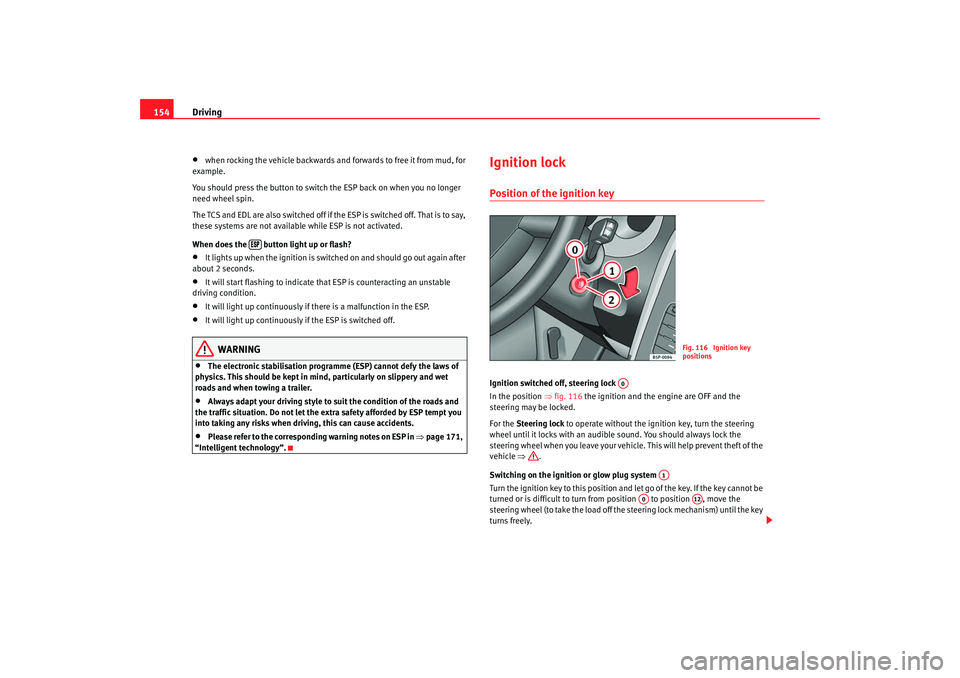
Ignition lockPosition of the ignition keyIgnition switched off, steering lock
In the position ⇒fig. 116 the ignition and the engine are OFF and the
steering may be locked.
For the Steering lock to operate without the ignition key, turn the steering
wheel until it locks with an audible sound. You should always lock the
steering wheel when you leave your vehicle. This will help prevent theft of the
vehicle ⇒.
Switching on the ignition or glow plug system
Turn the ignition key to this position an d let go of the key. If the key cannot be
turned or is difficult to turn from position to position , move the
steering wheel (to take the load off the steering lock mechanism) until the key
turns freely.
Fig. 116 Ignition key
positions
A0
A1
A0
A12
leon ingles.book Seite 154 Dienst ag, 11. September 2007 1:47 13
Page 162 of 302
Driving
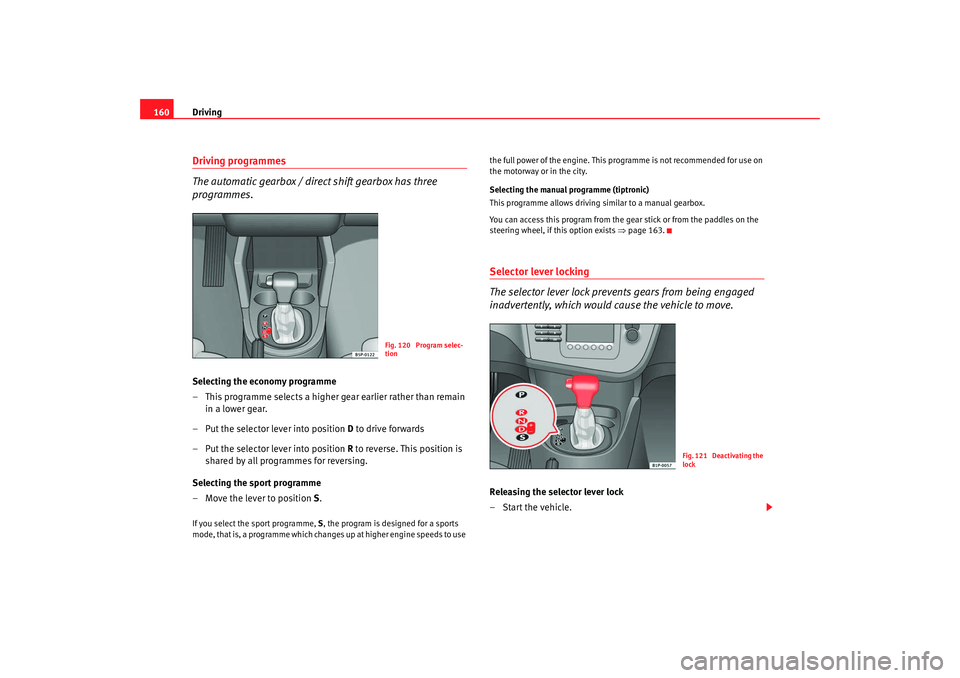
160Driving programmes
The automatic gearbox / direct shift gearbox has three
programmes.Selecting the economy programme
– This programme selects a higher gear earlier rather than remain
in a lower gear.
– Put the selector lever into position D to drive forwards
– Put the selector lever into position R to reverse. This position is
shared by all programmes for reversing.
Selecting the sport programme
– Move the lever to position S.If you select the sport programme, S, the program is designed for a sports
mode, that is, a programme which changes up at higher engine speeds to use the full power of the engine. This pr
ogramme is not recommended for use on
the motorway or in the city.
Selecting the manual programme (tiptronic)
This programme allows driving similar to a manual gearbox.
You can access this program from the gear stick or from the paddles on the
steering wheel, if this option exists ⇒page 163.
Selector lever locking
The selector lever lock prevents gears from being engaged
inadvertently, which would cause the vehicle to move.Releasing the selector lever lock
–Start the vehicle.
Fig. 120 Program selec-
tion
Fig. 121 Deactivating the
lock
leon ingles.book Seite 160 Dienst ag, 11. September 2007 1:47 13
Page 165 of 302
Driving163
Safety First
Operating instructions
Tips and Maintenance
Te c h n i c a l D a t a
Using the Tiptronic gear system
The Tiptronic system allows th e driver to manually select
gears
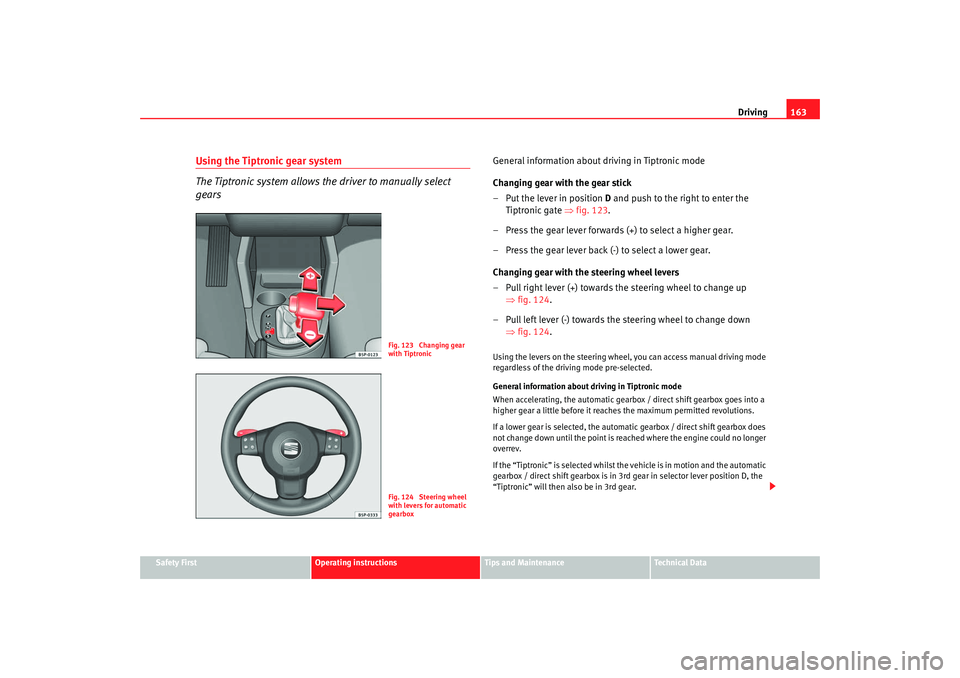
General information about driving in Tiptronic mode
Changing gear with the gear stick
– Put the lever in position D and push to the right to enter the
Tiptronic gate ⇒fig. 123 .
– Press the gear lever forwards (+) to select a higher gear.
– Press the gear lever back (-) to select a lower gear.
Changing gear with the steering wheel levers
– Pull right lever (+) towards the steering wheel to change up ⇒fig. 124.
– Pull left lever (-) towards the steering wheel to change down ⇒fig. 124.Using the levers on the steering wheel, you can access manual driving mode
regardless of the driv ing mode pre-selected.
General information about driving in Tiptronic mode
When accelerating, the automatic gearbox / direct shift gearbox goes into a
higher gear a little before it reac hes the maximum permitted revolutions.
If a lower gear is selected, the automatic gearbox / direct shift gearbox does
not change down until the point is re ached where the engine could no longer
overrev.
If the “Tiptronic” is selected whilst the vehicle is in motion and the automatic
gearbox / direct shift gearbox is in 3rd gear in selector lever position D, the
“Tiptronic” will then also be in 3rd gear.
Fig. 123 Changing gear
with TiptronicFig. 124 Steering wheel
with levers for automatic
gearbox
leon ingles.book Seite 163 Dienst ag, 11. September 2007 1:47 13
Page 166 of 302
Driving
164
Note•
The gearbox controls on the steering wheel can operate with the gear stick
in any position and with the vehicle in motion.
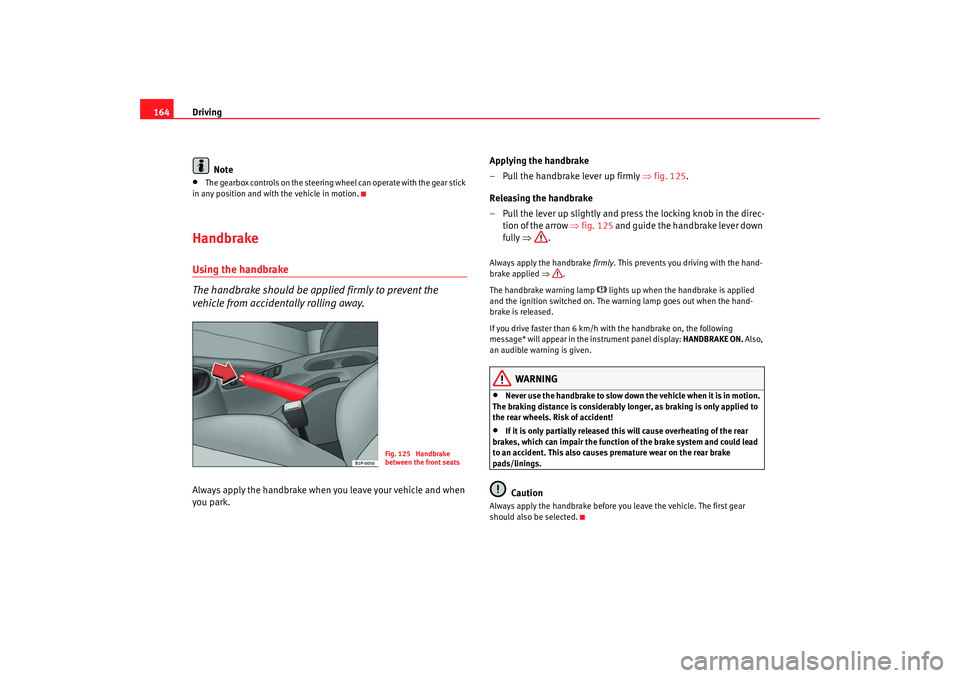
HandbrakeUsing the handbrake
The handbrake should be applied firmly to prevent the
vehicle from accidentally rolling away.Always apply the handbrake when you leave your vehicle and when
you park. Applying the handbrake
– Pull the handbrake lever up firmly ⇒
fig. 125.
Releasing the handbrake
– Pull the lever up slightly and press the locking knob in the direc- tion of the arrow ⇒fig. 125 and guide the handbrake lever down
fully ⇒ .
Always apply the handbrake firmly. This prevents you driving with the hand-
brake applied ⇒.
The handbrake warning lamp
lights up when the handbrake is applied
and the ignition switched on. The warning lamp goes out when the hand-
brake is released.
If you drive faster than 6 km/h with the handbrake on, the following
message* will appear in the instrument panel display: HANDBRAKE ON. Also,
an audible warning is given.
WARNING
•
Never use the handbrake to slow down the vehicle when it is in motion.
The braking distance is considerably longer, as braking is only applied to
the rear wheels. Risk of accident!
•
If it is only partially released this will cause overheating of the rear
brakes, which can impair the function of the brake system and could lead
to an accident. This also causes premature wear on the rear brake
pads/linings.Caution
Always apply the handbrake before you leave the vehicle. The first gear
should also be selected.
Fig. 125 Handbrake
between the front seats
leon ingles.book Seite 164 Dienst ag, 11. September 2007 1:47 13