change wheel Seat Leon 5D 2008 User Guide
[x] Cancel search | Manufacturer: SEAT, Model Year: 2008, Model line: Leon 5D, Model: Seat Leon 5D 2008Pages: 293, PDF Size: 8.67 MB
Page 89 of 293
Steering wheel controls*
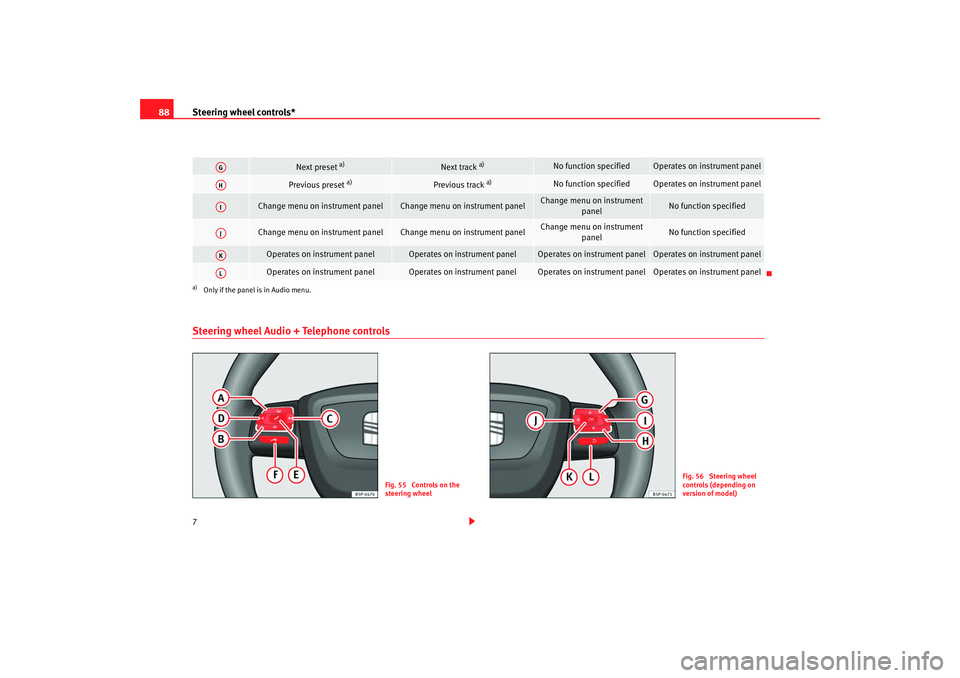
88Steering wheel Audio + Telephone controls7
Next preset
a)
Next track
a)
No function specified
Operates on instrument panel
Previous preset
a)
Previous track
a)
No function specified
Operates on instrument panel
Change menu on instrument panel
Change menu on instrument panel
Change menu on instrument
panel
No function specified
Change menu on instrument panel
Change menu on instrument panel
Change menu on instrument
panel
No function specified
Operates on instrument panel
Operates on instrument panel
Operates on instrument panel
Operates on instrument panel
Operates on instrument panel
Operates on instrument panel
Operates on instrument panel
Operates on instrument panel
a)Only if the panel is in Audio menu.
AGAHAIAJAKAL
Fig. 55 Controls on the
steering wheel
Fig. 56 Steering wheel
controls (depending on
version of model)
leon_ingles Seite 88 Montag, 26. Januar 2009 4:29 16
Page 90 of 293
Steering wheel controls*89
Safety First
Operating instructions
Practical tips
Te c h n i c a l D a t a
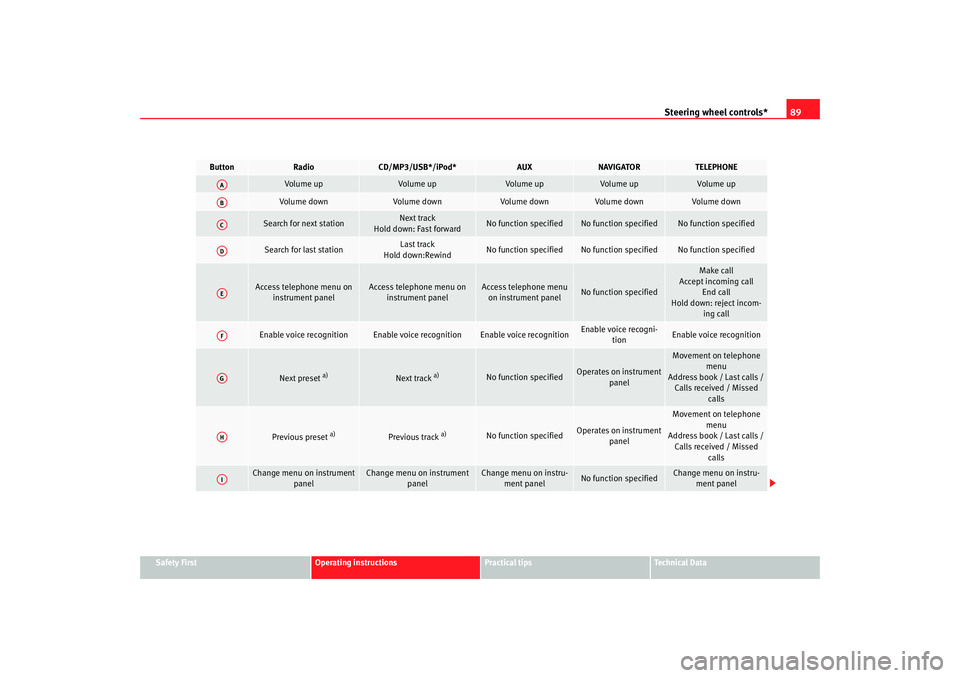
Button
Radio
CD/MP3/USB*/iPod*
AUX
NAVIGATOR
TELEPHONE
Volume up
Vol ume up
Volume up
Vo l u m e u p
Vol ume up
Volume down
Vol ume down
Vol ume down
Volume down
Volume down
Search for next station
Next track
Hold down: Fast forward
No function specified
No function specified
No function specified
Search for last station
Last track
Hold down:Rewind
No function specified
No function specified
No function specified
Access telephone menu on instrument panel
Access telephone menu on instrument panel
Access telephone menu on instrument panel
No function specified
Make call
Accept incoming call
End call
Hold down: reject incom- ing call
Enable voice recognition
Enable voice recognition
Enable voice recognition
Enable voice recogni-tion
Enable voice recognition
Next preset
a)
Next track
a)
No function specified
Operates on instrument
panel
Movement on telephone menu
Address book / Last calls / Calls received / Missed calls
Previous preset
a)
Previous track
a)
No function specified
Operates on instrument panel
Movement on telephone
menu
Address book / Last calls / Calls received / Missed
calls
Change menu on instrument panel
Change menu on instrument panel
Change menu on instru-ment panel
No function specified
Change menu on instru-ment panel
AAABACADAEAFAGAHAI
leon_ingles Seite 89 Montag, 26. Januar 2009 4:29 16
Page 91 of 293
Steering wheel controls*
90
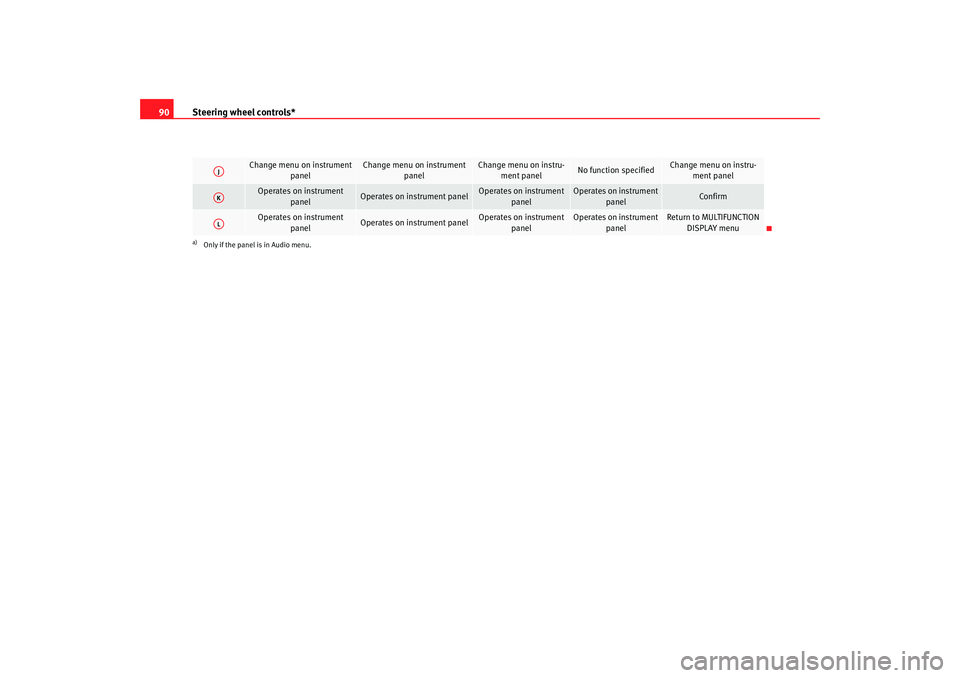
Change menu on instrument
panel
Change menu on instrument panel
Change menu on instru-ment panel
No function specified
Change menu on instru-ment panel
Operates on instrument
panel
Operates on instrument panel
Operates on instrument panel
Operates on instrument panel
Confirm
Operates on instrument panel
Operates on instrument panel
Operates on instrument panel
Operates on instrument panel
Return to MULTIFUNCTION DISPLAY menu
a)Only if the panel is in Audio menu.AJAKAL
leon_ingles Seite 90 Montag, 26. Januar 2009 4:29 16
Page 117 of 293

Lights and visibility
116Indicator and main beam headlight lever
The turn signal and main beam lever also operates the
parking lights and the headlight flasher.The turn signal and main beam headlight lever has the following
functions:
Switching on the turn signals
– Move the lever all the way up ⇒page 116, fig. 76 to indicate
right , and all the way down to indicate left.
Signalling a lane change
– Push the lever up or down to the point where you incur resistance and then release it. The turn signal will flash several
times. The corresponding warning lamp will also flash. Switching main beam on and off
– Turn the light switch to position
.
–Press the lever forward ⇒ page 116, fig. 76 to switch on the
main beams.
– Pull the lever back towards you to switch the main beam head- lights off again.
Headlight flashers
– Pull the lever towards the steering wheel to operate the flasher.
Switching on parking lights
– Switch the ignition off and remove the key from the lock.
– Move the lever up or down to turn the right or left-hand parking lights on, respectively.
WARNING
The main beam can dazzle other driver s. Risk of accident! Never use the
main beam headlights or the headligh t flasher if they could dazzle other
drivers.
Note
•
The turn signals only work when the ignition is switched on. The corre-
sponding warning lamp
or flashes in the instrume nt panel. The warning
lamp
flashes when the turn signals are operated, provided a trailer is
correctly attached and connected to the vehicle. If a turn signal bulb is defec-
tive, the warning lamp flashes at double speed. If the trailer turn signal bulbs
are damaged, warning lamp
does not light up. Change the bulb.
Fig. 76 Indicator and
main beam lever
A1
A2
A1
A2
A3
A4
leon_ingles Seite 116 Montag, 26. Januar 2009 4:29 16
Page 163 of 293

Driving
162the full power of the engine. This pr ogramme is not recommended for use on
the motorway or in the city.
Selecting the manual programme (tiptronic)
This programme allows driving similar to a manual gearbox.
This programme may be accessed using the selector lever or from the
steering wheel controls when this option is fitted ⇒page 164.Selector lever locking
The selector lever lock prevents gears from being engaged
inadvertently, which would cause the vehicle to move.Releasing the selector lever lock
–Start the vehicle. – Press and release the brake pedal, at the same time press the
button on the selector lever.
The lock is only activated when the vehicle is stopped or at a speed of less
than 5 km/h. At higher speeds, the lock is automatically released in position
N.
For rapid changes of position (e.g. from R to D) the lever will not lock. If the
lever remains in the position N more than one second then it is locked. With
the automatic lock, the lever is prevented passing from P and N to any other
gear without first pressing the brake pedal.
The selector lever must be put in the position P in order to remove the key.Driving with an automatic gearbox* / DSG automatic gearbox*
The drive and reverse gears are automatically engaged.
Fig. 123 Deactivating the
lock
Fig. 124 Driving
leon_ingles Seite 162 Montag, 26. Januar 2009 4:29 16
Page 166 of 293

Driving165
Safety First
Operating instructions
Practical tips
Te c h n i c a l D a t a
General information about driving in Tiptronic mode
Changing gear with the gear stick
– Put the lever in position D and press towards the right to enter
the Tiptronic gate ⇒ page 164, fig. 125.
– Press the gear lever forwards (+) to select a higher gear.
– Press the gear lever back (-) to select a lower gear.
Changing gear with the steering wheel levers
– Press the right paddle towards the steering wheel to change up ⇒page 164, fig. 126 .
– Press the left paddle towards the steering wheel to change down ⇒page 164, fig. 126 .Using the levers on the steering wheel, you can access manual driving mode
regardless of the driving mode pre-selected.
General information about driving in Tiptronic mode
When accelerating, the automatic gearbox / direct shift gearbox goes into a
higher gear a little before it reaches the maximum permitted revolutions.
If a lower gear is selected, the automatic gearbox / direct shift gearbox does
not change down until the point is reached where the engine could no longer
overrev.
If the “Tiptronic” is selected whilst the vehicle is in motion and the automatic
gearbox / direct shift gearbox is in 3rd gear in selector lever position D, the
“Tiptronic” will then also be in 3rd gear.
Note
•
The gearbox controls on the steering wheel can operate with the gear stick
in any position and with the vehicle in motion.
HandbrakeUsing the handbrake
The handbrake should be applied firmly to prevent the
vehicle from accidentally rolling away.Always apply the handbrake when you leave your vehicle and when
you park.
A+A–
Fig. 127 Handbrake
between the front seats
leon_ingles Seite 165 Montag, 26. Januar 2009 4:29 16
Page 178 of 293

Intelligent technology177
Safety First
Operating instructions
Practical tips
Te c h n i c a l D a t a
•
With compact temporary spare wheel.
•
When using the snow chains.
•
When driving in deep snow or on soft terrain.
•
When the vehicle is bogged-down, to free it by “rocking.”
The TCS should be switched on again afterwards as soon as possible.
WARNING
•
It must be remembered that TCS cann ot defy the laws of physics. This
should be kept in mind, particular ly on slippery and wet roads and when
towing a trailer.
•
Always adapt your driving style to suit the condition of the roads and
the traffic situation. Do not let the extra safety afforded by TCS tempt you
into taking any risks when driving, this can cause accidents.Caution
•
In order to ensure that TCS function correctly, all four wheels must be
fitted with the same tyres. Any differences in the rolling radius of the tyres can
cause the system to reduce engine power when this is not desired.
•
Modifications to the vehicle (e.g. to the engine, the brake system, running
gear or any components affecting the wh eels and tyres) could affect the effi-
ciency of the ABS and TCS.
XDS*
Driveshaft differentialWhen taking a bend, the driveshaft differential mechanism allows the outer
wheel to turn at a higher speed than the inner wheel. In this way, the wheel
which is turning faster (outer wheel) receives less drive torque than the inner
wheel. This may mean that in certain situations the torque provided to the inner wheel is too high, causing the wheels to spin. On the other hand, the
outer wheel receives a lower drive torque than it could transmit. This causes
an overall loss of lateral grip on the front shaft, resulting in understeering or
“lengthening” of the path.
The XDS system is able, using the ESP sensors and signals, to detect and
correct this effect.
The XDS, via the ESP, brakes the inner wheel thus counteracting the excess
drive torque in this wheel. This means that the path requested by the driver
is more precise,
The XDS system operates in combination with the ESP and is always active,
even when the traction control, TCS, is disconnected.
Electronic stabilisation programme (ESP)*General notes
The electronic stabilisation programme increases the
vehicle's stability on the road.The electronic stabilisation programme helps to reduce the danger of skid-
ding.
The electronic stabilisation programme (ESP) consists of
ABS, EDL, TCS and
Steering manoeuvre recommendations.
Electronic Stabilising Program (ESP)*
ESP reduces the danger of skidding by braking the wheels individually.
The system uses the steering wheel angle and road speed to calculate the
changes of direction desired by the driver, and constantly compares them
with the actual behaviour of the vehi cle. If the desired course is not being
leon_ingles Seite 177 Montag, 26. Januar 2009 4:29 16
Page 182 of 293
Intelligent technology181
Safety First
Operating instructions
Practical tips
Te c h n i c a l D a t a
Caution
•
Never let the brakes “drag” by leaving your foot on the pedal when you do
not really intend to brake. This overhe ats the brakes, resulting in longer stop-
ping distances and greater wear.
•
Before driving down a long, steep gradient, it is advisable to reduce speed
and change to a lower gear (or move the selector lever to a lower gear position
if your car has automatic transmission). This makes use of engine braking
and prolongs the service life of the brakes. If you still have to use the brakes,
it is better to brake firmly at intervals than to apply the brakes continuously.Note
•
If the brake servo is not functioning due to a malfunction, or if the vehicle
has to be towed, you will have to press the brake pedal considerably harder
to make up for the lack of servo assistance.
•
If you wish to equip the car with accessories such as a front spoiler or
wheel covers, it is important that the flow of air to the front wheels is not
obstructed, otherwise the brakes can overheat.
Power steering (servotronic*)
The power steering assists the driver when turning the
steering wheel (with the engine running).The power steering assists the driver by reducing the force needed to turn the
steering wheel. In cars equipped with servotronic* power steering the degree
of power assistance is regulated electronically according to road speed.
The power steering will keep on working in spite servo tronic* device fails. The
degree of power assistance will, however, no longer adapt to different
speeds. If the electronic regulating system is not working properly, this is
most noticeable when turning the steering wheel at low speeds (for instance when parking) – more effort will be requ
ired than usual. The fault should be
corrected by a qualified work shop as soon as possible.
The power steering does not work if the engine is off. In this case the steering
wheel is very hard to turn.
If the steering is held at its turning limit when the car is stationary, this will
place an excessive load on the power steering system. Turning the steering
wheel to its limit places a load on the sy stem, which causes noise. It will also
reduce the idling speed of the engine.
Caution
When the engine is running, do not tu rn the steering wheel to its limit for
more than 15 seconds. Otherwise, there is a risk of damaging the power
steering.
Note
•
If the power steering should fail at any time or the engine is switched off
(for instance when being towed), the car can still be steered. However, more
effort will be required to turn the steering wheel.
•
If the system is leaking or malfunctioning, please take the car to a quali-
fied workshop as soon as possible.
•
The power steering requires a special hydraulic fluid. The container is
located in the engine compartment (front left). The correct fluid level in the
reservoir is important for the power steering to function properly. The
hydraulic fluid level is checked at the Inspection Service.
leon_ingles Seite 181 Montag, 26. Januar 2009 4:29 16
Page 224 of 293

Wheels and tyres223
Safety First
Operating instructions
Practical tips
Te c h n i c a l D a t a
2. The tyre pressures should only be checked when the tyres are
cold. The slightly raised pressures of warm tyres must not be
reduced.
3. Adjust the tyre pressure to the load you are carrying.Tyre pressure
The correct tyre pressure is especially important at high speeds. The pressure
should therefore be checked at least once a month and before starting a
journey.
The sticker with the tyre pressure values can be found on the inside of the
tank flap. The tyre pressure values given are for cold tyres. The slightly raised
pressures of warm tyres must not be reduced ⇒.
WARNING
•
Check the tyre pressure at least once per month. Checking tyre pressure
value is very important. If the tyre pre ssure is too high or too low, there is
an increased danger of accidents - particularly at high speeds.
•
A tyre can easily burst if the pressure is too low, causing an accident!
•
At continuously high speeds, a tyre with insufficient pressure flexes
more. In this way it becomes too hot, and this can cause tread separation
and tyre blow-out. Always observe the recommended tyre pressures.
•
If the tyre pressure is too low or too high, the tyres will wear prema-
turely and the vehicle will not handle well. Risk of accident!For the sake of the environment
Under-inflated tyres will increase fuel consumption.
Tyre pressure monitoring*
The tyre pressure monitoring system constantly checks the
pressure of the tyres.The system uses the speed sensors of the ABS wheels. It operates by
analysing the speed and frequency spectrum of each wheel.
For optimum performance, use genuine SEAT tyres. In addition, check and
adjust tyre pressures regularly.
Whenever the tyre pressures are changed or one or more tyres are changed,
the system should be Reset by pressing the SET switch on the central console.
The system warns the driver in the event of a loss of pressure by means of
symbols and messages in the instrument cluster display. The system uses
ESP ⇒page 177.
Note that tyre pressure also depends on tyre temperature. Tyre pressure
increases about 0.1 bar for each 10°C in tyre temperature increase. The tyre
heats up while the vehicle is being driven and the tyre pressure will rise
accordingly. For this reason, you should only adjust the tyre pressures when
they are cold (i.e. approximately at ambient temperature).
To ensure that the tyre pressure monitoring system works reliably, you should
check and, if necessary, adjust the tyre pressures at regular intervals and
store the correct pressures (reference values) in the system.
A tyre pressure information label is attached to the inside of the fuel tank flap.
WARNING
•
Never adjust tyre pressure when the tyres are hot. This may damage or
even burst the tyres. Risk of accident!
•
An insufficiently inflated tyre flexes a lot more at high speeds and
causes significant heating of the ty re. Under these conditions, the tyre
bead may be released or the tyre may burst. Risk of accident!
leon_ingles Seite 223 Montag, 26. Januar 2009 4:29 16
Page 225 of 293

Wheels and tyres
224
For the sake of the environmentUnder-inflated tyres lead to increased fuel consumption and tyre wear.Significant tyre pressure lossThe tyre symbol
is displayed and indicates that the tyre pressure for a least
one tyre is insufficient.
– Stop the vehicle.
– Switch the engine off.
– Check the tyre(s).
– Change the wheel if necessary.
Tyre service life
The service life of tyres is dependent on tyre pressure, driving
style and fitting.
Fig. 147 Tyre tread wear
indicatorsFig. 148 Diagram for
changing wheels
leon_ingles Seite 224 Montag, 26. Januar 2009 4:29 16