radio Seat Leon 5D 2010 User Guide
[x] Cancel search | Manufacturer: SEAT, Model Year: 2010, Model line: Leon 5D, Model: Seat Leon 5D 2010Pages: 309, PDF Size: 8.2 MB
Page 108 of 309

Unlocking and locking
106Radio frequency remote controlLocking and unlocking the vehicle
The remote control key is used to lock and unlock the vehicle
from a distance.
Using the button ⇒fig. 62 (arrow) on the control, the key blade is released.
Unlocking the vehicle ⇒fig. 62 . The doors and the tailgate are
unlocked.
Locking the vehicle ⇒fig. 62 .
Unlocking the tailgate. Press button ⇒fig. 62 until all the turn signals
on the vehicle flash briefly. When the unlocking button is pressed,
you have 2 minutes to open the door. Once this time has passed, it will lock
again.
Also, the battery indicator on the key ⇒fig. 62 , will flash.
The remote control transmitter and the batteries are integrated in the key. The
receiver is inside the vehicle. The maximum range depends on different
factors. The range is reduced as the batteries start to lose power.
Selective unlocking*
When the button is pressed once the driver door is unlocked, all others
remain locked.
Press the button twice to unlock all doors.
Fig. 62 Assignment of
buttons on the remote
control key
Fig. 63 Range of the
remote control
A1
A2
A3
A3
A1A1
Leon_EN.book Seite 106 Mittwoch, 1. September 2010 6:16 18
Page 109 of 309

Unlocking and locking107
Safety First
Operating Instructions
Practical Tips
Technical Specifications
WARNING
•An improper use of the key can cause serious injuries.•Never leave children or disabled persons in the vehicle. In case of emer-
gency, they may not be able to leave the vehicle and not manage on their
own.•Never forget the keys inside the vehicle. Otherwise, this could result in
serious injuries, accidents or even the theft of your vehicle. Always take the
key with you when you leave the vehicle.•An uncontrolled use of the key could start the engine or activate any
electric equipment (e.g. electric windows), causing risk of accident. The
vehicle can be locked when using the remote control key. This could
complicate the aid in case of emergency.Note
•The remote control can be programmed by means of pressing the
unlocking button once; as a result, only the driver door will unlock. When the
button is pressed once more, all doors and the tailgate will be unlocked.•The remote control functions only when you are in range ⇒page 106,
fig. 63 (red area).•If the vehicle is unlocked using the button, it will lock again auto-
matically if any of the doors or the tailgate are not opened within 30 seconds
after unlocking it. This function prevents the vehicle from remaining unlocked
if the unlock button is pressed by mistake.•If the vehicle cannot be opened and closed using the remote control, the
remote control key will have to be re-synchronised ⇒page 107.
Changing the batteryIf the battery indicator does not flash when the buttons are pushed, the
battery must be replaced.
Caution
The use of inappropriate batteries may damage the radio frequency remote
control. For this reason, always replace the dead battery with another of the
same size and power.
For the sake of the environment
Used batteries must be disposed of at an appropriate waste facility or
through an authorised service, given that their components can affect the
environment.Synchronising the remote control key
If it is not possible to unlock or lock the door with the remote
control, it should be re-synchronised.–Press the ⇒page 106, fig. 62 button on the remote control.
– Then close the vehicle using the key bit within one minute.It is possible that the vehicle could no longer be opened and closed with the
remote control if the button is repeatedly pressed outside of the effective
range of the radio frequency remote control. The remote control key will have
to be resynchronised.
Spare remote control keys are available in your Authorised Service Centres,
where they must be matched to the locking system.
A1
Leon_EN.book Seite 107 Mittwoch, 1. September 2010 6:16 18
Page 146 of 309

Seats and storage compartments
144Electrical sockets
Electrical equipment can be connected to any of the 12 volt
sockets.Electrical accessories may be connected to the 12 volt power socket in the
front centre console ⇒fig. 100 and in the luggage compartment*. The appli-
ances connected to each power point must not exceed a power rating of 120
Watt.
WARNING
The power sockets and the connected accessories will only operate when
the ignition is on or when the engine is running. Improper use of the
sockets or electrical accessories can lead to serious injuries or cause a fire.
To avoid the risk of injury, never leave children alone inside the vehicle.
Note
•The use of electrical appliances with the engine switched off will cause a
battery discharge.•Before using any electrical accessories, see the instructions in
⇒ page 212.Auxiliary audio connection (AUX-IN)*– Lift the AUX cover ⇒fig. 101 .
– Insert the plug as far as possible (see Radio manual).
Fig. 100 Power socket,
front centre console
Fig. 101 Auxiliary audio
connection
Leon_EN.book Seite 144 Mittwoch, 1. September 2010 6:16 18
Page 147 of 309

Seats and storage compartments145
Safety First
Operating Instructions
Practical Tips
Technical Specifications
MEDIA-IN connector*For information concerning the use of this equipment, please see the Radio
handbook.
First-aid kit, warning triangle, fire
extinguisherWarning triangleThe emergency warning triangle can be fitted in the side lining of the luggage
compartment.
Note
•The warning triangle is not part of the vehicle’s standard equipment.First aid kit and fire extinguisherThe first aid kit* can be housed in a storage box in the left side lining of the
luggage compartment.
Fig. 102 Opening
connector on centre
consoleFig. 103 Connector on
the centre console
Fig. 104 Housing for the
emergency warning
triangle in the luggage
compartment
Leon_EN.book Seite 145 Mittwoch, 1. September 2010 6:16 18
Page 156 of 309

Air conditioning
1542C-Climatronic*Control switches
The controls allow separate adjustment of air conditioner settings for the left and right.The air conditioner controls the temperature when the engine is
running and the blower is switched on.
– Turn the temperature control knobs ⇒fig. 110 in order to adjust
the temperature on the left hand side or the right hand side
respectively.
– The functions will be switched on when its buttons are pressed. When these functions are activated, they are indicated on the
radio display. In addition, all these functions are lit with LEDs.
Press the button again to switch off the function.
The temperature can be adjusted separately for the left and right sides of the
vehicle interior.
Button – defrost function for the windscreen. The air drawn in from
outside the vehicle is directed at the windscreen. The air recirculation
mode, if switched on, will be switched off as soon as the defrost function
is switched on. At temperatures over 3 °C, the air conditioning system
will be switched on automatically in order to dehumidify the air. The
button is lit in yellow and the symbol appears on the radio or navigator
display. button – Upper air distribution
button – Centre air distribution
button – Lower air distribution
Fig. 110 On the dash panel: 2C Climatronic controls
A1
<
A2
A3
A4
Leon_EN.book Seite 154 Mittwoch, 1. September 2010 6:16 18
Page 157 of 309

Air conditioning155
Safety First
Operating Instructions
Practical Tips
Technical Specifications
button – Manual air recirculation mode
button – Heated rear window The heating will be switched off auto-
matically approximately 20 minutes after switching on. However, it may
be turned off by pushing the button. The button lights up yellow and the
symbol appears in the display.
button – Automatic temperature, ventilation and air distribution
control ⇒page 156
button - Dual zone synchroniser
button – Switches the 2C-Climatronic on and off ⇒page 157
Blower control ⇒page 157
button – Switches on the air conditioning system
WARNING
For road safety all windows must be clear of ice, snow, and condensation.
This is essential to ensure good visibility. Please familiarise yourself with
the correct operation of the heating and ventilation system, including the
anti-fog/defrost functions for the windscreens.
Note
Please observe the general notes ⇒page 158.
Viewing Climatronic information
Information about the Climatronic system can be displayed
on the radio or radio and navigation screen mounted at
factory.
A5
A6
=
A7
AUTO
A8
DUAL
A9
OFF
A10A11
AC
Fig. 111 Navigation
display with information
about the ClimatronicFig. 112 Radio display
with information about
Climatronic
Leon_EN.book Seite 155 Mittwoch, 1. September 2010 6:16 18
Page 158 of 309

Air conditioning
156The LEDs on the Climatronic controls indicate that the selected function has
been activated.
In addition, the radio or radio and navigation displays mounted at factory
briefly display the current settings of the Climatronic if any are modified.
The symbols used on the radio or radio and navigation displays are the same
as the symbols used for the Climatronic controls.Automatic mode
In automatic mode air temperature, air flow and distribution
are automatically regulated so that a specified temperature is
attained as quickly as possible and then maintained.The temperature can be adjusted separately for the left and right
sides of the vehicle interior.
Switching on automatic mode
–Press the button ⇒page 154, fig. 110 . “AUTO High” is
shown on the radio display (high fan speed).
– Press the button again ⇒page 154, fig. 110 . “AUTO Low”
is shown on the radio display (low fan speed).Depending upon the version and finish, the vehicle may include:
When a temperature of 22 °C (72 °F) is set in automatic mode a comfortable
interior climate is quickly reached. Therefore, we recommend you not to
change this adjustment, except as necessary to suit individual preferences or
particular circumstances. The inside temperature can be set between +18 °C
(64°F) and +26°C (80°F). These are approximate temperatures and the actual temperature may be slightly higher or lower depending on the ambient
conditions.
Climatronic maintains a constant temperature. The temperature of the air
supplied to the interior, the blower speed and the air distribution are regu-
lated automatically. The system also considers the sunlight radiation, so
there is no need for manual readjustment. Therefore,
automatic mode almost
always provides the best comfort for the vehicle occupants throughout the
year.
Automatic mode is switched off whenever an adjustment is made using the
buttons for the air distribution, air flow or or the air recirculation button . The temperature will continue to be regulated within the parameters
manually selected by the user.
Note
There are two automatic modes:•Automatic mode LO: This calculates the air flow for two people.•Automatic mode HI: This calculates the air flow for more than two
people.
AUTOAUTO
<
Leon_EN.book Seite 156 Mittwoch, 1. September 2010 6:16 18
Page 159 of 309

Air conditioning157
Safety First
Operating Instructions
Practical Tips
Technical Specifications
Manual mode
In manual mode you can adjust the air temperature, air flow and distribution as required.Switching on manual mode
– To enter manual mode, press one of the buttons ⇒fig. 113 to
or press the air flow control . The selected function is
shown on the radio or navigator display.Te m p e r a t u r e
There are separate temperature selectors for the left and right sides of the
vehicle interior. The selected temperature is displayed above the selector.
The inside temperature can be set between +18 °C (64 °F) and +26 °C (80 °F).
These are approximate temperatures and the actual temperature may be
slightly higher or lower depending on the ambient conditions.
If a temperature below 18 °C (64 °F) is selected, the display switches to LO In
this setting the system runs at maximum cooling output and the temperature
is not regulated. If a temperature above 26 °C (80 °F) is selected, the display switches to
HI In
this setting the system runs at maximum heating output and the temperature
is not regulated.
Blower
The air flow may be adjusted freely using the control . Always have the
blower running at a low setting to ensure a constant flow of fresh air into the
vehicle. Pushing the button
– to the minimum -1, turns the Climatronic off.
Air distribution
The air distribution is adjusted using the buttons , and . It is also
possible to open and close some of the air vents separately.
Switching the air conditioning on and off
When the button is on (LED lit), the air conditioning system is on.
When the button is off (LED off), the air conditioning system is off.Fig. 113 On the dash panel: 2C Climatronic controls.
A1
A5
A10
A10
ACAC
Leon_EN.book Seite 157 Mittwoch, 1. September 2010 6:16 18
Page 181 of 309
Driving179
Safety First
Operating Instructions
Practical Tips
Technical Specifications
Caution
Please note that low obstacles detected by the system may no longer be
registered by the sensors as the vehicle moves closer, so the system will not
give any further warning. Certain kinds of obstacles (such as wire fences,
chains, thin painted posts or trailer draw bars, etc) may not always be
detected by the system, so take care not to damage the vehicle in such cases.
Note
Please refer to the notes on towing ⇒page 180.SEAT Parking System Plus*: Description
The parking system plus is an acoustic and optical parking
aid.Sensors are located in the front and rear bumpers. When the sensors detect
an obstacle, you are alerted by acoustic and optical signals. The measuring
range of the sensors starts at approximately:
The acoustic signals sound with increasing frequency as you approach the
obstacle. When the vehicle is less than 0.30 m away from the obstacle, the
warning tone will sound continuously. Stop moving immediately!
The volume of the warning beeps will be gradually reduced after about four
seconds if the vehicle remains at a constant distance from a detected
obstacle (it does not affect the permanent acoustic signal).
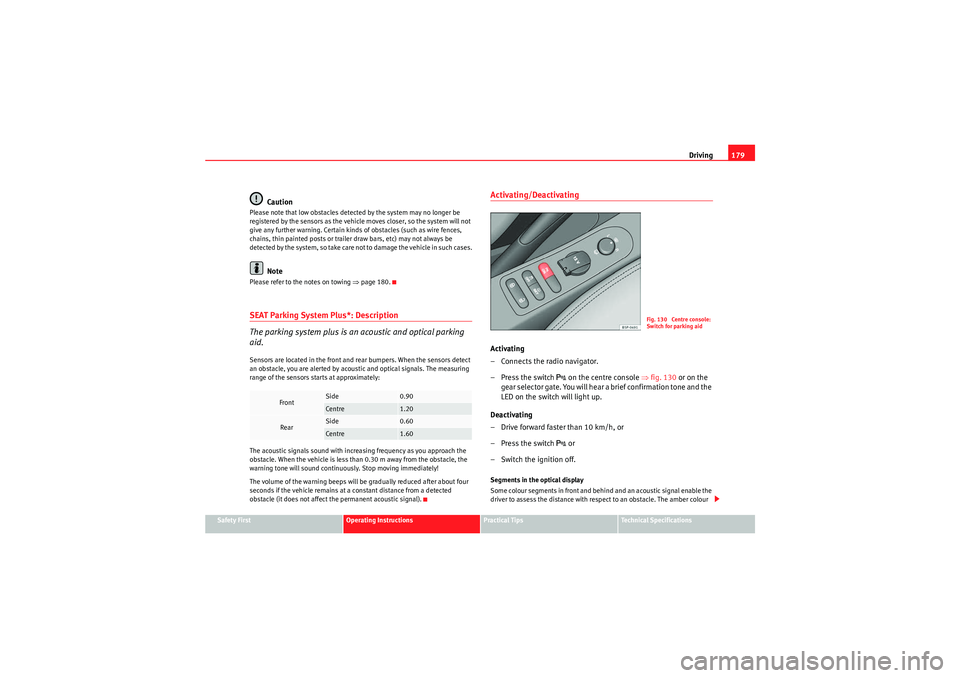
Activating/DeactivatingActivating
– Connects the radio navigator.
–Press the switch
on the centre console ⇒ fig. 130 or on the
gear selector gate. You will hear a brief confirmation tone and the
LED on the switch will light up.
Deactivating
– Drive forward faster than 10 km/h, or
–Press the switch or
– Switch the ignition off.
Segments in the optical display
Som e colour segments in front and behind and an acoustic signal enable the
driver to assess the distance with respect to an obstacle. The amber colour
Front
Side
0.90
Centre
1.20
Rear
Side
0.60
Centre
1.60
Fig. 130 Centre console:
Switch for parking aid
Leon_EN.book Seite 179 Mittwoch, 1. September 2010 6:16 18
Page 206 of 309

Vehicle maintenance and cleaning
204Care of the vehicle exteriorAutomatic car wash tunnel
The vehicle can normally be washed without problem in an
automatic car wash.The vehicle paintwork is so durable that the vehicle can normally be washed
without problems in an automatic car wash tunnel. However, the paintwork
wear depends to a large extent on the kind of the car wash tunnel, the
brushes used, its water filtering and the type of cleaning and preservative
products.
Before going through a vehicle wash, be sure to take the usual precautions
such as closing the windows and sunroof.
If the vehicle has special accessories such as spoilers or a roof rack or two-
way radio aerial, etc., it is advisable to consult the car wash tunnel operator.
After washing, the brakes could take some time to respond as the brake discs
and pads could be wet, or even frozen in winter. Dry the brakes by braking
several times.
WARNING
Water, ice and salt on the brakes can reduce braking efficiency. Risk of acci-
dent.
Caution
If an automatic car wash tunnel is used, before entering the tunnel, put the
aerial down parallel to the roof and do not tighten to avoid damage.
Washing by handVehicle washing
– First soften the dirt and rinse it off with water.
– Clean your vehicle from top to bottom with a soft sponge, a glove or a brush. Use very light pressure.
– Rinse the sponge or glove often with clean water.
– Special car shampoo should only be used for very stubborn dirt.
– Leave the wheels, sill panels etc. until last, using a different sponge or glove.
– Rinse the vehicle thoroughly with water.
– Dry the vehicle surface gently with a chamois leather.
–In cold temperature , dry the rubber seals and their surfaces to
prevent them from freezing. Apply silicone spray to the rubber
seals.
After washing the vehicle
– After washing, avoid sudden and sharp braking. Dry the brakes by braking several times ⇒page 193, “Braking capacity and
braking distance”.
WARNING
•Wash your vehicle with the ignition switched off.•Protect your hands and arms from cuts on sharp metal edges when
cleaning the underbody, the inside of the wheel housings etc. Risk of
injury.
Leon_EN.book Seite 204 Mittwoch, 1. September 2010 6:16 18