radio Seat Leon 5D 2011 MEDIA SYSTEM 2.2
[x] Cancel search | Manufacturer: SEAT, Model Year: 2011, Model line: Leon 5D, Model: Seat Leon 5D 2011Pages: 112, PDF Size: 2.42 MB
Page 25 of 112
24Audio mode
DAB digital radio mode
Introduction
Some units also have a DAB radio receiver. DAB is a broadcasting standard
for the overland reception of radio programmes
Additional Information:
● Safety notes ⇒ page 6
● Unit overview ⇒ page 8
● Basic information on use ⇒ page 10
● Radio mode ⇒ page 14
Note
The radio station is responsible for the content of the broadcast informa-
tion.
Operation
In Europe, digital radio has two DAB broadcasting standards, DAB+ and
DMB radio. The digital radio broadcasts on frequencies from waveband III
(174 MHz to 240 MHz) and waveband L (1452 MHz to 1492 MHz).
The frequencies of both bands are called “channels”, and are abbreviated
accordingly (for example, 12 A).
In one channel, several DAB stations join together with the additional avail-
able services, forming an “Ensemble”.
These additional services are used to send additional information to the ra-
dio (e.g. news, sports, weather, warnings, etc.). DAB is currently
not available in all areas. When the DAB radio mode is ac-
tive, in areas where DAB is not available, the symbol of an aerial crossed
out is displayed.
Depending on the settings, in DAB mode incoming DAB messages are
played (for example, news, sport, weather forecasts, warnings, etc.)
⇒ page 27.
As a general rule, while you are driving the DAB tracking function changes
to the channel of the currently playing digital station with the best recep-
tion. This permits additional settings to be made ⇒ page 27.
Note
If the symbol of a crossed-out aerial is displayed “”, this indicates that
the currently playing digital station on the channel selected is no longer
available in this location.
Note
Some digital stations also offer the radio text service. This is activated in
exactly the same way as for a conventional radio station ⇒ page 21.
Note
The DAB radio receiver is compatible with the DAB and DAB+ standards.
Page 26 of 112
25
Audio mode
Operation
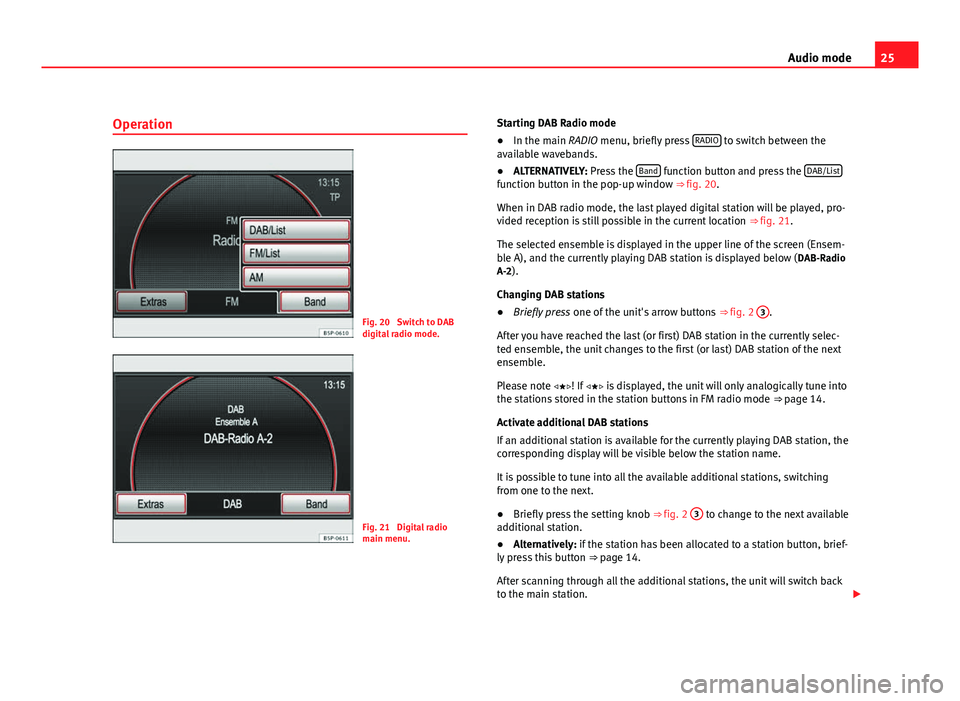
Fig. 20 Switch to DAB
digital radio mode.
Fig. 21 Digital radio
main menu. Starting DAB Radio mode
●
In the main RADIO menu, briefly press RADIO
to switch between the
available wavebands.
● ALTERNATIVELY: Press the Band
function button and press the DAB/Listfunction button in the pop-up window ⇒ fig. 20.
When in DAB radio mode, the last played digital station will be played, pro-
vided reception is still possible in the current location
⇒ fig. 21.
The selected ensemble is displayed in the upper line of the screen (Ensem-
ble A), and the currently playing DAB station is displayed below ( DAB-Radio
A-2).
Changing DAB stations
● Briefly press one of the unit's arrow buttons ⇒ fig. 2 3
.
After you have reached the last (or first) DAB station in the currently selec-
ted ensemble, the unit changes to the first (or last) DAB station of the next
ensemble.
Please note ! If is displayed, the unit will only analogically tune into
the stations stored in the station buttons in FM radio mode ⇒ page 14.
Activate additional DAB stations
If an additional station is available for the currently playing DAB station, the
corresponding display will be visible below the station name.
It is possible to tune into all the available additional stations, switching
from one to the next.
● Briefly press the setting knob ⇒ fig. 2 3
to change to the next available
additional station.
● Alternatively: if the station has been allocated to a station button, brief-
ly press this button ⇒ page 14.
After scanning through all the additional stations, the unit will switch back
to the main station.
Page 27 of 112
26Audio mode
● Alternatively: press the function button Extras
and Additional stations1)
in
the pop-up window.
● Alternatively: switch on the additional stations from the list of DAB sta-
tions ⇒ page 26.
Note
The stations are stored to the station buttons in the same way as that de-
scribed for the conventional radio mode ⇒ page 14.
Note
The scan function stops and starts in the same way as that described for the
conventional Radio mode ⇒ page 14.
DAB station list
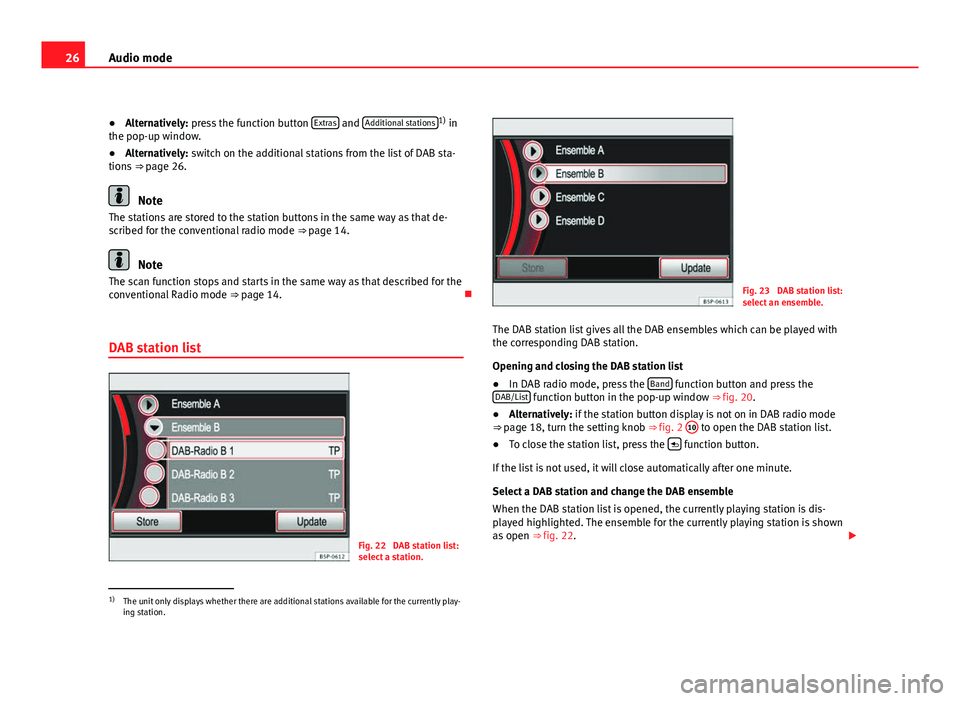
Fig. 22 DAB station list:
select a station.
Fig. 23 DAB station list:
select an ensemble.
The DAB station list gives all the DAB ensembles which can be played with
the corresponding DAB station.
Opening and closing the DAB station list
● In DAB radio mode, press the Band
function button and press the
DAB/List function button in the pop-up window ⇒ fig. 20.
● Alternatively: if the station button display is not on in DAB radio mode
⇒ page 18, turn the setting knob ⇒ fig. 2 10
to open the DAB station list.
● To close the station list, press the function button.
If the list is not used, it will close automatically after one minute.
Select a DAB station and change the DAB ensemble
When the DAB station list is opened, the currently playing station is dis-
played highlighted. The ensemble for the currently playing station is shown
as open ⇒ fig. 22.
1)
The unit only displays whether there are additional stations available for the currently play-
ing station.
Page 28 of 112
27
Audio mode
● Turn and press the setting knob ⇒ fig. 2 10
to select and switch on a
station in an open ensemble.
● Turn the setting knob to the left until the open ensemble has been selec-
ted, for example, Ensemble B
.
● Press the setting knob to close the ensemble display.
● Turn the setting button to select another ensemble ⇒ fig. 23.
● Turn the setting button to open the selected ensemble.
● Switch on the station by touching the screen, or by turning and pressing
the setting knob.
Switching on additional stations on the DAB station list
If there are additional stations for a DAB station, an arrow is displayed be-
fore the name of the station .
If one of these stations is switched on from the list, first another list is
opened for you to select whether you wish to listen to the main station o
one of the additional stations.
Updating the DAB station list
While the stations are being updated, the unit searches the dial for availa-
ble ensembles in the region.
Even though the unit is not operating in DAB mode, the list of DAB stations
will be automatically updated.
The list of digital stations can also be updated manually.
● Press the Update
function button in the DAB station list
⇒ fig. 22.
● Wait until the update has completed.
● Alternatively: press the Cancel
function button.
While the stations are being updated, a pop-up window opens and the vol-
ume of the DAB radio is muted.
The pop-up window closes once the update is complete.
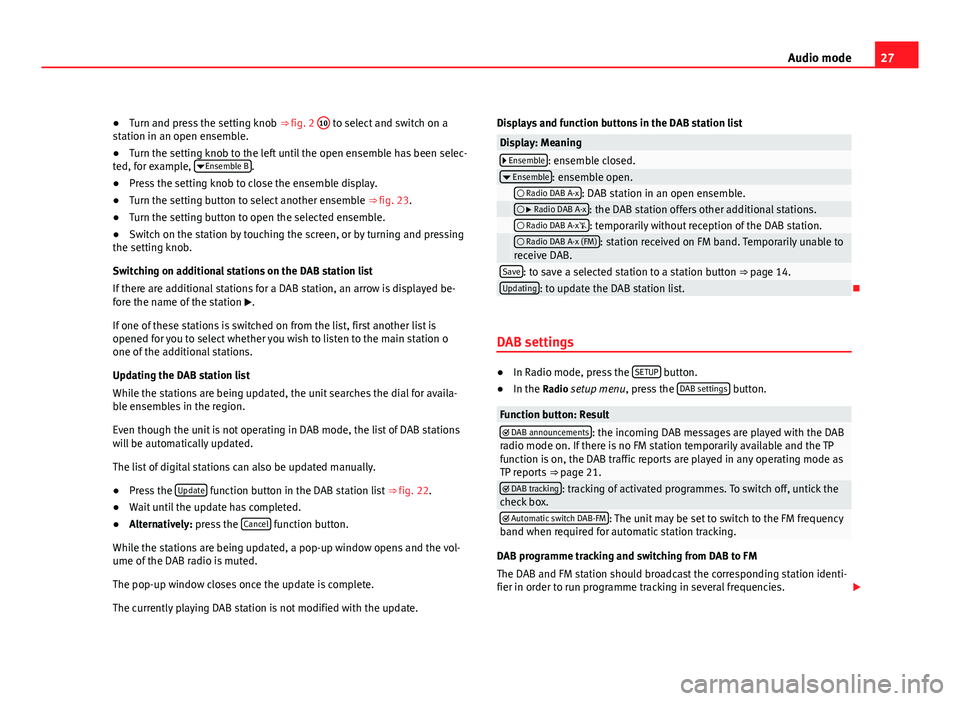
The currently playing DAB station is not modified with the update. Displays and function buttons in the DAB station list
Display: Meaning Ensemble: ensemble closed.
Ensemble: ensemble open. Radio DAB A-x: DAB station in an open ensemble. Radio DAB A-x: the DAB station offers other additional stations. Radio DAB A-x: temporarily without reception of the DAB station. Radio DAB A-x (FM): station received on FM band. Temporarily unable to
receive DAB.
Save: to save a selected station to a station button ⇒ page 14.Updating: to update the DAB station list.
DAB settings
● In Radio mode, press the SETUP button.
● In the Radio setup menu, press the DAB settings button.
Function button: Result DAB announcements: the incoming DAB messages are played with the DAB
radio mode on. If there is no FM station temporarily available and the TP
function is on, the DAB traffic reports are played in any operating mode as
TP reports ⇒ page 21.
DAB tracking: tracking of activated programmes. To switch off, untick the
check box.
Automatic switch DAB-FM: The unit may be set to switch to the FM frequency
band when required for automatic station tracking.
DAB programme tracking and switching from DAB to FM
The DAB and FM station should broadcast the corresponding station identi-
fier in order to run programme tracking in several frequencies.
Page 29 of 112
28Audio mode
When the DAB reception is poor, the unit tries to find and tune into the cor-
responding DAB station in the FM band.
As long as the station is broadcast through the FM band, (FM) is displayed
behind the station name. When the station can be found again in DAB, the
(FM) display disappears.
If the reception of a DAB station is poor and it cannot be found on FM either,
the radio volume is muted.
The DAB programme tracking function can be switched off if you do not wish
to change stations automatically, as the loss of signal is for a short time on-
ly, for example, when driving though a tunnel.
Page 30 of 112
29
Audio mode
Media mode Introduction
“Media sources” are audio sources containing audio files on various differ-
ent data media (e.g. CD, memory card, external MP3 player). These audio
files can be played by the radio and navigation system from its correspond-
ing drives or audio input sockets (internal CD player, memory card slot, ME-
DIA-IN interface, AUX-IN, etc.).
The supported file formats listed are collectively referred to below as “audio
files”. A CD containing audio files of these types is referred to as an “audio
data CD”.
Additional Information:
● Safety notes ⇒ page 6
● Unit overview ⇒ page 8
● Multimedia interface ⇒ page 43
WARNING
● Inserting a data medium while you are driving could distract you from
the road and result in accident.
● The functions described below depend on the device used. There may
be differences with certain devices.
Media source and audio file requirements
Factory-fitted CD players conform to safety class 1 according to
DIN IEC 76 (CO) 6/ VDE 0837.
The unit only accepts 12-cm standard CDs and memory cards with the di-
mensions 32 mm x 24 mm x 2.1 mm or 1.4 mm.
Media sourcesRequirements for playing in the unit Audio CDs with CD Digital
Audio logo .- CD Digital Audio specification.
CD-ROM, CD-R and CD-RW
audio data CDs up to max.
700 MB (megabytes) compli-
ant with ISO 9660 or in the
Joliet file system.
SD and MMC memory
cards up to max. 2 GB (giga-
bytes) and SDHC memory
cards up to max. 32 GB.- MP3 files (.mp3) with bit rates of between
48 and 320 kbit/s or with variable bit rate.
- WMA files (.wma) up to 9.2 mono/stereo
without copy protection.
- Playlists in the formats PLS, M3U and WPL.
- File names and paths no longer than 256
characters.
- Folder structures with a maximum of eight
levels.
- Audio data CDs with max. 50 folders and
max. 500 files.
- Memory cards with max. 5000 folders and
max. 15000 files with max. 6000 files per
folder.
Playing audio files via
Bluetooth ®a)
.- The external audio source must be com-
patible with the Bluetooth A2DP profile.
AUX. External audio source.– Audio output is possible with a 3.5 mm
jack connector ⇒ fig. 2 9.MDI. External data medium.- Compatible with MEDIA-IN multimedia in-
terface ⇒ page 43.
AUX2. Additional external
source- Depending on the vehicle equipment, this
source can be used to play audio from an
external player connected to a Rear Seat En-
tertainment system (only if the vehicle does
not have MDI).
a) Bluetooth ®
is a registered trademark of Bluetooth SIG, Inc.
Restrictions and notes
Dirt, high temperatures or mechanical damage may damage the data medi-
ums. Observe the manufacturer's instructions.
Page 35 of 112
34Audio mode
External audio source connected to the AUX-IN multimedia
socket
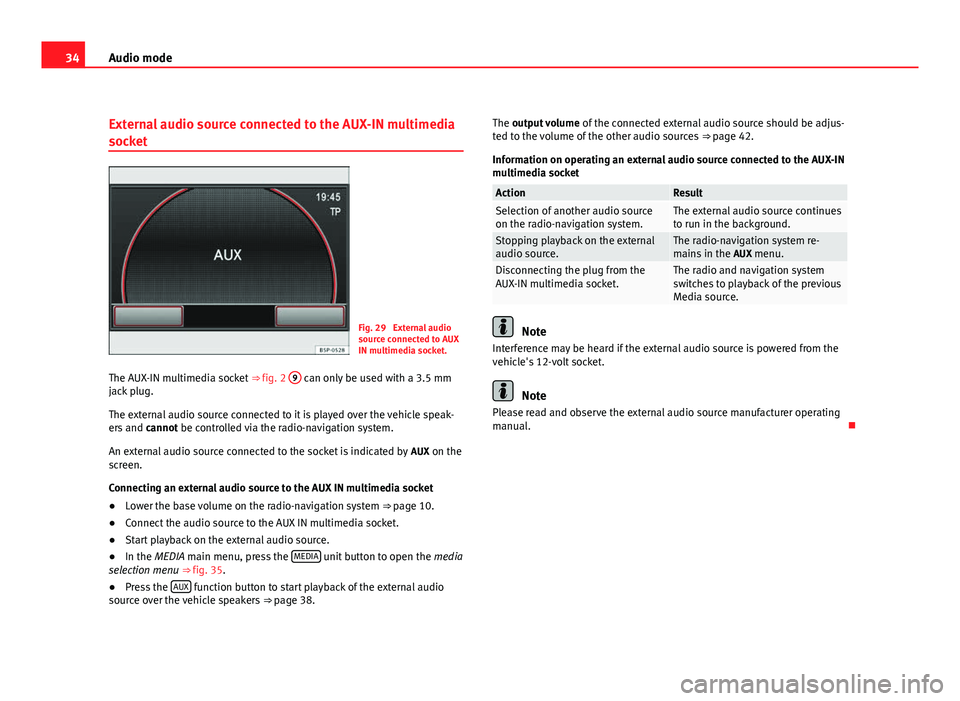
Fig. 29 External audio
source connected to AUX
IN multimedia socket.
The AUX-IN multimedia socket ⇒ fig. 2 9
can only be used with a 3.5 mm
jack plug.
The external audio source connected to it is played over the vehicle speak-
ers and cannot be controlled via the radio-navigation system.
An external audio source connected to the socket is indicated by AUX on the
screen.
Connecting an external audio source to the AUX IN multimedia socket
● Lower the base volume on the radio-navigation system ⇒ page 10.
● Connect the audio source to the AUX IN multimedia socket.
● Start playback on the external audio source.
● In the MEDIA main menu, press the MEDIA
unit button to open the
media
selection menu ⇒ fig. 35.
● Press the AUX
function button to start playback of the external audio
source over the vehicle speakers ⇒ page 38. The output volume
of the connected external audio source should be adjus-
ted to the volume of the other audio sources ⇒ page 42.
Information on operating an external audio source connected to the AUX-IN
multimedia socket
ActionResultSelection of another audio source
on the radio-navigation system.The external audio source continues
to run in the background.
Stopping playback on the external
audio source.The radio-navigation system re-
mains in the AUX menu.
Disconnecting the plug from the
AUX-IN multimedia socket.The radio and navigation system
switches to playback of the previous
Media source.
Note
Interference may be heard if the external audio source is powered from the
vehicle's 12-volt socket.
Note
Please read and observe the external audio source manufacturer operating
manual.
Page 36 of 112
35
Audio mode
Additional AUX2 external audio source
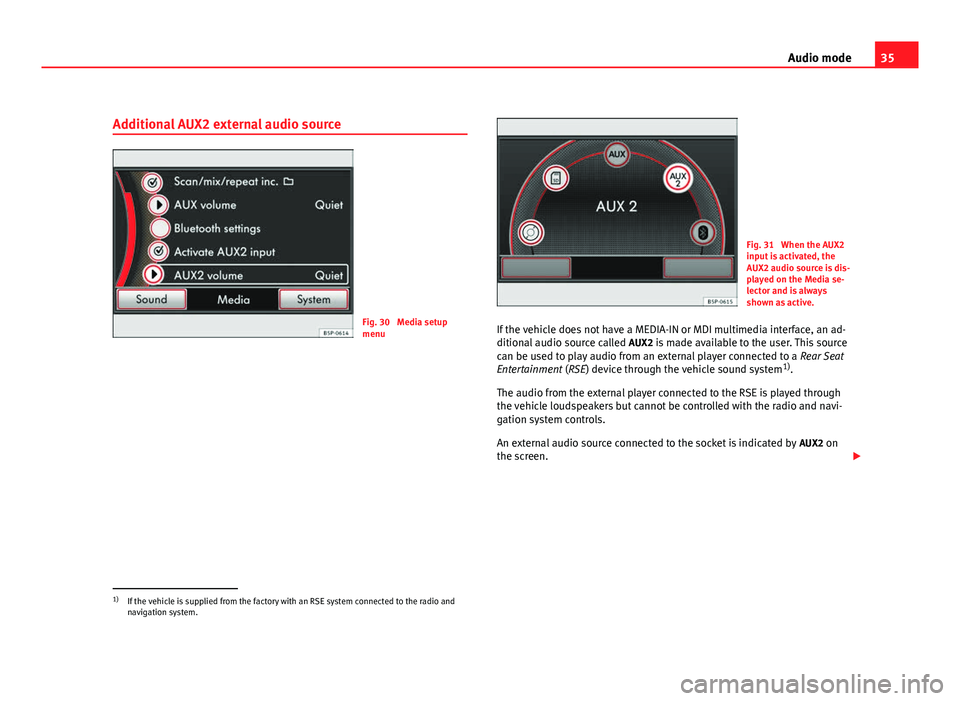
Fig. 30 Media setup
menu
Fig. 31 When the AUX2
input is activated, the
AUX2 audio source is dis-
played on the Media se-
lector and is always
shown as active.
If the vehicle does not have a MEDIA-IN or MDI multimedia interface, an ad-
ditional audio source called AUX2 is made available to the user. This source
can be used to play audio from an external player connected to a Rear Seat
Entertainment (RSE) device through the vehicle sound system 1)
.
The audio from the external player connected to the RSE is played through
the vehicle loudspeakers but cannot be controlled with the radio and navi-
gation system controls.
An external audio source connected to the socket is indicated by AUX2 on
the screen.
1)
If the vehicle is supplied from the factory with an RSE system connected to the radio and
navigation system.
Page 37 of 112
36Audio mode
Playing audio from an RSE system using an additional external audio
source
● Lower the base volume on the radio-navigation system ⇒ page 10.
● Connect the external player to the AUX-RSE connector in the vehicle and
start playback on the external player in accordance with the instructions giv-
en in the RSE handbook.
● In Media mode, press the SETUP
unit button to open the
Media setup
menu. Tick the checkbox Activate AUX2 input so that the AUX2 source is
shown in the Media selection menu 1)
⇒ fig. 30.
● In the MEDIA main menu, press the MEDIA
unit button to open the
Media
selection menu.
● Press the AUX2 ⇒ fig. 31 function button to start playback of the external
audio source connected to the RSE over the vehicle speakers.
The output volume of the connected external audio source should be adjus-
ted to the volume of the other audio sources ⇒ page 42 ( AUX2 volume in
the Media settings menu ⇒ fig. 30).
Things to note about the AUX2 additional external audio source
● If another audio source (CD, SD, etc.) is selected during playback, the
external player connected to the RSE continues playing.
● When playback on the external audio source has finished or if the exter-
nal player is disconnected from the AUX-RSE connector, the radio and navi-
gation system remains in the AUX2 menu.
● The AUX2 symbol remains visible and on (highlighted in red), and there-
fore accessible, as long as the “ Activate AUX2 input” check box in the ( Me-
dia setup menu ) is ticked. The option should be deactivated when playback
has finished. Recommendations for use
●
If your vehicle is not fitted with an RSE system or a MEDIA-IN or MDI mul-
timedia interface, we recommend that the Activate AUX2 input is always left
unticked. Otherwise, the AUX2 source (if your vehicle does not have MDI) or
the “MDI” source may be shown in the Media selection menu as “active”
(accessible), even if there is no audio source connected to them.
● If your vehicle is fitted with a MEDIA-IN or MDI multimedia interface, the
AUX2 additional external source is not available. Use the check box Activate
AUX2 input as described in the section MEDIA-IN or MDI multimedia inter-
face.
1)
This option can also be activated using the function button in the pop-up window which
appears when you try to go to the MEDIA main menu when there is no Media source con-
nected or activated.
Page 38 of 112
37
Audio mode
External audio source connected via Bluetooth ®
Fig. 32 Bluetooth audio
mode.
Fig. 33 Media selection
menu with BT audio se-
lected.
In Bluetooth audio mode, audio files from an external audio source connec-
ted by Bluetooth ®
can be played over the vehicle speakers. The external au-
dio source must be compatible with the Bluetooth A2DP profile. Starting Bluetooth audio transfer
●
Pair or connect the external audio source with the Bluetooth interface of
the radio and navigation system using the “Bluetooth settings” submenu in
the Media settings menu. This submenu allows you to use the Bluetooth
connections using audio devices. It is used in the same way as the “Blue-
tooth Settings” submenu in the Telephone settings menu .
● Lower the base volume on the radio-navigation system ⇒ page 10.
● Start playback on the Bluetooth external audio source.
Depending on the unit, you can start playback of the Bluetooth audio
source via the Media selection menu ⇒ page 37.
Starting Bluetooth audio playback
● In the main menu, press the MEDIA
button to open the Media selection
menu.
● Select the
Bluetooth function button for the mode described
⇒ page 38.
Bluetooth Audio mode is indicated by BT audio or on the screen.
When playback on the external audio source is stopped, the radio-naviga-
tion system remains in the Bluetooth audio menu ⇒ fig. 32. To switch to an-
other audio source, it must be selected manually ⇒ page 38.
Note
The output volume of the connected external audio source should be adjus-
ted to the volume of the other audio sources ⇒ page 42.
Note
Always switch off the warning and service tones on a connected Bluetooth
audio source, e.g. key tones on a mobile telephone, to prevent interference
noise and malfunctions.