phone Seat Leon 5D 2011 MEDIA SYSTEM 2.2
[x] Cancel search | Manufacturer: SEAT, Model Year: 2011, Model line: Leon 5D, Model: Seat Leon 5D 2011Pages: 112, PDF Size: 2.42 MB
Page 4 of 112
Table of Contents
General information . . . . . . . . . . . . . . . . 4
Important Information . . . . . . . . . . . . . . 5
Introduction . . . . . . . . . . . . . . . . . . . . . . . . . . 6
Before using the unit for the first time . . . . . . 6
Safety instructions . . . . . . . . . . . . . . . . . . . . . . . . 6
Versions available . . . . . . . . . . . . . . . . . . . . . . . . . 7
Unit overview . . . . . . . . . . . . . . . . . . . . . . . . . . . . . 8
General operating information . . . . . . . . . . . . . 10
Audio mode . . . . . . . . . . . . . . . . . . . . . . . . . . . 14
Radio mode . . . . . . . . . . . . . . . . . . . . . . . . . . . . . . . 14
RDS radio data and TP (Traffic Programme)
services . . . . . . . . . . . . . . . . . . . . . . . . . . . . . . . . . . . 21
DAB digital radio mode . . . . . . . . . . . . . . . . . . . . 24
Media mode . . . . . . . . . . . . . . . . . . . . . . . . . . . . . . 29
MEDIA-IN multimedia interface . . . . . . . . . . . . . 43
Navigation . . . . . . . . . . . . . . . . . . . . . . . . . . . . 48
Introduction to navigation . . . . . . . . . . . . . . . . . 48
Enter destination . . . . . . . . . . . . . . . . . . . . . . . . . . 54
Destination memory . . . . . . . . . . . . . . . . . . . . . . . 60
Route guidance . . . . . . . . . . . . . . . . . . . . . . . . . . . 65 Telephone control (Phone)
. . . . . . . . 77
Introduction . . . . . . . . . . . . . . . . . . . . . . . . . . . . . . . 77
Main menu . . . . . . . . . . . . . . . . . . . . . . . . . . . . . . . . 83
Control from the steering wheel . . . . . . . . . . . . 85
Instrument panel display . . . . . . . . . . . . . . . . . . 86
Control from the navigation system . . . . . . . . . 89
Operation via voice control . . . . . . . . . . . . . . . . . 94
Settings (SETUP) . . . . . . . . . . . . . . . . . . . . 99
Sound, volume and system settings . . . . . . . . 99
Abbreviations . . . . . . . . . . . . . . . . . . . . . . . . 102
Abbreviations . . . . . . . . . . . . . . . . . . . . . . . . . . . . . 102
Index . . . . . . . . . . . . . . . . . . . . . . . . . . . . . . . . . . . 103
3
Table of Contents
Page 9 of 112
8Introduction
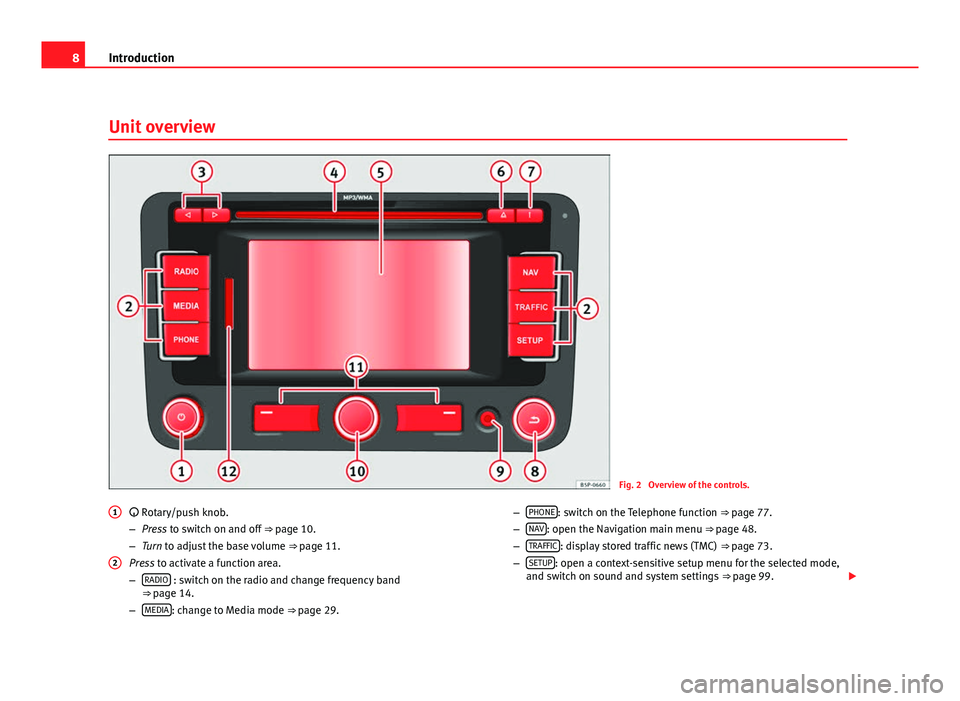
Unit overview
Fig. 2 Overview of the controls.
Rotary/push knob.
– Press to switch on and off ⇒ page 10.
– Turn to adjust the base volume ⇒ page 11.
Press to activate a function area.
– RADIO
: switch on the radio and change frequency band
⇒ page 14.
– MEDIA
: change to Media mode ⇒
page 29.
1
2
–
PHONE: switch on the Telephone function
⇒ page 77.
– NAV: open the Navigation main menu ⇒ page 48.
– TRAFFIC: display stored traffic news (TMC)
⇒ page 73.
– SETUP: open a context-sensitive setup menu for the selected mode,
and switch on sound and system settings ⇒ page 99.
Page 11 of 112
10Introduction
General operating information
Introduction
If system settings are modified, some aspects of the unit's operation may
differ from the descriptions given in this manual. For this reason, SEAT rec-
ommends that you reset the unit to its factory settings the first time you use
it ⇒ page 100.
Additional Information:
● Safety notes ⇒ page 6
● Unit overview ⇒ page 8
● Multifunction steering wheel, to change track or station ⇒ Booklet Own-
er's Manual, chapter Vehicle overview
Note
Lightly pressing the buttons or briefly pressing the touchscreen is sufficient
to operate the unit.
Note
Never press a button down for longer than 10 minutes. Otherwise the sys-
tem will interpret this as a malfunction ( button jammed).
Note
Due to country-specific legislation, certain functions cannot be selected on
the screen when the vehicle is travelling above a certain speed.
Note
Using a mobile telephone in the vehicle may cause noise from the vehicle
speakers.
Note
In some vehicles equipped with a parking distance warning system, the vol-
ume of the current audio source is automatically lowered when reverse gear
is engaged. If talking on the telephone through the radio and navigation
system, the volume of the conversation is also lowered automatically when
reverse gear is engaged.
Note
Restrictions on the use of devices using Bluetooth technology may be appli-
cable in some countries. Please ask your local authority for further informa-
tion.
Switching on and off
With the ignition on, press the rotary/push knob
⇒ fig. 2 1 briefly to
manually switch the unit on or off.
When the unit is switched on, the system starts, and the last selected audio
source is played at the last selected volume, provided this is not greater
than the “start-up volume”.
When the key is removed from the ignition, the radio and navigation unit
automatically switches off. By pressing the rotary/push knob
⇒ fig. 2 1
,
the radio switches on and switches off automatically after approx. 30 mi-
nutes (switch-off delay), or manually if the rotary/push knob is pressed
again.
Anti-theft code
The anti-theft code is stored in the vehicle once it has been entered (con-
venience radio code). The anti-theft coding lock then only needs to be re-
leased manually if the unit is installed in another vehicle. In such a case, a
keypad field and a prompt to enter the code will appear when the unit is
switched on. In this case, you should contact a SEAT dealer.
Page 38 of 112
37
Audio mode
External audio source connected via Bluetooth ®
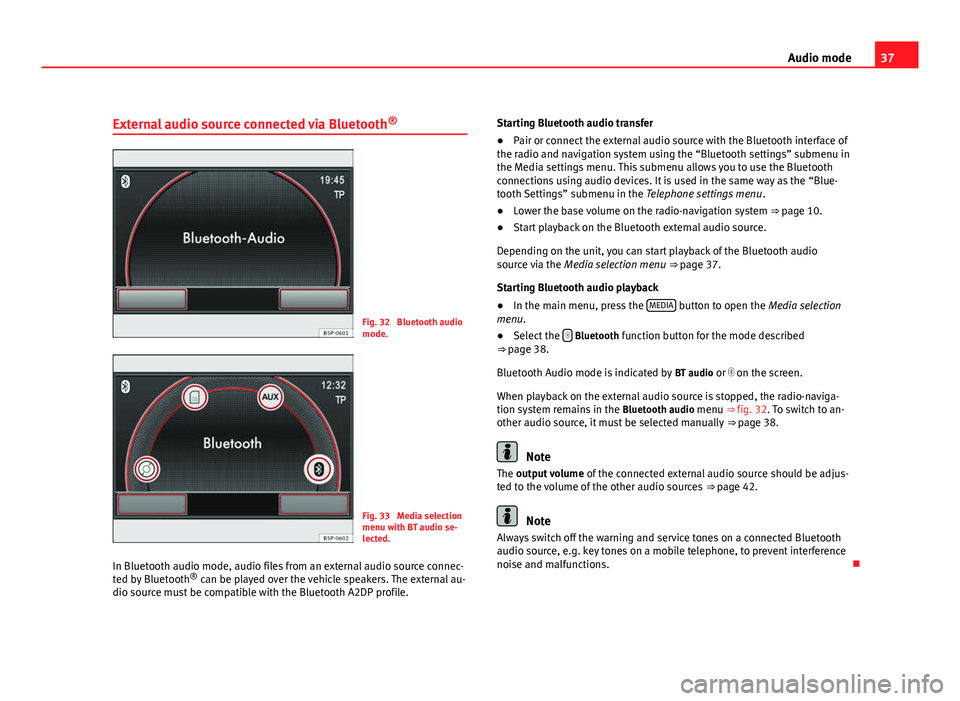
Fig. 32 Bluetooth audio
mode.
Fig. 33 Media selection
menu with BT audio se-
lected.
In Bluetooth audio mode, audio files from an external audio source connec-
ted by Bluetooth ®
can be played over the vehicle speakers. The external au-
dio source must be compatible with the Bluetooth A2DP profile. Starting Bluetooth audio transfer
●
Pair or connect the external audio source with the Bluetooth interface of
the radio and navigation system using the “Bluetooth settings” submenu in
the Media settings menu. This submenu allows you to use the Bluetooth
connections using audio devices. It is used in the same way as the “Blue-
tooth Settings” submenu in the Telephone settings menu .
● Lower the base volume on the radio-navigation system ⇒ page 10.
● Start playback on the Bluetooth external audio source.
Depending on the unit, you can start playback of the Bluetooth audio
source via the Media selection menu ⇒ page 37.
Starting Bluetooth audio playback
● In the main menu, press the MEDIA
button to open the Media selection
menu.
● Select the
Bluetooth function button for the mode described
⇒ page 38.
Bluetooth Audio mode is indicated by BT audio or on the screen.
When playback on the external audio source is stopped, the radio-naviga-
tion system remains in the Bluetooth audio menu ⇒ fig. 32. To switch to an-
other audio source, it must be selected manually ⇒ page 38.
Note
The output volume of the connected external audio source should be adjus-
ted to the volume of the other audio sources ⇒ page 42.
Note
Always switch off the warning and service tones on a connected Bluetooth
audio source, e.g. key tones on a mobile telephone, to prevent interference
noise and malfunctions.
Page 41 of 112
40Audio mode
● Press the Up
function button to open the folder above the currently se-
lected folder ⇒ fig. 37.
● Press a folder on the screen (e.g. F1
) to select another track from that
folder or to open another subfolder .
● ALTERNATIVELY: Turn the setting knob, select the folder and turn and
press the knob again to select the track or open the subfolder .
● Repeatedly pressing the Up
function button moves up through the fold-
er structure until you reach the root directory of the media source that is cur-
rently playing. In the root directory, the Up
function button is disabled. The
Media source currently playing is displayed in the bottom line of the screen
⇒ fig. 37.
If a MEDIA-IN multimedia interface is installed and an iPod ®1)
or iPhone 1)
is
connected, a special iPod selection menu is displayed at the top selection
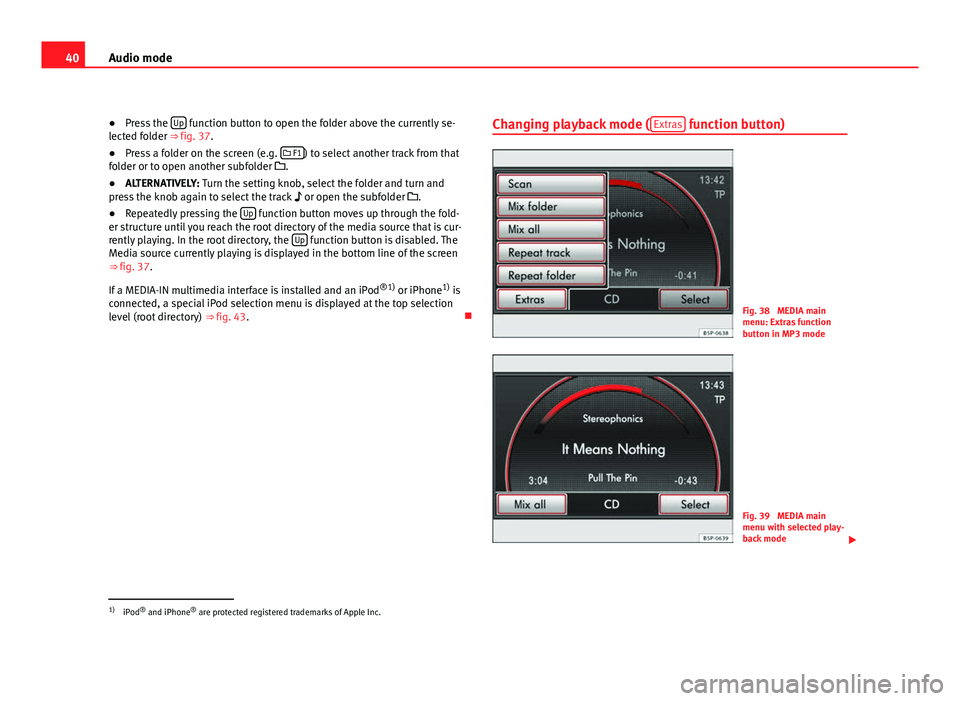
level (root directory) ⇒ fig. 43. Changing playback mode (
Extras
function button)
Fig. 38 MEDIA main
menu: Extras function
button in MP3 mode
Fig. 39 MEDIA main
menu with selected play-
back mode
1)
iPod ®
and iPhone ®
are protected registered trademarks of Apple Inc.
Page 42 of 112
41
Audio mode
Depending on the setting, subfolders may be included in the selected play-
back mode ⇒ page 41. This setting must be defined before the playback
mode is selected.
Starting and stopping a playback mode
The range of playback modes available depends on the selected Media
source and the type of audio files played.
● During playback, press the Extras
function button in the MEDIA main
menu.
● In the pop-up window, press one of the playback modes listed by turn-
ing and pressing the setting knob ⇒ fig. 2 10
.
● The pop-up window will close. The selected playback mode is indicated
in the function button (fig. 39 Mix all
).
● Briefly pressing this function button ends the playback mode and re-
sumes normal playback at the current track.
Refer to the information on the playing order of files and folders ⇒ page 30.
The scan function can also be started or stopped by briefly pressing the set-
ting knob ⇒ fig. 2
Available playback modes
Function button: ResultScan: Each track of the current folder or current Media source will be
played for 10 seconds. The scan function starts at the next track.
Mix: The tracks of the current audio CD will be played in random order.Mix folder: The tracks of the current folder will be played in random order.Mix all: The tracks of the current data medium will be played in random or-
der.
Repeat track: Repeats the currently playing title.Repeat CD: At the end of the current audio CD, its tracks will be played
again.
Function button: ResultRepeat folder: At the end of the current folder, its tracks will be played
again.
The random play and repeat functions remain active for the corresponding
Media source until they are closed for that source.
Media setup menu (SETUP)
In Media mode, press the SETUP unit button to open the
Media setup menu.
The selection options depend on the type of unit and equipment.
Function button: ResultTraffic programme (TP): To activate or deactivate the TP function ⇒ page 21. Scan/Mix/Repeat incl. : Subfolders are included in the selected playback
mode ⇒ page 40.
This setting must be defined before the playback mode is activated.
AUX volume: Adjust the input volume for an external audio source in the
AUX-IN multimedia socket ⇒ fig. 2 9 to the output volume
of the other au-
dio sources ⇒ page 34.
Bluetooth settings: Press to enter the BT settings menu to view the list of de-
vices connected, search for devices, etc.
BT-Audio volume: Adjust the input volume for a Bluetooth audio source to
the playback volume of the other audio sources.
Activating the AUX2 input: Press to activate the AUX2 audio input. If your ve-
hicle does not have an RSE system, or a MEDIA-IN or MDI multimedia inter-
face, this checkbox should always be left unmarked ⇒ page 35.
MDI volume: Adjust the input volume for an iPod®
or iPhone ®
or other de-
vice connected to the MEDIA-IN multimedia interface to the playback vol-
ume of the other audio sources ⇒ page 43.
AUX2 volume: Adjust the input volume for the AUX2 ⇒ table on page 41
external audio source to the playback volume of the other audio sources
⇒ page 34.
10.
Page 45 of 112

44Audio mode
Data medium connection adapter
Use the adapter, supplied in accessories and specific to the vehicle, to con-
nect the external data medium to the MEDIA-IN multimedia interface.
For further information, please see the SEAT web page.
Notes and requirements
Compatible data mediaLegible files and formatsData media compliant with the
USB 2.0 specification.
Data media with the FAT file sys-
tem FAT16 (< < 2 GB) or FAT32 (> 2
GB).
iPods ®
and iPhones ®
of various
generations a)
.
MTP players with the “PlaysFor-
Sure” or “ReadyForVista” logo.- Audio files in MP3, WMA, OGG-Vorbis
and AAC format.
Playlists in PLS, B4S, ASX and WPL for-
mat.
Please read and observe the external data medium operating instructions.a) iPod ®
and iPhone ®
are protected registered trademarks of Apple Inc.
Notes and restrictions
Only audio files that can be read via the MEDIA-IN multimedia interface can
be displayed, played and controlled on the radio and navigation system.
In the case of MTP players and depending on the battery charge and the
quantity of data, it may take a few minutes for them to be ready for use.
If an external data medium is divided into several partitions, only the first
partition with compatible audio files will be played.
Please observe the additional instructions and restrictions regarding the re-
quirements for multimedia sources ⇒ page 29. Connecting and operating
Fig. 42 MEDIA main
menu: MDI multimedia
source (MEDIA-IN multi-
media interface).
Fig. 43 Selection menu
for a connected iPod.
Before connecting or playing an external data medium, turn down the vol-
ume on the radio-navigation system ⇒ page 11.
Page 46 of 112

45
Audio mode
Connecting and disconnecting an external data medium (MDI) - Alhambra
● Connect the appropriate adapter to the MEDIA-IN multimedia interface.
● Connect the external data medium to the MEDIA-IN multimedia interface
via the adapter.
● If necessary, switch on the external data medium or select the appropri-
ate data mode.
Even though the display may indicate otherwise, the external data medium
may be disconnected from the MEDIA-IN multimedia interface at any time
without data loss.
Connecting or disconnecting an external data medium (MDI) - Altea, Altea
XL, Altea Freetrack, Leon
Connecting a mass storage device or player with a USB connection
Connect the device to the USB connector of the MEDIA-IN interface.
If necessary, start playback in the external device.
Connecting an iPod or iPhone in order to control it from the radio and
navigation system
Connect the iPod or iPhone to the MEDIA-IN interface using the cable or
special iPod adapter provided by SEAT.
Connecting an external device to the AUX input of the MEDIA-IN inter-
face
Connect the device to the AUX input of the MEDIA-IN interface with the
right cable.
Even though the display may indicate otherwise, the external data medium
may be disconnected from the MEDIA-IN multimedia interface at any time
without data loss. –
–
– Control through the radio and navigation system
An external data medium correctly connected to the MEDIA-IN multimedia
interface can be controlled through the radio and navigation system.
Depending on the unit, when an external data medium is connected and
switched on, it is necessary to change to the radio and navigation system
manually for playback.
●
Open the MEDIA main menu.
● Press the MEDIA
unit button to open the
Media selection menu.
● Press the MDI function button to start or resume playback from the ex-
ternal data medium.
Further details of the operation of the external data medium (changing
track, selecting tracks and playback modes) are given in the corresponding
chapter of this manual ⇒ page 8.
If the selected media source is disconnected from the MEDIA-IN multimedia
interface while being played, the radio and navigation system will remain in
MDI mode. Another audio source must be selected manually.
Special features. ALTEA and LEON models
Depending on the vehicle equipment, from the radio and navigation unit
and via the MEDIA-IN interface, the user can:
● play and control audio files from a mass storage device or MP3 player
with USB, iPod or iPhone connection.
● play audio from an external player connected to the AUX input of the Me-
dia-IN Interface
● play audio from an external player connected to the AUX input of the
Rear Seat Entertainment system (if fitted in the vehicle)
Sometimes the additional auxiliary input of the MEDIA-IN interface must be
activated in order to use the MDI Media source in the Media selector.
Activation:
Page 47 of 112

46Audio mode
● ticking the Activate AUX2 input check box in the Media Setup Menu or,
● this option can also be activated using the function button in the pop-
up window which appears when you try to go to the MEDIA main menu when
there is no Media source connected or activated.
When should it be activated?
● LEON: to play audio from an iPod (via the SEAT adapter cable) or from an
external device connected to the AUX input of the MEDIA-IN interface.
● ALTEA, ALTEA XL, Freetrack: to play audio from an external player connec-
ted to the AUX input of the Rear Seat Entertainment system (if fitted in the
vehicle)
iPod ®
and iPhone ®
When an iPod ®
or iPhone ®
is connected, a special iPod selection menu is
displayed at the top selection level of the track view ⇒ fig. 43. This iPod se-
lection menu always has the same structure and is operated in the familiar
way.
The music controls on the connected iPod ®
or iPhone ®
are disabled.
The output volume of a connected iPod ®
or iPhone ®
should be adjusted to
the volume of the other audio sources ⇒ page 42. Possible error messages after connecting an external data medium
Error messageCauseProcedureDevice not suppor-
tedPlayback from the ex-
ternal data medium or
communication via the
adapter cable used is
not possible.Test the adapter cable.
If possible, update the soft-
ware for the external data
medium.
Unit not ready for
operationCommunication inter-
rupted.Check the connection and
make sure the external data
medium is working correctly.
Due to the large number of different data media and various iPod
®
and
iPhone ®
generations available, it is not possible to guarantee fault-free
operation of all functions described here.
Note
External audio sources connected to the AUX socket of the MEDIA-IN inter-
face can be played through the radio and navigation system, but cannot be
controlled from there. To control the external audio source, please see the
manufacturer's instructions. As long as the external audio source is not
switched off, it will continue operating even if another source starts to play
in the radio and navigation system.
Note
The MDI symbol remains visible and on (highlighted in red), and therefore
accessible, as long as the “Activate AUX2 input” check box (Media setup
menu) is ticked. The option should be deactivated when playback has fin-
ished.
Page 78 of 112
77
Telephone control (Phone)
Telephone control (Phone) Introduction
Introduction
The telephone functions described below may be controlled using the radio
and navigation system, and by voice control, provided that there is a mobile
phone switched on and with the BT function on. In addition, the mobile
must be connected and paired via Bluetooth to the radio and navigation
system.
For the connection between the mobile phone and the radio and navigation
system, the mobile phone must have Bluetooth®
and it must be activated.
If no mobile phone is connected to the radio and navigation system, tele-
phone control from the navigator and voice control will not be available.
● Pair and connect the mobile phone to the radio and navigation system
⇒ page 80.
When the mobile phone has been paired with the navigation system, the
phone can be controlled via the navigation system and the multifunction
controls on the steering wheel using the vehicle instrument panel. Func-
tions available include making calls in hands-free mode, access to the mo-
bile phone book, access to the list of calls received, missed and recently di-
alled, and control of these functions using the voice recognition system.
The hands-free device means that the telephone can be used inside the ve-
hicle; the driver will not have to remove their hands from the steering wheel
nor will be distracted from traffic.
Please observe instructions concerning the use of mobile phones in vehi-
cles without an external aerial ⇒ page 79.
WARNING
Telephone calls and the use of the mobile phone pre-installation while
driving may distract the driver from the road and result in accident.
● You should always drive with due care and attention.
● Select volume settings that allow you to easily hear signals from out-
side the vehicle at all times, e.g. emergency service sirens.
● Your call may be cut off or you may be unable to make calls if you are
in an area with no mobile phone network coverage, an area where the
network is very weak or, in some cases, in a tunnel, garage or underpass.
This also means that no emergency calls can be made.
WARNING
If your mobile phone is loose and is not securely fastened, it could be
thrown around the vehicle interior in the event of sudden braking, sharp
movements or accident and cause injury to passengers.
● While the vehicle is in motion, always secure the mobile phone prop-
erly outside the airbag deployment zone.
WARNING
Mobile phones may affect the operation of pacemakers. Always maintain
a suitable distance between the phone and the pacemaker.
● Maintain a gap of roughly 20 centimetres between the aerials of the
mobile phone and the pacemaker, as mobile phones may affect the func-
tioning of pacemakers.