gearbox Seat Leon 5D 2011 User Guide
[x] Cancel search | Manufacturer: SEAT, Model Year: 2011, Model line: Leon 5D, Model: Seat Leon 5D 2011Pages: 302, PDF Size: 4.17 MB
Page 171 of 302

169
Driving
speeds to use the full power of the engine. This programme is not
recommended for use on the motorway or in the city.
Selecting the manual programme (tiptronic)
This programme allows driving similar to a manual gearbox.
This programme may be accessed using the selector lever or from the steer-
ing wheel controls when this option is fitted ⇒ page 171.
Selector lever locking
The selector lever lock prevents gears from being engaged
inadvertently, which would cause the vehicle to move.
Fig. 125 Deactivating
the lock
Releasing the selector lever lock
– Start the vehicle.
– Press and release the brake pedal, at the same time press the
button on the selector lever. The lock is only activated when the vehicle is stopped or at a speed of less
than 5 km/h. At higher speeds, the lock is automatically released in posi-
tion N.
For rapid changes of position (e.g. from
R to D) the lever will not lock. If the
lever remains in the position N more than one second then it is locked. With
the automatic lock, the lever is prevented passing from P and N to any other
gear without first pressing the brake pedal.
The selector lever must be put in the position P in order to remove the key.
Driving with an automatic gearbox* / DSG automatic
gearbox*
The drive and reverse gears are automatically engaged.
Fig. 126 Driving
Driving
– Press and hold the foot brake.
Safety FirstOperating InstructionsPractical TipsTechnical Specifications
Page 172 of 302
170Driving
–Press the button on the selector lever knob (on the left)
⇒ fig. 126.
– Select a gear for driving ( R, D or S).
– Release the button and wait a few seconds for the gear to en-
gage, a light jerk will be felt.
– Release the brake and accelerate.
Short stop
– Hold the vehicle stationary with the brake pressed down (for ex-
ample at traffic lights). The selector lever does not need to be
put into the positions P or N for this.
– Do not press the accelerator.
Parking the vehicle
– Press the brake pedal and hold to bring the vehicle to a stop.
– Apply the handbrake firmly.
– Press in the button on the selector lever knob, move the lever to
the position P and release the button.
Driving slowly
– Move the selector lever to position D and press to the right to
put the lever into tiptronic mode.
– Press the gear lever towards (-) to select a lower gear.
Hill stop
– Hold the vehicle, in all cases, using the brake pedal to prevent
rolling back. –
Do not try to slow the vehicle using another forward gear (en-
gine braking).
Descending gradients
– With the gear engaged, release the brake and accelerate.
The steeper the gradient the lower the gear must be for effective engine
braking. For example, if 3rd gear is used on a very steep gradient, the en-
gine braking is insufficient and vehicle accelerates. So that the engine
speed does not become excessive, the gearbox changes to the next highest
gear. Depress the brake pedal and move the selector lever to the tiptronic
gate to return to 3rd gear.
WARNING
● The driver should never leave the vehicle while the engine is running
or with any gear selected. If for any reason you must leave the vehicle
with the engine running, apply the handbrake and move the selector lev-
er to position P.
● When the engine is running and the positions D, S or R are selected,
it is necessary to hold the vehicle with the brake pedal because the vehi-
cle will creep at a low speed.
● Never accelerate while changing the position of the gear lever (risk of
an accident).
● The gear lever must never be moved into the positions R or P while
moving (risk of an accident).
● Before descending a steep gradient, reduce speed and use the tip-
tronic programme to select a lower gear.
● If you must stop on a hill, always hold the vehicle using the footbrake
to avoid rolling back.
Page 173 of 302
171
Driving
WARNING (Continued)
● The footbrake must not be held for a long period of time, not even
lightly; continuous braking will cause overheating of the brakes and a re-
duction or even a loss of braking power and a significant increase in
braking distances.
● Never allow the vehicle to coast down a gradient with the selector lev-
er in positions N or D, even when the engine is not running. For descents,
the use of the tiptronic programme is recommended to keep the speed
reduced.
CAUTION
● Never use the automatic gearbox to hold the vehicle stationary on a hill,
even for short periods, as this may overheat the gearbox and cause dam-
age. Apply the handbrake or depress the foot brake to hold the vehicle in
position.
● If the vehicle is allowed to roll with the engine stopped but the selector
in position N then the gearbox may be damaged because it will not be lubri-
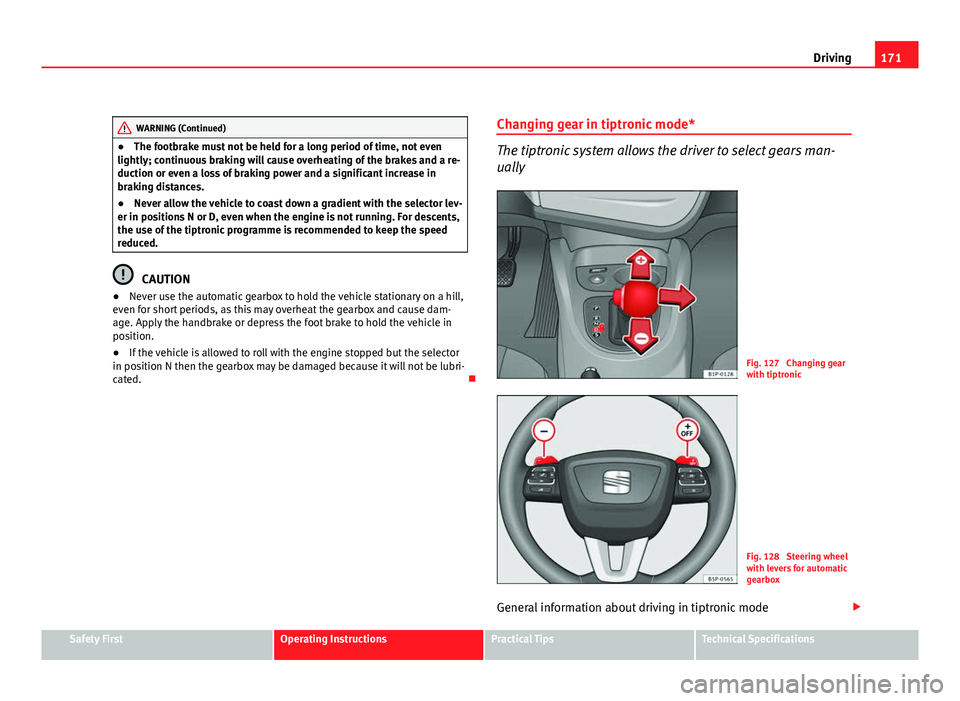
cated. Changing gear in tiptronic mode*
The tiptronic system allows the driver to select gears man-
ually
Fig. 127 Changing gear
with tiptronic
Fig. 128 Steering wheel
with levers for automatic
gearbox
General information about driving in tiptronic mode
Safety FirstOperating InstructionsPractical TipsTechnical Specifications
Page 174 of 302
172Driving
Changing gear with the selector lever
–Put the lever in position D and press towards the right to enter
the tiptronic gate ⇒ fig. 127.
– Press the gear lever forwards +
⇒ fig. 127 to select a higher
gear.
– Press the gear lever back –
⇒ fig. 127 to select a lower gear.
Changing gear with the steering wheel levers
– Press the right paddle lever +
(+OFF) towards the steering
wheel to change up ⇒ fig. 128.
– Press the left paddle –
towards the steering wheel to change
down ⇒ fig. 128.
Using the paddle levers on the steering wheel, you can access manual driv-
ing mode regardless of the pre-selected driving mode.
General information about driving in tiptronic mode
When accelerating, the automatic gearbox / DSG automatic gearbox goes
into a higher gear a little before the engine reaches its maximum permitted
revolutions.
If a lower gear is selected, the automatic gearbox / DSG automatic gearbox
will only change down when the engine cannot go over its maximum permit-
ted revolutions.
If tiptronic is selected whilst the vehicle is in motion and the automatic
gearbox / DSG automatic gearbox is in third gear and selector lever position
D, tiptronic mode will then also be in third gear.
Changing gears in the normal or sport programme using the steering wheel
paddle levers
If the paddle levers ⇒ fig. 128 are used in the normal or sport programme,
the system switches temporarily to tiptronic mode. To exit tiptronic mode again, press the right paddle lever
+ OFF
towards the steering wheel for ap-
proximately one second. You will also leave tiptronic mode if the paddle lev-
ers are not moved for a certain time.
Note
● The gearbox controls on the steering wheel can operate with the selector
lever in any position and with the vehicle in motion.
Kickdown feature
This feature allows maximum acceleration. If you press the accelerator down thoroughly, the gearbox automatically
changes down, depending on speed and engine speed, into a lower gear to
take full advantage of give the vehicle maximum acceleration.
The gearbox does not change gear until the engine reaches the maximum
determined engine speed for the gear.
WARNING
You could lose control of the vehicle if you accelerate on slippery road
surfaces. Risk of serious injury.
● Be particularly careful when using the kickdown features on slippery
road surfaces. With a fast acceleration, the vehicle could lose traction
and skid.
● You should use the kickdown feature only when traffic and weather
conditions allow it to be used safely.
Page 183 of 302
181
Driving
Vehicles with a manual gearbox
The system is completely turned off by moving the control B
all the way to
the right hand side (OFF engaged), or when the vehicle is stationary,
ignition off.
Vehicles with automatic gearbox / DSG automatic gearbox
To completely disengage the system, the selector lever must be placed in
one of the following positions: P, N, R or 1 or with the vehicle stopped and
the ignition turned off.
Safety FirstOperating InstructionsPractical TipsTechnical Specifications
Page 194 of 302
192Driving and the environment
Drive anticipating the traffic situation
A vehicle uses most fuel when accelerating. When you anticipate the situa-
tion, you have to brake less often and, thus, accelerate less. If it is possible,
let the vehicle roll with a gear engaged, for example, if you see a red light
ahead. The braking effect achieved in this way helps to reduce the wear of
brakes and tyres; emissions and fuel consumption are reduced to zero (dis-
connection due to inertia).
Change gear early to save energy
An effective way of saving fuel is to change up quickly through the gears.
Running the engine at high rpm in the lower gears uses an unnecessary
amount of fuel.
Manual gearbox: Change from first to second gear as quickly as possible.
We recommend that, whenever possible, you change to a higher gear upon
reaching 2000 rpm. Follow the “recommended gear” indication that ap-
pears on the instrument panel ⇒ page 62.
Avoid driving at high speed
We advise you not to drive at the top speed permitted by the vehicle. Fuel
consumption, exhaust emissions and noise levels all increase very rapidly
at higher speeds. Driving at moderate speeds will help to save fuel.
Avoid idling
It is worthwhile switching off the engine when waiting in a traffic jam, at lev-
el crossings or at traffic lights with a long red phase. The fuel saved after
only 30 - 40 seconds is greater than the amount of fuel needed to restart
the engine.
The engine takes a long time to warm up when it is idling. Mechanical wear
and pollutant emissions are also especially high during this initial warm-up
phase. It is therefore best to drive off immediately after starting the engine.
Avoid running the engine at high speed.
Periodic maintenance
Periodic maintenance work guarantees that, before beginning a journey,
you will not consume more than the required amount of fuel. A well-serviced engine gives you the benefit of
improved fuel efficiency as well as maxi-
mum reliability and an enhanced resale value.
A badly serviced engine can consume up to 10% more fuel than necessary.
Avoid short journeys
To reduce the consumption and emission of polluting gases, the engine and
the exhaust filtration systems should reach the optimum service tempera-
ture.
With the engine cold, fuel consumption is proportionally higher. The engine
does not warm up and fuel consumption does not normalise until having
driven approximately four kilometres. This is why we recommend avoiding
short trips whenever possible.
Maintain the correct tyre pressures
Bear in mind that keeping the tyres at an adequate pressure saves fuel. If
the tyre pressure is just one bar too low, fuel consumption can increase by
as much as 5%. Due to the greater rolling resistance, under-inflation also
increases tyre wear and impairs handling.
The tyre pressures should always be checked when the tyres are cold.
Do not use winter tyres all year round as they increase fuel consumption by
up to 10%.
Avoid unnecessary weight
Every kilo of extra weight will put up the fuel consumption, so it is worth
checking the luggage compartment occasionally to make sure that no un-
necessary loads are being transported.
A roof rack is often left in place for the sake of convenience, even when it is
no longer needed. At a speed of 100-120 km/h your vehicle will use about
12% more fuel as a result of the extra wind resistance caused by the roof
rack even when it is not in use.
Page 245 of 302
243
If and when
– All passengers should leave the vehicle. They should wait in a
safe area (for instance behind the roadside crash barrier).
– Switch off the engine. Switch on the hazard warning lights.
– Apply the handbrake firmly.
– Engage the first gear , or put the selector lever to position P for
those vehicles with an automatic gearbox.
– If you are towing a trailer, unhitch it from your vehicle.
– Take the vehicle tools and the spare wheel out of the luggage
compartment.
WARNING
Put the hazard warning lights on and place the warning triangle in posi-
tion. This is for your own safety and also warns other road users.
CAUTION
If you have to change the wheel on a gradient, block the wheel opposite the
wheel being changed by placing a stone or similar object under it to prevent
the vehicle from rolling away.
Note
Please observe legal requirements when doing so.
Changing a wheel
Change the wheel as described below
– Pull off the hub cap. See ⇒ fig. 155. –
Slacken the wheel bolts.
– Raise the car with the jack at the corresponding point.
– Remove the wheel and then mount the spare wheel
– Lower the vehicle.
– Tighten the wheel bolts firmly with the box spanner.
– Replace the wheel trim.
After changing a wheel
After changing the wheel there are still tasks to complete. – Put the tools and jack back in the luggage compartment.
– Place the wheel with the defective tyre in the luggage compart-
ment and secure it.
– Check the tyre pressure of the newly fitted tyre as soon as pos-
sible.
– Have the tightening torque of the wheel bolts checked as soon
as possible with a torque wrench. The prescribed torque must
be 120 Nm.
Note
● If you notice that the wheel bolts are corroded and difficult to turn when
changing a wheel, they must be replaced before having the wheel bolt tor-
que checked.
● For safety reasons, drive at moderate speeds until the wheel bolt tight-
ening torque has been checked.
Safety FirstOperating InstructionsPractical TipsTechnical Specifications
Page 254 of 302
252If and when
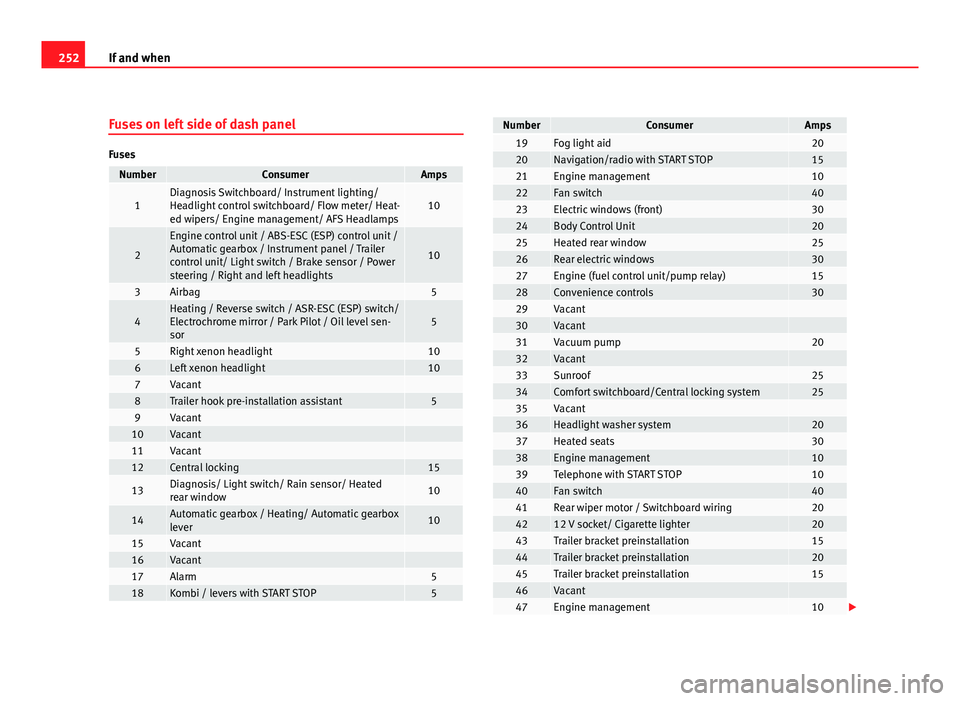
Fuses on left side of dash panel
Fuses
NumberConsumerAmps
1Diagnosis Switchboard/ Instrument lighting/
Headlight control switchboard/ Flow meter/ Heat-
ed wipers/ Engine management/ AFS Headlamps10
2
Engine control unit / ABS-ESC (ESP) control unit /
Automatic gearbox / Instrument panel / Trailer
control unit/ Light switch / Brake sensor / Power
steering / Right and left headlights
10
3Airbag5
4Heating / Reverse switch / ASR-ESC (ESP) switch/
Electrochrome mirror / Park Pilot / Oil level sen-
sor5
5Right xenon headlight106Left xenon headlight107Vacant 8Trailer hook pre-installation assistant59Vacant 10Vacant 11Vacant 12Central locking15
13Diagnosis/ Light switch/ Rain sensor/ Heated
rear window10
14Automatic gearbox / Heating/ Automatic gearbox
lever10
15Vacant 16Vacant 17Alarm518Kombi / levers with START STOP5
NumberConsumerAmps19Fog light aid2020Navigation/radio with START STOP1521Engine management1022Fan switch4023Electric windows (front)3024Body Control Unit2025Heated rear window2526Rear electric windows3027Engine (fuel control unit/pump relay)1528Convenience controls3029Vacant 30Vacant 31Vacuum pump2032Vacant 33Sunroof2534Comfort switchboard/Central locking system2535Vacant 36Headlight washer system2037Heated seats3038Engine management1039Telephone with START STOP1040Fan switch4041Rear wiper motor / Switchboard wiring204212 V socket/ Cigarette lighter2043Trailer bracket preinstallation1544Trailer bracket preinstallation2045Trailer bracket preinstallation1546Vacant 47Engine management10
Page 255 of 302
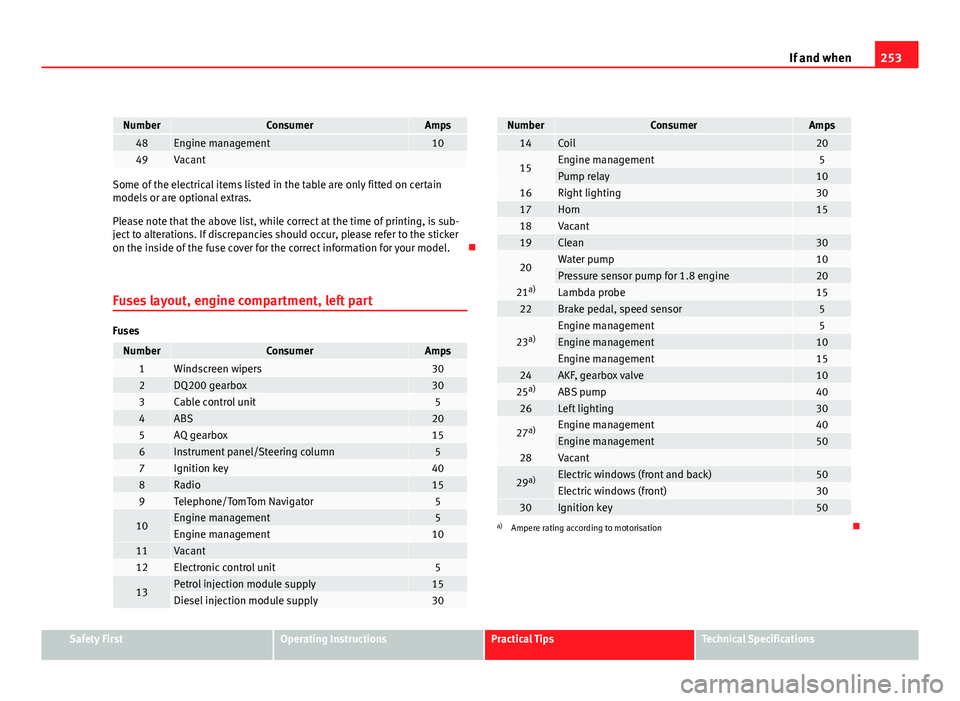
253
If and when
NumberConsumerAmps48Engine management1049Vacant
Some of the electrical items listed in the table are only fitted on certain
models or are optional extras.
Please note that the above list, while correct at the time of printing, is sub-
ject to alterations. If discrepancies should occur, please refer to the sticker
on the inside of the fuse cover for the correct information for your model.
Fuses layout, engine compartment, left part
Fuses
NumberConsumerAmps1Windscreen wipers302DQ200 gearbox303Cable control unit54ABS205AQ gearbox156Instrument panel/Steering column57Ignition key408Radio159Telephone/TomTom Navigator5
10Engine management5Engine management1011Vacant 12Electronic control unit5
13Petrol injection module supply15Diesel injection module supply30
NumberConsumerAmps14Coil20
15Engine management5Pump relay1016Right lighting3017Horn1518Vacant 19Clean30
20Water pump10Pressure sensor pump for 1.8 engine2021 a)Lambda probe1522Brake pedal, speed sensor5
23a)Engine management5Engine management10Engine management1524AKF, gearbox valve1025a)ABS pump4026Left lighting30
27a)Engine management40Engine management5028Vacant
29a)Electric windows (front and back)50Electric windows (front)3030Ignition key50a)
Ampere rating according to motorisation
Safety FirstOperating InstructionsPractical TipsTechnical Specifications
Page 269 of 302
267
If and when
Do not pull too hard with the towing vehicle and take care to avoid jerking
the tow-rope. When towing on an unpaved road, there is always a risk of
overloading and damaging the anchorage points.
The ignition of the vehicle being towed must be switched on to prevent the
steering wheel from locking and also to allow the use of the turn signals,
horn, windscreen wipers and washers.
As the brake servo does not work if the engine is not running, you must ap-
ply considerably more pressure to the brake pedal than you normally would.
As the power assisted steering does not work if the engine is not running,
you will need more strength to steer than you normally would.
Towing vehicles with an automatic gearbox
● Put the selector lever into position “N”.
● Do not drive faster than 50 km/h.
● Do not tow further than 50 km.
● If a breakdown vehicle is used, the vehicle must be towed with the front
wheels raised.
Note
● Observe legal requirements when towing or tow-starting.
● Switch on the hazard warning lights of both vehicles. However, observe
any regulations to the contrary.
● For technical reasons, vehicles with an automatic gearbox must not be
tow-started.
● If damage to your vehicle means that there is no lubricant in the gear-
box, you must raise the drive wheels while the vehicle is being towed.
● If the vehicle has to be towed more than 50 km, the front wheels should
be raised during towing, and towing should be carried out by a qualified
person. ●
The steering wheel is locked when the vehicle has no electrical power.
The vehicle must then be towed with the front wheels raised. Towing should
be carried out by a qualified person.
● The towing eye should always be kept in the vehicle. Please refer to the
notes on ⇒ page 266.
Safety FirstOperating InstructionsPractical TipsTechnical Specifications