warning Seat Leon 5D 2011 Service Manual
[x] Cancel search | Manufacturer: SEAT, Model Year: 2011, Model line: Leon 5D, Model: Seat Leon 5D 2011Pages: 302, PDF Size: 4.17 MB
Page 53 of 302
51
Child safety
Securing child seats
Ways to secure a child seat
A child seat can be secured differently on the rear seat and
on the front passenger seat. You can secure a child seat to the rear seat or front passenger seat in the
following ways:
● Child seats in groups 0 to 3 can be secured with a seat belt.
● Child seats in groups 0, 0+ and 1 with the ISOFIX and Top Tether* sys-
tems can be secured without using the seatbelt, thanks to the ISOFIX and
Top Tether* securing rings ⇒ page 51.
CategoryWeightSeat locationsFront passen-
gerRear outerRear centre
Group 0<10 kgU*U/LUGroup 0+<13 kgU*U/LUGroup 19-18 kgU*U/LUGroup 2 / 315-36 kgU*UU
Suitable for universal approved restraining systems for use in this age
category (universal retention systems are those fitted using the adult
seat belt).
Move the front passenger seat as far back as possible, as high as pos-
sible and always deactivate the airbag.
Suitable for retention systems using the ISOFIX and Top Tether* an-
chors.
U:
*:
L:
WARNING
● When travelling, children must be secured in the vehicle with a re-
straint system suitable for age, weight and size.
● Never install a child seat facing backwards on the front passenger
seat unless the front passenger airbag has been disabled. This could
cause fatal injuries to the child! However, if, in exceptional cases, it is
necessary to transport a child in the front passenger seat, the front pas-
senger airbag ⇒ page 44, Deactivating airbags* must always be disabled
and the seat adjusted to its highest position, where possible.
● Read and always observe information and warnings concerning the
use of child seats ⇒ page 46.
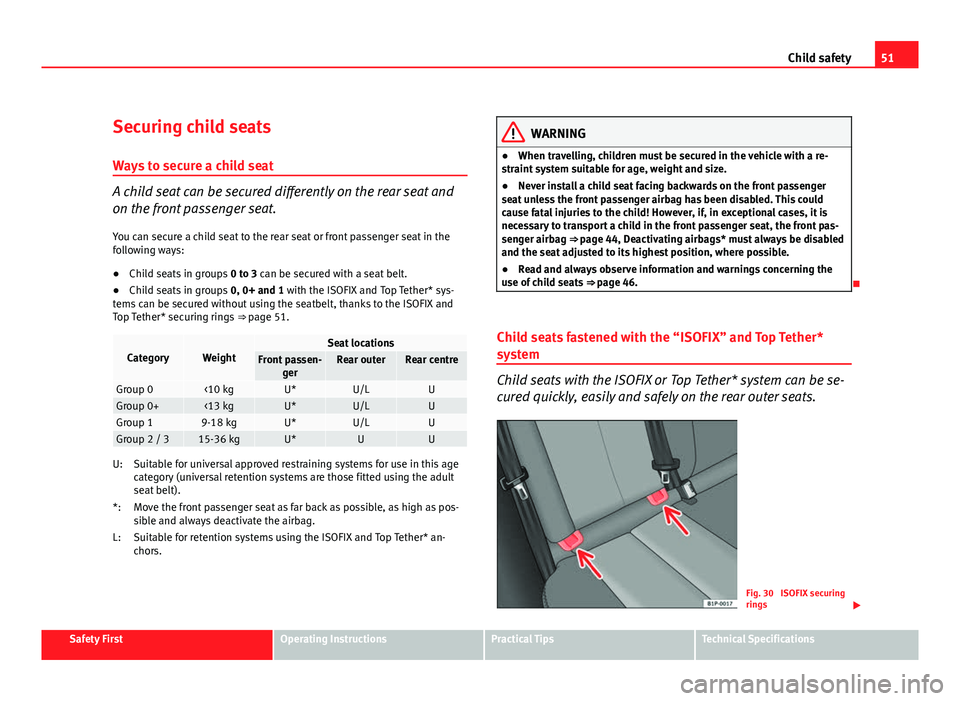
Child seats fastened with the “ISOFIX” and Top Tether*
system
Child seats with the ISOFIX or Top Tether* system can be se-
cured quickly, easily and safely on the rear outer seats.
Fig. 30 ISOFIX securing
rings
Safety FirstOperating InstructionsPractical TipsTechnical Specifications
Page 54 of 302
52Child safety
When removing or fitting the child seat, please be sure to follow
the manufacturer's instructions.
–Move the seat as far to rear as it will go.
– Press the child seat onto the ISOFIX retaining rings until the
child seat can be heard to engage securely. If the child seat is
equipped with Toptether* anchor points, secure it to the corre-
spondent ring. Observe the manufacturer's instructions.
– Pull on both sides of the child seat to ensure that it is secure.
Two ISOFIX retaining rings are fitted on each rear seat. In some vehicles, the
rings are secured to the seat frame and, in others, they are secured to the
rear floor. The access to the ISOFIX rings is between the rear seat backrest
and the seat cushioning. The Top Tether* anchors are located at the rear of
the backs seats (behind the seat or in the luggage compartment).
Child seats with the ISOFIX and Top Tether* attachment system are available
from the Authorised Service Centres.
WARNING
● The securing rings are designed only for use with ISOFIX and Top
Tether* child seats.
● Never secure child seats that do not have the ISOFIX and Top Tether*
system, retaining belts or other objects to the securing rings – this could
result in potentially fatal injuries to the child!
● Ensure that the child seat is secured correctly using the “ISOFIX” and
Top Tether* securing rings.
Page 57 of 302
55
Cockpit
Operating Instructions Cockpit
Overview Overview of the dash panel
This overview will help you to familiarise yourself with the
controls and displays. Door release lever
Light switch . . . . . . . . . . . . . . . . . . . . . . . . . . . . . . . . . . . . . . . . . . . . . . . 115
Lighting control for instrument and control lighting . . . . . . . . .119
Headlight range control . . . . . . . . . . . . . . . . . . . . . . . . . . . . . . . . . . . 119
Air vent
Turn signal and main beam lever and cruise control system* 122, 178
Controls on the steering wheel . . . . . . . . . . . . . . . . . . . . . . . . . . . . . 91
Instrument panel:
– Instruments . . . . . . . . . . . . . . . . . . . . . . . . . . . . . . . . . . . . . . . . . . . . 57
– Display . . . . . . . . . . . . . . . . . . . . . . . . . . . . . . . . . . . . . . . . . . . . . . . . 61
– Indicator lamps . . . . . . . . . . . . . . . . . . . . . . . . . . . . . . . . . . . . . . . . . 77
Horn (works only when the ignition is on)/ Driver front airbag . .30
Windscreen wiper and washer lever and operation of the
multifunction display* . . . . . . . . . . . . . . . . . . . . . . . . . . . . . . . . . . . . . 125, 63
Left seat heating button . . . . . . . . . . . . . . . . . . . . . . . . . . . . . . . . . . . 136
1
2345678
910
11
Controls for
–
Heating* and ventilation . . . . . . . . . . . . . . . . . . . . . . . . . . . . . . . . 145
– Climatic* . . . . . . . . . . . . . . . . . . . . . . . . . . . . . . . . . . . . . . . . . . . . . . . 147
– Climatronic* . . . . . . . . . . . . . . . . . . . . . . . . . . . . . . . . . . . . . . . . . . . . 151
Radio/Navigator*
Right seat heating button . . . . . . . . . . . . . . . . . . . . . . . . . . . . . . . . . . 136
Front passenger airbag . . . . . . . . . . . . . . . . . . . . . . . . . . . . . . . . . . . . 30
Glove compartment lever . . . . . . . . . . . . . . . . . . . . . . . . . . . . . . . . . . 138
Cup holder compartment . . . . . . . . . . . . . . . . . . . . . . . . . . . . . . . . . . 139
Selector lever . . . . . . . . . . . . . . . . . . . . . . . . . . . . . . . . . . . . . . . . . . . . . 168
Controls on the centre console:
– Central locking . . . . . . . . . . . . . . . . . . . . . . . . . . . . . . . . . . . . . . . . . 97
– ESC (ESP) . . . . . . . . . . . . . . . . . . . . . . . . . . . . . . . . . . . . . . . . . . . . . . 184
– Tyre pressure monitoring
– Park Pilot* . . . . . . . . . . . . . . . . . . . . . . . . . . . . . . . . . . . . . . . . . . . . . 175
– Cigarette lighter / Power socket . . . . . . . . . . . . . . . . . . . . . . . . . 140
– Exterior mirror adjustment . . . . . . . . . . . . . . . . . . . . . . . . . . . . . . 130
– Start-Stop* . . . . . . . . . . . . . . . . . . . . . . . . . . . . . . . . . . . . . . . . . . . . . 164
Handbrake . . . . . . . . . . . . . . . . . . . . . . . . . . . . . . . . . . . . . . . . . . . . . . . . 173
Hazard warning light switch . . . . . . . . . . . . . . . . . . . . . . . . . . . . . . . 120
Warning lamp for deactivated front passenger airbag . . . . . . .44
Pedals
Ignition lock . . . . . . . . . . . . . . . . . . . . . . . . . . . . . . . . . . . . . . . . . . . . . . 159
Steering column control lever* . . . . . . . . . . . . . . . . . . . . . . . . . . . . . 157
12
13141516171819
202122232425
Safety FirstOperating InstructionsPractical TipsTechnical Specifications
Page 60 of 302

58Cockpit
Fuel gauge and reserve indicator
Fig. 33 Instrument pan-
el: fuel gauge
Instrument panel: fuel gauge
The fuel tank has a capacity of approx. 55 litres.
When the needle reaches the reserve area ⇒ fig. 33 (arrow), the warning
lamp will light up and an acoustic signal will sound reminding the driver to
refuel. At this point there are still 7 litres of fuel in the tank.
The following text appears on the instrument panel display 1)
PLEASE REFUEL
[XXX]*. Engine coolant temperature gauge
This gauge shows the engine coolant temperature.
Fig. 34 Instrument pan-
el: engine coolant tem-
perature gauge
Needle in cold zone A
Avoid high engine speeds and heavy engine loads
⇒ fig. 34.
Needle in normal zone B
In normal driving conditions, the needle should be in the middle section of
the scale. The temperature may also rise when the engine is working hard,
especially at high outside temperatures. This is no cause for concern as
long as the warning lamp does not light up and no warning message* ap-
pears on the instrument panel display.
1)
Depending on the version of the model.
Page 61 of 302
59
Cockpit
Needle in warning zone C
The warning lamp* ⇒ fig. 48 2 will light up if the needle is in the warning
zone. The following warning message appears on the instrument panel dis-
play 1)
. Stop the vehicle and switch off the engine. Check the coolant level
⇒ page 224 ⇒
.
Even if the coolant level is correct do not continue driving. You should ob-
tain technical assistance.
WARNING
When working in the engine compartment, always observe the safety
warnings ⇒ page 217.
CAUTION
Accessories in front of the air inlet reduce the cooling effect of the coolant.
At high outside temperatures and high engine loads, there is a risk of the
engine overheating.
Rev counter
The rev counter displays the engine speed in revolutions per
minute. The start of the red zone ⇒ fig. 32 4
indicates the maximum engine speed
operating at service temperature. However, it is advisable to change up a in-
to a higher gear, move the selector lever to D or lift your foot off the acceler-
ator before the needle reaches the red zone.
CAUTION
The rev counter needle must never enter the red zone on the scale. Risk of
engine damage.
For the sake of the environment
Changing up into higher gears sooner, following the recommended gear in-
dications ⇒ fig. 38 will help you to reduce fuel consumption, emissions and
also engine noise.
Speedometer
The speedometer is equipped with a digital odometer and a trip recorder, in
addition to a service intervals display.
During the running-in period, the instructions shown on ⇒ page 189
should be followed.
Setting the digital clock*
The digital clock is located in the instrument panel display.
– Turn the setting knob ⇒ fig. 32 5
clockwise until the first
“click” to set the hour. The hour will flash. To change the hour,
press the button.
– Turn the setting knob clockwise to the second “click” to set the
minutes. The minutes will flash. To change the minutes, press
the button.
1)
Depending on the version of the model.
Safety FirstOperating InstructionsPractical TipsTechnical Specifications
Page 62 of 302
60Cockpit
LPG system*
LPG gauge
Fig. 35 Instrument pan-
el: gas gauge.
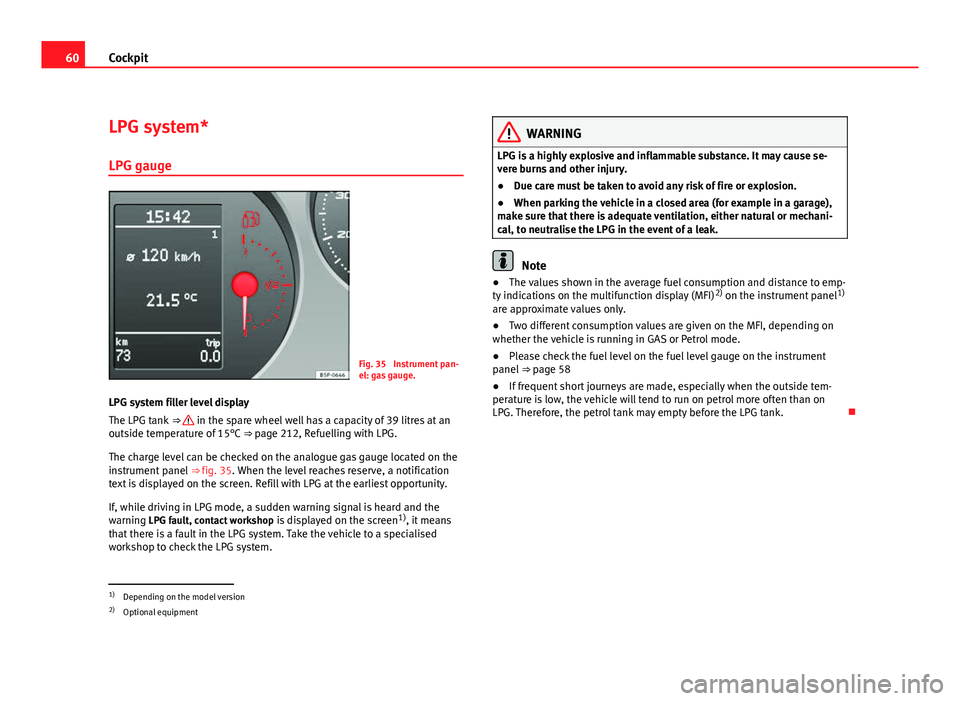
LPG system filler level display
The LPG tank ⇒
in the spare wheel well has a capacity of 39 litres at an
outside temperature of 15°C ⇒ page 212, Refuelling with LPG.
The charge level can be checked on the analogue gas gauge located on the
instrument panel ⇒ fig. 35. When the level reaches reserve, a notification
text is displayed on the screen. Refill with LPG at the earliest opportunity.
If, while driving in LPG mode, a sudden warning signal is heard and the
warning LPG fault, contact workshop is displayed on the screen1)
, it means
that there is a fault in the LPG system. Take the vehicle to a specialised
workshop to check the LPG system.
WARNING
LPG is a highly explosive and inflammable substance. It may cause se-
vere burns and other injury.
● Due care must be taken to avoid any risk of fire or explosion.
● When parking the vehicle in a closed area (for example in a garage),
make sure that there is adequate ventilation, either natural or mechani-
cal, to neutralise the LPG in the event of a leak.
Note
● The values shown in the average fuel consumption and distance to emp-
ty indications on the multifunction display (MFI) 2)
on the instrument panel 1)
are approximate values only.
● Two different consumption values are given on the MFI, depending on
whether the vehicle is running in GAS or Petrol mode.
● Please check the fuel level on the fuel level gauge on the instrument
panel ⇒ page 58
● If frequent short journeys are made, especially when the outside tem-
perature is low, the vehicle will tend to run on petrol more often than on
LPG. Therefore, the petrol tank may empty before the LPG tank.
1)
Depending on the model version
2) Optional equipment
Page 63 of 302
61
Cockpit
Digital instrument panel display
Display (without warning or information texts)
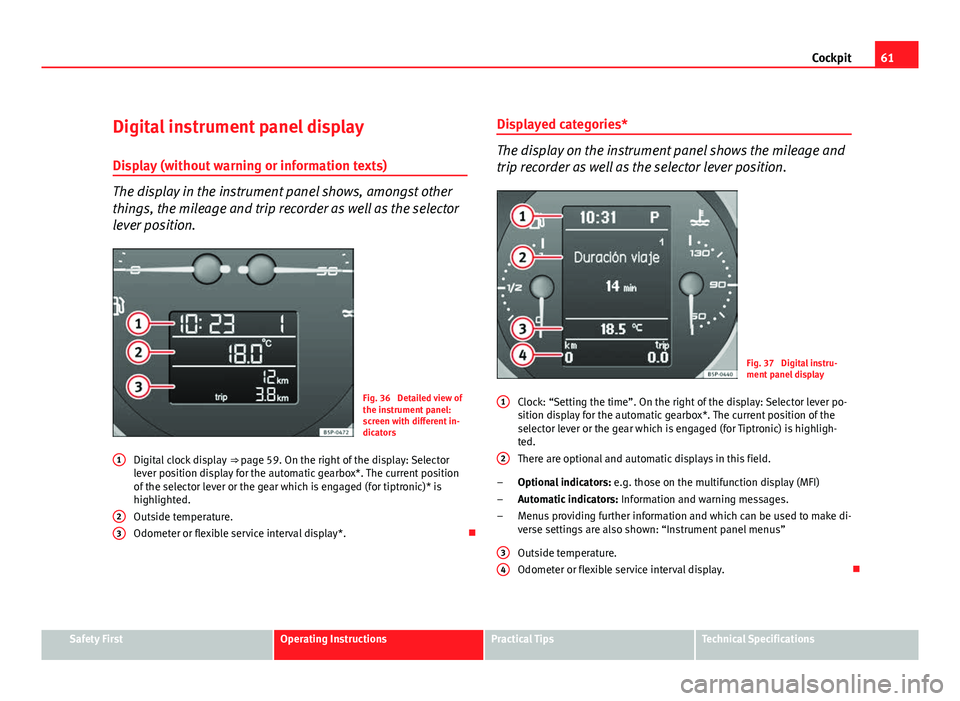
The display in the instrument panel shows, amongst other
things, the mileage and trip recorder as well as the selector
lever position.
Fig. 36 Detailed view of
the instrument panel:
screen with different in-
dicators
Digital clock display ⇒ page 59. On the right of the display: Selector
lever position display for the automatic gearbox*. The current position
of the selector lever or the gear which is engaged (for tiptronic)* is
highlighted.
Outside temperature.
Odometer or flexible service interval display*.
1
23
Displayed categories*
The display on the instrument panel shows the mileage and
trip recorder as well as the selector lever position.
Fig. 37 Digital instru-
ment panel display
Clock: “Setting the time”. On the right of the display: Selector lever po-
sition display for the automatic gearbox*. The current position of the
selector lever or the gear which is engaged (for Tiptronic) is highligh-
ted.
There are optional and automatic displays in this field.
Optional indicators: e.g. those on the multifunction display (MFI)
Automatic indicators: Information and warning messages.
Menus providing further information and which can be used to make di-
verse settings are also shown: “Instrument panel menus”
Outside temperature.
Odometer or flexible service interval display.
1
2
–
–
–
3
4
Safety FirstOperating InstructionsPractical TipsTechnical Specifications
Page 64 of 302
62Cockpit
Recommended gear display*
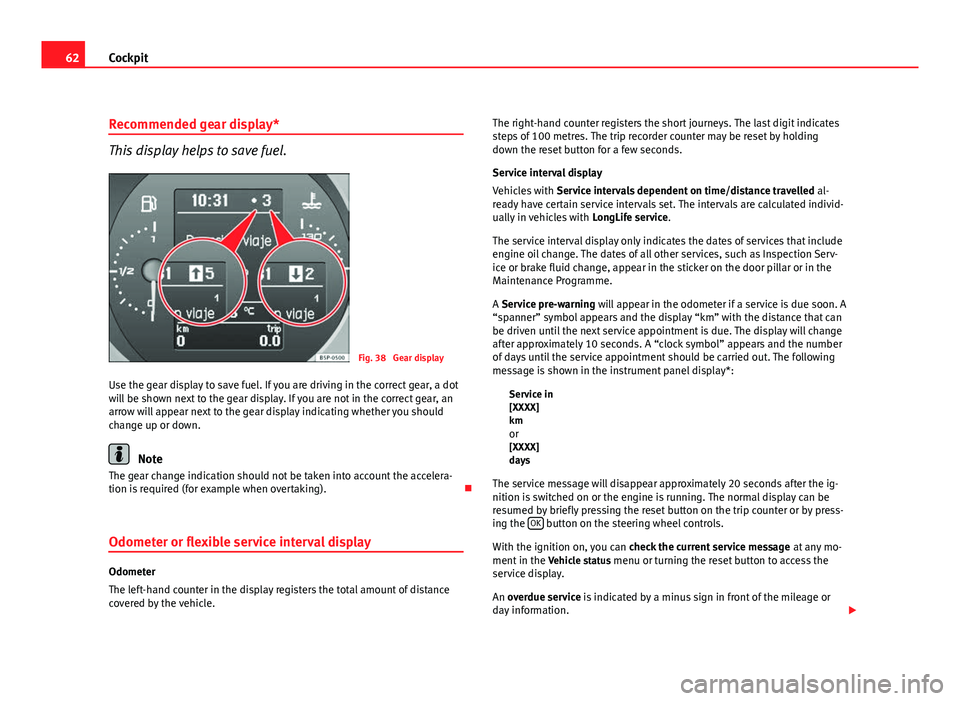
This display helps to save fuel.
Fig. 38 Gear display
Use the gear display to save fuel. If you are driving in the correct gear, a dot
will be shown next to the gear display. If you are not in the correct gear, an
arrow will appear next to the gear display indicating whether you should
change up or down.
Note
The gear change indication should not be taken into account the accelera-
tion is required (for example when overtaking).
Odometer or flexible service interval display
Odometer
The left-hand counter in the display registers the total amount of distance
covered by the vehicle. The right-hand counter registers the short journeys. The last digit indicates
steps of 100 metres. The trip recorder counter may be reset by holding
down the reset button for a few seconds.
Service interval display
Vehicles with
Service intervals dependent on time/distance travelled al-
ready have certain service intervals set. The intervals are calculated individ-
ually in vehicles with LongLife service.
The service interval display only indicates the dates of services that include
engine oil change. The dates of all other services, such as Inspection Serv-
ice or brake fluid change, appear in the sticker on the door pillar or in the
Maintenance Programme.
A Service pre-warning will appear in the odometer if a service is due soon. A
“spanner” symbol appears and the display “km” with the distance that can
be driven until the next service appointment is due. The display will change
after approximately 10 seconds. A “clock symbol” appears and the number
of days until the service appointment should be carried out. The following
message is shown in the instrument panel display*: Service in
[XXXX]
kmor
[XXXX]
days
The service message will disappear approximately 20 seconds after the ig-
nition is switched on or the engine is running. The normal display can be
resumed by briefly pressing the reset button on the trip counter or by press-
ing the OK
button on the steering wheel controls.
With the ignition on, you can check the current service message at any mo-
ment in the Vehicle status menu or turning the reset button to access the
service display.
An overdue service is indicated by a minus sign in front of the mileage or
day information.
Page 65 of 302
63
Cockpit
Indications for vehicles with LongLife service
Technical progress has made it possible to considerably reduce servicing re-
quirements. With the LongLife System, SEAT ensures that your vehicle only
has an interval service when it is necessary. The length of the service inter-
vals (max. two years) is determined by factors such as conditions under
which the vehicle is used and personal driving style.
The service pre-warning will first appear 20 days before the date on which
the service is due. The distance travelled is rounded off to the nearest 100
km and the time to full days. The current service message can only be con-
sulted 500 km after the last service. Until that time, only dashes are dis-
played.
Note
● If you reset the display manually, the next service interval will be indica-
ted after 15 000 km or one year and will not be calculated individually.
● Do not reset the display between service intervals as the display will
otherwise be incorrect.
● In LongLife Service vehicles, if the battery is disconnected for a long pe-
riod, the days remaining until the next service cannot be calculated. There-
fore, the service message displays on the instrument panel may be incor-
rect. Take into account the maximum authorised service intervals. Multifunction display (MFI)*
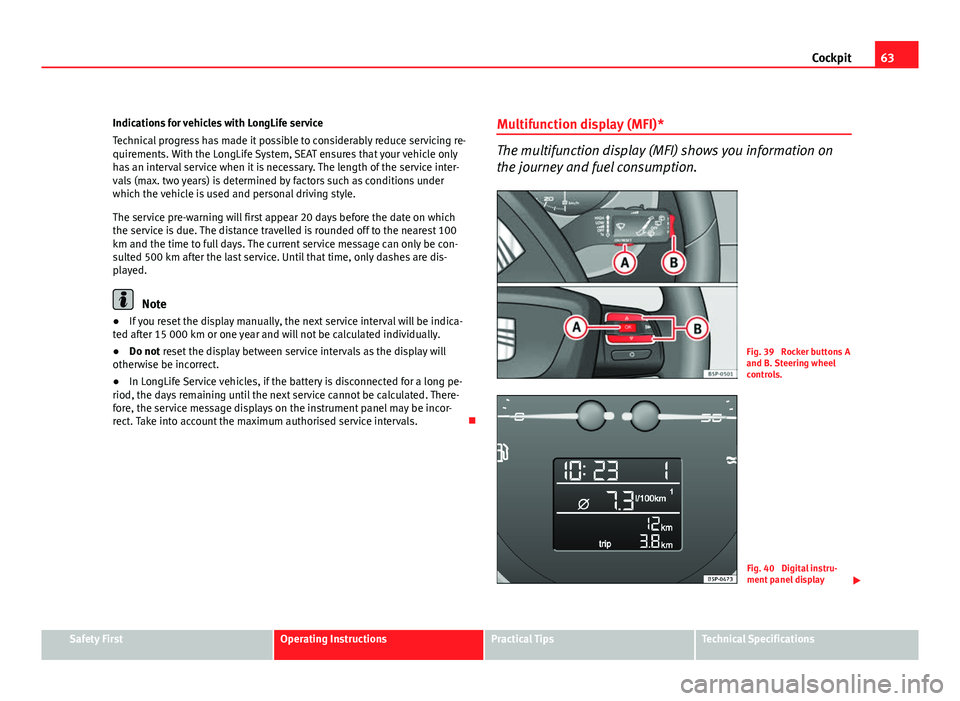
The multifunction display (MFI) shows you information on
the journey and fuel consumption.
Fig. 39 Rocker buttons A
and B. Steering wheel
controls.
Fig. 40 Digital instru-
ment panel display
Safety FirstOperating InstructionsPractical TipsTechnical Specifications
Page 67 of 302
65
Cockpit
Memory displays
● Driving speed
● Journey duration
● Average speed
● Distance
● Distance to empty
● Average fuel consumption
● Current fuel consumption
● Outside temperature display
● Speed warning
Km/h - Driving speed
Driving speed is digitally shown in the display.
min - Journey duration
The display shows the amount of time which has elapsed since the ignition
was switched on.
The maximum display value in both memories is 19 hours and 59 minutes.
The memory will automatically be deleted once this value has been
reached.
Ø mph - Average speed The average speed will be shown after running a distance of approximately
100 metres. Until then dashes will appear in the display. The display will be
updated every 5 seconds while the vehicle is in motion.
km - Distance travelled
The display shows the distance travelled since the ignition was switched on. The maximum display value in both memories is 1999 km. The memory will
automatically be deleted once this value has been reached.
Km - Fuel range
The fuel range is calculated using the figures for tank content and current
fuel consumption. It shows how far the vehicle can travel using the same
conditions as a reference.
Ø ltr/100km - Average fuel consumption
The average fuel consumption will be shown ⇒ fig. 42 after a distance of ap-
proximately 100 metres has been travelled. Until then dashes will appear in
the display. The display will be updated every 5 seconds while the vehicle is
in motion. The amount of fuel used will not be shown.
l/100 km or l/h - Current fuel consumptionThe display will show the current fuel consumption in litre/km whilst the ve-
hicle is in motion or in litre/hour when the vehicle is in a stationary position
with the engine running.
Using this display you can see how your driving style affects fuel consump-
tion ⇒ page 191.
Outside temperature display
The measurement range extends from -45°C to +58°C. At temperatures be-
low +4°C, an ice crystal symbol is displayed and a warning sounds if the ve-
hicle is moving at more than 20 km/h (ice danger warning). This symbol will
flash for about 10 seconds and remains lit until the outside temperature
rises above +4°C or 6°C if it was already lit.
Set speed indicator
When driving at the required speed, enter the speed indicator mode and
press the button A
(Reset), the display remembers the indicated speed. If
the indicated speed is exceeded, a warning message is displayed on the
screen 1)
and an acoustic signal is given.
1)
Depending on the model version, the message on the screen may vary and may be repre-
sented by flashing of the speed indication or by a speed message.
Safety FirstOperating InstructionsPractical TipsTechnical Specifications