warning Seat Leon 5D 2012 Owner's manual
[x] Cancel search | Manufacturer: SEAT, Model Year: 2012, Model line: Leon 5D, Model: Seat Leon 5D 2012Pages: 289, PDF Size: 3.81 MB
Page 133 of 289
132Seats and storage
Luggage compartment cover
The luggage compartment cover blocks the view into the
luggage compartment.
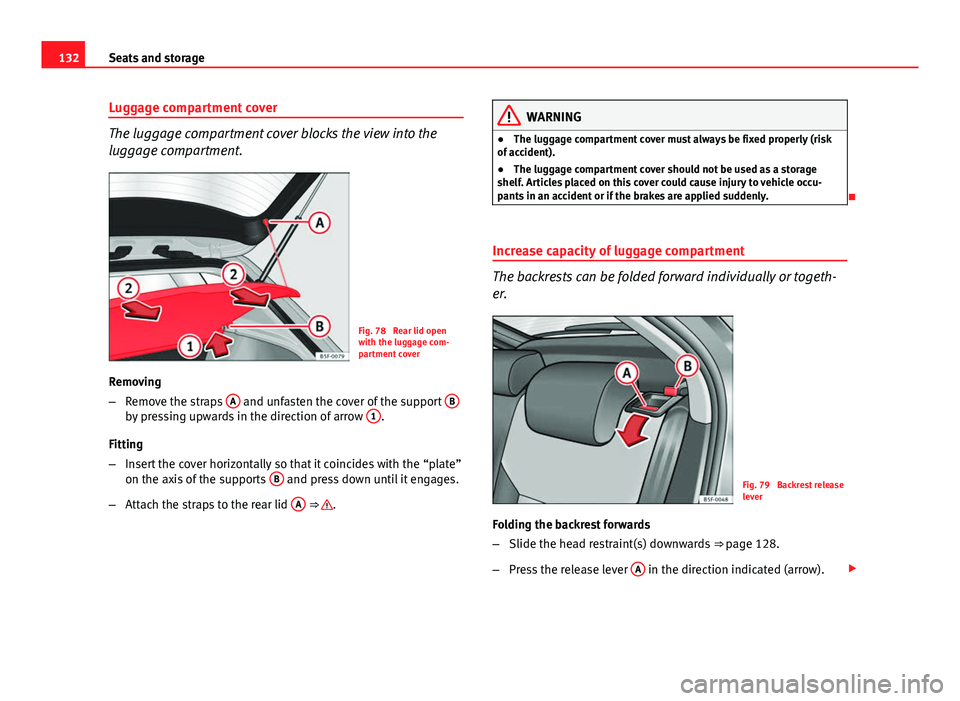
Fig. 78 Rear lid open
with the luggage com-
partment cover
Removing
– Remove the straps A
and unfasten the cover of the support Bby pressing upwards in the direction of arrow 1.
Fitting
– Insert the cover horizontally so that it coincides with the “plate”
on the axis of the supports B
and press down until it engages.
– Attach the straps to the rear lid A
⇒ .
WARNING
● The luggage compartment cover must always be fixed properly (risk
of accident).
● The luggage compartment cover should not be used as a storage
shelf. Articles placed on this cover could cause injury to vehicle occu-
pants in an accident or if the brakes are applied suddenly.
Increase capacity of luggage compartment
The backrests can be folded forward individually or togeth-
er.
Fig. 79 Backrest release
lever
Folding the backrest forwards
– Slide the head restraint(s) downwards ⇒
page 128.
– Press the release lever A
in the direction indicated (arrow).
Page 134 of 289
133
Seats and storage
– Fold the backrest forwards.
Returning the backrest to its upright position
– Move the backrest until it engages properly ⇒
. The red mark-
ing on the tab B should no longer be visible when the backrest
is properly secured.
WARNING
● Make sure that the rear backrest is securely locked in position so that
the seat belt can provide proper protection on the centre rear seat.
● The rear backrest must always be securely latched so that objects
stored in the luggage compartment will not fly forward through the inte-
rior during sudden braking.
CAUTION
● With the backrest inclined there is a danger of damaging the rear head
restraints when adjusting the front seats backwards.
● When returning the backrest to an upright position, make sure that the
side seat belts are not caught up and damaged in the catches for the back-
rest. Fastening rings*
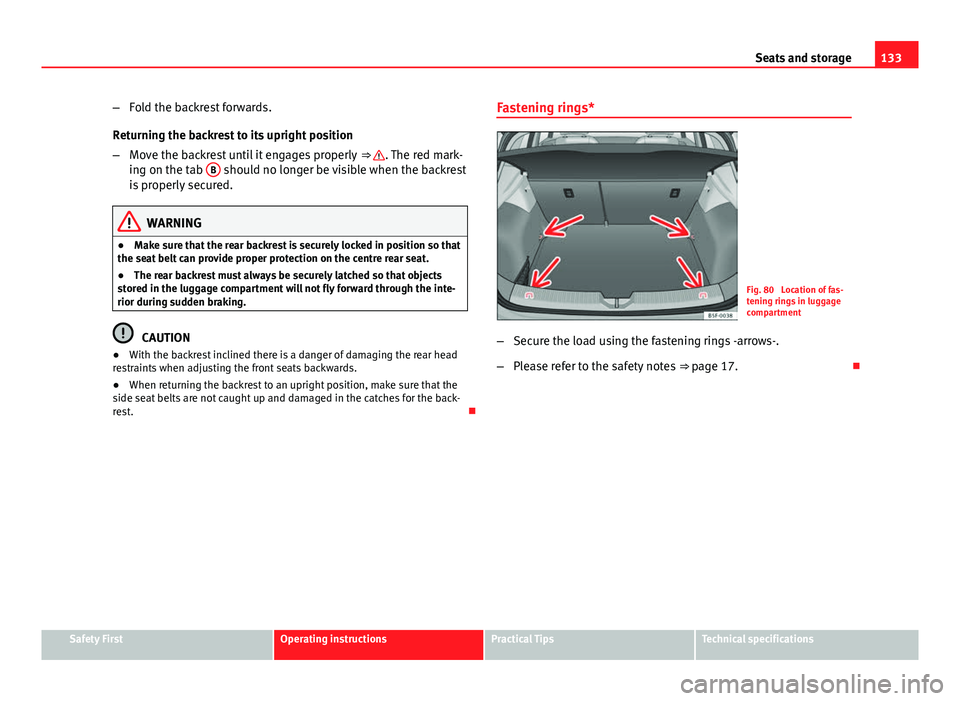
Fig. 80 Location of fas-
tening rings in luggage
compartment
– Secure the load using the fastening rings -arrows-.
– Please refer to the safety notes ⇒ page 17.
Safety FirstOperating instructionsPractical TipsTechnical specifications
Page 135 of 289

134Air conditioning
Air conditioning
Heating, ventilation, cooling
Introduction
Viewing Climatronic information
On the screen of Climatronic control unit and on the screen of the factory-
fitted Easy Connect system, the theoretical values of the temperature zones
are shown.
The unit of temperature measurement can be changed in the Easy Connect
system.
Dust and pollen filter
The dust and pollen filter with its activated charcoal cartridge serves as a
barrier against impurities in the air taken into the vehicle interior.
The dust and pollen filter must be changed regularly so that air conditioner
performance is not adversely affected.
If the filter loses efficiency prematurely due to use in areas with very high
levels of air pollution, the filter must be changed more frequently than sta-
ted in the Service Schedule.
Additional information and warnings:
● Easy Connect system
● Seat functions
● Windscreen wipers and washers
● Caring for and cleaning the vehicle exterior
WARNING
Reduced visibility through the windows increases the risk of serious acci-
dents.
● Always ensure that all windows are free of ice and snow, and that
they are not fogged, so as to maintain good visibility of everything out-
side.
● The maximum heat output required to defrost windows as quickly as
possible is only available when the engine has reached its normal run-
ning temperature. Only drive when you have good visibility.
● Always ensure that you use the heating system, fresh air system, air
conditioner and the heated rear window to maintain good visibility to the
outside.
● Never leave the air recirculation on for a long period of time. If the
cooling system is switched off and air recirculation mode switched on,
the windows can mist over very quickly, considerably limiting visibility.
● Switch air recirculation mode off when it is not required.
WARNING
Stuffy or used air will increase fatigue and reduce driver concentration
possibly resulting in a serious accident.
● Never leave the fresh air fan turned off or use the air recirculation for
long periods of time; the air in the vehicle interior will not be refreshed.
Page 137 of 289

136Air conditioning
Control but-
tonAdditional information. Climatronic.
4Indications on the temperature display screen selected for
the right and left sides.
Defrost function. The air drawn in from outside the vehicle is
directed at the windscreen and air recirculation is automati-
cally switched off. To defrost the windscreen more quickly,
the air is dehumidified at temperatures over approximately
+3 °C (+38 °F) and the fan runs at maximum output.
The air is directed at the chest of driver and passengers by
the dash panel air vents.
Air distribution towards the footwell.
Upward air distribution.
Heated rear window: this only works when the engine is run-
ning and switches off automatically after a maximum of 10
minutes.
Air recirculation ⇒ page 141.
Buttons for seat heating ⇒ page 126.
Press the button to switch on or off the cooling system.
Press the button to make maximum cooling capacity availa-
ble. The recirculation of air and the cooling system turn on
automatically and air distribution adjusts automatically to
the position .
Transfer the driver side temperature settings to the passen-
ger side: when the button lamp is lit , the temperature
settings on the driver side also apply to the passenger side.
Press the button or the temperature control on the passenger
side in order to change the temperature on that side. The
button lamp is lit.
Control but- tonAdditional information. Climatronic.
Automatic adjustment of temperature, fan, and air distribu-
tion. Press the button to switch on the function. The button
will light up
.
When the configuration button is pressed the air condi-
tioner management menu will be shown on the Easy Connect
system screen.
Switching offTurn the fan control to the 0 position or press the button .
WARNING
Stuffy or used air will increase fatigue and reduce driver concentration
possibly resulting in a serious accident.
● Never leave the fresh air fan turned off or use the air recirculation for
long periods of time; the air in the vehicle interior will not be refreshed.
Operating by using the Easy Connect* system (valid for
Radio Entry)
In the Easy Connect system it is also possible to perform various adjust-
ments to the Climatronic.
Open the air conditioner menu
● Press the Setup
button
● ALTERNATIVELY: press the MENU button in Easy Connect. With the rotat-
ing switch select the air conditioner menu and open it.
On the screen you can see and change the current settings, for example, the
temperature set for the driver side and for that of the passenger.
Page 139 of 289

138Air conditioning
Control but-
tonAdditional information. Manual air conditioning system.
1 Temper-
ature
... Rotate the control to set the temperature accordingly.
2 Fan
Setting 0: fan and manual air conditioning switched off, level
6: maximum fan level
3 Air dis-
tributionRotate the continuous control to direct the airflow to the de-
sired area.
Defrost function. The airflow is directed at the windscreen. In
this position, air recirculation is automatically switched off or
is not switched on. Increase the fan power to clear the wind-
screen of condensation as soon as possible. To dehumidify
the air, the cooling system will automatically switch on.
The air is directed at the chest of driver and passengers by
the dash panel air vents.
Distribution of air towards the chest and the footwell area.
Air distribution towards the footwell.
Air distribution towards the windscreen and the footwell.
Heated rear window: this only works when the engine is run-
ning and switches off automatically after a maximum of 10
minutes.
Air recirculation ⇒ page 141.
Control but- tonAdditional information. Manual air conditioning system.
Buttons for seat heating ⇒ page 126.
Turn the control to the position to make maximum
cooling capacity available. Air recirculation and the cooling
system are turned on automatically.
WARNING
Stuffy or used air will increase fatigue and reduce driver concentration
possibly resulting in a serious accident.
● Never leave the fresh air fan turned off or use the air recirculation for
long periods of time; the air in the vehicle interior will not be refreshed.
Heating system and fresh air controls
Fig. 83 In the centre console: heating system and fresh air controls
Page 140 of 289
139
Air conditioning
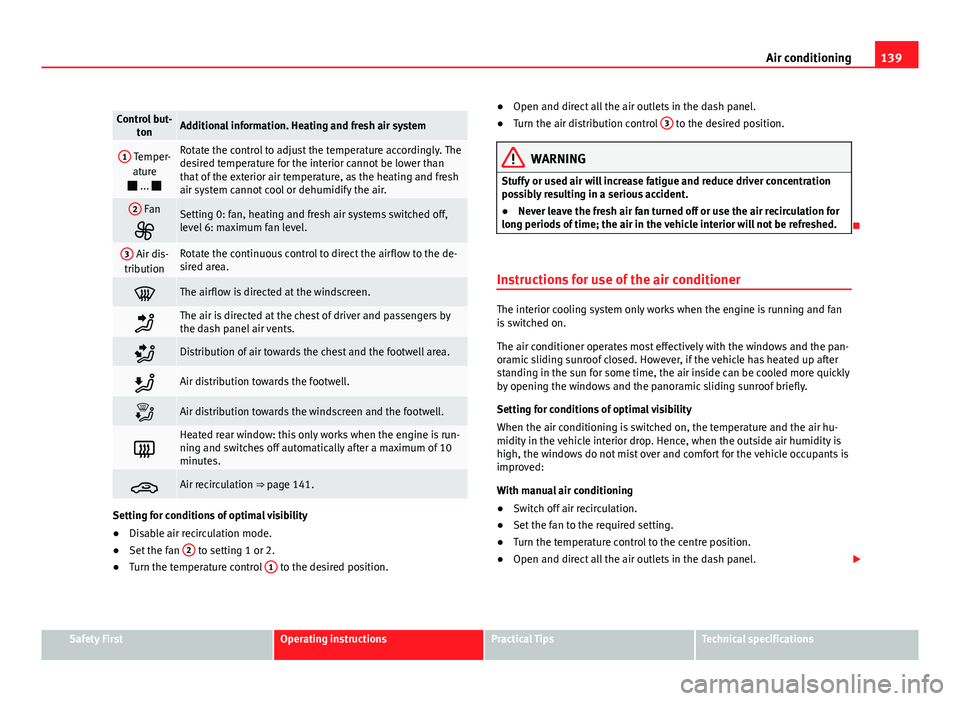
Control but-
tonAdditional information. Heating and fresh air system
1 Temper-
ature
... Rotate the control to adjust the temperature accordingly. The
desired temperature for the interior cannot be lower than
that of the exterior air temperature, as the heating and fresh
air system cannot cool or dehumidify the air.
2 Fan
Setting 0: fan, heating and fresh air systems switched off,
level 6: maximum fan level.
3 Air dis-
tributionRotate the continuous control to direct the airflow to the de-
sired area.
The airflow is directed at the windscreen.
The air is directed at the chest of driver and passengers by
the dash panel air vents.
Distribution of air towards the chest and the footwell area.
Air distribution towards the footwell.
Air distribution towards the windscreen and the footwell.
Heated rear window: this only works when the engine is run-
ning and switches off automatically after a maximum of 10
minutes.
Air recirculation ⇒ page 141.
Setting for conditions of optimal visibility
● Disable air recirculation mode.
● Set the fan 2
to setting 1 or 2.
● Turn the temperature control 1 to the desired position. ●
Open and direct all the air outlets in the dash panel.
● Turn the air distribution control 3
to the desired position.
WARNING
Stuffy or used air will increase fatigue and reduce driver concentration
possibly resulting in a serious accident.
● Never leave the fresh air fan turned off or use the air recirculation for
long periods of time; the air in the vehicle interior will not be refreshed.
Instructions for use of the air conditioner
The interior cooling system only works when the engine is running and fan
is switched on.
The air conditioner operates most effectively with the windows and the pan-
oramic sliding sunroof closed. However, if the vehicle has heated up after
standing in the sun for some time, the air inside can be cooled more quickly
by opening the windows and the panoramic sliding sunroof briefly.
Setting for conditions of optimal visibility
When the air conditioning is switched on, the temperature and the air hu-
midity in the vehicle interior drop. Hence, when the outside air humidity is
high, the windows do not mist over and comfort for the vehicle occupants is
improved:
With manual air conditioning
● Switch off air recirculation.
● Set the fan to the required setting.
● Turn the temperature control to the centre position.
● Open and direct all the air outlets in the dash panel.
Safety FirstOperating instructionsPractical TipsTechnical specifications
Page 142 of 289

141
Air conditioning
There are other additional, non-adjustable air vents in the dash panel 2
, in
the footwell and in the rear area of the interior.
Note
Never place food, medicines or other heat-sensitive objects close to the air
vents. Food, medicine and other heat or cold sensitive objects may be dam-
aged or made unsuitable for use by the air coming from the air vents.
Air recirculation
Basic points
Air recirculation:
Manual air recirculation (heating and fresh air system, manual
air conditioning).
Air recirculation mode prevents the ambient air from entering the interior.
When the outside temperature is very high, selecting manual air recircula-
tion mode for a short period refreshes the vehicle interior more quickly.
For safety reasons, air recirculation mode is switched off when the button
is pressed or the air distributor turned to .
Switching on and switching off manual air recirculation with air conditioner
(manual) or with the heating and fresh air systems
Activate: press the button until the warning lamp lights up.
Deactivate: press the button until all warning lamps switch off.
Switching on and off manual air recirculation with Climatronic
Activate: press the * button until the warning lamp lights up.
Deactivate: press the * button until all warning lamps switch off. Functioning mode of manual air recirculation (air conditioning menu)
With the automatic air recirculation mode activated, the entry of fresh air in-
to the cabin interior is enabled. If the system detects a high concentration
of hazardous substances in the ambient air, air recirculation mode is
switched on automatically. When the level of impurities drops to within a
normal range, recirculation mode is switched off.
The system is unable to detect unpleasant smells.
Air recirculation mode is
not automatically switched on in the following ca-
ses of outside temperatures and conditions:
● The cooling system is switched on (the * button lamp is on) and the am-
bient temperature is below +3 ° C (+38 ° F).
● The cooling system and the windscreen wipers are switched off and the
outside temperature is below +10 °C (+50 °F).
● The cooling system is switched on, the outside temperature is below
+15 °C (+59 °F) and the windscreen wipers are switched on.
Activation/deactivation of automatic air recirculation is done in the air con-
ditioner menu, under Configuration.
WARNING
Stuffy or used air will increase fatigue and reduce driver concentration
possibly resulting in a serious accident.
● Never use recirculation mode for long periods as it does not refresh
the air inside the vehicle.
● If the cooling system is switched off and air recirculation mode
switched on, the windows can mist over very quickly, considerably limit-
ing visibility.
● Switch air recirculation mode off when it is not required.
Safety FirstOperating instructionsPractical TipsTechnical specifications
Page 144 of 289

143
Driving
Driving SteeringAdjusting the steering wheel position
The height and reach of the steering wheel can be freely ad-
justed to suit the driver.
Fig. 85 Lever in the low-
er left side of the steer-
ing column
– Press the lever 1
⇒ Fig. 85 down ⇒
–
Move the steering wheel to the desired position.
– Move the lever up, applying pressure until the close position is
reached.
WARNING
● Never adjust the position of the steering wheel when the vehicle is
moving, as this could cause an accident.
● Move the lever up firmly so the steering wheel position does not acci-
dentally change during driving. risk of accident!
● Make sure you are capable of reaching and holding the upper part of
the steering wheel, while your back remains well supported by the back-
rest: risk of accident!
Safety FirstOperating instructionsPractical TipsTechnical specifications
Page 145 of 289

144Driving
Ignition lock
Starting the engine with the ignition key
Switch on the ignition with the key in the ignition and start
the engine.
Fig. 86 Ignition key po-
sitions
Steering wheel lock
– To lock the steering wheel, remove the key from the ignition and
turn the wheel until it locks. In vehicles with the automatic gear-
box*, the selector lever must be in the position P in order to re-
move the key.
– To unlock the steering wheel, insert the key into the ignition
and simultaneously turn the key (in the direction of the arrow)
and the steering wheel.
Warning: If the steering wheel cannot be turned, this is because
the steering wheel lock is activated. Switching the ignition on/off, preheating
–
Turn the ignition key to position 2
to switch on the ignition.
– Turn the ignition key to position 1
to switch off the ignition.
Preheating is produced in Diesel vehicles when the ignition is
switched on.
Starting up the engine
– Manual gearbox: Press the clutch pedal all the way down and
move the gearbox lever into neutral.
– Automatic gearbox : Press the brake pedal and move the selec-
tor lever to position P or N.
– Turn the ignition key to position 3
. The key returns to position
2 automatically. Do not press the accelerator.
Diesel engines can take a few seconds longer than usual to start
on cold days. Therefore the clutch pedal (manual gearbox) or the
brake pedal (automatic gearbox) must remain pressed until the en-
gine starts up. During preheating, the warning lamp remains lit.
The preheating time depends on the coolant and exterior tempera-
tures. When the engine is at operating temperature or at outside
temperatures above +8 °C (46 °F) the warning lamp will only
light up for about one second. This means that the engine starts
immediately.
If the engine does not immediately start up, interrupt the starting process
and try again after 30 seconds. To start the engine again, return the key to
position 1
.
Page 146 of 289

145
Driving
Start-Stop System*
If the vehicle is stopped and the Start-Stop system* switches off the engine,
the ignition remains switched on.
Automatic gearbox: Before leaving the vehicle, make sure that the ignition
is switched off and the selector lever is in position P.
Driver messages on the instrument panel display
Press the clutch This message appears on vehicles with a manual gearbox if the driver tries
to start the engine without having the clutch pedal pressed. The engine will
only start if you press the clutch pedal.
Press the brake
This message appears on vehicles with an automatic gearbox if the driver
tries to start the engine without having the brake pedal pressed.
Select N or P
This message appears if you try to start or stop the engine when the selec-
tor lever of the automatic gearbox is not in position P or N. The engine can
only start or stop in these positions.
Engage position P; the vehicle can move; doors can only close in position P. For safety reasons, this driver message appears and an audible warning
sounds if the selector lever of the automatic gearbox is not in position P af-
ter you switch off the ignition. Otherwise the vehicle could move.
Gear change: selector lever in the drive position! This driver message is displayed and a buzzer is sounded when the selector
lever is not in the position P when the driver door is opened. Put the selec-
tor lever in position P; otherwise the vehicle can roll away.
Ignition is switched onThis driver message is displayed and a buzzer is sounded when the driver
door is opened with the ignition switched on.
WARNING
● Never run the engine in confined spaces, as the exhaust gases are
poisonous.
● Never remove the key from the ignition if the vehicle is in motion.
Otherwise, the steering could suddenly lock, making it impossible to
steer the vehicle: risk of accident!
● Always take the key with you when you leave the vehicle. This is par-
ticularly important if there are children in the vehicle, as they might oth-
erwise be able to start the engine or use power-operated equipment (e.g.
the electric windows), which could cause injuries.
CAUTION
Avoid high engine speeds, full throttle and extreme load conditions until
the engine has reached its normal operating temperature, otherwise this
can damage the engine.
For the sake of the environment
Do not warm up the engine by running it with the car stationary. You should
drive off as soon as you start the engine. This will help avoid unnecessary
exhaust emissions.
Note
● If it is difficult to turn the ignition key to the position 1, turn the steer-
ing wheel to both sides to release the steering lock.
● When starting from cold, the engine may be a little noisy for the first few
seconds until oil pressure has built up in the hydraulic valve lifters. This is
quite normal, and no cause for concern.
● If the vehicle battery is disconnected and reconnected, the key must re-
main in the position 1
for around 5 seconds before starting up.
● Vehicles with automatic gearbox: After switching off the ignition, you
can only remove the ignition key if the selector lever is in position “P” (park-
ing lock). Next, the selector lever is locked.
Safety FirstOperating instructionsPractical TipsTechnical specifications