limit Seat Leon 5D 2012 User Guide
[x] Cancel search | Manufacturer: SEAT, Model Year: 2012, Model line: Leon 5D, Model: Seat Leon 5D 2012Pages: 289, PDF Size: 3.81 MB
Page 142 of 289

141
Air conditioning
There are other additional, non-adjustable air vents in the dash panel 2
, in
the footwell and in the rear area of the interior.
Note
Never place food, medicines or other heat-sensitive objects close to the air
vents. Food, medicine and other heat or cold sensitive objects may be dam-
aged or made unsuitable for use by the air coming from the air vents.
Air recirculation
Basic points
Air recirculation:
Manual air recirculation (heating and fresh air system, manual
air conditioning).
Air recirculation mode prevents the ambient air from entering the interior.
When the outside temperature is very high, selecting manual air recircula-
tion mode for a short period refreshes the vehicle interior more quickly.
For safety reasons, air recirculation mode is switched off when the button
is pressed or the air distributor turned to .
Switching on and switching off manual air recirculation with air conditioner
(manual) or with the heating and fresh air systems
Activate: press the button until the warning lamp lights up.
Deactivate: press the button until all warning lamps switch off.
Switching on and off manual air recirculation with Climatronic
Activate: press the * button until the warning lamp lights up.
Deactivate: press the * button until all warning lamps switch off. Functioning mode of manual air recirculation (air conditioning menu)
With the automatic air recirculation mode activated, the entry of fresh air in-
to the cabin interior is enabled. If the system detects a high concentration
of hazardous substances in the ambient air, air recirculation mode is
switched on automatically. When the level of impurities drops to within a
normal range, recirculation mode is switched off.
The system is unable to detect unpleasant smells.
Air recirculation mode is
not automatically switched on in the following ca-
ses of outside temperatures and conditions:
● The cooling system is switched on (the * button lamp is on) and the am-
bient temperature is below +3 ° C (+38 ° F).
● The cooling system and the windscreen wipers are switched off and the
outside temperature is below +10 °C (+50 °F).
● The cooling system is switched on, the outside temperature is below
+15 °C (+59 °F) and the windscreen wipers are switched on.
Activation/deactivation of automatic air recirculation is done in the air con-
ditioner menu, under Configuration.
WARNING
Stuffy or used air will increase fatigue and reduce driver concentration
possibly resulting in a serious accident.
● Never use recirculation mode for long periods as it does not refresh
the air inside the vehicle.
● If the cooling system is switched off and air recirculation mode
switched on, the windows can mist over very quickly, considerably limit-
ing visibility.
● Switch air recirculation mode off when it is not required.
Safety FirstOperating instructionsPractical TipsTechnical specifications
Page 150 of 289

149
Driving
Speed warning function
Introduction
The speed warning function can help prevent you exceeding
a particular pre-set maximum speed. The speed warning function will warn the driver if a pre-set maximum speed
is exceeded. The system gives a warning buzzer signal if the set speed is
exceeded by about 3 km/h (2 mph). The warning lamp and the driver
message Speed limit exceeded! will be displayed simultaneously on the in-
strument panel display. The warning lamp switches off when reducing
speed below the stored maximum limit.
You are recommended to store this speed limit warning if you always wish
to be reminded of a particular speed limit. This could be when driving in
countries with general speed limits, or if a particular speed should not be
exceeded when winter tyres are fitted etc.
Note
● Please bear in mind that, even with the speed warning function, it is still
important to keep an eye on the vehicle speed with the speedometer and to
observe the legal speed limits.
● The speed limit warning function in the version for several countries
warns you at a speed of 120 km/h (80 mph). This is a factory-set speed lim-
it. Setting speed limit warning
You can use the radio or the Easy Connect* to set, alter or
cancel the speed limit warning.
Vehicles with radio
– Select: SETUP
button > control button
Driver assistant > Speed
warning.
Vehicles with Easy Connect
– Select: Systems control button or Vehicle systems > Driver assis-
tant > Speed warning.
The warning limit can be set from 30 to 240 km/h (20 to 150 mph). The ad-
justment is done in 10 km/h (mph) intervals.
Start-Stop system*
Description and operation
The Start-Stop system helps save fuel and reduce CO 2 emissions.
In Start-Stop mode, the engine will automatically switch off when the vehi-
cle stops, when stopping at traffic lights for example. The ignition remains
switched on during the stopping phase. The engine automatically switches
back on when required.
As soon as the ignition is switched on, the Start-Stop function is automati-
cally activated.
Safety FirstOperating instructionsPractical TipsTechnical specifications
Page 154 of 289

153
Driving
● Press and hold the clutch pedal to the floor.
● Place the gearbox lever in the required position ⇒
.
● Release the clutch pedal to engage clutch.
In some countries the clutch pedal must be fully pressed down for the en-
gine to start.
Selecting reverse gear
● Engage reverse gear only when the vehicle is stopped.
● Press and hold the clutch pedal to the floor ⇒
.
● Move the gearbox lever into the neutral position and press it down.
● Move the gearbox lever completely to the left and then forwards to posi-
tion it in reverse gear ⇒ Fig. 89 R
.
● Release the clutch pedal to engage clutch.
Changing down gears
While driving, changing down a gear must always be done gradually, i.e. to
the gear directly below and when the engine speed is not too high ⇒
.
Changing down while bypassing one or various gears at high speeds or at
high engine speeds can damage the clutch and the gearbox, even if the
clutch pedal remains depressed ⇒
.
Kick-down
In vehicles with a speed limiter, the kick-down function enables the pro-
grammed speed to be exceeded deliberately, i.e. when overtaking.
When the accelerator is pressed to the floor, the speed limiter is temporarily
deactivated as the programmed speed is exceeded.
When the speed of the vehicle falls below the programmed value again, and
when the accelerator is not pressed to the floor, the speed limiter is reacti-
vated.
WARNING
When the engine is running, the vehicle will start to move as soon as a
gear is engaged and the clutch released. This is also the case with the
electro-mechanical parking brake switched on.
● Never engage reverse gear when the vehicle is moving.
WARNING
If the gear is changed down inappropriately by selecting a gear that is
too low, you may lose control of the vehicle, causing an accident and se-
rious injuries.
CAUTION
When travelling at high speeds or at high engine speeds, selecting a gear
that is too low can cause considerable damage to the clutch and the gear-
box. This can also occur if the clutch pedal is pressed and held and it does
not engage.
CAUTION
To prevent damage and avoid premature wear, please observe the follow-
ing:
● Do not rest your hand on the gear lever while driving. The pressure ap-
plied by your hand is transmitted to the gearbox selector forks.
● Always ensure that the vehicle is completely stopped before engaging
the reverse gear.
● Always press the clutch to the floor when changing gears.
● Never hold the vehicle “on the clutch” on hills with the engine on.
Safety FirstOperating instructionsPractical TipsTechnical specifications
Page 159 of 289
158Driving
CAUTION
● If you stop the vehicle on a gradient, do not attempt to stop it from roll-
ing by depressing the accelerator when a gear has been selected. This
could cause overheating and damage the automatic gearbox. Apply the
handbrake firmly or press the brake pedal in order to prevent the vehicle
from rolling back.
● If you allow the car to roll with the selector lever in position N with the
engine switched off, the automatic gearbox will be damaged as it will not be
lubricated.
● In certain driving situations or traffic conditions, such as frequently
starting, prolonged creeping of the vehicle, or traffic jams with continuous
stoppages, the automatic gearbox could overheat causing damage! If the
warning lamp lights up, stop the vehicle as soon as possible and wait for
the gearbox to cool ⇒ page 162.
● In certain driving situations or traffic conditions, such as frequently
starting, prolonged creeping of the vehicle, or traffic jams with continuous
stoppages, the automatic gearbox could overheat causing damage! If the
warning lamp lights up, stop the vehicle as soon as possible and wait for
the gearbox to cool ⇒ page 162.
Downhill speed control*
The downhill speed control function helps the driver when
driving down steep gradients.
Downhill speed control is activated when the selector lever is in D/S and
the driver applies the foot brake. The automatic gearbox automatically en-
gages a lower gear that is suitable for the slope. The downhill speed control
function attempts to maintain the speed at which the vehicle was travelling
when the foot brake was applied (subject to the laws of physics and techni-
cal drive limitations). It may be necessary to adjust the speed again using
the foot brake in certain situations. Given that the downhill speed control
can only change down to 3rd gear, on very steep descents the tiptronic mode may be required. In this case, manually reduce the tiptronic to 2nd or
1st gear to use the engine brake and reduce the charge on the brakes.
Downhill speed control is deactivated as soon as the road levels out again
or you press the accelerator pedal.
On vehicles with cruise control system* ⇒
page 164, downhill speed con-
trol is activated when you set a cruising speed.
WARNING
The downhill speed control cannot defy the laws of physics. Therefore,
speed cannot be maintained constant in all situations. Always be pre-
pared to use the brakes!
Page 169 of 289
168Driver assistance systems
Travelling down hills with the CCS
When travelling down hills the CCS cannot maintain a constant speed. Slow
the vehicle down using the brake pedal and reduce gears if required.
Automatic off
The cruise control system (CCS) is switched off automatically or temporarily:
● If the system detects a fault that could affect the working order of the
CCS.
● If you press and maintain the accelerator pedal for a certain time, driv-
ing faster than the stored speed.
● If the dynamic driving control systems intervene (i.e. ASR or ESC).
● If the airbag is triggered.
Lane Assist system* Introduction
Additional information and warnings:
● SEAT information system ⇒ page 73
● Accessories, parts replacement, repairs and modifications ⇒ page 230
WARNING
The intelligent technology in the Lane Assist system cannot change the
limits imposed by the laws of physics and by the very nature of the sys-
tem. Careless or uncontrolled use of the Lane Assist system may cause
accidents and injury. The system is not a replacement for driver aware-
ness.
● Always adapt your speed and the distance to the vehicles ahead in
line with visibility, weather conditions, the condition of the road and the
traffic situation.
● Always keep your hands on the steering wheel so it can be turned at
any time.
● The Lane Assist system does not detect all road markings. The road
surfaces, road structures or objects in poor condition can be incorrectly
detected as road markings under certain circumstances by the Lane As-
sist system. In such situations, switch the Lane Assist system off imme-
diately.
● Please observe the indications on the instrument panel and act as is
necessary.
● Always pay attention to the vehicle's surroundings.
● When the area of vision of the camera becomes dirty, covered or is
damaged, the Lane Assist system function can be affected.
CAUTION
In order to avoid influencing the operation of the system, the following
points must be taken into account:
● Regularly clean the area of vision of the camera and keep it in a clean
state, without snow or ice.
● Do not cover the area of vision of the camera.
● Check that the area of vision of the windscreen camera is not damaged.
Page 171 of 289
170Driver assistance systems
Control lamps
flashes or
lights upPossible causeSolution
(yellow)Lane Assist active but
not available.The system can not accurately recog-
nise the lane. Please see page 170,
The Lane Assist system is not availa-
ble (the control lamp is lit up yellow).
(green)Lane Assist system ac-
tive and available._
Several warning and control lamps light up for a few seconds when the igni-
tion is switched on while the function is verified. They will switch off after a
few seconds.
WARNING
If the warning lamps and messages are ignored, the vehicle may stall in
traffic, or may cause accidents and severe injuries.
● Never ignore the warning lamps or text messages.
● Stop the vehicle safely as soon as possible.
Note
Failure to heed the control lamps and text messages when they appear may
result in faults in the vehicle. Operating mode
Fig. 99 In the wind-
screen: Field of vision of
the Lane Assist system
camera
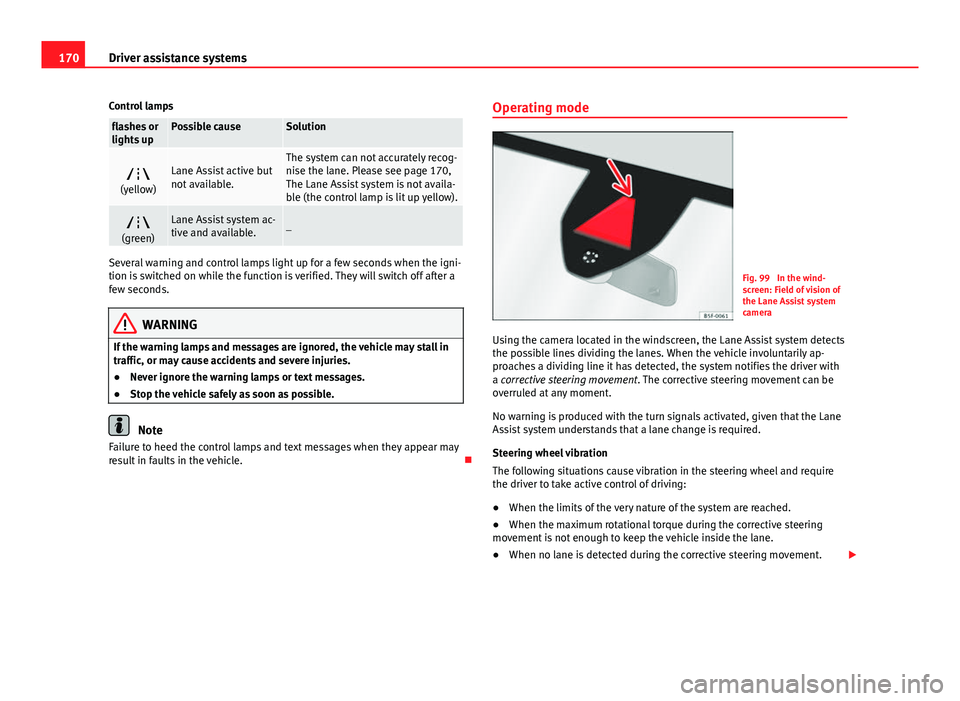
Using the camera located in the windscreen, the Lane Assist system detects
the possible lines dividing the lanes. When the vehicle involuntarily ap-
proaches a dividing line it has detected, the system notifies the driver with
a corrective steering movement . The corrective steering movement can be
overruled at any moment.
No warning is produced with the turn signals activated, given that the Lane
Assist system understands that a lane change is required.
Steering wheel vibration
The following situations cause vibration in the steering wheel and require
the driver to take active control of driving:
● When the limits of the very nature of the system are reached.
● When the maximum rotational torque during the corrective steering
movement is not enough to keep the vehicle inside the lane.
● When no lane is detected during the corrective steering movement.
Page 172 of 289

171
Driver assistance systems
Switching the Lane Assist system on or off
● The Assistants menu ⇒ page 77 drops down in the instrument panel by
pressing the Assistants button on the turn signal lever or by operating the
menu in the multifunction steering wheel.
● OR: by pressing the OK
button on the steering wheel the
⇒ page 77
function is activated/deactivated.
● The Lane centring guide is activated/deactivated in the Easy Connect
system using the CAR
button and the button on the Setup function
⇒ page 79.
Self-deactivation: The Lane Assist system can be automatically deactivated
if there is a system malfunction. The control lamp disappears.
Hands-Off Function
● If the driver does not exert any physical action on the steering wheel for
about 10 to 12 sec. the function deactivates.
● Visual and audible warnings on the instrument panel.
● The function switches off 2 seconds after the warning.
The Lane Assist system is active but it is not available (the control lamp is
lit up yellow)
● When driving at speeds below 65 km/h (38 mph).
● When the Lane Assist system does not detect the dividing lines of the
road. For example, in the event warnings indicating road works, and snow,
dirt, moisture or reflections.
● When the radius of a curve is too small.
● When no road markings can be seen.
● When the distance to the next marking to too great.
● When the system does not detect any clear and active steering move-
ment during a long period of time.
● Temporarily, in the event of very dynamic driving styles.
● If a turn signal is activated.
● With the stability control system ESC in Sport mode.
Note
● Before starting a journey, verify that the field of vision of the camera is
not covered ⇒ Fig. 99.
● Always keep the field of vision of the camera clean.
Switching off the Lane Assist system in the following
situations
Due to the limits of the Lane Assist system, switch it off in the following sit-
uations:
● When more attention is required of the driver
● When driving in a sporty style
● In unfavourable weather conditions
● On roads in poor condition
● In areas of road works
Note
The Lane Assist system deactivates when driving below 60 km/h (40 mph).
SEAT Drive Modes* Introduction
SEAT Drive Mode enables the driver to choose between four profiles or
modes, normal, sport, eco and individual , that modify the behaviour of vari-
ous vehicle functions, providing different driving experiences.
Safety FirstOperating instructionsPractical TipsTechnical specifications
Page 175 of 289

174Driver assistance systems
Note
● Tiredness detection has been developed for driving on motorways and
well paved roads only.
● If there is a fault in the system, have it checked by a specialised work-
shop.
Function and operation
Fig. 101 On the instru-
ment panel display:
Tiredness detection sym-
bol
Tiredness detection determines the driving behaviour of the driver when
starting a journey, making a calculation of tiredness. This is constantly com-
pared with the current driving behaviour. If the system detects that the driv-
er is tired, an audible warning is given with a sound and an optic warning is
shown with a symbol and complementary message on the instrument panel
display ⇒ Fig. 101. The message on the instrument panel display is shown
for about 5 seconds, and depending on the case, is repeated. The system
stores the last message displayed.
The message on the instrument panel display can be switched off by press-
ing the
button on the windscreen wiper lever or the button on the
multi function steering wheel ⇒ page 73. The message can be recalled to the instrument panel display using the mul-
tifunction display
⇒ page 73.
Conditions of operation
Driving behaviour is only calculated on speeds above about 65 km/h (40
mph) up to around 200 km/h (125 mph).
Switching on and off
Tiredness detection can be activated or deactivated in the Easy Connect
system with the button
and the function button ⇒
page 79. A mark
indicates that the adjustment has been activated.
System limitations
The Tiredness detection has certain limitations inherent to the system. The
following conditions can limit the Tiredness detection or prevent it from
functioning.
● At speeds below 65 km/h (40 mph)
● At speeds above 200 km/h (125 mph)
● When cornering
● On roads in poor condition
● In unfavourable weather conditions
● When a sporty driving style is employed
● In the event of a serious distraction to the driver
Tiredness detection will be restored when the vehicle is stopped for more
than 15 minutes, when the ignition is switched off or when the driver has
unbuckled their seat belt and opened the door.
In the event of slow driving during a long period of time (below 65 km/h (40
mph) the system automatically re-establishes the tiredness calculation.
When driving at a faster speed the driving behaviour will be recalculated.
Page 183 of 289

182Driver assistance systems
Towing bracket
If the trailer power socket is occupied, the rear parking aid sensors will not
activate when reverse gear is engaged, or when the button is pressed.
This function may not be covered under warranty if the towing bracket is not
factory-fitted. This causes the following limitations:
Plus parking aid*
There will be no warning about the presence of obstacles in the rear area.
The monitoring in the front area remains active. The optical display changes
to towing mode.
Page 184 of 289
183
Intelligent technology
Practical Tips Intelligent technology
Electronic Stability Control (ESC)
Description
EI ESC helps to improve safety. It reduces the tendency to skid and improves
the stability and roadholding of the vehicle. EI ESC detects critical handling
situations, such as vehicle understeer or oversteer, or wheelspin on the
driving wheels. It stabilises the vehicle by braking individual wheels or by
reducing the engine torque. The warning lamp will flash on the instrument
panel when the ESC is intervening .
ESC includes the Anti-lock brake system (ABS), the brake assist system, the
traction control system (ASR), electronic differential lock (EDL), electronic
self-locking*, selective torque control* and tractor-trailer sway mitigation*.
ESC also helps stabilise the vehicle by changing the torque.
Anti-lock brake system (ABS)
ABS prevents the wheels from locking up under braking until the vehicle
has reached a virtual standstill. You can continue to steer the vehicle even
when the brakes are on full. Keep your foot on the brake pedal and do not
pump the brakes. You will feel the brake pedal pulsate while the ABS is
working.
Brake assist system
The brake assist system can reduce the required braking distance. The brak-
ing force is automatically boosted if you press the brake pedal quickly in an
emergency. You must keep pressing the brake pedal until the danger has
passed. Traction control system (ASR)
In the event of wheelspin, the traction control system reduces the engine
torque to match the amount of grip available. This helps the car to start
moving, accelerate or climb a gradient.
Electronic differential lock (EDL)
When the EDL detects wheelspin, it brakes the spinning wheel and directs
the power to the other driven wheel. This function is available up to a speed
of around 100 km/h, 62 mph).
To prevent the disc brake of the braked wheel from overheating, the EDL
cuts out automatically if subjected to excessive loads. The vehicle can still
be driven. The EDL will switch on again automatically when the brake has
cooled down.
Tractor-trailer sway mitigation*
If the vehicle is pulling a trailer, it will control the following: Tractor-trailers
tend to sway. When the swaying of the trailer is felt by the vehicle and de-
tected by the ESC, it will automatically brake the towing vehicle within the
limits of the system and mitigate the sway. Tractor-trailer sway mitigation is
not available in all countries.
Electronic self-locking*/Selective torque control*
When driving around bends, an electronic self-locking intervenes. The front
wheel on the inside of the curve, or the two inside wheels, respectively, are
selectively braked as required. This minimises the traction of the front
wheels, allowing you to take bends with greater precision and neutrality. In
certain circumstances, where roads are wet or snow-covered, the respective
system may not intervene.
Safety FirstOperating instructionsPractical TipsTechnical specifications