belt Seat Leon 5D 2012 Service Manual
[x] Cancel search | Manufacturer: SEAT, Model Year: 2012, Model line: Leon 5D, Model: Seat Leon 5D 2012Pages: 289, PDF Size: 3.81 MB
Page 57 of 289
56Child safety
Child seats with the Top Tether system come with a strap for securing the
seat to the vehicle anchor point, located at the back of the rear seat back-
rest.
The objective of the retainer strap is to reduce forward movements of the
child seat in a crash, helping reduce the risk of injuries to the head from hit-
ting the inside of the vehicle.
Using the Top Tether in rear-facing mounted seats
Currently, there are very few rear-facing child safety seats that have Top
Tether. Please carefully read and follow the seat manufacturer instructions
to learn the proper way to install the Top Tether strap.
Fitting the Top Tether child restraint to the anchoring point
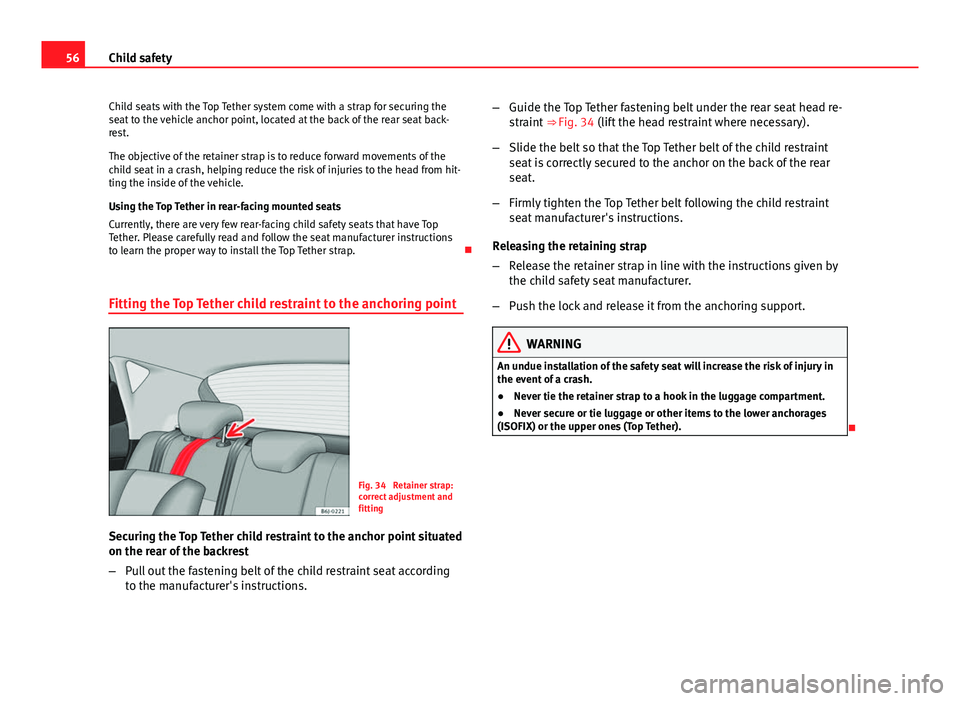
Fig. 34 Retainer strap:
correct adjustment and
fitting
Securing the Top Tether child restraint to the anchor point situated
on the rear of the backrest
– Pull out the fastening belt of the child restraint seat according
to the manufacturer's instructions. –
Guide the Top Tether fastening belt under the rear seat head re-
straint ⇒ Fig. 34 (lift the head restraint where necessary).
– Slide the belt so that the Top Tether belt of the child restraint
seat is correctly secured to the anchor on the back of the rear
seat.
– Firmly tighten the Top Tether belt following the child restraint
seat manufacturer's instructions.
Releasing the retaining strap
– Release the retainer strap in line with the instructions given by
the child safety seat manufacturer.
– Push the lock and release it from the anchoring support.
WARNING
An undue installation of the safety seat will increase the risk of injury in
the event of a crash.
● Never tie the retainer strap to a hook in the luggage compartment.
● Never secure or tie luggage or other items to the lower anchorages
(ISOFIX) or the upper ones (Top Tether).
Page 70 of 289
69
Instruments and warning/control lamps
Vehicles with an automatic gearbox*
The display is only visible in tiptronic mode ⇒ page 159
The following display symbols mean:
● Shifting up a gear
● Shifting down a gear
CAUTION
The gear-change indicator is intended to help save fuel. It is not intended to
recommend the right gear for all driving situations. In certain situations, on-
ly the driver can choose the correct gear (for instance when overtaking, driv-
ing up a steep gradient or towing a trailer).
Note
The display disappears from the instrument panel when you press the
clutch pedal.
Control lamps Control and warning lamps
The control and warning lamps are indicators of warnings, ⇒ , faults ⇒ or certain functions. Some control and warning lamps come on when the ig-
nition is switched on, and switch off when the engine starts running, or
while driving.
Depending on the model, additional text messages may be viewed on the
instrument panel display. These may be purely informative or they may be
advising of the need for action ⇒ page 61, Instruments. Depending upon the equipment fitted in the vehicle, instead of a warning
lamp, sometimes a symbol may be displayed on the instrument panel.
When certain control and warning lamps are lit, an audible warning is also
heard.
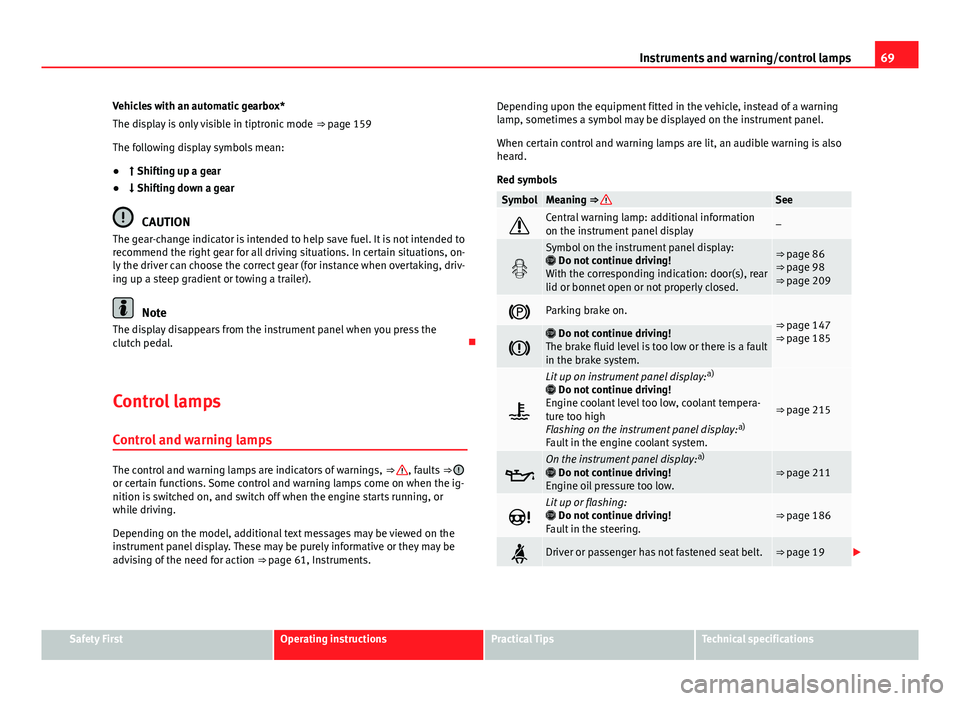
Red symbols
SymbolMeaning ⇒ See
Central warning lamp: additional information
on the instrument panel display–
Symbol on the instrument panel display:
Do not continue driving!
With the corresponding indication: door(s), rear
lid or bonnet open or not properly closed.⇒ page 86
⇒ page 98
⇒ page 209
Parking brake on.⇒ page 147
⇒ page 185
Do not continue driving!
The brake fluid level is too low or there is a fault
in the brake system.
Lit up on instrument panel display: a)
Do not continue driving!
Engine coolant level too low, coolant tempera-
ture too high
Flashing on the instrument panel display: a)
Fault in the engine coolant system.
⇒ page 215
On the instrument panel display: a)
Do not continue driving!
Engine oil pressure too low.⇒ page 211
Lit up or flashing:
Do not continue driving!
Fault in the steering.⇒ page 186
Driver or passenger has not fastened seat belt.⇒ page 19
Safety FirstOperating instructionsPractical TipsTechnical specifications
Page 71 of 289
70Instruments and warning/control lamps
SymbolMeaning ⇒ See
Use the foot brake!
On the instrument panel display: a)
Fault in the battery.⇒ page 217
a) Colour presentation on instrument panel with colour display.
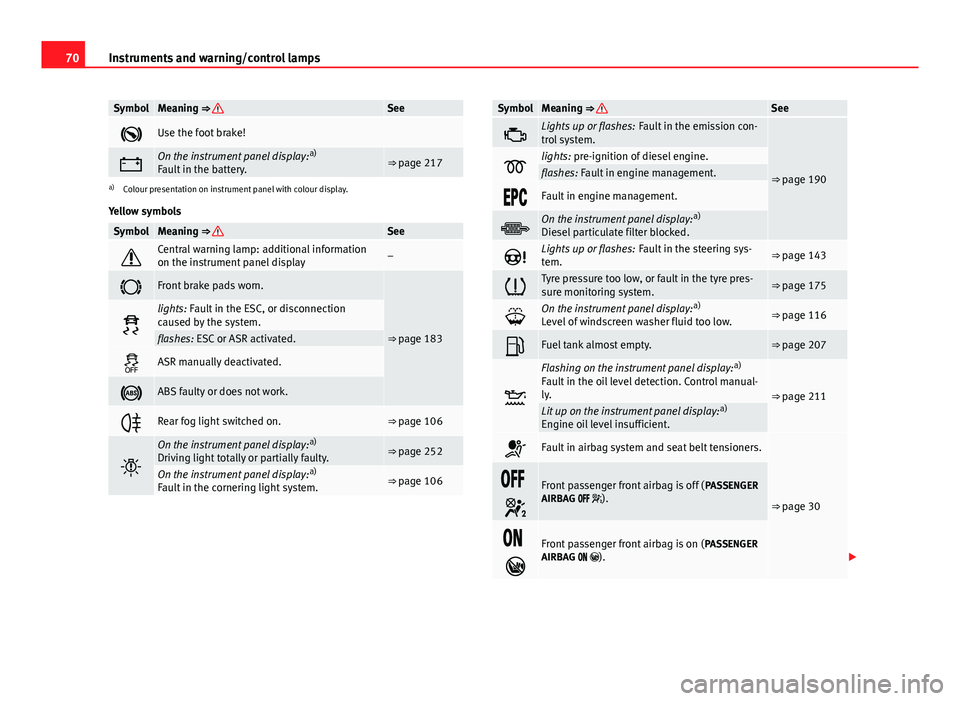
Yellow symbols
SymbolMeaning ⇒ See
Central warning lamp: additional information
on the instrument panel display–
Front brake pads worn.
⇒ page 183
lights: Fault in the ESC, or disconnection
caused by the system.
flashes: ESC or ASR activated.
ASR manually deactivated.
ABS faulty or does not work.
Rear fog light switched on.⇒ page 106
On the instrument panel display: a)
Driving light totally or partially faulty.⇒ page 252
On the instrument panel display: a)
Fault in the cornering light system.⇒ page 106
SymbolMeaning ⇒ See
Lights up or flashes: Fault in the emission con-
trol system.
⇒ page 190lights: pre-ignition of diesel engine.flashes: Fault in engine management.
Fault in engine management.
On the instrument panel display: a)
Diesel particulate filter blocked.
Lights up or flashes: Fault in the steering sys-
tem.⇒ page 143
Tyre pressure too low, or fault in the tyre pres-
sure monitoring system.⇒ page 175
On the instrument panel display: a)
Level of windscreen washer fluid too low.⇒ page 116
Fuel tank almost empty.⇒ page 207
Flashing on the instrument panel display: a)
Fault in the oil level detection. Control manual-
ly.
⇒ page 211Lit up on the instrument panel display: a)
Engine oil level insufficient.
Fault in airbag system and seat belt tensioners.
⇒ page 30
Front passenger front airbag is off ( PASSENGER
AIRBAG ).
Front passenger front airbag is on ( PASSENGER
AIRBAG ).
Page 126 of 289

125
Seats and storage
Seats and storage General notes
WARNING
The Safe driving chapter contains important information, tips, sugges-
tions and warnings that you should read and observe for your own safety
and the safety of your passengers ⇒ page 7.
Front seats Manual seat adjustment
Fig. 71 Front seats:
manual seat adjustment Adjusting the seat forward/backward: pull the lever and move the seat
forwards or backwards.
Adjusting the lumbar support* : press the button in the corresponding
position.
Backrest lower/raise: turn the hand wheel.
Raise/lower the seat: Pull/push the lever.
WARNING
● Adjust the front seats only when the vehicle is stationary. Failure to
do so could result in an accident.
● Be careful when adjusting the seat height. Careless or uncontrolled
adjustment can cause injuries.
● The front seat backrests must not be reclined for driving. Otherwise,
seat belts and the airbag system might not protect as they should, with
the subsequent danger of injury.
Front centre armrest
The centre armrest can be adjusted to various levels. Adjusting the centre armrest
– To adjust the tilt, lift the armrest from the starting position so
that it is engaged.
– To return the armrest to the starting position, remove the arm-
rest from the upper fixed position and lower it.
The armrest can be moved backwards and forwards.
1
2
34
Safety FirstOperating instructionsPractical TipsTechnical specifications
Page 127 of 289

126Seats and storage
Seat functions
Introduction
Additional information and warnings
● Adjusting the position of the seats ⇒ page 10
● Seat belts ⇒ page 19
● Airbag system ⇒ page 30
● Child seats (accessories) ⇒ page 47
WARNING
Inappropriate use of the seat functions can cause severe injuries.
● Assume the proper sitting position before your trip and remain in it
throughout. This also applies to the other occupants.
● Always keep hands, fingers, feet and other parts of the body away
from the operating radius and the adjustment of seats.
Seat heating
Fig. 72 In the centre
console: front seats heat-
ing switch The seat cushions can be heated electrically when the ignition is switched
on. The backrest is also heated in some versions.
The seat heating should not be engaged in any of the following conditions:
●
The seat is unoccupied.
● The seat has a covering.
● There is a child seat installed in the seat.
● The seat cushion is wet or damp.
● The indoor or outdoor temperature is greater than 25 °C (77 °F).
FunctionUsing seat heatingTo switch sys-
tem on:Press the button or . Seat heating is switched on fully.
Adjusting the
heating out-
put:Press the button or repeatedly until the desired inten-
sity level is reached.
To switch sys-
tem off:Press the button or until all warning lamps switch off.
WARNING
People who, because of medications, paralysis or chronic diseases (e.g.
diabetes) cannot perceive pain or temperature, or have a limited percep-
tion thereof, may suffer burns to the back, buttocks or legs when using
seat heating, an occurrence that may entail a very lengthy recovery peri-
od or from which it may not be possible to recover fully. Seek medical ad-
vice if you have doubts regarding your health.
● People with a limit pain and temperature threshold must never use
seat heating.
Page 134 of 289
133
Seats and storage
– Fold the backrest forwards.
Returning the backrest to its upright position
– Move the backrest until it engages properly ⇒
. The red mark-
ing on the tab B should no longer be visible when the backrest
is properly secured.
WARNING
● Make sure that the rear backrest is securely locked in position so that
the seat belt can provide proper protection on the centre rear seat.
● The rear backrest must always be securely latched so that objects
stored in the luggage compartment will not fly forward through the inte-
rior during sudden braking.
CAUTION
● With the backrest inclined there is a danger of damaging the rear head
restraints when adjusting the front seats backwards.
● When returning the backrest to an upright position, make sure that the
side seat belts are not caught up and damaged in the catches for the back-
rest. Fastening rings*
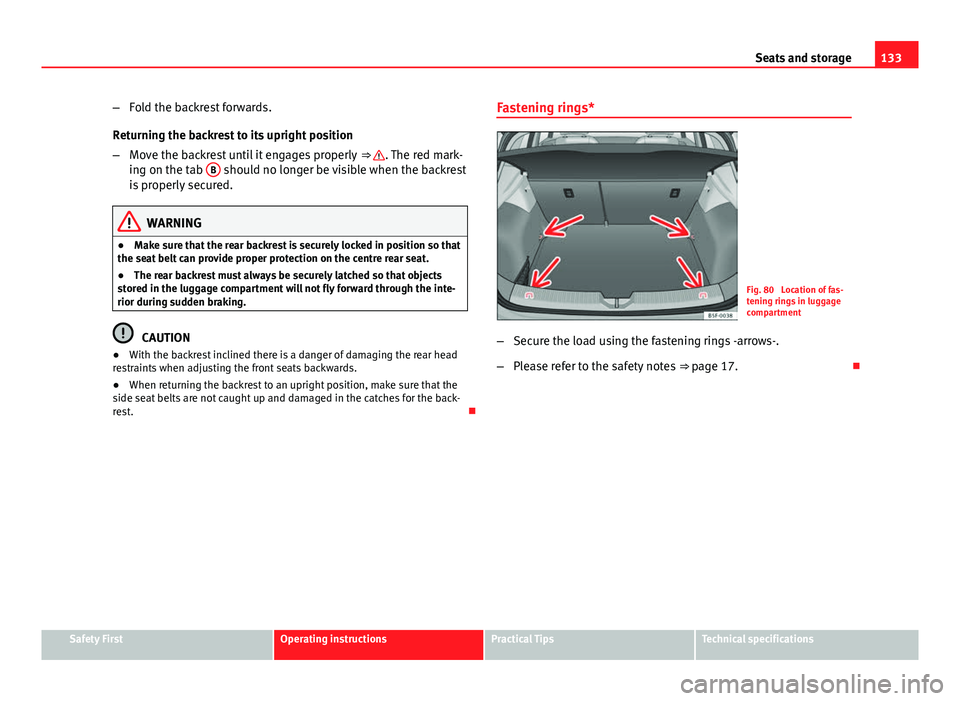
Fig. 80 Location of fas-
tening rings in luggage
compartment
– Secure the load using the fastening rings -arrows-.
– Please refer to the safety notes ⇒ page 17.
Safety FirstOperating instructionsPractical TipsTechnical specifications
Page 149 of 289
148Driving
–Apply the handbrake.
– Select first gear.
– Switch the engine off and remove the key from the ignition. Turn
the steering wheel slightly to engage the steering lock.
– Always take you keys with you when you leave the vehicle ⇒
.
Additional notes on parking the vehicle on gradients:
Turn the steering wheel so that the vehicle rolls against the kerb if it started
to roll.
● If the vehicle is parked facing downhill, turn the front wheels so that
they point towards the kerb .
● If the vehicle is parked facing uphill, turn the front wheels so that they
point away from the kerb .
● Secure the vehicle as normal by applying the handbrake firmly and se-
lecting first gear.
WARNING
● Take measures to reduce the risk of injury when you leave your vehi-
cle unattended.
● Never park where the hot exhaust system could ignite inflammable
materials, such as dry grass, low bushes, spilt fuel etc.
● Never allow vehicle occupants to remain in the vehicle when it is
locked. They would be unable to open the vehicle from the inside, and
could become trapped in the vehicle in an emergency. In the event of an
emergency, locked doors will delay assistance to vehicle occupants.
● Never leave children alone in the vehicle. They could set the vehicle
in motion, for example, by releasing the handbrake or the gearbox lever.
● Depending on weather conditions, it may become extremely hot or
cold inside the vehicle. This can be fatal.
Hill hold assist*
The Hill hold assist facilitates moving off when driving up-
hill.
Important: the driver door must be closed, the seat belt fastened and the
engine running.
The system is activated when you press and hold the brake pedal for a few
seconds.
To prevent the vehicle from rolling backwards when moving off, the brake
force will remain for a moment after releasing the brake pedal. This short
space of time is enough to start the vehicle with ease.
WARNING
● The smart technology included in the Hill hold assist cannot defy the
laws of physics. Do not let the extra convenience afforded by the Hill hold
assist tempt you into taking any risks when driving.
● The Hill hold assist cannot maintain the vehicle stationary on a slope
in all situations (e.g. on slippery or icy ground).
● If you do not start the vehicle immediately after taking your foot off
the brake pedal, the vehicle may start to roll back under certain circum-
stances. Depress the brake pedal or use the handbrake immediately.
● If the engine stalls, depress the brake pedal or use the handbrake im-
mediately.
● If you are moving off on a slope in stop-and-go traffic, press and hold
the brake pedal for a few seconds before driving off. This will prevent the
vehicle from rolling back unintentionally.
Note
The SEAT Official Service or a specialised workshop can tell you if your vehi-
cle is equipped with the Hill hold assist.
Page 151 of 289

150Driving
Basic requirements for the Start-Stop mode
● The driver door must be closed.
● The driver must have their seat belt fastened.
● The bonnet must be closed.
● The vehicle must have travelled at more than 4 km/h (2 mph) since the
last stop.
● The vehicle cannot be towing a trailer.
WARNING
● Never switch the engine off until the vehicle is stationary. The brake
servo and power steering functions will not be completely covered under
warranty. More force may also be needed to turn the steering wheel or to
brake. As you cannot steer and brake in the normal manner, there is a
greater risk of accidents and serious injury.
● Never remove the key from the ignition if the vehicle is in motion.
Otherwise, the steering could lock making it impossible to steer the vehi-
cle.
● Always take the ignition key with you whenever you leave the vehicle,
even temporarily. This is particularly important if there are children in
the vehicle, as they might otherwise be able to start the engine or use
power-operated equipment (e.g. the electric windows), which could
cause injuries.
● To avoid injury, make sure that the Start-Stop system is switched off
when working in the engine compartment ⇒ page 152.
CAUTION
The Start-Stop system must always be switched off when driving through
flooded areas ⇒ page 152. Stop/Start the engine
Vehicles with a manual gearbox
–
When the vehicle is stopped, put it into neutral and release the
clutch pedal. The engine will switch off. The warning lamp
will appear on the instrument panel display.
– When the clutch pedal is pressed the engine will start up again.
The warning lamp will switch off.
Vehicles with an automatic gearbox
– Use the foot brake to bring the vehicle to a stop and keep the
brake pedal pressed down with your foot. The engine will switch
off. The warning lamp will appear in the display.
– When you take your foot off the brake pedal the engine will start
up again. The warning lamp will switch off.
Additional information related to the automatic gearbox
The engine stops when the selector lever is in the positions P, D, N and S, in
addition to when in manual mode. With the selector lever in position P, the
engine will also remain switched off when you take your foot off the brake
pedal. In order to start the engine up again the accelerator must be press-
ed, or another gear engaged or the brake released.
If the selector lever is placed in position R during the stopping phase, the
engine will start up again.
Change from position D to P to prevent the engine from accidentally starting
when changing and passing by position R.
Page 175 of 289

174Driver assistance systems
Note
● Tiredness detection has been developed for driving on motorways and
well paved roads only.
● If there is a fault in the system, have it checked by a specialised work-
shop.
Function and operation
Fig. 101 On the instru-
ment panel display:
Tiredness detection sym-
bol
Tiredness detection determines the driving behaviour of the driver when
starting a journey, making a calculation of tiredness. This is constantly com-
pared with the current driving behaviour. If the system detects that the driv-
er is tired, an audible warning is given with a sound and an optic warning is
shown with a symbol and complementary message on the instrument panel
display ⇒ Fig. 101. The message on the instrument panel display is shown
for about 5 seconds, and depending on the case, is repeated. The system
stores the last message displayed.
The message on the instrument panel display can be switched off by press-
ing the
button on the windscreen wiper lever or the button on the
multi function steering wheel ⇒ page 73. The message can be recalled to the instrument panel display using the mul-
tifunction display
⇒ page 73.
Conditions of operation
Driving behaviour is only calculated on speeds above about 65 km/h (40
mph) up to around 200 km/h (125 mph).
Switching on and off
Tiredness detection can be activated or deactivated in the Easy Connect
system with the button
and the function button ⇒
page 79. A mark
indicates that the adjustment has been activated.
System limitations
The Tiredness detection has certain limitations inherent to the system. The
following conditions can limit the Tiredness detection or prevent it from
functioning.
● At speeds below 65 km/h (40 mph)
● At speeds above 200 km/h (125 mph)
● When cornering
● On roads in poor condition
● In unfavourable weather conditions
● When a sporty driving style is employed
● In the event of a serious distraction to the driver
Tiredness detection will be restored when the vehicle is stopped for more
than 15 minutes, when the ignition is switched off or when the driver has
unbuckled their seat belt and opened the door.
In the event of slow driving during a long period of time (below 65 km/h (40
mph) the system automatically re-establishes the tiredness calculation.
When driving at a faster speed the driving behaviour will be recalculated.
Page 190 of 289

189
Intelligent technology
Information recorded in the control units
Your vehicle is fitted at the factory with a series of electronic control units
responsible for the engine and gearbox management. In addition, the con-
trol units supervise the correct performance of the exhaust gas system and
the airbag systems.
Therefore, while the vehicle is being driven, these electronic control units
are continuously analysing the vehicle data. In the event of faults or devia-
tions from the theoretical values, only this data is stored. Generally, the in-
strument panel warning lamps indicate whether there are any malfunctions.
This data can only be read and analysed using special equipment.
The storing of the data allows specialised workshops to detect and repair
faults. Stored data may include:
● Important data about the engine and gearbox
● Speed
● Direction of travel
● Braking force
● Seat belt check
The vehicle control units never record conversations held by passengers in
the vehicle.
If the control unit records an accident with airbag activation, the system
may automatically send a signal. This will depend on the network operator.
Normally, transmission is only possible in areas with sufficient coverage.
Event Data Recorder
The vehicle is not fitted with an event data recorder.
An event data recorder temporarily stores the vehicle information. There-
fore, in the event of accident, it is possible to obtain detailed information
about how the accident occurred. For example, in vehicles with airbag sys-
tems, data relating to speed of impact, seat belt status, seat positions and airbag activation times may be stored. The volume of data depends on the
manufacturer.
Event data recorders can only be mounted with authorisation from the vehi-
cle owner and, in some countries, they are governed by local legislation.
Reprogramming control units
On the whole, all the data required for the component management is stor-
ed in the control units. The programming of certain convenience functions,
such as the turn signal convenience mode, individual door opening and dis-
play indications can be modified using special equipment at the workshop.
If the convenience functions are reprogrammed, the Instruction Manual in-
formation and descriptions will not coincide with the modified functions.
Therefore, SEAT recommends that any changes are recorded in the “Other
workshop notes section” of the Service Plan.
You can find out about possible reprogramming at your SEAT Official Serv-
ice.
Event recorder
In the footwell on the driver side you will find the diagnostics connection
socket for reading the event recorder. The event recorder stores operating
data and data on the status of the electronic control units. The events re-
corder should only be read and deleted by a SEAT Official Service or special-
ised workshop.
WARNING
The diagnostics connection socket must not be used for private purpo-
ses. Improper use can cause malfunctions: risk of accident!
Safety FirstOperating instructionsPractical TipsTechnical specifications