ESP Seat Leon 5D 2013 Owner's Guide
[x] Cancel search | Manufacturer: SEAT, Model Year: 2013, Model line: Leon 5D, Model: Seat Leon 5D 2013Pages: 339, PDF Size: 4.8 MB
Page 100 of 339
98Opening and closing
WARNING
Do not leave anyone (especially children) in the vehicle if it is locked from
the outside and the anti-theft security system* is enabled, as the doors
and windows cannot then be opened from the inside. Locked doors could
delay assistance in an emergency, potentially putting lives at risk.
Emergency locking and unlocking Introduction
The doors, rear lid and panoramic tilting sunroof can be locked manually
and partially opened, for example if the key or the central locking is dam-
aged.
Additional information and warnings:
● Vehicle key set ⇒ page 89
● Central locking and locking system ⇒ page 87
● Rear lid ⇒ page 100
WARNING
Opening and closing doors carelessly can cause serious injury.
● If the vehicle is locked from outside, the doors and windows cannot
be opened from the inside.
● Never leave children or disabled people alone in the car. They could
be trapped in the car in an emergency and will not be able to get them-
selves to safety.
● Depending on the time of the year, temperatures inside a locked and
closed vehicle can be extremely high or extremely low resulting in seri-
ous injuries and illness or even death, particularly for young children.
WARNING
Getting in the way of the doors and the rear lid is dangerous and can lead
to serious injury.
● Open and close the doors and the rear lid only when there is nobody
in the way.
CAUTION
When opening and closing in an emergency, carefully disassemble compo-
nents and then reassemble them carefully to avoid damage to the vehicle.
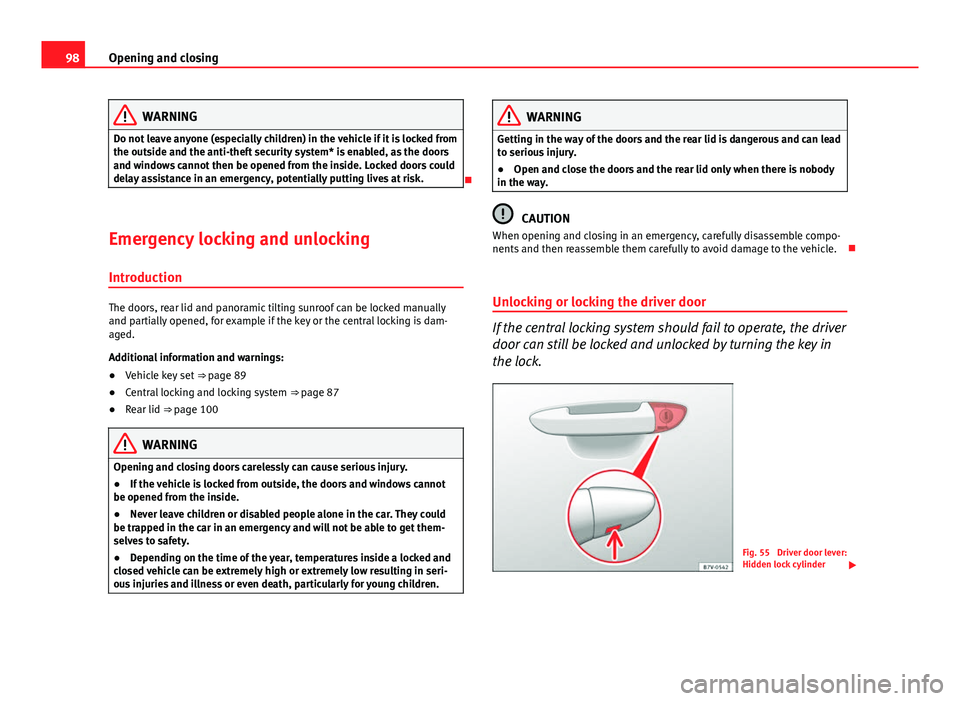
Unlocking or locking the driver door
If the central locking system should fail to operate, the driver
door can still be locked and unlocked by turning the key in
the lock.
Fig. 55 Driver door lever:
Hidden lock cylinder
Page 109 of 339
107
Opening and closing
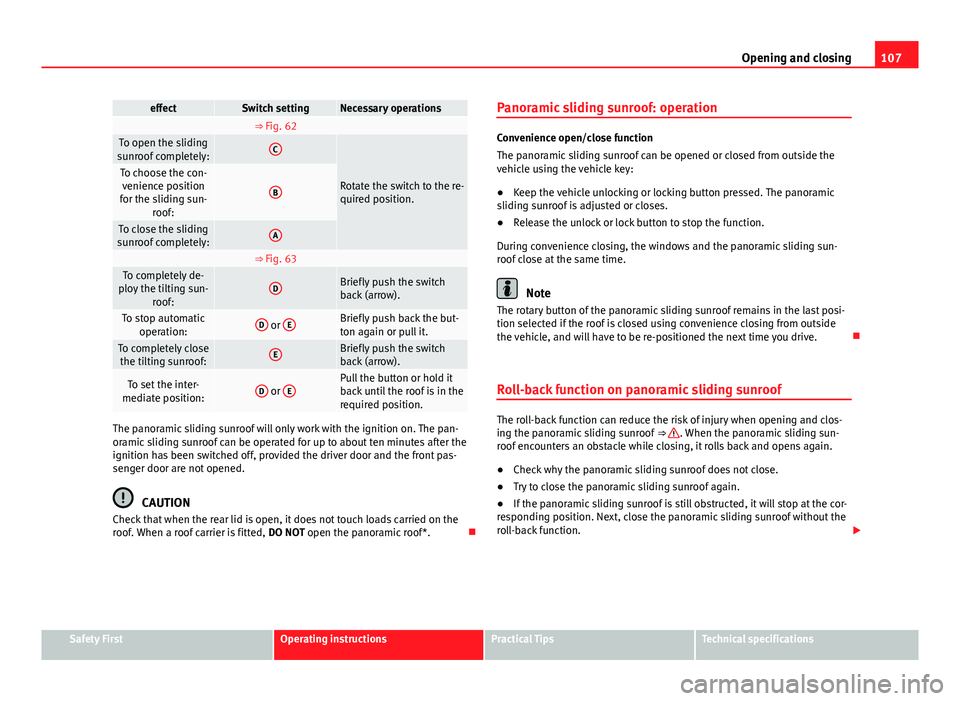
effectSwitch settingNecessary operations ⇒ Fig. 62 To open the sliding
sunroof completely:C
Rotate the switch to the re-
quired position.To choose the con- venience position
for the sliding sun- roof:
B
To close the sliding
sunroof completely:A
⇒ Fig. 63 To completely de-
ploy the tilting sun- roof:DBriefly push the switch
back (arrow).
To stop automaticoperation:D or EBriefly push back the but-
ton again or pull it.
To completely close
the tilting sunroof:EBriefly push the switch
back (arrow).
To set the inter-
mediate position:D or EPull the button or hold it
back until the roof is in the
required position.
The panoramic sliding sunroof will only work with the ignition on. The pan-
oramic sliding sunroof can be operated for up to about ten minutes after the
ignition has been switched off, provided the driver door and the front pas-
senger door are not opened.
CAUTION
Check that when the rear lid is open, it does not touch loads carried on the
roof. When a roof carrier is fitted, DO NOT open the panoramic roof*. Panoramic sliding sunroof: operation
Convenience open/close function
The panoramic sliding sunroof can be opened or closed from outside the
vehicle using the vehicle key:
●
Keep the vehicle unlocking or locking button pressed. The panoramic
sliding sunroof is adjusted or closes.
● Release the unlock or lock button to stop the function.
During convenience closing, the windows and the panoramic sliding sun-
roof close at the same time.
Note
The rotary button of the panoramic sliding sunroof remains in the last posi-
tion selected if the roof is closed using convenience closing from outside
the vehicle, and will have to be re-positioned the next time you drive.
Roll-back function on panoramic sliding sunroof
The roll-back function can reduce the risk of injury when opening and clos-
ing the panoramic sliding sunroof ⇒ . When the panoramic sliding sun-
roof encounters an obstacle while closing, it rolls back and opens again.
● Check why the panoramic sliding sunroof does not close.
● Try to close the panoramic sliding sunroof again.
● If the panoramic sliding sunroof is still obstructed, it will stop at the cor-
responding position. Next, close the panoramic sliding sunroof without the
roll-back function.
Safety FirstOperating instructionsPractical TipsTechnical specifications
Page 110 of 339
108Opening and closing
Closing without the roll-back function
● The ⇒ Fig. 62 1
switch should be in the “closed” position A.
● Within five seconds of triggering the roll-back function, pull the control
all the way back ⇒ Fig. 63 (arrow E
) until the panoramic sliding sunroof
closes fully.
● The panoramic sliding sunroof closes without the roll-back function.
● If the panoramic sliding sunroof still cannot be closed, visit a special-
ised workshop.
WARNING
Closing the panoramic sliding sunroof without the roll-back function may
result in serious injury.
● Always close the panoramic sliding sunroof carefully.
● Make sure that nobody is in the way of the panoramic sliding sunroof,
especially when it is closed without the roll-back function.
● The anti-trap function does not prevent fingers or other parts of the
body getting pinched against the window frame and causing injury.
Note
The anti-trap function is activated if the windows and the panoramic sliding
sunroof are closed from the outside of the vehicle using the ignition key for
convenience closing ⇒ page 103.
Page 111 of 339
109
Lights and visibility
Lights and visibility
Lights Introduction
The legal requirements regarding the use of vehicle lights in each country
must be observed.
The driver is personally responsible for the correct use and adjustment of
the lights in all situations.
Additional information and warnings:
● Information system ⇒ page 73
● Changing bulbs ⇒ page 293
WARNING
If the headlights are regulated too high and the main beam is not used
correctly, there is a risk of dazzling or distracting other road users. This
could result in a serious accident.
● Always make sure that the headlights are correctly adjusted.
● Never use the main beam or headlight flasher when it can dazzle oth-
er drivers.
Control lamps
lights upPossible causeSolution
Driving light totally or partially
faulty.
Replace the corresponding
bulb ⇒ page 293.
If all the bulbs are OK, the vehi-
cle should be taken to a speci-
alised workshop if necessary.
Rear fog light switched on.⇒ page 111.
Fog lights switched on
Left or right turn signal.
The control lamp flashes twice
as fast when a vehicle or trailer
turn signal is faulty.If necessary, check the vehicle
and trailer lighting.
Main beam on or flasher on.⇒ page 110.
Light Assist on.⇒ page 114
Several warning and control lamps should light up for a few seconds when
the ignition is switched on, signalling that the function is being verified.
They will switch off after a few seconds.
Safety FirstOperating instructionsPractical TipsTechnical specifications
Page 112 of 339
110Lights and visibility
WARNING
If the warning lamps and messages are ignored, the vehicle may stall in
traffic, or may cause accidents and severe injuries.
● Never ignore the warning lamps or text messages.
● Stop the vehicle safely as soon as possible.
● Park the vehicle at a suitable distance away from the traffic ensuring
that the exhaust system is not in contact with inflammable material, for
example, dry grass, fuel, oil, etc.
● A faulty vehicle represents a risk of accident for the driver and for oth-
er road users. If necessary, switch on the hazard warning lamps and put
out the warning triangle to advise other drivers.
CAUTION
Failure to heed the control lamps and text messages when they appear may
result in faults in the vehicle.
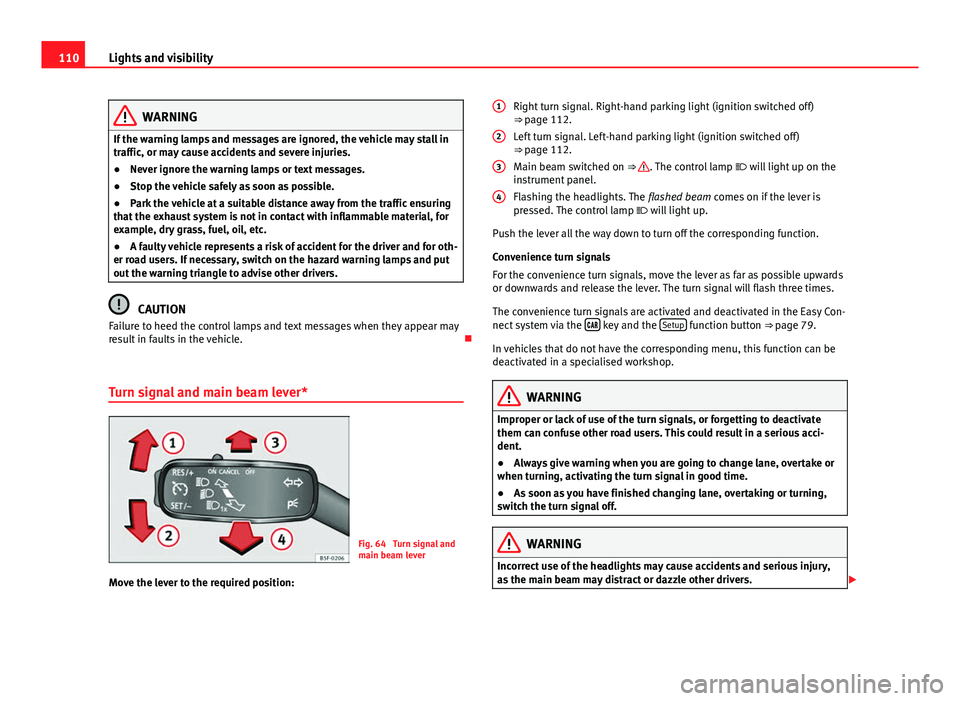
Turn signal and main beam lever*
Fig. 64 Turn signal and
main beam lever
Move the lever to the required position: Right turn signal. Right-hand parking light (ignition switched off)
⇒ page 112.
Left turn signal. Left-hand parking light (ignition switched off)
⇒ page 112.
Main beam switched on ⇒
. The control lamp
will light up on the
instrument panel.
Flashing the headlights. The flashed beam comes on if the lever is
pressed. The control lamp will light up.
Push the lever all the way down to turn off the corresponding function.
Convenience turn signals
For the convenience turn signals, move the lever as far as possible upwards
or downwards and release the lever. The turn signal will flash three times.
The convenience turn signals are activated and deactivated in the Easy Con-
nect system via the
key and the Setup function button ⇒ page 79.
In vehicles that do not have the corresponding menu, this function can be
deactivated in a specialised workshop.
WARNING
Improper or lack of use of the turn signals, or forgetting to deactivate
them can confuse other road users. This could result in a serious acci-
dent.
● Always give warning when you are going to change lane, overtake or
when turning, activating the turn signal in good time.
● As soon as you have finished changing lane, overtaking or turning,
switch the turn signal off.
WARNING
Incorrect use of the headlights may cause accidents and serious injury,
as the main beam may distract or dazzle other drivers.
1
2
3
4
Page 114 of 339
112Lights and visibility
Lights and visibility: functions
Parking light
When the parking light is switched on, (right or left turn signal), the front
side light and the rear light on the corresponding side of the vehicle stay lit.
The parking lights can only be activated with the ignition switched off and
the turn signal and main beam lever in the central position, before being
triggered.
Parking light on both sides
With the ignition switched off and the light switch in position , when lock-
ing the vehicle from the outside, the parking lights on both sides of the ve-
hicle light up. In doing so, only the side lights of both headlights light up,
and additionally the tail lights will do so partially.
Daytime driving light*
The daytime driving lights consist of individual lights, integrated in the front
headlights. With the daylight driving lights on, only these lights switch on
⇒
.
The daytime driving lights switch on every time the ignition is switched on,
if the switch is in positions or , according to the level of exterior light-
ing.
When the light switch is in position , a light sensor automatically
switches dipped beam on and off (including the control and instrument
lighting) or the daytime driving lights depending on the level of exterior
lighting.
Automatic dipped beam control
The automatic dipped beam control is merely intended as an aid and is not
able to recognise all driving situations. When the light switch is in position
, the vehicle lights and the instru-
ment panel and switch lighting switch on and off automatically in the fol-
lowing situations ⇒
:
Automatic switching on:Automatic switching off:The photo sensor detects darkness,
for example, when driving through a
tunnel.When adequate lighting is detected.
The rain sensor detects rain and ac-
tivates the windscreen wipers.When the windscreen wipers have
been inactive for a few minutes.
Cornering lights* 1)
When turning slowly or on very tight bends, the cornering lights are activa-
ted automatically. The cornering lights may be integrated in the fog lights
and are switched on only at speeds of less than 40 km/h (25 mph).
When reverse gear is engaged, the cornering lights on both sides of the ve-
hicle switch on, in order to better illuminate the area for parking.
Motorway lights*
The motorway light is available on vehicles equipped with full-LED lights.
The function is connected/disconnected via the corresponding Easy Con-
nect system menu.
● Activation: When going above 110 km/h (75 mph) for more than 30 sec-
onds, the dipped beam raises slightly to increase the distance of visibility of
the driver.
● Deactivation: When reducing the speed of the car below 100 km/h, the
dipped beam returns to its normal position.
1)
This function is not available on vehicles equipped with full-LED headlights.
Page 119 of 339
117
Lights and visibility
Vehicle with halo-
gen headlightsIn the “Leaving Home” function, the daytime running
lights (DRL), the rear side lights and the licence plate
lights are switched on.
Vehicle with full-
LED headlightsIn the “Leaving Home” function, the dipped beams,
the daytime running lights (DRL), the rear side lights
and the licence plate lights are switched on.
Activation
● When the vehicle is unlocked using the remote control.
● The “Leaving Home” function is only activated when the rotary light
switch is in position and the light sensor detects darkness.
Deactivation
● When the “Leaving Home” lights go out after the delay period (default:
30 sec.).
● When the vehicle is locked using the remote control.
● When the light control is switched into a position other than .
● With the ignition is switched on.
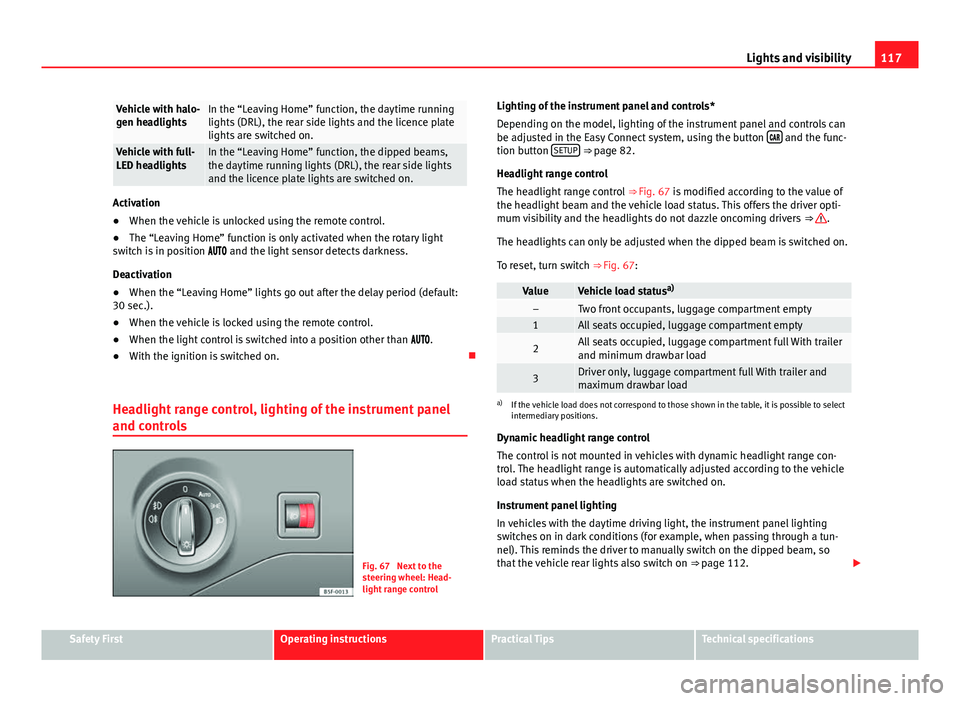
Headlight range control, lighting of the instrument panel
and controls
Fig. 67 Next to the
steering wheel: Head-
light range control Lighting of the instrument panel and controls*
Depending on the model, lighting of the instrument panel and controls can
be adjusted in the Easy Connect system, using the button
and the func-
tion button SETUP ⇒ page 82.
Headlight range control
The headlight range control ⇒ Fig. 67 is modified according to the value of
the headlight beam and the vehicle load status. This offers the driver opti-
mum visibility and the headlights do not dazzle oncoming drivers ⇒
.
The headlights can only be adjusted when the dipped beam is switched on.
To reset, turn switch ⇒ Fig. 67:
ValueVehicle load status a)–Two front occupants, luggage compartment empty1All seats occupied, luggage compartment empty
2All seats occupied, luggage compartment full With trailer
and minimum drawbar load
3Driver only, luggage compartment full With trailer and
maximum drawbar load
a)
If the vehicle load does not correspond to those shown in the table, it is possible to select
intermediary positions.
Dynamic headlight range control
The control is not mounted in vehicles with dynamic headlight range con-
trol. The headlight range is automatically adjusted according to the vehicle
load status when the headlights are switched on.
Instrument panel lighting
In vehicles with the daytime driving light, the instrument panel lighting
switches on in dark conditions (for example, when passing through a tun-
nel). This reminds the driver to manually switch on the dipped beam, so
that the vehicle rear lights also switch on ⇒ page 112.
Safety FirstOperating instructionsPractical TipsTechnical specifications
Page 120 of 339
118Lights and visibility
WARNING
Heavy objects in the vehicle may mean that the headlights dazzle and
distract other drivers. This could result in a serious accident.
● Adjust the light beam to the vehicle load status so that it does not
blind other drivers.
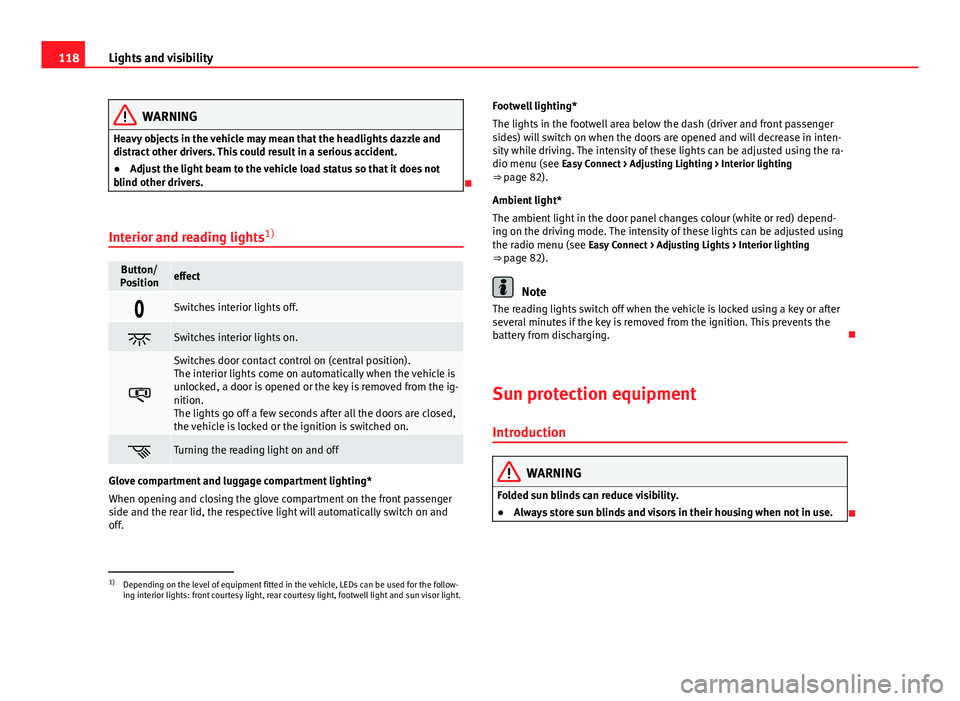
Interior and reading lights 1)
Button/
Positioneffect
Switches interior lights off.
Switches interior lights on.
Switches door contact control on (central position).
The interior lights come on automatically when the vehicle is
unlocked, a door is opened or the key is removed from the ig-
nition.
The lights go off a few seconds after all the doors are closed,
the vehicle is locked or the ignition is switched on.
Turning the reading light on and off
Glove compartment and luggage compartment lighting*
When opening and closing the glove compartment on the front passenger
side and the rear lid, the respective light will automatically switch on and
off. Footwell lighting*
The lights in the footwell area below the dash (driver and front passenger
sides) will switch on when the doors are opened and will decrease in inten-
sity while driving. The intensity of these lights can be adjusted using the ra-
dio menu (see Easy Connect > Adjusting Lighting > Interior lighting
⇒ page 82).
Ambient light*
The ambient light in the door panel changes colour (white or red) depend-
ing on the driving mode. The intensity of these lights can be adjusted using
the radio menu (see Easy Connect > Adjusting Lights > Interior lighting
⇒ page 82).
Note
The reading lights switch off when the vehicle is locked using a key or after
several minutes if the key is removed from the ignition. This prevents the
battery from discharging.
Sun protection equipment Introduction
WARNING
Folded sun blinds can reduce visibility.
● Always store sun blinds and visors in their housing when not in use.
1)
Depending on the level of equipment fitted in the vehicle, LEDs can be used for the follow-
ing interior lights: front courtesy light, rear courtesy light, footwell light and sun visor light.
Page 123 of 339

121
Lights and visibility
Window wiper lever
Fig. 70 Operating the
windscreen wiper and
rear wiper
Move the lever to the required position ⇒ :
0Windscreen wiper off.
1
Windscreen wipers interval wipe.
Using the control ⇒ Fig. 70 A adjust the interval (vehicles
without the rain sensor), or the sensitivity of the rain sensor.
2Slow wipe.
3Continuous wipe.
4Brief press, short clean. Hold the lever down for more time to
increase the wipe frequency.
5
The windscreen washer function is activated by pushing the
lever forwards, and simultaneously the windscreen wipers
start.
Move the lever to the required position ⇒ :
6Interval wipe for rear window. The rear wiper will wipe the
window approximately every six seconds.
7The windscreen washer function is activated by pressing the
lever, and the rear wiper starts simultaneously.
CAUTION
If the ignition is switched off with the windscreen wipers active, they com-
plete their wipe before returning to the rest position. Ice, snow and other
obstacles on the windscreen may damage the wiper and the windscreen
wiper motor.
● If necessary, remove snow and ice from the windscreen wipers before
starting your journey.
● Carefully lift the frozen windscreen wipers from the glass. SEAT recom-
mends a de-icer spray for this operation.
CAUTION
Do not switch on the windscreen wipers if the windscreen is dry. Cleaning
with the windscreen wipers while dry can cause damage.
Note
● The windscreen wiper and rear wiper system only function when the ig-
nition is switched on and the bonnet or rear lid, respectively, are closed.
● The interval wipe speed varies according to the vehicle speed. The faster
the vehicle is moving, the more often the windscreen is cleaned.
● The rear wiper is automatically switched on when the windscreen wiper
is on and the car is in reverse gear.
Safety FirstOperating instructionsPractical TipsTechnical specifications
Page 129 of 339
127
Lights and visibility
Interior rear vision mirror with manual setting for anti-dazzle
position
– Position the small lever of the lower edge of the mirror to face
towards the rear.
Anti-dazzle rear vision mirror with automatic setting*
– Press the button A
. Warning lamp B will light up. The interior
mirror will darken automatically when bright light (e.g. from the
headlights of a following vehicle) shines on its.
WARNING
In the event that an automatic anti-dazzle rear vision mirror breaks, an
electrolyte fluid may leak. This could cause irritation to the skin, eyes
and respiratory organs. If you come into contact with this liquid, it must
be rinsed with large quantities of water. If necessary, get medial help.
CAUTION
In the event that an automatic anti-dazzle rear vision mirror breaks, an elec-
trolyte fluid may leak. This liquid attacks plastic surfaces. Clean the liquid
with a wet sponge as soon as possible.
Note
● If the light incident in the interior rear vision mirror is obstructed (e.g.
with the sun blind*), the anti-dazzle rear vision mirror with automatic set-
ting will not operate perfectly.
● When the interior lights are on or reverse gear engaged, the rear vision
mirrors do not darken with automatic adjustment for anti-dazzle position.
Safety FirstOperating instructionsPractical TipsTechnical specifications