lock Seat Leon 5D 2013 Workshop Manual
[x] Cancel search | Manufacturer: SEAT, Model Year: 2013, Model line: Leon 5D, Model: Seat Leon 5D 2013Pages: 339, PDF Size: 4.8 MB
Page 171 of 339
169
Driving
countries with general speed limits, or if a particular speed should not be
exceeded when winter tyres are fitted etc.
Note
● Please bear in mind that, even with the speed warning function, it is still
important to keep an eye on the vehicle speed with the speedometer and to
observe the legal speed limits.
● The speed limit warning function in the version for several countries
warns you at a speed of 120 km/h (80 mph). This is a factory-set speed lim-
it.
Setting speed limit warning
You can use the radio or the Easy Connect* to set, alter or
cancel the speed limit warning.
Vehicles with radio
– Select: SETUP
button > control button
Driver assistant > Speed
warning.
Vehicles with Easy Connect
– Select: Systems control button or Vehicle systems > Driver assis-
tant > Speed warning.
The warning limit can be set from 30 to 240 km/h (20 to 150 mph). The ad-
justment is done in 10 km/h (mph) intervals. Start-Stop system*
Description and operation
The Start-Stop system helps save fuel and reduce CO 2 emissions.
In Start-Stop mode, the engine will automatically switch off when the vehi-
cle stops, when stopping at traffic lights for example. The ignition remains
switched on during the stopping phase. The engine automatically switches
back on when required.
As soon as the ignition is switched on, the Start-Stop function is automati-
cally activated.
Basic requirements for the Start-Stop mode
● The driver door must be closed.
● The driver must have their seat belt fastened.
● The bonnet must be closed.
● The vehicle must have travelled at more than 4 km/h since the last stop.
● The vehicle cannot be towing a trailer.
WARNING
● Never switch the engine off until the vehicle is stationary. The brake
servo and power steering functions will not be completely covered under
warranty. More force may also be needed to turn the steering wheel or to
brake. As you cannot steer and brake in the normal manner, there is a
greater risk of accidents and serious injury.
● Never remove the key from the ignition if the vehicle is in motion.
Otherwise, the steering could lock making it impossible to steer the vehi-
cle.
Safety FirstOperating instructionsPractical TipsTechnical specifications
Page 175 of 339
173
Driving
CAUTION
When travelling at high speeds or at high engine speeds, selecting a gear
that is too low can cause considerable damage to the clutch and the gear-
box. This can also occur if the clutch pedal is pressed and held and it does
not engage.
CAUTION
To prevent damage and avoid premature wear, please observe the follow-
ing:
● Do not rest your hand on the gear lever while driving. The pressure ap-
plied by your hand is transmitted to the gearbox selector forks.
● Always ensure that the vehicle is completely stopped before engaging
the reverse gear.
● Always press the clutch to the floor when changing gears.
● Never hold the vehicle “on the clutch” on hills with the engine on.
Automatic gearbox/DSG automatic gearbox* Introduction
Your vehicle is equipped with an electronically controlled manual gearbox.
Torque between the engine and the gearbox is transmitted via two inde-
pendent clutches. They replace the torque converter found on conventional
automatic gearboxes and allow for smooth, uninterrupted acceleration of
the vehicle.
The tiptronic system allows the driver to change gears manually if desired
⇒ page 178, Changing gears in tiptronic mode*. Selector lever positions
The selector lever position engaged is highlighted on the display in the in-
strument cluster. With the selector lever in the manual gearbox positions G,
D, E and S, the engaged gear is also indicated on the display.
P – Parking lock
When the selector lever is in this position, the driven wheels are locked me-
chanically. The parking lock must be engaged only when the vehicle is
sta-
tionary ⇒
.
The interlock button (the button on the selector lever handle) must be
pressed in and simultaneously the brake pedal must be depressed before
moving the selector lever either in or out of position P.
R – Reverse gear
Reverse gear must be engaged only when the vehicle is stationary and the
engine is idling ⇒
.
To move the selector lever to position R, the interlock button must be press-
ed in and at the same time the brake pedal must be depressed. The reverse
lights come on when the selector lever is in the R position with the ignition
on.
N – Neutral (idling)
With the selector lever in this position, the gear is in neutral.
D/S – Permanent drive (forward) position
The selector lever in the D/S position enables the gears to be controlled in
normal mode (D) or Sport (S). To select Sport mode (S), move the selector
lever backwards. Moving the lever again will select normal mode (D). The
selected driving mode is shown on the instrument panel display.
In normal mode (D), the gearbox automatically selects the best gear ratio.
This depends on the engine load, the road speed and the dynamic gear
control programme (DCP).
Safety FirstOperating instructionsPractical TipsTechnical specifications
Page 176 of 339
174Driving
Sport mode (S) must be selected for a sporty driving style. This setting
makes use of the engine's maximum power output. When accelerating the
gear shifts will be noticeable.
The brake pedal must be pressed when moving the selector lever from D/S
to N if the vehicle is stationary or at speeds below 5 km/h ⇒
.
Under certain circumstances (e.g. when driving in mountains) it can be ad-
vantageous to switch temporarily to tiptronic mode ⇒ page 178, in order to
manually select gear ratios to suit the driving conditions.
WARNING
● Take care not to accidentally press the accelerator pedal when the ve-
hicle is stopped. The vehicle could otherwise start moving immediately
(in some cases even if the parking brake is engaged) resulting in the risk
of an accident.
● Never move the selector lever to R or P when driving. Failure to do so
could result in an accident.
● With the selector lever in any position (except P) the vehicle must al-
ways be held with the foot brake when the engine is running. This is be-
cause an automatic gearbox still transmits power even when idling, and
the vehicle tends to “creep”. The accelerator pedal must on no account
be pressed inadvertently when a gear is engaged with the vehicle sta-
tionary. The vehicle could otherwise start moving immediately (in some
cases even if the parking brake is engaged) resulting in the risk of an ac-
cident.
● While you are selecting a gear and the vehicle is stopped with the en-
gine running, do not accelerate. Failure to do so could result in an acci-
dent.
WARNING (Continued)
● As a driver you should never leave your vehicle if the engine is run-
ning and a gear is engaged. If you have to leave your vehicle while the
engine is running, you must apply the handbrake and engage the parking
lock (P).
● To avoid accidents, apply the handbrake and put the selector lever in
position P before opening the bonnet and working on the vehicle with
the engine running. Please always observe the important safety warn-
ings ⇒ page 251, Working on components in the engine compartment.
Note
● If the selector lever is moved accidentally to N when driving, release the
accelerator and let the engine speed drop to idling before selecting gear
range D or S again.
● Should the power supply to the selector lever be interrupted in posi-
tion P, the selector lever will be locked. If this should happen the manual
release can be used ⇒ page 182.
Page 177 of 339
175
Driving
Selector lever lock
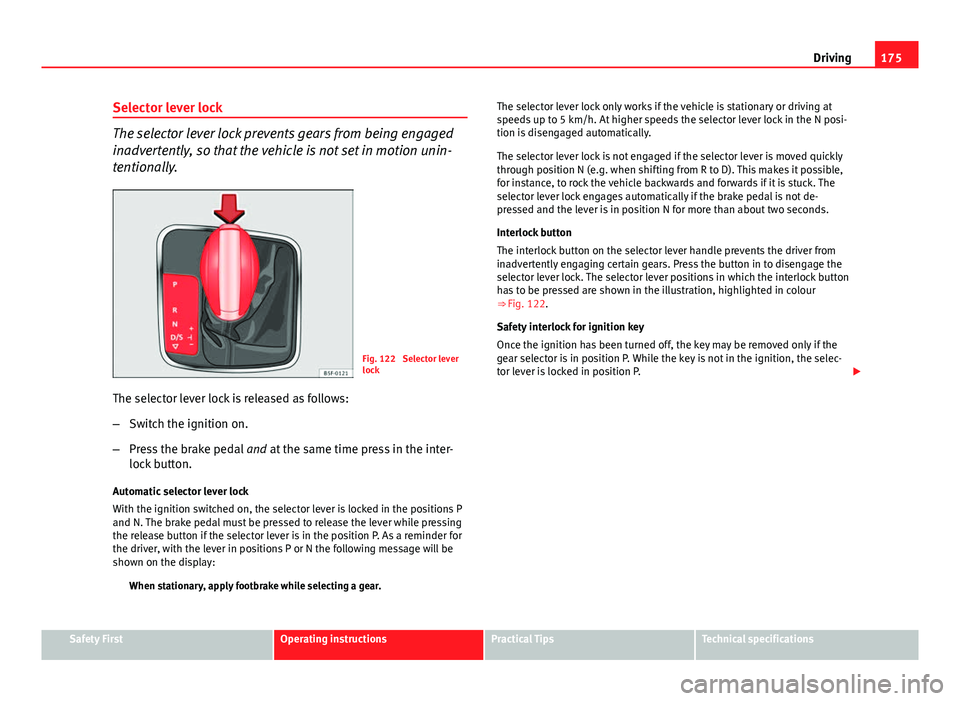
The selector lever lock prevents gears from being engaged
inadvertently, so that the vehicle is not set in motion unin-
tentionally.
Fig. 122 Selector lever
lock
The selector lever lock is released as follows:
– Switch the ignition on.
– Press the brake pedal and at the same time press in the inter-
lock button.
Automatic selector lever lock
With the ignition switched on, the selector lever is locked in the positions P
and N. The brake pedal must be pressed to release the lever while pressing
the release button if the selector lever is in the position P. As a reminder for
the driver, with the lever in positions P or N the following message will be
shown on the display: When stationary, apply footbrake while selecting a gear. The selector lever lock only works if the vehicle is stationary or driving at
speeds up to 5 km/h. At higher speeds the selector lever lock in the N posi-
tion is disengaged automatically.
The selector lever lock is not engaged if the selector lever is moved quickly
through position N (e.g. when shifting from R to D). This makes it possible,
for instance, to rock the vehicle backwards and forwards if it is stuck. The
selector lever lock engages automatically if the brake pedal is not de-
pressed and the lever is in position N for more than about two seconds.
Interlock button
The interlock button on the selector lever handle prevents the driver from
inadvertently engaging certain gears. Press the button in to disengage the
selector lever lock. The selector lever positions in which the interlock button
has to be pressed are shown in the illustration, highlighted in colour
⇒
Fig. 122.
Safety interlock for ignition key
Once the ignition has been turned off, the key may be removed only if the
gear selector is in position P. While the key is not in the ignition, the selec-
tor lever is locked in position P.
Safety FirstOperating instructionsPractical TipsTechnical specifications
Page 178 of 339
176Driving
Note
● If the selector lever lock does not engage, there is a fault. The transmis-
sion is interrupted to prevent the vehicle from accidentally moving. Follow
the procedure below in order for the selector lever lock to engage again:
–With a 6-speed gearbox: press the brake pedal and release it again.
– With a 7-speed gearbox: press the brake pedal. Move the selector lev-
er to position P or N and subsequently engage a gear.
● Despite a gear being engaged, the vehicle does not move forwards or
back. Proceed to the next mode:
–When the vehicle does not move in the required direction, the system
may not have the gear range correctly engaged. Press the brake pedal
and engage the gear range again.
– If the vehicle still does not move in the required direction, there is a
system malfunction. Seek specialist assistance and have the system
checked.
Driving tips
The gearbox changes gear ratios automatically as the vehi-
cle moves.
The engine can only start with the selector lever in the position P or
N. At low temperatures, below -10 °C (50 °F), the engine can only
start with the selector lever in the position P.
Starting the vehicle
– Press and hold the brake pedal.
– Press and hold the interlock button (the button in the selector
lever handle), move the selector lever to the desired position,
for instance D ⇒ page 173, and release the interlock button. –
Wait for the gearbox to engage the gear (a slight movement can
be felt).
– Release the brake and press the accelerator ⇒
.
Stopping briefly
– Apply the foot brake to hold the vehicle when stationary (for in-
stance at traffic lights). Do not press the accelerator.
Stopping/Parking
If the driver door is opened and the selector lever is not in position
P, the vehicle could move. Driver message: Gear change: selector
lever in drive position! will be displayed. Additionally, a buzzer will sound.
– Press and hold the brake pedal ⇒
.
– Apply the handbrake.
– Move the selector lever to position P.
Holding the car on a hill
– Always apply the brake pedal firmly to prevent the vehicle from
“moving backwards; if necessary, apply the handbrake” ⇒
.
Do not try to stop the vehicle “rolling back” by increasing the
engine speed when a gear is engaged (pressing the accelera-
tor) ⇒
.
Moving off uphill in vehicles without Hill start assistant*
– Apply the handbrake.
– Once you have engaged a gear press the accelerator carefully
and disengage the handbrake.
Page 179 of 339
177
Driving
Moving off uphill in vehicles with Hill start assistant*
– Once you have engaged a gear, release the footbrake and press
the accelerator ⇒ page 168, Hill driving assistant*.
Driving down hills: In some situations (on mountain roads or when towing a
trailer or caravan) it can be advantageous to switch temporarily to the man-
ual gearbox programme so that the gear ratios can be selected manually to
suit the driving conditions ⇒
.
On level ground it is sufficient to move the selector lever to position P. On
slopes, first engage the parking brake and then put the selection lever into
the P position. This avoids overloading the locking mechanism and it will be
easier to move the selector lever from position P.
WARNING
● As a driver you should never leave your vehicle if the engine is run-
ning and a gear is engaged. If you have to leave your vehicle while the
engine is running, you must apply the handbrake and engage the parking
lock P.
● If the engine is running and a gear is engaged (D/S or R) or the vehi-
cle is in tiptronic mode, you will need to hold the car with the footbrake.
Otherwise, the car will creep forwards as the power transmission is not
fully interrupted even when the engine is idling.
● Take care not to accidentally press the accelerator pedal when the ve-
hicle is stopped. The vehicle could otherwise start moving immediately
(in some cases even if the parking brake is engaged) resulting in the risk
of an accident.
● While you are selecting a gear and the vehicle is stopped with the en-
gine running, do not accelerate. Failure to do so could result in an acci-
dent.
● Never move the selector lever to R or P when driving: this could result
in an accident!
WARNING (Continued)
● Before you drive down a steep gradient, reduce your speed and use
tiptronic to select a low gear.
● Never allow the brake to rub and do not use the brake pedal too often
or for long periods. Constant braking causes overheating in the brakes.
This could significantly reduce braking power, increase braking distance
or even result in the total failure of the brake system.
● To avoid rolling back on gradients always hold the vehicle with the
footbrake or handbrake if you have to stop.
CAUTION
● If you stop the vehicle on a gradient, do not attempt to stop it from roll-
ing by depressing the accelerator when a gear has been selected. This
could cause overheating and damage the automatic gearbox. Apply the
handbrake firmly or press the brake pedal in order to prevent the vehicle
from rolling back.
● If you allow the car to roll with the selector lever in position N with the
engine switched off, the automatic gearbox will be damaged as it will not be
lubricated.
● In certain driving situations or traffic conditions, such as frequently
starting, prolonged “creeping” of the vehicle or traffic jams with continuous
stoppages, the gearbox could overheat causing damage! If the warning
lamp lights up, stop the vehicle as soon as possible and wait for the
gearbox to cool ⇒ page 181.
● In certain driving situations or traffic conditions, such as frequently
starting, prolonged “creeping” of the vehicle or traffic jams with continuous
stoppages, the gearbox could overheat causing damage! If the warning
lamp lights up, stop the vehicle as soon as possible and wait for the
gearbox to cool ⇒ page 182.
Safety FirstOperating instructionsPractical TipsTechnical specifications
Page 185 of 339
183
Driving
certain degree of practical skill. We therefore advise you to obtain
professional assistance.
A screwdriver will be needed to carry out the manual release. Use
the flat part of the screwdriver blade ⇒ page 274.
Removing the cover from the selector lever
– Apply the handbrake ⇒
to ensure that the car does not
move.
– Carefully pull the corners of the selector lever boot and fold up
the selector lever boot (inside out) by hand.
Releasing the selector lever
– Using a screwdriver, press and hold the yellow unlocking tab
sideways ⇒ Fig. 125.
– Now press the interlock button on the selector lever A
and
move the selector lever to position N.
– After carrying out the manual release, attach the selector lever
boot on the gearbox console again.
If the power supply should ever fail (discharged battery, etc.) and the vehi-
cle has to be pushed or towed, the selector lever must first be moved to po-
sition N. This is possible after operating the manual release mechanism.
WARNING
The selector lever may be moved out of position P only when the hand-
brake is firmly applied. If this does not work, secure the vehicle with the
brake pedal. On a slope the vehicle could otherwise start to move inad-
vertently after shifting the selector lever out of position P - accident risk!
Safety FirstOperating instructionsPractical TipsTechnical specifications
Page 224 of 339
222Intelligent technology
Practical Tips
Intelligent technology
Electronic Stability Control (ESC)
Description
The ESC helps to improve safety. It reduces the tendency to skid and im-
proves the stability and roadholding of the vehicle. The ESC detects critical
handling situations, such as vehicle understeer or oversteer, or wheelspin
on the driving wheels. It stabilises the vehicle by braking individual wheels
or by reducing the engine torque. The warning lamp will flash on the instru-
ment panel when the ESC is intervening .
ESC includes the Anti-lock brake system (ABS), the brake assist system, the
traction control system (ASR), electronic differential lock (EDL), electronic
self-locking*, selective torque control* and tractor-trailer sway mitigation*.
ESC also helps stabilise the vehicle by changing the torque.
Anti-lock brake system (ABS)
ABS prevents the wheels from locking up under braking until the vehicle
has reached a virtual standstill. You can continue to steer the vehicle even
when the brakes are on full. Keep your foot on the brake pedal and do not
pump the brakes. You will feel the brake pedal pulsate while the ABS is
working.
Brake assist system
The brake assist system can reduce the required braking distance. The brak-
ing force is automatically boosted if you press the brake pedal quickly in an
emergency. You must keep pressing the brake pedal until the danger has
passed. Traction control system (ASR)
In the event of wheelspin, the traction control system reduces the engine
torque to match the amount of grip available. This helps the car to start
moving, accelerate or climb a gradient.
Electronic differential lock (EDL)
When the EDL detects wheelspin, it brakes the spinning wheel and directs
the power to the other driven wheel. This function is available up to a speed
of around 100 km/h, 62 mph).
To prevent the disc brake of the braked wheel from overheating, the EDL
cuts out automatically if subjected to excessive loads. The vehicle can still
be driven. The EDL will switch on again automatically when the brake has
cooled down.
Tractor-trailer sway mitigation*
If the vehicle is pulling a trailer, it will control the following: Tractor-trailers
tend to sway. When the swaying of the trailer is felt by the vehicle and de-
tected by the ESC, it will automatically brake the towing vehicle within the
limits of the system and mitigate the sway. Tractor-trailer sway mitigation is
not available in all countries.
Electronic self-locking*/Selective torque control*
When driving around bends, an electronic self-locking intervenes. The front
wheel on the inside of the curve, or the two inside wheels, respectively, are
selectively braked as required. This minimises the traction of the front
wheels, allowing you to take bends with greater precision and neutrality. In
certain circumstances, where roads are wet or snow-covered, the respective
system may not intervene.
Page 225 of 339
223
Intelligent technology
Multi-collision brake
In an accident, the multi-collision brake can help the driver by braking to
avoid the risk of skidding during the accident, which could lead to further
collisions.
The multi-collision brake works for front, side or rear accidents, when the
airbag control unit records its activation level and the accident takes place
at a speed of over 10 km/h (6 mph). The ESC automatically brakes the vehi-
cle, as long as the accident has not damaged the ESC, the brake hydraulics
or the on-board network.
The following actions control automatic braking during the accident:
● When the driver presses the accelerator. The automatic braking does not
take place.
● When the braking pressure through pressing the brake pedal is greater
than the system’s braking pressure. The vehicle will brake manually.
● Multi-collision braking will not be available if ESC is malfunctioning.
WARNING
● The ESC, ABS, ASR, EDL, electronic self-locking differential or selec-
tive torque control systems cannot exceed the limits imposed by the laws
of physics. Always bear this in mind, especially on wet or slippery roads.
If you notice the systems cutting in, you should reduce your speed imme-
diately to suit the road and traffic conditions. Do not be encouraged to
take risks by the presence of more safety systems. If you do, an accident
may occur.
● Please remember that the accident risk always increases if you drive
fast, especially in corners or on a slippery road, or if you follow too close
behind the vehicle in front of you. The ESC, ABS, brake assist, EDL, elec-
tronic self-locking and selective torque control systems cannot prevent
accidents: risk of accidents!
● Accelerate with caution on slippery surfaces (for example, icy or
snow-covered). Despite the control systems, the driven wheels could
spin, affecting the stability of the vehicle: risk of accident!
Note
● The ABS and ASR will only operate correctly if the four wheels have iden-
tical tyres. Any differences in the rolling radius of the tyres can cause the
system to reduce engine power when this is not desired.
● The regulating processes of the systems can make noises when they in-
tervene.
● If the warning lamp lights up, or alternatively, there could be a
fault ⇒ page 69.
Switching on/off the ESC and ASR
The ESC is switched on automatically when the engine is
started. The ESC cannot be deactivated. ESC in “Sport Mode”
Sport mode is activated through the Easy Connect system menu ⇒ page 79.
The ability of the ESC to stabilise the vehicle is limited; the traction control
system (ASR) becomes disabled ⇒
.
The control lamp will light up. For vehicles with a driver information sys-
tem*, the driver will be shown the electronic stability control (ESC) option:
sport. Warning! Limited stability .
In the following exceptional circumstances enabling the ESC Sport mode to
improve the traction of the wheels is tenable:
● “Swing” the vehicle to unblock it.
● Driving in deep snow or on loose surfaces.
Disable ESC Sport mode
Through the Easy Connect system ⇒ page 79. The warning lamp will
switch off. For vehicles with a driver information system*, the driver will be
shown the electronic stability control (ESC) option: on .
Safety FirstOperating instructionsPractical TipsTechnical specifications
Page 226 of 339
224Intelligent technology
Disable ASR
ASR mode is deactivated ⇒ page 79 through the Easy Connect system
menu. The traction control system will be disabled.
The control lamp will light up. For vehicles with a driver information sys-
tem* the driver will be informed that ASR is disabled.
In the following exceptional circumstances enabling the ESC Sport mode to
improve the traction of the wheels is tenable:
● “Swing” the vehicle to unblock it.
● Driving in deep snow or on loose surfaces.
Activate ASR
ASR mode is activated ⇒ page 79 through the Easy Connect system menu.
The traction control system will be enabled.
The control lamp switches off. For vehicles with a driver information sys-
tem* the driver will be informed that ASR is enabled.
WARNING
You should switch on the ESC Sport mode only if the traffic conditions
and your driving ability allow you to do so safely: risk of skidding!
● With ESC in Sport mode, the stabilising function will be limited to al-
low for a sportier drive. The driving wheels could spin and the vehicle
could skid.
Note
If the ASR is disconnected or the ESC’s Sport mode is selected, cruise con-
trol* will be switched off. Brakes
New brake pads
For the first 400 km (250 miles), new brake pads have not yet reached their
maximum braking capacity, and need to be “run in” first. However, you can
compensate for the slightly reduced braking effect by applying more pres-
sure on the brake pedal. Avoid overloading the brakes while running them
in.
Wear
The rate of wear on the
brake pads depends a great deal on how you drive
and the conditions in which the vehicle is operated. This is a particular
problem in urban traffic and short stretches, or with very sporty driving.
Depending on the speed, the braking force, and the environmental condi-
tions (for example, the temperature, air humidity, etc.) noises may be pro-
duced on braking.
Wet roads or road salt
In certain situations (for example, on driving through flooded areas, in se-
vere downpours or after washing the vehicle) the braking action could be
delayed if the discs and pads are damp, or frozen in winter. In this case the
brakes should be dried by pressing the brake pedal several times.
At high speed and with the windscreen wipers activated, the brake pads will
briefly touch the brake discs. This takes place, although unnoticeable to the
driver, at regular intervals to improve the response time of the brakes when
they are wet.
The effectiveness of the brakes can also be temporarily reduced if the vehi-
cle is driven for some distance without using the brakes when there is a lot
of salt on the road in winter. The layer of salt that accumulates on the discs
and pads can be removed by gently applying the brakes a few times.