lock Seat Leon 5D 2013 User Guide
[x] Cancel search | Manufacturer: SEAT, Model Year: 2013, Model line: Leon 5D, Model: Seat Leon 5D 2013Pages: 339, PDF Size: 4.8 MB
Page 59 of 339

57
Child safety
Child seats with the Top Tether system come with a strap for securing the
seat to the vehicle anchor point, located at the back of the rear seat back-
rest.
The objective of the retainer strap is to reduce forward movements of the
child seat in a crash, helping reduce the risk of injuries to the head from hit-
ting the inside of the vehicle.
Using the Top Tether in rear-facing mounted seats
Currently, there are very few rear-facing child safety seats that have Top
Tether. Please carefully read and follow the seat manufacturer instructions
to learn the proper way to install the Top Tether strap.
Fitting the Top Tether child restraint to the anchoring point
Fig. 36 Retainer strap:
correct adjustment and
fitting
Securing the Top Tether child restraint to the anchor point situated
on the rear of the backrest
– Pull out the fastening belt of the child restraint seat according
to the manufacturer's instructions. –
Guide the Top Tether fastening belt under the rear seat head re-
straint ⇒ Fig. 36 (lift the head restraint where necessary).
– Slide the belt so that the Top Tether belt of the child restraint
seat is correctly secured to the anchor on the back of the rear
seat.
– Firmly tighten the Top Tether belt following the child restraint
seat manufacturer's instructions.
Releasing the retaining strap
– Release the retainer strap in line with the instructions given by
the child safety seat manufacturer.
– Push the lock and release it from the anchoring support.
WARNING
An undue installation of the safety seat will increase the risk of injury in
the event of a crash.
● Never tie the retainer strap to a hook in the luggage compartment.
● Never secure or tie luggage or other items to the lower anchorages
(ISOFIX) or the upper ones (Top Tether).
Safety FirstOperating instructionsPractical TipsTechnical specifications
Page 61 of 339

59
Controls and displays
Operating instructions Controls and displays
Overview
Door handle
Central locking switch . . . . . . . . . . . . . . . . . . . . . . . . . . . . . . . . . . . . . 94
Electric control to adjust exterior mirrors . . . . . . . . . . . . . . . . . . . .125
Air outlets . . . . . . . . . . . . . . . . . . . . . . . . . . . . . . . . . . . . . . . . . . . . . . . . 160
Control lever for:
– Turn signals and main beam headlights . . . . . . . . . . . . . . . . .110
– Lane Assist . . . . . . . . . . . . . . . . . . . . . . . . . . . . . . . . . . . . . . . . . . . . . 207
– Main beam assist . . . . . . . . . . . . . . . . . . . . . . . . . . . . . . . . . . . . . . . 114
– Cruise control system (CCS) . . . . . . . . . . . . . . . . . . . . . . . . . . . . . 184
Depending on equipment fitted:
– Lever for cruise control . . . . . . . . . . . . . . . . . . . . . . . . . . . . . . . . . . 184
Steering wheel with horn and
– Driver airbag . . . . . . . . . . . . . . . . . . . . . . . . . . . . . . . . . . . . . . . . . . . 36
– On-board computer controls . . . . . . . . . . . . . . . . . . . . . . . . . . . . 73
– Controls for radio, telephone, navigation and speech dia-
logue system ⇒ Booklet Radio
– Paddle levers for tiptronic gearshift (automatic gearbox) . .178
Instrument panel . . . . . . . . . . . . . . . . . . . . . . . . . . . . . . . . . . . . . . . . . . 61
Control lever for:
– Windscreen wipers and washer . . . . . . . . . . . . . . . . . . . . . . . . . . 120
– Wipe and wash system . . . . . . . . . . . . . . . . . . . . . . . . . . . . . . . . . 120
– On-board computer . . . . . . . . . . . . . . . . . . . . . . . . . . . . . . . . . . . . . 73
12345
6
7
89
Depending on equipment fitted: Radio or display for Easy
Connect (navigation, radio, TV/video)
. . . . . . . . . . . . . . . . . . . . . .79
Depending on the equipment, buttons for:
– SEAT driving modes . . . . . . . . . . . . . . . . . . . . . . . . . . . . . . . . . . . . . 211
– Start-Stop system . . . . . . . . . . . . . . . . . . . . . . . . . . . . . . . . . . . . . . . 169
– Park assist system . . . . . . . . . . . . . . . . . . . . . . . . . . . . . . . . . . . . . . 217
– Hazard warning lights . . . . . . . . . . . . . . . . . . . . . . . . . . . . . . . . . . 113
– Airbag off display . . . . . . . . . . . . . . . . . . . . . . . . . . . . . . . . . . . . . . . 46
Glove box with (depending on equipment): . . . . . . . . . . . . . . . . .134
– CD player* and/or SD card* ⇒ Booklet Radio
– Multimedia interface* ⇒ Booklet Radio
Tyre pressure switch . . . . . . . . . . . . . . . . . . . . . . . . . . . . . . . . . . . . . . . 216
Front passenger airbag switch . . . . . . . . . . . . . . . . . . . . . . . . . . . . . 46
Front passenger airbag . . . . . . . . . . . . . . . . . . . . . . . . . . . . . . . . . . . . 36
Passenger seat heating control . . . . . . . . . . . . . . . . . . . . . . . . . . . . 130
Storage compartment
Depending on gearbox fitted, gear lever or selector lever for:
– manual gearbox . . . . . . . . . . . . . . . . . . . . . . . . . . . . . . . . . . . . . . . . 172
– automatic gearbox . . . . . . . . . . . . . . . . . . . . . . . . . . . . . . . . . . . . . . 173
Depending on the equipment, controls for:
– Heating and ventilation system or manual air conditioner .158, 157
– Automatic air conditioner . . . . . . . . . . . . . . . . . . . . . . . . . . . . . . . 154
Parking brake . . . . . . . . . . . . . . . . . . . . . . . . . . . . . . . . . . . . . . . . . . . . . 166
Driver seat heating control . . . . . . . . . . . . . . . . . . . . . . . . . . . . . . . . . 130
10
11
12
131415161718
19
2021
Safety FirstOperating instructionsPractical TipsTechnical specifications
Page 62 of 339

60Controls and displays
Ignition lock . . . . . . . . . . . . . . . . . . . . . . . . . . . . . . . . . . . . . . . . . . . . . . 162
Knee airbag . . . . . . . . . . . . . . . . . . . . . . . . . . . . . . . . . . . . . . . . . . . . . . . 39
Adjustable steering column . . . . . . . . . . . . . . . . . . . . . . . . . . . . . . . . 162
Storage compartment
Bonnet lock release . . . . . . . . . . . . . . . . . . . . . . . . . . . . . . . . . . . . . . . 252
Headlight range control . . . . . . . . . . . . . . . . . . . . . . . . . . . . . . . . . . . 117
Light switch . . . . . . . . . . . . . . . . . . . . . . . . . . . . . . . . . . . . . . . . . . . . . . . 109
Electric windows . . . . . . . . . . . . . . . . . . . . . . . . . . . . . . . . . . . . . . . . . . 102
Note
● Some of the equipment listed in this section is only fitted on certain
models or are optional extras.
● A separate instruction manual is enclosed if the vehicle is equipped
with a factory-fitted radio, CD player, AUX IN connection, or navigation sys-
tem.
● The arrangement of switches and controls on right-hand drive models*
may be slightly different from the layout shown in ⇒ page 58. However, the
symbols used to identify the controls are the same.
2223242526272829
Page 67 of 339
65
Instruments and warning/control lamps
WARNING
Although the outside temperature is above freezing, some roads and
bridges may be frozen.
● At an outside temperature of above +4 °C (+39 °F), even when the
“ice crystal” is not visible, there may still be ice on the road.
● Never rely on the outside temperature indicator!
CAUTION
Failure to heed the control lamps and text messages when they appear may
result in faults in the vehicle.
Note
● Different versions of the instrument panel are available and therefore
the versions and instructions on the display may vary. In the case of dis-
plays without warning or information texts, faults are indicated exclusively
by the warning lamps.
● Depending on the equipment, some settings and instructions can also
be carried out in the Easy Connect system.
● When several warnings are active at the same time, the symbols are
shown successively for a few seconds. The symbols will stay on until the
fault is rectified.
Service interval display
The service interval indication appears on the instrument panel display
⇒ Fig. 38 3.
SEAT distinguishes between services with engine oil change (e.g. Oil
change service) and services without engine oil change (e.g. Inspection). In vehicles with
Services established by time or mileage , the service inter-
vals are already pre-defined.
In vehicles with LongLife Service , the intervals are determined individually.
Technical progress has made it possible to considerably reduce servicing re-
quirements. The technology used by SEAT ensures that your vehicle only
has an Oil Change Service when it is necessary. To establish when the Oil
Change Service is due (max. 2 years), the vehicle's conditions of use and
individual driving styles are considered. The service pre-warning first ap-
pears 20 days before the date established for the corresponding service.
The kilometres remaining until the next service are always rounded up to
the nearest 100 km (miles) and the remaining time is given in complete
days. The current service message cannot be viewed until 500 km (miles)
after the last service. Prior to this only lines are visible on the display.
Inspection reminder
When the Service date is approaching, when the ignition is switched on a
Service reminder is displayed.
In vehicles without text messages , a spanner is displayed on the instrument
panel with a figure given in km. The number of kilometres shown is the
maximum number that may be driven until the next service. After a few sec-
onds, the display mode changes. A clock symbol appears and the number
of days until the next service appointment is due.
In vehicles with text messages , Service in --- km (miles) or --- days is dis-
played on the instrument panel.
Service due
After the service date, an audible warning is given when the ignition is
switched on and the spanner displayed on the screen flashes for a few sec-
onds . In vehicles with text messages , Service in --- km or --- days is dis-
played on the instrument panel.
Reading a service notification
With the ignition switched on, the engine off and the vehicle at a standstill,
the current service notification can be read:
Safety FirstOperating instructionsPractical TipsTechnical specifications
Page 72 of 339
70Instruments and warning/control lamps
SymbolMeaning ⇒ See
Lit up on instrument panel display: a)
Do not continue driving!
Engine coolant level too low, coolant tempera-
ture too high
Flashing on the instrument panel display: a)
Fault in the engine coolant system.
⇒ page 257
On the instrument panel display: a)
Do not continue driving!
Engine oil pressure too low.⇒ page 253
Lit up or flashing:
Do not continue driving!
Fault in the steering.⇒ page 225
Driver or passenger has not fastened seat belt.⇒ page 20
Use the foot brake!
On the instrument panel display: a)
Fault in the battery.⇒ page 260
a) Colour presentation on instrument panel with colour display. Yellow symbols
SymbolMeaning ⇒ See
Central warning lamp: additional information
on the instrument panel display–
Front brake pads worn.
⇒ page 222
lights: Fault in the ESC, or disconnection
caused by the system.
flashes: ESC or ASR activated.
ASR manually deactivated.
ABS faulty or does not work.
Rear fog light switched on.⇒ page 109
On the instrument panel display:
a)
Driving light totally or partially faulty.⇒ page 293
On the instrument panel display: a)
Fault in the cornering light system.⇒ page 109
Lights up or flashes: Fault in the emission con-
trol system.
⇒ page 230lights: pre-ignition of diesel engine.flashes: Fault in engine management.
Fault in engine management.
On the instrument panel display: a)
Diesel particulate filter blocked.
Lights up or flashes: Fault in the steering sys-
tem.⇒ page 162
Tyre pressure too low, or fault in the tyre pres-
sure monitoring system.⇒ page 214
Page 73 of 339
71
Instruments and warning/control lamps
SymbolMeaning ⇒ See
On the instrument panel display: a)
Level of windscreen washer fluid too low.⇒ page 120
Fuel tank almost empty.⇒ page 248
Flashing on the instrument panel display: a)
Fault in the oil level detection. Control manual-
ly.
⇒ page 253Lit up on the instrument panel display: a)
Engine oil level insufficient.
Fault in airbag system and seat belt tensioners.
⇒ page 31OFF Front passenger front airbag is off ( PASSENGER
AIRBAG ).
ON Front passenger front airbag is on ( PASSENGER
AIRBAG ).
Lane Assist is switched on, but not active.⇒ page 207
On the instrument panel display: a)
Fault in the gearbox.⇒ page 182
a) Colour presentation on instrument panel with colour display.
Other control lamps
SymbolMeaning ⇒ See
Left or right turn signal.⇒ page 109
Hazard warning lights on.⇒ page 113
Trailer turn signals⇒ page 234
SymbolMeaning ⇒ See
lights: Press the foot brake!
flashes: The selector lever locking button has
not engaged.⇒ page 173
The vehicle is stopped by engine braking.
lights: Cruise control operating.
⇒ page 184lights: Speed limiter switched on and active.flashes: The speed set by the speed limiter has
been exceeded.
Lane Assist is switched on and active.⇒ page 207
Main beam on or flasher on.⇒ page 109
On the instrument panel display:
Light Assist switched on.
On the instrument panel display:
Immobiliser active.
On the instrument panel display:
Service interval display.⇒ page 65
On the instrument panel display:
Mobile telephone is connected via Bluetooth to
the original telephone device.
⇒ Book-
let Bluetooth
System
On the instrument panel display:
Mobile telephone battery charge meter. Availa-
ble only for pre-installed factory-fitted devices.
On the instrument panel display:
Ice warning. The outside temperature is lower
than +4 °C (+39 °F).⇒ page 64
Safety FirstOperating instructionsPractical TipsTechnical specifications
Page 85 of 339
83
Introduction to the Easy Connect system*
Any changes made using the settings menus are automatically saved on
closing those menus.
WARNING
Any distraction may lead to an accident, with the risk of injury. Operating
the Easy Connect system while driving could distract you from traffic.
Opening and Closing Settings menu
–Switch the ignition on.
– Switch on the Easy Connect system.
– Press the Easy Connect button
.
– Press the Setup
function button.
– Press the Opening and closing
function button to open the Open-
ing and closing settings menu.
When the function button check box is activated , the function is active.
Pressing the menu button
will always take you to the last menu used.
MenuSubmenuPossible settingDescription
Opening and
Closing settings
Radio-operated
remote controlConvenience open
function.⇒ page 92
Central locking
Unlocking doors, au-
tomatic locking/un-
locking, audible
confirmation.
⇒ page 87
Any changes made using the settings menus are automatically saved on
closing those menus.
WARNING
Any distraction may lead to an accident, with the risk of injury. Operating
the Easy Connect system while driving could distract you from traffic.
Multifunction Display settings menu
–Switch the ignition on.
– Switch on the Easy Connect system.
– Press the Easy Connect button
.
– Press the Setup
function button.
– Press the multi-function indicator
button to open the multi-function
screen adjustment menu.
When the function button check box is activated , the function is active.
Pressing the menu button
will always take you to the last menu used.
Safety FirstOperating instructionsPractical TipsTechnical specifications
Page 89 of 339
87
Opening and closing
Opening and closing Central locking system
Description
The vehicle can be locked and unlocked via the central locking system.
There are several methods, depending on the vehicle equipment:
● key with remote control ⇒ page 92,
● lock on driver door (emergency opening ⇒ page 98) or
● interior central locking switch ⇒ page 94.
Unlocking one side of the vehicle only
When you lock the vehicle with the key, the doors and the rear lid are
locked. When you open the door, you can either unlock only the driver door,
or all the vehicle doors. To select the required option, use Easy Connect*
⇒ page 93.
Central locking (Auto Lock)
The Auto Lock function locks the doors and the rear lid when the vehicle ex-
ceeds a speed of about 15 km/h (10 mph).
The vehicle is unlocked again when the ignition key is removed. Alternative-
ly, the vehicle can also be unlocked via the central locking switch or by pull-
ing one of the inside door handles. The Auto Lock function can be switched
on and off on the sound system or on the Easy Connect* system
⇒ page 93.
In the event of an accident in which the airbags inflate, the doors will be au-
tomatically unlocked to facilitate access and assistance. Anti-theft security system (Safelock)
1)
The following message is displayed on the instrument panel to remind the
driver that when the vehicle is closed from the outside, the anti-theft securi-
ty system is switched on. Do not forget the Safelock. Please see Instruction
Manual. The vehicle cannot be opened from inside. This makes it more diffi-
cult for unauthorised persons to break into the vehicle ⇒ .
The anti-theft security system can be switched off each time the vehicle is
locked:
● Turn the key a second time to the lock position, in the door lock, for the
next two seconds . If necessary, remove the protective cover on the driver
door handle ⇒ page 98. or
● Press
on the remote control key for a second time
for the following 2
seconds.
The flashing frequency of the diode in the door sill immediately confirms
the process. Initially, the diode flashes in a fast sequence for a brief period,
then it stops for approximately 30 seconds and, lastly continues flashing
slowly.
Anti-theft alarm system*
If the anti-theft alarm system senses interference with the vehicle it triggers
an audible and visible alarm.
The anti-theft alarm system is automatically switched on when locking the
vehicle. It switches off when the vehicle is unlocked from a distance.
When the driver door is unlocked with the key, you should switch on the ig-
nition within 15 seconds. Otherwise the alarm will be triggered. On some
export versions, the alarm is triggered immediately when you open a door.
1)
The availability of this function depends on the vehicle equipment.
Safety FirstOperating instructionsPractical TipsTechnical specifications
Page 90 of 339
88Opening and closing
To deactivate the alarm, press the button
on the remote control key, or
switch on the ignition. After a certain time, the alarm will automatically
switch off.
Switch off the vehicle interior monitoring and tow-away protection if you
wish to prevent the alarm from being triggered accidentally ⇒ page 97.
Turn signals
The turn signals will flash twice when the vehicle is unlocked and once
when the vehicle is locked.
If the signals do not flash, this indicates that one of the doors, the rear lid or
the bonnet is not closed correctly.
Accidental lock-out
The central locking system prevents you from being locked out of the vehi-
cle in the following situations:
● If the driver door is open, the vehicle cannot be locked with the central
locking switch ⇒ page 94.
Lock the vehicle with the remote control key, when all the doors and the rear
lid have been closed. This prevents the accidental locking of the vehicle.
WARNING
Do not leave anyone (especially children) in the vehicle if it is locked from
the outside and the anti-theft security system* is enabled, as the doors
and windows cannot then be opened from the inside. Locked doors could
delay assistance in an emergency, potentially putting lives at risk.
Note
● Never leave any valuable items in the vehicle unattended. Even a locked
vehicle is not a safe.
● If the diode on the driver door sill lights up for about 30 seconds when
the vehicle is locked, the central locking system or anti-theft alarm* is not
working properly. You should have the fault repaired at a SEAT Official Serv-
ice or specialised workshop.
● The vehicle interior monitoring of the anti-theft alarm* system will only
function as intended if the windows and the sunroof* are closed.
Page 91 of 339
89
Opening and closing
Vehicle key
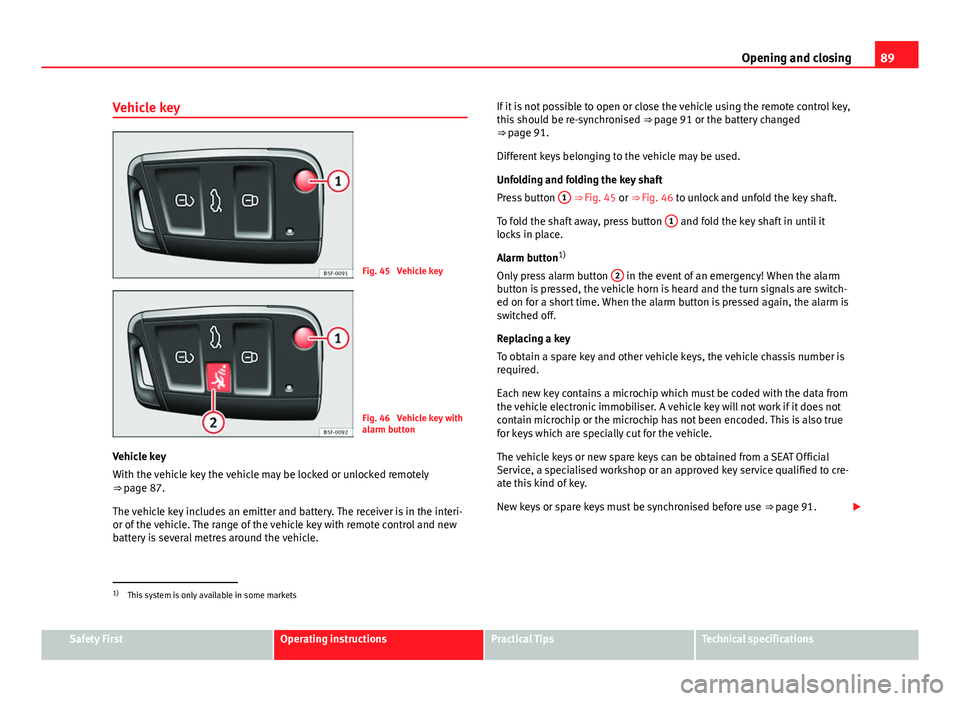
Fig. 45 Vehicle key
Fig. 46 Vehicle key with
alarm button
Vehicle key
With the vehicle key the vehicle may be locked or unlocked remotely
⇒ page 87.
The vehicle key includes an emitter and battery. The receiver is in the interi-
or of the vehicle. The range of the vehicle key with remote control and new
battery is several metres around the vehicle. If it is not possible to open or close the vehicle using the remote control key,
this should be re-synchronised
⇒ page 91 or the battery changed
⇒ page 91.
Different keys belonging to the vehicle may be used.
Unfolding and folding the key shaft
Press button 1
⇒ Fig. 45 or ⇒
Fig. 46 to unlock and unfold the key shaft.
To fold the shaft away, press button 1
and fold the key shaft in until it
locks in place.
Alarm button 1)
Only press alarm button 2
in the event of an emergency! When the alarm
button is pressed, the vehicle horn is heard and the turn signals are switch-
ed on for a short time. When the alarm button is pressed again, the alarm is
switched off.
Replacing a key
To obtain a spare key and other vehicle keys, the vehicle chassis number is
required.
Each new key contains a microchip which must be coded with the data from
the vehicle electronic immobiliser. A vehicle key will not work if it does not
contain microchip or the microchip has not been encoded. This is also true
for keys which are specially cut for the vehicle.
The vehicle keys or new spare keys can be obtained from a SEAT Official
Service, a specialised workshop or an approved key service qualified to cre-
ate this kind of key.
New keys or spare keys must be synchronised before use ⇒ page 91.
1)
This system is only available in some markets
Safety FirstOperating instructionsPractical TipsTechnical specifications