phone Seat Leon 5D 2014 MEDIA SYSTEM 2.2
[x] Cancel search | Manufacturer: SEAT, Model Year: 2014, Model line: Leon 5D, Model: Seat Leon 5D 2014Pages: 114, PDF Size: 2.47 MB
Page 75 of 114
74Telephone control (Phone)
Pairing the mobile phone with the radio
navigation system
Link and connect the mobile
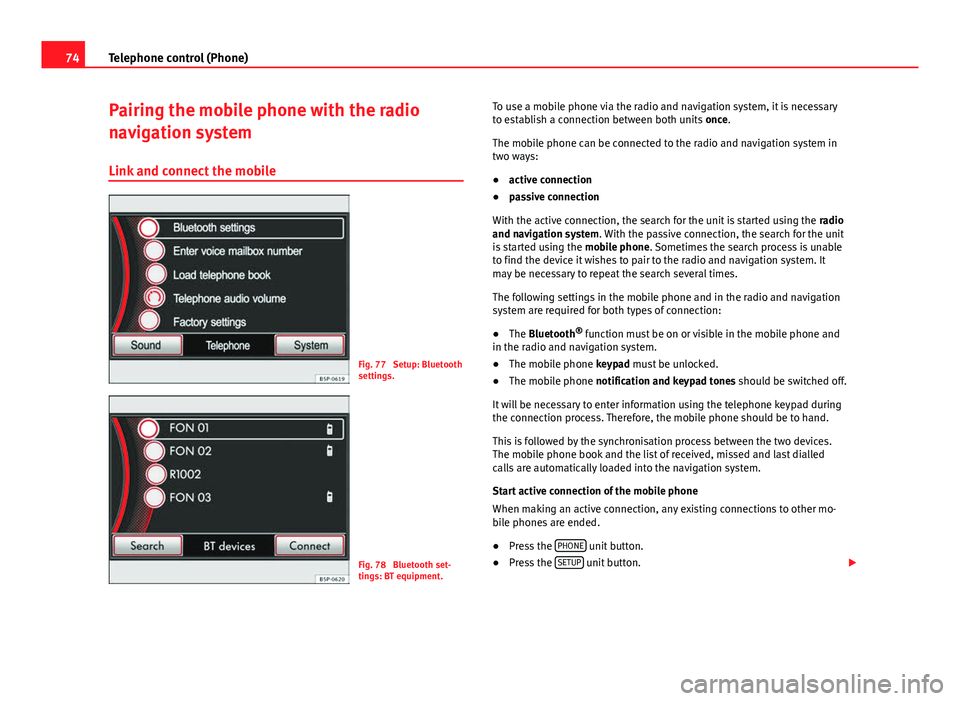
Fig. 77 Setup: Bluetooth
settings.
Fig. 78 Bluetooth set-
tings: BT equipment. To use a mobile phone via the radio and navigation system, it is necessary
to establish a connection between both units once.
The mobile phone can be connected to the radio and navigation system in
two ways:
● active connection
● passive connection
With the active connection, the search for the unit is started using the radio
and navigation system. With the passive connection, the search for the unit
is started using the mobile phone. Sometimes the search process is unable
to find the device it wishes to pair to the radio and navigation system. It
may be necessary to repeat the search several times.
The following settings in the mobile phone and in the radio and navigation
system are required for both types of connection:
● The Bluetooth ®
function must be on or visible in the mobile phone and
in the radio and navigation system.
● The mobile phone keypad must be unlocked.
● The mobile phone notification and keypad tones should be switched off.
It will be necessary to enter information using the telephone keypad during
the connection process. Therefore, the mobile phone should be to hand.
This is followed by the synchronisation process between the two devices.
The mobile phone book and the list of received, missed and last dialled
calls are automatically loaded into the navigation system.
Start active connection of the mobile phone
When making an active connection, any existing connections to other mo-
bile phones are ended.
● Press the PHONE
unit button.
● Press the SETUP unit button.
Page 76 of 114
75
Telephone control (Phone)
● Press the Bluetooth Settings
function button.
● Press the Find devices function button.
The search process may last 15 to 20 seconds. On completion, the names of
any mobile phones found are displayed on the screen. Sometimes the
search process is unable to find the device it wishes to pair to the radio and
navigation system. It may be necessary to repeat the search several times.
● Select the entry corresponding to the mobile phone to be connected
from the list of Bluetooth devices ⇒ Fig. 78.
● Establish a connection by pressing the Connect
function button.
● Alternatively: establish the connection by pressing the right unit button.
● Alternatively: establish the connection by pressing the name of the
phone in the entry in the list.
Now establish a connection between the mobile phone and the radio and
navigation system. To confirm the connection between the two units, certain
information should be entered in the mobile phone.
● Confirm connection in the mobile phone.
● Enter PIN shown on the radio and navigation display via the mobile
phone and confirm. Some mobile phones permit a Bluetooth connection us-
ing the “Secure Simple pairing” method. In this case, you are not asked to
enter a PIN from the mobile phone, but to confirm that the PIN displayed on
the mobile and the PIN displayed on the navigation system are the same.
When the PIN has been correctly entered, a message confirming the connec-
tion is displayed on the radio and navigation system screen. The address
book stored in the mobile phone and the call lists are automatically loaded.
The time taken to load the information will depend upon the quantity of da-
ta stored in the mobile phone. Once the data has been loaded, the tele-
phone control data will be available in the radio and navigation system. The
main menu, PHONE, is displayed on the screen.
Start passive connection of the mobile phone
● Press the PHONE
unit button.
● Press the SETUP unit button. ●
Press the Bluetooth Settings
function button.
● Press the Activate BT visibility function button. Once the BT visibility has
been activated in the navigation system, it will remain active for approx. 5
minutes.
● Start searching for Bluetooth audio accessories in the mobile phone.
The search process may last 15 to 20 seconds. On completion of the proce-
dure, the radio and navigation system is shown in the mobile phone as
SEAT_BT. Sometimes the search process is unable to find the device it wish-
es to pair to the radio and navigation system. It may be necessary to repeat
the search several times.
● Select SEAT_BT on the mobile phone, in the list of entries of Bluetooth
audio accessories found and establish connection.
Now establish a connection between the mobile phone and the radio and
navigation system. To end the connection between the two units, certain in-
formation should be entered in the mobile phone.
● Enter PIN shown on the radio and navigation display via the mobile
phone and confirm. Some mobile phones permit a Bluetooth connection us-
ing the “Secure Simple pairing” method. In this case, you are not asked to
enter a PIN from the mobile phone, but to confirm that the PIN displayed on
the mobile and the PIN displayed on the navigation system are the same.
When the PIN has been correctly entered, the mobile phone address book
and call lists are automatically loaded. The time taken to load the informa-
tion will depend upon the quantity of data stored in the mobile phone. Once
the data has been loaded, the telephone control data will be available in
the radio and navigation system. The main menu, PHONE, is displayed on
the screen.
If the PIN is not entered correctly, the Bluetooth visibility automatically
switches off in the radio and navigation system. To reconnect the phone
again, visibility should be reactivated via the Bluetooth settings.
Page 77 of 114
76Telephone control (Phone)
Changing between user profiles
When a mobile phone is connected to the radio and navigation system, a
user profile is created for that mobile.
Up to four different user profiles can be created. If four user profiles have
already been created and you wish to create a new profile, it will be neces-
sary to first delete one of the previous profiles.
It is only possible to connect one mobile phone to the hands-free profile of
the radio and navigation system at a given time.
Up to two different Bluetooth devices can be connected at the same time.
Each device will be linked to a different profile (one as hands-free and one
as multimedia). It is not possible to connect two devices under the same
profile (e.g. two mobile phones as hands-free or two multimedia players at
the same time).
To delete a user profile, proceed as follows:
● Press the SETUP
unit button.
● Press the Bluetooth Settings function button.
● Alternatively: select the Bluetooth Settings by turning the setting knob
⇒ Fig. 1 10 and press knob to confirm.
● Press the Paired devices list function button.
● OR: Select the Paired device list function button by turning the setting
knob and press knob to confirm.
● Select the mobile phone to be deleted from the list of connected units.
● Press the Delete
function button or the lower button to confirm the pro-
cedure.
After deleting the phone, there will only be three entries in the list of con-
nected units. It will now be possible to start a new connection to another
mobile phone.
Note
For the purposes of security, Bluetooth visibility in the radio and navigation
system is limited to 5 minutes.
Note
The Bluetooth connection has a maximum range of 10 metres. An existing
Bluetooth connection will be disconnected if the distance between the con-
nected units is greater than this. The connection is automatically resumed
when the units are back within the range.
Note
When a mobile phone is connected for the first time from the navigation
system telephone menu, the phone is paired as a telephone and as a media
player (for playing music stored in the phone via Bluetooth). With a mobile
phone that has already been paired with the navigation system:
● If you try to pair a second mobile phone with the telephone menu, the
first mobile phone will be completely disconnected from the navigation sys-
tem.
● If you try to pair a second mobile phone from the media menu, the first
mobile phone will only be disconnected as a media player, but will continue
to be paired as a mobile phone. This means that the first mobile phone will
operate as a telephone, while the music played will be taken from the song
list on the second mobile phone.
Automatic pairing
When the telephone has been connected and the corresponding user pro-
file created, your telephone will automatically link up with the SEAT tele-
phone system under the following conditions:
Page 78 of 114
77
Telephone control (Phone)
● The mobile phone is switched on and the Bluetooth function and visibili-
ty are activated. The mobile phone must be close to the vehicle.
● Whenever automatic connection was selected in the questions posed
during the first pairing, and provided that the mobile phone user profile has
not been deleted.
Main menu PHONE main menu
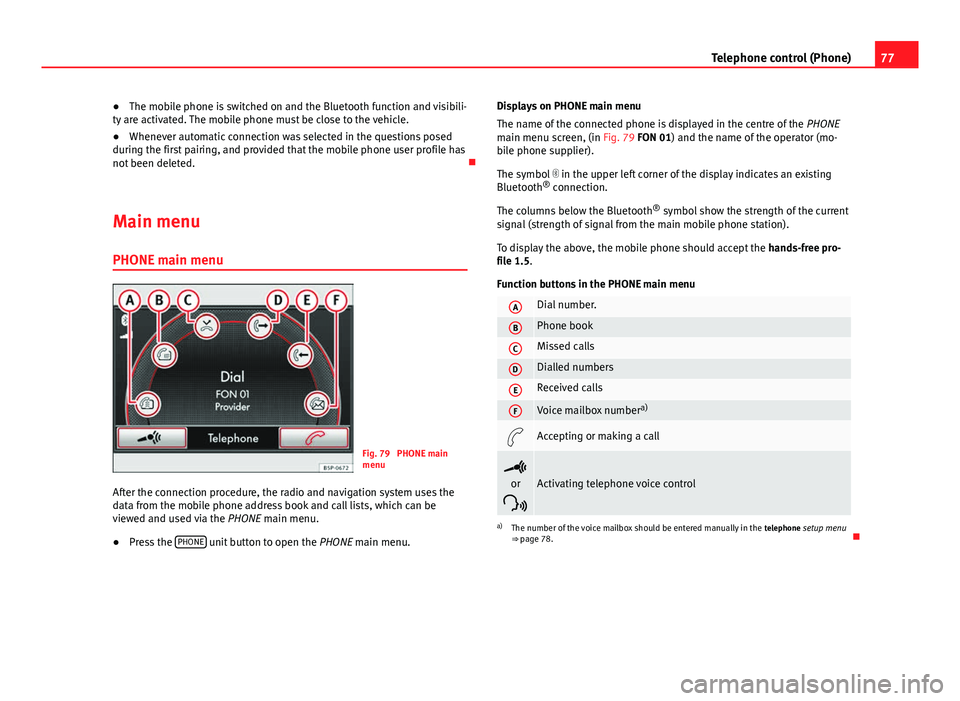
Fig. 79 PHONE main
menu
After the connection procedure, the radio and navigation system uses the
data from the mobile phone address book and call lists, which can be
viewed and used via the PHONE main menu.
● Press the PHONE
unit button to open the
PHONE main menu. Displays on PHONE main menu
The name of the connected phone is displayed in the centre of the PHONE
main menu screen, (in Fig. 79 FON 01) and the name of the operator (mo-
bile phone supplier).
The symbol in the upper left corner of the display indicates an existing
Bluetooth ®
connection.
The columns below the Bluetooth ®
symbol show the strength of the current
signal (strength of signal from the main mobile phone station).
To display the above, the mobile phone should accept the hands-free pro-
file 1.5.
Function buttons in the PHONE main menu
ADial number.
BPhone book
CMissed calls
DDialled numbers
EReceived calls
FVoice mailbox number a)
Accepting or making a call
or
Activating telephone voice control
a) The number of the voice mailbox should be entered manually in the telephone setup menu
⇒ page 78.
Page 79 of 114
78Telephone control (Phone)
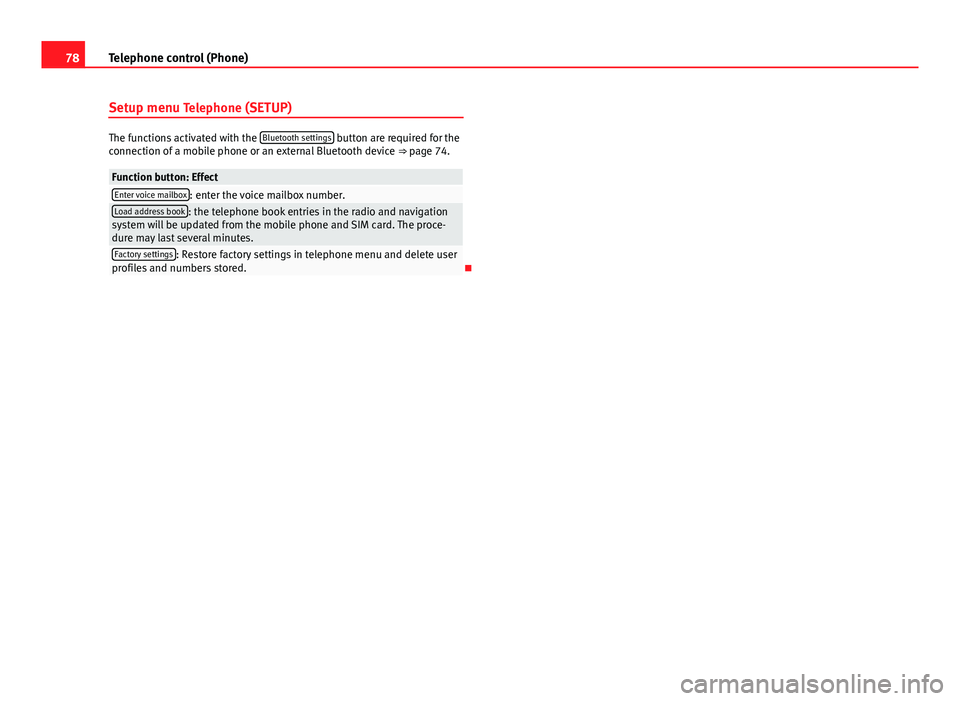
Setup menu Telephone (SETUP)
The functions activated with the Bluetooth settings button are required for the
connection of a mobile phone or an external Bluetooth device ⇒ page 74.
Function button: EffectEnter voice mailbox: enter the voice mailbox number.Load address book: the telephone book entries in the radio and navigation
system will be updated from the mobile phone and SIM card. The proce-
dure may last several minutes.
Factory settings: Restore factory settings in telephone menu and delete user
profiles and numbers stored.
Page 80 of 114
79
Telephone control (Phone)
Control from the navigation system
Telephone book
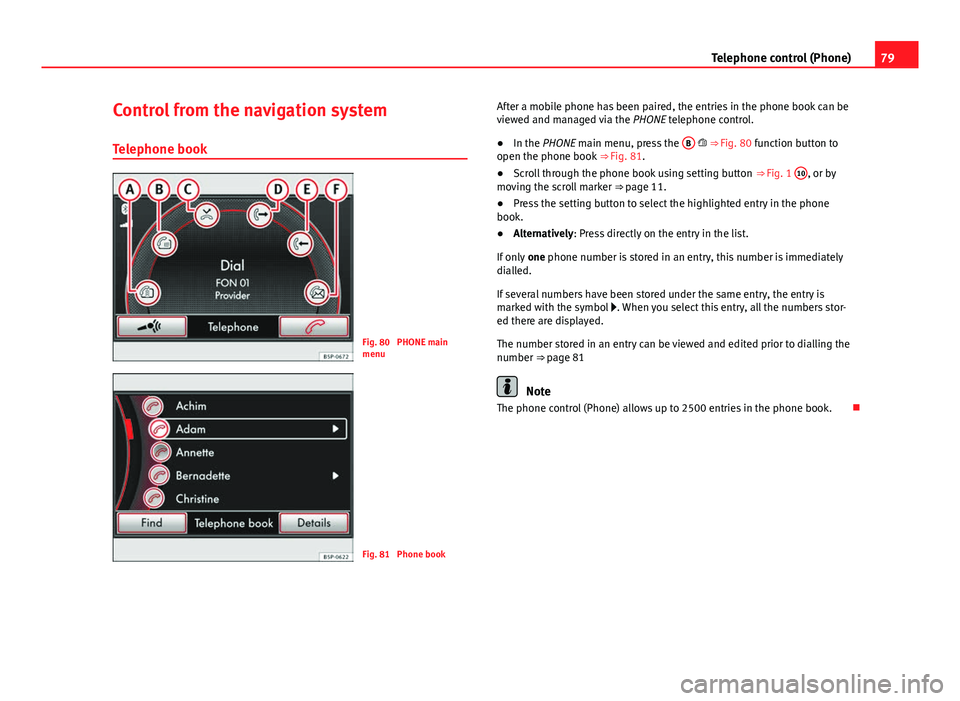
Fig. 80 PHONE main
menu
Fig. 81 Phone book After a mobile phone has been paired, the entries in the phone book can be
viewed and managed via the
PHONE telephone control.
● In the PHONE main menu, press the B
⇒ Fig. 80 function button to
open the phone book ⇒ Fig. 81.
● Scroll through the phone book using setting button ⇒ Fig. 1 10
, or by
moving the scroll marker ⇒ page 11.
● Press the setting button to select the highlighted entry in the phone
book.
● Alternatively: Press directly on the entry in the list.
If only one phone number is stored in an entry, this number is immediately
dialled.
If several numbers have been stored under the same entry, the entry is
marked with the symbol . When you select this entry, all the numbers stor-
ed there are displayed.
The number stored in an entry can be viewed and edited prior to dialling the
number ⇒ page 81
Note
The phone control (Phone) allows up to 2500 entries in the phone book.
Page 81 of 114
80Telephone control (Phone)
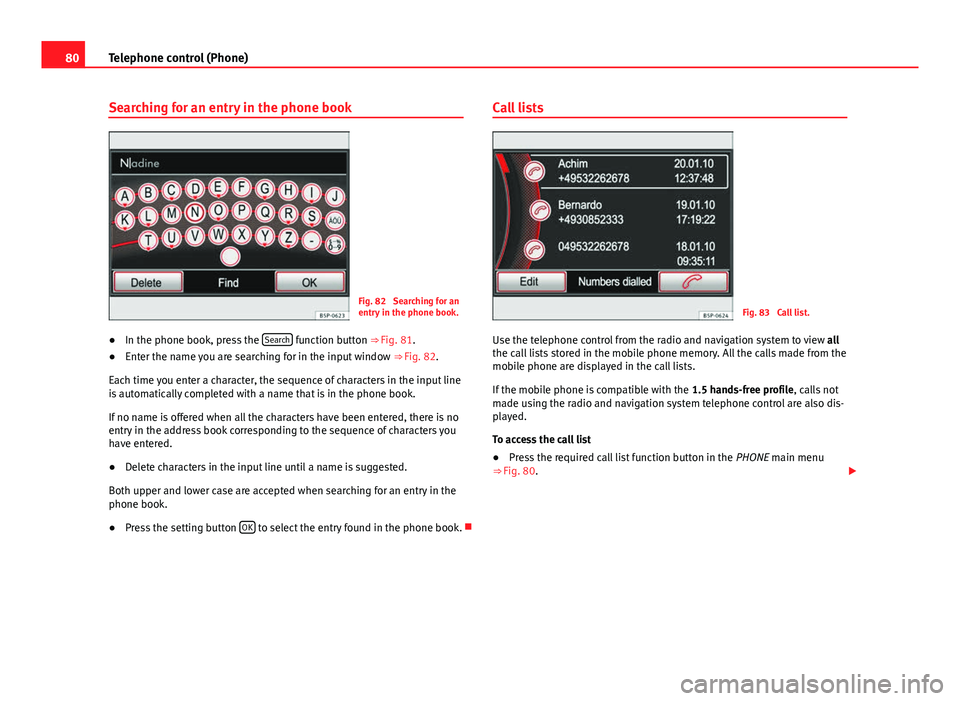
Searching for an entry in the phone book
Fig. 82 Searching for an
entry in the phone book.
● In the phone book, press the Search
function button
⇒ Fig. 81.
● Enter the name you are searching for in the input window
⇒ Fig. 82.
Each time you enter a character, the sequence of characters in the input line
is automatically completed with a name that is in the phone book.
If no name is offered when all the characters have been entered, there is no
entry in the address book corresponding to the sequence of characters you
have entered.
● Delete characters in the input line until a name is suggested.
Both upper and lower case are accepted when searching for an entry in the
phone book.
● Press the setting button OK
to select the entry found in the phone book. Call lists
Fig. 83 Call list.
Use the telephone control from the radio and navigation system to view all
the call lists stored in the mobile phone memory. All the calls made from the
mobile phone are displayed in the call lists.
If the mobile phone is compatible with the 1.5 hands-free profile, calls not
made using the radio and navigation system telephone control are also dis-
played.
To access the call list
● Press the required call list function button in the PHONE main menu
⇒ Fig. 80.
Page 82 of 114

81
Telephone control (Phone)
Call list: Meaning
Missed calls: Displays the phone numbers of unanswered or
missed calls.
Dialled numbers: displays the phone numbers dialled using the
mobile phone and the radio and navigation system telephone
control.
Received calls: displays the phone numbers received through
the mobile phone and the radio and navigation system tele-
phone control.
● Alternatively: Open the required call list in the PHONE main menu by
turning and pressing setting knob ⇒ Fig. 1 10.
If a phone number has been saved in the phone book, the call list will dis-
play the name stored against the phone number instead of the number.
Note
The call list display will depend on the mobile phone used.
Displaying and editing phone numbers
Before dialling a phone number stored in the phone book or in a call list, it
can be displayed and edited in an input window.
Viewing phone numbers in a phone book entry and opening them in the
input window
● Select the phone number and press the Details
function button
⇒ Fig. 81.
● If several numbers have been stored under the same phone book entry,
you should first select the number required.
● Press the Edit
function button to view the number selected in the input
window. Opening phone numbers from a call list in the input window
● Select the entry in a call list and press the Edit
⇒ Fig. 83 function but-
ton.
Editing phone numbers
The phone number can be changed in the input window or played as a DTMF
sequence. After it has been changed, press the function button
to dial
the number.
The changes are not saved permanently in the phone book. After the num-
ber has been dialled, the modified number can be viewed in the Dialled
numbers call list.
Accepting, ending or rejecting a call
Fig. 84 PHONE main
menu
An incoming call can be accepted, ended or rejected using the radio and
navigation phone control system.
Page 83 of 114
82Telephone control (Phone)
● Press the
function button to answer the call.
● Press the function button to answer the call.
● Press the function button to reject an incoming call.
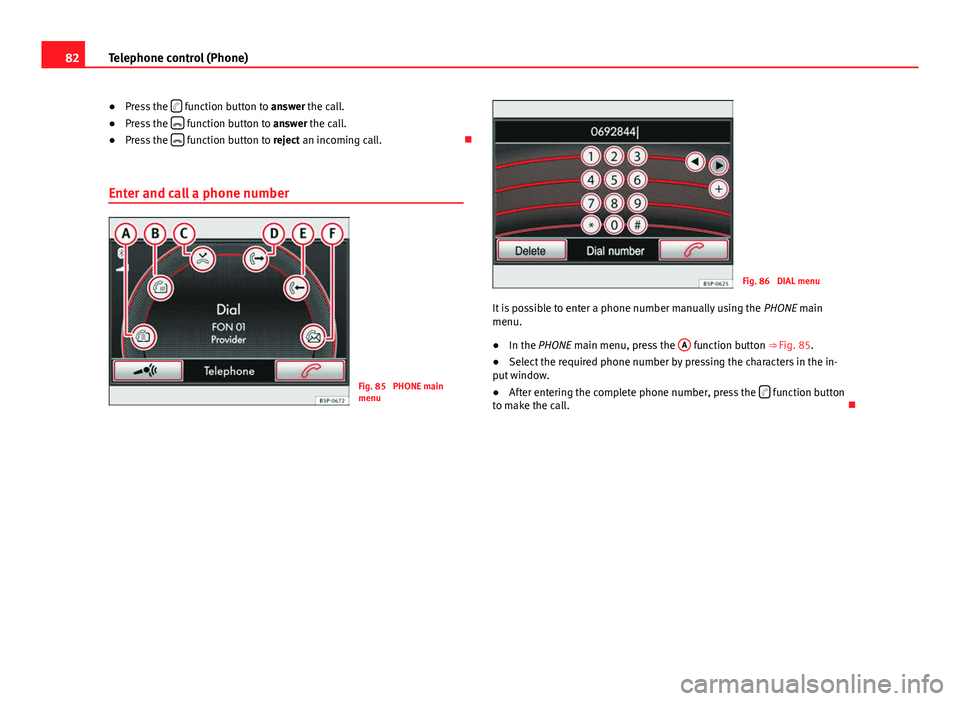
Enter and call a phone number
Fig. 85 PHONE main
menu
Fig. 86 DIAL menu
It is possible to enter a phone number manually using the PHONE main
menu.
● In the PHONE main menu, press the A
function button
⇒ Fig. 85.
● Select the required phone number by pressing the characters in the in-
put window.
● After entering the complete phone number, press the
function button
to make the call.
Page 84 of 114

83
Telephone control (Phone)
Calling the SEAT services*
Fig. 87 DIAL menu
In some countries, and for some models, SEAT also offers customers the
SEAT Call service. If this service is available, two additional function buttons
⇒ Fig. 87 will be displayed in the
DIAL menu. The SEAT Call function in-
cludes two services:
1. Call to SEAT information service
In the PHONE main menu, press the A
function button
⇒ Fig. 85.
Press the information button
⇒ Fig. 87
The system automatically starts to call the SEAT information service.
2. Call to the SEAT technical assistance service In the PHONE main menu, press the A
function button
⇒ Fig. 85.
Press the technical assistance button
⇒ Fig. 87
The system automatically starts to call the SEAT technical assistance
service.
This service operates via a local call in the country in which the vehicle is
sold, and via roaming in all other countries.
–
–
–
–
–
– Making a call with a stored number
Open and examine the phone book or call list as described in
⇒ page 79.
Phone book entry
● Select the required input by turning setting button ⇒ Fig. 1 10
and press
the button to dial the number.
● Alternatively: Press on the required entry directly to dial the number.
Dialling the number with the entry from the call list
● Select the required entry by turning the setting button and dial the num-
ber by pressing the settings button or the function button
.
● Alternatively: Press on the required entry directly to dial the number.
During a phone call
Fig. 88 Active connec-
tion display.