audio Seat Leon 5D 2014 MEDIA SYSTEM PLUS - NAVI SYSTEM
[x] Cancel search | Manufacturer: SEAT, Model Year: 2014, Model line: Leon 5D, Model: Seat Leon 5D 2014Pages: 64, PDF Size: 1.71 MB
Page 26 of 64
Audio mode
● Start playback of the external audio source.
● In the main MEDIA
menu, press the SOURC E›››
Fig. 21 function button and A
UX .
The output volume
of
the c
onnected external
audio source should be adjusted to the vol-
ume of the other audio sources ››› page 54.
Things to note when operating an external
audio source using the AUX-IN multimedia
ActionEffect
Selection of another audio
source on the radio-navi-
gation system.The external audio source
continues to run in the
background.
Stopping playback on the
external audio source.The infotainment system
remains in the AUX menu.
Disconnecting the plug
from the AUX-IN multime-
dia socket.The infotainment system
changes, and plays the
last media source that was
active. Note
● Please read and observe the external audio
source manufacturer operating manual.
● Interference noise may be heard if the ex-
ternal audio source is powered from the 12-
volt power socket of the vehicle. MEDIA-IN multimedia interface
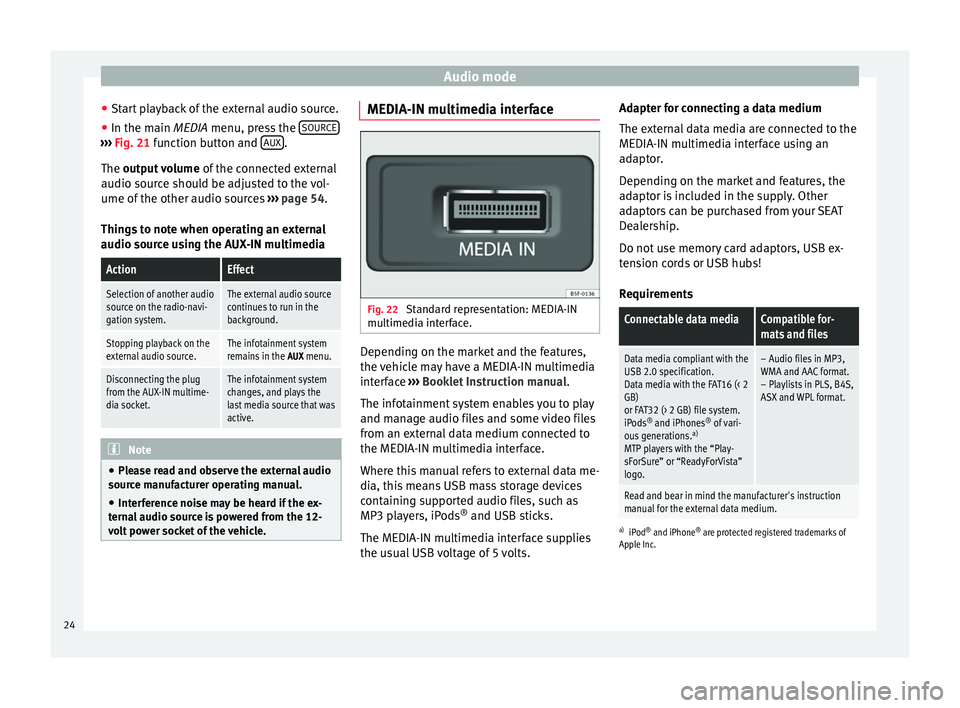
Fig. 22
Standard representation: MEDIA-IN
multimedia interface. Depending on the market and the features,
the vehicle may have a MEDIA-IN multimedia
interface
›››
Booklet Instruction manual.
The infotainment system enables you to play
and manage audio files and some video files
from an external data medium connected to
the MEDIA-IN multimedia interface.
Where this manual refers to external data me-
dia, this means USB mass storage devices
containing supported audio files, such as
MP3 players, iPods ®
and USB sticks.
The MEDIA-IN multimedia interface supplies
the usual USB voltage of 5 volts. Adapter for connecting a data medium
The external data media are connected to the
MEDIA-IN multimedia interface using an
adaptor.
Depending on the market and features, the
adaptor is included in the supply. Other
adaptors can be purchased from your SEAT
Dealership.
Do not use memory card adaptors, USB ex-
tension cords or USB hubs!
Requirements
Connectable data mediaCompatible for-
mats and files
Data media compliant with the
USB 2.0 specification.
Data media with the FAT16 (< 2
GB)
or FAT32 (> 2 GB) file system.
iPods ®
and iPhones ®
of vari-
ous generations. a)
MTP players with the “Play-
sForSure” or “ReadyForVista”
logo.– Audio files in MP3,
WMA and AAC format.
– Playlists in PLS, B4S,
ASX and WPL format.
Read and bear in mind the manufacturer's instruction
manual for the external data medium.
a) iPod ®
and iPhone ®
are protected registered trademarks of
Apple Inc.
24
Page 27 of 64
Audio mode
Notes and restrictions
The infotainment system enables you to view,
play and manage compatible audio files
through the MEDIA-IN multimedia interface.
In the case of MTP players and depending on
the battery charge and the quantity of data, it
may take a few minutes for them to be ready
for use.
External hard discs with a capacity greater
than 32 GB must, in certain circumstances,
be reformatted to the FAT32 file system. On
the Internet, for example, you will find pro-
grams and instructions for this.
If the data carrier has several partitions, only
the first partition will be recognised (except
with USB, in which the first 2 will be visible).
Take into account all other instructions and
limitations regarding requirements for media
sources.
Connecting and disconnecting an external
data medium
● Connect a suitable adaptor to the MEDIA-IN
multimedia interface.
● Connect the external data medium to the
MEDIA-IN multimedia interface via the adapt-
er.
● If necessary, switch on the external data
medium or select the appropriate data mode.
Regardless of any indications to the contrary
that there may be on the matter, the external data medium can be disconnected from the
MEDIA-IN multimedia interface at any time
without losing the data.
When disconnecting an iPod
®
or iPhone ®
from the adaptor, take care to press the two
unlocking tabs on the narrow sides of the
iPod ®
connector simultaneously.
Operating the infotainment system
An external data medium that is correctly
connected to the MEDIA-IN multimedia inter-
face can be operated using the infotainment
system.
● In the main MEDIA
menu, press the SOURC E ›››
Fig. 21 function button and select USB or
iPod ...
››› page 24 .
Other oper ation
s with the external data medi-
um (changing tracks, selecting tracks and ac-
tivating playback modes) are carried out as
described in the corresponding chapters.
iPod ®
and iPhone ®
If you connect an iPod ®
or iPhone ®
, the top
selection level will display the specific lists of
the iPod ( playlists, artist, album,
title, podcasts etc.). The appearance of
these lists is similar to that of the media cen-
tre , and they are managed as described.
Music management is blocked so it can be
managed with the iPod ®
or iPhone ®
that is
connected. The playback volume
of some iPods®
or
iPhones ®
can adapt to the volume of the oth-
er audio sources ››› page 24.
Files from iPods ®
or iPhones ®
cannot be im-
port
ed.
Possible error messages after connecting an ex-
ternal data medium
Error mes-
sageCauseProcedure
Device not
supportedThe external
data medium
cannot be
played– Consult the list of
supported devices
on the web.
– When possible,
update the software
of the external data
medium.
Unit not op-
erationalCommunication
interrupted.Check the connec-
tion and make sure
the external data
medium is working
correctly.
Due to the large number of different data media availa-
ble, it is not possible to guarantee fault-free operation of
all functions described here. Note
● The connecting adaptor used must not be
crushed or bent sharply. This could damage
the adaptor and cause operational faults.
● To play music, do not simultaneously link
the external media player to the infotainment » 25
Page 28 of 64
Audio mode
system using Bluetooth and the MEDIA-IN
multimedia interface, as this can cause play-
back limitations.
● If a connected device is not recognised, un-
plug all connected devices and reconnect the
device. External data support in MEDIA-IN*
port
Only supported audio files can be displayed
and played. Other files are ignored.
Playback starts automatically if there are
readable audio files stored on the data sup-
port.
End connection
The connected data support
must be pre-
pared for disconnection before it can be re-
moved.
● Press the infotainment button MENU ; then,
press Settings to open the menu System set-
tings ››› page 53 .
● Pr e
ss the Safely remove USB data stick function
button. After removing the data stick correct-
ly from the system, the function button be-
comes inactive (grey).
● The data media may now be disconnected. Illegible data medium
If the data on a connected support device
cannot be read, the warning
No playable files
is displayed. Note
Read and bear in mind the manufacturer's in-
struction manual for the external data medi-
um. Connecting an external media player
via Bluetooth
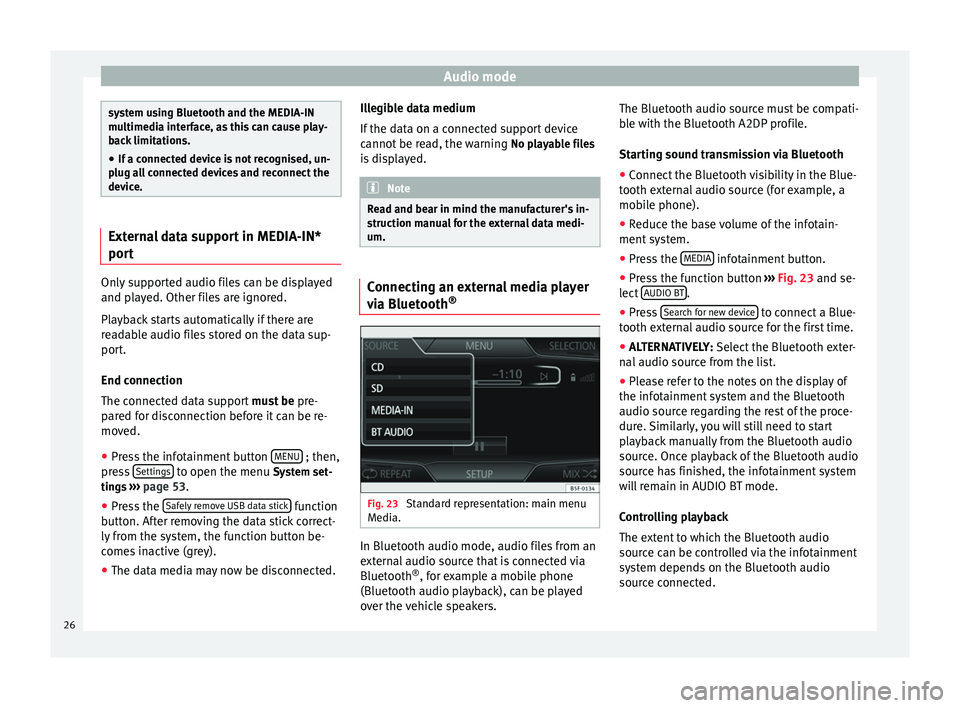
® Fig. 23
Standard representation: main menu
Media. In Bluetooth audio mode, audio files from an
external audio source that is connected via
Bluetooth
®
, for example a mobile phone
(Bluetooth audio playback), can be played
over the vehicle speakers. The Bluetooth audio source must be compati-
ble with the Bluetooth A2DP profile.
Starting sound transmission via Bluetooth
● Connect the Bluetooth visibility in the Blue-
tooth external audio source (for example, a
mobile phone).
● Reduce the base volume of the infotain-
ment system.
● Press the MEDIA infotainment button.
● Press the function button ››› Fig. 23 and se-
l ect
AUDIO BT .
● Press Search for new device to connect a Blue-
tooth external audio source for the first time.
● ALTERNATIVELY: Select the Bluetooth exter-
n al
audio source from the list.
● Please refer to the notes on the display of
the infotainment system and the Bluetooth
audio source regarding the rest of the proce-
dure. Similarly, you will still need to start
playback manually from the Bluetooth audio
source. Once playback of the Bluetooth audio
source has finished, the infotainment system
will remain in AUDIO BT mode.
Controlling playback
The extent to which the Bluetooth audio
source can be controlled via the infotainment
system depends on the Bluetooth audio
source connected.
26
Page 29 of 64
Audio mode
Media players with the AVRCP Bluetooth pro-
file, the playback of the Bluetooth audio
source can be started and stopped automati-
cally when changing to Bluetooth audio
mode, or to another audio source. In addi-
tion, it is possible to view or change the track
via the infotainment system. Note
Due to the large number of different Blue-
tooth audio sources available, it is not possi-
ble to guarantee fault-free operation of all
functions described here. Note
● Deactivate the service and warning sounds
of a connected Bluetooth audio source (for
example, the key tones of the mobile phone)
to avoid interference noise and anomalies in
the operation.
● Depending on the external player connec-
ted, the response time of the system can
vary.
● To ensure your BT player works correctly,
check the compatibility lists first. Changing tracks in the main menu
MEDIA
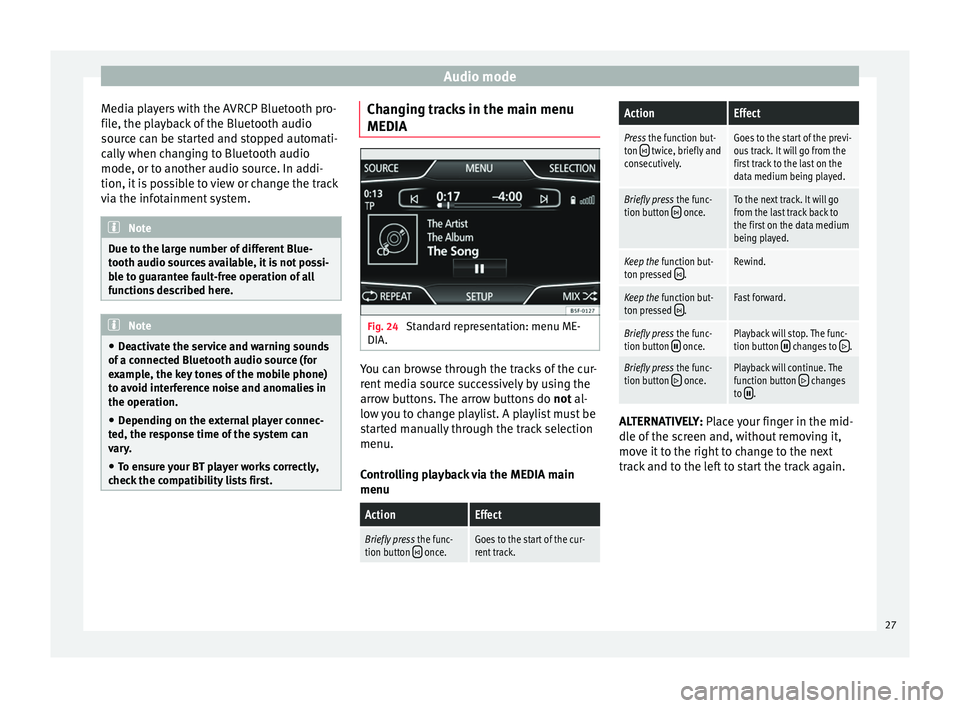
Fig. 24
Standard representation: menu ME-
DIA. You can browse through the tracks of the cur-
rent media source successively by using the
arrow buttons. The arrow buttons do
not al-
lo w
you to change playlist. A playlist must be
started manually through the track selection
menu.
Controlling playback via the MEDIA main
menu
ActionEffect
Briefly press the func-
tion button once.Goes to the start of the cur-
rent track.
ActionEffect
Press the function but-
ton twice, briefly and
consecutively.Goes to the start of the previ-
ous track. It will go from the
first track to the last on the
data medium being played.
Briefly press the func-
tion button once.To the next track. It will go
from the last track back to
the first on the data medium
being played.
Keep the function but-
ton pressed .Rewind.
Keep the function but-
ton pressed .Fast forward.
Briefly press the func-
tion button once.Playback will stop. The func-
tion button changes to .
Briefly press the func-
tion button once.Playback will continue. The
function button changes
to . ALTERNATIVELY:
Place your finger in the mid-
dl e of
the screen and, without removing it,
move it to the right to change to the next
track and to the left to start the track again.
27
Page 30 of 64
Audio mode
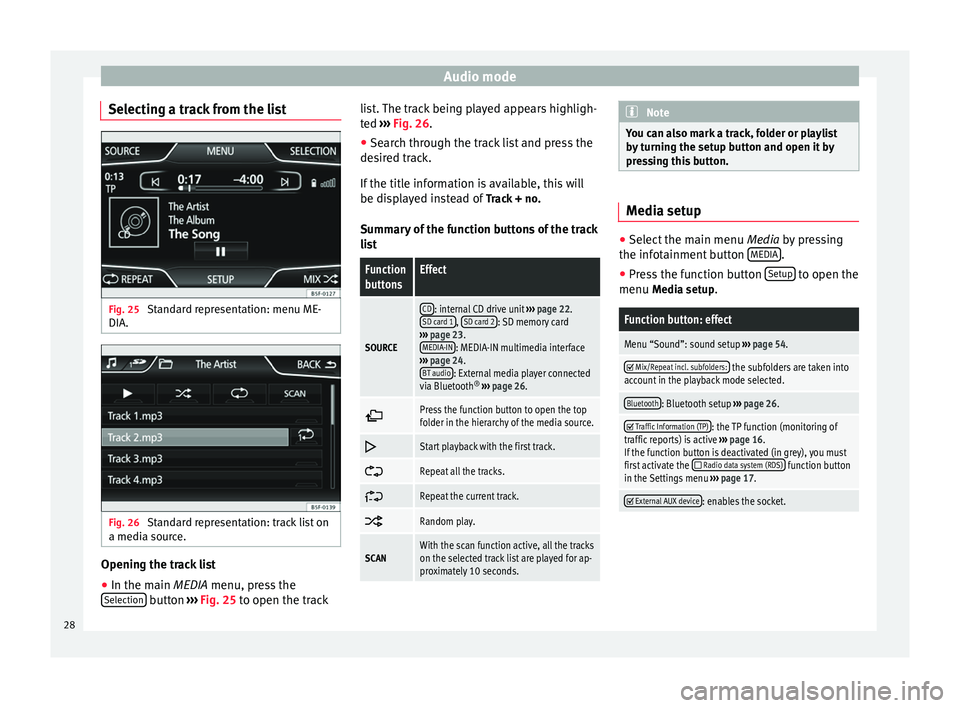
Selecting a track from the list Fig. 25
Standard representation: menu ME-
DIA. Fig. 26
Standard representation: track list on
a media source. Opening the track list
● In the main MEDIA
menu, press the
Sel
ection button
›››
Fig. 25 to open the track li
s t. The track being played appears highligh-
ted ››› Fig. 26
.
● Search through the track list and press the
desired track.
If the title information is available, this will
be displayed instead of Track + no.
Summary of the function buttons of the track
list
Function
buttonsEffect
SOURCE
CD: internal CD drive unit ››› page 22.
SD card 1, SD card 2: SD memory card
››› page 23.
MEDIA-IN
: MEDIA-IN multimedia interface
››› page 24.
BT audio
: External media player connected
via Bluetooth ®
››› page 26.
Press the function button to open the top
folder in the hierarchy of the media source.
Start playback with the first track.
Repeat all the tracks.
Repeat the current track.
Random play.
SCANWith the scan function active, all the tracks
on the selected track list are played for ap-
proximately 10 seconds. Note
You can also mark a track, folder or playlist
by turning the setup button and open it by
pressing this button. Media setup
●
Select the main menu Media by pressing
the inf ot
ainment button MEDIA .
● Press the function button Setup to open the
menu Media setup
.
Function button: effect
Menu “Sound”: sound setup ››› page 54.
Mix/Repeat incl. subfolders: the subfolders are taken into
account in the playback mode selected.
Bluetooth: Bluetooth setup ››› page 26.
Traffic Information (TP): the TP function (monitoring of
traffic reports) is active ››› page 16.
If the function button is deactivated (in grey), you must
first activate the
Radio data system (RDS) function button
in the Settings menu ››› page 17.
External AUX device: enables the socket.
28
Page 36 of 64
NavigationFunction button: effect
2: one point of interest in the area in question. Press
the icon to view the details of the point of interest. Searching for a point of interest
● In the navigation main menu, press the
function button POI .
● Press the Others function button.
Function button: effect
Search area: select the area in which you wish to search
for points of interest.
Near current location: looks for points of interest in
the area around your current location. Destination area
a) : looks for points of interest in the
area around the destination. Along the route
a) : looks for points of interest in the
area along the route. Near address
: looks for points of interest in the area
around the address entered. Select on map
: looks for points of interest in the
area around the destination selected on the map.
To select a destination on the map, press the func-
tion button Edit
.
Category: select main category (e.g.
Car and travel), cate-
gory (e.g. Airports) and finally the desired entry from the
list.
Save: stores the selected point of interest in the
destination memory. Dial nr.
b) : establishes a telephone connection to
the number assigned to the point of interest. Start
: starts guided navigation at the selected
point of interest.
Function button: effect
Find: search for a point of interest by entering its name.
a) The function button is displayed only when guided navigation
is activated.
b) The function button is only displayed when the point of inter-
est contains a telephone number.
View ●
Press the View function button in the main
navigation menu ›››
Fig. 30 .
Function button: effect
2D : two-dimensional representation of the map,
from above (conventional).
3D : three-dimensional representation of the map,
tilted from above (bird's eye view).
a)
: view the final destination on the map.
a)
: view the whole journey on the map.
Day/Night: alternate between day and night view.
Split screen: press to view the split screen ››› page 34.
The split screen can also be shown or hidden by press-
ing the infotainment button NAV
.
a)
The function button is displayed only when guided navigation
is activated.
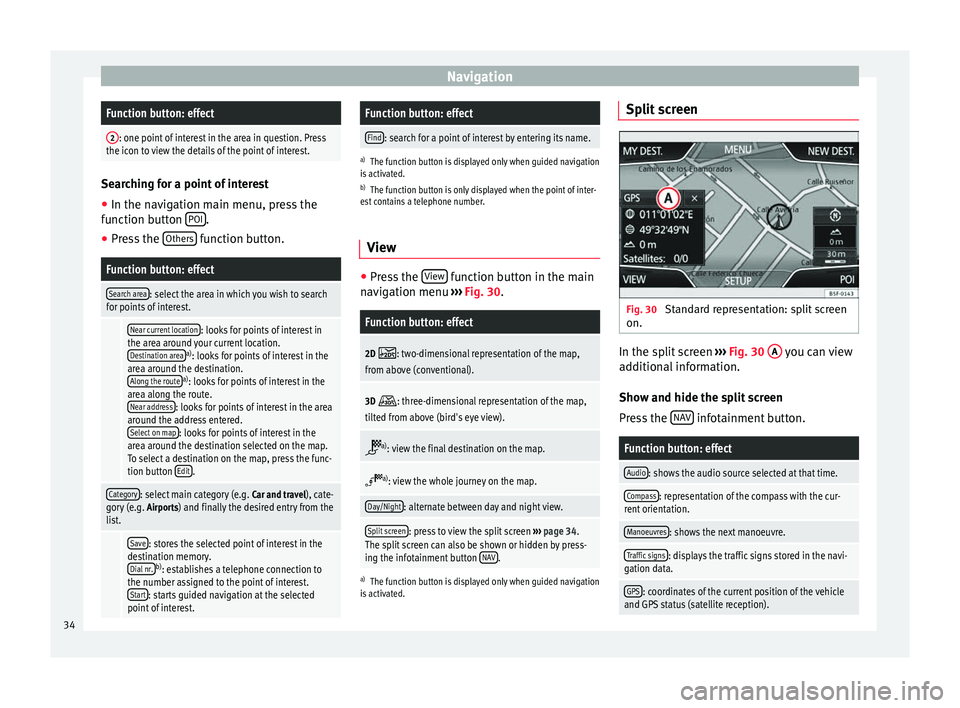
Split screen Fig. 30
Standard representation: split screen
on. In the split screen
›››
Fig. 30 A you can view
additional information.
Show and hide the split screen
Press the NAV infotainment button.
Function button: effect
Audio: shows the audio source selected at that time.
Compass: representation of the compass with the cur-
rent orientation.
Manoeuvres: shows the next manoeuvre.
Traffic signs: displays the traffic signs stored in the navi-
gation data.
GPS: coordinates of the current position of the vehicle
and GPS status (satellite reception). 34
Page 45 of 64
Telephone management (PHONE)
mobile phone. If they coincide, you must
confirm it on both devices.
Onc e the link
is complete, the main menu
PHONE
will be shown.
Linking and connecting mobile telephones
You can link up to 20
mobile telephones to
the infotainment system, but only one mobile
phone can be connected as hands-free, and
only one device as BT audio at any time.
When you turn on the infotainment system
the connection is automatically established
with the mobile phone that was last connec-
ted. If it cannot establish a connection with
that mobile phone, the telephone manager
will automatically try to establish a connec-
tion with the next mobile phone that appears
on the list of linked devices.
The working radius of the Bluetooth connec-
tion is a maximum of 10 metres . If this work-
ing radius is exceeded, the connection estab-
lished through Bluetooth will be interrupted.
The connection is automatically re-establish-
ed as
soon as this device comes back into
the Bluetooth working radius.
If the maximum number of linked devices is
reached and you wish to link another one to
the system, it will automatically replace the
one that has recently been used the least. If you wish to replace it with another one, the
user must erase it beforehand. To do so:
●
Press the unit button Setup within the tele-
phone context.
● Press the function button Bluetooth setup .
● Press the function button My devices .
● In the list of devices linked, press the func-
tion button remove after the mobile phone to
be deleted and then press Delete to confirm
the process. Note
● The behaviour may vary depending on the
device connected.
● For some android mobile devices you must
accept the request to access the PBAP phone-
book after linking, to be able to access the
phonebook. It is recommended to activate
the option “always” so as not to have to ac-
cept it every time you connect. General information
Please refer to the notes on using a mobile
phone in the vehicle without connection to
exterior antenna
›››
Booklet Instruction Man-
ual, chapter Accessories and technical modi-
fications .
On ly
use devices that support Bluetooth. At
your SEAT dealership, or on the Internet, you will find information about products that sup-
port Bluetooth.
Take into account the instruction manual of
the mobile phone and of the manufacturer of
the accessories. In areas with poor coverage
there may be anomalies in the reception and
calls may be interrupted.
Most electronic devices are shielded against
radio frequency signals (high-frequency). On
some occasions, nevertheless, electronic de-
vices cannot be protected against the radio
frequency signals from the telephone manag-
er. This may produce interference.
Note
● There may be restrictions on the use of
Bluetooth devices in some countries. Infor-
mation is available from the local authorities.
● To connect the telephone manager to a de-
vice via Bluetooth technology, read the corre-
sponding instruction manual for the particu-
lar safety instructions. Only use products
that support Bluetooth. Bluetooth
® Bluetooth
®
Bluetooth technology is used to connect a
mobile phone to the vehicle's telephone
manager. To use the telephone manager with
a mobile phone with Bluetooth, the linking
process must be carried out once. »
43
Page 46 of 64
Telephone management (PHONE)
If a connection has already been established,
some mobile telephones with Bluetooth are
recognised and a connection is established
with them automatically when the ignition is
switched on. For this purpose, the mobile
phone and its Bluetooth must be connected,
and all the live Bluetooth connections with
other devices must be closed.
The Bluetooth wireless connection is free.
Bluetooth R
is a registered trademark of Blue-
tooth ®
SIG, Inc.
Bluetooth ®
profiles
When you connect a mobile phone to the tel-
ephone manager, the data exchange is
through one of the 2 Bluetooth profiles.
● Hands-free Bluetooth profile (HFP): If a mo-
b i
le phone is connected to the telephone
manager through the HFP, calls can be made
wirelessly through the hands-free device.
● Advanced audio profile (A2DP): Bluetooth
profile for transmitting audio signals with
stereo quality.
Voice control Many radio, media, telephone and navigation
functions may be activated through voice
commands. The voice control of the infotainment system
is only available for the language that has
been selected in system settings
››› page 53 .
V oic
e control settings ››› page 54.
When voice control is activated, you can
choose what text and icons take on the col-
our of the different functions:
● Red (RADIO and MEDIA) ››› page 45 and
››› page 45
● Green (PHONE) ››› page 46
● Blue (NAV) ››› page 46
Start and stop the voice control
● To activate the voice control, briefly press
the button on the multi-function steering
wheel . It can also be activated with the
VOICE button in the MIB.
● When voice control is activated, a rising
signal will sound and a menu containing the
main commands will be displayed (the menu
will be displayed if this option ››› page 54 is
activated in the voice control settings). The
spoken instructions will guide you through
the following “dialogue”.
● Pronounce the desired order and follow the
instructions of the “dialogue”. A function can
often be activated with different spoken com-
mands. In case of doubt, try to give a com-
mand. ●
When an action is carried out (e.g. calling a
contact), the voice control automatically de-
activates and must be reactivated when nee-
ded again. There are certain commands after
which the voice control does not end and
waits with What do you wish to do now? .
● To manually end voice control, keep the
button pressed on the multi-function steering
wheel until you hear the corresponding con-
firmation (falling sound), or press the but-
ton on the di
splay. You can also press the
VOICE button twice to deactivate voice con-
trol. (Voice control is deactivated in the fol-
lowing ways: by briefly pressing the VOICE
button or Command on the steering wheel
twice; or by pressing VOICE or Command on
the steering wheel for a few moments, and
touching the screen or any button on the ra-
dio).
Help with voice control
The first time you use the voice control, listen
to the Help.
● Press the function button .
● Give the “
Help” command in the language
established in the System setting, and follow
the dialogue instructions.
Operation during the dialogue
While the infotainment system transmits a
spoken indication, the display will show the
symbol .
44
Page 48 of 64
Telephone management (PHONE)
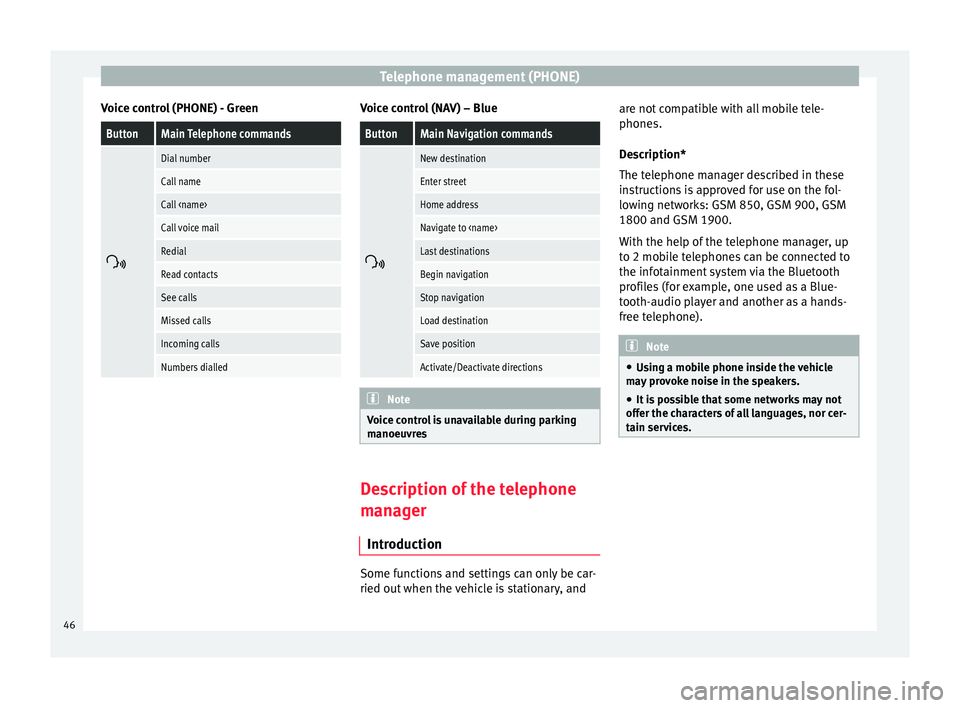
Voice control (PHONE) - GreenButtonMain Telephone commands
Dial number
Call name
Call
Call voice mail
Redial
Read contacts
See calls
Missed calls
Incoming calls
Numbers dialled Voice control (NAV) – Blue
ButtonMain Navigation commands
New destination
Enter street
Home address
Navigate to
Last destinations
Begin navigation
Stop navigation
Load destination
Save position
Activate/Deactivate directions
Note
Voice control is unavailable during parking
manoeuvres Description of the telephone
manager
Introduction Some functions and settings can only be car-
ried out when the vehicle is stationary, andare not compatible with all mobile tele-
phones.
Description*
The telephone manager described in these
instructions is approved for use on the fol-
lowing networks: GSM 850, GSM 900, GSM
1800 and GSM 1900.
With the help of the telephone manager, up
to 2 mobile telephones can be connected to
the infotainment system via the Bluetooth
profiles (for example, one used as a Blue-
tooth-audio player and another as a hands-
free telephone).
Note
● Using a mobile phone inside the vehicle
may provoke noise in the speakers.
● It is possible that some networks may not
offer the characters of all languages, nor cer-
tain services. 46
Page 50 of 64
Telephone management (PHONE)
Battery level of the mobile phone connected.
Signal strength of the mobile phone coverage.
Private mode: To activate private mode, go to
the Menu
Setup and deactivate the check-
box: Hands-free (during an active call). With
the private mode activated the active audio
and microphone become that of the mobile
phone connected to the hands-free. When it
is deactivated, the audio reverts to the car-kit
of the vehicle. This configuration is only ap-
plicable to the active call, so for subsequent
calls, the audio will revert by default to the
car-kit of the vehicle.
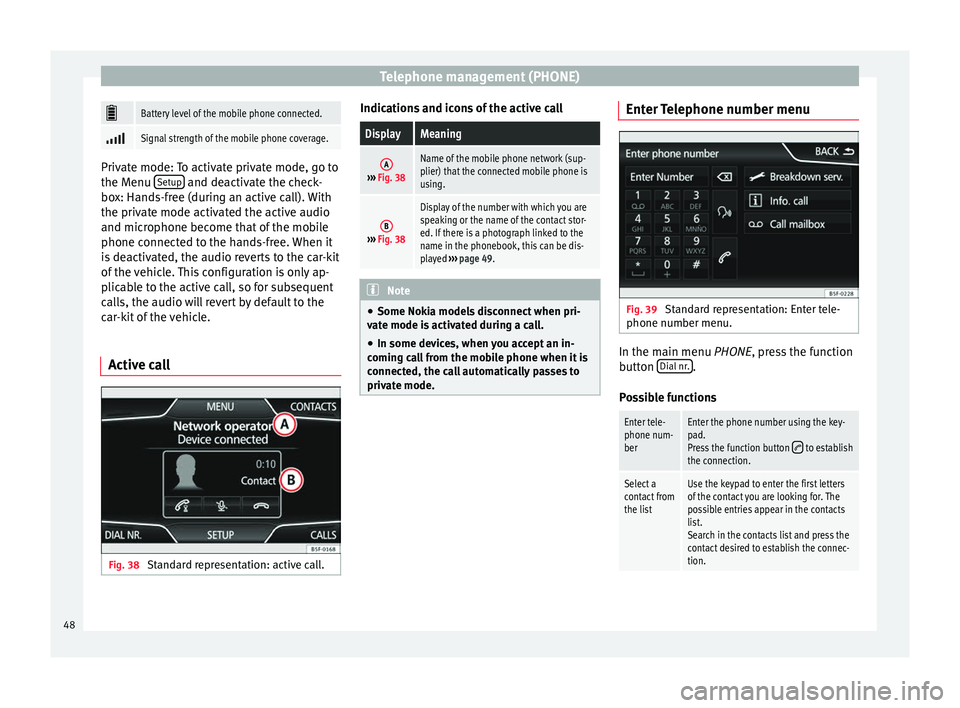
Active call Fig. 38
Standard representation: active call. Indications and icons of the active callDisplayMeaning
A›››
Fig. 38
Name of the mobile phone network (sup-
plier) that the connected mobile phone is
using.
B››› Fig. 38
Display of the number with which you are
speaking or the name of the contact stor-
ed. If there is a photograph linked to the
name in the phonebook, this can be dis-
played ››› page 49. Note
● Some Nokia models disconnect when pri-
vate mode is activated during a call.
● In some devices, when you accept an in-
coming call from the mobile phone when it is
connected, the call automatically passes to
private mode. Enter Telephone number menu
Fig. 39
Standard representation: Enter tele-
phone number menu. In the main menu
PHONE
, press the function
b
utton Dial nr. .
Possible functions
Enter tele-
phone num-
berEnter the phone number using the key-
pad.
Press the function button
to establish
the connection.
Select a
contact from
the listUse the keypad to enter the first letters
of the contact you are looking for. The
possible entries appear in the contacts
list.
Search in the contacts list and press the
contact desired to establish the connec-
tion. 48