USB Seat Leon 5D 2014 NAVI SYSTEM PLUS
[x] Cancel search | Manufacturer: SEAT, Model Year: 2014, Model line: Leon 5D, Model: Seat Leon 5D 2014Pages: 84, PDF Size: 2.08 MB
Page 38 of 84
Audio and Media Mode
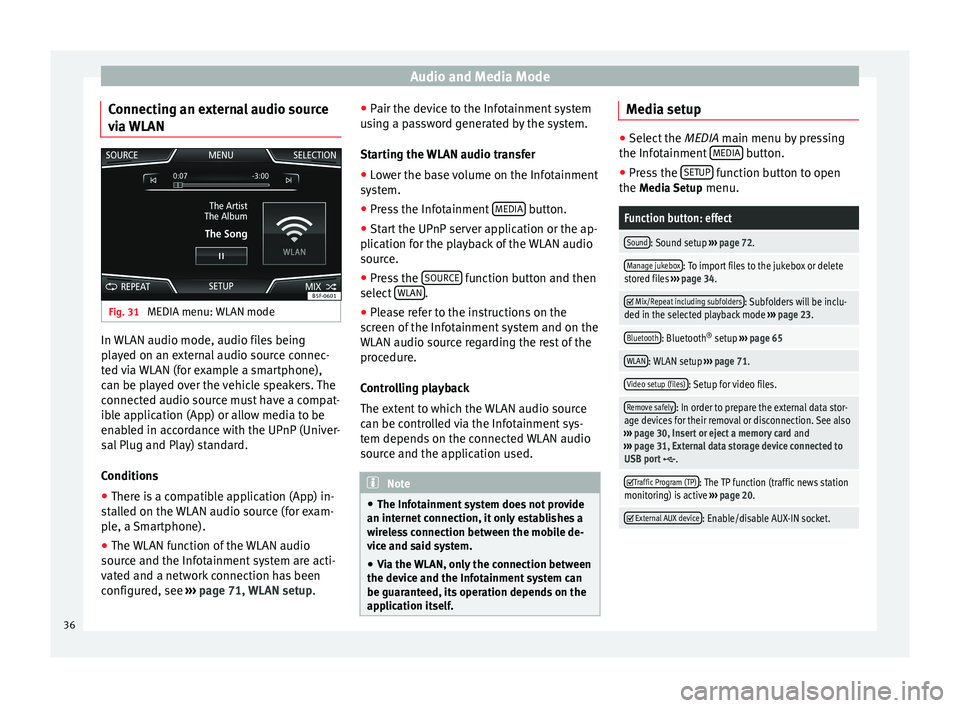
Connecting an external audio source
via WLAN Fig. 31
MEDIA menu: WLAN mode In WLAN audio mode, audio files being
played on an external audio source connec-
ted via WLAN (for example a smartphone),
can be played over the vehicle speakers. The
connected audio source must have a compat-
ible application (App) or allow media to be
enabled in accordance with the UPnP (Univer-
sal Plug and Play) standard.
Conditions
● There is a compatible application (App) in-
stalled on the WLAN audio source (for exam-
ple, a Smartphone).
● The WLAN function of the WLAN audio
source and the Infotainment system are acti-
vated and a network connection has been
configured, see ››› page 71, WLAN setup. ●
Pair the device to the Infotainment system
using a password generated by the system.
Starting the WLAN audio transfer
● Lower the base volume on the Infotainment
system.
● Press the Infotainment MEDIA button.
● Start the UPnP server application or the ap-
plication for the playback of the WLAN audio
source.
● Press the SOURCE function button and then
select WLAN .
● Please refer to the instructions on the
screen of the Infotainment system and on the
WLAN audio source regarding the rest of the
procedure.
Controlling playback
The extent to which the WLAN audio source
can be controlled via the Infotainment sys-
tem depends on the connected WLAN audio
source and the application used. Note
● The Infotainment system does not provide
an internet connection, it only establishes a
wireless connection between the mobile de-
vice and said system.
● Via the WLAN, only the connection between
the device and the Infotainment system can
be guaranteed, its operation depends on the
application itself. Media setup
●
Select the MEDIA main menu by pressing
the Inf ot
ainment MEDIA button.
● Press the SETUP function button to open
the Media Setup menu.
Function button: effect
Sound: Sound setup ››› page 72.
Manage jukebox: To import files to the jukebox or delete
stored files ››› page 34.
Mix/Repeat including subfolders: Subfolders will be inclu-
ded in the selected playback mode ››› page 23.
Bluetooth: Bluetooth ®
setup ››› page 65
WLAN: WLAN setup ››› page 71.
Video setup (files): Setup for video files.
Remove safely: In order to prepare the external data stor-
age devices for their removal or disconnection. See also
››› page 30, Insert or eject a memory card and
››› page 31, External data storage device connected to
USB port
.
Traffic Program (TP): The TP function (traffic news station
monitoring) is active ››› page 20.
External AUX device: Enable/disable AUX-IN socket.
36
Page 68 of 84
Telephone management system (PHONE)Function button: effect
Paired devices: Displays paired devices. To disconnect
and connect Bluetooth ®
devices and Bluetooth ®
pro-
files.
Find devices: Search for visible Bluetooth ®
devices within
the range of the Infotainment system. The maximum
range is approx. 10 metres.
Bluetooth audio (A2DP/AVRCP): This function must be ac-
tive if it is necessary to connect an external audio source
via Bluetooth ®
to the Infotainment system. ››› page 33. User profile setup
In the
PHONE
main menu, press the S
ETUPfunction button and then the
User profile func-
tion button.
Function button: effect
Manage favourites: Editing speed dial buttons.
Speed dial button in use : Press to delete the stored
number.
Speed dial button free : Press to assign a number
from the phonebook to the speed dial button in
question.
Mailbox number: To enter or modify the mailbox number.
Code: To enter a prefix to be placed before the num-
ber entered ››› page 61.
Sort by: To set the order of appearance of the entries in
the phonebook ( Forename and surname or vice-versa).
Function button: effect
Import contacts: Press to import the phonebook of the
connected telephone, or to update the imported phone-
book.
Delete other user profiles: To delete all the inactive user pro-
files or only one of them.
Reminder: don't forget your mobile phone: If there is already
an active Bluetooth ®
connection with another mobile
telephone when turning off the ignition, the following
message appears: “Don't forget your mobile telephone ”.
Select ring tonea)
: To select a ring tone from a list of prede-
fined melodies (tones). The selected ring tone is played
and set up when exiting the submenu.
Show pictures for contactsb)
: If phonebook contacts have
been stored with a photograph, it can be displayed on
the speed dial buttons, on the call lists and in the pho-
nebook.
a) Depending on the mobile telephone used, the selected ring
tone, or the one set up on the mobile telephone, is played. This
function will not be displayed if not supported by the mobile tel-
ephone.
b) Depending on the mobile phone. Note
Some telephones need to be restarted to re-
download the most recent contacts added. Communication protocol between the
Infotainment system and mobile
devices specifically for Applications
(Apps) that control or read
information from the system.
Description
The system has a communication protocol to
establish connections between this and oth-
er mobile devices (smartphones/tablets).
This communication can allow data (media,
navigation, radio, audio and vehicle data) to
be read and/or written. In order to establish
this communication, the Application must be
certified by VW consortium brands as they re-
quire authentication by the Application to be
able to establish communication (this means
that not all the Apps will have access to es-
tablishing communication with the System).
Activation
From the
SETUP menu,
Mobile device data transfer , there is a checkbox
to activate/deactivate the function, and a
dropdown menu called Use apps to operate which controls the level of interaction be-
tween the Apps and the System
›››
table on
page 70 : Deactivate, Confirm, and Allow.
Int er
faces
This communication protocol supports the
connection via WLAN interfaces and USB.
66
Page 69 of 84

Telephone management system (PHONE)
Note
SEAT applications are designed to communi-
cate with the vehicle and interact with it via
the MirrorLink ®
connection, therefore its
functionality is linked to the mobile device
being connected via USB-MirrorLink ®
. Other
Apps certified by the consortium or third par-
ties may have access to this communication
w ith the
System via WLAN without Mirror-
Link ®
. MirrorLink™
Introduction MirrorLink™ is a protocol which enables the
communication between a portable device
and the Infotainment system via USB.
Using it makes it possible to display and
manage the content and functions displayed
on the portable device on the Infotainment
system screen.
To avoid distracting the driver while driving,
only specially adapted applications can be
used
››› .
WARNING
If a mobile terminal is not secured or is incor-
rectly secured in the vehicle, it could move
around the passenger compartment in the event of a sudden driving manoeuvre, emer-
gency stop or accident, resulting in injury.
●
While driving, mobile terminals must be se-
curely fastened in position, outside the air-
bag deployment zones, or safely stowed
away. WARNING
Any applications that are not suitable or exe-
cute incorrectly may cause damage to the ve-
hicle, accidents and serious injuries.
● SEAT recommends the use of the Apps that
SEAT provides for this vehicle.
● For the full use of SEAT Apps, it is necessa-
ry to activate the “Mobile device data trans-
fer” option in Setup ››› page 70.
● Protect the mobile terminal with its appli-
cations from improper use.
● Never make modifications to the applica-
tions.
● Consult the instruction manual for the mo-
bile terminal. WARNING
The use of applications while driving can dis-
tract your attention from the traffic. Distract-
ing the driver in any way can lead to an acci-
dent and cause injuries.
● Always drive carefully and responsibly. CAUTION
● In areas where special regulations apply or
the use of mobile terminals is forbidden, the
mobile terminal must be switched off at all
times. The radiation produced by the mobile
terminal when switched on may interfere with
sensitive technical and medical equipment,
possibly resulting in malfunction or damage
to the equipment.
● SEAT cannot be held liable for any damage
caused to the vehicle as a result of the use of
applications that are of poor quality or are
defective, the inadequate programming of
the applications, the insufficient coverage of
the network, the loss of data during trans-
mission or the improper use of mobile termi-
nals. Note
● The use of MirrorLink™ technology may re-
sult in high consumption of your 3G/4G data
plan.
● SEAT recommends the using the device
with a high battery charge when connected to
MirrorLink™. Requirements
In order to use MirrorLink™, the following re-
quirements must be met:
● The mobile device must be compatible with
MirrorLink™. »
67
Page 70 of 84

Telephone management system (PHONE)
● The mobile device must be connected to
the Infotainment system via USB.
● Depending on the mobile device used, a
suitable application must be installed for the
use of MirrorLink™ on the device. Note
You can find further information on the tech-
nical requirements, compatible devices, suit-
able applications and availability at
www.seat.es or at SEAT dealers. MirrorLink™ main menu
Fig. 57
Function buttons in the general view
of compatible applications. Fig. 58
Other MirrorLink™ function buttons. Activating MirrorLink™
The requirements must be met to be able to
use MirrorLink™
››› page 67 .
Pr e
ss the Infotainment system MENU button
to open the general view of the menus.
Press the MirrorLink function button.
Press the Selection function button and then
select the mobile device from the list of devi-
ces.
Function buttons and possible messages
Function button/message: function/meaning
DISCONNECTEnd connection with MirrorLink™
CLOSE APPS
Press to close the open apps. Then
press the apps to be closed or the Close all
function button to close all the
open applications.
Function button/message: function/meaning
1 : 1Press to change to the mobile device
screen.
SETTINGSTo open the MirrorLink™ setup
››› Fig. 58 1Press to return to the main menu.
›››
Fig. 58 2Press to display the keypad on the
screen.
›››
Fig. 58 3
Press to hide all function buttons.
OR: Press the right-hand setup button
››› Fig. 1 4 to show or hide all function
buttons.
››› Fig. 58 4Press to display all the function buttons
in the right-hand margin.
›››
Fig. 58 5
View of other function buttons.
The display of the function buttons as
well as the number of buttons will de-
pend on the mobile device being used.
›››
Fig. 58 6
The symbol redirects to the right-hand
setup button
››› Fig. 1 4. Press the
right-hand setup button to show or
hide all the function buttons. MirrorLink™ setup
Open the MirrorLink™ setup menu
Press the
Setup function button in the
Mirror-
Link™ main menu.
68
Page 72 of 84

Settings
Settings
Menu and system setup Main menu System setup The selection of possible setups will depend
on the country, the unit in question and the
vehicle equipment.
● Press the Infotainment system MENU but-
ton and then press the SETUP function but-
ton.
● To adjust the settings for a certain function,
press the appropriate function button.
Changes are automatically stored when a
menu is closed.Function button: effect
Screen: To perform screen setup.
Switch off screen (in 10 seconds): If this function is ac-
tive and the Infotainment system is not in use, the
screen will switch off after approximately 10 sec-
onds. Pressing the screen or pressing one of the Info-
tainment system buttons will switch the screen back
on.
Brightness: To select the brightness level of the
screen.
Day/Night: To select the display type ( Day, Night or
Automatic).
Confirmation Tone: Confirmation tone for pressing a
function button is activated.
Function button: effect
Proximity sensors: The proximity sensors are activa-
ted. Also see ››› page 10, Proximity sensors .
Show clock in standby mode: In standby mode, the cur-
rent time is shown on the Infotainment system dis-
play.
Date and time: To alter the time and date.
Clock time source: To select the time source (GPS or
manual).
GPS: The date and time can be selected using the
Time zone function button. In this case, the Dateand Time function buttons for manually entering
the data will not be active.
Manually: The date and time can be manually ad-
justed using the Date and Time function buttons.
In this case, the Time zone function button will not
be active.
Time: To manually alter the time.
Automatic summer time (DST) adjustment: The time is set
automatically.
Time zone: To change to the desired time zone.
Time format: To select the time display format (12- or
24-hour clock).
Date: To adjust the current time.
Date format: To select the display format for the date
(DD.MM.YYYY, YY-MM-DD or MM-DD-YY).
Idioma/Language: To select the desired language for the
texts and announcements in the voice control system.
Keyboard: To select the keypad (ABC or QWERTY).
Function button: effect
Additional keypad languages: To select the additional key-
pad languages.
Units: To set the measurement units for the vehicle dis-
plays.
Distance , vehicle speed , temperature, volume, consump-
tion and pressure.
Mobile device data transfer
Activate data transfer for apps : To allow the mobile tele-
phone paired via WLAN or USB to transfer applica-
tions to the system.
Use apps to operate: Allows the execution of all the
available functions from the App.
Deactivate: Limits specific functions that require a
higher level of security. Confirm
: Allows 100% functionality of the App but
with certain actions relating to the Infotainment
system requiring confirmation. Allow
: Allows the execution of all the available
functions from the App.
Voice control: To perform the voice control setup
››› page 11.
Remove safely: To eject the data storage device (SD card
1/SD card 2/USB) from the system. After correctly eject-
ing the data storage device from the system, the func-
tion button becomes inactive (grey colour).
Factory settings: When restoring factory settings, all en-
tries and changes made are deleted, depending on the
selected setup.
Bluetooth: To perform Bluetooth ®
setup ››› page 65. 70
Page 75 of 84
Abbreviations
Abbreviations AbbreviationsA2DPTechnology included by many manufactur-
ers to transmit audio signals via Bluetooth
(Advanced Audio Distribution Profile).
AMModulation of the wave amplitude (medium
wave, MW)
AUX-INAdditional audio input (Auxiliary Input)
AVRCPTechnology included by many manufactur-
ers for the remote management of audio
sources via Bluetooth (Audio Video Remote
Control Profile).
DABDigital transmission standard for digital ra-
dio (Digital Audio Broadcasting)
DINDeutsches Institut fur Normung (German in-
dustry standard).
DRMDigital Rights Management
DTMFDial tone with dual tone multiple frequency
EONAssistance for other radio transmission net-
works (Enhanced Other Network)
FMFrequency modulation (ultra-short wave,
UKW)
GSMGlobal System for Mobile Communications
HFPHands-Free Profile.
IMEISerial number for univocally identifying GSM
devices (International Mobile Station Equip-
ment Identity).
LEDLight Emitting Diode
MP3Audio file compression format.
PIN codePersonal identification number.
RDSRadio data system.
SIMSubscriber Identity Module.
SMSShort Message Service.
SSDJukebox (SSD Solid-State-Drive).
TMCTraffic reports for dynamic navigation (Traffic
Message Channel)
TPTraffic reports function in Radio mode (Traf-
fic Program).
USBUniversal Serial Bus
VBRVariable bit rate.
WLANWireless Local Area Network
WMAAudio file compression format. 73
Page 77 of 84

Index
Index
A
After starting route guidance . . . . . . . . . . . . . . . . 42
AM . . . . . . . . . . . . . . . . . . . . . . . . . . . . . . . . . . . . . . 14
Areas where special regulations apply . . . . . . . . . 57
Automatic storing of stations . . . . . . . . . . . . . . . . 19
AUX-IN . . . . . . . . . . . . . . . . . . . . . . . . . . . . . . . . . . . 32 AUX-IN multimedia socket . . . . . . . . . . . . . . . . . 32
external audio source . . . . . . . . . . . . . . . . . . . . . 32
AUX-IN multimedia socket . . . . . . . . . . . . . . . . . . . 32
Avoid congestion . . . . . . . . . . . . . . . . . . . . . . . . . . 47
B Base volume . . . . . . . . . . . . . . . . . . . . . . . . . . . . . . . 7 change . . . . . . . . . . . . . . . . . . . . . . . . . . . . . . . . . 7
sound suppression (mute) . . . . . . . . . . . . . . . . . . 7
Bluetooth connect audio source . . . . . . . . . . . . . . . . . . . . . 33
profiles . . . . . . . . . . . . . . . . . . . . . . . . . . . . . . . . 57
select Bluetooth audio . . . . . . . . . . . . . . . . . . . . 27
setup . . . . . . . . . . . . . . . . . . . . . . . . . . . . . . . . . . 65
Buttons . . . . . . . . . . . . . . . . . . . . . . . . . . . . . . . . . 5, 8
C
Call lists . . . . . . . . . . . . . . . . . . . . . . . . . . . . . . . . . 64
Call mailbox . . . . . . . . . . . . . . . . . . . . . . . . . . . . . . 61
CAR . . . . . . . . . . . . . . . . . . . . . . . . . . . . . . . . . . . . . 52
CAR menu management . . . . . . . . . . . . . . . . . . . . . . . . . . . . 52
CD/DVD select . . . . . . . . . . . . . . . . . . . . . . . . . . . . . . . . . . 27
CD and DVD mode . . . . . . . . . . . . . . . . . . . . . . . . . . . . . . . . . . 30
CD or DVD insert and eject . . . . . . . . . . . . . . . . . . . . . . . . . . 30 Check boxes . . . . . . . . . . . . . . . . . . . . . . . . . . . . . . . 8
Controls . . . . . . . . . . . . . . . . . . . . . . . . . . . . . . . . . . . 5
Copyright . . . . . . . . . . . . . . . . . . . . . . . . . . . . . . . . 23
information . . . . . . . . . . . . . . . . . . . . . . . . . . . . . 71
Cursor . . . . . . . . . . . . . . . . . . . . . . . . . . . . . . . . . . . . 9
D
DAB . . . . . . . . . . . . . . . . . . . . . . . . . . . . . . . . . . . . . 14 see: RADIO . . . . . . . . . . . . . . . . . . . . . . . . . . . . . 16
Delayed switch off (waiting time) . . . . . . . . . . . . . . 7
Delete all entries . . . . . . . . . . . . . . . . . . . . . . . . . . . . . . 70
user entries . . . . . . . . . . . . . . . . . . . . . . . . . . . . . 70
Delete data . . . . . . . . . . . . . . . . . . . . . . . . . . . . . . . 70
Delete entries . . . . . . . . . . . . . . . . . . . . . . . . . . . . . 70
Demo mode Navigation . . . . . . . . . . . . . . . . . . . . . . . . . . . . . . 49
Destination memory . . . . . . . . . . . . . . . . . . . . . . . . 44
Dial number . . . . . . . . . . . . . . . . . . . . . . . . . . . . . . 61
Dial (telephone number) . . . . . . . . . . . . . . . . . . . . 61
Display use . . . . . . . . . . . . . . . . . . . . . . . . . . . . . . . . . . . . . 8
DVD . . . . . . . . . . . . . . . . . . . . . . . . . . . . . . . . . . . . . 37 control . . . . . . . . . . . . . . . . . . . . . . . . . . . . . . . . . 37
DVD video mode . . . . . . . . . . . . . . . . . . . . . . . . . 37
main menu . . . . . . . . . . . . . . . . . . . . . . . . . . . . . 37
mode . . . . . . . . . . . . . . . . . . . . . . . . . . . . . . . . . . 30
regional code . . . . . . . . . . . . . . . . . . . . . . . . . . . 37
setup . . . . . . . . . . . . . . . . . . . . . . . . . . . . . . . . . . 36
start . . . . . . . . . . . . . . . . . . . . . . . . . . . . . . . . . . . 37
Dynamic route guidance . . . . . . . . . . . . . . . . . . . . 47
E
Eject see: CD or DVD . . . . . . . . . . . . . . . . . . . . . . . . . . 30
EON . . . . . . . . . . . . . . . . . . . . . . . . . . . . . . . . . . . . . 20 Explosion risk areas
Telephone . . . . . . . . . . . . . . . . . . . . . . . . . . . . . . 57
External audio source . . . . . . . . . . . . . . . . . . . . . . 32 adjust the playback volume . . . . . . . . . . . . . . . . 72
Bluetooth audio . . . . . . . . . . . . . . . . . . . . . . . . . 33
MEDIA-IN . . . . . . . . . . . . . . . . . . . . . . . . . . . . . . . 31
WLAN audio . . . . . . . . . . . . . . . . . . . . . . . . . . . . 36
External data storage device MEDIA-IN . . . . . . . . . . . . . . . . . . . . . . . . . . . . . . . 31
USB . . . . . . . . . . . . . . . . . . . . . . . . . . . . . . . . . . . 31
F
Factory setup . . . . . . . . . . . . . . . . . . . . . . . . . . . . . 70
Favourites (speed dial buttons) see PHONE . . . . . . . . . . . . . . . . . . . . . . . . . . . . . 65
FM . . . . . . . . . . . . . . . . . . . . . . . . . . . . . . . . . . . . . . 14
Frequency wavelength AM . . . . . . . . . . . . . . . . . . . . . . . . . . . . . . . . . . . . 14
change . . . . . . . . . . . . . . . . . . . . . . . . . . . . . . . . 14
DAB . . . . . . . . . . . . . . . . . . . . . . . . . . . . . . . . . . . 14
FM . . . . . . . . . . . . . . . . . . . . . . . . . . . . . . . . . . . . 14
Function buttons . . . . . . . . . . . . . . . . . . . . . . . . . 5, 8 Images main menu . . . . . . . . . . . . . . . . . . . . . . . 38
MEDIA main menu . . . . . . . . . . . . . . . . . . . . . . . 25
RADIO main menu . . . . . . . . . . . . . . . . . . . . . . . 14
G GALA . . . . . . . . . . . . . . . . . . . . . . . . . . . . . . . . . . . . 72
H
Hard drive (Infotainment system) see Jukebox (SSD) . . . . . . . . . . . . . . . . . . . . . . . 34
I
Ignition switched off delayed switch off (waiting time) . . . . . . . . . . . . 7
75
Page 78 of 84
Index
Images display . . . . . . . . . . . . . . . . . . . . . . . . . . . . . . . . . 38
main menu . . . . . . . . . . . . . . . . . . . . . . . . . . . . . 38
setup . . . . . . . . . . . . . . . . . . . . . . . . . . . . . . . . . . 39
Infotainment buttons . . . . . . . . . . . . . . . . . . . . . . . . 5
Infotainment system buttons . . . . . . . . . . . . . . . . . 6
Input mask . . . . . . . . . . . . . . . . . . . . . . . . . . . . . . . . 9
Interference from a mobile telephone . . . . . . . . . . 6
Introduction . . . . . . . . . . . . . . . . . . . . . . . . . . . . . . . 3
iPad . . . . . . . . . . . . . . . . . . . . . . . . . . . . . . . . . . . . . 31
iPhone . . . . . . . . . . . . . . . . . . . . . . . . . . . . . . . . . . . 31
iPod . . . . . . . . . . . . . . . . . . . . . . . . . . . . . . . . . . . . . 31
K Keypad . . . . . . . . . . . . . . . . . . . . . . . . . . . . . . . . . . . 9
L Lowering the volume . . . . . . . . . . . . . . . . . . . . . . . . 6
M Main menu images . . . . . . . . . . . . . . . . . . . . . . . . . . . . . . . . . 38
MEDIA . . . . . . . . . . . . . . . . . . . . . . . . . . . . . . . . . 25
PHONE . . . . . . . . . . . . . . . . . . . . . . . . . . . . . . . . . 60
RADIO . . . . . . . . . . . . . . . . . . . . . . . . . . . . . . . . . 14
setup . . . . . . . . . . . . . . . . . . . . . . . . . . . . . . . . . . 70
sound . . . . . . . . . . . . . . . . . . . . . . . . . . . . . . . . . 72
Map display change . . . . . . . . . . . . . . . . . . . . . . . . . . . . . . . . 46
function buttons . . . . . . . . . . . . . . . . . . . . . . . . . 47
MEDIA AUX-IN multimedia socket . . . . . . . . . . . . . . . . . 32
bit rate . . . . . . . . . . . . . . . . . . . . . . . . . . . . . . . . . 23
Bluetooth audio . . . . . . . . . . . . . . . . . . . . . . . . . 33
CD mode . . . . . . . . . . . . . . . . . . . . . . . . . . . . . . . 30
CD with audio data . . . . . . . . . . . . . . . . . . . . . . . 23
Change media source . . . . . . . . . . . . . . . . . . . . 27 Changing track . . . . . . . . . . . . . . . . . . . . . . . . . . 27
Copyright . . . . . . . . . . . . . . . . . . . . . . . . . . . . . . . 23
DVD mode . . . . . . . . . . . . . . . . . . . . . . . . . . . . . . 30
external data storage device connected to
USB port . . . . . . . . . . . . . . . . . . . . . . . . . . . . . 31
Fast forward . . . . . . . . . . . . . . . . . . . . . . . . . . . . 27
Fast reverse . . . . . . . . . . . . . . . . . . . . . . . . . . . . . 27
Faulty CD or DVD . . . . . . . . . . . . . . . . . . . . . . . . . 30
function buttons . . . . . . . . . . . . . . . . . . . . . . 25, 26
hard drive memory (jukebox SSD) . . . . . . . . . . . 34
insert a memory card . . . . . . . . . . . . . . . . . . . . . 30
insert and eject a CD or DVD . . . . . . . . . . . . . . . 30
iPod, iPad and iPhone . . . . . . . . . . . . . . . . . . . . 31
main menu . . . . . . . . . . . . . . . . . . . . . . . . . . . . . 25
MEDIA-IN . . . . . . . . . . . . . . . . . . . . . . . . . . . . . . . 31
Media mode . . . . . . . . . . . . . . . . . . . . . . . . . . . . 23
Media source selection menu . . . . . . . . . . . . . . 27
memory card unreadable . . . . . . . . . . . . . . . . . . 30
messages and symbols . . . . . . . . . . . . . . . . . . . 26
MP3 files . . . . . . . . . . . . . . . . . . . . . . . . . . . . . . . 23
notes . . . . . . . . . . . . . . . . . . . . . . . . . . . . . . . . . . 25
Playing order . . . . . . . . . . . . . . . . . . . . . . . . . . . . 25
playlists . . . . . . . . . . . . . . . . . . . . . . . . . . . . . . . . 24
play modes . . . . . . . . . . . . . . . . . . . . . . . . . . . . . 26
prepare a memory card for removal . . . . . . . . . 30
random play (Mix) . . . . . . . . . . . . . . . . . . . . . . . 26
remove a memory card . . . . . . . . . . . . . . . . . . . . 30
repeat function (Repeat) . . . . . . . . . . . . . . . . . . 26
requirements . . . . . . . . . . . . . . . . . . . . . . . . . . . 23
restrictions . . . . . . . . . . . . . . . . . . . . . . . . . . . . . 24
Scan (SCAN) . . . . . . . . . . . . . . . . . . . . . . . . . . . . 26
select data storage device . . . . . . . . . . . . . . . . . 27
select track . . . . . . . . . . . . . . . . . . . . . . . . . . . . . 28
setup . . . . . . . . . . . . . . . . . . . . . . . . . . . . . . . . . . 36
store audio files (jukebox SSD) . . . . . . . . . . . . . 34
track information . . . . . . . . . . . . . . . . . . . . . . . . 26
track list . . . . . . . . . . . . . . . . . . . . . . . . . . . . . . . . 28
Unreadable CD or DVD . . . . . . . . . . . . . . . . . . . . 30 WLAN audio . . . . . . . . . . . . . . . . . . . . . . . . . . . . 36
WMA files . . . . . . . . . . . . . . . . . . . . . . . . . . . . . . 23
Media playback sources . . . . . . . . . . . . . . . . . . . . 27 CD . . . . . . . . . . . . . . . . . . . . . . . . . . . . . . . . . . . . 27
SD card . . . . . . . . . . . . . . . . . . . . . . . . . . . . . . . . 27
select . . . . . . . . . . . . . . . . . . . . . . . . . . . . . . . . . . 27
USB . . . . . . . . . . . . . . . . . . . . . . . . . . . . . . . . . . . 27
Media sources Bluetooth audio . . . . . . . . . . . . . . . . . . . . . . . . . 27
Memory card insert . . . . . . . . . . . . . . . . . . . . . . . . . . . . . . . . . . 30
prepare a memory card for removal . . . . . . . . . 30
remove . . . . . . . . . . . . . . . . . . . . . . . . . . . . . . . . 30
select . . . . . . . . . . . . . . . . . . . . . . . . . . . . . . . . . . 27
unreadable . . . . . . . . . . . . . . . . . . . . . . . . . . . . . 30
Menu summary (MENU) . . . . . . . . . . . . . . . . . . . . . . 6
Messages navigation . . . . . . . . . . . . . . . . . . . . . . . . . . . . . . 40
MirrorLink™ . . . . . . . . . . . . . . . . . . . . . . . . . . . . . . 67 Setup . . . . . . . . . . . . . . . . . . . . . . . . . . . . . . . . . . 68
Mute . . . . . . . . . . . . . . . . . . . . . . . . . . . . . . . . . . . . . 7
My destinations . . . . . . . . . . . . . . . . . . . . . . . . . . . 44
My tours navigation . . . . . . . . . . . . . . . . . . . . . . . . . . . . . . 44
N
Navigation announcements . . . . . . . . . . . . . . . . . 43
Navigation data . . . . . . . . . . . . . . . . . . . . . . . . . . . 40 data update . . . . . . . . . . . . . . . . . . . . . . . . . . . . 40
install . . . . . . . . . . . . . . . . . . . . . . . . . . . . . . . . . 40
NAV (navigation) . . . . . . . . . . . . . . . . . . . . . . . . . . 40 after starting route guidance . . . . . . . . . . . . . . . 42
areas not fully digitalised . . . . . . . . . . . . . . . . . 40
avoid congestion . . . . . . . . . . . . . . . . . . . . . . . . 47
change destination . . . . . . . . . . . . . . . . . . . . . . 43
change view . . . . . . . . . . . . . . . . . . . . . . . . . . . . 46
compass display . . . . . . . . . . . . . . . . . . . . . . . . . 46
76
Page 79 of 84
Index
congestion ahead . . . . . . . . . . . . . . . . . . . . . . . . 43
contacts . . . . . . . . . . . . . . . . . . . . . . . . . . . . . . . . 44
data update . . . . . . . . . . . . . . . . . . . . . . . . . . . . 40
Demo mode . . . . . . . . . . . . . . . . . . . . . . . . . . . . 49
destination memory . . . . . . . . . . . . . . . . . . . . . . 44
destinations and contacts . . . . . . . . . . . . . . . . . 44
dynamic route guidance . . . . . . . . . . . . . . . 43, 47
entering destination . . . . . . . . . . . . . . . . . . . . . . 41
entering the home address . . . . . . . . . . . . . . . . 44
enter new destination . . . . . . . . . . . . . . . . . . . . 42
enter stopover . . . . . . . . . . . . . . . . . . . . . . . . . . . 43
exclude section . . . . . . . . . . . . . . . . . . . . . . . . . . 43
function buttons . . . . . . . . . . . . . . . . . . . . . . . . . 41
importing Personal POI . . . . . . . . . . . . . . . . . . . 48
importing vCards . . . . . . . . . . . . . . . . . . . . . . . . 48
installing navigation data . . . . . . . . . . . . . . . . . 40
List of driving manoeuvres . . . . . . . . . . . . . . . . . 46
map display . . . . . . . . . . . . . . . . . . . . . . . . . . . . 47
map, select the destination on the map . . . . . . 42
messages and symbols . . . . . . . . . . . . . . . . . . . 41
my destinations . . . . . . . . . . . . . . . . . . . . . . . . . 44
my tours . . . . . . . . . . . . . . . . . . . . . . . . . . . . . . . 44
navigation announcements . . . . . . . . . . . . . . . . 43
navigation area . . . . . . . . . . . . . . . . . . . . . . . . . . 40
Navigation main menu . . . . . . . . . . . . . . . . . . . . 41
navigation messages . . . . . . . . . . . . . . . . . . . . . 40
opening the main menu . . . . . . . . . . . . . . . . . . . 41
points of interest . . . . . . . . . . . . . . . . . . . . . 42, 45
possible limitations . . . . . . . . . . . . . . . . . . . . . . 40
road sign indicators . . . . . . . . . . . . . . . . . . . . . . 49
route information . . . . . . . . . . . . . . . . . . . . . . . . 43
route list . . . . . . . . . . . . . . . . . . . . . . . . . . . . . . . 43
search for point of interest . . . . . . . . . . . . . . . . . 46
setup . . . . . . . . . . . . . . . . . . . . . . . . . . . . . . . . . . 49
show traffic congestion . . . . . . . . . . . . . . . . . . . 47
split screen . . . . . . . . . . . . . . . . . . . . . . . . . . . . . 46
stop route guidance . . . . . . . . . . . . . . . . . . . . . . 43 store position . . . . . . . . . . . . . . . . . . . . . . . . . . . 44
tour mode . . . . . . . . . . . . . . . . . . . . . . . . . . . . . . 44
TRAFFIC . . . . . . . . . . . . . . . . . . . . . . . . . . . . . . . . 47
traffic reports . . . . . . . . . . . . . . . . . . . . . . . . . . . 47
updating navigation data . . . . . . . . . . . . . . . . . 40
O On-screen keypad . . . . . . . . . . . . . . . . . . . . . . . . . . 9
Online traffic information . . . . . . . . . . . . . . . . . . . 47
Operation additional displays . . . . . . . . . . . . . . . . . . . . . . . 10
Changing the volume . . . . . . . . . . . . . . . . . . . . . . 7
function buttons . . . . . . . . . . . . . . . . . . . . . . . . . . 8
general instructions for use . . . . . . . . . . . . . . . . . 6
Infotainment system buttons . . . . . . . . . . . . . . . . 6
input . . . . . . . . . . . . . . . . . . . . . . . . . . . . . . . . . . . 9
input mask . . . . . . . . . . . . . . . . . . . . . . . . . . . . . . 9
on-screen keypad . . . . . . . . . . . . . . . . . . . . . . . . . 9
PHONE . . . . . . . . . . . . . . . . . . . . . . . . . . . . . . 56, 59
RADIO . . . . . . . . . . . . . . . . . . . . . . . . . . . . . . . . . 14
rotary knobs . . . . . . . . . . . . . . . . . . . . . . . . . . . . . 6
search lists . . . . . . . . . . . . . . . . . . . . . . . . . . . . . . 9
slider . . . . . . . . . . . . . . . . . . . . . . . . . . . . . . . . . . . 9
slide (screen) . . . . . . . . . . . . . . . . . . . . . . . . . . . . 9
sound suppression (mute) . . . . . . . . . . . . . . . . . . 7
switch on and switch off . . . . . . . . . . . . . . . . . . . 7
touchscreen . . . . . . . . . . . . . . . . . . . . . . . . . . . . . 8
voice control . . . . . . . . . . . . . . . . . . . . . . . . . . . . 11
P
Personal POI importing . . . . . . . . . . . . . . . . . . . . . . . . . . . . . . 48
PHONE A2DP . . . . . . . . . . . . . . . . . . . . . . . . . . . . . . . . . . 57
Areas where special regulations apply . . . . . . . 57
Bluetooth profiles . . . . . . . . . . . . . . . . . . . . . . . . 57
Bluetooth setup . . . . . . . . . . . . . . . . . . . . . . . . . 65 call lists . . . . . . . . . . . . . . . . . . . . . . . . . . . . . . . . 64
call mailbox . . . . . . . . . . . . . . . . . . . . . . . . . . . . . 61
connect and disconnect the telephone man-
agement system . . . . . . . . . . . . . . . . . . . . . . . 65
connection via the Infotainment system . . . . . . 58
contacts . . . . . . . . . . . . . . . . . . . . . . . . . . . . . . . . 62
description of the function . . . . . . . . . . . . . . . . 57
dial . . . . . . . . . . . . . . . . . . . . . . . . . . . . . . . . 61, 62
Display and symbols . . . . . . . . . . . . . . . . . . . . . 61
enter telephone number . . . . . . . . . . . . . . . . . . 61
Explosion risk areas . . . . . . . . . . . . . . . . . . . . . . 57
favourites (speed dial buttons) . . . . . . . . . . . . . 65
general information . . . . . . . . . . . . . . . . . . . . . . 56
GSM network . . . . . . . . . . . . . . . . . . . . . . . . . . . 57
HFP . . . . . . . . . . . . . . . . . . . . . . . . . . . . . . . . . . . 57
main menu . . . . . . . . . . . . . . . . . . . . . . . . . . . . . 60
mobile telephone pairing . . . . . . . . . . . . . . . . . 58
pairing of mobile telephone . . . . . . . . . . . . . . . 58
pairing via the Infotainment system . . . . . . . . . 58
phonebook . . . . . . . . . . . . . . . . . . . . . . . . . . . . . 62
setup . . . . . . . . . . . . . . . . . . . . . . . . . . . . . . . . . . 65
short messages (SMS) . . . . . . . . . . . . . . . . . . . . 63
telephone management system . . . . . . . . . 56, 59
user profile setup . . . . . . . . . . . . . . . . . . . . . . . . 66
Voice control . . . . . . . . . . . . . . . . . . . . . . . . . . . . 11
Physical buttons see: Infotainment system buttons . . . . . . . . . . . . 6
Play CD . . . . . . . . . . . . . . . . . . . . . . . . . . . . . . . . . . . . 30
DVD . . . . . . . . . . . . . . . . . . . . . . . . . . . . . . . . . . . 30
external data storage device (USB) . . . . . . . . . . 31
MEDIA . . . . . . . . . . . . . . . . . . . . . . . . . . . . . . . . . 25
RADIO . . . . . . . . . . . . . . . . . . . . . . . . . . . . . . . . . 14
SD card . . . . . . . . . . . . . . . . . . . . . . . . . . . . . . . . 25
track . . . . . . . . . . . . . . . . . . . . . . . . . . . . . . . . . . . 28
Playback AUX-IN . . . . . . . . . . . . . . . . . . . . . . . . . . . . . . . . . 32
77
Page 81 of 84

Index
Special features displays . . . . . . . . . . . . . . . . . . . . . . . . . . . . . . . . 10
lowering the volume . . . . . . . . . . . . . . . . . . . . . . . 6
store station logos . . . . . . . . . . . . . . . . . . . . . . . 17
Speed-dependent volume . . . . . . . . . . . . . . . . . . . 72
Speed dial buttons See PHONE . . . . . . . . . . . . . . . . . . . . . . . . . . . . . 65
Split screen NAV (navigation) . . . . . . . . . . . . . . . . . . . . . . . . . 46
SSD (Media mode) see Jukebox (SSD) . . . . . . . . . . . . . . . . . . . . . . . 34
Station select . . . . . . . . . . . . . . . . . . . . . . . . . . . . . . . . . . 18
set a station name . . . . . . . . . . . . . . . . . . . . . . . 19
store . . . . . . . . . . . . . . . . . . . . . . . . . . . . . . . . . . 18
tune . . . . . . . . . . . . . . . . . . . . . . . . . . . . . . . . . . . 18
Station logos store . . . . . . . . . . . . . . . . . . . . . . . . . . . . . . . . . . 17
store automatically . . . . . . . . . . . . . . . . . . . . . . . 17
Station names . . . . . . . . . . . . . . . . . . . . . . . . . . . . 15
Stations scan function (SCAN) . . . . . . . . . . . . . . . . . . . . . 19
Station search . . . . . . . . . . . . . . . . . . . . . . . . . . . . 19
Station tracking . . . . . . . . . . . . . . . . . . . . . . . . . . . 15
Store audio files (jukebox SSD) . . . . . . . . . . . . . . . . . . 34
Switch off . . . . . . . . . . . . . . . . . . . . . . . . . . . . . . . . . 7
Switch on . . . . . . . . . . . . . . . . . . . . . . . . . . . . . . . . . 7
T Text entry . . . . . . . . . . . . . . . . . . . . . . . . . . . . . . . . . 9
Things to note AUX mode . . . . . . . . . . . . . . . . . . . . . . . . . . . . . . 33
TMCpro traffic reports . . . . . . . . . . . . . . . . . . . . . . 47
TMC traffic reports . . . . . . . . . . . . . . . . . . . . . . . . . 47
Touchscreen . . . . . . . . . . . . . . . . . . . . . . . . . . . . . . . 5 Tour mode
navigation . . . . . . . . . . . . . . . . . . . . . . . . . . . . . . 44
TP (traffic news station) activate and deactivate . . . . . . . . . . . . . . . . . . . 20
EON . . . . . . . . . . . . . . . . . . . . . . . . . . . . . . . . . . . 20
TP (Traffic Program) traffic announcement (INFO) . . . . . . . . . . . . . . . 21
Track list . . . . . . . . . . . . . . . . . . . . . . . . . . . . . . . . . 28
Traffic announcement (INFO) . . . . . . . . . . . . . . . . . 21
Traffic news station see: TP (traffic news station) . . . . . . . . . . . . . . . 20
Traffic reports . . . . . . . . . . . . . . . . . . . . . . . . . . . . . 47 online . . . . . . . . . . . . . . . . . . . . . . . . . . . . . . . . . 47
on the map . . . . . . . . . . . . . . . . . . . . . . . . . . . . . 47
symbols . . . . . . . . . . . . . . . . . . . . . . . . . . . . . . . . 47
TMC/TMCpro . . . . . . . . . . . . . . . . . . . . . . . . . . . . 47
U
Unit buttons . . . . . . . . . . . . . . . . . . . . . . . . . . . . . . . 6
USB connect an external data storage device . . . . . 31
disconnect . . . . . . . . . . . . . . . . . . . . . . . . . . . . . 31
error messages . . . . . . . . . . . . . . . . . . . . . . . . . . 32
faults . . . . . . . . . . . . . . . . . . . . . . . . . . . . . . . . . . 32
select . . . . . . . . . . . . . . . . . . . . . . . . . . . . . . . . . . 27
unreadable . . . . . . . . . . . . . . . . . . . . . . . . . . . . . 31
USB port
iPad management . . . . . . . . . . . . . . . . . . . . . . . 31
iPhone management . . . . . . . . . . . . . . . . . . . . . 31
USB port iPod management . . . . . . . . . . . . . . . . . . . . . . . 31
Use check boxes . . . . . . . . . . . . . . . . . . . . . . . . . . . . . 8
User profile setup . . . . . . . . . . . . . . . . . . . . . . . . . . . . . . . . . . 66 V
vCards importing . . . . . . . . . . . . . . . . . . . . . . . . . . . . . . 48
video setup . . . . . . . . . . . . . . . . . . . . . . . . . . . . . . . . . . 36
View NAV (navigation) . . . . . . . . . . . . . . . . . . . . . . . . . 46
Virtual buttons see: Function buttons . . . . . . . . . . . . . . . . . . . . . . 8
Voice control . . . . . . . . . . . . . . . . . . . . . . . . . . . . . . 11 languages available . . . . . . . . . . . . . . . . . . . . . . 11
Volume base volume . . . . . . . . . . . . . . . . . . . . . . . . . . . . . 7
change . . . . . . . . . . . . . . . . . . . . . . . . . . . . . . . . . 7
set for external audio sources . . . . . . . . . . . . . . 72
speed dependent volume adjustment (GALA) . 72
traffic reports . . . . . . . . . . . . . . . . . . . . . . . . . . . 72
Volume distribution (Balance and Fader) . . . . . . . 72
W
Waiting time . . . . . . . . . . . . . . . . . . . . . . . . . . . . . . . 7
WLAN connect external audio source . . . . . . . . . . . . . 36
setup . . . . . . . . . . . . . . . . . . . . . . . . . . . . . . . . . . 71
79