service Seat Leon 5D 2014 NAVI SYSTEM PLUS
[x] Cancel search | Manufacturer: SEAT, Model Year: 2014, Model line: Leon 5D, Model: Seat Leon 5D 2014Pages: 84, PDF Size: 2.08 MB
Page 61 of 84

Telephone management system (PHONE)
● Use your mobile phone to enter and con-
firm your PIN code, as indicated in the dis-
play of the infotainment system.
OR:
● Compare the PIN code shown on the dis-
play of the Infotainment system with that
shown on the mobile phone. If they match,
confirm on both
devices.
When p
airing has been completed correctly,
the
PHONE main menu is displayed and the
phonebook; call lists stored on the mobile
telephone are automatically loaded. The du-
ration of the loading process depends on the
amount of data stored on the mobile phone.
After loading, the data will be available on
the Infotainment system.
Pairing and connection of mobile telephones
You can pair up to 20 mobile telephones to
the Infotainment system, but there can only
be two mobile phones simultaneously con-
nected as hands-free, and a third device as
BT audio at any time.
When the Infotainment system is switched
on, it automatically connects to the last con-
nected mobile phone. If it is not possible to
connect to this mobile phone, the telephone
management system will try to automatically
connect to the next mobile phone on the list
of paired devices. The maximum range of the Bluetooth
®
con-
nection is approx. 10 metres. The active
Bluetooth ®
connection disconnects if this
distance is exceeded. The connection is auto-
matically re-established as soon as the de-
vic
e is once again within Bluetooth ®
range.
If the maximum number of paired devices is
reached and you wish to pair another one to
the system, it will automatically replace the
one used least recently. If you wish to replace
it with another one, the user must erase it be-
forehand. To do so:
● Press the Setup button on the device while
in telephone mode.
● Press the function button Bluetooth setup .
● Activate the Paired devices function button.
● In the list of paired devices, press the function button next to the mobile phone to
be deleted and then press
Delete to confirm
the process.
Description of the telephone
management system Introduction Some functions and setup can only be per-
formed when the vehicle is stopped and are
not available on all mobile telephones.With the help of the telephone manager, up
to 3 mobile telephones can be connected to
the Infotainment system via the Bluetooth
profiles (for example, one used as a Blue-
tooth-audio player and/or another two as
hands-free telephones).
Note
● Using a mobile phone inside the vehicle
may provoke noise in the speakers.
● Some networks may not recognise all lan-
guage characters or offer all services. 59
Page 64 of 84

Telephone management system (PHONE)Possible functions
a)
Prefix func-
tion
Enter the telephone number with-
out the prefix and press the function button. The prefix stored
in the User profile setup menu
››› page 66 is automatically
placed before the entered number
and the call is made.
Enter the country
code
To enter a country code, instead of
the first two digits (international
access code e.g. “00”) you can en-
ter the character “+”.
Press the 0 button for approx. 2
seconds to add the +.
Breakdown serv-
ice call Press the function button to obtain
help in the event of breakdown.
For this the network of SEAT deal-
erships is available to you with
their Mobile Service.
Information call Press the function button to obtain
information on the SEAT brand and
the additional services contracted
related to traffic and travel.
a)
The function button is only displayed when the prefix function
is activated in the User profile setup menu ››› page 66. Note
Breakdown service and information calls can
incur an additional cost on your telephone
bill. Phonebook Menu (contacts)
Fig. 52
Contacts Menu. Fig. 53
Search window. As soon as the first pairing is performed, it
may take some time for the phonebook
1)
da-
ta from the paired mobile telephone to be
available on the Infotainment system. De-
pending on the volume of data to be transfer-
red, the process can take up to an hour. It
may be necessary to confirm the data transfer
on the mobile telephone.
The phonebook can also be opened during a
telephone call.
If the name stored in the phonebook has an
assigned photo, it can be displayed in the list
next to the name ››› page 65, Telephone
setup . For this purpose the option
Sho w pict
ures for contacts must be activated in
the Telephone setup
context (check the com-
p
atibility lists). 1)
Depending on the device, only the contacts from
the telephone memory are loaded.
62
Page 75 of 84
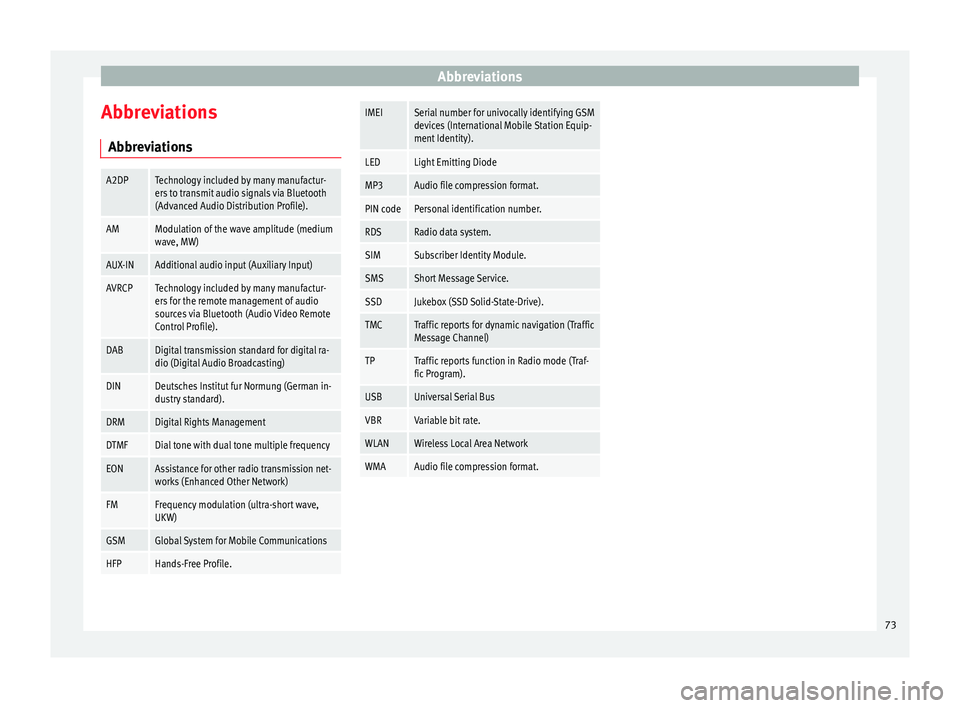
Abbreviations
Abbreviations AbbreviationsA2DPTechnology included by many manufactur-
ers to transmit audio signals via Bluetooth
(Advanced Audio Distribution Profile).
AMModulation of the wave amplitude (medium
wave, MW)
AUX-INAdditional audio input (Auxiliary Input)
AVRCPTechnology included by many manufactur-
ers for the remote management of audio
sources via Bluetooth (Audio Video Remote
Control Profile).
DABDigital transmission standard for digital ra-
dio (Digital Audio Broadcasting)
DINDeutsches Institut fur Normung (German in-
dustry standard).
DRMDigital Rights Management
DTMFDial tone with dual tone multiple frequency
EONAssistance for other radio transmission net-
works (Enhanced Other Network)
FMFrequency modulation (ultra-short wave,
UKW)
GSMGlobal System for Mobile Communications
HFPHands-Free Profile.
IMEISerial number for univocally identifying GSM
devices (International Mobile Station Equip-
ment Identity).
LEDLight Emitting Diode
MP3Audio file compression format.
PIN codePersonal identification number.
RDSRadio data system.
SIMSubscriber Identity Module.
SMSShort Message Service.
SSDJukebox (SSD Solid-State-Drive).
TMCTraffic reports for dynamic navigation (Traffic
Message Channel)
TPTraffic reports function in Radio mode (Traf-
fic Program).
USBUniversal Serial Bus
VBRVariable bit rate.
WLANWireless Local Area Network
WMAAudio file compression format. 73
Page 80 of 84

Index
POI importing . . . . . . . . . . . . . . . . . . . . . . . . . . . . . . 48
Points of interest . . . . . . . . . . . . . . . . . . . . . . . . . . 45
Points of Interest . . . . . . . . . . . . . . . . . . . . . . . . . . 42
Pop-up windows . . . . . . . . . . . . . . . . . . . . . . . . . . . . 8
Preset buttons . . . . . . . . . . . . . . . . . . . . . . . . . . . . 17
Proximity sensor . . . . . . . . . . . . . . . . . . . . . . . . . . . . 5
Q Quick reference guide . . . . . . . . . . . . . . . . . . . . . . . 3
R
RADIO . . . . . . . . . . . . . . . . . . . . . . . . . . . . . . . . . . . 14 additional DAB services . . . . . . . . . . . . . . . . . . . 16
additional DAB stations . . . . . . . . . . . . . . . . . . . 16
AM setup . . . . . . . . . . . . . . . . . . . . . . . . . . . . . . . 21
change frequency . . . . . . . . . . . . . . . . . . . . . . . . 14
DAB display . . . . . . . . . . . . . . . . . . . . . . . . . . . . . 16
DAB operation . . . . . . . . . . . . . . . . . . . . . . . . . . . 16
DAB preset list . . . . . . . . . . . . . . . . . . . . . . . . . . 16
DAB Radio Text . . . . . . . . . . . . . . . . . . . . . . . . . . 16
DAB setup . . . . . . . . . . . . . . . . . . . . . . . . . . . . . . 22
DAB station information . . . . . . . . . . . . . . . . . . . 16
DAB station tracking in FM . . . . . . . . . . . . . . . . . 16
DAB transmission standards . . . . . . . . . . . . . . . 16
EON . . . . . . . . . . . . . . . . . . . . . . . . . . . . . . . . . . . 20
FM setup . . . . . . . . . . . . . . . . . . . . . . . . . . . . . . . 21
main menu . . . . . . . . . . . . . . . . . . . . . . . . . . . . . 14
messages and symbols . . . . . . . . . . . . . . . . . . . 14
preset buttons . . . . . . . . . . . . . . . . . . . . . . . . . . 17
Radio mode . . . . . . . . . . . . . . . . . . . . . . . . . . . . . 14
Radio Text (RDS) . . . . . . . . . . . . . . . . . . . . . . . . . 15
RDS . . . . . . . . . . . . . . . . . . . . . . . . . . . . . . . . . . . 15
scan function (SCAN) . . . . . . . . . . . . . . . . . . . . . 19
select stations . . . . . . . . . . . . . . . . . . . . . . . . . . 18
set a station name . . . . . . . . . . . . . . . . . . . . . . . 19
setup . . . . . . . . . . . . . . . . . . . . . . . . . . . . . . . . . . 21 station list . . . . . . . . . . . . . . . . . . . . . . . . . . . . . . 18
station names display . . . . . . . . . . . . . . . . . . . . 15
station tracking by RDS . . . . . . . . . . . . . . . . . . . 15
store station logos . . . . . . . . . . . . . . . . . . . . . . . 17
store stations . . . . . . . . . . . . . . . . . . . . . . . . . . . 18
TP (traffic news station) . . . . . . . . . . . . . . . . . . . 20
traffic announcement (INFO) . . . . . . . . . . . . . . . 21
traffic news station . . . . . . . . . . . . . . . . . . . . . . . 20
tune stations . . . . . . . . . . . . . . . . . . . . . . . . . . . . 18
tune the frequency of the stations . . . . . . . . . . 18
Radio Text (RDS) . . . . . . . . . . . . . . . . . . . . . . . . . . . 15
Random play (Mix) . . . . . . . . . . . . . . . . . . . . . . . . . 26
RDS . . . . . . . . . . . . . . . . . . . . . . . . . . . . . . . . . . . . . 15 automatic station tracking . . . . . . . . . . . . . . . . . 15
Regional RDS . . . . . . . . . . . . . . . . . . . . . . . . . . . 15
TP (traffic news station) . . . . . . . . . . . . . . . . . . . 20
Repeat . . . . . . . . . . . . . . . . . . . . . . . . . . . . . . . . . . . 26
Repeat function (Repeat) . . . . . . . . . . . . . . . . . . . . 26
Requirements for data storage devices and files . . . . . . . . . . . . . . 23
Restore original setup . . . . . . . . . . . . . . . . . . . . . . 70
Road sign indicators . . . . . . . . . . . . . . . . . . . . . . . 49
rotary knobs . . . . . . . . . . . . . . . . . . . . . . . . . . . . . . . 5
Rotary knobs . . . . . . . . . . . . . . . . . . . . . . . . . . . . . . . 6
Route guidance Demo mode . . . . . . . . . . . . . . . . . . . . . . . . . . . . 49
dynamic . . . . . . . . . . . . . . . . . . . . . . . . . . . . . . . . 47
S Safety Instructions Infotainment system . . . . . . . . . . . . . . . . . . . . . . 3
SCAN MEDIA . . . . . . . . . . . . . . . . . . . . . . . . . . . . . . . . . 26
radio . . . . . . . . . . . . . . . . . . . . . . . . . . . . . . . . . . 19
Scan function (SCAN) RADIO . . . . . . . . . . . . . . . . . . . . . . . . . . . . . . . . . 19 Scan (SCAN)
MEDIA . . . . . . . . . . . . . . . . . . . . . . . . . . . . . . . . . 26
Screen . . . . . . . . . . . . . . . . . . . . . . . . . . . . . . . . . . . . 5
SD Card see: memory card . . . . . . . . . . . . . . . . . . . . . . . . 30
Search lists . . . . . . . . . . . . . . . . . . . . . . . . . . . . . . . . 9
Setup AM . . . . . . . . . . . . . . . . . . . . . . . . . . . . . . . . . . . . 21
Bluetooth . . . . . . . . . . . . . . . . . . . . . . . . . . . . . . 65
DAB . . . . . . . . . . . . . . . . . . . . . . . . . . . . . . . . . . . 22
default setting . . . . . . . . . . . . . . . . . . . . . . . . . . 70
factory setup . . . . . . . . . . . . . . . . . . . . . . . . . . . . 70
FM . . . . . . . . . . . . . . . . . . . . . . . . . . . . . . . . . . . . 21
images . . . . . . . . . . . . . . . . . . . . . . . . . . . . . . . . . 39
main menu . . . . . . . . . . . . . . . . . . . . . . . . . . . . . 70
Media . . . . . . . . . . . . . . . . . . . . . . . . . . . . . . . . . 36
menu and system setup . . . . . . . . . . . . . . . . . . . 70
navigation . . . . . . . . . . . . . . . . . . . . . . . . . . . . . . 49
PHONE . . . . . . . . . . . . . . . . . . . . . . . . . . . . . . . . . 65
radio . . . . . . . . . . . . . . . . . . . . . . . . . . . . . . . . . . 21
sound . . . . . . . . . . . . . . . . . . . . . . . . . . . . . . . . . 72
system . . . . . . . . . . . . . . . . . . . . . . . . . . . . . . . . . 70
user profile setup . . . . . . . . . . . . . . . . . . . . . . . . 66
video . . . . . . . . . . . . . . . . . . . . . . . . . . . . . . . . . . 36
voice control . . . . . . . . . . . . . . . . . . . . . . . . . . . . 13
volume . . . . . . . . . . . . . . . . . . . . . . . . . . . . . . . . 72
WLAN . . . . . . . . . . . . . . . . . . . . . . . . . . . . . . . . . . 71
Short messages (SMS) . . . . . . . . . . . . . . . . . . . . . . 63
Show clock . . . . . . . . . . . . . . . . . . . . . . . . . . . . . . . 70
Slider . . . . . . . . . . . . . . . . . . . . . . . . . . . . . . . . . . . . . 9
Slide (screen) . . . . . . . . . . . . . . . . . . . . . . . . . . . . . . 9
SMS . . . . . . . . . . . . . . . . . . . . . . . . . . . . . . . . . . . . . 63
Sound distribution (Balance and Fader) . . . . . . . . 72
Sound setup (bass and treble) . . . . . . . . . . . . . . . 72
Sound suppression . . . . . . . . . . . . . . . . . . . . . . . . . 7
Sound suppression (mute) . . . . . . . . . . . . . . . . . . . 7
78