cruise control Seat Leon 5D 2014 User Guide
[x] Cancel search | Manufacturer: SEAT, Model Year: 2014, Model line: Leon 5D, Model: Seat Leon 5D 2014Pages: 284, PDF Size: 5.85 MB
Page 155 of 284

Driver assistance systems
Distance margin selected, the ACC is in-
active.
Vehicle detected in front. The ACC is ac-
tive.
Adjustment of the temporary distance
from the vehicle in front with a program-
med speed.
Temporary distance adjustment from the
vehicle in front with a programmed
speed.
Warning and control lamps
››› in Control and warning lamps on
page 71 . The speed reduction by the ACC to
maintain the distance from the vehi-
cle in front is not sufficient.
Brake! apply the foot brake! Driver intervention prompt.
The ACC is not currently available.
a)
With the vehicle stationary, switch off the engine and
start it up again. Check the radar sensor visually for dirt,
ice or knocks. If it is still unavailable, refer to a special-
ised workshop to have the system inspected.
a)
The symbol on the instrument panels with colour display is in
colour.
The ACC is active.
No vehicle is detected in front. The programmed speed
remains constant.2
3
4
5
If the symbol is white: the ACC is ac-
tive.
A vehicle in front has been detected. The ACC adjusts
speed and distance from the vehicle in front.
If the symbol is grey: the ACC is not
active.
The system is switched on, but is not adjusting.
The ACC is active.
Some warning and control lamps will light up
briefly when the ignition is switched on to
check certain functions. They will switch off
after a few seconds.
WARNING
Observe the safety warnings ››› in Control
and warning lamps on page 71. Note
When the ACC is connected, the indications
on the instrument panel screen may be con-
cealed by warnings from other functions,
such as an incoming call. Radar sensor
Fig. 151
On the front bumper: radar sensor. A radar sensor is installed on the front bump-
er to determine the traffic situation
››› Fig. 151 1 . This sensor can detect vehi-
cles in front up to a distance of approximately
120 m.
The radar sensor's visibility may be impaired
by dirt, mud or snow, or by environmental in-
fluences such as rain or mist. In this case the
adaptive cruise control (ACC) does not work.
The instrument panel displays the following
message: ACC: No sensor vision! If necessary
clean the radar sensor ››› .
When the radar sensor begins to operate
properly again, the ACC will automatically be
available again. The message on the instru-
ment panel screen will switch off and the ACC
will be reactivated again. »
153
Technical specifications
Advice
Operation
Safety
The essentials
Page 156 of 284

Operation
ACC operation may be affected by a strong ra-
dar reverse reflection. This may occur, for ex-
ample, in a closed car park or due to the
presence of metallic objects (e.g. rails on the
road or sheets used in road works).
The area in front of and around the radar sen-
sor should not be covered with adhesives,
additional or similar headlights, as this may
negatively affect ACC operation.
If structural modifications are made to the ve-
hicle, for example, if the suspension is low-
ered or the front spoiler is modified, ACC op-
eration may be affected. So structural modifi-
cations should only be made by specialised
workshops. SEAT recommends visiting a SEAT
dealership for this purpose.
If work is done incorrectly on the front of the
vehicle, the radar sensor could be damaged
or lose its settings, and ACC operation may
be affected. So repair work should only be
made by specialised workshops. SEAT recom-
mends visiting a SEAT dealership for this pur-
pose. CAUTION
If you have the sensation that the radar sen-
sor is damaged or has lost its settings, dis-
connect the ACC. This will avoid possible
damage. If this occurs have it adjusted. ● The sensor may become damaged or lose
its settings when knocked, for example, dur- ing a parking manoeuvre. This may compro-
mise the system's efficacy or disconnect it.
●
Repairs to the radar sensor require special-
ist knowledge and special tools. SEAT recom-
mends visiting a SEAT dealership for this pur-
pose.
● Clean away the snow with a brush and the
ice preferably with a solvent-free de-icer
spray. Operating the Adaptive Cruise Control
ACC
Fig. 152
On the left of the steering column:
third lever for operating the Adaptive Cruise
Control. Fig. 153
On the left of the steering column:
third lever for operating the Adaptive Cruise
Control. When the Adaptive Cruise Control (ACC) is
connected, the green control lamp will
light up on the instrument panel, and the
programmed speed and ACC status will be
displayed
››› Fig. 150 .
C ondition
s for the adaptive cruise control to
be activated
● The selector lever must be at the D or S po-
sition or in the tiptronic selection track. In
manual gearbox any forward gear must be
engaged, except the 1st gear.
● In vehicles with manual gearbox, if there is
no programmed speed, drive at least at
30 km/h (18 mph).
Speed control
When the ACC is connected, speed can be
programmed and adjusted. The programmed
154
Page 158 of 284

Operation
The following conditions may lead the ACC
not to react:
● If the accelerator is pressed.
● If there is no gear engaged.
● If the ESC is controlling.
● If the driver is not wearing his/her seat
belt.
● If several brake lights of the vehicle or elec-
trically connected trailer are damaged.
● If the vehicle is reversing.
● Driving faster than 160 km/h (100 mph). WARNING
There is a danger of rear collision when the
minimum distance to the vehicle in front is
exceeded and the speed difference between
both vehicles is so great that a speed reduc-
tion by the ACC will not suffice. In this case
the brake pedal should be applied immedi-
ately.
● The ACC may not be able to detect all situa-
tions properly.
● “Stepping” on the accelerator may cause
the ACC not to intervene in braking. Driver
braking will have priority over intervention by
the speed control or adaptive cruise control.
● Always be ready to use the brakes!
● Observe country-specific provisions gov-
erning obligatory minimum distances be-
tween vehicles. Note
● The programmed speed is erased once the
ignition or the ACC are switched off.
● When the traction control system (ASR) is
deactivated during acceleration or else the
ESC is activated in Sport* Mode ( ››› page 81),
the ACC switches off automatically.
● In vehicles with the Start-Stop system, the
engine switches off automatically during the
ACC stopping phase and restarts automatical-
ly to begin driving. Vehicles with an automatic gearbox
If the vehicle is equipped with automatic
gearbox, the ACC can brake the vehicle until
it stops completely if a vehicle in front of it
stops.
The ACC will still be available for a few sec-
onds. The vehicle will restart by itself if the
vehicle in front moves (traffic jam assistant).
Disconnection criteria
The ACC will switch off if the driver applies
the brake pedal or the driver's door is
opened.
If the vehicle in front remains stationary for
more than 3 seconds, the ACC will also
switch off for safety reasons.
In this case the
driver should take control and apply the
brake. In the latter case, when the ACC is switched
off with the vehicle stationary, the vehicle
has to be braked by the pedal, since al-
though the car is idling it can move, as there
is a gear engaged.
Restarting the vehicle with the ACC manually
The ACC can be activated again by moving
the lever to position
2
››› Fig. 154 . WARNING
Your vehicle can start up even if there is an
obstacle between your vehicle and the vehi-
cle detected in front. Risk of accident! CAUTION
● If your vehicle with ACC does not start up
as expected, you can drive off by briefly step-
ping on the accelerator.
● The Start-Stop system usually acts if you
are driving with ACC. 156
Page 159 of 284

Driver assistance systems
Interrupting control Fig. 154
On the left of the steering column:
third lever for operating the Adaptive Cruise
Control. Important: the ACC is active.
Interrupting control during driving
● Move the lever to the position 3 . The
ACC
standby message is displayed to the driver.
or
● Br ak
e.
● To resume the programmed speed, turn the
lever to position 2 .
Interrupt speed control with the vehicle
stationary
Applies to vehicles with automatic gearbox:
● Move the lever to the position 3 . The
ACC
standby message is displayed to the driver. ●
To r
esume control, apply the brake and turn
the lever to position 2 .
WARNING
It is dangerous to activate control and resume
the programmed speed if the road, traffic or
weather conditions do not permit this. Risk of
accident! Setting the distance
Fig. 155
Control lever for: setting the dis-
tance. ●
To display the distance currently program-
med, briefly press the rocking button
››› Fig. 155
.
● To inc
rease/reduce the distance one level,
press the rocking button again towards the
left/right. The instrument panel display
modifies the distance between both vehicles. If the vehicle approaches another vehicle de-
tected in front of it, the ACC reduces the
speed accordingly and then controls the ad-
justed distance. If the vehicle detected in
front accelerates, the adaptive cruise control
will also accelerate up to the target speed
programmed at most.
The greater the speed, the greater the dis-
tance in metres should be
››› . We recom-
mend the setting Distance 3
. WARNING
With regard to distance setting, the driver is
responsible for observing country-specific
legislation. Message texts
ACC not available
The system can no longer continue to guar-
antee safe vehicle detection and will be de-
activated. The sensor has lost its setting or is
damaged. Take the vehicle to a specialised
workshop and have the fault repaired.
»
157
Technical specifications
Advice
Operation
Safety
The essentials
Page 160 of 284

Operation
ACC: currently not available. No sensor
v i
sion
ACC and Front Assist: currently not
available. No sensor vision
This message will be displayed to the driver if
the radar sensor's vision is impaired due, for
example, to leaves, snow, heavy fog or dirt.
Clean the sensor.
ACC: currently not available. Gradient too
st
eep
The maximum road slope has been excee-
ded, hence safe ACC operation cannot be
guaranteed. The ACC cannot be switched on.
ACC: only available in D, S or M
Select the D/S or M position on the selector
lever.
ACC: parking brake applied
The ACC is deactivated if the parking brake is
applied. The ACC is available once again after
the parking brake is released.
ACC: currently not available. Intervention
of stability control
The message for the driver is displayed when
the electronic stability control (ESC) inter-
venes. In this case, the ACC is automatically
switched off. ACC: Take action!
The message for the driver is displayed if,
when the vehicle starts up on a hill with a
mild slope, the vehicle rolls back even al-
though the ACC is activated. Apply the brake
to stop the vehicle from moving/colliding
with another vehicle.
ACC: speed limit
The mes
sage for the driver is displayed if, in
vehicles with manual gearbox, the current
speed is too low for the ACC mode.
The speed to be stored must be at least 30
km/h. The cruise control system switches off
if the speed falls below 20 km/h.
ACC: available as of the 2nd gear
The ACC is operational as of the 2nd gear
(manual gearbox).
ACC: engine speed
The message for the driver is displayed if,
when the AAC accelerates or brakes, the driv-
er does not shift up or down a gear in time,
which means exceeding or not reaching the
permissible engine speed. The AAC switches
itself off. A buzzer warning is heard.
ACC: clutch pressed
Vehicles with a manual gearbox: pressing the
clutch pedal for longer abandons control
mode.
Three white dots appear if a setting made
with the control lever cannot be performed.
For example, if when the vehicle is stationary
the ACC cannot be activated because the
driver is not wearing the seat belt.
Door open
Vehicles with automatic gearbox: the ACC
cannot be activated with the vehicle station-
ary and the door open.
Deactivating the Adaptive Cruise
Control ACC temporarily in certain
situations In the following situations the Adaptive
Cruise Control (ACC) should be deactivated
due to the system's limitations
››› :
● When changing lanes, on tight bends and
roundabouts, in acceleration and decelera-
tion lanes on motorways or in sections with
road works to prevent involuntary accelera-
tion to reach the programmed speed.
● When going through a tunnel, as operation
could be affected.
● On roads with several lanes, when other ve-
hicles are driving more slowly in the overtak-
ing lane. In this case, slower vehicles will be
overtaken on the right.
158
Page 161 of 284

Driver assistance systems
● In case of heavy rain, snow or spray, as the
vehicle in front might not be detected proper-
ly or, in certain circumstances, might not be
detected at all. WARNING
If the ACC does not switch off in the situa-
tions described, serious accidents and inju-
ries may occur.
● Always switch off the ACC in critical situa-
tions. Note
If you do not switch off the ACC in the afore-
mentioned situations, you may commit a le-
gal offence. Special driving situations
Fig. 156
(A) Vehicle on a bend. (B) Motorcy-
clist ahead out of range of the radar sensor. Fig. 157
(C) Vehicle changing lanes. (D) One
vehicle turning and another stationary. The adaptive cruise control (ACC) has certain
physical limitations inherent in the system.
For example, certain reactions of the ACC, in
certain circumstances, may be unexpected or
come late from the driver's point of view. So
pay attention in order to intervene if necessa-
ry.
For example, the following traffic situations
call for the utmost attention:
»
159Technical specifications
Advice
Operation
Safety
The essentials
Page 163 of 284

Driver assistance systems
Factors that may affect how the radar sensor
operates
If laser sensor operation is impaired, due to
heavy rain, spray, snow or mud, the ACC is
deactivated temporarily. The relevant text
message will appear in the dash panel dis-
play. If necessary, clean the radar sensor.
When the radar sensor begins to operate
properly again, the ACC will automatically be
available again. The message on the instru-
ment panel screen will switch off and the ACC
will be reactivated again.
ACC operation may be affected by a strong ra-
dar reverse reflection, for example in a closed
car park.
Trailer towing
When driving with trailer the ACC controls
less dynamically.
Overheated brakes
If the brakes overheat, for example after
abrupt braking or in long and steep slopes,
the ACC may be deactivated temporarily. The
relevant text message will appear in the dash
panel display. In this case, adaptive cruise
control cannot be activated.
Adaptive cruise control can be reactivated
once brake temperature has cooled suffi-
ciently. The message will disappear from the
instrument panel display. If the message ACC
not available remains on for quite a long time it means that there is a fault. Contact a speci-
alised workshop. SEAT recommends visiting
a SEAT dealership.
WARNING
If the message ACC ready to start appears on
the instrument panel display and the vehicle
in front starts up, the vehicle will start up au-
tomatically. In this case the radar sensor may
not detect obstacles on the road. This could
cause an accident and serious injuries.
● Before driving off, check that the road is
clear. If necessary, apply the brake. Monitoring system Front
Assist*
Introduction The Front Assist Monitoring system helps to
prevent rear collisions.
The Front Assist can warn the driver of colli-
sion hazards, prepare the vehicle for emer-
gency braking in case of danger, assist the
driver on braking and cause automatic brak-
ing.
The Front Assist is not a replacement for
driver awareness.Distance warning
If the system detects that safety is endan-
gered by the proximity of the vehicle in front,
it may warn the driver by means of a message
on the instrument panel when driving at a
speed of between approximately 60 km/h
(37 mph) and 210 km/h (130 mph)
››› Fig. 158 .
The w arnin
g moment varies depending on
the traffic situation and driver behaviour.
Pre-warning
If the system detects a possible collision with
the vehicle in front, it may warn the driver by
means of an audible warning and an indica-
tion on the instrument panel when driving at
a speed of between approximately 30 km/h
(18 mph) and 210 km/h (130 mph)
››› Fig. 158.
The warnin
g moment varies depending on
the traffic situation and driver behaviour. At
the same time, the vehicle will prepare for a
possible emergency braking ››› .
Critical warning
If the driver fails to react to the pre-warning,
the system may actively intervene in the
brakes when driving at a speed of between
approximately 30 km/h (18 mph) and
210 km/h (130 mph), generating a brief jolt
to warn of the imminent collision. »
161
Technical specifications
Advice
Operation
Safety
The essentials
Page 172 of 284
Operation
Ambient lighting
The ambient lighting guides located in the in-
terior front door panels of the Leon FR and
the Leon Cupra change colour from white to
red depending on the driving mode selected.
Adaptive Cruise Control (ACC) 1)
According to the active driving profile, the ac-
celeration gradient of the adaptive cruise
control varies.
Electronic self-locking differential 1)
The self-locking differential adapts its behav-
iour depending on the driving profile chosen.
Normal mode or Cupra mode can be selected
to prioritise improved traction in sport driv-
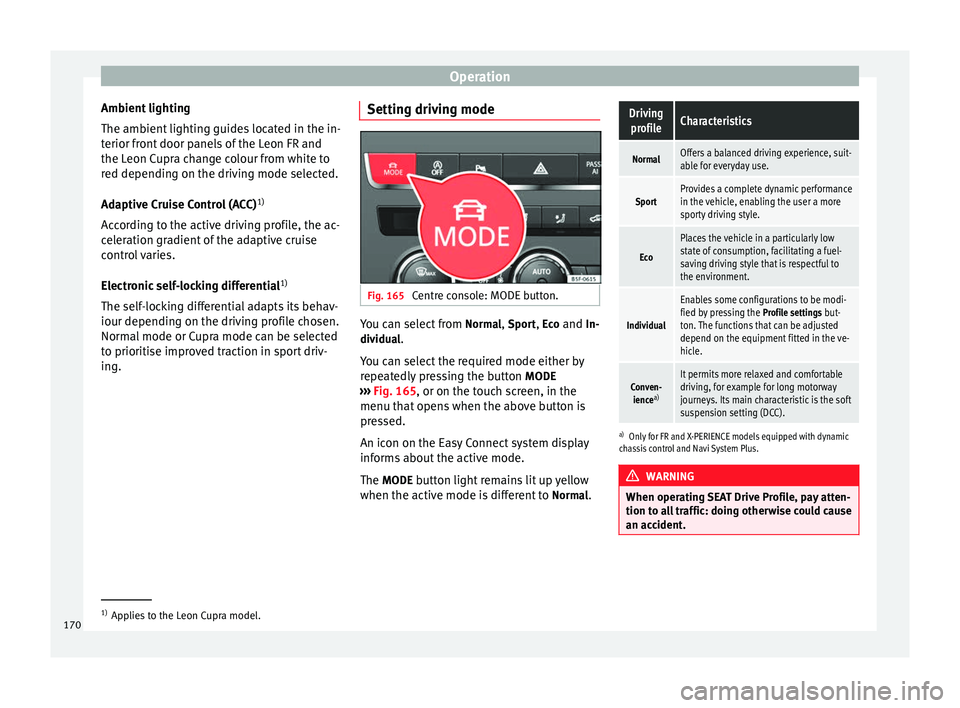
ing. Setting driving mode Fig. 165
Centre console: MODE button. You can select from
Normal
, Sport
, Eco
and In-
dividual .
You can select the required mode either by
repeatedly pressing the button MODE
››› Fig. 165 , or on the touch screen, in the
menu th at
opens when the above button is
pressed.
An icon on the Easy Connect system display
informs about the active mode.
The MODE
button light remains lit up yellow
when the active mode is different to Normal
.
Driving
profileCharacteristics
NormalOffers a balanced driving experience, suit-
able for everyday use.
SportProvides a complete dynamic performance
in the vehicle, enabling the user a more
sporty driving style.
Eco
Places the vehicle in a particularly low
state of consumption, facilitating a fuel-
saving driving style that is respectful to
the environment.
Individual
Enables some configurations to be modi-
fied by pressing the Profile settings but-
ton. The functions that can be adjusted
depend on the equipment fitted in the ve-
hicle.
Conven- ience a)It permits more relaxed and comfortable
driving, for example for long motorway
journeys. Its main characteristic is the soft
suspension setting (DCC).
a)
Only for FR and X-PERIENCE models equipped with dynamic
chassis control and Navi System Plus. WARNING
When operating SEAT Drive Profile, pay atten-
tion to all traffic: doing otherwise could cause
an accident. 1)
Applies to the Leon Cupra model.
170
Page 184 of 284
Advice
Advice
Care and maintenance
Accessories and modifications to the vehicle
Accessories, replacement parts and
repairs Always ask your dealer or specialist retailer
for advice before purchasing accessories and
replacement parts.
Your vehicle is designed to offer a high
standard of active and passive safety. For this
reason, we recommend that you ask a SEAT
Official Service for advice before fitting ac-
cessories or replacement parts. Your SEAT Of-
ficial Service has the latest information from
the manufacturer and can recommend acces-
sories and replacement parts which are suita-
ble for your requirements. They can also an-
swer any questions you might have regarding
official regulations.
We recommend you to use only
SEAT acces-
sories and
Genuine SEAT parts ®
. SEAT has
tested these parts and accessories for suita-
bility, reliability and safety. SEAT Official
Services have the necessary experience and
facilities to ensure that the parts are installed
correctly and professionally. Any
retro-fitted equipment which has a direct
effect on the vehicle and/or the way it is driv-
en, such as a cruise control system or elec-
tronically-controlled suspension, must be
approved for use in your vehicle and bear the
e mark (the European Union's authorisation
symbol).
If
any additional electrical devices are fitted
which do not serve to control the vehicle it-
self (for instance a refrigerator box, laptop or
ventilator fan, etc.), they must bear the
sign (manufacturer conformity declaration in
the European Union). WARNING
Accessories, for example telephone holders
or cup holders, should never be fitted on the
covers, or within the working range of the air-
bags. Otherwise, there is a danger of injury if
the airbag is triggered in an accident. Technical modifications
Modifications must always be carried out ac-
cording to our specifications.
Unauthorised modifications to the electronic
components, software, wiring or data transfer
in the vehicle may cause malfunctioning. Due
to the way the electronic components are
linked together in networks, other indirect
systems may be affected by the faults. This
can seriously impair safety, lead to excessivewear of components, and also invalidate your
vehicle registration documents.
You will appreciate that your SEAT dealership
cannot be held liable for any damage caused
by modifications and/or work performed in-
correctly.
We therefore recommend that all work should
be performed by a SEAT Official Service using
genuine SEAT parts
®
. WARNING
Incorrectly performed modifications or other
work on your vehicle can lead to malfunctions
and cause accidents. Two-way radios and office equipment
Radio transmitters (fixed installation)
Any retrofit installations of radio transmitters
in the vehicle require prior approval. SEAT
generally authorises in-vehicle installations
of approved types of radio transmitters provi-
ded that:
●
The aerial is installed correctly.
● The aerial is installed on the exterior of the
vehicle (and shielded cables are used togeth-
er with non-reflective aerial trimming).
● The effective transmitting power does not
exceed 10 Watts at the aerial base.
182
Page 271 of 284

Index
Index
A
ABS see Anti-lock brake system . . . . . . . . . . . . . . . 143
A C
C . . . . . . . . . . . . . . . . . . . . . . . . . . . . . . . . . . . . 151
radar sensor . . . . . . . . . . . . . . . . . . . . . . . . . . . 153
Accessories . . . . . . . . . . . . . . . . . . . . . . . . . . . . . . 113
Acoustic parking aid . . . . . . . . . . . . . . . . . . . . . . 173
Adaptive cruise control control lamp . . . . . . . . . . . . . . . . . . . . . . . . . . . 152
malfunction . . . . . . . . . . . . . . . . . . . . . . . . . . . . 152
messages on the display . . . . . . . . . . . . . . . . . 152
radar sensor . . . . . . . . . . . . . . . . . . . . . . . . . . . 153
special driving situations . . . . . . . . . . . . . . . . . 159
warning lamp . . . . . . . . . . . . . . . . . . . . . . . . . . 152
Adaptive Cruise Control . . . . . . . . . . . . . . . . . . . . 151 deactivating temporarily . . . . . . . . . . . . . . . . . 158
operating . . . . . . . . . . . . . . . . . . . . . . . . . . . . . . 154
Additional electrical appliances (efficiency pro- gramme) . . . . . . . . . . . . . . . . . . . . . . . . . . . . . . . 77
Adjusting front head restraints . . . . . . . . . . . . . . . . . . . . . 107
front seats . . . . . . . . . . . . . . . . . . . . . . . . . . . . . 106
rear head restraints . . . . . . . . . . . . . . . . . . . . . 107
Adjusting the head restraints Front head restraints . . . . . . . . . . . . . . . . . . . . 107
Airbag . . . . . . . . . . . . . . . . . . . . . . . . . . . . . . . . . . . 48
Airbag covers . . . . . . . . . . . . . . . . . . . . . . . . . . . . . 50
Airbags description . . . . . . . . . . . . . . . . . . . . . . . . . . . . . 49
Airbag system . . . . . . . . . . . . . . . . . . . . . . . . . . . . . 48 activation . . . . . . . . . . . . . . . . . . . . . . . . . . . . . . 49
Differences between front passenger front air-bag systems . . . . . . . . . . . . . . . . . . . . . . . . . . 51
disabling the front airbag . . . . . . . . . . . . . . . . . 54 front airbags . . . . . . . . . . . . . . . . . . . . . . . . . . . . 50
functioning . . . . . . . . . . . . . . . . . . . . . . . . . . . . . 49
head-protection airbags . . . . . . . . . . . . . . . . . . 53
Knee airbag . . . . . . . . . . . . . . . . . . . . . . . . . . . . . 52
side airbags . . . . . . . . . . . . . . . . . . . . . . . . . . . . 52
Air conditioning . . . . . . . . . . . . . . . . . . . . . . . . 26, 28
Air pressure (tyres) . . . . . . . . . . . . . . . . . . . . . . . . 208
Alarm system . . . . . . . . . . . . . . . . . . . . . . . . . . . . . 87
Alcantara: cleaning . . . . . . . . . . . . . . . . . . . . . . . 189
All-wheel drive Snow chains . . . . . . . . . . . . . . . . . . . . . . . . . . . 191
Winter tyres . . . . . . . . . . . . . . . . . . . . . . . . . . . . 191
Ambient lighting . . . . . . . . . . . . . . . . . . . . . . . . . 101
Anti-dazzle interior mirror . . . . . . . . . . . . . . . . . . 104
Anti-dazzle rear vision mirror . . . . . . . . . . . . . . . . 104
Anti-lock brake system . . . . . . . . . . . . . . . . . . . . . 143
Anti-puncture . . . . . . . . . . . . . . . . . . . . . . . . . . . . . 33
Anti-puncture kit . . . . . . . . . . . . . . . . . . . . . . . . . . . 33
Anti-theft alarm . . . . . . . . . . . . . . . . . . . . . . . . 82, 87 see also Anti-theft alarm system . . . . . . . . . . . . 82
Anti-theft
alarm system
Interior monitoring . . . . . . . . . . . . . . . . . . . . . . . 89
Tow-away protection . . . . . . . . . . . . . . . . . . . . . . 89
Anti-theft security system . . . . . . . . . . . 82, 85, 227
Anti-theft wheel bolts . . . . . . . . . . . . . . . . . . . . . 218
Anti-trap function Sliding panoramic sunroof . . . . . . . . . . . . . . . . 93
sun blind . . . . . . . . . . . . . . . . . . . . . . . . . . . . . . . 93
Anti-trap function sliding Anti-trap function . . . . . . . . . . . . . . . . . . . . . . . . 93
Antifreeze . . . . . . . . . . . . . . . . . . . . . . . . . . . . . . . 203
Aspects to take into account before starting the vehicle . . . . . . . . . . . . . . . . . . . . . . . . . . . . . . . . . 37
ASR see Traction control system . . . . . . . . . . . . . . . 143
As s
istance systems . . . . . . . . . . . . . . . . . . . . . . . 150
ACC . . . . . . . . . . . . . . . . . . . . . . . . . . . . . . . . . . 151
adaptive cruise control . . . . . . . . . . . . . . . . . . . 151 Cruise control . . . . . . . . . . . . . . . . . . . . . . . . . . 150
Parking aid . . . . . . . . . . . . . . . . . . . . . . . . . . . . 174
Assisted starting . . . . . . . . . . . . . . . . . . . . . . . . . 223
Assist systems Tyre monitoring indicator . . . . . . . . . . . . . . . . . 213
Audible warnings Lights . . . . . . . . . . . . . . . . . . . . . . . . . . . . . . . . . 94
Audible warning signal . . . . . . . . . . . . . . . . . . . . . 43
Auto Lock (central locking) . . . . . . . . . . . . . . . . . . 82
Automatic car washes see Washing . . . . . . . . . . . . . . . . . . . . . . . . . . . 183
Aut om
atic dipped beam control . . . . . . . . . . . . . . 96
Automatic gearbox . . . . . . . . . . . . . . . . . . . . . . . . 132 Backup programme . . . . . . . . . . . . . . . . . . . . . 139
Downhill speed control . . . . . . . . . . . . . . . . . . 138
Driving tips . . . . . . . . . . . . . . . . . . . . . . . . . . . . 136
Kick-down feature . . . . . . . . . . . . . . . . . . . . . . . 137
Launch Control Programme . . . . . . . . . . . . . . . 137
Manual release of selector lever . . . . . . . . . . . 229
Safety interlock for ignition key . . . . . . . . . . . . 129
Selector lever lock . . . . . . . . . . . . . . . . . . . . . . 134
Selector lever positions . . . . . . . . . . . . . . . . . . 133
Steering wheel with gearshift paddles . . . . . . 135
tiptronic . . . . . . . . . . . . . . . . . . . . . . . . . . 132, 135
Automatic gear change . . . . . . . . . . . . . . . . . . . . . 25
B Balanced (wheels) . . . . . . . . . . . . . . . . . . . . . . . . 208
Ball coupling . . . . . . . . . . . . . . . . . . . . . . . . . . . . . 179
Battery . . . . . . . . . . . . . . . . . . . . . . . . . . . 33, 86, 205 Assisted starting . . . . . . . . . . . . . . . . . . . . . . . . 223
Charge Level . . . . . . . . . . . . . . . . . . . . . . . . . . . 191
Charging . . . . . . . . . . . . . . . . . . . . . . . . . . . . . . 206
Disconnecting/Connecting . . . . . . . . . . . . . . . 205
Power Management . . . . . . . . . . . . . . . . . . . . . 191
Replacement . . . . . . . . . . . . . . . . . . . . . . . . . . . 207
Winter conditions . . . . . . . . . . . . . . . . . . . . . . . 205
269