warning lights Seat Leon 5D 2014 User Guide
[x] Cancel search | Manufacturer: SEAT, Model Year: 2014, Model line: Leon 5D, Model: Seat Leon 5D 2014Pages: 284, PDF Size: 5.85 MB
Page 51 of 284

Airbag system
travel on the rear seat. Never transport
children in the vehicle if they are not restrain-
ed or the restraint system is not appropriate
for their age, size or weight.
●
If you are not wearing a seat belt, or if you
lean forward or to the side while travelling or
assume an incorrect sitting position, there is
a substantially increased risk of injury. This
increased risk of injury will be further in-
creased if you are struck by an inflating air-
bag.
● To reduce the risk of injury from an inflating
airbag, always wear the seat belt properly
››› page 43.
● Alw
ays adjust the front seats properly. Description of airbag system
The airbag system is not a substitute for the
seat belts. The airbag system offers addition-
al protection for the driver and passenger in
combination with the seat belts.
The airbag system comprises the following
modules (as per vehicle equipment):
●
Electronic control unit
● Front airbags for driver and passenger
● Knee airbag for the driver
● Side airbags
● Head airbag ●
Airbag control lamp on the instrument
panel
● Key-operated switch for front passenger air-
bag
● Control lamp to disconnect/connect the
front airbag.
The airbag system operation is monitored
electronically. The airbag control lamp will il-
luminate for a few seconds every time the ig-
nition is switched on (self-diagnosis).
There is a fault in the system if the control
lamp :
● does not light up when the ignition is
switched on,
● turns off after 4 seconds after the ignition
is switched on
● turns off and then lights up again after the
ignition is switched on
● illuminates or flashes while the vehicle is
moving.
The airbag system is not triggered if:
● the ignition is switched off
● there is a minor frontal collision
● there is a minor side collision
● there is a rear-end collision
● the vehicle turns over. WARNING
● The seat belts and airbags can only provide
maximum protection if the occupants are
seated correctly ››› page 38, Sitting position
for vehicle occupants .
● If a fault has occurred in the airbag system,
have the system checked immediately by a
specialised workshop. Otherwise there is a
danger that during a collision, the system
may fail to trigger, or not trigger correctly. Airbag activation
The airbags deploy extremely rapidly, within
thousandths of a second, to provide addi-
tional protection in the event of an accident.
A fine dust may develop when the airbag de-
ploys. This is normal and it is not an indica-
tion of fire in the vehicle.
The airbag system is only ready to function
when the ignition is on.
In special accidents instances, several air-
bags may activate at the same time.
In the event of minor head-on and side colli-
sions, rear-end collisions, overturning or roll-
over of the vehicle, airbags
do not activate.
Activation factors
The conditions that lead to the airbag system
activating in each situation cannot be gener-
alised. Some factors play an important role, »
49
Technical specifications
Advice
Operation
Safety
The essentials
Page 52 of 284

Safety
such as the properties of the object the vehi-
cle hits (hard/soft), angle of impact, vehicle
speed, etc.
Deceleration trajectory is key for airbag acti-
vation.
The control unit analyses the collision trajec-
tory and activates the respective restraint
system.
If the deceleration rate is below the prede-
fined reference value in the control unit the
airbags will not be triggered, even though
the accident may cause extensive damage to
the car.
The following airbags are triggered in
serious head-on collisions
● Driver airbag.
● Front passenger front airbag
● Knee airbag for the driver.
The following airbags are triggered in
serious side-on collisions
● Front side airbag on the side of the acci-
dent.
● Rear side airbag on the side of the acci-
dent.
● Curtain (head) airbag on the side of the ac-
cident. In an accident with airbag activation:
●
the interior lights switch on (if the interior
light switch is in the courtesy light position);
● the hazard warning lights switch on;
● all doors are unlocked;
● the fuel supply to the engine is cut. Airbag overview
Front airbags Fig. 66
Driver airbag located in steering
wheel. 50
Page 56 of 284

Safety
See your technical service to make this ad-
justment.
●
There must be no other persons, animals or
objects between the occupants of the outer
seats and the deployment space of the head-
protection airbags so that the head-protec-
tion airbag can deploy completely without re-
striction and provide the greatest possible
protection. Therefore, sun blinds which have
not been expressly approved for use in your
vehicle may not be attached to the side win-
dows
● The built-in coat hooks should be used only
for lightweight clothing. Do not leave any
heavy or sharp-edged objects in the pockets.
Please, do not hang the clothes on coat hang-
ers.
● The airbags provide protection for just one
accident; replace them once they have de-
ployed.
● Any work on the head-protection airbag
system or removal and installation of the air-
bag components for other repairs (such as re-
moval of the roof lining) should only be per-
formed by a specialised workshop. Other-
wise, faults may occur during the airbag sys-
tem operation.
● Do not attempt to modify components of
the airbag system in any way.
● The side and head airbags are managed
through sensors located in the interior of the
front doors. To ensure the correct operation of
the side and curtain airbags neither the
doors nor the door panels should be modified
in any way (e.g. fitting loudspeakers). If the front door is damaged, the airbag system
may not work correctly. All work carried out
on the front door must be done in a special-
ised workshop.
Deactivating airbags
Disabling the front airbag Fig. 73
Control lamp for disabling the front
passenger front airbag on the dash panel It lights up on the combi-in-
strument
Fault in airbag
system and seat belt tensioners.Have the system checked immedi-
ately by a specialised workshop.
It lights up on the dash panel
Fault in the air-
bag system.Have the system checked immedi-
ately by a specialised workshop.
Front passenger
front airbag dis-
abled.Check whether the airbag should re-
main disabled.
It lights up on the dash panel
Front passenger
front airbag ena-
bled.The control lamp switches off about
60 seconds after the ignition is
turned on or after enabling of the
front passenger front airbag with the
key lock switch. Several warning and control lamps light up
for a few seconds when the ignition is switch-
ed on, signalling that the function is being
verified. They will switch off after a few sec-
onds.
If the front passenger airbag is deactivated,
the lamp
does not re-
m ain lit
, or if it is lit together with the control
lamp on the dash panel, there may be a
fault in the airbag system ››› .
The disabling of airbags is only carried out in
certain cases, i.e. if:
● a child seat is required in the front passen-
ger seat with the child facing in the opposite
direction to the direction of travel (in some
54
Page 57 of 284

Airbag system
countries, due to divergent legal require-
ments, facing in the direction of travel)
››› page 58 ;
● de s
pite the driver seat being in the correct
position, a minimum distance of 25 cm can-
not be maintained between the centre of the
steering wheel and the driver's torso,
● installation of special devices is required in
the steering wheel area due to a physical dis-
ability,
● if you have special seats installed (e.g. an
orthopaedic seat without side airbags).
The front passenger front airbag can be disa-
bled using the switch ››› page 55.
We recommend that you contact an author-
ised SEAT dealer for the disabling of other air-
bags.
Airbag system control
The airbag system availability is controlled
electronically, regardless of whether an air-
bag is disabled.
If an airbag was disabled using a diagnostics
system:
● the airbag system warning lamp illumi-
nates after switching on the ignition for
about 4 seconds, and then flashes for about
12 seconds. If the airbag has been disabled with the air-
bag switch on the side of the dash panel:
●
the airbag control lamp will illuminate
for about
4 seconds after the ignition is
switched on,
● The airbag is disabled, signalled with the
warning lamp
which lights up with the
word placed in the cen-
tre part of the dash panel ››› Fig. 74. WARNING
In the event of a fault in the airbag system,
the airbag may not trigger correctly, may fail
to trigger or may even trigger unexpectedly,
leading to severe or fatal injuries.
● Have the airbag system checked immedi-
ately by a specialised workshop.
● Never mount a child seat in the front pas-
senger seat or remove the mounted child
seat! The front passenger front airbag may
deploy during an accident in spite of the
fault. CAUTION
Always pay attention to any lit control lamps
and to the corresponding descriptions and in-
structions to avoid damage to the vehicle. Note
● Follow the current legislation in your coun-
try regarding the disabling of airbags. ●
At your authorised SEAT dealer you can find
information on which vehicle airbags can be
disabled. Front passenger front airbag switch
Fig. 74
Front passenger front airbag switch. Fig. 75
Warning lamp for disabling the front
passenger airbag. » 55
Technical specifications
Advice
Operation
Safety
The essentials
Page 67 of 284
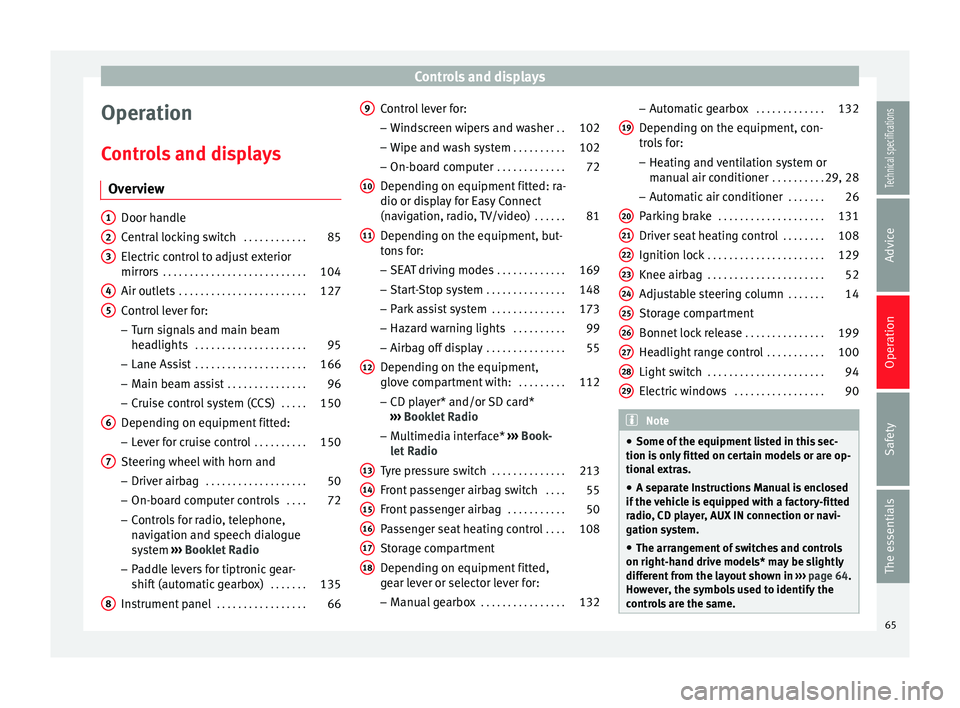
Controls and displays
Operation
Controls and displays Overview Door handle
Central locking switch
. . . . . . . . . . . .85
Electric control to adjust exterior
mirrors . . . . . . . . . . . . . . . . . . . . . . . . . . . 104
Air outlets . . . . . . . . . . . . . . . . . . . . . . . . 127
Control lever for:
– Turn signals and main beam
headlights . . . . . . . . . . . . . . . . . . . . . 95
– Lane Assist . . . . . . . . . . . . . . . . . . . . . 166
– Main beam assist . . . . . . . . . . . . . . . 96
– Cruise control system (CCS) . . . . .150
Depending on equipment fitted:
– Lever for cruise control . . . . . . . . . .150
Steering wheel with horn and – Driver airbag . . . . . . . . . . . . . . . . . . . 50
– On-board computer controls . . . .72
– Controls for radio, telephone,
navigation and speech dialogue
system ›››
Booklet Radio
– Paddle levers for tiptronic gear-
shift (automatic gearbox) . . . . . . .135
Instrument panel . . . . . . . . . . . . . . . . . 66
1 2
3
4
5
6
7
8 Control lever for:
– Windscreen wipers and washer . .102
– Wipe and wash system . . . . . . . . . .102
– On-board computer . . . . . . . . . . . . .72
Depending on equipment fitted: ra-
dio or display for Easy Connect
(navigation, radio, TV/video) . . . . . .81
Depending on the equipment, but-
tons for:
– SEAT driving modes . . . . . . . . . . . . .169
– Start-Stop system . . . . . . . . . . . . . . . 148
– Park assist system . . . . . . . . . . . . . .173
– Hazard warning lights . . . . . . . . . .99
– Airbag off display . . . . . . . . . . . . . . . 55
Depending on the equipment,
glove compartment with: . . . . . . . . .112
– CD player* and/or SD card*
››› Booklet Radio
– Multimedia interface* ››› Book-
let Radio
Tyre pressure switch . . . . . . . . . . . . . .213
Front passenger airbag switch . . . .55
Front passenger airbag . . . . . . . . . . .50
Passenger seat heating control . . . .108
Storage compartment
Depending on equipment fitted,
gear lever or selector lever for:
– Manual gearbox . . . . . . . . . . . . . . . . 132
9
10
11
12
13
14
15
16
17
18 –
Automatic gearbox . . . . . . . . . . . . .132
Depending on the equipment, con-
trols for: – Heating and ventilation system or
manual air conditioner . . . . . . . . . .29, 28
– Automatic air conditioner . . . . . . .26
Parking brake . . . . . . . . . . . . . . . . . . . . 131
Driver seat heating control . . . . . . . .108
Ignition lock . . . . . . . . . . . . . . . . . . . . . . 129
Knee airbag . . . . . . . . . . . . . . . . . . . . . . 52
Adjustable steering column . . . . . . .14
Storage compartment
Bonnet lock release . . . . . . . . . . . . . . .199
Headlight range control . . . . . . . . . . .100
Light switch . . . . . . . . . . . . . . . . . . . . . . 94
Electric windows . . . . . . . . . . . . . . . . . 90 Note
● Some of the equipment listed in this sec-
tion is only fitted on certain models or are op-
tional extras.
● A separate Instructions Manual is enclosed
if the vehicle is equipped with a factory-fitted
radio, CD player, AUX IN connection or navi-
gation system.
● The arrangement of switches and controls
on right-hand drive models* may be slightly
different from the layout shown in ››› page 64.
However, the symbols used to identify the
controls are the same. 19
20
21
22
23
24
25
26
27
28
29
65Technical specifications
Advice
Operation
Safety
The essentials
Page 72 of 284

Operation
Engine cold
If only the diodes in the lower part of the
scale light up, this indicates that the engine
has not yet reached operating temperature.
Avoid high revs and heavy acceleration and
do not make the engine work hard.
Normal temperature
If in normal operations, the diodes light up
until the central zone, it means that the en-
gine has reached operating temperature. At
high outside temperatures and when making
the engine work hard, the diodes may contin-
ue lighting up and reach the upper zone. This
is no cause for concern, provided the control
lamp does not light up on the instrument
panel digital display.
Heat range
When the diodes light up in the upper area of
the display and the control lamp appears
on the instrument panel display, the coolant
temperature is excessive ››› page 203. CAUTION
● To ensure a long useful life for the engine,
avoid high revs, driving at high speed and
making the engine work hard for approxi-
mately the first 15 minutes when the engine
is cold. The phase until the engine is warm al-
so depends on the outside temperature. If
necessary, use the engine oil temperature*
››› page 77 as a guide. ●
Additional lights and other accessories in
front of the air inlet reduce the cooling effect
of the coolant. At high outside temperatures
and high engine loads, there is a risk of the
engine overheating.
● The front spoiler also ensures proper distri-
bution of the cooling air when the vehicle is
moving. If the spoiler is damaged this can re-
duce the cooling effect, which could cause
the engine to overheat. Seek specialist assis-
tance. Fuel level - Gas
Fig. 85
Fuel gauge. Displays
2 and
6
››› Fig. 82 only work when
the ignition i s
switched on. When the display
reaches the reserve mark, the lower diode
lights up in red and the control lamp ap-
pears ››› page 66. When the fuel level is very
low
, the lower diode flashes in red. The yellow control lamp
lights up when the
reserve level has been reached.
The green warning lamp
lights up when the
vehicle is running in natural gas operating
mode.
The green warning lamp
switches off when
the natural gas is exhausted. The engine
changes to operate with petrol.
Problem:
If the vehicle is left parked for a
long time immediately after refuelling, the
natural gas level indicator may not accurately
indicate the same level shown after refuelling
when the vehicle is started up again. This is
not due to a leak in the system, but to a drop
in pressure in the gas tank for technical rea-
sons after a cooling phase just after refuel-
ling.
Fuel level - Petrol/Diesel Fig. 86
Fuel gauge.70
Page 73 of 284

Instruments and warning/control lamps
The display 6
››› Fig. 82 only works when
the ignition i s
switched on. When the display
reaches the reserve mark, the lower diode
lights up in red and the control lamp
ap-
pears ››› page 66. When the fuel level is very
low
, the lower diode flashes in red.
The distance to empty fuel level is displayed
on the instrument panel 3
››› Fig. 82 .
The c ap
acity of the fuel tank of your vehicle is
given in the Technical data section
››› page 268. CAUTION
Never run the fuel tank completely dry. An ir-
regular fuel supply could cause misfiring. In
this way the unburned fuel can reach the ex-
haust system, which could cause the catalytic
converter to overheat resulting in damage. Control lamps
Control and warning lamps Read the additional information carefully
››› page 22
.
The c ontr
ol and warning lamps are indicators
of warnings, ››› , faults
››› or certain func-
tions. Some control and warning lamps come
on when the ignition is switched on, and
switch off when the engine starts running, or
while driving. Depending on the model, additional text
messages may be viewed on the instrument
panel display. These may be purely informa-
tive or they may be advising of the need for
action
››› page 66, Instruments .
D ependin
g upon the equipment fitted in the
vehicle, instead of a warning lamp, some-
times a symbol may be displayed on the in-
strument panel.
When certain control and warning lamps are
lit, an audible warning is also heard. WARNING
If the warning lamps and messages are ignor-
ed, the vehicle may stall in traffic, or may
cause accidents and severe injuries.
● Never ignore the warning lamps or text
messages.
● Stop the vehicle safely as soon as possible.
● Park the vehicle away from traffic and en-
sure that there are no highly flammable ma-
terials under the vehicle that could come into
contact with the exhaust system (e.g. dry
grass, fuel).
● A faulty vehicle represents a risk of acci-
dent for the driver and for other road users. If
necessary, switch on the hazard warning
lamps and put out the warning triangle to ad-
vise other drivers.
● Before opening the bonnet, switch off the
engine and allow it to cool. ●
In any vehicle, the engine compartment is a
hazardous area and could cause severe inju-
ries ››› page 198. CAUTION
Failure to heed the control lamps and text
messages when they appear may result in
faults in the vehicle. Engine management*
This warning lamp monitors the engine man-
agement system for petrol engines.
The warning lamp (Electronic Power Con-
trol) lights up when the ignition is switched
on while system operation is being verified. It
should go out once the engine is started.
If there is a fault in the electronic engine
management system while you are driving,
this warning lamp will light up. Stop the vehi-
cle and seek technical assistance.
Glow plug system/Engine fault* The warning lamp lights up to show that the
glow plugs are preheating the diesel engine.
The control lamp
lights up
If the control lamp lights up when the en-
gine is started it means that the glow plugs »
71Technical specifications
Advice
Operation
Safety
The essentials
Page 83 of 284

Introduction to the Easy Connect system*
service intervals permitted in the
››› Book-
let Maintenance Programme. Introduction to the Easy
Connect system*
System Settings (CAR)* Introduction To select the settings menus, press the Easy
Connect
button and the
Setup function
button.
The actual number of menus available and
the name of the various options in these me-
nus will depend on the vehicle’s electronics
and equipment. WARNING
Any distraction may lead to an accident, with
the risk of injury. Operating the Easy Connect
system while driving could distract you from
traffic. CAR menu Setup
Read the additional information carefully
››› page 17
Pressing the menu button will always take
you to the last menu used.
When the function button check box is activa-
ted , the function is active. Pressing the menu button
will always take
you to the last menu used.
Any changes made using the settings menus
are automatically saved on closing those me-
nus.Function buttons in the ve-
hicle’s settings menuPage
ESC system››› page 143
Tyres››› page 212
Driver assistance››› table on page 18
Parking and manoeuvring››› page 173
Vehicle lights››› table on page 18
Rear vision mirrors and wind-
screen wipers››› table on page 18
Opening and closing››› table on page 18
Multifunction display››› page 19
Date and time››› table on page 18
Units››› table on page 18
Service››› page 67
Factory settings››› table on page 18 81
Technical specifications
Advice
Operation
Safety
The essentials
Page 87 of 284

Opening and closing
Programming the central locking
system You can use Easy Connect* to select which
doors are unlocked with the central locking
system. Using the radio or the Easy Connect*
system, you can select whether the vehicle
automatically closes with the “Auto Lock”
programme at speeds of more than 15 km/h
(10 mph).
Programming the unlocking of the doors
(vehicles with Easy Connect)
– Select: control button Systems or Vehicle
systems > Vehicle settings > Central locking >
Unlocking doors.
Programming the Auto Lock (vehicles with
radio)
– Select: SETUP button > control button
Central locking > Locking while driving
.
Programming the Auto Lock (vehicles with
Easy Connect)
– Select: control button Systems
or Vehicle
systems > Vehicle settings
> Locking while
driving .
Unlocking doors You can choose to unlock all
the doors or only the driver door
when you
unlock the vehicle. In all
the options, the fuel
tank flap is also unlocked. With the Driver setting, when you press the
button on the remote control key only the
door on the driver's side is unlocked. If that
button is pressed twice, the rest of the doors
and the rear lid will be unlocked.
In vehicles with a conventional key, turn the
key in the door lock, in the direction of open-
ing, twice within 2 seconds.
If the button is pressed, all the vehicle
doors are locked. At the same time, a confir-
mation signal* is heard.
Auto Lock/Locking while driving. If you select
on, all the vehicle doors are locked at speeds above 15 km/h (10 mph).
Central locking switch Read the additional information carefully
››› page 9
Please note the following when using the
central locking switch to lock your vehicle:
● It is not possible to open the doors or the
rear lid from the outside
(for safety reasons,
e.
g. when stopped at traffic lights).
● The LED in the central locking switch lights
up when all the doors are closed and locked.
● You can open the doors individually from
the inside by pulling the inside door handle. ●
In the event of an accident in which the air-
bags inflate, doors locked from the inside will
be automatically unlocked to facilitate access
and assistance. WARNING
● The central locking switch also operates
when the ignition is switched off and auto-
matically locks all the vehicle doors when the
button is pressed.
● The central locking switch does not operate
if the vehicle is locked from the outside and
the anti-theft security system is switched on.
● Locked doors could delay assistance in an
emergency, potentially putting lives at risk.
Do not leave anyone, especially children, in
the vehicle. Note
The doors and the tailgate are locked auto-
matically when the vehicle reaches a speed of
about 15 km/h (Auto Lock) ››› page 82. You
can unlock the vehicle again using button on the central locking switch.
Anti-theft security system (Safelock)*
The following message is displayed on the in-
strument panel to remind the driver that
when the vehicle is closed from the outside,
the anti-theft security system is switched on.
Do not forget the Safelock. Please see »
85
Technical specifications
Advice
Operation
Safety
The essentials
Page 92 of 284

Operation
To change the locking / unlocking status,
press the button or the button
1›››
page 9
on the remote control key.
A w arnin
g appears on the instrument panel
display if the rear lid is open or not properly
closed.* An audible warning is also given if
the rear lid is open when the car is driven
faster than 6 km/h*. WARNING
Observe the safety warnings ››› in Intro-
duction on page 227.
● Alw
ays close the rear lid properly. Risk of
accident or injury.
● The rear lid must not be opened when the
reverse or rear fog lights are lit. This may
damage the tail lights.
● Do not close the rear lid by pushing it down
with your hand on the rear window. The glass
could smash. Risk of injury!
● Ensure the rear lid is locked after closing it.
If not, it may open unexpectedly while driv-
ing.
● Closing the rear lid without observing and
ensuring it is clear could cause serious injury
to you and to third parties. Make sure that no
one is in the path of the rear lid.
● Never drive with the rear lid open or half-
closed, exhaust gases may penetrate into the
interior of the vehicle. Danger of poisoning!
● If you only open the rear lid, do not leave
the key inside. The vehicle cannot be opened
if the key is left inside. Tailgate automatic lock
Where the vehicle has been locked by press-
ing the
button on the remote control with
the rear lid open, the rear lid will lock auto-
matically when closed.
The automatic tailgate locking time extension
function can be activated. Where this func-
tion is activated and once the rear lid has
been unlocked by pressing the button on
the remote control key ››› page 84, the rear lid
can be re-opened for a certain length of time.
Where required, the automatic tailgate lock-
ing time extension function can be activated
or deactivated at an Authorised SEAT Service,
which will provide all the necessary informa-
tion.
Before the vehicle locks automatically, there
is a risk of intruders getting into the vehicle.
Therefore, we recommend you always lock
the vehicle by pressing the button on the
remote control or by using the central locking
button. Electric windows
Opening and closing of the electric
windows* Fig. 97
Detail of the driver door: controls for
the windows (5-door vehicle with front and
rear electric windows). Read the additional information carefully
››› page 10
The front and rear electric windows can be
operated by using the controls on the driver
door. The other doors each have a switch for
their own window.
Always close the windows fully if you park
the vehicle or leave it unattended ››› .
You can use the electric windows for approx.
10 minutes after switching off the ignition if
neither the driver door nor the front passen-
ger door has been opened and the key has
not been removed from the ignition.
90