ignition Seat Leon 5D 2014 Workshop Manual
[x] Cancel search | Manufacturer: SEAT, Model Year: 2014, Model line: Leon 5D, Model: Seat Leon 5D 2014Pages: 284, PDF Size: 5.85 MB
Page 152 of 284

Operation
Note
The system is automatically switched on each
time the engine is deliberately stopped dur-
ing a stopping phase. The engine will start
automatically. Driver messages on the instrument
panel display
Start-Stop system deactivated. Start the
engine manually
This driver message is displayed when cer-
tain conditions are not met during the stop-
ping phase and the Start-Stop system cannot
restart the engine. The engine must be star-
ted manually.
Start-Stop system: Fault! Function not available
There is a fault in the Start-Stop system. Take
the vehicle to a workshop to have the fault
repaired.
Cruise control system (CCS)* How it works The cruise control system (CCS) is able to
maintain the set speed from 20 km/h (15
mph). The CSS only reduces vehicle speed by ceas-
ing to accelerate, not by actively braking the
vehicle
››› .
WARNING
Use of the cruise control could cause acci-
dents and severe injuries if it is not possible
to drive at a constant speed maintaining the
safety distance.
● Do not use the cruise control in heavy traf-
fic, if the distance from the vehicle in front is
insufficient, on steep roads, with several
bends or in slippery circumstances (snow,
ice, rain or loose gravel), or on flooded roads.
● Never use the CCS when driving off-road or
on unpaved roads.
● Always adapt your speed and the distance
to the vehicles ahead in line with visibility,
weather conditions, the condition of the road
and the traffic situation.
● To avoid unexpected operation of the cruise
control system, turn it off every time you fin-
ish using it.
● It is dangerous to use a set speed which is
too high for the prevailing road, traffic or
weather conditions.
● When travelling down hills, the CCS cannot
maintain a constant speed. The vehicle tends
to accelerate under its own weight. Select a
lower gear or use the foot brake to slow the
vehicle. Warning and control lamp
Fig. 148
Instrument panel display: CCS status
indications Control lamp
When the warning lamp is lit, cruise con-
trol is active.
Several warning and control lamps light up
for a few seconds when the ignition is switch-
ed on, signalling that the function is being
verified. They will switch off after a few sec-
onds.
Displayed on the CCS screen
Status
Fig. 148:
CCS temporarily switched off. The set
speed is displayed in small figures.
A 150
Page 155 of 284

Driver assistance systems
Distance margin selected, the ACC is in-
active.
Vehicle detected in front. The ACC is ac-
tive.
Adjustment of the temporary distance
from the vehicle in front with a program-
med speed.
Temporary distance adjustment from the
vehicle in front with a programmed
speed.
Warning and control lamps
››› in Control and warning lamps on
page 71 . The speed reduction by the ACC to
maintain the distance from the vehi-
cle in front is not sufficient.
Brake! apply the foot brake! Driver intervention prompt.
The ACC is not currently available.
a)
With the vehicle stationary, switch off the engine and
start it up again. Check the radar sensor visually for dirt,
ice or knocks. If it is still unavailable, refer to a special-
ised workshop to have the system inspected.
a)
The symbol on the instrument panels with colour display is in
colour.
The ACC is active.
No vehicle is detected in front. The programmed speed
remains constant.2
3
4
5
If the symbol is white: the ACC is ac-
tive.
A vehicle in front has been detected. The ACC adjusts
speed and distance from the vehicle in front.
If the symbol is grey: the ACC is not
active.
The system is switched on, but is not adjusting.
The ACC is active.
Some warning and control lamps will light up
briefly when the ignition is switched on to
check certain functions. They will switch off
after a few seconds.
WARNING
Observe the safety warnings ››› in Control
and warning lamps on page 71. Note
When the ACC is connected, the indications
on the instrument panel screen may be con-
cealed by warnings from other functions,
such as an incoming call. Radar sensor
Fig. 151
On the front bumper: radar sensor. A radar sensor is installed on the front bump-
er to determine the traffic situation
››› Fig. 151 1 . This sensor can detect vehi-
cles in front up to a distance of approximately
120 m.
The radar sensor's visibility may be impaired
by dirt, mud or snow, or by environmental in-
fluences such as rain or mist. In this case the
adaptive cruise control (ACC) does not work.
The instrument panel displays the following
message: ACC: No sensor vision! If necessary
clean the radar sensor ››› .
When the radar sensor begins to operate
properly again, the ACC will automatically be
available again. The message on the instru-
ment panel screen will switch off and the ACC
will be reactivated again. »
153
Technical specifications
Advice
Operation
Safety
The essentials
Page 158 of 284

Operation
The following conditions may lead the ACC
not to react:
● If the accelerator is pressed.
● If there is no gear engaged.
● If the ESC is controlling.
● If the driver is not wearing his/her seat
belt.
● If several brake lights of the vehicle or elec-
trically connected trailer are damaged.
● If the vehicle is reversing.
● Driving faster than 160 km/h (100 mph). WARNING
There is a danger of rear collision when the
minimum distance to the vehicle in front is
exceeded and the speed difference between
both vehicles is so great that a speed reduc-
tion by the ACC will not suffice. In this case
the brake pedal should be applied immedi-
ately.
● The ACC may not be able to detect all situa-
tions properly.
● “Stepping” on the accelerator may cause
the ACC not to intervene in braking. Driver
braking will have priority over intervention by
the speed control or adaptive cruise control.
● Always be ready to use the brakes!
● Observe country-specific provisions gov-
erning obligatory minimum distances be-
tween vehicles. Note
● The programmed speed is erased once the
ignition or the ACC are switched off.
● When the traction control system (ASR) is
deactivated during acceleration or else the
ESC is activated in Sport* Mode ( ››› page 81),
the ACC switches off automatically.
● In vehicles with the Start-Stop system, the
engine switches off automatically during the
ACC stopping phase and restarts automatical-
ly to begin driving. Vehicles with an automatic gearbox
If the vehicle is equipped with automatic
gearbox, the ACC can brake the vehicle until
it stops completely if a vehicle in front of it
stops.
The ACC will still be available for a few sec-
onds. The vehicle will restart by itself if the
vehicle in front moves (traffic jam assistant).
Disconnection criteria
The ACC will switch off if the driver applies
the brake pedal or the driver's door is
opened.
If the vehicle in front remains stationary for
more than 3 seconds, the ACC will also
switch off for safety reasons.
In this case the
driver should take control and apply the
brake. In the latter case, when the ACC is switched
off with the vehicle stationary, the vehicle
has to be braked by the pedal, since al-
though the car is idling it can move, as there
is a gear engaged.
Restarting the vehicle with the ACC manually
The ACC can be activated again by moving
the lever to position
2
››› Fig. 154 . WARNING
Your vehicle can start up even if there is an
obstacle between your vehicle and the vehi-
cle detected in front. Risk of accident! CAUTION
● If your vehicle with ACC does not start up
as expected, you can drive off by briefly step-
ping on the accelerator.
● The Start-Stop system usually acts if you
are driving with ACC. 156
Page 165 of 284

Driver assistance systems
Radar sensor Fig. 159
On the front bumper: radar sensor. A radar sensor is installed on the front bump-
er to determine the traffic situation
››› Fig. 159 1 . This sensor can detect vehi-
cles in front up to a distance of approximately
120 m.
The radar sensor's visibility may be impaired
by dirt, mud or snow, or by environmental in-
fluences such as rain or mist. In this case the
Front Assist monitoring system does not
work. The instrument panel displays the fol-
lowing message: Front Assist: No sensor vi- sion! If necessary clean the radar sensor ››› .
When the radar sensor begins to operate
properly again, the Front Assist will automati-
cally be available again. The message will
disappear from the instrument panel display.
Front Assist operation may be affected by a
strong radar reverse reflection. This may oc-
cur, for example, in a closed car park or due to the presence of metallic objects (e.g. rails
on the road or sheets used in road works).
The area in front of and around the radar sen-
sor should not be covered with adhesives,
additional or similar headlights, as this may
negatively affect Front Assist operation.
If structural modifications are made to the ve-
hicle, for example, if the suspension is low-
ered or the front spoiler is modified, Front As-
sist operation may be affected. So structural
modifications should only be made by speci-
alised workshops. SEAT recommends visiting
a SEAT dealership for this purpose.
If work is done incorrectly on the front of the
vehicle, the radar sensor could be damaged
or lose its settings, and Front Assist opera-
tion may be affected. So repair work should
only be made by specialised workshops.
SEAT recommends visiting a SEAT dealership
for this purpose.
CAUTION
If you have the sensation that the radar sen-
sor is damaged or has lost its settings, dis-
connect the Front Assist. This will avoid pos-
sible damage. If this occurs have it adjusted. ● The sensor may become damaged or lose
its settings when knocked, for example, dur-
ing a parking manoeuvre. This may compro-
mise the system's efficacy or disconnect it.
● Repairs to the radar sensor require special-
ist knowledge and special tools. SEAT recom- mends visiting a SEAT dealership for this pur-
pose.
● Clean away the snow with a brush and the
ice preferably with a solvent-free de-icer
spray. Operating the Front Assist monitoring
system
Fig. 160
On the instrument panel display:
Front Assist switched off message. The Front Assist monitoring system is active
whenever the ignition is switched on.
When the Front Assist is switched off, so too
are the pre-warning function (pre warning)
and the distance warning.
SEAT recommends leaving the Front Assist al-
ways switched on. Exceptions
››› page 164,
Switching the Front Assist Monitoring Sys-
tem off in the following situations .
»
163Technical specifications
Advice
Operation
Safety
The essentials
Page 166 of 284

Operation
Switching the Front Assist monitoring
system on and off
With the ignition switched on, the Front As-
sist can be switched on and off as follows:
● Select the corresponding menu option us-
ing the button for the driver assist systems
››› page 73 .
● OR: switch the system on or off in the Easy
C onnect
system with the button and the
function buttons and
Driver Assist ›››
page 17
.
When the Fr ont
Assist monitoring system is
switched off, the instrument panel will inform
that it has been switched off with the follow-
ing indicator ››› Fig. 160
.
Switching the pre-warning function on or off
The pre-warning function can be switched on
or off in the Easy Connect system with the
button and the function buttons
and
Driver Assist
›››
page 17.
The system will store the setting for the next
time the ignition is switched on.
SEAT recommends keeping the pre-warning
function switched on at all times.
Switching distance warning on and off
If the safe distance with regard to the vehicle
in front is exceeded, the relevant warning will
appear on the instrument panel display . In this case, increase the safe dis-
tance.
The distance warning function can be activa-
ted or deactivated in the Easy Connect sys-
tem with the button
and the function but-
tons and
Driver Assist
›››
page 17.
The system will store the setting for the next
time the ignition is switched on.
SEAT recommends keeping the distance
warning switched on at all times.
Switching the Front Assist Monitoring
System off in the following situations In the following situations the Front Assist
Monitoring System should be deactivated
due to the system's limitations
››› :
● When the vehicle is to be towed.
● If the vehicle is on a test bed.
● When the radar sensor is damaged.
● If the radar sensor takes a heavy knock, for
example in a rear collision.
● If it intervenes several times unnecessarily.
● If the radar sensor is covered temporarily
with some kind of accessory, such as an ad-
ditional headlight or the like.
● When the vehicle is to be loaded on a lorry,
ferry or train. WARNING
If the Front Assist is not switched off in the
situations described, serious accidents and
injuries may occur.
● Switch off the Front Assist in critical situa-
tions. System limitations
The Front Assist Monitoring System has cer-
tain physical limitations inherent in the sys-
tem. Thus, in certain circumstances some of
the system's reactions may be inopportune
or be delayed from the driver's standpoint.
So pay attention in order to intervene if nec-
essary.
The following conditions may cause the Front
Assist Monitoring System not to react or do
so too late:
● On taking tight bends.
● Pressing the accelerator all the way down.
● If the Front Assist is switched off or dam-
aged.
● If the ASR has been manually disconnec-
ted.
● If the ESC is controlling.
● If several brake lights of the vehicle or elec-
trically connected trailer are damaged.
● If the radar sensor is dirty or covered.
164
Page 173 of 284
Driver assistance systems
Note
● When the vehicle is switched off it will al-
ways store the driving profile that was selec-
ted when the ignition key was removed. Nev-
ertheless, when the engine is restarted the
engine and the gear will not restart in its
sportier mode in order to save fuel. For en-
gine and gear to revert to a sportier mode,
select the corresponding driving profile again
on the Easy Connect system screen.
● Your speed and driving style must always
be adjusted to visibility, weather, and traffic
conditions.
● The eco mode is not available when towing
a tr ai
ler. Setting driving mode
3 Applies to the model: Leon Cupra
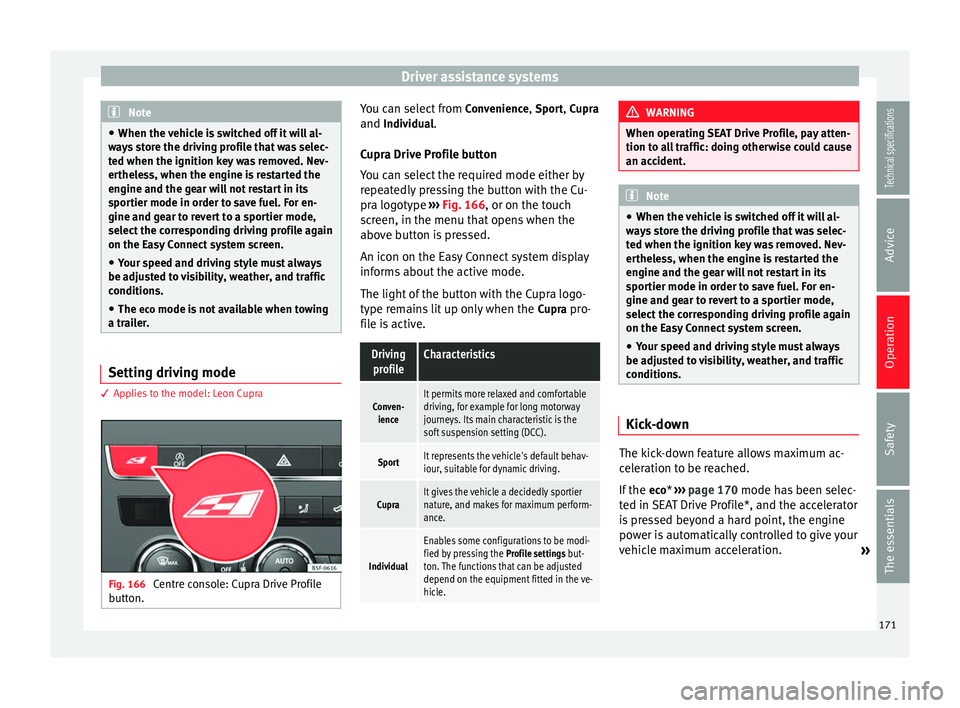
Fig. 166
Centre console: Cupra Drive Profile
button. You can select from
Convenience, Sport,
Cupra
and
Individual.
Cupr a Drive Profile button
You can select the required mode either by
repeatedly pressing the button with the Cu-
pra logotype ››› Fig. 166, or on the touch
screen, in the menu that opens when the
above button is pressed.
An icon on the Easy Connect system display
informs about the active mode.
The light of the button with the Cupra logo-
type remains lit up only when the Cupra pro-
file is active.
Driving profileCharacteristics
Conven- ienceIt permits more relaxed and comfortable
driving, for example for long motorway
journeys. Its main characteristic is the
soft suspension setting (DCC).
SportIt represents the vehicle's default behav-
iour, suitable for dynamic driving.
CupraIt gives the vehicle a decidedly sportier
nature, and makes for maximum perform-
ance.
Individual
Enables some configurations to be modi-
fied by pressing the Profile settings but-
ton. The functions that can be adjusted
depend on the equipment fitted in the ve-
hicle. WARNING
When operating SEAT Drive Profile, pay atten-
tion to all traffic: doing otherwise could cause
an accident. Note
● When the vehicle is switched off it will al-
ways store the driving profile that was selec-
ted when the ignition key was removed. Nev-
ertheless, when the engine is restarted the
engine and the gear will not restart in its
sportier mode in order to save fuel. For en-
gine and gear to revert to a sportier mode,
select the corresponding driving profile again
on the Easy Connect system screen.
● Your speed and driving style must always
be adjusted to visibility, weather, and traffic
conditions. Kick-down
The kick-down feature allows maximum ac-
celeration to be reached.
If the
eco
* ›››
page 170 mode has been selec-
t ed in S
EAT Drive Profile*, and the accelerator
is pressed beyond a hard point, the engine
power is automatically controlled to give your
vehicle maximum acceleration. »
171
Technical specifications
Advice
Operation
Safety
The essentials
Page 175 of 284

Driver assistance systems
conditions can limit the Tiredness detection
or prevent it from functioning.
● At speeds below 65 km/h (40 mph)
● At speeds above 200 km/h (125 mph)
● When cornering
● On roads in poor condition
● In unfavourable weather conditions
● When a sporty driving style is employed
● In the event of a serious distraction to the
driver
Tiredness detection will be restored when the
vehicle is stopped for more than 15 minutes,
when the ignition is switched off or when the
driver has unbuckled their seat belt and
opened the door.
In the event of slow driving during a long pe-
riod of time (below 65 km/h (40 mph) the
system automatically re-establishes the tired-
ness calculation. When driving at a faster
speed the driving behaviour will be recalcula-
ted.
Parking aid
General information Various systems are available to help you
when parking or manoeuvring in tight spaces, depending on the equipment fitted
on your vehicle.
The
rear parking aid
is an audible assistant
th
at warns about obstacles located behind
the vehicle ››› page 174.
Durin
g parking, the
parking system plus as-
sists you visually and audibly about obsta-
cles detected in front and behind
the vehicle
››› page 174. WARNING
● Always pay attention, also when looking
straight ahead, to traffic and the vehicle sur-
roundings. The assistance systems are not a
replacement for driver awareness. When in-
serting or removing the vehicle from a park-
ing space, or when performing similar ma-
noeuvres the driver always assumes the re-
sponsibility.
● Take into account that the system is not al-
ways in conditions to recognise or represent
certain surfaces, such as dress fabric: Risk of
causing an accident!
● The sensors and cameras have blind spots,
making the detection of people and objects
impossible. Pay special attention to children
and animals: Risk of causing an accident!
● Always keep visual control of the vehicle
surroundings: use the rear vision mirrors for
additional help. CAUTION
● Under certain circumstances, the system
does not detect or display certain objects:
– Objects such as snow chains, trailer draw
bars, bars or fences.
– Objects that are located above the sen-
sors, such as protrusions in a wall.
– Objects with certain surfaces or struc-
tures, such as wire mesh fences or pow-
der snow.
● Please note that low obstacles detected by
the system may no longer be registered by
the sensors as the car moves closer, so the
system will not give any further warning. In
certain circumstances, objects such as high kerbs that could damage the bottom of the
vehicle are not detected either.
● If the first warning from the Park Pilot is ig-
nored, the vehicle could suffer considerable
damage.
● The knocks or damage on the radiator
grille, bumper, wheel arch and vehicle under-
body can adjust the orientation of the sen-
sors. This can affect the parking aid function.
Have the function checked by a specialised
workshop. Note
● In certain situations, the system can give a
warning even though there is no obstacle in
the detected area, e.g: » 173
Technical specifications
Advice
Operation
Safety
The essentials
Page 177 of 284

Driver assistance systems
As you approach the obstacle, the time inter-
val between the audible warnings will be re-
duced.
If you maintain separation from the obstacle,
the volume of the warning begins to reduce
after four seconds (does not affect the tone
of the constant warning).
Activating/Deactivating Fig. 169
Centre console: parking aid button. Fig. 170
Miniature indication of automatic ac-
tivation Switching on
– Engage reverse gear or
– Press the switch in the centre console
››› Fig. 169 . A short confirmation signal will
be he ar
d and the button symbol will light
up yellow.
With certain equipment (Adaptive Cruise Con-
trol - ACC), the system will be activated auto-
matically when the vehicle reverses for a cer-
tain distance (about 10 cm if an obstacle is
detected in the rear area and about 20 cm if
no obstacle is detected in the rear area).
Switching off
– Drive forwards at more than 10 km/h (6
mph), or
– Press the button, or
– switch the ignition off. Segments of the visual indication
The distance of separation from the obstacle
can be estimated using the segments around
the vehicle.
The graphic display of the segments varies
according to the vehicle's equipment:
The yellow trail indi-
cates the vehicle's expected journey
based on the steering wheel angle. A
white
segment is displayed when the
obstacle is not within the vehicle's tra-
jectory or the direction of travel would
avoid it entering the vehicle's trajectory.
If the obstacle is within the vehicle’s tra-
jectory, a yellow segment is displayed
(at
a distance of more than 30 cm) or a
red
segment (at a distance of less than
30 cm) at the same time as the corre-
sponding audible warning sounds.
The
yellow trail indicates the vehicle's ex-
pected journey based on the steering
wheel angle. A white segment is dis-
pl
ayed when the obstacle is not within
the vehicle's trajectory or the direction
of travel would avoid it entering the ve-
hicle's trajectory. If the obstacle is with-
in the vehicle’s trajectory, a red
segment
is displayed at the same time as the cor-
responding audible warning sounds. »
SEAT Navi System Plus:
SEAT Media System Plus/Navi System:
175
Technical specifications
Advice
Operation
Safety
The essentials
Page 178 of 284
Operation
In this
equipment, a visual display of the vehi-
cle’s trajectory is not available. In any
event, a white
segment is displayed if
ther
e is an obstacle at a distance of
more than 30 cm. A
red segment is dis-
played if there is an obstacle at a dis-
tance of less than 30 cm from the vehi-
cle. Whenever the obstacle is located in
the vehicle’s direction of travel, the cor-
responding audible warning will sound.
As the vehicle approaches an obstacle, the
segments are displayed closer to the vehicle.
When the penultimate segment is displayed,
this means that the vehicle has reached the
collision zone. In the collision zone, the ob-
stacles are represented in red, including
those out of the path. Do not continue to
move forward (or backward) ››› in General
information on page 173 ,
›
›› in General in-
formation on page 173 !
Automatic activation
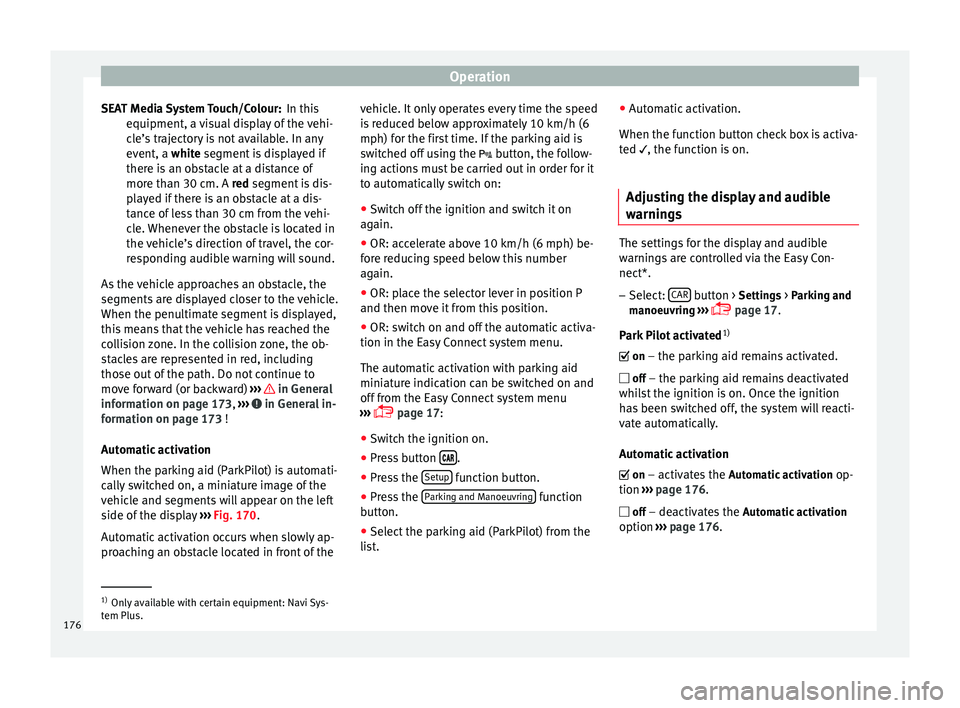
When the parking aid (ParkPilot) is automati-
cally switched on, a miniature image of the
vehicle and segments will appear on the left
side of the display ››› Fig. 170 .
Aut om
atic activation occurs when slowly ap-
proaching an obstacle located in front of the SEAT Media System Touch/Colour: vehicle. It only operates every time the speed
is reduced below approximately 10 km/h (6
mph) for the first time. If the parking aid is
switched off using the
button, the follow-
ing actions must be carried out in order for it
to automatically switch on:
● Switch off the ignition and switch it on
again.
● OR: accelerate above 10 km/h (6 mph) be-
fore reducing speed below this number
again.
● OR: place the selector lever in position P
and then move it from this position.
● OR: switch on and off the automatic activa-
tion in the Easy Connect system menu.
The automatic activation with parking aid
miniature indication can be switched on and
off from the Easy Connect system menu
››› page 17:
● Swit
ch the ignition on.
● Press button .
● Press the Setup function button.
● Press the Parking and Manoeuvring function
button.
● Select the parking aid (ParkPilot) from the
list. ●
Automatic activation.
When the function button check box is activa-
ted
, the f
unction is on.
Adju
sting the display and audible
warnings The settings for the display and audible
warnings are controlled via the Easy Con-
nect*.
– Select: CAR button > Settings > Parking and
manoeuvring ›››
page 17.
Park Pilot activated 1)
on – the parking aid remains activated. off – the parking aid remains deactivated
whilst the ignition is on. Once the ignition
has been switched off, the system will reacti-
vate automatically.
Automatic activation
on
– activates the Automatic activation
op-
tion ›››
page 176 .
off
– de activ
ates the Automatic activation
option ›››
page 176. 1)
Only available with certain equipment: Navi Sys-
tem Plus.
176
Page 179 of 284

Towing bracket device
Front volume
Volume in the front and rear area.
Front sound settings/sharpness
Frequency (tone) of the sound in the front
area.
Rear volume
Volume in the rear area.
Rear sound settings/sharpness
Frequency (tone) of the sound in the rear
area.
Adjust volume
With the parking aid switched on, the active
audio/video source volume will be reduced
to the intensity of the selected setting.
You will hear a short test tone from the corre-
sponding speaker each time you make a new
setting.
Error messages When the parking aid is activated or when
switching it on, if a continuous warning can
be heard over several seconds (additionally,
in the case of Parking system plus the LED of
the
button flashes), there is a fault in the
system. If the fault does not disappear before
switching off the ignition, the next time the parking aid is switched on by engaging re-
verse gear the fault will only be indicated
with the flashing LED on the
b
utton.
P
arking system plus*
If there is a fault in a sensor, the symbol
is
displayed on the Easy Connect display in
front of/behind the vehicle. If a rear sensor is
faulty, only the obstacles in the areas A and
B are displayed
››› Fig. 168 . If a front sensor
i s
faulty, only the obstacles in the areas C and
D are displayed.
Have the fault corrected by a specialised
workshop without delay.
Towing bracket If the trailer power socket is occupied, the
rear parking aid sensors will not activate
when reverse gear is engaged, or when the
button is pressed. This function may not
be covered under warranty if the towing
bracket is not factory-fitted. This causes the
following limitations:
Parking system plus*
There will be no warning about the presence
of obstacles in the rear area. The monitoring
in the front area remains active. The optical
display changes to towing mode. Towing bracket device
Trailer towing What do you need to bear in mind
when towing a trailer? Your vehicle may be used to tow a trailer
when fitted with the correct equipment.
If you wish to
retrofit a towing bracket, con-
s u
lt ››› page 180.
Connect
ors
Your vehicle is fitted with a 13-pin connector
for the electrical connection between the
trailer and the vehicle.
If the trailer has a 7-pin plug you will need to
u se an a
dapter cable. It is available at any
Technical Service.
Trailer weight/drawbar load
Never exceed the authorised trailer weight. If
you do not load the trailer up to the maxi-
mum permitted trailer weight, you can then
climb correspondingly steeper slopes.
The maximum trailer weights listed are only applicable for
altitudes up to 1000 m above
sea level. With increasing altitude the engine
power and therefore the vehicle climbing
ability are impaired because of the reduced
air density. The maximum trailer weight has »
177
Technical specifications
Advice
Operation
Safety
The essentials