lock Seat Leon 5D 2014 Workshop Manual
[x] Cancel search | Manufacturer: SEAT, Model Year: 2014, Model line: Leon 5D, Model: Seat Leon 5D 2014Pages: 284, PDF Size: 5.85 MB
Page 136 of 284

Operation
●
While you are selecting a gear and the vehi-
cle is stopped with the engine running, do
not accelerate. Failure to follow this instruc-
tion could result in an accident.
● As a driver you should never leave your ve-
hicle if the engine is running and a gear is en-
gaged. If you have to leave your vehicle while
the engine is running, you must apply the
handbrake and engage the parking lock (P).
● To avoid accidents, apply the handbrake
and put the selector lever in position P before
opening the bonnet and working on the vehi-
cle with the engine running. Please always
observe the important safety warnings
››› page 198, Work in the engine compart-
ment. Note
● If the selector lever is moved accidentally
to N when driving, release the accelerator and
let the engine speed drop to idling before se-
lecting gear range D or S again.
● Should the power supply to the selector
lever be interrupted in position P, the selector
lever will be locked. If this should happen the
manual release can be used ››› page 229. Selector lever lock
Fig. 143
Selector lever lock. The selector lever lock prevents gears from
being engaged inadvertently, so that the ve-
hicle is not set in motion unintentionally.
The selector lever lock is released as follows:
– Switch the ignition on.
– Press the brake pedal and at the same time
pr e
ss in the interlock button.
Automatic selector lever lock
With the ignition switched on, the selector
lever is locked in the positions P and N. The
brake pedal must be pressed to release the
lever while pressing the release button if the
selector lever is in the position P. As a re-
minder for the driver, with the lever in posi-
tions P or N the following message will be
shown on the display: When stationary, apply footbrake while se-
lecting a gear.
The selector lever lock only works if the vehi-
cle is stationary or driving at speeds up to 5
km/h. At higher speeds the selector lever
lock in the N position is disengaged automat-
ically.
The selector lever lock is not engaged if the
selector lever is moved quickly through posi-
tion N (e.g. when shifting from R to D). This
makes it possible, for instance, to rock the
vehicle “backwards and forwards” if it is
stuck. The selector lever lock engages auto-
matically if the brake pedal is not depressed
and the lever is in position N for more than
about two seconds.
Interlock button
The interlock button on the selector lever
handle prevents the driver from inadvertently
engaging certain gears. Press the button in
to disengage the selector lever lock. The se-
lector lever positions in which the interlock
button has to be pressed are shown in the il-
lustration, highlighted in colour ››› Fig. 143.
Safety
interlock for ignition key
Once the ignition has been turned off, the
key may be removed only if the gear selector
is in position P. While the key is not in the ig-
nition, the selector lever is locked in position
P.
134
Page 137 of 284
Driving
Note
● If the selector lever lock does not engage,
there is a fault. The transmission is interrup-
ted to prevent the vehicle from accidentally
moving. Follow the procedure below in order
for the selector lever lock to engage again:
–With a 6-speed gearbox: press the brake
pedal and release it again.
– With a 7-speed gearbox: press the brake
pedal. Move the selector lever to posi-
tion P or N and subsequently engage a
gear.
● Despite a gear being engaged, the vehicle
does not move forwards or back. Proceed to
the next mode:
– When the vehicle does not move in the
required direction, the system may not
have the gear range correctly engaged.
Press the brake pedal and engage the
gear range again.
– If the vehicle still does not move in the
required direction, there is a system mal-
function. Seek specialist assistance and
have the system checked. Changing gears in tiptronic mode*
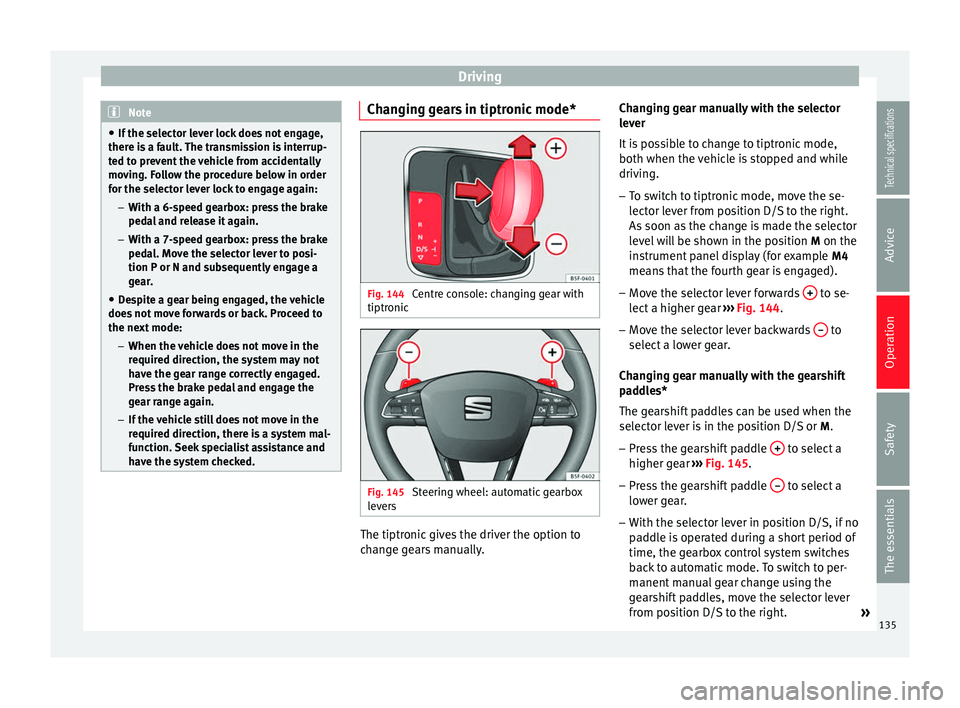
Fig. 144
Centre console: changing gear with
tiptronic Fig. 145
Steering wheel: automatic gearbox
levers The tiptronic gives the driver the option to
change gears manually.Changing gear manually with the selector
lever
It is possible to change to tiptronic mode,
both when the vehicle is stopped and while
driving.
– To switch to tiptronic mode, move the se-
lector lever from position D/S to the right.
As soon as the change is made the selector
level will be shown in the position M on the
instrument panel display (for example M4
means that the fourth gear is engaged).
– Move the selector lever forwards + to se-
lect a higher gear ››› Fig. 144 .
– Mo v
e the selector lever backwards – to
select a lower gear.
Changing gear manually with the gearshift
paddles*
The gearshift paddles can be used when the
selector lever is in the position D/S or M.
– Press the gearshift paddle + to select a
higher gear ››› Fig. 145 .
– Pr e
ss the gearshift paddle – to select a
lower gear.
– With the selector lever in position D/S, if no
paddle is operated during a short period of
time, the gearbox control system switches
back to automatic mode. To switch to per-
manent manual gear change using the
gearshift paddles, move the selector lever
from position D/S to the right.
»
135
Technical specifications
Advice
Operation
Safety
The essentials
Page 138 of 284

Operation
When accelerating, the gearbox automatical-
ly shifts up into the next gear shortly before
the maximum engine speed is reached.
If you select a lower gear, the automatic gear-
box will not shift down until there is no risk of
overrevving the engine.
When the kick-down feature is used, the
gearbox shifts down to a lower gear, depend-
ing on road speed and engine speed.
Driving tips The gearbox changes gear ratios automatical-
ly as the vehicle moves.
The engine can only start with the selector
lever in the position P or N. At low tempera-
tures, below -10°C (50°F), the engine can on-
ly start with the selector lever in the position
P.
Starting the vehicle
– Press and hold the brake pedal.
– Press and hold the interlock button (the
button on the selector lever handle), move
the selector lever to the desired position,
for instance D
› ››
page 133, and release the
interlock button.
– Wait for the gearbox to engage the gear (a
slight movement can be felt). –
Release the brake and press the accelerator
››› .
Stopping briefly – Apply the foot brake to hold the vehicle
briefly when stationary (for instance at traf-
fic lights). Do not press the accelerator.
Stopping/Parking
If the driver door is opened and the selector
lever is not in position P, the vehicle could
move. The driver message will be: Gear
change: selector lever in the drive position!. Additionally, a buzzer will sound.
– Press and hold the brake pedal ››› .
– Apply the handbrake.
– Move the selector lever to position P.
Holding the car on a hill – Always apply the brake pedal firmly to pre-
v ent
the vehicle from “moving backwards;
if necessary, apply the handbrake” ››› .
Do not
try to stop the vehicle “rolling back”
b
y increasing the engine speed when a
gear is engaged (pressing the accelerator)
››› .
Moving off uphill in vehicles without Hill
start assistant* – Apply the handbrake. –
Once you have engaged a gear press the
accelerator carefully and disengage the
handbrake.
Moving off uphill in vehicles with Hill start
assistant* – Once you have engaged a gear, release the
footbrake and press the accelerator
››› page 147, Hill driving assistant*.
Driving down hills: in some situations (on
mountain roads or when towing a trailer or
caravan) it can be advantageous to switch
temporarily to the manual gearbox pro-
gramme so that the gear ratios can be selec-
ted manually to suit the driving conditions
››› .
On level ground it is sufficient to move the
selector lever to position P. On slopes, first
engage the parking brake and then put the
selection lever into the P position. This
avoids overloading the locking mechanism
and it will be easier to move the selector lev-
er from position P. WARNING
Observe the safety warnings ››› in Selector
lever positions on page 133.
● Never allow the brake to rub and do not use
the brake pedal too often or for long periods.
Constant braking causes overheating in the 136
Page 145 of 284

Driver assistance systems
(2.5 miles), when fuel consumption will re-
turn to a normal level.
Check tyre pressure
Always make sure the tyres are inflated to the
correct pressures ››› page 208 to save fuel. If
the pr e
ssure is below half bar, fuel consump-
tion may increase by 5%. Due to the greater
rolling resistance, under-inflation
also increa-
ses tyre wear and impairs handling.
Do not use winter tyres all year round as they
increase fuel consumption by up to 10%.
Avoid carrying unnecessary loads
Given that every kilo of extra weight will in-
cr
ease the fuel consumption, it is advisable
to always check the luggage compartment to
make sure that no unnecessary loads are be-
ing transported.
Since the luggage rack increases the aerody-
namic drag of the vehicle, you should remove
it when not needed. This will save, at a speed
of 100-120 km/h (60-75 mph), 12% of fuel.
Save electrical energy
The engine drives the alternator, thereby gen-
erating electricity. This implies that any in-
crease in power consumption also increases
fuel consumption! For this reason, switch off
any unneeded electrical devices. Devices that
use a lot of electricity includes the blower at a high setting, the rear window heating or
the seat heating*. Driver assistance systems
Braking and stability systems Electronic Stability Control (ESC) The ESC helps to improve safety. It reduces
the tendency to skid and improves the stabil-
ity and roadholding of the vehicle. The ESC
detects critical handling situations, such as
vehicle understeer or oversteer, or wheelspin
on the driving wheels. It stabilises the vehi-
cle by braking individual wheels or by reduc-
ing the engine torque. The warning lamp will
flash on the instrument panel when the ESC
is intervening
.
ESC includes the Anti-lock brake system
(ABS), the brake assist system, the traction
control system (ASR), electronic differential
lock (EDL), electronic self-locking*, selective
torque control* and tractor-trailer sway miti-
gation*. ESC also helps stabilise the vehicle
by changing the torque.
Anti-lock brake system (ABS)
ABS prevents the wheels from locking up un-
der braking until the vehicle has reached a
virtual standstill. You can continue to steer
the vehicle even when the brakes are on full.
Keep your foot on the brake pedal and do not
pump the brakes. You will feel the brake ped-
al pulsate while the ABS is working. »
143
Technical specifications
Advice
Operation
Safety
The essentials
Page 146 of 284

Operation
Brake assist system
The brake assist system can reduce the re-
quired braking distance. The braking force is
automatically boosted if you press the brake
pedal quickly in an emergency. You must
keep pressing the brake pedal until the dan-
ger has passed.
Traction control system (ASR)
In the event of wheelspin, the traction control
system reduces the engine torque to match
the amount of grip available. This helps the
car to start moving, accelerate or climb a gra-
dient.
Electronic differential lock (EDL)
When the EDL detects wheelspin, it brakes
the spinning wheel and directs the power to
the other driven wheel. This function is active
up to approximately 100 km/h.
To prevent the disc brake of the braked wheel
from overheating, the EDL cuts out automati-
cally if subjected to excessive loads. The ve-
hicle can still be driven. The EDL will switch
on again automatically when the brake has
cooled down.
Tractor-trailer sway mitigation*
If the vehicle is pulling a trailer, it will control
the following: Tractor-trailers tend to sway.
When the swaying of the trailer is felt by the
vehicle and detected by the ESC, it will auto- matically brake the towing vehicle within the
limits of the system and mitigate the sway.
Tractor-trailer sway mitigation is not available
in all countries.
Electronic self-locking*/Selective torque
control*
When driving around bends, an electronic
self-locking intervenes. The front wheel on
the inside of the curve, or the two inside
wheels, respectively, are selectively braked
as required. This minimises the traction of
the front wheels, allowing you to take bends
with greater precision and neutrality. In cer-
tain circumstances, where roads are wet or
snow-covered, the respective system may not
intervene.
Multi-collision brake
In an accident, the multi-collision brake can
help the driver by braking to avoid the risk of
skidding during the accident, which could
lead to further collisions.
The multi-collision brake works for front, side
or rear accidents, when the airbag control
unit records its activation level and the acci-
dent takes place at a speed of over 10 km/h
(6 mph). The ESC automatically brakes the
vehicle, as long as the accident has not dam-
aged the ESC, the brake hydraulics or the on-
board network.
The following actions control automatic brak-
ing during the accident:
●
When the driver presses the accelerator,
the automatic braking does not take place.
● When the braking pressure through press-
ing the brake pedal is greater than the sys-
tem’s braking pressure the vehicle will brake
automatically.
● Multi-collision braking will not be available
if ESC is malfunctioning. WARNING
● The ESC, ABS, ASR, EDL, electronic self-
locking differential or selective torque control
systems cannot exceed the limits imposed by
the laws of physics. Always bear this in mind,
especially on wet or slippery roads. If you no-
tice the systems cutting in, you should re-
duce your speed immediately to suit the road
and traffic conditions. Do not be encouraged
to take risks by the presence of more safety
systems. If you do, an accident may occur.
● Please remember that the accident risk al-
ways increases if you drive fast, especially in
corners or on a slippery road, or if you follow
too close behind the vehicle in front of you.
The ESC, ABS, brake assist, EDL, electronic
self-locking and selective torque control sys-
tems cannot prevent accidents: risk of acci-
dents! 144
Page 150 of 284
Operation
Note
The Official Service or a specialist workshop
can tell you if your vehicle is equipped with
this system. Start-Stop system*
Description and operation The Start-Stop system helps save fuel and re-
duce CO
2 emissions.
In Start-Stop mode, the engine will automati-
cally switch off when the vehicle stops, when
stopping at traffic lights for example. The ig-
nition remains switched on during the stop-
ping phase. The engine automatically
switches back on when required.
As soon as the ignition is switched on, the
Start-Stop function is automatically activa-
ted.
Basic requirements for the Start-Stop mode ● The driver door must be closed.
● The driver must have their seat belt fas-
tened.
● The bonnet must be closed.
● The vehicle must have travelled at more
than 4 km/h (2 mph) since the last stop.
● The vehicle cannot be towing a trailer. WARNING
● Never switch the engine off until the vehi-
cle is stationary. The brake servo and power
steering functions will not be completely cov-
ered under warranty. More force may also be
needed to turn the steering wheel or to brake.
As you cannot steer and brake in the normal
manner, there is a greater risk of accidents
and serious injury.
● Never remove the key from the ignition if
the vehicle is in motion. Otherwise, the steer-
ing could lock making it impossible to steer
the vehicle.
● To avoid injury, make sure that the Start-
Stop system is switched off when working in
the engine compartment ››› page 149. CAUTION
The Start-Stop system must always be
switched off when driving through flooded
areas ››› page 149. Stop/Start the engine
Vehicles with a manual gearbox
– When the vehicle is stopped, put it into
neutral and release the clutch pedal. The
engine will switch off. The warning lamp
will appear on the instrument panel dis-
play. –
When the clutch pedal is pressed the en-
gine will start up again. The warning lamp
will switch off.
Vehicles with an automatic gearbox
– Use the foot brake to bring the vehicle to a
stop and keep the brake pedal pressed
down with your foot. The engine will switch
off. The warning lamp will appear in the
di s
play.
– When you take your foot off the brake pedal
the engine will start up again. The warning
lamp will switch off.
Additional information related to the
automatic gearbox
The engine stops when the selector lever is in
the positions P, D, N and S, in addition to
when in manual mode. With the selector lev-
er in position P, the engine will also remain
switched off when you take your foot off the
brake pedal. In order to start the engine up
again the accelerator must be pressed, or an-
other gear engaged or the brake released.
If the selector lever is placed in position R
during the stopping phase, the engine will
start up again.
Change from position D to P to prevent the
engine from accidentally starting when
changing and passing by position R.
148
Page 172 of 284
Operation
Ambient lighting
The ambient lighting guides located in the in-
terior front door panels of the Leon FR and
the Leon Cupra change colour from white to
red depending on the driving mode selected.
Adaptive Cruise Control (ACC) 1)
According to the active driving profile, the ac-
celeration gradient of the adaptive cruise
control varies.
Electronic self-locking differential 1)
The self-locking differential adapts its behav-
iour depending on the driving profile chosen.
Normal mode or Cupra mode can be selected
to prioritise improved traction in sport driv-
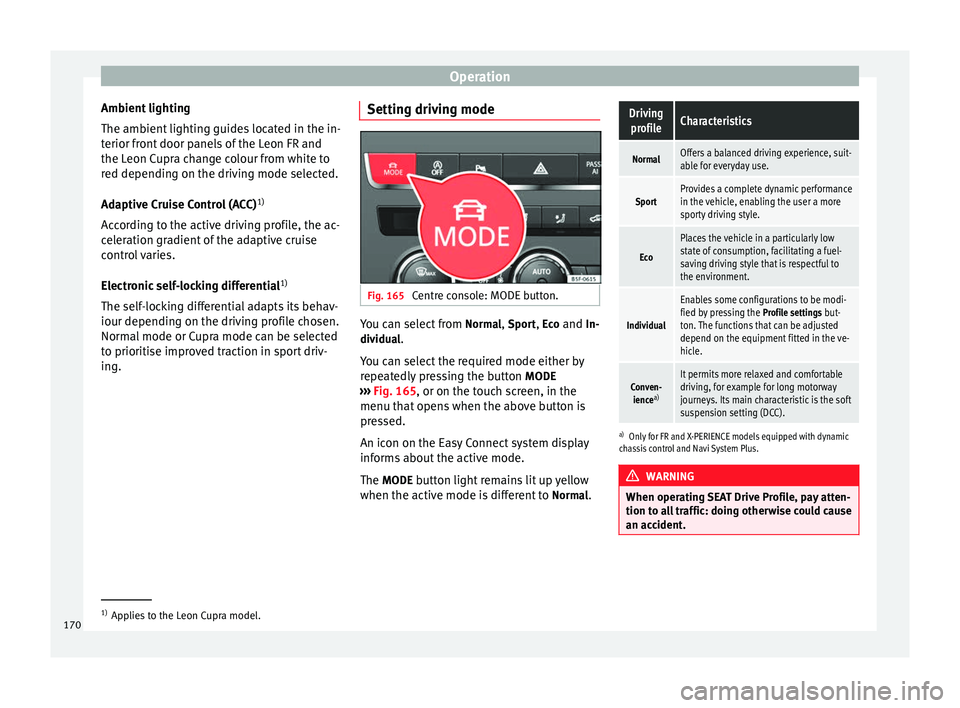
ing. Setting driving mode Fig. 165
Centre console: MODE button. You can select from
Normal
, Sport
, Eco
and In-
dividual .
You can select the required mode either by
repeatedly pressing the button MODE
››› Fig. 165 , or on the touch screen, in the
menu th at
opens when the above button is
pressed.
An icon on the Easy Connect system display
informs about the active mode.
The MODE
button light remains lit up yellow
when the active mode is different to Normal
.
Driving
profileCharacteristics
NormalOffers a balanced driving experience, suit-
able for everyday use.
SportProvides a complete dynamic performance
in the vehicle, enabling the user a more
sporty driving style.
Eco
Places the vehicle in a particularly low
state of consumption, facilitating a fuel-
saving driving style that is respectful to
the environment.
Individual
Enables some configurations to be modi-
fied by pressing the Profile settings but-
ton. The functions that can be adjusted
depend on the equipment fitted in the ve-
hicle.
Conven- ience a)It permits more relaxed and comfortable
driving, for example for long motorway
journeys. Its main characteristic is the soft
suspension setting (DCC).
a)
Only for FR and X-PERIENCE models equipped with dynamic
chassis control and Navi System Plus. WARNING
When operating SEAT Drive Profile, pay atten-
tion to all traffic: doing otherwise could cause
an accident. 1)
Applies to the Leon Cupra model.
170
Page 182 of 284

Operation
You should always reduce speed immediately
if the trailer shows the slightest sign of snak-
ing . Never try to stop the “snaking” by in-
c r
easing speed.
Always brake in due course. If the trailer has
an overrun brake, apply the brakes gen
tly at
first and then, firmly. This will prevent the
jerking that can be caused by locking of trail-
er wheels. Select a low gear in due course
before going down a steep downhill. This en-
ables you to use the engine braking to slow
down the vehicle.
Reheating
At very high temperatures and during pro-
longed slopes, driving in a low gear and high
engine speed, always monitor the coolant
temperature gauge ››› page 71.
Electronic stability control*
The ESC* system helps to stabilise the trailer
in case of skidding or rocking. Retrofitting a towing bracket*
Fig. 172
Attachment points for towing brack-
et. If a towing bracket is to be fitted after the ve-
hicle is purchased, this must be completed
according to the instructions of the towing
bracket manufacturer.The attachment points for the towing bracket
A are on the lower part of the vehicle.
The distance between the centre of the ball
coupling and the ground should never be
lower than the indicated value, even with a
fully loaded vehicle and including the maxi-
mum drawbar load.
Elevation values for securing the towing
bracket:
B65 mm (minimum)
C350 mm to 420 mm (fully laden vehicle)
D1040 mm
E317 mm
FLEON/LEON SCLEON ST
319 mm596 mm Fitting a towing bracket
●
Driving with a trailer involves an extra effort
for the vehicle. Therefore, before fitting a
towing bracket, please contact a Technical
Service to check whether your cooling system
needs modification.
● The legal requirements in your country
must be observed (e.g. the fitting of a sepa-
rate control lamp).
● Certain vehicle components, e.g. the rear
bumper, must be removed and reinstalled.
The towing bracket securing bolts must be
180
Page 186 of 284

Advice
Automatic car washes
Before going through a car wash, be sure to
take the usual precautions such as closing
the windows and roof. If the vehicle has spe-
cial accessories such as spoilers or a roof
rack or two-way radio aerial, etc., it is advisa-
ble to consult the car wash tunnel operator.
It is best to use a car wash without revolving
bristles if possible.
Washing the vehicle with a high pressure
cleaner
When washing the vehicle with a high-pres-
sure cleaner, always follow the operating in-
structions for the equipment. This applies
particularly to the operating pressure and the
spraying distance . Do not hold the nozzle too
c lo
se to soft materials such as rubber hoses
or seals. The same applies to the parking aid
sensors*, which are located in the rear bump-
er.
Do not use a nozzle that sprays the water out
in a
direct stream or one that has a rotating
jet for forcing off dirt.
Washing the car by hand
When washing the car by hand, use plenty of
water to soften the dirt first, and rinse off as
well as possible.
Then clean the vehicle with a soft sponge,
glove
or brush using only slight pressure.
You should start on the roof and work down. Special car
soap
should only be used for very
persistent dirt.
Rinse the sponge or glove thoroughly and of-
ten.
Wheels, sills and similar should be cleaned
last. Use a second sponge for this. WARNING
● The vehicle should only be washed with the
ignition switched off. Failure to follow this in-
struction could result in an accident.
● Do not clean the underside of chassis, the
inside of wheel arches or wheel trims without
protecting your hands and arms. You may cut
yourself on sharp-edged metal parts. Other-
wise, there is a risk of sustaining cuts.
● When washing the car during the winter
season: water and ice in the brake system
can reduce braking effectiveness: risk of acci-
dent! CAUTION
● Do not wash the vehicle in direct sunlight –
otherwise the paint can be damaged.
● Do not use sponges, abrasive household
sponges or similar to clean insect remains.
This could damage the surface.
● Clean off stubborn dirt (insects, etc.) from
the headlights at regular intervals, for in-
stance when filling the fuel tank. The head-
lights should only be washed with water, do not wipe them with a dry cloth or sponge. It
is best to use soapy water.
● Never wash tyres with a jet that sprays the
water out in a direct stream. This could dam-
age the tyres even if the spray is kept at a
distance and only used for a very short time.
● Before washing the vehicle in an automatic
car wash, please make sure to retract the ex-
terior mirrors to prevent them from being
damaged. Electrically retractable exterior
mirrors must not be folded in or out by hand,
always use the electrical power control. CAUTION
● Before washing the vehicle in an automatic
car wash, please proceed as follows to lock
the wiper arms so that they are not moved to-
wards the top of the windscreen:
–the bonnet must be closed.
– switch the ignition on and off.
– press the windscreen wiper lever forward
briefly (windscreen washer function).
This will lock the wiper arms. For the sake of the environment
The car should only be washed in special
wash bays. These areas are prepared to pre-
vent oily water from getting into the public
drains. In some places, washing vehicles out-
side the areas intended for this purpose is
prohibited. 184
Page 192 of 284

Advice
The retract function may not operate properly
in very dirty belts. Make sure that the inertia
reel seat belts are completely dry before al-
lowing them to retract. CAUTION
● Do not remove the seat belts from the vehi-
cle to clean them.
● Do not use chemical cleaning agents on the
seat belts, as this can damage the webbing.
Ensure that the seat belts do not come into
contact with corrosive fluids.
● If you find any damage to the belt webbing,
belt fittings, the belt retractor or the buckle,
the belt in question must be replaced by a
specialised workshop. Intelligent technology
Electro-mechanical steering Electro-mechanical power steering assists
the driver when steering.
Electro-mechanical power steering adapts
electronically to the speed of the car, torque
and t
urnin
g angle.
If the power steering should fail at any time
or the engine is switched off (for instance
when being towed), the car can still be
steered. However, more effort than normal
will be required to turn the steering wheel.
Driver warning lamps and messages (in red) Faulty steering! To park the vehicle
If the warning lamp remains on and the driver
indication appears, the power steering could
be faulty.
Do not continue driving. Seek specialist as-
s
istance.
(in yellow) Steering: System fault! You
may continue driving.
If the warning lamp comes on, the steering
could react with more difficultly or more sen-
sitivity than normal. In addition, when driving
in a straight line the steering wheel may be
off-centre. Drive slowly to a specialised workshop and
have the fault repaired.
(in yellow) Steering lock: fault! Go to an
Official Service
The electronic steering lock is malfunction-
ing.
Go to a specialised workshop as soon as
possible and have the fault repaired. WARNING
Take it immediately to a specialised work-
shop and have the fault repaired: risk of acci-
dent! Note
If the lamp (in red) or else (in y
ellow)
lights up briefly, you may continue driving. Progressive steering
Depending on the vehicle equipment, the
progressive steering can adapt steering hard-
ness to the current driving situation. The
power steering only works when the engine
is running.
In
city traffic
y
ou do not need to turn so much
on p
arking, manoeuvring or in very tight
turns.
On the
road or on the motorway, progressive
steering transmits, for example, in bends, a
190