ECO mode Seat Leon 5D 2016 Owner's Guide
[x] Cancel search | Manufacturer: SEAT, Model Year: 2016, Model line: Leon 5D, Model: Seat Leon 5D 2016Pages: 324, PDF Size: 6.93 MB
Page 184 of 324
Operation
reminder for the driver, with the lever in posi-
tion s
P or N the f
ollowing message will be
shown on the display:
When stationary, apply footbrake
while selecting a gear.
Level lock only engages with the vehicle sta-
tionary and at speeds of up to 5 km/h
(3 mph). At speeds of over 5 km/h (3 mph)
the lever lock is automatically deactivated in
position N.
The selector lever lock is not engaged if the
selector lever is moved quickly through posi-
tion N (e.g. when shifting from R to D). This
makes it possible, for instance, to rock the
vehicle “backwards and forwards” if it is
stuck. The selector lever lock engages auto-
matically if the brake pedal is not depressed
and the lever is in position N for more than
about two seconds.
Interlock button
The interlock button on the selector lever
handle prevents the driver from inadvertently
engaging certain gears. Press the button in
to disengage the selector lever lock. The se-
lector lever positions in which the interlock
button has to be pressed are shown in the il-
lustration, highlighted in colour ››› Fig. 191.
Safety interlock for ignition key
Once the ignition has been turned off, the
key may be removed only if the gear selector is in position P. While the key is not in the ig-
nition, the selector l
ever is locked in position
P. Note
● If the sel ect
or lever lock does not engage,
there is a fault. The transmission is interrup-
ted to prevent the vehicle from accidentally
moving. Follow the procedure below in order
for the selector lever lock to engage again:
–With a 6-speed gearbox: press the brake
pedal and release it again.
– With a 7-speed gearbox: press the brake
pedal. Move the selector lever to posi-
tion P or N and subsequently engage a
gear.
● Despite a gear being engaged, the vehicle
does not
move forwards or back. Proceed to
the next mode:
– When the vehicle does not move in the
required direction, the system may not
have the gear range correctly engaged.
Press the brake pedal and engage the
gear range again.
– If the vehicle still does not move in the
required direction, there is a system mal-
function. Seek specialist assistance and
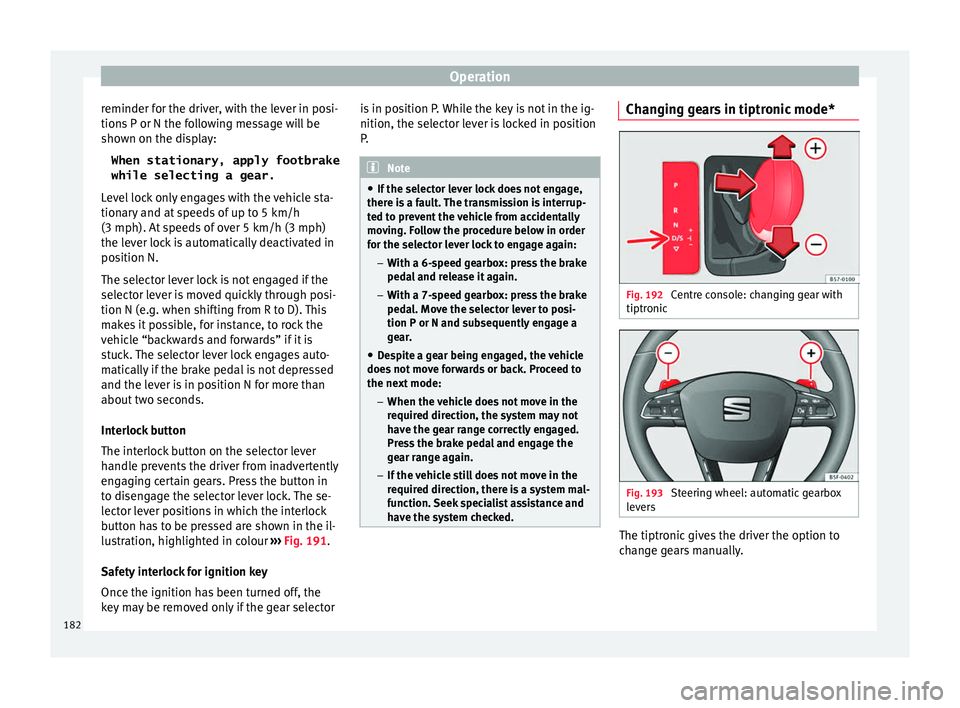
have the system checked. Changing gears in tiptronic mode*
Fig. 192
Centre console: changing gear with
tiptr onic Fig. 193
Steering wheel: automatic gearbox
l ev
er
s The tiptronic gives the driver the option to
c
h
an
ge gears manually.
182
Page 188 of 324
Operation
WARNING
The downhill speed control cannot defy the
la w
s of physics. Therefore, speed cannot be
maintained constant in all situations. Always
be prepared to use the brakes! Inertia mode
The inertia mode enables the kinetic energy
of the
v
ehicle to be harnessed enabling cer-
tain stretches to be driven without using the
accelerator. This enables fuel to be saved.
Use the inertia mode to “let the vehicle roll”
before, for example, arriving in a town.
Switching on inertia mode
Important: selector lever must be in position
D, gradients below 12 %.
– Select, in SEAT Drive Profile*, Eco mode
›› ›
page 219.
– Take your foot off the accelerator.
The driver mes
sage Inertia will be dis-
played. At speeds higher than 20 km/h (12
mph), the gearbox will automatically disen-
gage and the vehicle will roll freely, without
the effect of the engine brake. While the vehi-
cle rolls, the engine runs at idling speed.
Stopping inertia mode
– Press the brake or the accelerator pedal. To make use of the braking force and switch
off the engine ag
ain, simply press the brake
pedal briefly.
Applying both the inertia mode (= prolonged
section with less energy) and the switching
off using inertia (= shorter section without
the need for fuel) facilitates improved fuel
consumption and emission balance. WARNING
● If the iner ti
a mode has been switched on,
take into account, when approaching an ob-
stacle and releasing the accelerator pedal,
that the vehicle will not decelerate in the usu-
al manner: risk of accident!
● When using inertia mode while travelling
down hil
ls, the vehicle can increase speed:
risk of accident!
● If other users drive your vehicle, warn them
about inerti
a mode. Note
● Inerti a mode i
s only available in eco (SEAT
Drive Profile*) driving mode.
● The driver message Inertia is on
ly dis-
played with the current consumption. In iner-
tia mode the gear will no longer be displayed
(for example “E” will appear instead of “E7”).
● On downhill sections with gradients above
15 %, the inertia mode w
ill automatically be
switched off temporarily. Backup programme
A backup programme is in place if a fault
shoul
d oc
cur in the control system.
If all the positions of the selector lever are
shown over a light background on the instru-
ment panel display, there is a system fault
and the automatic gearbox will operate in
with the backup programme. When the back-
up programme is activated, it is possible to
drive the vehicle, however, at low speeds and
within a selected range of gears. In some ca-
ses driving in reverse gear may not be possi-
ble. CAUTION
If the gearbox operates with the backup pro-
gramme, t ak
e the vehicle to a specialised
workshop and have the fault repaired without
delay. Clutch
Clutch overheating! Please
stop!
The c lut
ch has overheated and could be dam-
aged. Stop the vehicle and wait for the gear-
box to cool with the engine at idling speed
and the selector lever in position P. When the
warning lamp and the driver message switch
off, have the fault corrected by a specialised
workshop without delay. If the warning lamp
186
Page 189 of 324

Driving
and the driver message do not switch off, do
not c
ontinue driv
ing. Seek specialist assis-
tance.
Gearbox malfunctions
Gearbox: Fault! Stop the ve-
hicle and place the lever in the
position P.
Ther e i
s a fault in the gearbox. Stop the vehi-
cle in a safe place and do not continue driv-
ing. Seek specialist assistance.
Gearbox: System fault! You
may continue driving.
Have the fault corrected by a specialised
workshop without delay. Gearbox: System fault! You
can continue driving with re-
strictions. Reverse gear disa‐
bled
Take the vehicle to a specialised workshop
and have the fault repaired without delay. Gearbox: System fault! You
can continue driving in D until
switching off the engine
Stop the vehicle in a safe place well away
from moving traffic. Seek specialist assis-
tance.
Gearbox: too hot. Adapt your
driving accordingly
Continue driv
ing at moderate speeds. When
the warning lamp switches off, you can con-
tinue driving in a normal manner.
Gearbox: press the brake and
engage a gear again.
If the fault was caused by a gearbox with a
high temperature, this driver message will be
displayed when the gearbox has cooled
again.
Run-in and economical driving Runnin
g-in the engine A new vehicle should be run in over a dis-
t
anc
e of
1500 km (1000 miles). For the first
1,000 km the engine speed should not ex-
ceed 2/3 of the maximum permissible engine
speed. In doing so, do not accelerate at full
throttle and do not drive with a trailer! From
1000 to 1500 km (600 to 1000 miles) you
can gradually increase the engine rpm and
road speed.
During its first few hours of running, the in-
ternal friction in the engine is greater than
later on when all the moving parts have bed-
ded down. How the vehicle is driven for the first 1,500
km influences
the future engine perform-
ance. Subsequently, also drive at a moderate
rate, especially when the engine is still cold:
this will lead to less engine wear and tear
and will prolong its useful life.
You should also avoid driving with the engine
speed too low. Change down to a lower gear
when the engine no longer runs “smoothly”.
If the engine revs too much, cut fuel injection
to protect the engine.
Environmental compatibility Environmental protection is a top priority in
the de
s
ign, c
hoice of materials and manufac-
ture of your new SEAT.
Constructive measures to encourage recy-
cling
● Joints and connections designed for easy
dismantlin
g
● Modular construction to facilitate disman-
tling
● Incr
eased use of single-grade materials.
● Plastic parts and elastomers are marked in
accor
dance with ISO 1043, ISO 11469 and
ISO 1629.
Choice of materials
● Use of recycled materials. »
187
Technical data
Advice
Operation
Emergencies
Safety
Page 190 of 324

Operation
● Use of
c
ompatible plastics in the same part
if its components are not easily separated.
● Use of recycled materials and/or materials
originating fr
om renewable sources.
● Reduction of volatile components, includ-
ing odour, in p
lastic materials.
● Use of CFC-free coolants.
Ban on heavy
metals, with the exceptions
dictated by law (Annex II of ELV Directive
2000/53/EC): cadmium, lead, mercury, hexa-
valent chromium.
Manufacturing methods
● Reduction of the quantity of thinner in the
protectiv
e wax for cavities.
● Use of plastic film as protection during ve-
hicle tr
ansport.
● Use of solvent-free adhesives.
● Use of CFC-free coolants in cooling sys-
tems.
● Recy
cling and energy recovery from resi-
dues (RDF).
● Impr
ovement in the quality of waste water.
● Use of systems for the recovery of residual
heat (therm
al recovery, enthalpy wheels,
etc.).
● The use of water-soluble paints. Economical and environmentally-
friendly drivin
g Fuel consumption, environmental pollution
and we
ar t
o the engine, brakes and tyres de-
pends largely on driving style. Fuel consump-
tion can be reduced by 10-15% with an eco-
nomical driving style and proper anticipation
of traffic conditions. The following section
gives you some tips on lessening the impact
on the environment and reducing your oper-
ating costs at the same time.
Active cylinder management (ACT ®
)*
››› table on page 2
Depending on vehicle equipment, the active
cylinder management (ACT ®
) may automati-
cally deactivate some of the engine cylinders
if the driving situation does not require too
much power. When it is switched off, no fuel
is injected into these cylinders, hence total
fuel consumption may be reduced. The num-
ber of active cylinders can be seen on the in-
strument panel display ›››
page 31.
Foresight when driving
Acceleration causes the vehicle to consume
more fuel. If you think ahead when driving,
you will need to brake less and thus acceler-
ate less. Wherever possible, let the car roll
slowly to a stop, with a gear engaged (for in-
stance when you can see that the next traffic lights are red). This takes advantage of the
engine br
ak
ing effect, reducing wear on the
brakes and tyres. Emissions and fuel con-
sumption will drop to zero due to the overrun
fuel cut-off.
Changing gear to save energy
An effective way of saving is to change in ad-
vance to a higher gear. Running the engine at
high rpm in the lower gears uses an unneces-
sary amount of fuel.
Manual gearbox : shift up from first to second
gear as soon as possible. In any case, we rec-
ommend that you change to a higher gear
upon reaching 2,000 rpm. Choosing the right
gear enables fuel savings. Select the highest
possible gear appropriate for the driving sit-
uation (the engine should continue function-
ing with cyclical regularity).
Automatic gearbox : accelerate gradually and
without reaching the “kick-down” position.
Avoid driving at high speed
Avoid travelling at top speed, whenever pos-
sible. Fuel consumption, emission of harmful
gases and noise pollution multiply dispropor-
tionately as speed is increased. Driving at
moderate speeds will help to save fuel.
Reduce idling time
In vehicles with the Start-Stop system idling
is automatically reduced. In vehicles without
188
Page 203 of 324

Driver assistance systems
Any modification to the programmed speed
i s
sho
wn on the bottom left part of the instru-
ment panel display.
Adjusting distance level
The distance according to speed with regard
to the vehicle in front can be controlled on
the Easy Connect system on 5 levels
››› page 27.
In wet road conditions, you should always set
a larger distance with regard to the vehicle in
front than when driving in dry conditions.
The following distances can be preselected:
● Very short
● Short
● Media
● Long
● Very long
You can u
se the Easy Connect system to ad-
just the level of distance that should be ad-
justed when the ACC is switched on with the button and the
S
ETUP and
Driv
er a
s
sistancefunction buttons
››
›
page 27.
Adjusting the driving programme
In vehicles with driving profile selection
(SEAT Drive Profile), the profile selected can
influence acceleration behaviour
››› page 219. The following driving programmes items can
be selected:
● Norm
al
● Sport
● Eco
In vehic
les without the driving profile selec-
tion function, acceleration behaviour can be
influenced by selecting a driving programme
on the Easy Connect system using the button and the
S
ETUP and
Driv
er a
s
sistance function buttons
››
›
page 27.
The following conditions may lead the ACC
not to react:
● If the accelerator is pressed.
● If there is no gear engaged.
● If the ESC is controlling.
● If the driver is not wearing his/her seat
belt.
● If sev
eral brake lights of the vehicle or elec-
trically
connected trailer are damaged.
● If the vehicle is reversing.
● Driving faster than 210 km/h (150 mph). WARNING
There is a danger of rear collision when the
minimum dis t
ance to the vehicle in front is
exceeded and the speed difference between
both vehicles is so great that a speed reduc- tion by the ACC will not suffice. In this case
the brak
e ped
al should be applied immedi-
ately.
● The ACC may not be able to detect all situa-
tions pr
operly.
● “Stepping” on the accelerator may cause
the ACC
not to intervene in braking. Driver
braking will have priority over intervention by
the speed control or adaptive cruise control.
● Always be ready to use the brakes!
● Observe country-specific provisions gov-
erning ob
ligatory minimum distances be-
tween vehicles. Note
● The progr ammed s
peed is erased once the
ignition or the ACC are switched off.
● When the traction control system (ASR) is
deactivat
ed during acceleration or else the
ESC is activated in Sport* Mode
( ››› page 110), the ACC switches off automati-
cally.
● In vehicles with the Start-Stop system, the
engine swit
ches off automatically during the
ACC stopping phase and restarts automatical-
ly to begin driving. Vehicles with an automatic gearbox
If the vehicle is equipped with automatic
g
e
arbo
x, the ACC can brake the vehicle until »
201
Technical data
Advice
Operation
Emergencies
Safety
Page 205 of 324

Driver assistance systems
speed accordingly and then controls the ad-
ju s
t
ed distance. If the vehicle detected in
front accelerates, the adaptive cruise control
will also accelerate up to the target speed
programmed at most.
The greater the speed, the greater the dis-
tance in metres should be ››› . We recom-
mend the settin g
Di
stance 3. WARNING
With regard to distance setting, the driver is
re s
ponsible for observing country-specific
legislation. Driver messages
AC
C not available
The sy
stem can no longer continue to guar-
antee safe vehicle detection and will be de-
activated. The sensor has lost its setting or is
damaged. Take the vehicle to a specialised
workshop and have the fault repaired.
ACC: currently not available. No sensor vi-
sion
ACC and Front Assist: currently not availa-
ble. No sensor vision
This message will be displayed to the driver if
the radar sensor's vision is impaired due, for example, to leaves, snow, heavy fog or dirt.
Cl
e
an the sensor.
ACC: currently not available. Gradient too
steep
The maximum road slope has been excee-
ded, hence safe ACC operation cannot be
guaranteed. The ACC cannot be switched on.
ACC: only available in D, S or M
Select the D/S or M position on the selector
lever.
ACC: parking brake applied
The ACC is deactivated if the parking brake is
applied. The ACC is available once again after
the parking brake is released.
ACC: currently not available. Intervention
of stability control
The message for the driver is displayed when
the electronic stability control (ESC) inter-
venes. In this case, the ACC is automatically
switched off.
ACC: Take action!
The message for the driver is displayed if,
when the vehicle starts up on a hill with a
mild slope, the vehicle rolls back even al-
though the ACC is activated. Apply the brake
to stop the vehicle from moving/colliding
with another vehicle. ACC: speed limit
The mes
sage for the driver is displayed if, in
vehicles with manual gearbox, the current
speed is too low for the ACC mode.
The speed to be stored must be at least
30 km/h (18 mph). The speed limiter
switches off if the speed falls below 20 km/h
(12 mph).
ACC: available as of the 2nd gear
The ACC is operational as of the 2nd gear
(manual gearbox).
ACC: engine speed
The message for the driver is displayed if,
when the ACC accelerates or brakes, the driv-
er does not shift up or down a gear in time,
which means exceeding or not reaching the
permissible engine speed. The ACC switches
itself off. A buzzer warning is heard.
ACC: clutch pressed
Vehicles with a manual gearbox: pressing the
clutch pedal for longer abandons control
mode.
Door open
Vehicles with automatic gearbox: the ACC
cannot be activated with the vehicle station-
ary and the door open.
203
Technical data
Advice
Operation
Emergencies
Safety
Page 208 of 324

Operation
Narrow or misaligned vehicles
The r a
d
ar sensor can only detect narrow or
misaligned vehicles when they are within
range ››› Fig. 205 B. This applies particularly
to narrow vehicles such as motorbikes. In
these cases, you should brake as necessary.
Vehicles with special loads and accessories
Special loads and accessories of other vehi-
cles that jut out over the sides, backwards or
over the top may be out of the ACC's range.
Switch off the ACC when driving behind vehi-
cles with special loads and accessories or
when overtaking them. In these cases, you
should brake as necessary.
Other vehicles changing lanes
Vehicles changing lanes a short distance
away from your own can only be detected
when they are within range of the sensors.
Consequently, the ACC will take longer to re-
act ››› Fig. 206 C. In these cases, you should
brake as necessary.
Stationary vehicles
The ACC does not detect stationary objects
while driving, such as traffic tails or damaged
vehicles.
If a vehicle detected by the ACC turns or
moves over and there is a stationary vehicle
in front of it, the ACC will not react to it ›››
Fig. 206 D. In these ca ses, you should
brake as necessary.
Vehicles driving in the opposite direction
and vehicles crossing your path
The ACC does not react to vehicles approach-
ing from the opposite direction or vehicles
crossing your path.
Metal objects
Metal objects, e.g. rails on the road or sheets
used in road works, can confuse the radar
sensor and cause the ACC to react wrongly.
Factors that may affect how the radar sensor
operates
If laser sensor operation is impaired, due to
heavy rain, spray, snow or mud, the ACC is
deactivated temporarily. The relevant text
message will appear in the dash panel dis-
play. If necessary, clean the radar sensor.
When the radar sensor begins to operate
properly again, the ACC will automatically be
available again. The message on the instru-
ment panel screen will switch off and the ACC
will be reactivated again.
ACC operation may be affected by a strong ra-
dar reverse reflection, for example in a closed
car park. Trailer mode
When driving w
ith trailer the ACC controls
less dynamically.
Overheated brakes
If the brakes overheat, for example after
abrupt braking or in long and steep slopes,
the ACC may be deactivated temporarily. The
relevant text message will appear in the dash
panel display. In this case, adaptive cruise
control cannot be activated.
Adaptive cruise control can be reactivated
once brake temperature has cooled suffi-
ciently. The message will disappear from the
instrument panel display. If the message ACC
not available remains on for quite a long
time it means that there is a fault. Contact a
specialised workshop. SEAT recommends vis-
iting a SEAT dealership. WARNING
If the message ACC ready to start ap-
pear s
on the instrument panel display and
the vehicle in front starts up, the vehicle will
start up automatically. In this case the radar
sensor may not detect obstacles on the road.
This could cause an accident and serious in-
juries.
● Before driving off, check that the road is
cle
ar. If necessary, apply the brake. 206
Page 212 of 324
Operation
Depending on the infotainment system in-
s t
al
led in the vehicle, the advance warning
function may be adjusted as follows:
● Ready
● Medium
● Delayed
● Deactivated
SEAT r
ecommends driving with the function
in “Medium” mode.
Switching distance warning on and off
If the safe distance with regard to the vehicle
in front is exceeded, the relevant warning will
appear on the instrument panel display
. In this case, increase the safe dis-
tance.
The distance warning may be switched on
and off in the Easy Connect system using
the button and the
S
ETUP and
Driv er a
s
sistance function buttons
› ›
›
page 27.
The system will store the setting for the next
time the ignition is switched on.
SEAT recommends keeping the distance
warning switched on at all times. Switch Front Assist off in the following
situation
s In the following situations the Front Assist
Monitorin
g
System should be deactivated
due to the system's limitations ››› :
● When the vehicle is to be towed.
● If the vehicle is on a test bed.
● When the radar sensor is damaged.
● If the radar sensor takes a heavy knock, for
ex amp
le in a rear collision.
● If it intervenes several times unnecessarily.
● If the radar sensor is covered temporarily
with some k ind of
accessory, such as an ad-
ditional headlight or the like.
● When the vehicle is to be loaded on a lorry,
ferry
or train. WARNING
If the Front Assist is not switched off in the
sit uation
s described, serious accidents and
injuries may occur.
● Switch off the Front Assist in critical situa-
tions. System limitations
Front Assist has certain physical limitations
inher
ent in the sy
stem. Thus, in certain cir-
cumstances some of the system's reactions may be inopportune or be delayed from the
driver's s
tandpoint. So pay attention in order
to intervene if necessary.
The following conditions may cause Front As-
sist not to react or to do so too late:
● On taking tight bends.
● Pressing the accelerator all the way down.
● If the Front Assist is switched off or dam-
aged.
● If the ASR h
as been manually disconnec-
ted.
● If the E
SC is controlling.
● If several brake lights of the vehicle or elec-
trically
connected trailer are damaged.
● If the radar sensor is dirty or covered.
● If there are metal objects, e.g. rails on the
roa
d or sheets used in road works.
● If the vehicle is reversing.
● If the vehicle over-accelerates.
● In case of snow or heavy rain.
● In case of narrow vehicles, such as motor-
bike
s.
● Misaligned vehicles.
● Vehicles crossing the other's path.
● Vehicles approaching in the opposite direc-
tion.
210
Page 221 of 324

Driver assistance systems
●
If thi s
occurs, the Emergency Assist may
decelerate the vehicle until it comes to a com-
plete stop.
● When the Emergency Assist is activated, it
is on
ly available again after the ignition has
been switched off and back on again. SEAT Drive Profile*
Introduction
›› ›
table on page 2
SEAT Drive Profile enables the driver to
choose between four profiles or modes, Nor-
mal , Sport , Eco and Individual , that
modify the behaviour of various vehicle func-
tions, providing different driving experiences.
In the FR and X-PERIENCE models equipped
with dynamic chassis control, the Comfort
profile is also available.
In the Leon Cupra model the four profiles are Comfort , Sport, Cupra and Individual .
The Individual profile can be configured
according to personal preferences. The other
profiles are fixed. Description Depending on the equipment fitted in the ve-
hicl
e,
SEAT Drive Profile can operate on the
following functions:
Engine
Depending on the profile selected, the en-
gine responds more spontaneously or more
in harmony with the movements of the accel-
erator. Additionally, when Eco mode is selec-
ted, the Start-stop function is automatically
activated.
In vehicles with automatic transmission, the
gear change points are modified to position
them in lower or higher engine speed ranges.
Additionally, the Eco 1)
mode activates the In-
ertia function, enabling consumption to be
further reduced.
In manual gearbox vehicles, Eco1)
mode cau-
ses the gear change recommendation indica-
tions that appear on the instrument panel to
vary, facilitating more efficient driving.
Dynamic chassis control (DCC)
››› table on page 2 DCC continuously adapts the shock absorb-
ers
t
o the condition of the road and current
driving conditions, according to the pre-set
programme.
In the event of a fault in the DCC, the follow-
ing message is displayed on the instrument
screen Fault: damping setting .
Address
Power steering becomes more robust in Sport mode to enable a sportier driving
style. In the Leon Cupra the power steering
becomes more robust in Cupra mode.
Air conditioning
In vehicles with Climatronic, this can operate
in eco 1)
mode, especially restricting fuel con-
sumption.
Adaptive Cruise Control (ACC) 2)
According to the active driving profile, the ac-
celeration gradient of the adaptive cruise
control varies.
Electronic self-locking differential 2)
The self-locking differential adapts its behav-
iour depending on the driving profile chosen. »1)
In the Leon Cupra model, Ec o
mode is selected
through the Individual profile.
2) Applies to the Leon Cupra model.
219
Technical data
Advice
Operation
Emergencies
Safety
Page 222 of 324
Operation
Normal mode or Cupra mode can be selected
t o prioriti
se impr
oved traction in sport driv-
ing.
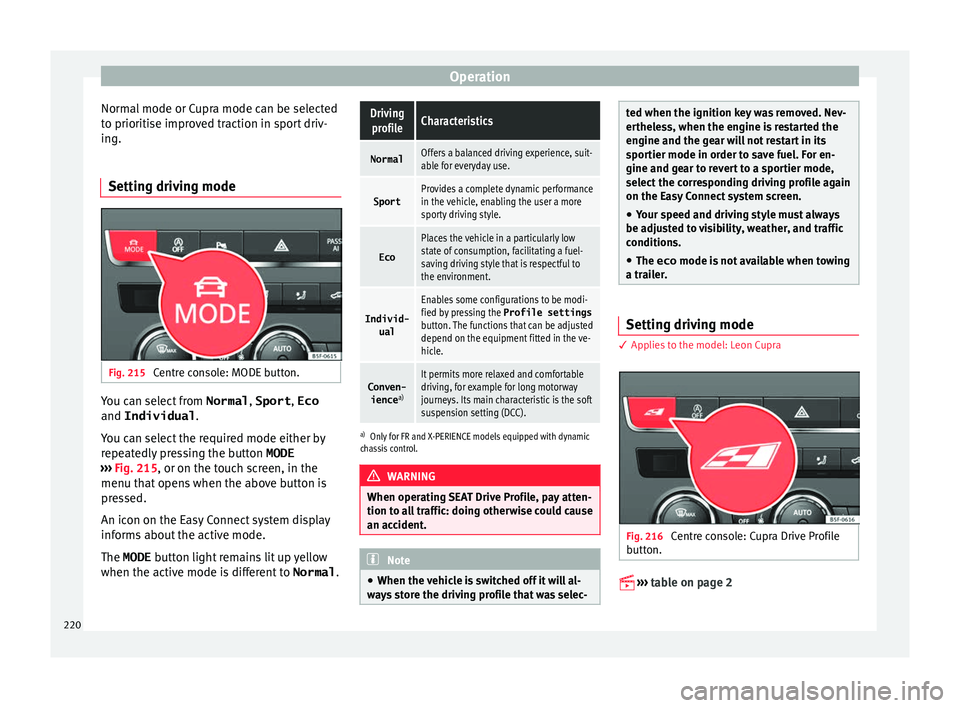
Setting driving mode Fig. 215
Centre console: MODE button. You can select from
Normal, Sport, Eco
and Individual .
Y ou c
an sel
ect the required mode either by
repeatedly pressing the button MODE
››› Fig. 215, or on the touch screen, in the
menu that opens when the above button is
pressed.
An icon on the Easy Connect system display
informs about the active mode.
The MODE button light remains lit up yellow
when the active mode is different to Normal.
Driving
profileCharacteristics
NormalOffers a balanced driving experience, suit-
able for everyday use.
SportProvides a complete dynamic performance
in the vehicle, enabling the user a more
sporty driving style.
Eco
Places the vehicle in a particularly low
state of consumption, facilitating a fuel-
saving driving style that is respectful to
the environment.
Individ- ual
Enables some configurations to be modi-
fied by pressing the Profile settings
button. The functions that can be adjusted
depend on the equipment fitted in the ve-
hicle.
Conven- ience a)It permits more relaxed and comfortable
driving, for example for long motorway
journeys. Its main characteristic is the soft
suspension setting (DCC).
a)
Only for FR and X-PERIENCE models equipped with dynamic
chassis control. WARNING
When operating SEAT Drive Profile, pay atten-
tion to a l
l traffic: doing otherwise could cause
an accident. Note
● When the v ehic
le is switched off it will al-
ways store the driving profile that was selec- ted when the ignition key was removed. Nev-
erthel
e
ss, when the engine is restarted the
engine and the gear will not restart in its
sportier mode in order to save fuel. For en-
gine and gear to revert to a sportier mode,
select the corresponding driving profile again
on the Easy Connect system screen.
● Your speed and driving style must always
be adjus
ted to visibility, weather, and traffic
conditions.
● The eco mode is not
available when towing
a trailer. Setting driving mode
3 App
lies to the model: Leon Cupra Fig. 216
Centre console: Cupra Drive Profile
b utt
on.
›› ›
table on page 2
220