towing Seat Leon 5D 2016 User Guide
[x] Cancel search | Manufacturer: SEAT, Model Year: 2016, Model line: Leon 5D, Model: Seat Leon 5D 2016Pages: 324, PDF Size: 6.93 MB
Page 92 of 324
Emergencies
kit. The towline anchorage should always be
k ept
in the
vehicle.
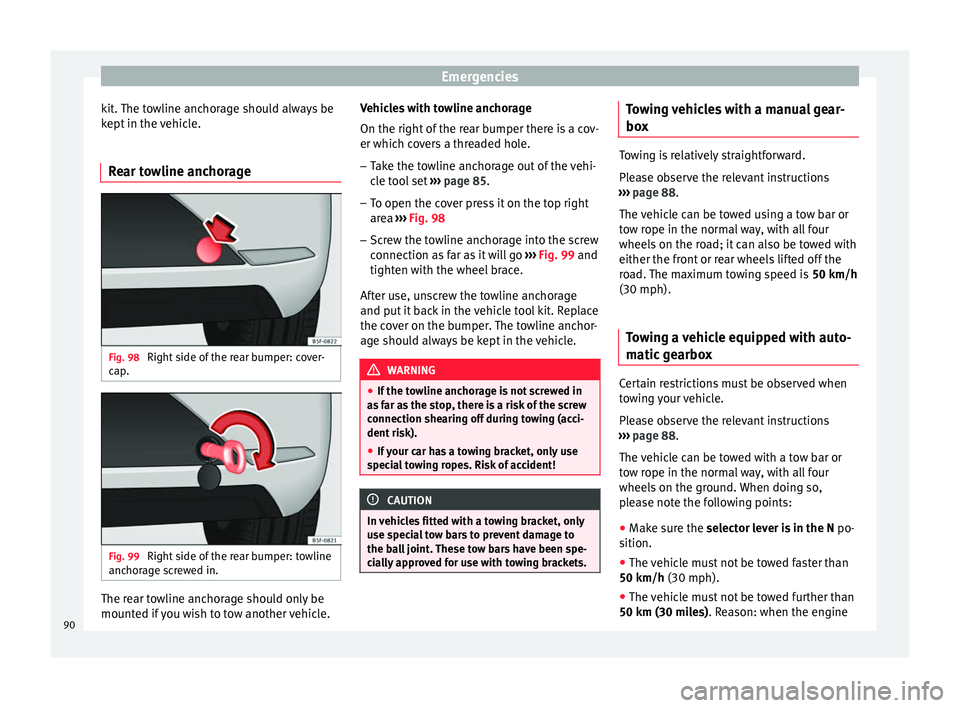
Rear towline anchorage Fig. 98
Right side of the rear bumper: cover-
c ap
. Fig. 99
Right side of the rear bumper: towline
anc hor
ag
e screwed in. The rear towline anchorage should only be
mou
nt
ed if
you wish to tow another vehicle. Vehicles with towline anchorage
On the right of the r
ear bumper there is a cov-
er which covers a threaded hole.
– Take the towline anchorage out of the vehi-
cle t
ool set ››› page 85.
– To open the cover press it on the top right
area ›
›› Fig. 98
– Screw the towline anchorage into the screw
connection as
far as it will go ››› Fig. 99 and
tighten with the wheel brace.
After use, unscrew the towline anchorage
and put it back in the vehicle tool kit. Replace
the cover on the bumper. The towline anchor-
age should always be kept in the vehicle. WARNING
● If the t o
wline anchorage is not screwed in
as far as the stop, there is a risk of the screw
connection shearing off during towing (acci-
dent risk).
● If your car has a towing bracket, only use
speci
al towing ropes. Risk of accident! CAUTION
In vehicles fitted with a towing bracket, only
use s pec
ial tow bars to prevent damage to
the ball joint. These tow bars have been spe-
cially approved for use with towing brackets. Towing vehicles with a manual gear-
bo
x Towing is relatively straightforward.
Ple
a
se observe the relevant instructions
››› page 88.
The vehicle can be towed using a tow bar or
tow rope in the normal way, with all four
wheels on the road; it can also be towed with
either the front or rear wheels lifted off the
road. The maximum towing speed is 50 km/h
(30 mph).
Towing a vehicle equipped with auto-
matic g
earbox Certain restrictions must be observed when
t
o
w
ing your vehicle.
Please observe the relevant instructions
››› page 88.
The vehicle can be towed with a tow bar or
tow rope in the normal way, with all four
wheels on the ground. When doing so,
please note the following points:
● Make sure the selector l
ever is in the N po-
sition.
● The vehicle must not be towed faster than
50 km/h (30 mph).
● The vehicle must not be towed further than
50 km (30 mile
s). Reason: when the engine
90
Page 179 of 324
Driving
To prevent the disc brake of the braked wheel
fr om o
v
erheating, the EDL cuts out automati-
cally if subjected to excessive loads. The ve-
hicle can still be driven. The EDL will switch
on again automatically when the brake has
cooled down.
Tractor-trailer sway mitigation*
If the vehicle is pulling a trailer, it will control
the following: Tractor-trailers tend to sway.
When the swaying of the trailer is felt by the
vehicle and detected by the ESC, it will auto-
matically brake the towing vehicle within the
limits of the system and mitigate the sway.
Tractor-trailer sway mitigation is not available
in all countries.
Electronic torque management (XDS)
When taking a curve, the driveshaft differen-
tial mechanism allows the outer wheel to turn
at a higher speed than the inner wheel. In
this way, the wheel that is turning faster (out-
er wheel) receives less drive torque than the
inner wheel. This may mean that in certain
situations the torque delivered to the inner
wheel is too high, causing the wheels to
spin. On the other hand, the outer wheel is
receiving a lower drive torque than it could
transmit. This causes an overall loss of lateral
grip on the front axle, resulting in understeer
or “lengthening” of the trajectory.
The XDS system can detect and correct this
effect via the sensors and signals of the ESC. Via the ESC, the XDS will brake the inside
wheel and cou
nter the excess driving torque
of that wheel. This means that the driver's
desired trajectory is much more precise.
The XDS system works in combination with
the ESC and is always active, even when ASR
traction control is disconnected, or the ESC in
Sport mode or disconnected.
Multi-collision brake
In an accident, the multi-collision brake can
help the driver by braking to avoid the risk of
skidding during the accident, which could
lead to further collisions.
The multi-collision brake works for front, side
or rear accidents, when the airbag control
unit records its activation level and the acci-
dent takes place at a speed of over 10 km/h
(6 mph). The ESC automatically brakes the
vehicle, as long as the accident has not dam-
aged the ESC, the brake hydraulics or the on-
board network
The following actions control automatic brak-
ing during the accident:
● When the driver presses the accelerator,
the automatic
braking does not take place.
● When the braking pressure through press-
ing the brak
e pedal is greater than the sys-
tem’s braking pressure the vehicle will brake
automatically. ●
Multi-c
ollision braking will not be available
if ESC is malfunctioning. WARNING
● The ESC, ABS, ASR, EDL, el ectr
onic self-
locking differential or selective torque control
systems cannot exceed the limits imposed by
the laws of physics. Always bear this in mind,
especially on wet or slippery roads. If you no-
tice the systems cutting in, you should re-
duce your speed immediately to suit the road
and traffic conditions. Do not be encouraged
to take risks by the presence of more safety
systems. If you do, an accident may occur.
● Please remember that the accident risk al-
way
s increases if you drive fast, especially in
corners or on a slippery road, or if you follow
too close behind the vehicle in front of you.
The ESC, ABS, brake assist, EDL, electronic
self-locking and selective torque control sys-
tems cannot prevent accidents: risk of acci-
dents!
● Accelerate with caution on slippery surfa-
ces
(for example, icy or snow-covered). De-
spite the control systems, the driven wheels
could spin, affecting the stability of the vehi-
cle: risk of accident! Note
● The ABS and ASR w i
ll only operate correctly
if the four wheels have identical tyres. Any
differences in the rolling radius of the tyres
can cause the system to reduce engine power
when this is not desired. » 177
Technical data
Advice
Operation
Emergencies
Safety
Page 186 of 324
Operation
– Onc e
y
ou have engaged a gear press the
accelerator carefully and disengage the
handbrake.
Moving off uphill in vehicles with Hill start
assistant*
– Once you have engaged a gear, release the
footbr
ake and press the accelerator
››› page 179, Hill driving assistant .
Driving down hills: in some situations (on
mountain roads or when towing a trailer or
caravan) it can be advantageous to switch
temporarily to the manual gearbox pro-
gramme so that the gear ratios can be selec-
ted manually to suit the driving conditions
››› .
On l ev
el
ground it is sufficient to move the
selector lever to position P. On slopes, first
engage the parking brake and then put the
selection lever into the P position. This
avoids overloading the locking mechanism
and it will be easier to move the selector lev-
er from position P. WARNING
Observe the safety warnings ›››
in Selector
lev er po
sitions on page 181.
● Never allow the brake to rub and do not use
the brake ped
al too often or for long periods.
Constant braking causes overheating in the
brakes. This could significantly reduce brak- ing power, increase braking distance or even
re
s
ult in the total failure of the brake system.
● To avoid rolling back on gradients always
hold the
vehicle with the footbrake or hand-
brake if you have to stop. CAUTION
● If y
ou stop the vehicle on a gradient, do not
attempt to stop it from rolling by depressing
the accelerator when a gear has been selec-
ted. This could cause overheating and dam-
age the automatic gearbox. Apply the hand-
brake firmly or press the brake pedal in order
to prevent the vehicle from rolling back.
● If you allow the car to roll with the selector
lever in po
sition N with the engine switched
off, the automatic gearbox will be damaged
as it will not be lubricated.
● In certain driving situations or traffic condi-
tions, suc
h as frequently starting, prolonged
“creeping” of the vehicle or traffic jams with
continuous stoppages, the gearbox could
overheat causing damage! If the warning
lamp lights up, stop the vehicle as soon as
possible and wait for the gearbox to cool
››› page 187. Kick-down feature
The kick-down feature allows maximum ac-
c
el
er
ation to be reached. When the accelerator pedal is pressed right
down pa
st the point of resistance at full throt-
tle, the gearbox will shift down to a lower
gear, depending on road speed and engine
speed. The upshift to the next higher gear is
delayed until the engine reaches maximum
rpm. WARNING
Please note that if the road surface is slip-
pery or w
et, the kick-down feature could
cause the driving wheels to spin, which could
result in skidding. Launch control programme
3 V
alid for vehicles: with Launch-Control/6-Speed
D
SG with diesel engines superior to 125 kW and pet-
rol engines superior to 140 kW.
The Launch control programme enables maxi-
mum acceleration.
Important: the engine must have reached op-
erating temperature and the steering wheel
must not be turned.
The engine speed for launch-control is differ-
ent on petrol and diesel engines. To use the
launch-control you must disconnect the anti-
slip regulation (ASR) through the Easy Con-
nect system menu ›››
page 110. The warning
lamp will stay switched on or will flash
slowly depending on whether or not the vehi-
cle has a driver information system*.
184
Page 193 of 324
Driver assistance systems
Driving tips Driv in
g thr
ough flooded roadsTo prevent damage to the vehicle when driv-
ing thr
ough w
ater, for example, along a floo-
ded road, please observe the following:
● The water should never come above the
lower edg
e of the bodywork.
● Drive at pedestrian speed. WARNING
After driving through water, mud, sludge,
etc ., the br
aking effect can be delayed slight-
ly due to moisture build-up on the discs and
brake pads. Applying the brakes carefully
several times will remove the moisture and
restore the full braking effect. CAUTION
● Drivin g thr
ough flooded areas may severely
damage vehicle components such as the en-
gine, transmission, running gear or electrical
system.
● Whenever driving through water, the Start-
Stop sys
tem* must be switched off
››› page 191. Note
● Check the depth of
the water before enter-
ing the flooded zone. ●
Do not s t
op in the water, drive in reverse, or
stop the engine in any situation.
● Note that vehicles travelling in the opposite
direction ma
y splash water that could exceed
the maximum permitted water height for your
vehicle.
● Avoid driving through salt water (corro-
sion). Driver assistance systems
St ar
t
-Stop system*
Description and operation
›› ›
table on page 2
The Start-Stop system helps save fuel and re-
duce CO 2 emissions.
In Start-Stop mode, the engine will automati-
cally switch off when the vehicle stops, when
stopping at traffic lights for example. The ig-
nition remains switched on during the stop-
ping phase. The engine automatically
switches back on when required.
As soon as the ignition is switched on, the
Start-Stop function is automatically activa-
ted.
Basic requirements for the Start-Stop mode
● The driver door must be closed.
● The driver must have their seat belt fas-
tened.
● The bonnet mu
st be closed.
● The vehicle must have travelled at more
than 4 km/h (2 mph) sinc
e the last stop.
● The vehicle cannot be towing a trailer. »
191
Technical data
Advice
Operation
Emergencies
Safety
Page 222 of 324

Operation
Normal mode or Cupra mode can be selected
t o prioriti
se impr
oved traction in sport driv-
ing.
Setting driving mode Fig. 215
Centre console: MODE button. You can select from
Normal, Sport, Eco
and Individual .
Y ou c
an sel
ect the required mode either by
repeatedly pressing the button MODE
››› Fig. 215, or on the touch screen, in the
menu that opens when the above button is
pressed.
An icon on the Easy Connect system display
informs about the active mode.
The MODE button light remains lit up yellow
when the active mode is different to Normal.
Driving
profileCharacteristics
NormalOffers a balanced driving experience, suit-
able for everyday use.
SportProvides a complete dynamic performance
in the vehicle, enabling the user a more
sporty driving style.
Eco
Places the vehicle in a particularly low
state of consumption, facilitating a fuel-
saving driving style that is respectful to
the environment.
Individ- ual
Enables some configurations to be modi-
fied by pressing the Profile settings
button. The functions that can be adjusted
depend on the equipment fitted in the ve-
hicle.
Conven- ience a)It permits more relaxed and comfortable
driving, for example for long motorway
journeys. Its main characteristic is the soft
suspension setting (DCC).
a)
Only for FR and X-PERIENCE models equipped with dynamic
chassis control. WARNING
When operating SEAT Drive Profile, pay atten-
tion to a l
l traffic: doing otherwise could cause
an accident. Note
● When the v ehic
le is switched off it will al-
ways store the driving profile that was selec- ted when the ignition key was removed. Nev-
erthel
e
ss, when the engine is restarted the
engine and the gear will not restart in its
sportier mode in order to save fuel. For en-
gine and gear to revert to a sportier mode,
select the corresponding driving profile again
on the Easy Connect system screen.
● Your speed and driving style must always
be adjus
ted to visibility, weather, and traffic
conditions.
● The eco mode is not
available when towing
a trailer. Setting driving mode
3 App
lies to the model: Leon Cupra Fig. 216
Centre console: Cupra Drive Profile
b utt
on.
›› ›
table on page 2
220
Page 226 of 324

Operation
If the windscreen wiper is
w ork
in
g while you are driving, the signal
with the additional rain sign will be
shown first, on the left, as it is the one
that is applicable at the time.
A sign valid only with restrictions, e.g.
No overtaking at certain times, will be
displayed third ››› Fig. 217 C.
Town or city entrance and exit signs activate
the display of current speed limits in the
country's cities or roads. If there is an addi-
tional speed limit sign next to the town or
city entrance and exit signs, this sign will al-
so be displayed.
Signs indicating the end of a speed limit or
the end of an overtaking prohibition are not
displayed.
No warning will be given if the speed limit
sign displayed is exceeded. The correspond-
ing legal provisions are applicable.
Activating and deactivating traffic sign dis-
play on the instrument panel
The permanent display of traffic signs on the
instrument panel can be activated or deacti-
vated on the infotainment system by means
of the button and the function buttons
S ETUP and
Driv
er As
s
istance .
Ad
dition
al
sign:
Third: Trailer mode
In vehic
les equipped with a towing bracket
device from the factory and a trailer that is
electrically connected to the vehicle, it is pos-
sible to activate or deactivate the display of
specific traffic signs for vehicles with trailer,
such as speed limits or overtaking prohibi-
tions. Activation or deactivation is performed
on the infotainment system by means of
the button and the function buttons
S ETUP and
Driv
er As
s
istance
› ››
p
age 27.
F
atigue detection (break rec-
ommendation)*
Introduction
›› ›
table on page 2
The Fatigue detection informs the driver
when their driving behaviour shows signs of
fatigue. WARNING
Do not let the comfort afforded by the Fatigue
detection sy s
tem tempt you into taking any
risks when driving. Take regular breaks, suffi-
cient in length when making long journeys.
● The driver always assumes the responsibil-
ity of driv
ing to their full capacity.
● Never drive if you are tired. ●
The sys t
em does not detect the tiredness of
the driver in all circumstances. Consult the in-
formation in the section ››› page 225, System
limitations.
● In some situations, the system may incor-
rectly int
erpret an intended driving manoeu-
vre as driver tiredness.
● No warning is given in the event of the ef-
fect c
alled microsleep!
● Please observe the indications on the in-
strument p
anel and act as is necessary. Note
● Fatigue det ection h
as been developed for
driving on motorways and well paved roads
only.
● If there is a fault in the system, have it
check
ed by a specialised workshop.224
Page 229 of 324

Driver assistance systems
●
Ple a
se observe information on towing a
trailer ››› page 230.
● The display on the Easy Connect screen
shows
a slight time delay. Rear parking aid*
The rear Parking Aid assists the driver in
park
in
g by means of audible warning
sounds.
Description
There are sensors integrated in the rear
bumper. When the sensors detect an obsta-
cle, you are alerted by audible warnings.
Make particularly sure that the sensors are
not covered by adhesives, residues and the
like, as this could affect the system's opera-
tion. Cleaning instructions ››› page 248.
The approximate measurement range of the
rear sensors is:
side area0.60 m
central area1.60 m As you approach the obstacle, the time inter-
v
al
betw
een the audible warnings will be re-
duced. When you reach around 0.30 m the
warning will be constant: Do not continue to
move forward (or backward) ››› in Generalinformation on page 226,
››
›
in General in-
f orm
ation on p
age 226 !
If you maintain separation from the obstacle,
the volume of the warning begins to reduce
after four seconds (does not affect the tone
of the constant warning).
Activating/Deactivating
When engaging reverse gear, the parking aid
is automatically switched on. This is con-
firmed with a short warning.
On disengaging reverse gear, the Parking Aid
system is disconnected immediately.
Parking system plus* Fig. 219
Represented area. Parking system plus assists you audibly and
v
i
s
ually when parking. There are sensors integrated in the front and
rear b
umpers. When they detect an obstacle,
you are alerted by audible warnings and visu-
ally on the Easy Connect system.
In the event of danger of a frontal collision,
the audible warnings come from the front of
the vehicle, and in the event of the danger of
a rear-end collision they come from the rear.
Make particularly sure that the sensors are
not covered by adhesives, residues and the
like, as this could affect the system's opera-
tion. Cleaning instructions ››› page 248.
The approximate measurement range of the
sensors is:
1.20 m
0.60 m
1.60 m
0.60 m
As you approach the obstacle, the time inter-
val between the audible warnings will be re-
duced. When you reach around 0.30 m the
warning will be constant: do not continue to
move forward (or backward)!
If you maintain separation from the obstacle,
the volume of the warning begins to reduce
after four seconds (does not affect the tone
of the constant warning). A B
C
D
227
Technical data
Advice
Operation
Emergencies
Safety
Page 232 of 324

Operation
Moreover, with the SEAT Media System
Plu s/Nav
i
System radios, a yellow trail indi-
cates the vehicle's expected journey based
on the steering wheel angle.
Whenever the obstacle is located in the vehi-
cle’s direction of travel, the corresponding
audible warning will sound.
As the vehicle approaches an obstacle, the
segments are displayed closer to the vehicle.
When the penultimate segment is displayed,
this means that the vehicle has reached the
collision zone. In the collision zone, the ob-
stacles are represented in red, including
those out of the path. Do not continue to
move forward (or backward) ››› in General
inf orm
ation on p
age 226, ››› in General in-
f orm
ation on p
age 226 !
Adjusting the display and audible
warning
s The settings for the display and audible
w
arnin
g
s are controlled via the Easy Con-
nect*.
Automatic activation
on – activates the Automatic activa-
tion option ›››
page 229.
off – deactivates the Automatic ac-
tivation option ››› page 229. Front volume*
Volume in the fr
ont and rear area.
Front sound settings/sharpness*
Frequency (tone) of the sound in the front
area.
Rear volume*
Volume in the rear area.
Rear sound settings/sharpness*
Frequency (tone) of the sound in the rear
area.
Adjust volume
With the parking aid switched on, the active
audio/video source volume will be reduced
to the intensity of the selected setting.
Error messages When the Parking Aid is activated or when it
i
s
sw
itched on, if a message reporting a Park-
ing aid error is displayed on the instrument
panel, there is a fault in the system.
If the fault doesn't disappear before discon-
necting the ignition, next time that parking
aid is engaged in reverse, it will not be indi-
cated. Parking System Plus*
If there i
s a fault in the parking aid system a
message will appear on the instrument panel
indicating the error. In addition the key
LED will blink.
If there is a fault in a sensor, the symbol is
displayed on the Easy Connect display in
front of/behind the vehicle. If a rear sensor is
faulty, only the obstacles in the areas A and
B are displayed
››
›
Fig. 219. If a front sensor
is faulty, only the obstacles in the areas C and
D are displayed.
Hav e the f
au
lt corrected by a specialised
workshop without delay.
Towing bracket In vehicles equipped with a towing bracket
dev
ic
e fr
om the factory, when the trailer is
connected electrically, the Parking Aid rear
sensors will not be activated when reverse
gear is engaged, when the selector lever is
turned to position R or when the button is
pressed.
Parking System Plus
The distance to possible obstacles at the rear
of the vehicle will not be displayed on the
screen and nor will it be indicated by means
of audible sound signals.
230
Page 236 of 324

Operation
Meaning of the orientation lines
› ›
›
Fig. 224
Side lines: extension of the vehicle (the
approximate width of the vehicle plus the
rear view mirrors) on the road surface.
End of the side lines: the area marked in
green ends approximately 2 m behind
the vehicle on the road surface.
Intermediate line: indicates a distance of
approximately 1 m behind the vehicle on
the road surface.
Red horizontal line: indicates a safe dis-
tance of approximately 40 cm at the rear
of the vehicle on the road surface.
Parking manoeuvre
● Place the vehicle in front of the parking
spac
e and engage reverse gear (manual
gearbox) or move the selector to the R posi-
tion (automatic gearbox).
● Reverse slowly, and turn the steering wheel
so that the s
ide orientation lines lead to-
wards the parking space.
● Guide the vehicle into the parking space so
that the s
ide orientation lines run parallel to
it. 1
2
3
4 Towing bracket device
T o
w
ing bracket device*
Introduction The towing bracket device fitted to your vehi-
cl
e, be it
factory-fitted or a genuine SEAT ac-
cessory, meets all the national technical and
legal requirements for towing.
Your vehicle is fitted with a 13-pin connector
for the electrical connection between the
trailer and the vehicle. If the trailer is equip-
ped with a 7-pin connector you can use the
corresponding available adaptor that is a
genuine SEAT accessory.
The maximum authorised towing load is
80 kg. WARNING
● Bef or
e each journey, make sure that the de-
tachable ball joint is properly fitted and se-
cured in its housing.
● If the detachable ball joint is not properly
fitted and secur
ed, do not use it.
● Do not use the towing bracket device for
tow
ing if it is damaged or has missing parts.
● Do not modify or adapt the towing device
connection.
● Never u
nhook the detachable ball joint
when the trail
er is hitched. CAUTION
Handle the detachable ball joint with care in
order t o av
oid damaging the bumper paint-
work. Note
Towing the vehicle with the detachable ball
joint ›
›› page 90. Description
Fig. 225
Towing bracket device support / de-
t ac h
able ball joint / key 234
Page 237 of 324

Towing bracket device
Depending on the country or version, the
t o
w
ing bracket device's detachable ball joint
is located:
● underneath the floor panel of the luggage
compar
tment.
● or else on the surf
ace of the floor panel of
the luggage compartment in a bag secured
to the fastening rings.
The ball joint is fitted and removed by hand.
The towing device bracket is supplied with a
key.
Key to ››› Fig. 225
13-pin connector
Safety lug
Hook housing
Hook housing cap
Ball protective cover
Detachable ball
Locking lever
Lock cover
Release bolt
Lock
Locking balls
Key
1 2
3
4
5
6
7
8
9
10
11
12 Note
Contact an Authorised Service Partner if you
lose y
our key. Placing in standby position
Fig. 226
Step 1 Fig. 227
Step 2 Before assembling it, place the detachable
b
al
l
in the standby position with the follow-
ing two steps.
Step 1
● Turn the key in the direction of arrow 1 un-
ti l
the p
art of the key with the holes reaches
the top position ››› Fig. 226.
Step 2
● Grip the detachable ball below the protec-
tive co
ver.
● Press the release bolt B in the direction of
arr o
w 2 , and at the same time press lever
C in the direction of arrow
3 as far as it will
g o
›
›
› Fig. 227.
The lever will remain blocked in this position.
235
Technical data
Advice
Operation
Emergencies
Safety