ignition Seat Leon 5D 2016 Owner's Guide
[x] Cancel search | Manufacturer: SEAT, Model Year: 2016, Model line: Leon 5D, Model: Seat Leon 5D 2016Pages: 324, PDF Size: 6.93 MB
Page 79 of 324
Airbag system
travel on the rear seat. Never transport
chi
l
dren in the vehicle if they are not restrain-
ed or the restraint system is not appropriate
for their age, size or weight.
● If you are not wearing a seat belt, or if you
lean f
orward or to the side while travelling or
assume an incorrect sitting position, there is
a substantially increased risk of injury. This
increased risk of injury will be further in-
creased if you are struck by an inflating air-
bag.
● To reduce the risk of injury from an inflating
airbag, alw
ays wear the seat belt properly
››› page 71.
● Always adjust the front seats properly. Description of the airbag system
Read the additional information carefully
› ›
›
page 16.
The airbag system is not a substitute for the
seat belts. The airbag system offers addition-
al protection for the driver and passenger in
combination with the seat belts.
The airbag system comprises the following
modules (as per vehicle equipment):
● Electronic control unit
● Front airbags for driver and passenger
● Knee airbag for the driver
● Side airbags ●
Head airb
ag
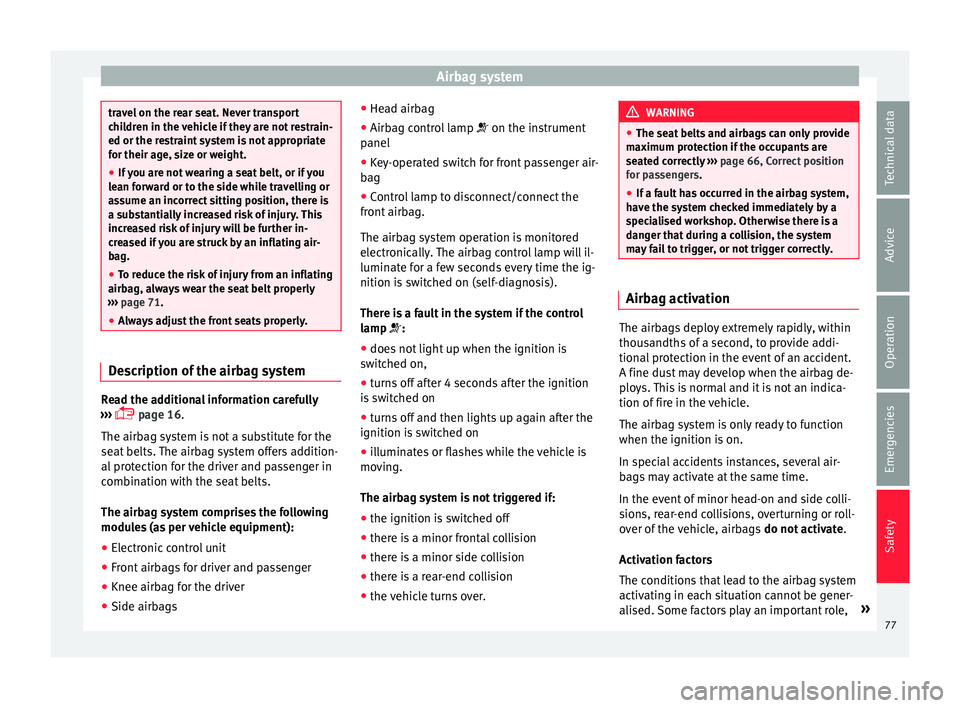
● Airbag control lamp on the instrument
p
anel
● Key-operated switch for front passenger air-
bag
● Contr
ol lamp to disconnect/connect the
front airb
ag.
The airbag system operation is monitored
electronically. The airbag control lamp will il-
luminate for a few seconds every time the ig-
nition is switched on (self-diagnosis).
There is a fault in the system if the control
lamp :
● does not light up when the ignition is
switc
hed on,
● turns off after 4 seconds after the ignition
is sw
itched on
● turns off and then lights up again after the
ignition is sw
itched on
● illuminates or flashes while the vehicle is
movin
g.
The airbag system is not triggered if:
● the ignition is switched off
● there is a minor frontal collision
● there is a minor side collision
● there is a rear-end collision
● the vehicle turns over. WARNING
● The seat belt
s and airbags can only provide
maximum protection if the occupants are
seated correctly ››› page 66, Correct position
for passengers.
● If a fault has occurred in the airbag system,
have the sy
stem checked immediately by a
specialised workshop. Otherwise there is a
danger that during a collision, the system
may fail to trigger, or not trigger correctly. Airbag activation
The airbags deploy extremely rapidly, within
thou
s
andths
of a second, to provide addi-
tional protection in the event of an accident.
A fine dust may develop when the airbag de-
ploys. This is normal and it is not an indica-
tion of fire in the vehicle.
The airbag system is only ready to function
when the ignition is on.
In special accidents instances, several air-
bags may activate at the same time.
In the event of minor head-on and side colli-
sions, rear-end collisions, overturning or roll-
over of the vehicle, airbags do not activate.
Activation factors
The conditions that lead to the airbag system
activating in each situation cannot be gener-
alised. Some factors play an important role, »
77
Technical data
Advice
Operation
Emergencies
Safety
Page 82 of 324
Safety
●
The side and he a
d airbags are managed
through sensors located in the interior of the
front doors. To ensure the correct operation of
the side and curtain airbags neither the
doors nor the door panels should be modified
in any way (e.g. fitting loudspeakers). If the
front door is damaged, the airbag system
may not work correctly. All work carried out
on the front door must be done in a special-
ised workshop. Deactivating airbags
D e
activ
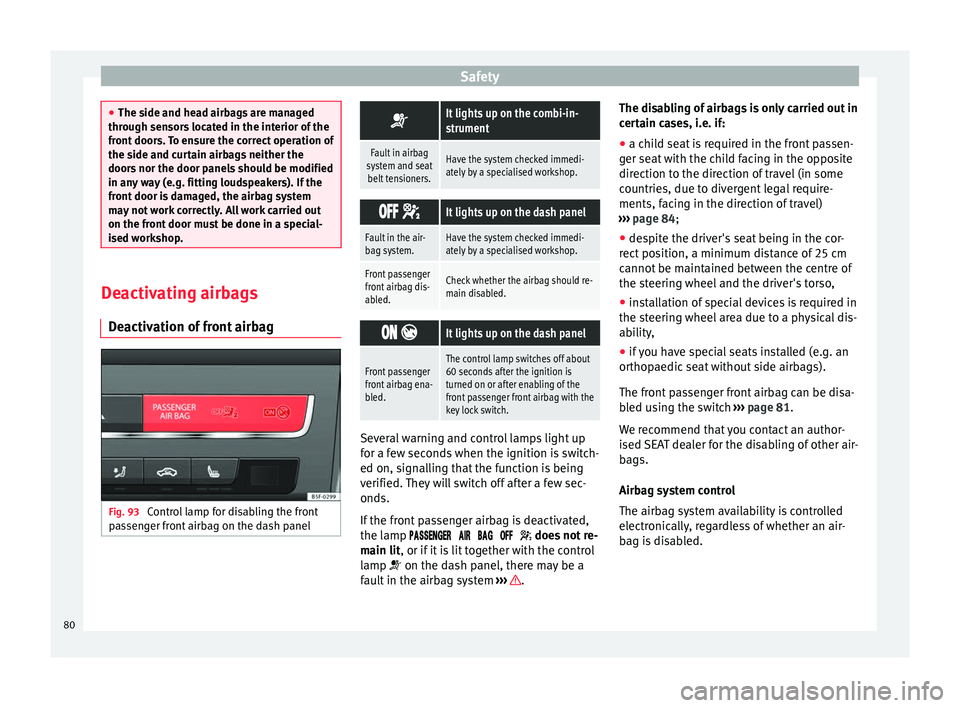
ation of front airbag Fig. 93
Control lamp for disabling the front
p a
s
senger front airbag on the dash panel
It lights up on the combi-in-
strument
Fault in airbag
system and seat belt tensioners.Have the system checked immedi-
ately by a specialised workshop.
It lights up on the dash panel
Fault in the air-
bag system.Have the system checked immedi-
ately by a specialised workshop.
Front passenger
front airbag dis-
abled.Check whether the airbag should re-
main disabled.
It lights up on the dash panel
Front passenger
front airbag ena-
bled.The control lamp switches off about
60 seconds after the ignition is
turned on or after enabling of the
front passenger front airbag with the
key lock switch. Several warning and control lamps light up
f
or a f
ew sec
onds when the ignition is switch-
ed on, signalling that the function is being
verified. They will switch off after a few sec-
onds.
If the front passenger airbag is deactivated,
the lamp does not re-
main lit, or if it is lit together with the control
lamp on the dash panel, there may be a
fault in the airbag system ››› .The disabling of airbags is only carried out in
c
er
t
ain cases, i.e. if:
● a child seat is required in the front passen-
ger seat
with the child facing in the opposite
direction to the direction of travel (in some
countries, due to divergent legal require-
ments, facing in the direction of travel)
››› page 84;
● despite the driver's seat being in the cor-
rect po
sition, a minimum distance of 25 cm
cannot be maintained between the centre of
the steering wheel and the driver's torso,
● installation of special devices is required in
the steerin
g wheel area due to a physical dis-
ability,
● if you have special seats installed (e.g. an
orthopaedic
seat without side airbags).
The front passenger front airbag can be disa-
bled using the switch ››› page 81.
We recommend that you contact an author-
ised SEAT dealer for the disabling of other air-
bags.
Airbag system control
The airbag system availability is controlled
electronically, regardless of whether an air-
bag is disabled.
80
Page 83 of 324
Airbag system
If an airbag was disabled using a diagnostics
sy s
t
em:
● the airbag system warning lamp illumi-
n
ates after switching on the ignition for
about 4 seconds, and then flashes for about
12 seconds.
If the airbag has been disabled with the air-
bag switch on the side of the dash panel:
● the airbag control lamp wil
l illuminate
for about 4 seconds after the ignition is
switched on,
● The airbag is disabled, signalled with the
warning l
amp which lights up with the
word placed in the cen-
tre part of the dash panel ››› Fig. 94. WARNING
In the event of a fault in the airbag system,
the airbag m a
y not trigger correctly, may fail
to trigger or may even trigger unexpectedly,
leading to severe or fatal injuries.
● Have the airbag system checked immedi-
ately b
y a specialised workshop.
● Never mount a child seat in the front pas-
senger se
at or remove the mounted child
seat! The front passenger front airbag may
deploy during an accident in spite of the
fault. CAUTION
Always pay attention to any lit control lamps
and to the c orr
esponding descriptions and in-
structions to avoid damage to the vehicle. Note
● Fo l
low the current legislation in your coun-
try regarding the disabling of airbags.
● At your authorised SEAT dealer you can find
information on whic
h vehicle airbags can be
disabled. Front passenger front airbag switch
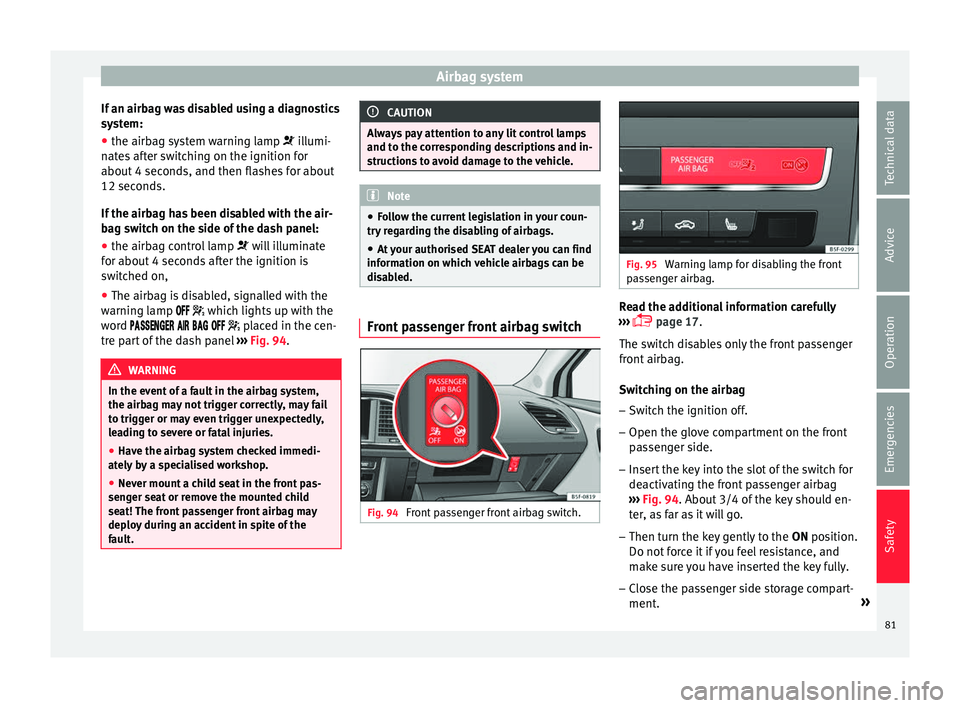
Fig. 94
Front passenger front airbag switch. Fig. 95
Warning lamp for disabling the front
pa s
senger airbag. Read the additional information carefully
› ›
›
page 17.
The switch disables only the front passenger
front airbag.
Switching on the airbag
– Switch the ignition off.
– Open the glove compartment on the front
pas
senger side.
– Insert the key into the slot of the switch for
deactivatin
g the front passenger airbag
››› Fig. 94. About 3/4 of the key should en-
ter, as far as it will go.
– Then turn the key gently to the ON position.
Do not
force it if you feel resistance, and
make sure you have inserted the key fully.
– Close the passenger side storage compart-
ment. »
81
Technical data
Advice
Operation
Emergencies
Safety
Page 84 of 324

Safety
– Chec k, w
ith the ignition sw
itched on, that
the control lamp ››› Fig. 95 does not
light up, with the word
in the centre part of the dash panel.
– The warning lamp
is illuminated for
60 seconds in the centre part of the dash
panel.
Control lamp with the word
(front passenger airbag disabled)
If the front passenger front airbag is disa-
bled, after switching on the ignition, the con-
trol lamp will light up for several seconds,
then it will switch off for about 1 s and then
switch on again.
If the control lamp is flashing, there is a fault
in the disabling of the airbag system ››› .
Pl e
a
se go immediately to an Official Service. WARNING
● The driver of the
vehicle is responsible for
disabling or switching on the airbag.
● Always switch off the ignition before disa-
bling the fr
ont passenger airbag! Failure to do
so could result in a fault in the airbag deacti-
vation system.
● Never leave the key in the airbag disabling
switc
h as it could get damaged or enable or
disable the airbag during driving.
● If the (airbag dis
abled) control lamp
flashes, the front passenger front airbag will
not trigger in the event of an accident! Have the system immediately checked by an Offi-
ci
a
l Service. Transporting children safely
Saf ety
f
or children
Introduction For safety reasons, as we have learned from
acc
ident
statistics, we recommend that chil-
dren under 12 years of age travel in the rear
seats. Depending on their age, height and
weight, children travelling in rear seats must
use a child seat or a seat belt. For safety rea-
sons, the child seat should be installed in the
rear seat, behind the front passenger seat or
in the centre back seat.
The physical laws involved and the forces
acting in a collision apply also to children
››› page 73. But unlike adults, children do not
have fully developed muscle and bone struc-
tures. This means that children are subject to
a greater risk of injury.
To reduce the risk of injuries, children must
always use special child restraint systems
when travelling in the vehicle.
We recommend the use of child safety prod-
ucts from the SEAT Original Accessories Pro-
gramme, which includes systems for all ages
made by “Peke” (not for all countries).
These systems have been especially de-
signed and approved, complying with the
ECE-R44. regulation.
82
Page 90 of 324
Emergencies
they should be changed if they are damaged,
or c l
e
aned if they are dirty ››› .
Dam ag
ed w
iper blades should be replaced
immediately. These are available from quali-
fied workshops. WARNING
Worn or dirty wiper blades reduce visibility
and incr e
ase the risk of accident and serious
injury.
● Always replace damaged or worn blades or
bla
des which do not clean the windscreen
correctly. CAUTION
● Damag ed or dir
ty windscreen wipers could
scratch the glass.
● If products containing solvents, rough
spong
es or sharp objects are used to clean
the blades, the graphite layer will be dam-
aged.
● Never use fuel, nail varnish remover, paint
thinner or simil
ar products to clean the win-
dows.
● In icy conditions, always check that the
wiper bl
ades are not frozen to the glass be-
fore using the wipers. In cold weather, it may
help to leave the vehicle parked with the wip-
ers in service position ›››
page 63. CAUTION
● To pr ev
ent damage to the bonnet and the
wiper arms, only leave them in the service
position.
● Before driving, always lower the wiper
arms. Towing and tow-starting the ve-
hicl
e
Gener
al information Read the additional information carefully
› ›
›
page 60.
Tow-starting means starting the engine of
the vehicle while another pulls it.
Towing means one vehicle pulling another
that is not roadworthy.
If the vehicle comes with the Keyless Access
system, towing is only allowed with the igni-
tion on!
The vehicle battery drains if the vehicle is
towed with the engine switched off and the
ignition connected. Depending on the battery
charge status, the drop in voltage may be so
large, even after just a few minutes, that no
electrical device in the vehicle may work e.g.
the hazard warning lights. In vehicles with the Keyless Access system, the steering
wheel cou
ld lock up. WARNING
If the vehicle has no electrical power, the
brak e light
s, turn signals and all other lights
will no longer function. Do not have the vehi-
cle towed away. Failure to follow this instruc-
tion could result in an accident. WARNING
The risk of accidents is high when tow-start-
ing, f or e
xample, the towed vehicle can easily
be driven into the towing vehicle. CAUTION
If there is no oil in the gearbox or no lubricant
in the autom atic
transmission the car may
only be towed with the driven wheels lifted
clear of the road, or transported on a special
car transporter or trailer. CAUTION
Do not tow a vehicle for more than 50 m in at-
tempt t
o start it. There is risk of damage to
the catalytic converter. Note
● Ple a
se observe related legal requirements.88
Page 91 of 324
Self-help
●
Swit c
h on the hazard warning lights of both
vehicles. However, observe any regulations
to the contrary.
● The tow rope must not be twisted. Other-
wise the fr
ont tow line anchorage could be
pulled off the vehicle. Indications for tow-starting
Vehicle's should not generally be tow-star-
ted.
The jump s
tart should be used instead
››› page 61.
For technical reasons, towing the following
vehicles is not allowed:
● Vehicles with an automatic gearbox.
● If the vehicle battery is discharged, be-
cau se in
vehicles with the Keyless Access
locking and ignition system the steering re-
mains locked and the electronic parking
brake cannot be deactivated nor can the elec-
tronic lock of the steering column be re-
leased if they are activated.
● If the battery is flat, it is possible that the
engine contr
ol units may not operate correct-
ly.
However, if the vehicle must absolutely be
tow-started (in the case of manual gearbox-
es):
● Engage the 2nd or 3rd gear. ●
Keep the clut
ch pressed down.
● Switch on the ignition and the hazard warn-
ing lights.
● Once both
vehicles are moving, release the
clutc
h.
● Once the engine starts, press the clutch
and diseng
age the gear to avoid colliding
with the towing vehicle. Note
The vehicle can only be tow-started if the
electr onic
parking brake and, if appropriate,
the electronic lock of the steering column are
deactivated. If the vehicle has no power sup-
ply or there is an electric system fault, the
engine must be tow-started to deactivate the
electronic parking brake and the electronic
lock of the steering column. Anchoring the front tow line
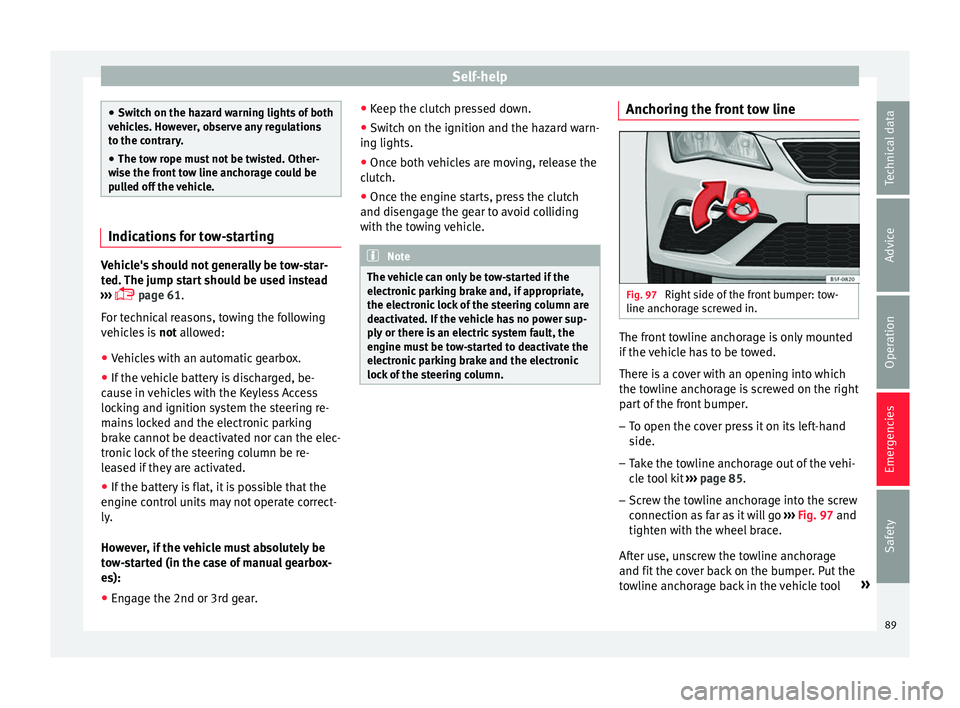
Fig. 97
Right side of the front bumper: tow-
line anc hor
ag
e screwed in. The front towline anchorage is only mounted
if
the
v
ehicle has to be towed.
There is a cover with an opening into which
the towline anchorage is screwed on the right part of the front bumper.
– To open the cover press it on its left-hand
side.
– Tak
e the towline anchorage out of the vehi-
cle t
ool kit ››› page 85.
– Screw the towline anchorage into the screw
connection as
far as it will go ›››
Fig. 97 and
tighten with the wheel brace.
After use, unscrew the towline anchorage
and fit the cover back on the bumper. Put the
towline anchorage back in the vehicle tool »
89
Technical data
Advice
Operation
Emergencies
Safety
Page 93 of 324
Fuses and bulbs
is not running, the gearbox oil pump does
not w
ork
and the gearbox is not adequately
lubricated for higher speeds or longer distan-
ces.
If the vehicle has to be towed with a break-
down truck, it must only be suspended at the
front wheels. Reason: the drive shafts are lo-
cated on the front wheels. If the car is towed
with the rear wheels lifted off the road (I.e.
travelling backwards), the drive shafts also
turn backwards. The planetary gears in the
automatic gearbox then turn at such high
speeds that the gearbox will be severely
damaged in a short time. Note
● If it i
s not possible to tow the vehicle in the
normal way, or if it has to be towed further
than 50 km (30 miles), it must be transported
on a special car transporter or trailer.
● Should the power supply to the selector
lever be int
errupted in position P, the selector
lever will be locked. Before the vehicle can be
recovered/manoeuvred you must manually
release the selector lever ›››
page 43. Fuses and bulbs
F u
se
s
Introduction In general, a fuse can be assigned to various
electric
al
components. Likewise, an electrical
component can be protected by several
fuses.
Only replace fuses when the cause of the
problem has been solved. If a newly inserted
fuse blows after a short time, you must have
the electrical system checked by a special-
ised workshop as soon as possible. WARNING
The high voltages in the electrical system can
give seriou s
electrical shocks, causing burns
and even death!
● Never touch the electrical wiring of the igni-
tion syst
em.
● Take care not to cause short circuits in the
electrica
l system. WARNING
Using unsuitable fuses, repairing fuses or
bridging a c urr
ent circuit without fuses can
cause a fire and serious injury. ●
Never u se a f
use with a higher value. Only
replace fuses with a fuse of the same amper-
age (same colour and markings) and size.
● Never repair a fuse.
● Never replace a fuse by a metal strip, staple
or simil
ar. CAUTION
● To pr ev
ent damage to the vehicle's electric
system, before replacing a fuse always turn
off the ignition, the lights and all electrical
elements and remove the key from the igni-
tion.
● If you replace a fuse with higher-rating
fuse,
you could cause damage to another part
of the electrical system.
● Protect the fuse boxes when open to pre-
vent the entr
y of dust or humidity as they can
damage the electrical system. Note
● One component m
ay have more than one
fuse.
● Several components may run on a single
fuse. 91
Technical data
Advice
Operation
Emergencies
Safety
Page 96 of 324
Emergencies
If you choose to change the engine compart-
ment l
amp
s yourself, remember that it is a
dangerous area ››› in Work in the engine
c omp
ar
tment on page 262.
Always use identical bulbs with the same
designation. The name can be found on the
base of the bulb holder.
Depending on how equipped the vehicle is,
there are different sets of headlights and tail
lights:
● Halogen headlights
● Full-LED main headlights*
● Halogen headlights with LED daytime run-
ning lights*
● Re
ar bulb light
● LED rear light*
Ful
l-LED headlight system*
Full-LED headlights handle all light functions
(daylight, side light, turn signal, dipped
beam and route light) with light emitting di-
odes (LEDs) as a light source.
Full-LED headlights are designed to last the
lifetime of the car and light bulbs cannot be
replaced. In case of headlight failure, go to
an authorised workshop to have it replaced. WARNING
● Tak e p
articular care when working on com-
ponents in the engine compartment if the en-
gine is warm. Risk of burns.
● Bulbs are highly sensitive to pressure. The
glas
s can break when you touch the bulb,
causing injury.
● When changing bulbs, please take care not
to injure
yourself on sharp edges, in particu-
lar on the headlight housing. CAUTION
● Remo v
e the ignition key before working on
the electric system. Otherwise, a short circuit
could occur.
● Switch off the lights and the parking light
before c
hanging a bulb.
● Take good care to avoid damaging any com-
ponents. For the sake of the environment
Please ask your specialist retailer how to dis-
pose of u
sed bulbs in the proper manner. Note
● Ple a
se check at regular intervals that all
lighting (especially the exterior lighting) on
your vehicle is functioning properly. This is
not only in the interest of your own safety,
but also that of all other road users. ●
Bef or
e changing a bulb, make sure you
have the correct new bulb.
● Do not touch the glass part of the bulb with
your bar
e hands, use a cloth or paper towel
instead, since the fingerprints left on the
glass will vaporise as a result of the heat gen-
erated by the bulb, they will be deposited on
the reflector and will impair its surface. 94
Page 105 of 324
Controls and displays
Operation
C ontr
o
ls and displays
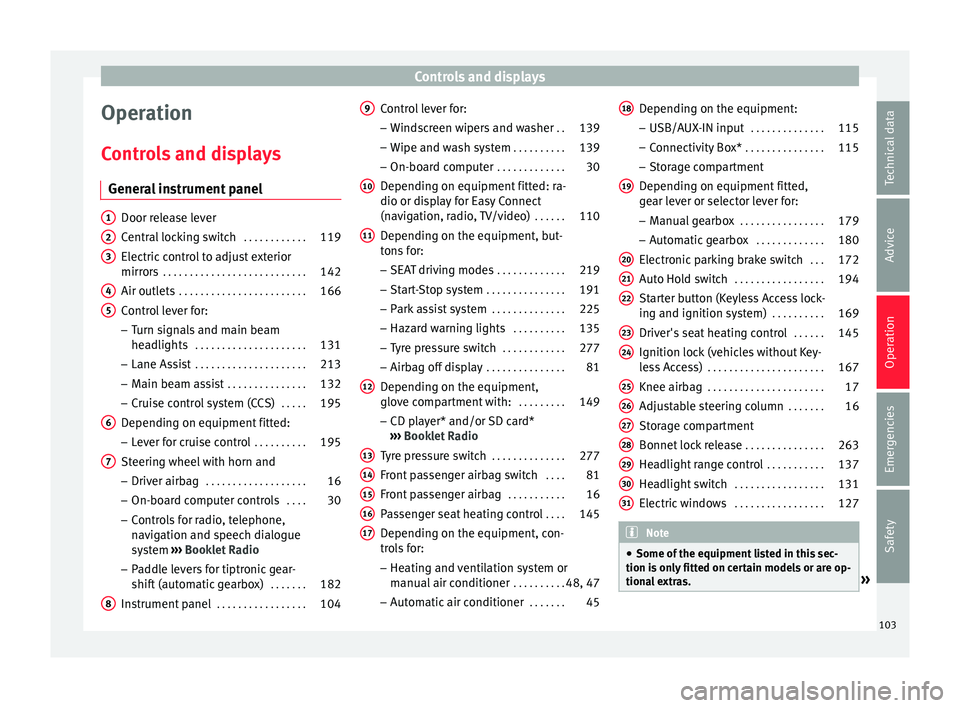
General instrument panel Door release lever
Centr
al
locking switch . . . . . . . . . . . .119
Electric control to adjust exterior
mirrors . . . . . . . . . . . . . . . . . . . . . . . . . . . 142
Air outl
ets . . . . . . . . . . . . . . . . . . . . . . . . 166
Control lever for:
– Turn s ign
als and main beam
headlights . . . . . . . . . . . . . . . . . . . . . 131
– Lane Ass i
st . . . . . . . . . . . . . . . . . . . . . 213
– Main beam a
ssist . . . . . . . . . . . . . . . 132
– Cruise c
ontrol system (CCS) . . . . .195
Depending on equipment fitted:
– Lev er f
or cruise control . . . . . . . . . .195
Steering wheel with horn and – Driver airbag . . . . . . . . . . . . . . . . . . . 16
– On-boar d c
omputer controls . . . .30
– Contro
ls for radio, telephone,
navigation and speech dialogue
system ›››
Booklet Radio
– Paddle levers for tiptronic gear-
shift (automatic gearbox) . . . . . . .182
Instrument panel . . . . . . . . . . . . . . . . . 104
1 2
3
4
5
6
7
8 Control lever for:
– Wind
s
creen wipers and washer . .139
– Wipe and wa
sh system . . . . . . . . . . 139
– On-board c
omputer . . . . . . . . . . . . . 30
Depending on equipment fitted: ra-
dio or disp
lay for Easy Connect
(navigation, radio, TV/video) . . . . . .110
Depending on the equipment, but-
tons
for:
– SEAT driving modes . . . . . . . . . . . . .219
– Star t
-Stop system . . . . . . . . . . . . . . . 191
– Park a
ssist system . . . . . . . . . . . . . . 225
– Hazard w
arning lights . . . . . . . . . .135
– Tyr
e pressure switch . . . . . . . . . . . .277
– Airbag off di
splay . . . . . . . . . . . . . . . 81
Depending on the equipment,
glov e c
ompartment with: . . . . . . . . .149
– CD pl a
yer* and/or SD card*
››› Booklet Radio
Tyre pressure switch . . . . . . . . . . . . . .277
Front passenger airbag switch . . . .81
Front passenger airbag . . . . . . . . . . .16
Passenger seat heating control . . . .145
Depending on the equipment, con-
tro l
s for:
– Heating and ventilation system or
manual air conditioner . . . . . . . . . .48, 47
– Autom atic
air conditioner . . . . . . .45
9
10
11
12
13
14
15
16
17 Depending on the equipment:
– USB/A UX
-IN inp
ut . . . . . . . . . . . . . . 115
– Connectivity
Box* . . . . . . . . . . . . . . . 115
– Storag
e compartment
Depending on equipment fitted,
gear lever or selector lever for: – Manual gearbox . . . . . . . . . . . . . . . . 179
– Automatic
gearbox . . . . . . . . . . . . . 180
Electronic parking brake switch . . .172
Auto Hold switch . . . . . . . . . . . . . . . . . 194
Starter button (Keyless Access lock-
ing and ignition sys
tem) . . . . . . . . . . 169
Driver's seat heating control . . . . . .145
Ignition lock (vehicles without Key-
les
s Access) . . . . . . . . . . . . . . . . . . . . . . 167
Knee airbag . . . . . . . . . . . . . . . . . . . . . . 17
Adjustable steering column . . . . . . .16
Storage compartment
Bonnet lock
release . . . . . . . . . . . . . . . 263
Headlight range control . . . . . . . . . . .137
Headlight switch . . . . . . . . . . . . . . . . . 131
Electric windows . . . . . . . . . . . . . . . . . 127 Note
● Some of the equipment li
sted in this sec-
tion is only fitted on certain models or are op-
tional extras. » 18
19
20
21
22
23
24
25
26
27
28
29
30
31
103
Technical data
Advice
Operation
Emergencies
Safety
Page 108 of 324
Operation
● Sec ond s
peed di
splay ›››
page 30.
● Speed warning function ›››
page 37.
● Start-Stop system status display
›››
page 191.
● Active cylinder management display
(ACT ®
)* ››
› page 188
● Signs recognised by the traffic signal de-
tection sys
tem ››› page 222
● Low consumption driving status (ECO)
›››
page 106
● Identifying letters on engine (MKB).
Dist
ance travelled
The odometer registers the total distance
travelled by the car.
The odometer (trip ) shows the distance
travelled since the last odometer reset. The
last digit of the trip recorder indicates distan-
ces of 100 metres or one tenths of a mile.
● Briefly press the button ›››
Fig. 120 4 to re-
set the trip r
ec
order to 0.
● Keep the button 4 pressed for about 3
sec ond
s
and the previous value will be dis-
played.
Time
● To set the time, keep the button ›››
Fig. 120
4 pressed for more than 3 seconds to select
the hour or minut e di
s
play. ●
To continue settin
g the time, press the up-
per or lower part of the button 4 . Hold but-
t on do
wn t
o scroll through the numbers
quickly.
● Press the button 4 again in order to finish
settin g the time.
The time c an al
so be set via the button
and S
ETUP function button in the Easy Con-
nect sy
s
tem ››› page 110.
Compass
With the ignition on and the navigation sys-
tem on, the cardinal point corresponding to
the direction of travel of the vehicle is dis-
played on the instrument panel.
Selector lever position
The selected gear is displayed on the side of
the selector lever and on the instrument pan-
el display. In positions D and S, and with the
Tiptronic, the corresponding gear is also dis-
played.
Recommended gear (manual gearbox)
The recommended gear in order to save fuel
is displayed on the instrument panel while
you are driving ›››
page 32.
Second speed display (mph or km/h)
In addition to the speedometer, the speed
can also be displayed in a different unit of
measurement (in miles or in km per hour). This option cannot be deactivated in models
destined f
or countries in which the second
speed must always be visible.
The second speed display can be adjusted in
the Easy Connect system via the button
and the S
ETUP function button
››
›
page 110.
Speed warning
When the speed setting is exceeded, this will
be indicated on the instrument panel display.
This is very useful, for example when using
winter tyres that are not designed for driving
at the maximum speed of the vehicle
››› page 37.
The speed warning settings can be adjusted
in the Easy Connect system via the button
and the S
ETUP function button
››
›
page 110.
Start-Stop operating display
Updated information relating to the status is
displayed on the instrument panel
››› page 191.
Low consumption driving status (ECO)*
Depending on the equipment, when driving,
the “ECO ” display appears on the instrument
panel when the vehicle is in low consump-
tion status due to active cylinder manage-
ment (ACT ®
)* ›››
page 188.
106