ECU Seat Leon 5D 2017 Owner's Guide
[x] Cancel search | Manufacturer: SEAT, Model Year: 2017, Model line: Leon 5D, Model: Seat Leon 5D 2017Pages: 332, PDF Size: 7.25 MB
Page 133 of 332

Opening and closing
● Mo v
e the g
ear lever to position P (if the ve-
hicle has automatic gearbox), since other-
wise the vehicle cannot be locked.
● Close the door.
● Push the central locking button on the
remote c
ontrol and touch the locking sensor
surface ››› Fig. 136 B on the driver door han-
dl e onc
e w
ithin the following 5 seconds. Do
not grip the door handle, otherwise the vehi-
cle will not lock. Deactivation is also possible
if the vehicle is locked through the driver’s
door lock.
● To check that the function has been deacti-
vated, w
ait at least 10 seconds, grip and pull
on the door handle. The door should not
open.
The next time the door can only be unlocked
via the remote control or the lock cylinder.
The next time the door is locked/unlocked,
Keyless Access will be active again.
Convenience functions
To close all the electric windows and the sun-
roof using the convenience function, keep a
finger for a few seconds on the locking sen-
sor surface B (arrow) of the door handle un-
ti l
the w
indows and roof have closed.
The doors opened by touching the sensor
surface of the door handle depend on the
settings that have been activated in the info-
tainment system with the button and theSETTINGS and
Openin
g and c
lo
sing function but-
t on
s. CAUTION
The sensor surfaces on the door handles
cou l
d engage if hit with a water jet or high
pressure steam if there is a valid vehicle key
in the proximity. If at least one of the electric
windows is open and the sensor surface B (arrow) on one of the handles is activated
continuou
s
ly, all windows will close. Note
● If the v
ehicle battery has little or no charge,
or the vehicle key battery is almost or entire-
ly out of charge, you will probably not be able
to lock or unlock the vehicle with the Keyless
Access system. The vehicle can be unlocked
or locked manually ››› page 97.
● To control the proper locking of the vehicle,
the rele
ase function is disabled for approx. 2
seconds.
● If the message Keyless access system
faulty is di
splayed on the screen of the
dash panel, abnormalities may occur in the
operation of the Keyless Access system. Con-
tact a specialised workshop. SEAT recom-
mends visiting a SEAT dealership for this.
● Depending on the function set on the info-
tainment sy
stem for the mirrors, the exterior
mirrors will unfold and the surround lighting
will come on when unlocking the vehicle us-
ing the sensor surface on the driver and pas-
senger door handles ››› page 150. ●
If ther e i
s no valid key inside the vehicle or
the system fails to detect one, a warning will
display on the dash panel screen. This could
happen if any other radio frequency signal in-
terferes with the key signal (e.g. from a mo-
bile device accessory) or if the key is covered
by another object (e.g. an aluminium case).
● If the sensors are very dirty, e.g. have a lay-
er of sa
lt, the correct functioning of the sen-
sors on the door handles may be affected. In
this case, clean the vehicle.
● If the vehicle is equipped with an automatic
gearbo
x, it may only be locked in the gear
stick is in position P. Anti-theft security system (Safelock)*
The following message is displayed on the in-
s
trument
p
anel to remind the driver that
when the vehicle is closed from the outside,
the anti-theft security system is switched on. Do not forget the Safelock.
Please see Instruction Manual . The
vehicle cannot be opened from inside. This
makes it more difficult for unauthorised per-
sons to break into the vehicle ››› in De-
s c
ription on p
age 125.
The anti-theft security system can be switch-
ed off each time the vehicle is locked:
● Turn the key a second time to the lock posi-
tion, in the door lock, w
ithin two seconds. If »
131
Technical data
Advice
Operation
Emergencies
Safety
Page 137 of 332

Opening and closing
● Panor
amic/ti
lting sunroof open (partially or
completely).
● Movement of objects inside the vehicle,
such a
s loose papers, items hanging from
the rear vision mirror (air fresheners), etc. Note
● If the v
ehicle is relocked and the alarm is
activated without the volumetric sensor func-
tion, relocking will activate the alarm with all
its functions, except the volumetric sensor.
This function is reactivated when the alarm is
switched on again, unless it is deliberately
switched off.
● If the alarm has been triggered by the volu-
metric sensor
, this will be indicated by a
flashing of the warning lamp on the driver
door when the vehicle is opened. The flash is
different to the flash indicating the alarm is
activated.
● The vibration of a mobile phone left inside
the vehic
le may cause the vehicle interior
monitoring alarm to trigger, as both sensors
react to movements and shakes inside the ve-
hicle.
● If on activating the alarm, any door or the
rear lid i
s open, only the alarm will be activa-
ted. The vehicle interior monitoring and the
anti-tow system will only be activated once
all the doors are closed (including the rear
lid). Deactivating the vehicle interior moni-
t
orin
g and anti-t
ow system* When the vehicle is locked, the alarm will be
trigg
er
ed if movements are detected in the
interior (e.g. by animals) or if the vehicle's in-
clination is changed (e.g. during transport).
You can prevent the alarm from being trig-
gered accidentally by switching off the vehi-
cle interior monitoring and/or tow-away pro-
tection.
● To switch off the interior monitoring and
to w-
away protection, switch off the ignition
and, using the Infotainment system, select: button >
S
ET
TINGS function button > Open-
in g and c
lo
sing > Central locking > Switch off
alarm.
● When the vehicle is locked now, the vehicle
interior monitorin
g and the tow-away protec-
tion are switched off until the next time the
door is opened.
If the anti-theft security system (Safelock)*
››› page 131 is switched off, the vehicle interi-
or monitoring and the tow-away protection
are automatically switched off. WARNING
Observe the safety warnings ›››
in Descrip-
tion on pag e 125
. Rear lid (luggage compart-
ment)
R e
ar lid aut
omatic locking Where the vehicle has been locked by press-
ing the
button on the remote control with
the rear lid open, the rear lid will lock auto-
matically when closed.
The automatic rear lid locking time extension
function can be activated. Where this func-
tion is activated and once the rear lid has
been unlocked by pressing the button on
the remote control key ›››
page 127, the rear
lid can be re-opened for a certain length of
time.
Where required, the automatic tailgate lock-
ing time extension function can be activated
or deactivated at an Authorised SEAT Service,
which will provide all the necessary informa-
tion.
Before the vehicle locks automatically, there
is a risk of intruders getting into the vehicle.
Therefore, we recommend you always lock
the vehicle by pressing the button on the
remote control or by using the central locking
button. WARNING
Observe the safety warnings ›››
in Intro-
duction on pag e 97
. » 135
Technical data
Advice
Operation
Emergencies
Safety
Page 155 of 332
Seats and head restraints
Electric driver's seat adjustment* Read the additional information carefully
›› ›
page 19 WARNING
● If the el ectric
front seats are used negli-
gently or without paying due attention, it can
cause serious injury.
● The front seats can also be electrically ad-
just
ed when the ignition is switched off. Nev-
er leave a child or any other person who may
need help in the vehicle.
● In the event of an emergency, electrical ad-
justment
can be stopped by pressing any
control. CAUTION
To avoid damaging the electrical components
of the fr ont
seats, please refrain from kneel-
ing on the seat or applying sharp pressure at
a single point to the seat cushion and back-
rest. Note
● It m a
y not be possible to electrically adjust
the seat if the vehicle battery is very low.
● If the engine is started while the seats are
being electric
ally adjusted, the adjustment
will stop. Adjusting the front head restraints
Read the additional information carefully
›› ›
page 20
Adjust the head restraint ›››
page 20 so
that as far as possible the top of the head re-
straint is level with the top of your head.
When this is not possible, try to get as close
as possible to this position.
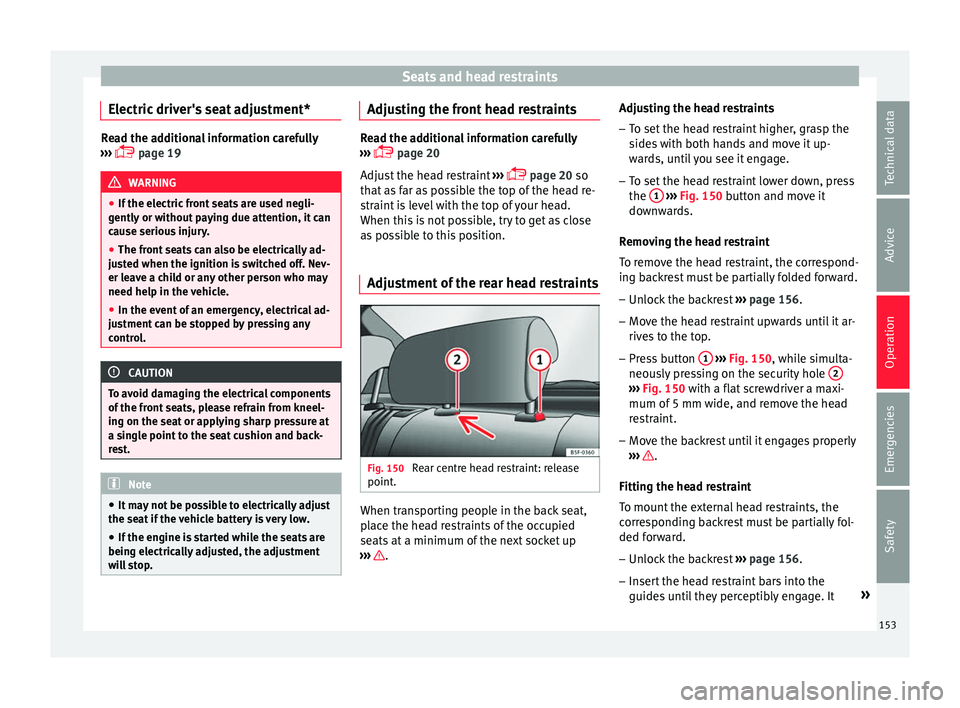
Adjustment of the rear head restraints Fig. 150
Rear centre head restraint: release
point . When transporting people in the back seat,
p
l
ac
e the head restraints of the occupied
seats at a minimum of the next socket up
››› .Adjusting the head restraints
– To set the head restraint higher, grasp the
side
s
with both hands and move it up-
wards, until you see it engage.
– To set the head restraint lower down, press
the 1
› ››
Fig. 150
b
utton and move it
downwards.
Removing the head restraint
To remove the head restraint, the correspond-
ing backrest must be partially folded forward. – Unlock the backrest ›››
page 156.
– Move the head restraint upwards until it ar-
rives
to the top.
– Press button 1
› ›
› Fig. 150
, while simulta-
neously pressing on the security hole 2 ›››
Fig. 150 with a fl at
screwdriver a maxi-
mum of 5 mm wide, and remove the head
restraint.
– Move the backrest until it engages properly
›› ›
.
Fittin g the he
a
d restraint
To mount the external head restraints, the
corresponding backrest must be partially fol-
ded forward.
– Unlock the backrest ›››
page 156.
– Insert the head restraint bars into the
guides u
ntil they perceptibly engage. It »
153
Technical data
Advice
Operation
Emergencies
Safety
Page 158 of 332

Operation
Folding the backrest forwards
– Place the side seat belts in the trim clip
› ›
›
Fig. 153.
– Slide the head restraint(s) downwards
›››
page 153.
– Press the release lever ›››
Fig. 154 1 in the
dir ection of
the arr
ow.
– Fold the backrest forwards.
Conv
erting the table to a seat
– Raise the backrest until it engages in its
upright pos
ition ››› . The red marking on
the t ab
›
›
› Fig. 154 2 should no longer be
v i
s
ible when the backrest is properly se-
cured. WARNING
The safe driving chapter contains important
inform ation, tip
s, suggestions and warnings
that you should read and observe for your
own safety and the safety of your passengers
››› page 74. WARNING
● Mak e s
ure that the rear backrest is securely
locked in position so that the seat belt can
provide proper protection on the centre rear
seat.
● The rear backrest must always be securely
latc
hed so that objects stored in the luggage compartment will not fly forward through the
interior durin
g s
udden braking. CAUTION
● With the b ac
krest inclined there is a danger
of damaging the rear head restraints when
adjusting the front seats backwards.
● When folding the backrest forwards, make
sure t
o place the side seat belts in the trim
clip to prevent them from being damaged by
becoming trapped in the backrest lock. Folding down and lifting the rear seat
b
ac
k
rest 3 App
lies to the model: LEON ST Fig. 155
On the rear seat backrest: release
c at
c
h 1 ; red mark
2 . Fig. 156
In the luggage compartment: levers
for r emot
e release of the left part 1 and right
par t
2 of the rear seat backrest.
The rear seat backrest is split and each part
be lo
w
er
ed separately to extend the luggage
compartment.
When the rear seat backrest is lowered no-
body else can travel in the corresponding
seats (not even a child).
Lowering the rear seat backrest with the un-
lock button
● Lower the head restraint properly.
● Push the unlock button ›››
Fig. 155 1 for-
w ar
d
s and at the same time lift the backrest.
● The rear seat backrest is not engaged when
the red mark
ing of the button 2 is visible.
L o
w
ering the rear seat backrest with the re-
mote release lever
● Lower the head restraint properly.
156
Page 160 of 332
Operation
●
Do not driv e w
ith the drawer cover open.
There is an injury risk for passengers if the
cargo is released in case of sudden braking or
an accident. Folding table*
3 Applies to the model: LEON ST
Fig. 158
Left-hand front seat: folding table. –
To open the tray, open it up in the direction
of the arr
o
w ››› Fig. 158. WARNING
● The fo l
ding trays may not be folded down
whilst the vehicle is in motion and anyone is
seated on the second row of seats. There is a
risk of injury during a sudden braking ma-
noeuvre! The tray must therefore be closed
and properly secured whilst the vehicle is in
motion. ●
Do not p ut
hot drinks in the drink holders.
During normal or sudden driving manoeuvres,
sudden braking or an accident, the hot drink
could be spilled. Danger of scalding. CAUTION
When driving, do not leave open cans in the
c up ho l
ders. The drink might be spilt on brak-
ing, for example, and could damage the vehi-
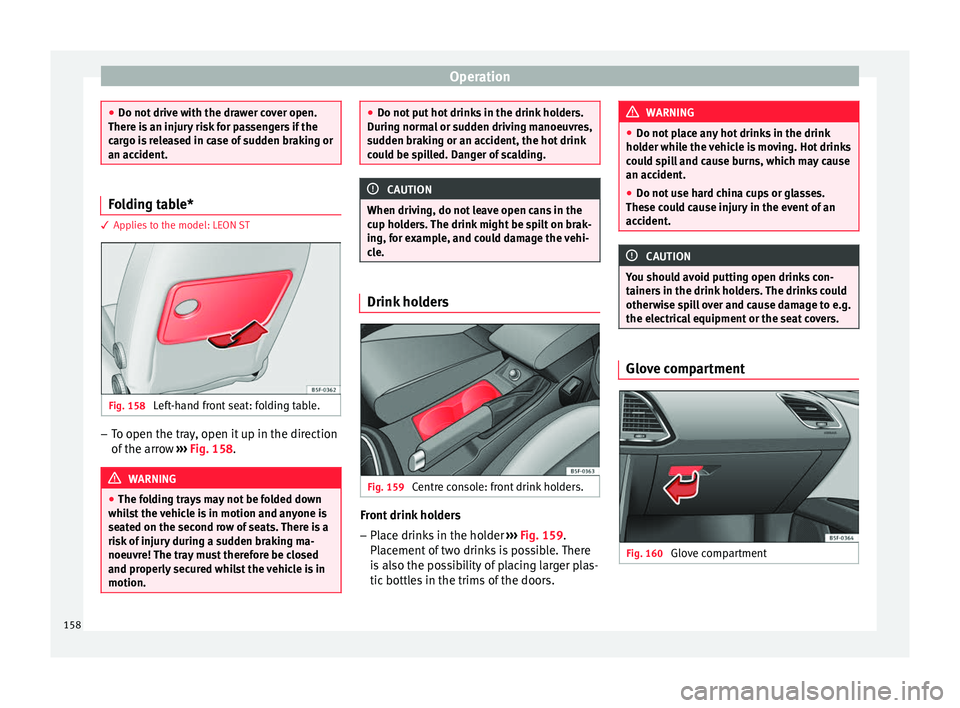
cle. Drink holders
Fig. 159
Centre console: front drink holders. Front drink holders
– Place drinks in the holder ››
›
Fig. 159.
Placement of two drinks is possible. There
is also the possibility of placing larger plas-
tic bottles in the trims of the doors. WARNING
● Do not p l
ace any hot drinks in the drink
holder while the vehicle is moving. Hot drinks
could spill and cause burns, which may cause
an accident.
● Do not use hard china cups or glasses.
These cou
ld cause injury in the event of an
accident. CAUTION
You should avoid putting open drinks con-
tainer s
in the drink holders. The drinks could
otherwise spill over and cause damage to e.g.
the electrical equipment or the seat covers. Glove compartment
Fig. 160
Glove compartment158
Page 162 of 332

Operation
Fig. 162
Detailed view of the side trim in the
lugg ag
e compartment: 12-volt power socket
(applies only to the LEON ST model). In the centre console
– Remove the connector located in the centre
con
so
le from the power socket ››› Fig. 161
.
– Insert the plug of the electrical appliance
into the pow
er socket.
In the luggage compartment (applies only to
the LEON ST model) – Lift the power socket cover ›››
Fig. 162.
– Insert the plug of the electrical appliance
into the pow
er socket.
Electrical equipment can be connected to the
12 volt power socket. The appliances connec-
ted to each power socket must not exceed a
power rating of 120 Watt. USB power sockets
Depending on the equipment
and the coun-
try, the vehicle may also have USB connec-
tions exclusively for charging or as a power
socket.
These USB ports are located at the rear of the
console, between the front seats ››› Fig. 161
. These connectors can work at a maximum
power of up to 10.5 W per port.
They are not intended for file playback. WARNING
The power socket works only when the igni-
tion is on. Impr
oper use may cause serious
injury or even fire. Children should therefore
not be left in the vehicle unattended if the
button is also left behind. Otherwise there is
a possibility that they may be injured. CAUTION
Always use the correct type of plugs to avoid
dam agin
g the sockets. Note
● The use of el
ectrical appliances with the
engine switched off will cause a battery dis-
charge.
● Should the connected appliance overheat,
immediately
switch it off and disconnect it
from the socket. ●
Bef or
e switching the ignition on or off, un-
plug the appliances from the USB ports to
protect them from any damage caused by
fluctuations in voltage. Storing objects
Lo a
ding the luggage compartment All luggage and other loose objects must be
saf
ely
secured in the luggage compartment.
Unsecured objects which shift back and forth
could impair the driving safety or driving
characteristics of the vehicle by shifting the
centre of gravity.
– Distribute the load evenly in the luggage
comp ar
tment.
– Place heavy objects as far forward as possi-
ble in the lug
gage compartment.
– Place the heavy objects first.
– Secure heavy objects to the fitted fastening
rings
››› page 167. WARNING
● Loo se lug
gage and other objects in the lug-
gage compartment could cause serious inju-
ries.
● Always stow objects in the luggage com-
partment
and secure them on the fastening
rings. 160
Page 163 of 332

Transport and practical equipment
●
Use s uit
able straps to secure heavy ob-
jects.
● During sudden manoeuvres or accidents,
loose ob
jects can be thrown forward, injuring
vehicle occupants or passers-by. This in-
creased risk of injury will be further increased
if a loose object is struck by an inflating air-
bag. If this happens, objects may shoot out-
ward like a missile. Risk of fatal injury.
● Please note that the centre of gravity may
shift when tr
ansporting heavy objects; this
may affect vehicle handling and lead to an ac-
cident. Therefore, it is essential to adjust
your speed and driving style accordingly, to
avoid accidents.
● Never exceed the allowed axle weights or
allo
wed maximum weight. If said weights are
exceeded, the driving characteristics of the
vehicle may change, leading to accidents, in-
juries and damage to the vehicle.
● Never leave your vehicle unattended, espe-
cia
lly when the rear lid is open. Children
could climb into the luggage compartment,
closing the door behind them; they will be
trapped and run the risk of death.
● Never allow children to play in or around
the vehic
le. Close and lock all the doors and
the rear lid when you leave the vehicle. Be-
fore you lock the vehicle, make sure that
there are no adults or children in the vehicle. Note
● Air cir c
ulation in the vehicle helps reduce
fogging of the windows. Used air escapes
through ventilation slits in the side trim of
the luggage compartment. Ensure that the
ventilation slots are never covered.
● Straps for securing the load to the fasten-
ing ring
s are commercially available. Luggage compartment shelf
3 App
lies to the model: LEON/LEON SC Fig. 163
In the luggage compartment: remov-
in g and in
s
talling the rear shelf. Fig. 164
In the luggage compartment: remov-
ing and in s
talling the rear shelf. The luggage compartment cover blocks the
v
iew int
o the lug
gage compartment.
Removing ● Detach the cord loops ›››
Fig. 163 B from
their hook s
A .
● Remove the rear shelf from the side sup-
por ts
›
›› Fig. 164 by pulling it upwards and
then take it out.
● If necessary, the rear shelf can be stored
under the lugg
age compartment variable
floor ››› page 163
Fitting
● Insert the cover horizontally so that the “re-
ces
s” fits onto the axis of the supports
››› Fig. 164 and press down until it engages.
● Hook the loops ›››
Fig. 163 B to the rear lid
› ›
›
.
»
161
Technical data
Advice
Operation
Emergencies
Safety
Page 165 of 332

Transport and practical equipment
● The r e
ar shelf
can be stored under the lug-
gage compartment variable floor when the
latter is in the top position (except for vehi-
cles equipped with natural gas engine CNG)
››› page 164.
Fitting the rear shelf
● Place the rear shelf in the housing provided
in the left
side cover.
● Engage the support of the rear shelf
›››
Fig. 166 1 in the right housing.
● Check that the support ››
›
Fig. 166 1 is
pr operly
en
gaged. WARNING
Animals, loose or unsecured or objects car-
ried on the re ar shelf
can cause serious injury
in case of sudden manoeuvring or braking or
in case of an accident.
● Do not leave hard, sharp or heavy objects
or in bags
on the rear shelf.
● Never carry animals on the rear shelf. CAUTION
To retract the rear shelf, press on its handle
in a down w
ards only direction; if you press it
upwards it may lead to its axles breaking. Storing the rear shelf
3 Applies to the model: LEON/LEON SC
Fig. 167
In the luggage compartment: covers
f or s
t
oring the rear shelf. Fig. 168
In the luggage compartment: fitting
the s t
or
age compartment shelf. The rear shelf can be stored under the lug-
g
ag
e c
ompartment variable floor.
● Remove the left and right covers
›››
Fig. 167. ●
Pres
s the rear shelf until it engages in its
housing ››› Fig. 168.
● Put the left and right covers in their original
position.
163
Technical data
Advice
Operation
Emergencies
Safety
Page 166 of 332

Operation
Storing the rear shelf 3 Applies to the model: LEON ST
Fig. 169
In the luggage compartment: hous-
in g f
or s
toring the rear shelf. Fig. 170
In the luggage compartment: hous-
in g f
or s
toring the rear shelf. The rear shelf can be stored under the lug-
g
ag
e c
ompartment variable floor.
● Remove covers ›››
Fig. 169 A left and right.●
Pr e
s
s the head of the rear shelf in the direc-
tion of the arrow until it engages in its hous-
ing ››› Fig. 170.
● Put the left and right covers in their original
position.
U
se of the net partition behind the
rear se
at* 3 Applies to the model: LEON ST
Fig. 171
In the luggage compartment: pulling
out and sec urin
g the net partition. Fig. 172
In the luggage compartment: remov-
ing the net p
artition. Pulling out and securing the net partition
● Pull up handle ››
›
Fig. 171 2 to remove the
net fr
om the c
asing 4 .
● Hook in the net partition on the right side
3 (magnified image).
● Hook in the net partition in the left side
hou s
in
g 1 pulling the rod.
The net p
ar
tition is properly assembled when
the T-shaped ends are firmly secured in the
corresponding housings 3 and
1 .
R etr
actin
g the net partition
● Unhook the rod from the housings 3 and
1 .
● Roll up the net into the casing 4 lowering
it w
ith
your hand.
164
Page 167 of 332

Transport and practical equipment
Removing the net partition
● Fold the rear seat backrests forward.
● Press the left or right release catch
› ›
›
Fig. 172 in the direction of the arrow 1 .
● Remove the casing from the support in the
dir ection of
the arr
ow ››› Fig. 172 2 .
Fittin g the net
p
artition
● Fold the rear seat backrests forward.
● Fit the casing in the right and left supports.
● Press the casing into the left and right sup-
ports in the op
posite direction to the arrow
››› Fig. 172 2 until it engages.
The r ed m
ark
ings on the release buttons
should no longer be visible. WARNING
● Alw a
ys secure objects, even when the net
partition is properly assembled.
● There should be nobody behind the assem-
bled p
artition when the vehicle is moving. CAUTION
Incorrect handling of the net partition could
cau se d
amage.
● Do not “release” the net partition when
lowerin
g it, as the net and other vehicle parts
could be damaged. Roll down the net parti-
tion by hand. Use of the net partition with the rear
se
at
b
ackrests lowered 3 Applies to the model: LEON ST
Fig. 173
Assembling the net partition in the
r e
ar se
at backrests. Fig. 174
In the luggage compartment: net
p ar
tition hook
ed into the rear seat backrests. Fitting the net partition
● Fold the rear seat backrests forward. ●
Remo
v
e the net partition from the side sup-
ports.
● Place the net casing in the rail slots in the
direction of the arr
ows ››› Fig. 173 1 .
● Push the casing towards the left side of the
v ehic
l
e in the direction of arrow ››› Fig. 173
2 and as far as it will go.
● Check that the net is secure.
P u
l
ling out and securing the net partition
● Pull up handle ›››
Fig. 174 2 to remove the
net fr
om the c
asing ››› Fig. 174 4 .
● Hook in the net partition on the right side
› ›
›
Fig. 174 3 (magnified image).
● Hook in the net partition in the left side
hou s
in
g ››› Fig. 174 1 pulling the rod.
The net p
ar
tition is properly assembled when
the T-shaped ends are firmly secured in the
corresponding housings ››› Fig. 174 3 and
1 .
R etr
actin
g the net partition
● Remove the rod from the housings in the
trims of the r
oof side members.
● Roll up the net into the casing ›››
Fig. 174
4 lowering it with your hand.
»
165
Technical data
Advice
Operation
Emergencies
Safety