ECO mode Seat Leon SC 2013 User Guide
[x] Cancel search | Manufacturer: SEAT, Model Year: 2013, Model line: Leon SC, Model: Seat Leon SC 2013Pages: 339, PDF Size: 4.8 MB
Page 103 of 339
101
Opening and closing
The automatic rear lid locking time extension function can be activated.
Where this function is activated and once the rear lid has been unlocked by
pressing the
button on the remote control key
⇒ page 92, the rear lid
can be re-opened for a certain length of time.
Where required, the automatic rear lid locking time extension function can
be activated or deactivated at a SEAT Authorised Service, which will provide
all of the necessary information.
Before the vehicle locks automatically, there is a risk of intruders getting in-
to the vehicle. Therefore, we recommend you always lock the vehicle by
pressing the
button on the remote control or by using the central locking
button.
Applies to the model: LEON / LEON SC Manual release of the rear lid in an emergency
The rear lid can be unlocked manually from inside in the
event of an emergency.
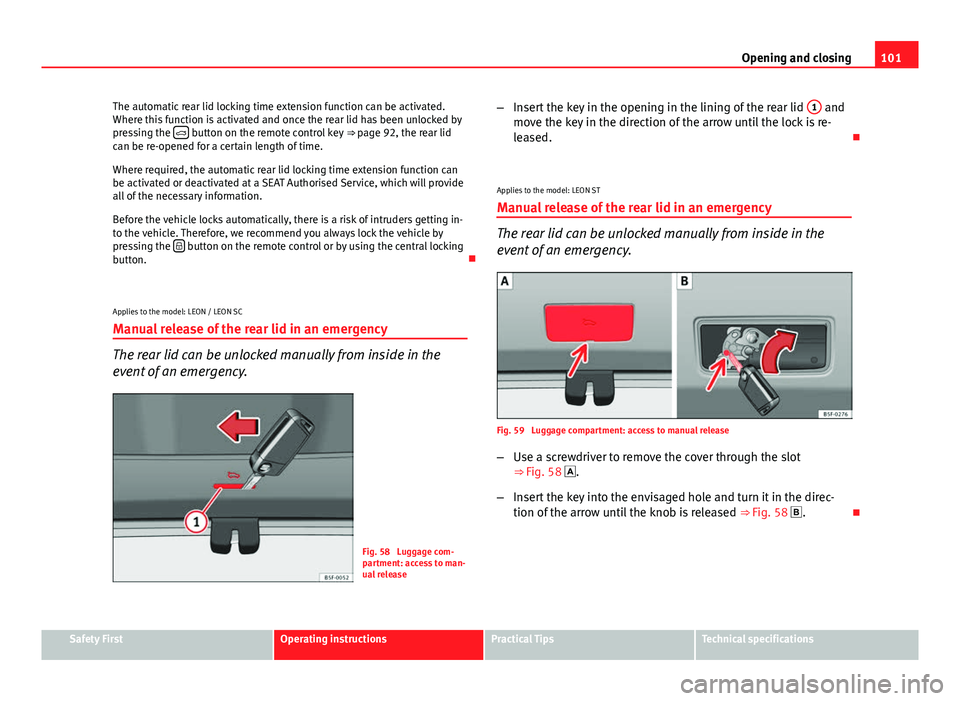
Fig. 58 Luggage com-
partment: access to man-
ual release –
Insert the key in the opening in the lining of the rear lid 1
and
move the key in the direction of the arrow until the lock is re-
leased.
Applies to the model: LEON ST
Manual release of the rear lid in an emergency
The rear lid can be unlocked manually from inside in the
event of an emergency.
Fig. 59 Luggage compartment: access to manual release
– Use a screwdriver to remove the cover through the slot
⇒ Fig. 58 .
– Insert the key into the envisaged hole and turn it in the direc-
tion of the arrow until the knob is released ⇒ Fig. 58 .
Safety FirstOperating instructionsPractical TipsTechnical specifications
Page 120 of 339
118Lights and visibility
WARNING
Heavy objects in the vehicle may mean that the headlights dazzle and
distract other drivers. This could result in a serious accident.
● Adjust the light beam to the vehicle load status so that it does not
blind other drivers.
Interior and reading lights 1)
Button/
Positioneffect
Switches interior lights off.
Switches interior lights on.
Switches door contact control on (central position).
The interior lights come on automatically when the vehicle is
unlocked, a door is opened or the key is removed from the ig-
nition.
The lights go off a few seconds after all the doors are closed,
the vehicle is locked or the ignition is switched on.
Turning the reading light on and off
Glove compartment and luggage compartment lighting*
When opening and closing the glove compartment on the front passenger
side and the rear lid, the respective light will automatically switch on and
off. Footwell lighting*
The lights in the footwell area below the dash (driver and front passenger
sides) will switch on when the doors are opened and will decrease in inten-
sity while driving. The intensity of these lights can be adjusted using the ra-
dio menu (see Easy Connect > Adjusting Lighting > Interior lighting
⇒ page 82).
Ambient light*
The ambient light in the door panel changes colour (white or red) depend-
ing on the driving mode. The intensity of these lights can be adjusted using
the radio menu (see Easy Connect > Adjusting Lights > Interior lighting
⇒ page 82).
Note
The reading lights switch off when the vehicle is locked using a key or after
several minutes if the key is removed from the ignition. This prevents the
battery from discharging.
Sun protection equipment Introduction
WARNING
Folded sun blinds can reduce visibility.
● Always store sun blinds and visors in their housing when not in use.
1)
Depending on the level of equipment fitted in the vehicle, LEDs can be used for the follow-
ing interior lights: front courtesy light, rear courtesy light, footwell light and sun visor light.
Page 124 of 339
122Lights and visibility
Windscreen wiper functions
Windscreen wiper performance in different situations:If the vehicle is at a stand-
still:The activated position provisionally changes
to the previous position.
During the automatic wipe:
The air conditioner comes on for approxi-
mately 30 seconds in air recirculation mode
to prevent the smell of the windscreen wash-
er fluid entering the inside the vehicle.
For the interval wipe:The intervals between wipes vary according
to the speed of the vehicle. The higher the
vehicle speed the shorter the intervals.
Heated windscreen washer jets
The heating only thaws the frozen jets, it does not thaw the water in the
washer hoses. The heated windscreen washer jets automatically adjust the
heat depending on the ambient temperature, when the ignition is switched
on.
Headlight wash/wipe system
The headlight washers/wipers clean the headlight lenses.
After the ignition is switched on, the first and every fifth time the wind-
screen washer is switched on, the headlights are also washed. Therefore,
the windscreen wiper lever should be pulled towards the steering wheel
when the dipped beam or main beam are on. Any incrusted dirt (such as in-
sects) should be cleaned regularly (e.g. when refuelling).
To ensure the headlight washers work correctly in winter, any snow which
has got into the bumper jet supports should be cleaned away. If necessary,
remove snow with an anti-icing spray.
Note
The wiper will try to wipe away any obstacles that are on the windscreen.
The wiper will stop moving if the obstacle blocks its path. Remove the ob-
stacle and switch the wiper back on again.
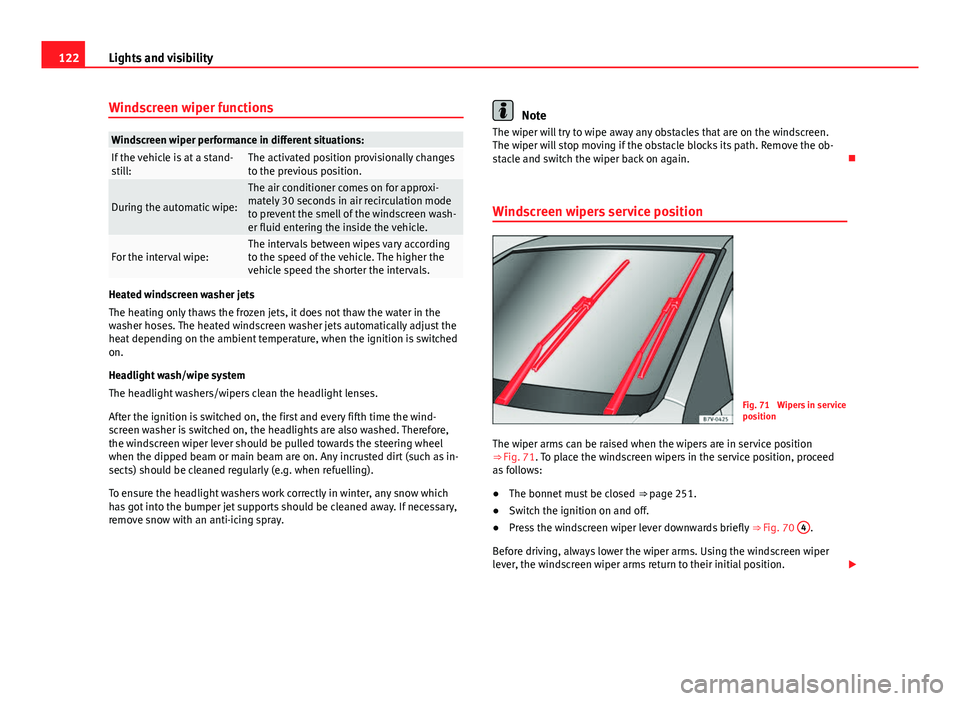
Windscreen wipers service position
Fig. 71 Wipers in service
position
The wiper arms can be raised when the wipers are in service position
⇒ Fig. 71. To place the windscreen wipers in the service position, proceed
as follows:
● The bonnet must be closed ⇒ page 251.
● Switch the ignition on and off.
● Press the windscreen wiper lever downwards briefly ⇒ Fig. 70 4
.
Before driving, always lower the wiper arms. Using the windscreen wiper
lever, the windscreen wiper arms return to their initial position.
Page 135 of 339
133
Seats and storage
Storage compartments
Storage areas under the front seats*
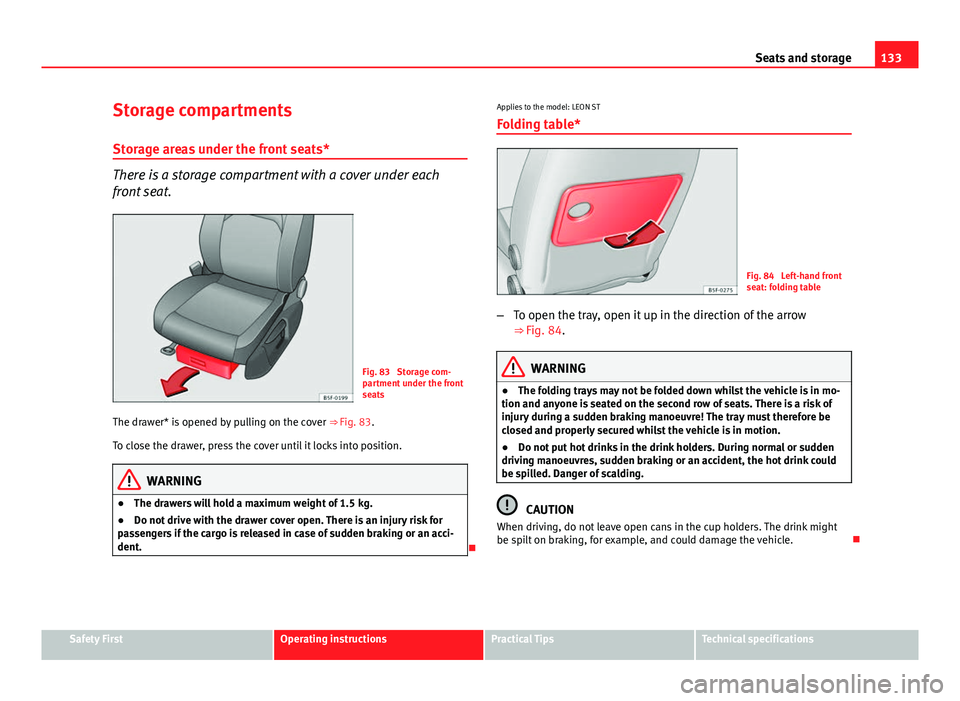
There is a storage compartment with a cover under each
front seat.
Fig. 83 Storage com-
partment under the front
seats
The drawer* is opened by pulling on the cover ⇒ Fig. 83.
To close the drawer, press the cover until it locks into position.
WARNING
● The drawers will hold a maximum weight of 1.5 kg.
● Do not drive with the drawer cover open. There is an injury risk for
passengers if the cargo is released in case of sudden braking or an acci-
dent.
Applies to the model: LEON ST
Folding table*
Fig. 84 Left-hand front
seat: folding table
– To open the tray, open it up in the direction of the arrow
⇒ Fig. 84.
WARNING
● The folding trays may not be folded down whilst the vehicle is in mo-
tion and anyone is seated on the second row of seats. There is a risk of
injury during a sudden braking manoeuvre! The tray must therefore be
closed and properly secured whilst the vehicle is in motion.
● Do not put hot drinks in the drink holders. During normal or sudden
driving manoeuvres, sudden braking or an accident, the hot drink could
be spilled. Danger of scalding.
CAUTION
When driving, do not leave open cans in the cup holders. The drink might
be spilt on braking, for example, and could damage the vehicle.
Safety FirstOperating instructionsPractical TipsTechnical specifications
Page 139 of 339
137
Seats and storage
Applies to the model: LEON / LEON SC
Increase capacity of luggage compartment
The backrests can be folded forward individually or togeth-
er.
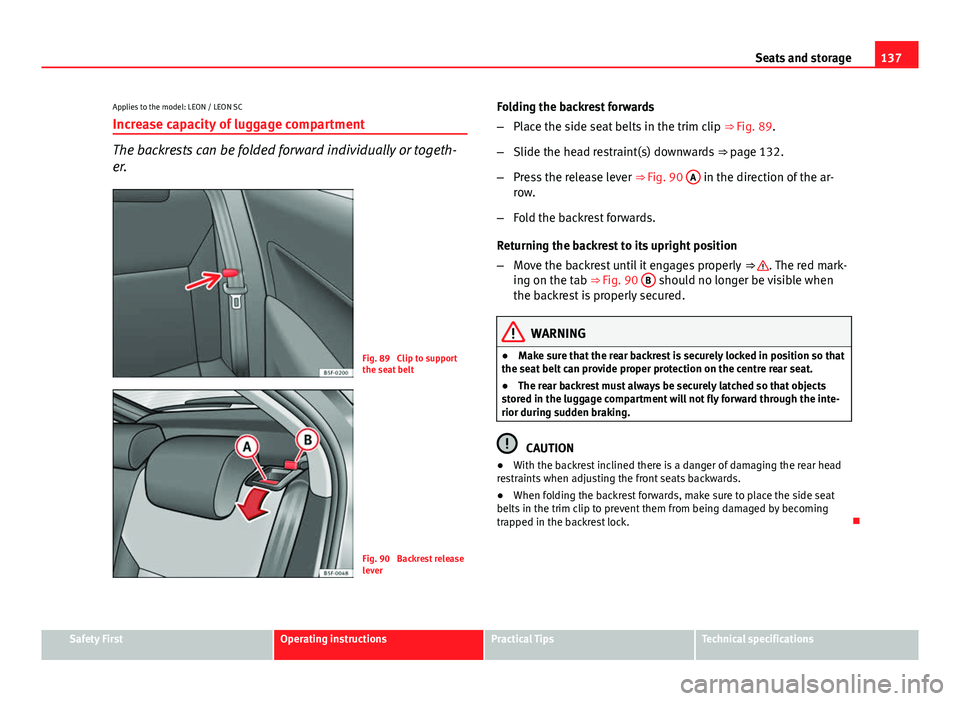
Fig. 89 Clip to support
the seat belt
Fig. 90 Backrest release
lever Folding the backrest forwards
–
Place the side seat belts in the trim clip ⇒ Fig. 89.
– Slide the head restraint(s) downwards ⇒ page 132.
– Press the release lever ⇒ Fig. 90 A
in the direction of the ar-
row.
– Fold the backrest forwards.
Returning the backrest to its upright position
– Move the backrest until it engages properly ⇒
. The red mark-
ing on the tab ⇒ Fig. 90 B should no longer be visible when
the backrest is properly secured.
WARNING
● Make sure that the rear backrest is securely locked in position so that
the seat belt can provide proper protection on the centre rear seat.
● The rear backrest must always be securely latched so that objects
stored in the luggage compartment will not fly forward through the inte-
rior during sudden braking.
CAUTION
● With the backrest inclined there is a danger of damaging the rear head
restraints when adjusting the front seats backwards.
● When folding the backrest forwards, make sure to place the side seat
belts in the trim clip to prevent them from being damaged by becoming
trapped in the backrest lock.
Safety FirstOperating instructionsPractical TipsTechnical specifications
Page 148 of 339
146Seats and storage
In order to use the fastening rings, they must be lifted beforehand 1)
.
WARNING
If unsuitable or damaged belts or retaining straps are used, they could
break in the event of braking or an accident. Objects could then be
launched across the passenger compartment and cause serious or fatal
injuries.
● Always use belts or retaining straps that are suitable and in a good
condition.
● Fasten the belts and straps to the fastening rings safely.
● Objects in the luggage compartment that are unsecured could move
suddenly and modify the handling of the vehicle.
● Secure all objects, small and light.
● The maximum tensile load of the fastening ring should never be ex-
ceeded for securing objects.
● Never secure a child seat to the fastening rings.
Note
● The maximum tensile load that the fastening rings can support is 3.5
kN.
● Belts and securing systems for the appropriate load can be obtained
from specialised dealerships. SEAT recommends visiting a SEAT dealership
for this. Retaining hooks
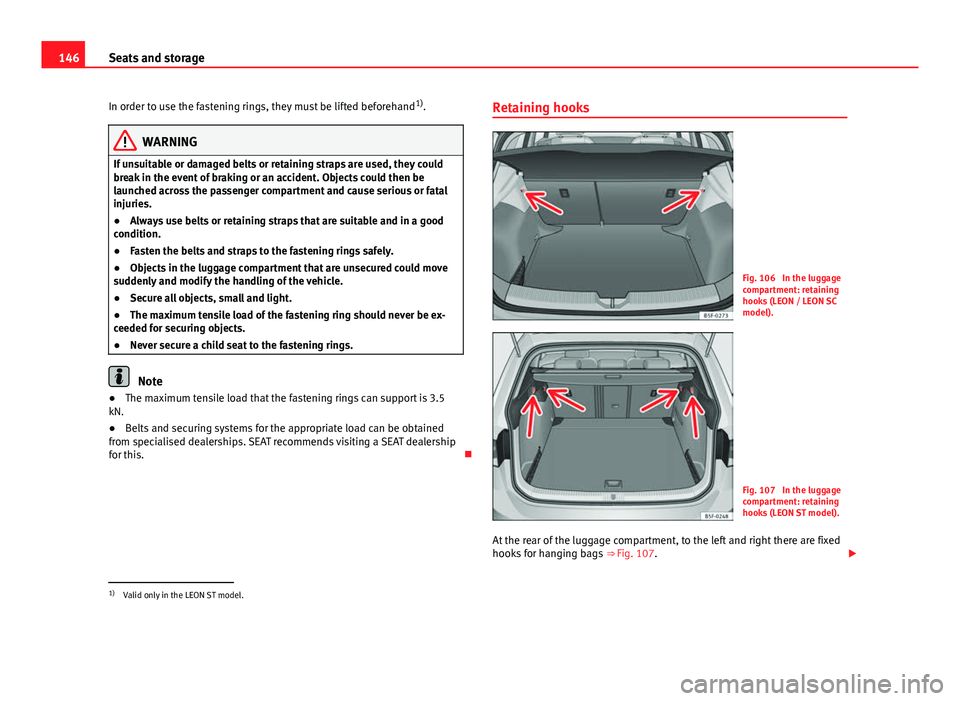
Fig. 106 In the luggage
compartment: retaining
hooks (LEON / LEON SC
model).
Fig. 107 In the luggage
compartment: retaining
hooks (LEON ST model).
At the rear of the luggage compartment, to the left and right there are fixed
hooks for hanging bags ⇒ Fig. 107.
1)
Valid only in the LEON ST model.
Page 153 of 339
151
Seats and storage
Applies to the model: LEON ST
Securing the cross bars and roof carrier system
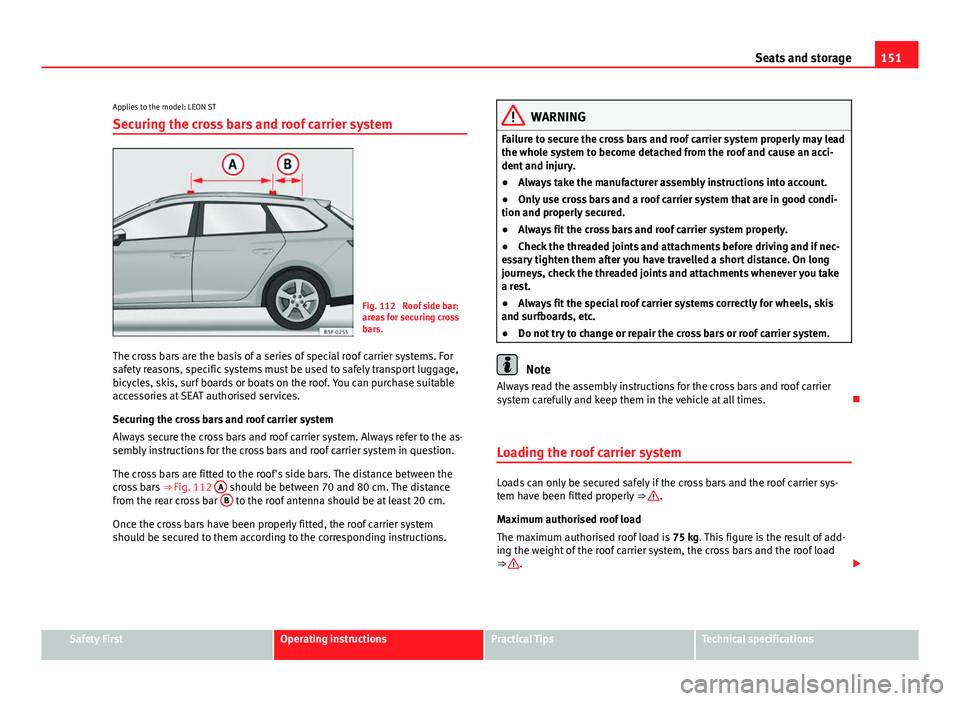
Fig. 112 Roof side bar:
areas for securing cross
bars.
The cross bars are the basis of a series of special roof carrier systems. For
safety reasons, specific systems must be used to safely transport luggage,
bicycles, skis, surf boards or boats on the roof. You can purchase suitable
accessories at SEAT authorised services.
Securing the cross bars and roof carrier system
Always secure the cross bars and roof carrier system. Always refer to the as-
sembly instructions for the cross bars and roof carrier system in question.
The cross bars are fitted to the roof's side bars. The distance between the
cross bars ⇒ Fig. 112 A
should be between 70 and 80 cm. The distance
from the rear cross bar B to the roof antenna should be at least 20 cm.
Once the cross bars have been properly fitted, the roof carrier system
should be secured to them according to the corresponding instructions.
WARNING
Failure to secure the cross bars and roof carrier system properly may lead
the whole system to become detached from the roof and cause an acci-
dent and injury.
● Always take the manufacturer assembly instructions into account.
● Only use cross bars and a roof carrier system that are in good condi-
tion and properly secured.
● Always fit the cross bars and roof carrier system properly.
● Check the threaded joints and attachments before driving and if nec-
essary tighten them after you have travelled a short distance. On long
journeys, check the threaded joints and attachments whenever you take
a rest.
● Always fit the special roof carrier systems correctly for wheels, skis
and surfboards, etc.
● Do not try to change or repair the cross bars or roof carrier system.
Note
Always read the assembly instructions for the cross bars and roof carrier
system carefully and keep them in the vehicle at all times.
Loading the roof carrier system
Loads can only be secured safely if the cross bars and the roof carrier sys-
tem have been fitted properly ⇒ .
Maximum authorised roof load
The maximum authorised roof load is 75 kg. This figure is the result of add-
ing the weight of the roof carrier system, the cross bars and the roof load
⇒
.
Safety FirstOperating instructionsPractical TipsTechnical specifications
Page 168 of 339
166Driving
CAUTION
If the engine has been running under high load for a long time, there is a
risk of heat building up in the engine compartment after the engine has
been switched off; this could cause engine damage. For this reason, you
should idle the engine for approx. 2 minutes before you switch it off.
Note
● After the engine is switched off the radiator fan may run on for up to 10
minutes, even if the ignition is switched off. It is also possible that the fan
turns itself on once more if the coolant temperature increases due to the
heat accumulated in the engine compartment or due to its prolonged expo-
sure to solar radiation.
● If the vehicle is stopped and the Start-Stop system* switches off the en-
gine, the ignition remains switched on. Make sure that the ignition is
switched off before leaving the vehicle, otherwise the battery could dis-
charge.
Kick-down
The kick-down feature allows maximum acceleration to be
reached. If the eco*
⇒ page 212 mode has been selected in SEAT Drive Mode*, and
the accelerator is pressed beyond a hard point, the engine power is auto-
matically controlled to give your vehicle maximum acceleration.
WARNING
Please note that if the road surface is slippery or wet, the kick-down fea-
ture could cause the driving wheels to spin, which could result in skid-
ding.
Handbrake
Using the handbrake
The handbrake should be applied firmly to prevent the vehi-
cle from accidentally rolling away.
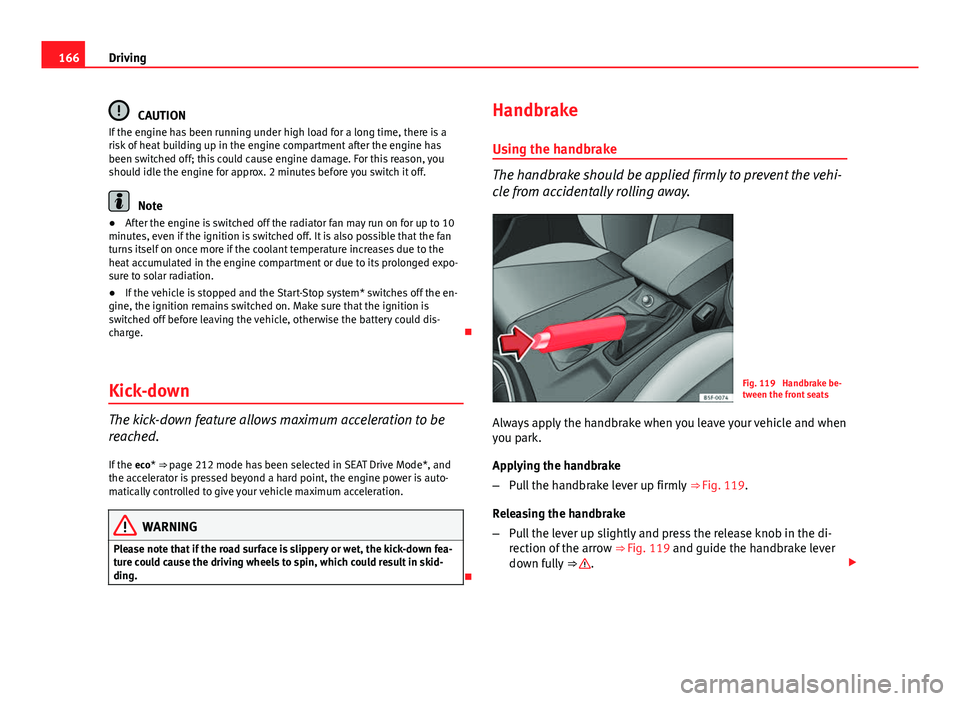
Fig. 119 Handbrake be-
tween the front seats
Always apply the handbrake when you leave your vehicle and when
you park.
Applying the handbrake
– Pull the handbrake lever up firmly ⇒ Fig. 119.
Releasing the handbrake
– Pull the lever up slightly and press the release knob in the di-
rection of the arrow ⇒ Fig. 119 and guide the handbrake lever
down fully ⇒
.
Page 182 of 339
180Driving
flash slowly depending on whether or not the vehicle has a driver
information system* 1)
.
– When the engine is running, switch off the traction control
(ASR) 1)
2)
.
– Move the selector lever to position “S” or tiptronic, or select the
driving mode Sport from the SEAT Drive Mode* ⇒ page 211.
– Press the brake pedal firmly with your left foot and hold it down
for at least one second.
– With your right foot, press the accelerator down to the full throt-
tle or kick-down position. The engine speed will stabilise at ap-
prox. 3200 rpm (petrol engine) or approx. 2000 rpm (diesel en-
gine).
– Take your left foot off the brake pedal.
WARNING
● Always adapt your driving style to the traffic conditions.
● Only use the “Launch control programme” when road and traffic con-
ditions permit, and make sure the way in which you drive and accelerate
the vehicle does not inconvenience or endanger other road users.
WARNING (Continued)
● Make sure that the ESC remains switched on. Please note that when
the ASR and ESC are deactivated, the wheels may start to spin, causing
the vehicle to lose grip. Risk of accident!
● After putting the vehicle into gear, the “sport” mode of the ESC
should be deactivated again by briefly pressing the
OFF
button.
Note
● After using the “Launch control programme”, the gearbox temperature
may have increased considerably. In this case, the programme could be dis-
abled for several minutes. The programme can be used again after the cool-
ing phase.
● Accelerating with the “Launch control programme” places a heavy load
on all parts of the vehicle. This can result in increased wear and tear.
Inertia mode
The inertia mode enables the kinetic energy of the vehicle to be
harnessed enabling certain stretches to be driven without using
the accelerator. This enables fuel to be saved. Use the inertia mode
to “let the vehicle roll” before, for example, arriving in a town.
Switching on inertia mode
Important: selector lever must be in position D, gradients below
12 %.
1)
On vehicles with the driver information system, the ESC lamp lights up permanently and
the corresponding text message Stability control deactivated (temporary) appears on the in-
strument panel to indicate the deactivation status.
2) Vehicles without driver information system: the warning lamp flashes slowly/Vehicles with
driver information system: the warning lamp stays on.
Page 183 of 339
181
Driving
– Select Eco mode ⇒ page 211 once in SEAT Drive Mode*.
– Take your foot off the accelerator.
The driver message Inertia will be displayed. At speeds higher
than 20 km/h (12 mph), the gearbox will automatically disengage
and the vehicle will roll freely, without the effect of the engine
brake. While the vehicle rolls, the engine runs at idling speed.
Stopping inertia mode
– Press the brake or the accelerator pedal.
To make use of the braking force and switch off the engine again,
simply press the brake pedal briefly.
Applying both the inertia mode (= prolonged section with less energy) and
the switching off using inertia (= shorter section without the need for fuel)
facilitates improved fuel consumption and emission balance.
WARNING
● If the inertia mode has been switched on, take into account, when ap-
proaching an obstacle and releasing the accelerator pedal, that the vehi-
cle will not decelerate in the usual manner: risk of accident!
● When using inertia mode while travelling down hills, the vehicle can
increase speed: risk of accident!
● If other users drive your vehicle, warn them about inertia mode.
Note
● Inertia mode is only available in eco driving mode (SEAT Drive Mode*).
● The driver message Inertia is only displayed with the current consump-
tion. In inertia mode the gear will no longer be displayed (for example: “E”
will appear in place of “E7”).
● On downhill sections with gradients above 15 %, the inertia mode will
automatically be switched off temporarily.
Backup programme
A backup programme is in place if a fault should occur in the
control system.
If all the positions of the selector lever are shown over a light background
on the instrument panel display, there is a system fault and the automatic
gearbox will operate in with the backup programme. When the backup pro-
gramme is activated, it is possible to drive the vehicle, however, at low
speeds and within a selected range of gears. In some cases driving in re-
verse gear may not be possible .
CAUTION
If the gearbox operates with the backup programme, take the vehicle to a
specialised workshop and have the fault repaired without delay.
Clutch
Clutch overheated! Stop the vehicle!
The clutch has overheated and could be damaged. In order to prevent the
temperature from increasing again and so that the clutch is cooled, stop the
Safety FirstOperating instructionsPractical TipsTechnical specifications