brake Seat Leon SC 2013 User Guide
[x] Cancel search | Manufacturer: SEAT, Model Year: 2013, Model line: Leon SC, Model: Seat Leon SC 2013Pages: 339, PDF Size: 4.8 MB
Page 115 of 339
113
Lights and visibility
WARNING
If the road is not well lit and other road users cannot see the vehicle well
enough or at all, accidents may occur.
● The automatic dipped beam control ( ) only switches on the dip-
ped beam when there are no changes in brightness, and not, for example
when it is foggy.
● Never drive with daytime lights if the road is not well lit due to weath-
er or lighting conditions. Daytime lights do not provide enough light to
illuminate the road properly or be seen by other road users.
● The rear lights do not come on with the daytime driving light. A vehi-
cle which does not have the rear lights on may not be visible to other
drivers in the darkness, in the case of heavy rain or in conditions of poor
visibility.
Note
In cold or damp weather conditions, the headlights, tail lights and turn sig-
nals may mist up inside temporarily. This is normal and in no way effects
the useful life of the vehicle lighting system. Hazard warning lights
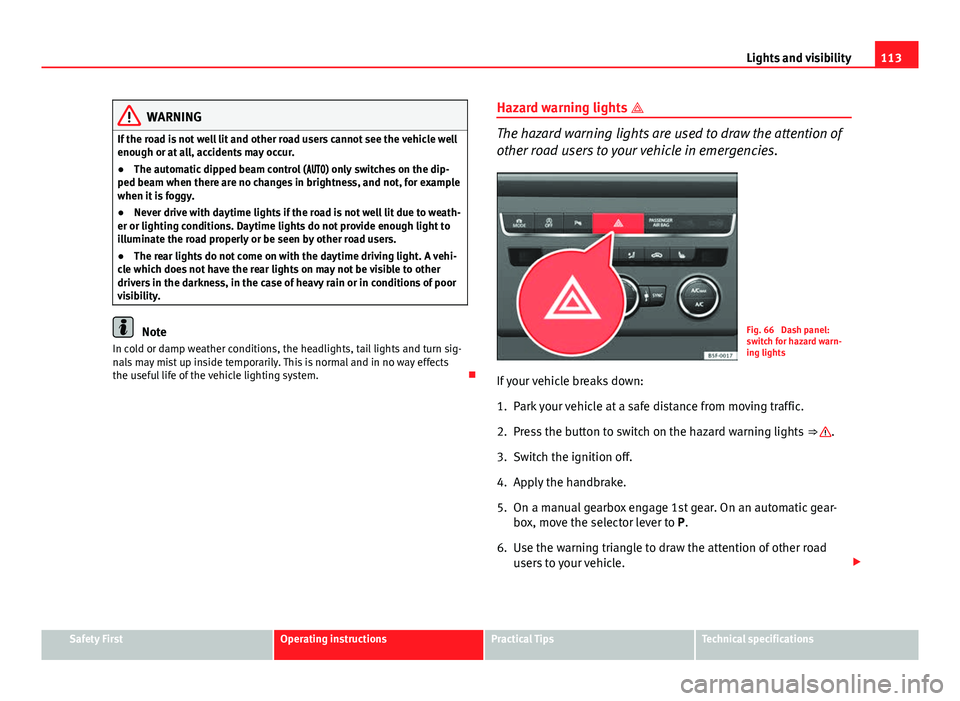
The hazard warning lights are used to draw the attention of
other road users to your vehicle in emergencies.
Fig. 66 Dash panel:
switch for hazard warn-
ing lights
If your vehicle breaks down:
1. Park your vehicle at a safe distance from moving traffic.
2. Press the button to switch on the hazard warning lights ⇒
.
3. Switch the ignition off.
4. Apply the handbrake.
5. On a manual gearbox engage 1st gear. On an automatic gear- box, move the selector lever to P.
6. Use the warning triangle to draw the attention of other road users to your vehicle.
Safety FirstOperating instructionsPractical TipsTechnical specifications
Page 116 of 339
114Lights and visibility
7. Always take the vehicle key with you when you leave the vehi-
cle.
Switch on the hazard warning lights to warn other road users, for example:
● reaching the tail end of a traffic jam,
● there is an emergency
● your vehicle breaks down due to a technical fault,
● you are towing another vehicle or your vehicle is being towed.
All turn signals flash simultaneously when the hazard warning lights are
switched on. The two turn signal turn signal lamps and the turn signal
lamp in the switch will flash at the same time. The hazard warning lights
also work when the ignition is switched off.
Emergency braking warning
If the vehicle is braked suddenly and continuously at a speed of more than
80 km/h (50 mph), the brake light flashes several times per second to warn
vehicles driving behind. If you continue braking, the hazard warning lights
will come on automatically when the vehicle comes to a standstill. They
switch off automatically when the vehicle starts to move again.
WARNING
● The risk of an accident increases if your vehicle breaks down. Always
use the hazard warning lights and a warning triangle to draw the atten-
tion of other road users to your stationary vehicle.
● Never park where the catalytic converter could come into contact with
inflammable materials under the vehicle, for example dry grass or spilt
petrol. This could start a fire!
Note
● The battery will run down if the hazard warning lights are left on for a
long time, even if the ignition is switched off.
● The use of the hazard warning lights described here is subject to the rel-
evant statutory requirements.
Main beam assist*
Main beam assist (Light Assist)
The main beam assist begins operating (within the limits of the system and
depending on the environmental and traffic conditions) starting at a speed
of 60 km/h (37 mph), when it switches on automatically, and then deacti-
vates again below 30 km/h (18 mph) ⇒
. This is managed via a camera
situated on the base of the interior mirror.
The main beam assist generally detects illuminated areas and deactivates
the main beam when passing through a town, for example.
Page 142 of 339
140Seats and storage
WARNING
● The luggage compartment cover must always be fixed properly (risk
of accident).
● The luggage compartment cover should not be used as a storage
shelf. Articles placed on this cover could cause injury to vehicle occu-
pants in an accident or if the brakes are applied suddenly.
Applies to the model: LEON ST
Retractable rear shelf
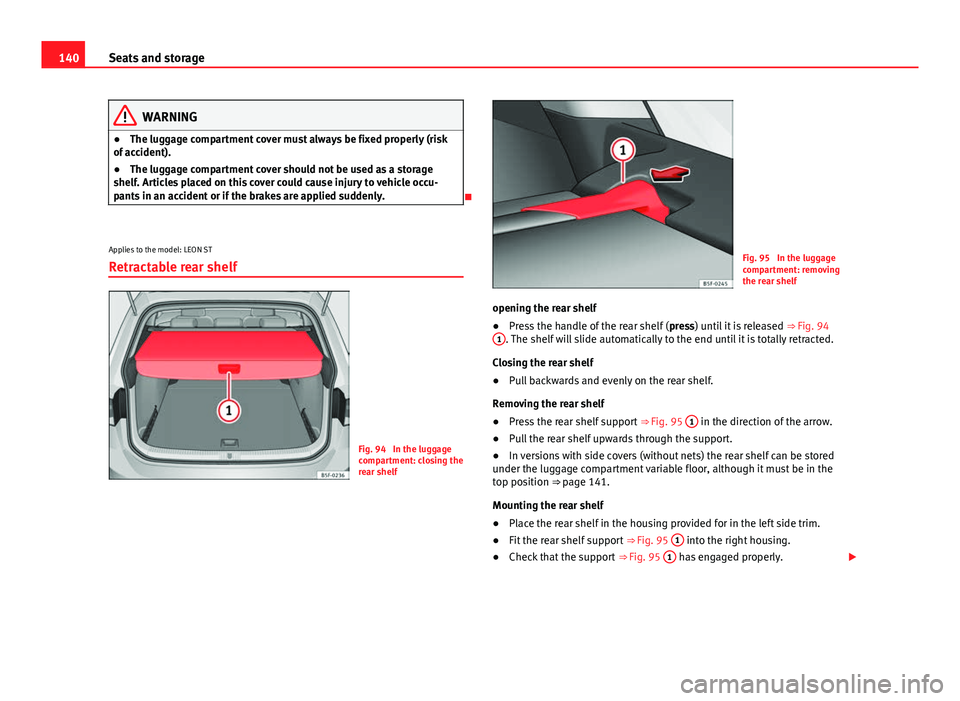
Fig. 94 In the luggage
compartment: closing the
rear shelf
Fig. 95 In the luggage
compartment: removing
the rear shelf
opening the rear shelf
● Press the handle of the rear shelf ( press) until it is released
⇒ Fig. 94
1
. The shelf will slide automatically to the end until it is totally retracted.
Closing the rear shelf
● Pull backwards and evenly on the rear shelf.
Removing the rear shelf
● Press the rear shelf support
⇒ Fig. 95 1
in the direction of the arrow.
● Pull the rear shelf upwards through the support.
● In versions with side covers (without nets) the rear shelf can be stored
under the luggage compartment variable floor, although it must be in the
top position ⇒ page 141.
Mounting the rear shelf
● Place the rear shelf in the housing provided for in the left side trim.
● Fit the rear shelf support
⇒ Fig. 95 1
into the right housing.
● Check that the support
⇒ Fig. 95 1 has engaged properly.
Page 164 of 339
162Driving
Driving
SteeringAdjusting the steering wheel position
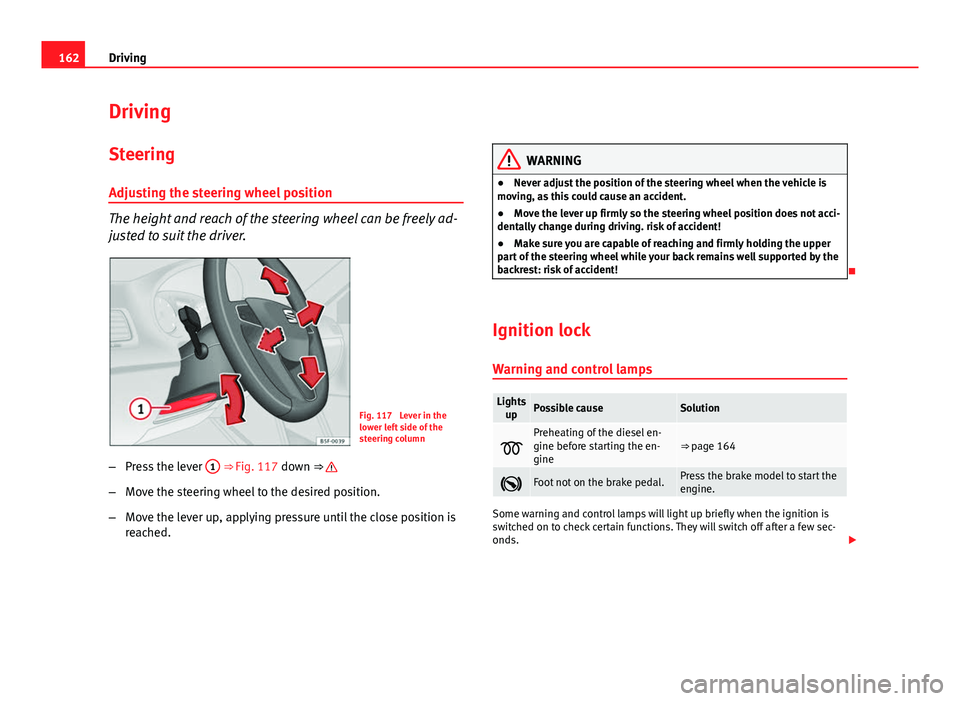
The height and reach of the steering wheel can be freely ad-
justed to suit the driver.
Fig. 117 Lever in the
lower left side of the
steering column
– Press the lever 1
⇒ Fig. 117 down ⇒
–
Move the steering wheel to the desired position.
– Move the lever up, applying pressure until the close position is
reached.
WARNING
● Never adjust the position of the steering wheel when the vehicle is
moving, as this could cause an accident.
● Move the lever up firmly so the steering wheel position does not acci-
dentally change during driving. risk of accident!
● Make sure you are capable of reaching and firmly holding the upper
part of the steering wheel while your back remains well supported by the
backrest: risk of accident!
Ignition lock Warning and control lamps
Lights upPossible causeSolution
Preheating of the diesel en-
gine before starting the en-
gine⇒ page 164
Foot not on the brake pedal.Press the brake model to start the
engine.
Some warning and control lamps will light up briefly when the ignition is
switched on to check certain functions. They will switch off after a few sec-
onds.
Page 166 of 339
164Driving
–Turn the ignition key to position 1
to switch off the ignition.
Preheating is produced in Diesel vehicles when the ignition is
switched on.
Starting up the engine
– Manual gearbox: Press the clutch pedal all the way down and
move the gearbox lever into neutral.
– Automatic gearbox : Press the brake pedal and move the selec-
tor lever to position P or N.
– Turn the ignition key to position 3
. The key returns to position
2 automatically. Do not press the accelerator.
Diesel engines can take a few seconds longer than usual to start
on cold days. Therefore the clutch pedal (manual gearbox) or the
brake pedal (automatic gearbox) must remain pressed until the en-
gine starts up. During preheating, the warning lamp remains lit.
The preheating time depends on the coolant and exterior tempera-
tures. When the engine is at operating temperature or at outside
temperatures above +8 °C (46 °F) the warning lamp will only
light up for about one second. This means that the engine starts
immediately.
If the engine does not immediately start up, interrupt the starting process
and try again after 30 seconds. To start the engine again, return the key to
position 1
.
Start-Stop System*
If the vehicle is stopped and the Start-Stop system* switches off the engine,
the ignition remains switched on.
Automatic gearbox: Before leaving the vehicle, make sure that the ignition
is switched off and the selector lever is in position P. Driver messages on the instrument panel display
Press the clutch This message appears on vehicles with a manual gearbox if the driver tries
to start the engine without having the clutch pedal pressed. The engine will
only start if you press the clutch pedal.
Press the brake
This message appears on vehicles with an automatic gearbox if the driver
tries to start the engine without having the brake pedal pressed.
Select N or P
This message appears if you try to start or stop the engine when the selec-
tor lever of the automatic gearbox is not in position P or N. The engine can
only start or stop in these positions.
Engage position P; the vehicle can move; doors can only close in position P. For safety reasons, this driver message appears and an audible warning
sounds if the selector lever of the automatic gearbox is not in position P af-
ter you switch off the ignition. Otherwise the vehicle could move.
Gear change: selector lever in the drive position!
This driver message is displayed and a buzzer is sounded when the selector
lever is not in the position P when the driver door is opened. Put the selec-
tor lever in position P; otherwise the vehicle can roll away.
Ignition is switched onThis driver message is displayed and a buzzer is sounded when the driver
door is opened with the ignition switched on.
Page 167 of 339
165
Driving
WARNING
● Never run the engine in confined spaces, as the exhaust gases are
poisonous.
● Never remove the key from the ignition if the vehicle is in motion.
Otherwise, the steering could suddenly lock, making it impossible to
steer the vehicle: risk of accident!
● Always take the key with you when you leave the vehicle. This is par-
ticularly important if there are children in the vehicle, as they might oth-
erwise be able to start the engine or use power-operated equipment (e.g.
the electric windows), which could cause injuries.
CAUTION
Avoid high engine speeds, full throttle and extreme load conditions until
the engine has reached its normal operating temperature, otherwise this
can damage the engine.
For the sake of the environment
Do not warm up the engine by running it with the car stationary. You should
drive off as soon as you start the engine. This will help avoid unnecessary
exhaust emissions.
Note
● If it is difficult to turn the ignition key to the position 1, turn the steer-
ing wheel to both sides to release the steering lock.
● When starting from cold, the engine may be a little noisy for the first few
seconds until oil pressure has built up in the hydraulic valve lifters. This is
quite normal, and no cause for concern.
● If the vehicle battery is disconnected and reconnected, the key must re-
main in the position 1
for around 5 seconds before starting up.
● Vehicles with automatic gearbox: After switching off the ignition, you
can only remove the ignition key if the selector lever is in position “P” (park-
ing lock). Next, the selector lever is locked. Switching off the engine with the key
Switching off the engine
–
Stop the vehicle.
– Turn the ignition key to position 1
⇒ Fig. 118.
Engaging the steering wheel lock
Important: selector lever (automatic gearbox*) must be in position
P.
– Remove the key from the ignition in position 1
⇒ Fig. 118
⇒ .
– Turn the steering wheel until you hear it engage.
Possible vehicle theft is prevented with the steering lock engaged.
WARNING
● Never switch the engine off until the vehicle is stationary. The brake
servo and power steering functions will not be completely covered under
warranty. More force may also be needed to turn the steering wheel or to
brake. As you cannot steer and brake in the normal manner, there is a
greater risk of accidents and serious injury.
● Never remove the key from the ignition if the vehicle is in motion.
Otherwise, the steering could lock making it impossible to steer the vehi-
cle.
● Always take the ignition key with you whenever you leave the vehicle,
even temporarily. This is particularly important if there are children in
the vehicle, as they might otherwise be able to start the engine or use
power-operated equipment (e.g. the electric windows), which could
cause injuries.
Safety FirstOperating instructionsPractical TipsTechnical specifications
Page 168 of 339
166Driving
CAUTION
If the engine has been running under high load for a long time, there is a
risk of heat building up in the engine compartment after the engine has
been switched off; this could cause engine damage. For this reason, you
should idle the engine for approx. 2 minutes before you switch it off.
Note
● After the engine is switched off the radiator fan may run on for up to 10
minutes, even if the ignition is switched off. It is also possible that the fan
turns itself on once more if the coolant temperature increases due to the
heat accumulated in the engine compartment or due to its prolonged expo-
sure to solar radiation.
● If the vehicle is stopped and the Start-Stop system* switches off the en-
gine, the ignition remains switched on. Make sure that the ignition is
switched off before leaving the vehicle, otherwise the battery could dis-
charge.
Kick-down
The kick-down feature allows maximum acceleration to be
reached. If the eco*
⇒ page 212 mode has been selected in SEAT Drive Mode*, and
the accelerator is pressed beyond a hard point, the engine power is auto-
matically controlled to give your vehicle maximum acceleration.
WARNING
Please note that if the road surface is slippery or wet, the kick-down fea-
ture could cause the driving wheels to spin, which could result in skid-
ding.
Handbrake
Using the handbrake
The handbrake should be applied firmly to prevent the vehi-
cle from accidentally rolling away.
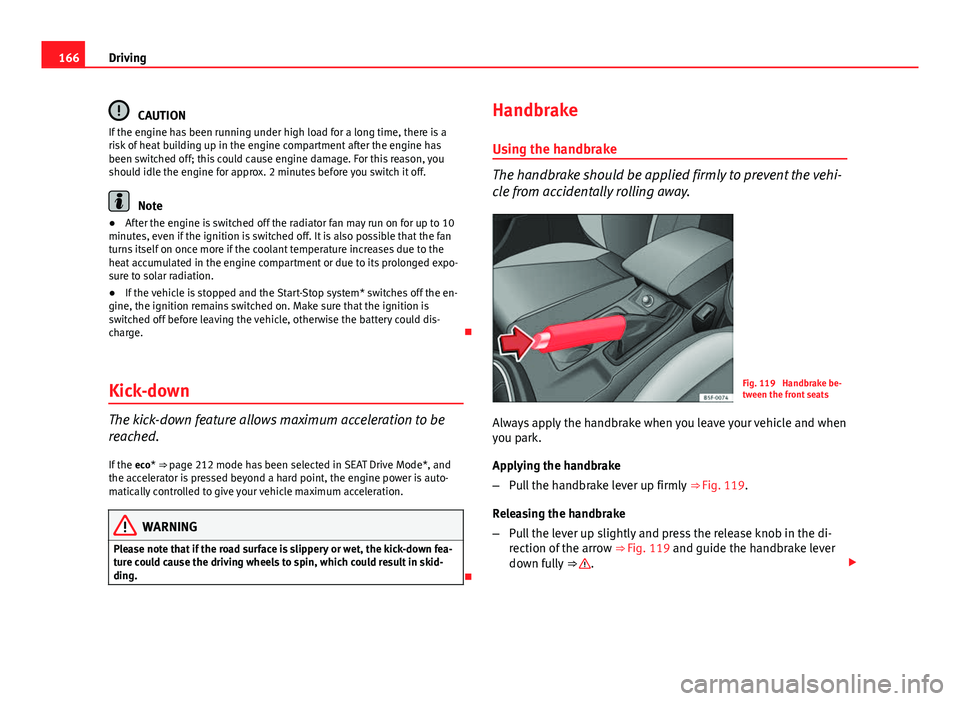
Fig. 119 Handbrake be-
tween the front seats
Always apply the handbrake when you leave your vehicle and when
you park.
Applying the handbrake
– Pull the handbrake lever up firmly ⇒ Fig. 119.
Releasing the handbrake
– Pull the lever up slightly and press the release knob in the di-
rection of the arrow ⇒ Fig. 119 and guide the handbrake lever
down fully ⇒
.
Page 169 of 339
167
Driving
Always apply the handbrake as far as it will go in order to prevent yourself
from driving with the handbrake applied by mistake ⇒
.
The handbrake warning lamp lights up when the handbrake is applied
and the ignition switched on. The warning lamp turns off when the hand-
brake is released.
If you drive faster than 6 km/h (4 mph) with the handbrake on, the following
message* will appear on the instrument panel display: HANDBRAKE ON. You
will also hear an audible warning.
WARNING
● Never use the handbrake to stop the vehicle when it is in motion. The
braking distance is considerably longer, because braking is only applied
to the rear wheels. Risk of accident!
● If the handbrake is only partially released, this will cause the rear
brakes to overheat, which can impair the function of the brake system
and could lead to an accident. This also causes premature wear on the
rear brake pads.
CAUTION
Always apply the handbrake before you leave the vehicle. The first gear
should also be selected.
Parking
The handbrake should always be firmly applied when the
vehicle is parked.
Always note the following points when parking the vehicle:
– Use the brake pedal to stop the vehicle. –
Apply the handbrake.
– Select first gear.
– Switch the engine off and remove the key from the ignition. Turn
the steering wheel slightly to engage the steering lock.
– Always take you keys with you when you leave the vehicle ⇒
.
Additional notes on parking the vehicle on gradients:
Turn the steering wheel so that the vehicle rolls against the kerb if it started
to roll.
● If the vehicle is parked facing downhill, turn the front wheels so that
they point towards the kerb .
● If the vehicle is parked facing uphill, turn the front wheels so that they
point away from the kerb .
● Secure the vehicle as normal by applying the handbrake firmly and se-
lecting first gear.
WARNING
● Take measures to reduce the risk of injury when you leave your vehi-
cle unattended.
● Never park where the hot exhaust system could ignite inflammable
materials, such as dry grass, low bushes, spilt fuel etc.
● Never allow vehicle occupants to remain in the vehicle when it is
locked. They would be unable to open the vehicle from the inside, and
could become trapped in the vehicle in an emergency. In the event of an
emergency, locked doors will delay assistance to vehicle occupants.
● Never leave children alone in the vehicle. They could set the vehicle
in motion, for example, by releasing the handbrake or the gearbox lever.
● Depending on weather conditions, it may become extremely hot or
cold inside the vehicle. This can be fatal.
Safety FirstOperating instructionsPractical TipsTechnical specifications
Page 170 of 339
168Driving
Hill driving assistant*
This function is only included in vehicles with ESC.
The hill driving assistant helps the driver to move off and upwards on a hill
when the vehicle is stationary.
The system maintains brake pressure for approximately two seconds after
the driver takes his foot off the brake pedal to prevent the vehicle from
lurching backwards when it is started. During these two seconds, the driver
has enough time to release the clutch pedal and accelerate without vehicle
moving and without having to use the handbrake, making start-up easier,
more comfortable and safer.
These are the basic operation conditions:
● being on a ramp or hill/slope,
● closed doors,
● vehicle completely stationary,
● engine running and foot on the brake,
● besides having a gear engaged or being in neutral for manual gear
change and with the selector lever at positions S, D or R in vehicles with au-
tomatic gearbox.
This system is also active in reversing uphill.
WARNING
● If you do not start the vehicle immediately after taking your foot off
the brake pedal, the vehicle may start to roll back under certain condi-
tions. Depress the brake pedal or use the hand brake immediately.
● If the engine stalls, depress the brake pedal or use the hand brake
immediately.
● When following a line of traffic uphill, if you want to prevent the vehi-
cle from rolling back accidentally when starting off, hold the brake pedal
down for a few seconds before starting off.
Note
The Official Service or a specialist workshop can tell you if your vehicle is
equipped with this system.
Speed warning function Introduction
The speed warning function can help prevent you exceeding
a particular pre-set maximum speed.
The speed warning function will warn the driver if a pre-set maximum speed
is exceeded. The system gives an warning buzzer signal if the set speed is
exceeded by about 3 km/h. The warning lamp and the driver message
Speed limit exceeded! will be displayed simultaneously on the instrument
panel display. The warning lamp switches off when reducing speed be-
low the stored maximum limit.
You are recommended to store this speed limit warning if you always wish
to be reminded of a particular speed limit. This could be when driving in
Page 171 of 339
169
Driving
countries with general speed limits, or if a particular speed should not be
exceeded when winter tyres are fitted etc.
Note
● Please bear in mind that, even with the speed warning function, it is still
important to keep an eye on the vehicle speed with the speedometer and to
observe the legal speed limits.
● The speed limit warning function in the version for several countries
warns you at a speed of 120 km/h (80 mph). This is a factory-set speed lim-
it.
Setting speed limit warning
You can use the radio or the Easy Connect* to set, alter or
cancel the speed limit warning.
Vehicles with radio
– Select: SETUP
button > control button
Driver assistant > Speed
warning.
Vehicles with Easy Connect
– Select: Systems control button or Vehicle systems > Driver assis-
tant > Speed warning.
The warning limit can be set from 30 to 240 km/h (20 to 150 mph). The ad-
justment is done in 10 km/h (mph) intervals. Start-Stop system*
Description and operation
The Start-Stop system helps save fuel and reduce CO 2 emissions.
In Start-Stop mode, the engine will automatically switch off when the vehi-
cle stops, when stopping at traffic lights for example. The ignition remains
switched on during the stopping phase. The engine automatically switches
back on when required.
As soon as the ignition is switched on, the Start-Stop function is automati-
cally activated.
Basic requirements for the Start-Stop mode
● The driver door must be closed.
● The driver must have their seat belt fastened.
● The bonnet must be closed.
● The vehicle must have travelled at more than 4 km/h since the last stop.
● The vehicle cannot be towing a trailer.
WARNING
● Never switch the engine off until the vehicle is stationary. The brake
servo and power steering functions will not be completely covered under
warranty. More force may also be needed to turn the steering wheel or to
brake. As you cannot steer and brake in the normal manner, there is a
greater risk of accidents and serious injury.
● Never remove the key from the ignition if the vehicle is in motion.
Otherwise, the steering could lock making it impossible to steer the vehi-
cle.
Safety FirstOperating instructionsPractical TipsTechnical specifications