brake Seat Leon SC 2013 Service Manual
[x] Cancel search | Manufacturer: SEAT, Model Year: 2013, Model line: Leon SC, Model: Seat Leon SC 2013Pages: 339, PDF Size: 4.8 MB
Page 197 of 339
195
Driver assistance systems
WARNING (Continued)
● “Stepping” on the accelerator may lead the ACC not to intervene to
brake. Acceleration by the driver takes priority over action by the active
cruise control.
● Always be prepared to use the brakes to halt the vehicle!
● Observe the provisions of the country in question regarding the mini-
mum obligatory distance between vehicles.
Note
● The stored speed is erased when the ignition or the ACC are switched
off.
● When the traction control system (ASR) is switched off or the ESC is acti-
vated in Sport* (⇒ page 79) mode, the ACC is switched off automatically.
● In vehicles with Start-Stop system, the engine switches off automatically
during the ACC halt phase and restarts automatically to begin driving.
Vehicles with an automatic gearbox
If the vehicle is equipped with automatic gearbox, the Adaptive Cruise Con-
trol (ACC) may brake it until it stops completely if the vehicle ahead stops.
The ACC will be available for a few seconds. The vehicle will restart autono-
mously if the vehicle ahead moves (assistant in line of traffic).
Disconnection criteria
The ACC will switch off if the driver steps on the brake pedal or the driver
door is opened. If the vehicle ahead stops for more than 3 seconds, the ACC will also switch
off for safety reasons.
In this case the driver should take over and apply the
foot brake.
In the latter case, when the ACC is switched off with the vehicle stationary,
the vehicle must be stopped by applying the foot brake; since the car, with
a gear engaged, even at idle speed, might move.
Restart the ACC manually.
The ACC can be switched on again by turning the lever to position 2
⇒ Fig. 134.
WARNING
Your vehicle can start up even if there is an obstacle between your own
and the one ahead. Risk of accident!
CAUTION
● If your vehicle with adaptive cruise control failed to start as expected,
even if the ACC available 1)
message is shown to the driver, you can start off
by briefly stepping on the accelerator.
● The Start-Stop system acts as usual when driving with adaptive cruise
control.
1)
Not available for the versions of some countries.
Safety FirstOperating instructionsPractical TipsTechnical specifications
Page 198 of 339
196Driver assistance systems
Interrupting cruise control
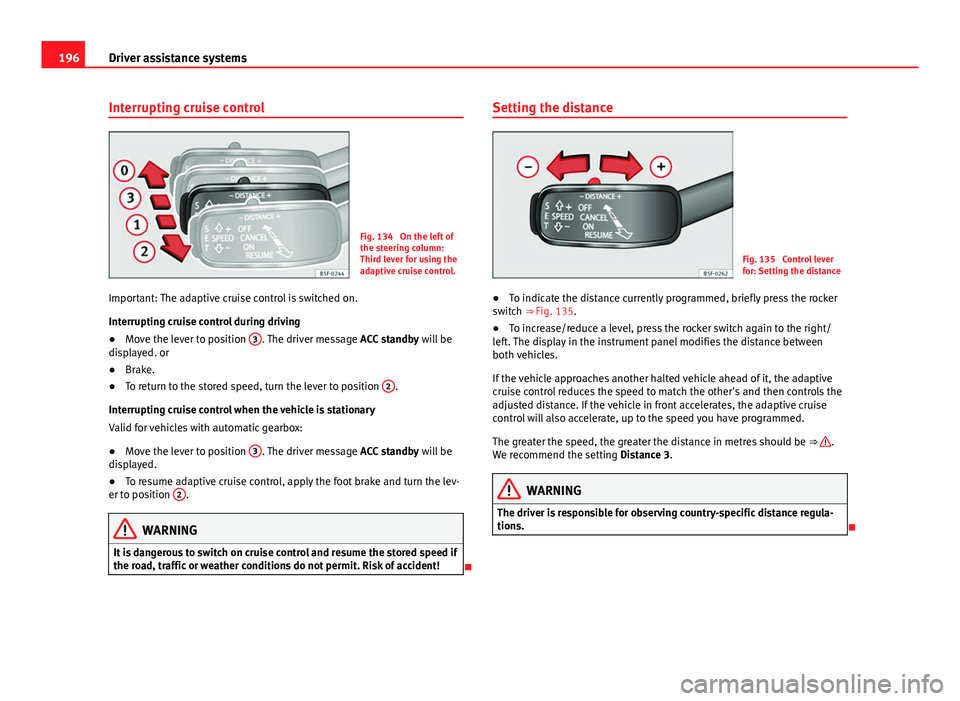
Fig. 134 On the left of
the steering column:
Third lever for using the
adaptive cruise control.
Important: The adaptive cruise control is switched on.
Interrupting cruise control during driving
● Move the lever to position 3
. The driver message
ACC standby will be
displayed. or
● Brake.
● To return to the stored speed, turn the lever to position 2
.
Interrupting cruise control when the vehicle is stationary
Valid for vehicles with automatic gearbox:
● Move the lever to position 3
. The driver message
ACC standby will be
displayed.
● To resume adaptive cruise control, apply the foot brake and turn the lev-
er to position 2
.
WARNING
It is dangerous to switch on cruise control and resume the stored speed if
the road, traffic or weather conditions do not permit. Risk of accident!
Setting the distance
Fig. 135 Control lever
for: Setting the distance
● To indicate the distance currently programmed, briefly press the rocker
switch ⇒ Fig. 135.
● To increase/reduce a level, press the rocker switch again to the right/
left. The display in the instrument panel modifies the distance between
both vehicles.
If the vehicle approaches another halted vehicle ahead of it, the adaptive
cruise control reduces the speed to match the other's and then controls the
adjusted distance. If the vehicle in front accelerates, the adaptive cruise
control will also accelerate, up to the speed you have programmed.
The greater the speed, the greater the distance in metres should be ⇒
.
We recommend the setting Distance 3.
WARNING
The driver is responsible for observing country-specific distance regula-
tions.
Page 199 of 339
197
Driver assistance systems
Message texts
ACC not available
The system cannot continue to guarantee safe vehicle detection so it is
switched off. The sensor has lost its setting or is damaged. Take the vehicle
to a specialised workshop to have the fault repaired.
ACC: not available at the moment. Sensor without visibility
ACC and Front Assist: not available at the moment. Sensor without
visibility
This message for the driver is displayed if the visibility of the radar's sensor
is impaired, e.g., by leaves, snow, heavy mist or dirt. Clean the sensor.
ACC: not available at the moment. Gradient too steep
The maximum slope has been exceeded, hence it cannot be guaranteed
that the adaptive cruise control will operate safely. The adaptive cruise con-
trol cannot be activated
ACC: only available in D, S or M
Select the position of the selector lever D/S or M.
ACC: parking brake applied
The adaptive cruise control is deactivated if the parking brake is applied.
The adaptive cruise control is available again if the parking brake is re-
leased.
ACC: not available at the moment. Stabilisation control intervention
The message for the driver is shown when the electronic stabilisation con-
trol (ESC) intervenes. In this case, the adaptive cruise control will automati-
cally be switched off.
ACC: Intervene!
The message for the driver is shown if, when you start up on a gentle slope,
the vehicle moves backwards even although the ACC is switched on. Step on the brake pedal to prevent the vehicle from moving/crashing into anoth-
er vehicle.
ACC: speed limit
The message for the driver is shown in vehicles with manual gearbox if the
current speed is too low for ACC mode.
The speed you wish to store must be at least 30 km/h. The cruise control
system switches off if the speed falls below 20 km/h.
ACC: available as of the 2nd gear
The adaptive cruise control is operational as of the 2nd gear (manual gear-
box).
ACC: engine speed
The message for the driver is shown if, when the adaptive cruise control ac-
celerates or brakes, the driver does not go up or down a gear in time, which
would mean either exceeding or not reaching the admissible rpm. The adap-
tive cruise control will then be switched off. A warning buzzer goes off.
ACC: clutch pressed down
Vehicles with a manual gearbox: press the clutch pedal for longer to exit
control.
Three white dots appear if a setting made with the control lever cannot be
executed. For example, the adaptive cruise control cannot be switched on in
a stationary vehicle when the driver's seatbelt is not fastened.
Door open
Vehicles with automatic gearbox: the adaptive cruise control cannot be
switched on in a stationary vehicle with the door open.
Safety FirstOperating instructionsPractical TipsTechnical specifications
Page 202 of 339
200Driver assistance systems
Overtaking
When the turn signal comes on before overtaking, the ACC accelerates the
vehicle automatically and thus reduces the distance between it and the ve-
hicle ahead.
When you move into the overtaking lane, if the ACC does not detect any ve-
hicle in front it accelerates until it reaches the stored speed and keeps it
constant.
The acceleration can be interrupted at any time by stepping on the brake
pedal or pulling back on the lever ⇒ page 193.
Driving through a bend
On entering or coming out of a bend, the radar sensor may no longer detect
the vehicle ahead of it or may react before a vehicle in the adjacent lane
⇒ Fig. 136 A. In such situations the vehicle may brake unnecessarily or may
cease to react with regard to the vehicle ahead. In this case, the driver has
to act by accelerating or interrupting the braking process by stepping on the
brake pedal or pulling the third lever backwards ⇒ page 193.
Driving in tunnels
When going through tunnels, the radar sensor function may be limited.
Switch off the ACC in tunnels.
Narrow vehicles or vehicles not driving straight
The radar sensor can only detect narrow vehicles or those that are not driv-
ing straight within its range ⇒ Fig. 136 B. This is particularly applicable to
narrow vehicles such as motorbikes. In these cases, brake yourself as nec-
essary.
Vehicles with loads and special accessories
The load and special accessories of other vehicles that jut out over the side,
backwards or forward may be outside the range of the ACC.
Switch off the ACC when driving behind vehicles with loads or special acces-
sories, as well as when overtaking these vehicles. In these cases, brake
yourself as necessary. Other vehicles changing lanes
Vehicles changing lanes not far away from the vehicle can only be detected
when they fall within the range of the sensors. Consequently, the ACC will
take longer to react
⇒ Fig. 137 C. In these cases, brake yourself if necessary.
Stationary vehicles
During driving, the ACC does not detect stationary objects, such as the end
of a jam or damaged vehicles.
If a vehicle detected by ACC turns or moves over and there is another sta-
tionary vehicle in front of it, the ACC will not react ⇒ Fig. 137 D. In these ca-
ses, brake yourself if necessary.
Vehicles travelling in the opposite direction and vehicles changing lanes
The ACC does not react to vehicles approaching in the opposite direction or
vehicles changing lanes.
Metal objects
Metal objects, e.g. rails on the road or the panels used on work sites, may
confuse the radar sensor and cause wrong reactions in the ACC.
Factors that may affect the operation of the radar sensor
If the operation of the radar sensor were affected by heavy rain, water mist,
snow or mud, the ACC is switched off temporarily. The relevant message ap-
pears on the instrument panel display. If necessary, clean the radar sensor.
When the radar sensor works properly again, the ACC will be automatically
available again. The message on the instrument panel display will go off
and the ACC can be switched on again.
In the event of a heavy reverse reflection of the radar signal, for example, in
a closed parking, ACC operation may be affected.
Trailer towing
When driving with a trailer, the ACC controls less dynamically.
Page 203 of 339
201
Driver assistance systems
Overheated brakes
If the brakes overheat, for example, after a sharp brake or in long and very
steep descents, the ACC may switch off temporarily. The relevant message
appears on the instrument panel display. In such cases, the cruise control
might not be switched on.
Once the brake temperature has come down sufficiently, the active cruise
control can be switched on again. The message will disappear from the in-
strument panel display. If the ACC not available message remains on for
quite some time, it means there is a fault. Visit a specialised workshop,
SEAT recommends a SEAT dealer.
WARNING
If the message ACC ready to start is shown on the instrument panel dis-
play and the vehicle ahead starts up, the vehicle will start automatically.
In this case, the radar sensor may not detect possible objects on the
road. This could cause an accident and serious injury.
● Before moving off, check that the road is clear. If necessary, apply the
foot brake.
Safety FirstOperating instructionsPractical TipsTechnical specifications
Page 204 of 339
202Driver assistance systems
Monitoring system Front Assist*
Introduction
The Front Assist Monitoring System helps to avoid rear-end collisions.
The Front Assist can warn the driver in case of a collision hazard, prepare
the vehicle for emergency braking in the event of danger, assisting the driv-
er in braking and provoking automatic braking.
The Front Assist system is not a replacement for driver awareness.
Additional information and warnings:
● SEAT information system ⇒ page 73
● Easy Connect system ⇒ page 79
● Cruise control system (CCS) ⇒ page 184
● Adaptive Cruise Control (ACC) ⇒ page 189
● Accessories, parts replacement, repairs and modifications ⇒ page 272
Distance warning
If the system detects that safety is compromised because you are driving
too close to the vehicle in front, it can warn the driver with an on-screen
message on the instrument panel when you are driving at a speed between
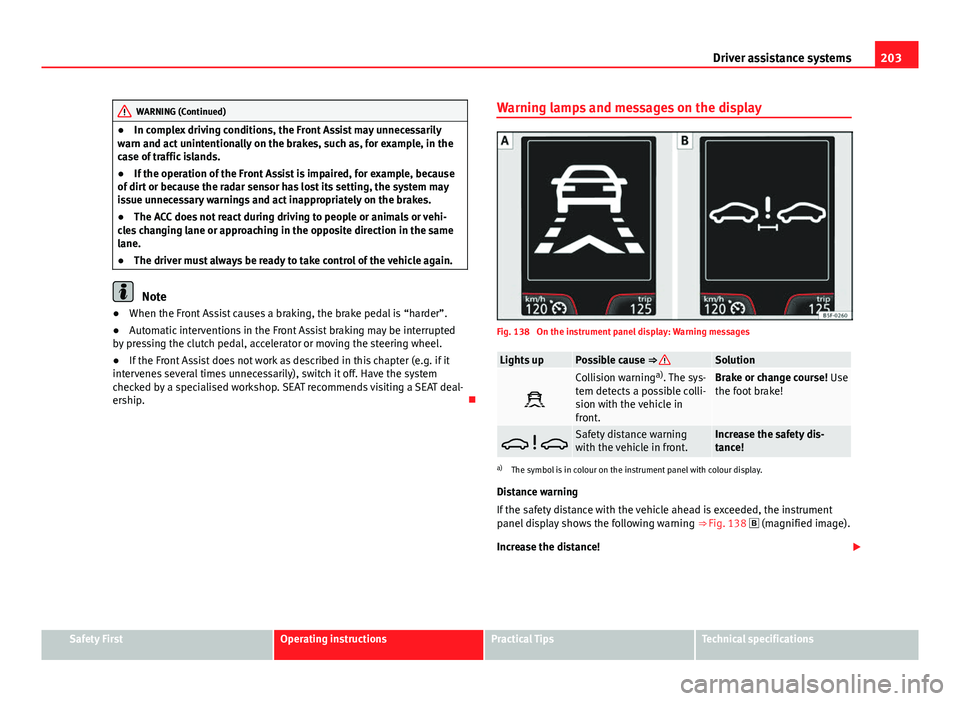
approx. 60 km/h (37 mph) and 210 km/h (130 mph) ⇒ Fig. 138.
The warning moment varies depending on traffic conditions and the driver's
behaviour.
Pre-warning
If the system detects a possible collision with the vehicle ahead, it can warn
the driver with a sound warning and a message on the instrument panel
display when driving at a speed of between approx. 30 km/h (18 mph) and
210 km/h (130 mph) ⇒ Fig. 138. The warning moment varies depending on traffic conditions and the driver's
behaviour. At the same time, the vehicle prepares for a possible emergency
braking ⇒
.
Critical warning
If the driver does not react to a pre-warning, the system can automatically
brake the vehicle when travelling at a speed of between approx. 30 km/h
(18 mph) and 210 km/h (130 mph), causing a brief jolt to warn of an immi-
nent collision hazard.
Automatic braking
If the driver fails to react to a critical warning, the system can automatically
brake the vehicle by progressively increasing braking pressure to reduce
speed when travelling at a speed of between approx. 5 km/h (3 mph) and
210 km/h (130 mph). Reducing speed in the event of a possible collision,
the system can thus help to reduce the consequences of an accident.
Brake assist
If the Front Assist realises that the driver is not braking enough in the event
of a collision hazard, the system can increase braking pressure and thus
avert the collision when travelling at a speed of between approx. 5 km/h
(3 mph) and 210 km/h (130 mph). Braking assistance only takes place
while the brake pedal is being pressed down hard.
WARNING
The intelligent technology in the Front Assist cannot change the laws of
physics. The driver is always responsible for braking in time. If the Front
Assist issues a warning, then, depending on traffic conditions, it is nec-
essary to brake immediately by applying the brake pedal or dodging the
obstacle.
● Always adapt speed and safety distance to the vehicle ahead accord-
ing to visibility, weather, road and traffic conditions.
● The Front Assist in itself cannot avoid accidents and serious injuries.
Page 205 of 339
203
Driver assistance systems
WARNING (Continued)
● In complex driving conditions, the Front Assist may unnecessarily
warn and act unintentionally on the brakes, such as, for example, in the
case of traffic islands.
● If the operation of the Front Assist is impaired, for example, because
of dirt or because the radar sensor has lost its setting, the system may
issue unnecessary warnings and act inappropriately on the brakes.
● The ACC does not react during driving to people or animals or vehi-
cles changing lane or approaching in the opposite direction in the same
lane.
● The driver must always be ready to take control of the vehicle again.
Note
● When the Front Assist causes a braking, the brake pedal is “harder”.
● Automatic interventions in the Front Assist braking may be interrupted
by pressing the clutch pedal, accelerator or moving the steering wheel.
● If the Front Assist does not work as described in this chapter (e.g. if it
intervenes several times unnecessarily), switch it off. Have the system
checked by a specialised workshop. SEAT recommends visiting a SEAT deal-
ership. Warning lamps and messages on the display
Fig. 138 On the instrument panel display: Warning messages
Lights upPossible cause ⇒ Solution
Collision warning
a)
. The sys-
tem detects a possible colli-
sion with the vehicle in
front.Brake or change course! Use
the foot brake!
Safety distance warning
with the vehicle in front.Increase the safety dis-
tance!
a) The symbol is in colour on the instrument panel with colour display.
Distance warning
If the safety distance with the vehicle ahead is exceeded, the instrument
panel display shows the following warning ⇒ Fig. 138
(magnified image).
Increase the distance!
Safety FirstOperating instructionsPractical TipsTechnical specifications
Page 208 of 339
206Driver assistance systems
WARNING
If the Front Assist is not switched off in the aforementioned situations,
accidents and serious injuries may be caused.
● Switch off the Front Assist in critical situations.
System limitations
The Front Assist Monitoring System has certain physical limitations inherent
in the system. Thus, for example, in certain circumstances some system re-
actions may be inappropriate or occur with delays as far as the driver is con-
cerned. Therefore, be on the lookout in case you have to intervene.
The following conditions may lead the Front Assist Monitoring System not
to react or react too late:
● When taking tight bends.
● If you step on the accelerator too hard
● If the Front Assist is switched off or damaged.
● If the ASR has been manually disconnected.
● If the ESC is controlling.
● If several brake lights on the vehicle or trailer have electrical faults.
● If the radar sensor is dirty or covered.
● If there are metal objects, e.g., rails on the road or the panels used on
work sites.
● If the vehicle is reversing.
● If the vehicle over-accelerates.
● In snow or heavy rain.
● In the case of narrow vehicles such as motorbikes.
● In the case of vehicles not driving straight.
● In the case of vehicles changing lanes. ●
In the case of vehicles approaching each other in the opposite direction.
● Loads and special accessories in other vehicles jutting out over the
sides, front or rear.
City emergency braking function
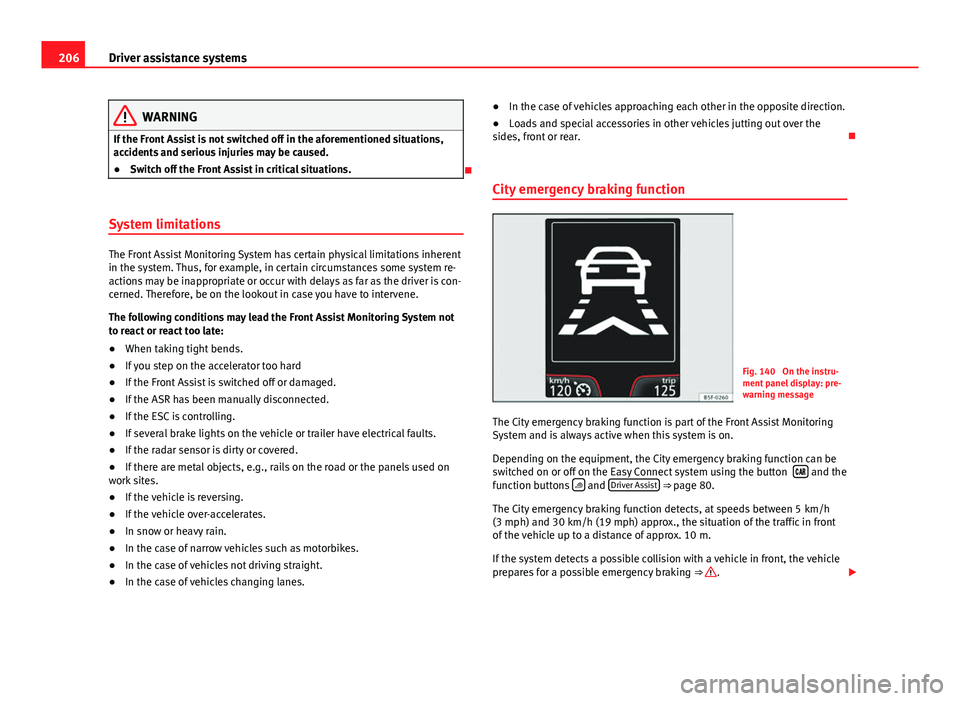
Fig. 140 On the instru-
ment panel display: pre-
warning message
The City emergency braking function is part of the Front Assist Monitoring
System and is always active when this system is on.
Depending on the equipment, the City emergency braking function can be
switched on or off on the Easy Connect system using the button
and the
function buttons and Driver Assist ⇒ page 80.
The City emergency braking function detects, at speeds between 5 km/h
(3 mph) and 30 km/h (19 mph) approx., the situation of the traffic in front
of the vehicle up to a distance of approx. 10 m.
If the system detects a possible collision with a vehicle in front, the vehicle
prepares for a possible emergency braking ⇒
.
Page 209 of 339
207
Driver assistance systems
If the driver does not react to a collision hazard, the system can automati-
cally brake the vehicle by progressively increasing braking pressure to re-
duce speed in the event of a collision. The system can thus help to reduce
the consequences of an accident.
Status display
Automatic deceleration by the City emergency braking function is shown on
the instrument panel display by means of a pre-warning message
⇒ Fig. 140 1)
.
WARNING
The smart technology included in the City emergency braking function
cannot defy the laws of physics. The driver is always responsible for
braking in time.
● Always adapt speed and safety distance to the vehicle ahead accord-
ing to visibility, weather, road and traffic conditions.
● The City emergency braking function alone cannot prevent accidents
or serious injury.
● In complex driving conditions, the City emergency braking function
may act on the brakes, for example, in areas with road works or metal
rails.
● If the City emergency braking function is impaired, for example, be-
cause of dirt or because the radar sensor has lost its setting, the system
may issue unnecessary warnings and act inappropriately on the brakes.
● The City emergency braking function does not react during driving to
people or animals or vehicles changing lane or approaching in the oppo-
site direction in the same lane.
Note
● When the City emergency braking function causes a braking, the brake
pedal is “harder”.
● Automatic interventions in the City emergency braking function may be
interrupted by pressing the clutch pedal, accelerator or moving the steering
wheel.
● The City emergency braking function can decelerate the vehicle and
bring it to a standstill. However, the brake system does not halt the vehicle
permanently. Use the foot brake!
● If several inappropriate interventions take place, disconnect the Front
Assist and with it the City emergency braking function. Visit a specialised
workshop, SEAT recommends a SEAT dealer.
● If numerous unfounded interventions occur the City emergency braking
function may disconnect automatically
Lane Assist system* Introduction
Additional information and warnings:
● SEAT information system ⇒ page 73
● Accessories, parts replacement, repairs and modifications ⇒ page 272
1)
The symbol is in colour on the instrument panel with colour display.
Safety FirstOperating instructionsPractical TipsTechnical specifications
Page 224 of 339
222Intelligent technology
Practical Tips
Intelligent technology
Electronic Stability Control (ESC)
Description
The ESC helps to improve safety. It reduces the tendency to skid and im-
proves the stability and roadholding of the vehicle. The ESC detects critical
handling situations, such as vehicle understeer or oversteer, or wheelspin
on the driving wheels. It stabilises the vehicle by braking individual wheels
or by reducing the engine torque. The warning lamp will flash on the instru-
ment panel when the ESC is intervening .
ESC includes the Anti-lock brake system (ABS), the brake assist system, the
traction control system (ASR), electronic differential lock (EDL), electronic
self-locking*, selective torque control* and tractor-trailer sway mitigation*.
ESC also helps stabilise the vehicle by changing the torque.
Anti-lock brake system (ABS)
ABS prevents the wheels from locking up under braking until the vehicle
has reached a virtual standstill. You can continue to steer the vehicle even
when the brakes are on full. Keep your foot on the brake pedal and do not
pump the brakes. You will feel the brake pedal pulsate while the ABS is
working.
Brake assist system
The brake assist system can reduce the required braking distance. The brak-
ing force is automatically boosted if you press the brake pedal quickly in an
emergency. You must keep pressing the brake pedal until the danger has
passed. Traction control system (ASR)
In the event of wheelspin, the traction control system reduces the engine
torque to match the amount of grip available. This helps the car to start
moving, accelerate or climb a gradient.
Electronic differential lock (EDL)
When the EDL detects wheelspin, it brakes the spinning wheel and directs
the power to the other driven wheel. This function is available up to a speed
of around 100 km/h, 62 mph).
To prevent the disc brake of the braked wheel from overheating, the EDL
cuts out automatically if subjected to excessive loads. The vehicle can still
be driven. The EDL will switch on again automatically when the brake has
cooled down.
Tractor-trailer sway mitigation*
If the vehicle is pulling a trailer, it will control the following: Tractor-trailers
tend to sway. When the swaying of the trailer is felt by the vehicle and de-
tected by the ESC, it will automatically brake the towing vehicle within the
limits of the system and mitigate the sway. Tractor-trailer sway mitigation is
not available in all countries.
Electronic self-locking*/Selective torque control*
When driving around bends, an electronic self-locking intervenes. The front
wheel on the inside of the curve, or the two inside wheels, respectively, are
selectively braked as required. This minimises the traction of the front
wheels, allowing you to take bends with greater precision and neutrality. In
certain circumstances, where roads are wet or snow-covered, the respective
system may not intervene.