heating Seat Leon SC 2013 User Guide
[x] Cancel search | Manufacturer: SEAT, Model Year: 2013, Model line: Leon SC, Model: Seat Leon SC 2013Pages: 339, PDF Size: 4.8 MB
Page 158 of 339
156Air conditioning
Open the air conditioner menu
● Press the Setup
button
● OR: press the MENU button in Easy Connect. With the rotating switch se-
lect the air conditioner menu and open it.
On the touch screen you can see and change the current settings, for exam-
ple, the temperature set for the driver and passenger sides, the air distribu-
tion and the fan speed. With button
the driver and passenger side tem-
peratures are synchronised ⇒ Booklet Media System Touch/Colour, chap-
ter Air conditioning.
To switch a function on or off, or to select a submenu, you must press the
corresponding function button.
For more information about functions ⇒ page 79.
Function but-
toneffect
OFFSwitch off and switch on the Climatronic.
SETTINGS
The air conditioning settings submenu is opened. It is
possible to make the following adjustments:
Function button Air conditioning profile.
: to adjust the level of
the fan in AUTO mode. You can choose between low, me-
dium and high.
Function button Automatic air recirculation
to switch on and
off automatic air recirculation ⇒ page 160.
BACK
function button to close the submenu.
Adjust through the Easy Connect system* 1)
In the Easy Connect system it is also possible to perform various adjust-
ments to the Climatronic. Open the air conditioner menu
● Press the Setup
button
On the top of the screen you can see and change the current settings, such
as, for example, the temperature set for the driver side and for that of pas-
senger. Temperatures up to +22 °C (+72 °F) are shown with blue arrows, and
temperatures over +22 °C (+72 °F) with red arrows.
To switch a function on or off, or to select a submenu, you must press the
corresponding function button.
Function buttoneffectAir conditioning profileAdjust the fan level in AUTO mode. You can choose be-
tween low, medium and high.
OFFClimatronic is switched off.ONClimatronic is switched on.
SETTINGS
The air conditioning settings submenu is opened. It is
possible to make the following adjustments:
Function button Air conditioning profile.
: to adjust the lev-
el of the fan in AUTO mode. You can choose between
low, medium and high.
Function button Automatic air recirculation
to switch on
and off automatic air recirculation ⇒ page 160.
BACK
function button to close the submenu.
Automatic supple-
mentary heating
Activate/deactivate the automatic activation of the
supplementary heating for colder countries (only for
engines with supplementary heating). With the option
deactivated, depending on the outside temperature
the heating may need more time than normal to reach
a comfortable temperature.
1) Applies to vehicles with a Media System Plus/Navi System
Page 159 of 339
157
Air conditioning
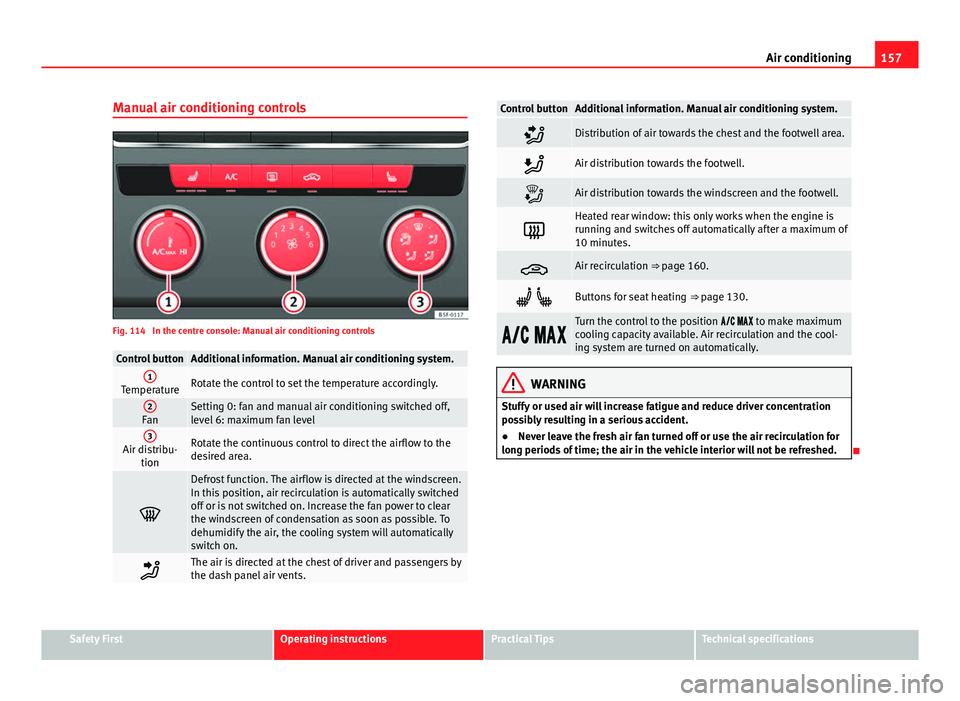
Manual air conditioning controls
Fig. 114 In the centre console: Manual air conditioning controls
Control buttonAdditional information. Manual air conditioning system.1TemperatureRotate the control to set the temperature accordingly.
2FanSetting 0: fan and manual air conditioning switched off,
level 6: maximum fan level
3Air distribu- tionRotate the continuous control to direct the airflow to the
desired area.
Defrost function. The airflow is directed at the windscreen.
In this position, air recirculation is automatically switched
off or is not switched on. Increase the fan power to clear
the windscreen of condensation as soon as possible. To
dehumidify the air, the cooling system will automatically
switch on.
The air is directed at the chest of driver and passengers by
the dash panel air vents.
Control buttonAdditional information. Manual air conditioning system.
Distribution of air towards the chest and the footwell area.
Air distribution towards the footwell.
Air distribution towards the windscreen and the footwell.
Heated rear window: this only works when the engine is
running and switches off automatically after a maximum of
10 minutes.
Air recirculation ⇒ page 160.
Buttons for seat heating ⇒ page 130.
Turn the control to the position to make maximum
cooling capacity available. Air recirculation and the cool-
ing system are turned on automatically.
WARNING
Stuffy or used air will increase fatigue and reduce driver concentration
possibly resulting in a serious accident.
● Never leave the fresh air fan turned off or use the air recirculation for
long periods of time; the air in the vehicle interior will not be refreshed.
Safety FirstOperating instructionsPractical TipsTechnical specifications
Page 160 of 339
158Air conditioning
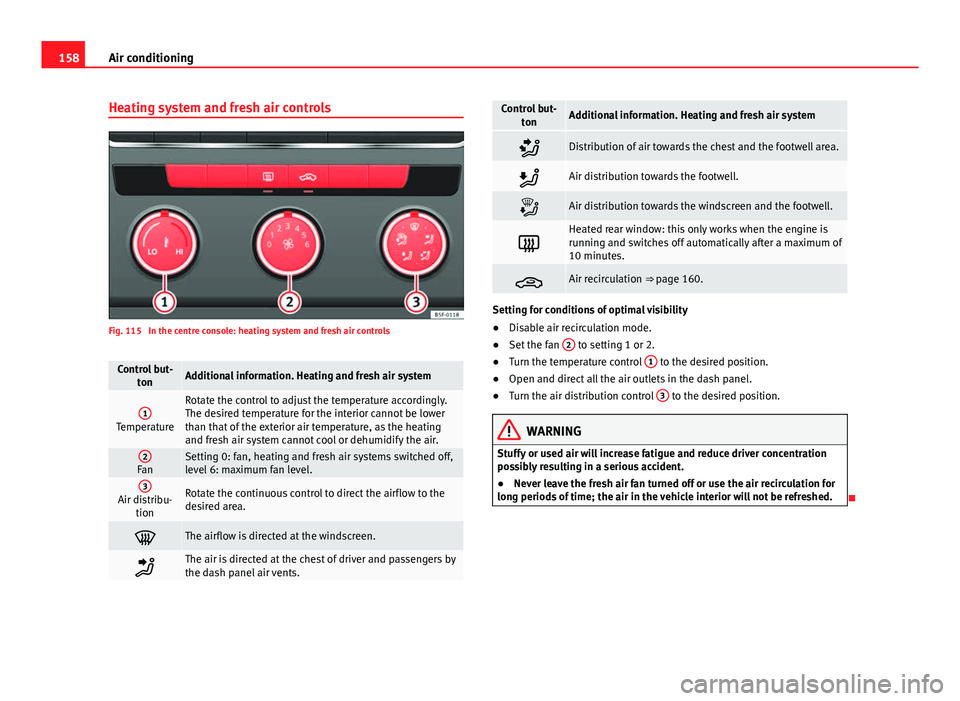
Heating system and fresh air controls
Fig. 115 In the centre console: heating system and fresh air controls
Control but-
tonAdditional information. Heating and fresh air system
1Temperature
Rotate the control to adjust the temperature accordingly.
The desired temperature for the interior cannot be lower
than that of the exterior air temperature, as the heating
and fresh air system cannot cool or dehumidify the air.
2FanSetting 0: fan, heating and fresh air systems switched off,
level 6: maximum fan level.
3Air distribu-tionRotate the continuous control to direct the airflow to the
desired area.
The airflow is directed at the windscreen.
The air is directed at the chest of driver and passengers by
the dash panel air vents.
Control but- tonAdditional information. Heating and fresh air system
Distribution of air towards the chest and the footwell area.
Air distribution towards the footwell.
Air distribution towards the windscreen and the footwell.
Heated rear window: this only works when the engine is
running and switches off automatically after a maximum of
10 minutes.
Air recirculation ⇒ page 160.
Setting for conditions of optimal visibility
●Disable air recirculation mode.
● Set the fan 2
to setting 1 or 2.
● Turn the temperature control 1 to the desired position.
● Open and direct all the air outlets in the dash panel.
● Turn the air distribution control 3
to the desired position.
WARNING
Stuffy or used air will increase fatigue and reduce driver concentration
possibly resulting in a serious accident.
● Never leave the fresh air fan turned off or use the air recirculation for
long periods of time; the air in the vehicle interior will not be refreshed.
Page 162 of 339
160Air conditioning
Air vents
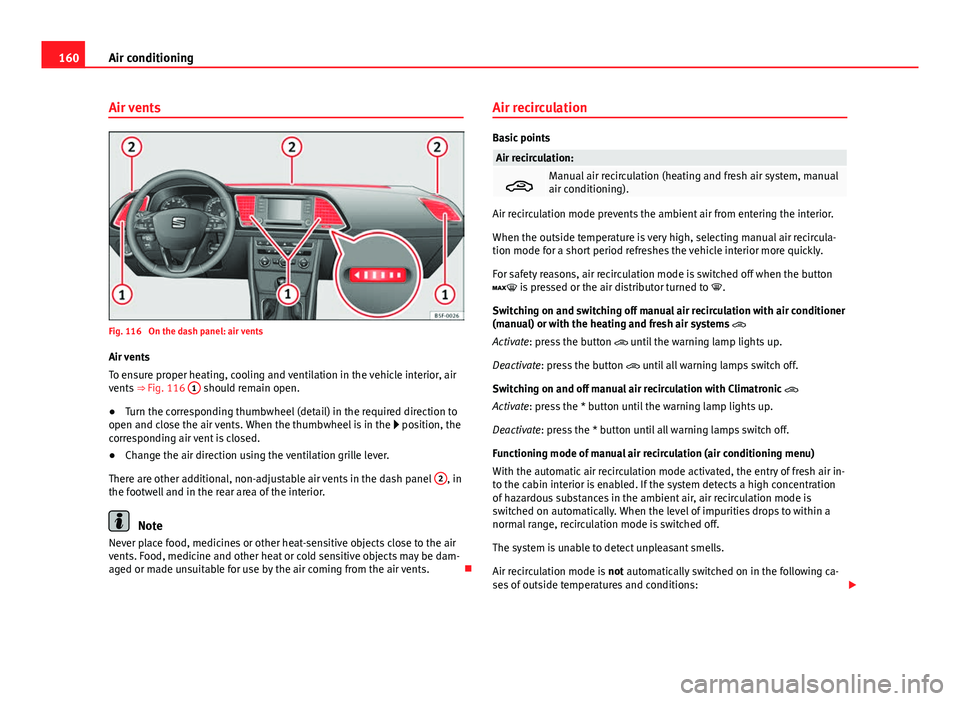
Fig. 116 On the dash panel: air vents
Air vents
To ensure proper heating, cooling and ventilation in the vehicle interior, air
vents ⇒ Fig. 116 1
should remain open.
● Turn the corresponding thumbwheel (detail) in the required direction to
open and close the air vents. When the thumbwheel is in the position, the
corresponding air vent is closed.
● Change the air direction using the ventilation grille lever.
There are other additional, non-adjustable air vents in the dash panel 2
, in
the footwell and in the rear area of the interior.
Note
Never place food, medicines or other heat-sensitive objects close to the air
vents. Food, medicine and other heat or cold sensitive objects may be dam-
aged or made unsuitable for use by the air coming from the air vents. Air recirculation
Basic points
Air recirculation:
Manual air recirculation (heating and fresh air system, manual
air conditioning).
Air recirculation mode prevents the ambient air from entering the interior.
When the outside temperature is very high, selecting manual air recircula-
tion mode for a short period refreshes the vehicle interior more quickly.
For safety reasons, air recirculation mode is switched off when the button
is pressed or the air distributor turned to
.
Switching on and switching off manual air recirculation with air conditioner
(manual) or with the heating and fresh air systems
Activate: press the button until the warning lamp lights up.
Deactivate: press the button until all warning lamps switch off.
Switching on and off manual air recirculation with Climatronic
Activate: press the * button until the warning lamp lights up.
Deactivate: press the * button until all warning lamps switch off.
Functioning mode of manual air recirculation (air conditioning menu)
With the automatic air recirculation mode activated, the entry of fresh air in-
to the cabin interior is enabled. If the system detects a high concentration
of hazardous substances in the ambient air, air recirculation mode is
switched on automatically. When the level of impurities drops to within a
normal range, recirculation mode is switched off.
The system is unable to detect unpleasant smells.
Air recirculation mode is not automatically switched on in the following ca-
ses of outside temperatures and conditions:
Page 164 of 339
162Driving
Driving
SteeringAdjusting the steering wheel position
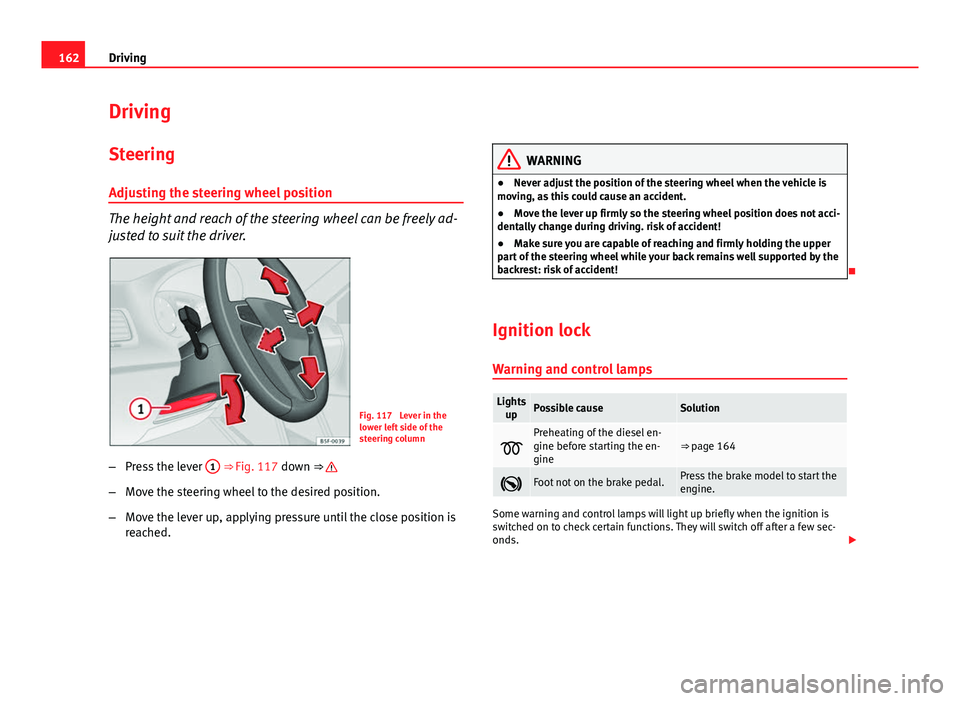
The height and reach of the steering wheel can be freely ad-
justed to suit the driver.
Fig. 117 Lever in the
lower left side of the
steering column
– Press the lever 1
⇒ Fig. 117 down ⇒
–
Move the steering wheel to the desired position.
– Move the lever up, applying pressure until the close position is
reached.
WARNING
● Never adjust the position of the steering wheel when the vehicle is
moving, as this could cause an accident.
● Move the lever up firmly so the steering wheel position does not acci-
dentally change during driving. risk of accident!
● Make sure you are capable of reaching and firmly holding the upper
part of the steering wheel while your back remains well supported by the
backrest: risk of accident!
Ignition lock Warning and control lamps
Lights upPossible causeSolution
Preheating of the diesel en-
gine before starting the en-
gine⇒ page 164
Foot not on the brake pedal.Press the brake model to start the
engine.
Some warning and control lamps will light up briefly when the ignition is
switched on to check certain functions. They will switch off after a few sec-
onds.
Page 165 of 339
163
Driving
WARNING
Failure to heed the warning lamps when they light up and the corre-
sponding messages may cause the vehicle to stall in traffic and cause ac-
cidents and severe injuries.
● Never ignore the warning lamps or messages.
● Stop the vehicle at the next safe opportunity.
● If the vehicle breaks down or has to be parked for repair, always park
it a safe distance away from the road, switch on the hazard warning
lights, switch off the engine and take other relevant safety measures to
warn vehicles approaching from the rear.
CAUTION
Failure to heed the control lamps when they light up and the corresponding
messages may result in damage to the vehicle. Starting the engine with the ignition key
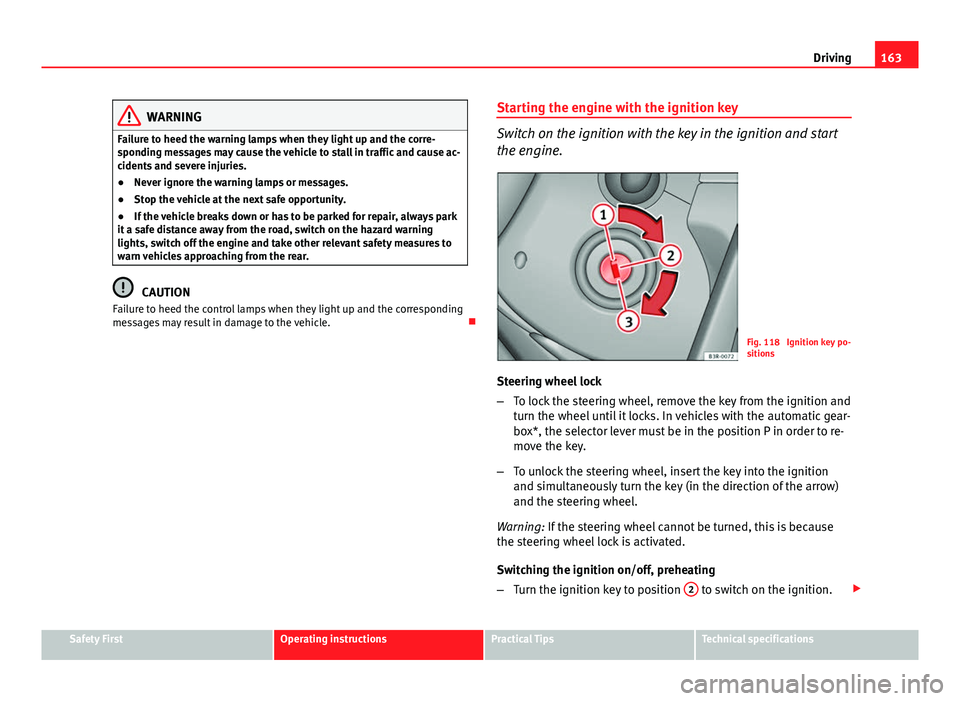
Switch on the ignition with the key in the ignition and start
the engine.
Fig. 118 Ignition key po-
sitions
Steering wheel lock
– To lock the steering wheel, remove the key from the ignition and
turn the wheel until it locks. In vehicles with the automatic gear-
box*, the selector lever must be in the position P in order to re-
move the key.
– To unlock the steering wheel, insert the key into the ignition
and simultaneously turn the key (in the direction of the arrow)
and the steering wheel.
Warning: If the steering wheel cannot be turned, this is because
the steering wheel lock is activated.
Switching the ignition on/off, preheating
– Turn the ignition key to position 2
to switch on the ignition.
Safety FirstOperating instructionsPractical TipsTechnical specifications
Page 166 of 339
164Driving
–Turn the ignition key to position 1
to switch off the ignition.
Preheating is produced in Diesel vehicles when the ignition is
switched on.
Starting up the engine
– Manual gearbox: Press the clutch pedal all the way down and
move the gearbox lever into neutral.
– Automatic gearbox : Press the brake pedal and move the selec-
tor lever to position P or N.
– Turn the ignition key to position 3
. The key returns to position
2 automatically. Do not press the accelerator.
Diesel engines can take a few seconds longer than usual to start
on cold days. Therefore the clutch pedal (manual gearbox) or the
brake pedal (automatic gearbox) must remain pressed until the en-
gine starts up. During preheating, the warning lamp remains lit.
The preheating time depends on the coolant and exterior tempera-
tures. When the engine is at operating temperature or at outside
temperatures above +8 °C (46 °F) the warning lamp will only
light up for about one second. This means that the engine starts
immediately.
If the engine does not immediately start up, interrupt the starting process
and try again after 30 seconds. To start the engine again, return the key to
position 1
.
Start-Stop System*
If the vehicle is stopped and the Start-Stop system* switches off the engine,
the ignition remains switched on.
Automatic gearbox: Before leaving the vehicle, make sure that the ignition
is switched off and the selector lever is in position P. Driver messages on the instrument panel display
Press the clutch This message appears on vehicles with a manual gearbox if the driver tries
to start the engine without having the clutch pedal pressed. The engine will
only start if you press the clutch pedal.
Press the brake
This message appears on vehicles with an automatic gearbox if the driver
tries to start the engine without having the brake pedal pressed.
Select N or P
This message appears if you try to start or stop the engine when the selec-
tor lever of the automatic gearbox is not in position P or N. The engine can
only start or stop in these positions.
Engage position P; the vehicle can move; doors can only close in position P. For safety reasons, this driver message appears and an audible warning
sounds if the selector lever of the automatic gearbox is not in position P af-
ter you switch off the ignition. Otherwise the vehicle could move.
Gear change: selector lever in the drive position!
This driver message is displayed and a buzzer is sounded when the selector
lever is not in the position P when the driver door is opened. Put the selec-
tor lever in position P; otherwise the vehicle can roll away.
Ignition is switched onThis driver message is displayed and a buzzer is sounded when the driver
door is opened with the ignition switched on.
Page 179 of 339
177
Driving
Moving off uphill in vehicles with Hill start assistant*
– Once you have engaged a gear, release the footbrake and press
the accelerator ⇒ page 168, Hill driving assistant*.
Driving down hills: In some situations (on mountain roads or when towing a
trailer or caravan) it can be advantageous to switch temporarily to the man-
ual gearbox programme so that the gear ratios can be selected manually to
suit the driving conditions ⇒
.
On level ground it is sufficient to move the selector lever to position P. On
slopes, first engage the parking brake and then put the selection lever into
the P position. This avoids overloading the locking mechanism and it will be
easier to move the selector lever from position P.
WARNING
● As a driver you should never leave your vehicle if the engine is run-
ning and a gear is engaged. If you have to leave your vehicle while the
engine is running, you must apply the handbrake and engage the parking
lock P.
● If the engine is running and a gear is engaged (D/S or R) or the vehi-
cle is in tiptronic mode, you will need to hold the car with the footbrake.
Otherwise, the car will creep forwards as the power transmission is not
fully interrupted even when the engine is idling.
● Take care not to accidentally press the accelerator pedal when the ve-
hicle is stopped. The vehicle could otherwise start moving immediately
(in some cases even if the parking brake is engaged) resulting in the risk
of an accident.
● While you are selecting a gear and the vehicle is stopped with the en-
gine running, do not accelerate. Failure to do so could result in an acci-
dent.
● Never move the selector lever to R or P when driving: this could result
in an accident!
WARNING (Continued)
● Before you drive down a steep gradient, reduce your speed and use
tiptronic to select a low gear.
● Never allow the brake to rub and do not use the brake pedal too often
or for long periods. Constant braking causes overheating in the brakes.
This could significantly reduce braking power, increase braking distance
or even result in the total failure of the brake system.
● To avoid rolling back on gradients always hold the vehicle with the
footbrake or handbrake if you have to stop.
CAUTION
● If you stop the vehicle on a gradient, do not attempt to stop it from roll-
ing by depressing the accelerator when a gear has been selected. This
could cause overheating and damage the automatic gearbox. Apply the
handbrake firmly or press the brake pedal in order to prevent the vehicle
from rolling back.
● If you allow the car to roll with the selector lever in position N with the
engine switched off, the automatic gearbox will be damaged as it will not be
lubricated.
● In certain driving situations or traffic conditions, such as frequently
starting, prolonged “creeping” of the vehicle or traffic jams with continuous
stoppages, the gearbox could overheat causing damage! If the warning
lamp lights up, stop the vehicle as soon as possible and wait for the
gearbox to cool ⇒ page 181.
● In certain driving situations or traffic conditions, such as frequently
starting, prolonged “creeping” of the vehicle or traffic jams with continuous
stoppages, the gearbox could overheat causing damage! If the warning
lamp lights up, stop the vehicle as soon as possible and wait for the
gearbox to cool ⇒ page 182.
Safety FirstOperating instructionsPractical TipsTechnical specifications
Page 224 of 339
222Intelligent technology
Practical Tips
Intelligent technology
Electronic Stability Control (ESC)
Description
The ESC helps to improve safety. It reduces the tendency to skid and im-
proves the stability and roadholding of the vehicle. The ESC detects critical
handling situations, such as vehicle understeer or oversteer, or wheelspin
on the driving wheels. It stabilises the vehicle by braking individual wheels
or by reducing the engine torque. The warning lamp will flash on the instru-
ment panel when the ESC is intervening .
ESC includes the Anti-lock brake system (ABS), the brake assist system, the
traction control system (ASR), electronic differential lock (EDL), electronic
self-locking*, selective torque control* and tractor-trailer sway mitigation*.
ESC also helps stabilise the vehicle by changing the torque.
Anti-lock brake system (ABS)
ABS prevents the wheels from locking up under braking until the vehicle
has reached a virtual standstill. You can continue to steer the vehicle even
when the brakes are on full. Keep your foot on the brake pedal and do not
pump the brakes. You will feel the brake pedal pulsate while the ABS is
working.
Brake assist system
The brake assist system can reduce the required braking distance. The brak-
ing force is automatically boosted if you press the brake pedal quickly in an
emergency. You must keep pressing the brake pedal until the danger has
passed. Traction control system (ASR)
In the event of wheelspin, the traction control system reduces the engine
torque to match the amount of grip available. This helps the car to start
moving, accelerate or climb a gradient.
Electronic differential lock (EDL)
When the EDL detects wheelspin, it brakes the spinning wheel and directs
the power to the other driven wheel. This function is available up to a speed
of around 100 km/h, 62 mph).
To prevent the disc brake of the braked wheel from overheating, the EDL
cuts out automatically if subjected to excessive loads. The vehicle can still
be driven. The EDL will switch on again automatically when the brake has
cooled down.
Tractor-trailer sway mitigation*
If the vehicle is pulling a trailer, it will control the following: Tractor-trailers
tend to sway. When the swaying of the trailer is felt by the vehicle and de-
tected by the ESC, it will automatically brake the towing vehicle within the
limits of the system and mitigate the sway. Tractor-trailer sway mitigation is
not available in all countries.
Electronic self-locking*/Selective torque control*
When driving around bends, an electronic self-locking intervenes. The front
wheel on the inside of the curve, or the two inside wheels, respectively, are
selectively braked as required. This minimises the traction of the front
wheels, allowing you to take bends with greater precision and neutrality. In
certain circumstances, where roads are wet or snow-covered, the respective
system may not intervene.
Page 230 of 339
228Intelligent technology
To restore the necessary energy balance, the system will then temporarily
shut off the electrical components that are using a lot of power, or reduce
the current they are consuming. Heating systems in particular use a large
amount of electrical power. If you notice, for instance, that the seat heating*
or the heated rear window is not working, they may have been temporarily
switched off or regulated to a lower heat output. These systems will be
available again as soon as sufficient electrical power is available.
You may also notice that the engine runs at a slightly faster idling speed.
This is quite normal, and no cause for concern. The increased idling speed
allows the alternator to meet the greater power requirement and charge the
battery at the same time.
Information recorded in the control units
Your vehicle is fitted at the factory with a series of electronic control units
responsible for the engine and gearbox management. In addition, the con-
trol units supervise the correct performance of the exhaust gas system and
the airbag systems.
Therefore, while the vehicle is being driven, these electronic control units
are continuously analysing the vehicle data. In the event of faults or devia-
tions from the theoretical values, only this data is stored. Generally, the in-
strument panel warning lamps indicate whether there are any malfunctions.
This data can only be read and analysed using special equipment.
The storing of the data allows specialised workshops to detect and repair
faults. Stored data may include:
● Important data about the engine and gearbox
● Speed
● Direction of travel ●
Braking force
● Seat belt check
The vehicle control units never record conversations held by passengers in
the vehicle.
If the control unit records an accident with airbag activation, the system
may automatically send a signal. This will depend on the network operator.
Normally, transmission is only possible in areas with sufficient coverage.
Event Data Recorder
The vehicle is not fitted with an event data recorder.
An event data recorder temporarily stores the vehicle information. There-
fore, in the event of accident, it is possible to obtain detailed information
about how the accident occurred. For example, in vehicles with airbag sys-
tems, data relating to speed of impact, seat belt status, seat positions and
airbag activation times may be stored. The volume of data depends on the
manufacturer.
Event data recorders can only be mounted with authorisation from the vehi-
cle owner and, in some countries, they are governed by local legislation.
Reprogramming control units
On the whole, all the data required for the component management is stor-
ed in the control units. The programming of certain convenience functions,
such as the turn signal convenience mode, individual door opening and dis-
play indications can be modified using special equipment at the workshop.
If the convenience functions are reprogrammed, the Instruction Manual in-
formation and descriptions will not coincide with the modified functions.
Therefore, SEAT recommends that any changes are recorded in the “Other
workshop notes section” of the Service Plan.
You can find out about possible reprogramming at your SEAT Official Serv-
ice.