park assist Seat Leon SC 2013 User Guide
[x] Cancel search | Manufacturer: SEAT, Model Year: 2013, Model line: Leon SC, Model: Seat Leon SC 2013Pages: 339, PDF Size: 4.8 MB
Page 199 of 339
197
Driver assistance systems
Message texts
ACC not available
The system cannot continue to guarantee safe vehicle detection so it is
switched off. The sensor has lost its setting or is damaged. Take the vehicle
to a specialised workshop to have the fault repaired.
ACC: not available at the moment. Sensor without visibility
ACC and Front Assist: not available at the moment. Sensor without
visibility
This message for the driver is displayed if the visibility of the radar's sensor
is impaired, e.g., by leaves, snow, heavy mist or dirt. Clean the sensor.
ACC: not available at the moment. Gradient too steep
The maximum slope has been exceeded, hence it cannot be guaranteed
that the adaptive cruise control will operate safely. The adaptive cruise con-
trol cannot be activated
ACC: only available in D, S or M
Select the position of the selector lever D/S or M.
ACC: parking brake applied
The adaptive cruise control is deactivated if the parking brake is applied.
The adaptive cruise control is available again if the parking brake is re-
leased.
ACC: not available at the moment. Stabilisation control intervention
The message for the driver is shown when the electronic stabilisation con-
trol (ESC) intervenes. In this case, the adaptive cruise control will automati-
cally be switched off.
ACC: Intervene!
The message for the driver is shown if, when you start up on a gentle slope,
the vehicle moves backwards even although the ACC is switched on. Step on the brake pedal to prevent the vehicle from moving/crashing into anoth-
er vehicle.
ACC: speed limit
The message for the driver is shown in vehicles with manual gearbox if the
current speed is too low for ACC mode.
The speed you wish to store must be at least 30 km/h. The cruise control
system switches off if the speed falls below 20 km/h.
ACC: available as of the 2nd gear
The adaptive cruise control is operational as of the 2nd gear (manual gear-
box).
ACC: engine speed
The message for the driver is shown if, when the adaptive cruise control ac-
celerates or brakes, the driver does not go up or down a gear in time, which
would mean either exceeding or not reaching the admissible rpm. The adap-
tive cruise control will then be switched off. A warning buzzer goes off.
ACC: clutch pressed down
Vehicles with a manual gearbox: press the clutch pedal for longer to exit
control.
Three white dots appear if a setting made with the control lever cannot be
executed. For example, the adaptive cruise control cannot be switched on in
a stationary vehicle when the driver's seatbelt is not fastened.
Door open
Vehicles with automatic gearbox: the adaptive cruise control cannot be
switched on in a stationary vehicle with the door open.
Safety FirstOperating instructionsPractical TipsTechnical specifications
Page 202 of 339
200Driver assistance systems
Overtaking
When the turn signal comes on before overtaking, the ACC accelerates the
vehicle automatically and thus reduces the distance between it and the ve-
hicle ahead.
When you move into the overtaking lane, if the ACC does not detect any ve-
hicle in front it accelerates until it reaches the stored speed and keeps it
constant.
The acceleration can be interrupted at any time by stepping on the brake
pedal or pulling back on the lever ⇒ page 193.
Driving through a bend
On entering or coming out of a bend, the radar sensor may no longer detect
the vehicle ahead of it or may react before a vehicle in the adjacent lane
⇒ Fig. 136 A. In such situations the vehicle may brake unnecessarily or may
cease to react with regard to the vehicle ahead. In this case, the driver has
to act by accelerating or interrupting the braking process by stepping on the
brake pedal or pulling the third lever backwards ⇒ page 193.
Driving in tunnels
When going through tunnels, the radar sensor function may be limited.
Switch off the ACC in tunnels.
Narrow vehicles or vehicles not driving straight
The radar sensor can only detect narrow vehicles or those that are not driv-
ing straight within its range ⇒ Fig. 136 B. This is particularly applicable to
narrow vehicles such as motorbikes. In these cases, brake yourself as nec-
essary.
Vehicles with loads and special accessories
The load and special accessories of other vehicles that jut out over the side,
backwards or forward may be outside the range of the ACC.
Switch off the ACC when driving behind vehicles with loads or special acces-
sories, as well as when overtaking these vehicles. In these cases, brake
yourself as necessary. Other vehicles changing lanes
Vehicles changing lanes not far away from the vehicle can only be detected
when they fall within the range of the sensors. Consequently, the ACC will
take longer to react
⇒ Fig. 137 C. In these cases, brake yourself if necessary.
Stationary vehicles
During driving, the ACC does not detect stationary objects, such as the end
of a jam or damaged vehicles.
If a vehicle detected by ACC turns or moves over and there is another sta-
tionary vehicle in front of it, the ACC will not react ⇒ Fig. 137 D. In these ca-
ses, brake yourself if necessary.
Vehicles travelling in the opposite direction and vehicles changing lanes
The ACC does not react to vehicles approaching in the opposite direction or
vehicles changing lanes.
Metal objects
Metal objects, e.g. rails on the road or the panels used on work sites, may
confuse the radar sensor and cause wrong reactions in the ACC.
Factors that may affect the operation of the radar sensor
If the operation of the radar sensor were affected by heavy rain, water mist,
snow or mud, the ACC is switched off temporarily. The relevant message ap-
pears on the instrument panel display. If necessary, clean the radar sensor.
When the radar sensor works properly again, the ACC will be automatically
available again. The message on the instrument panel display will go off
and the ACC can be switched on again.
In the event of a heavy reverse reflection of the radar signal, for example, in
a closed parking, ACC operation may be affected.
Trailer towing
When driving with a trailer, the ACC controls less dynamically.
Page 206 of 339
204Driver assistance systems
WARNING
Failure to heed the warning lamps when they light up and the corre-
sponding messages may result in an accident and injury.
● Never ignore the warning lamps or on-screen messages.
Note
When the Front Assist is connected, the instrument panel display messages
pertaining to other functions may be hidden, such as an incoming call.
Radar sensor
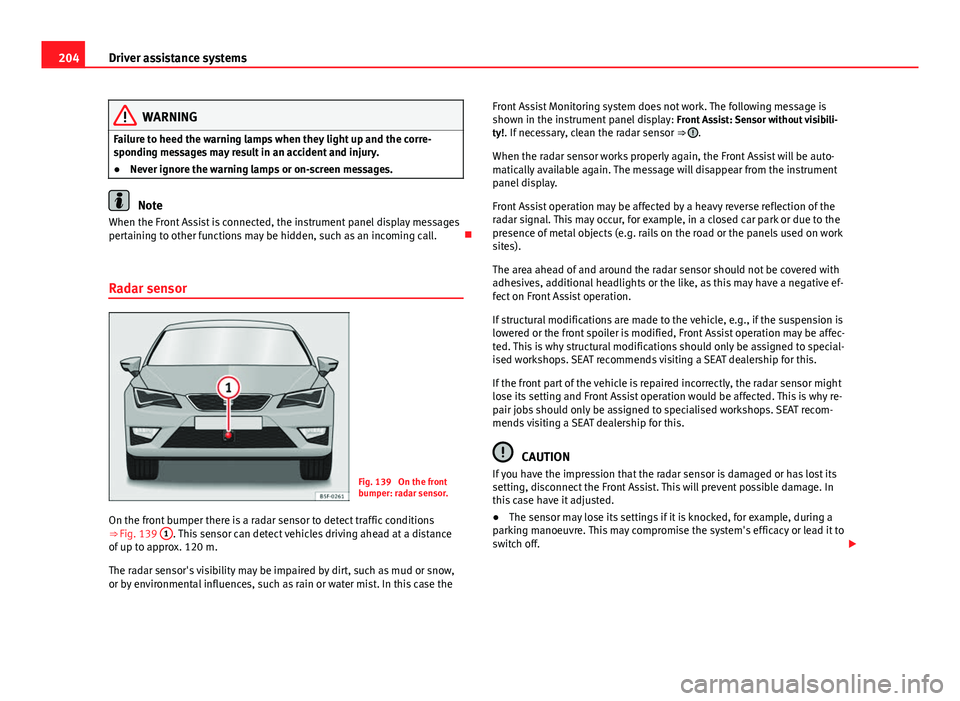
Fig. 139 On the front
bumper: radar sensor.
On the front bumper there is a radar sensor to detect traffic conditions
⇒ Fig. 139 1
. This sensor can detect vehicles driving ahead at a distance
of up to approx. 120 m.
The radar sensor's visibility may be impaired by dirt, such as mud or snow,
or by environmental influences, such as rain or water mist. In this case the Front Assist Monitoring system does not work. The following message is
shown in the instrument panel display:
Front Assist: Sensor without visibili-
ty!. If necessary, clean the radar sensor ⇒
.
When the radar sensor works properly again, the Front Assist will be auto-
matically available again. The message will disappear from the instrument
panel display.
Front Assist operation may be affected by a heavy reverse reflection of the
radar signal. This may occur, for example, in a closed car park or due to the
presence of metal objects (e.g. rails on the road or the panels used on work
sites).
The area ahead of and around the radar sensor should not be covered with
adhesives, additional headlights or the like, as this may have a negative ef-
fect on Front Assist operation.
If structural modifications are made to the vehicle, e.g., if the suspension is
lowered or the front spoiler is modified, Front Assist operation may be affec-
ted. This is why structural modifications should only be assigned to special-
ised workshops. SEAT recommends visiting a SEAT dealership for this.
If the front part of the vehicle is repaired incorrectly, the radar sensor might
lose its setting and Front Assist operation would be affected. This is why re-
pair jobs should only be assigned to specialised workshops. SEAT recom-
mends visiting a SEAT dealership for this.
CAUTION
If you have the impression that the radar sensor is damaged or has lost its
setting, disconnect the Front Assist. This will prevent possible damage. In
this case have it adjusted.
● The sensor may lose its settings if it is knocked, for example, during a
parking manoeuvre. This may compromise the system's efficacy or lead it to
switch off.
Page 219 of 339
217
Driver assistance systems
Wheel tread change
The wheel tread changes when:
● Tyre pressure is manually changed
● Tyre pressure is insufficient
● Tyre structure is damaged
● The vehicle is unbalanced because of a load
● The wheels on an axle are subject to a heavier load (e.g. when towing a
heavy load)
● The vehicle is fitted with snow chains
● The temporary spare wheel is fitted
● The wheel on one axle is changed
There may be a delay in the reaction of the tyre monitoring indicator or it
may not indicate anything under certain circumstances (e.g. sporty driving,
snow-covered or unpaved roads, or when driving with snow chains).
Calibrating the tyre monitoring indicator
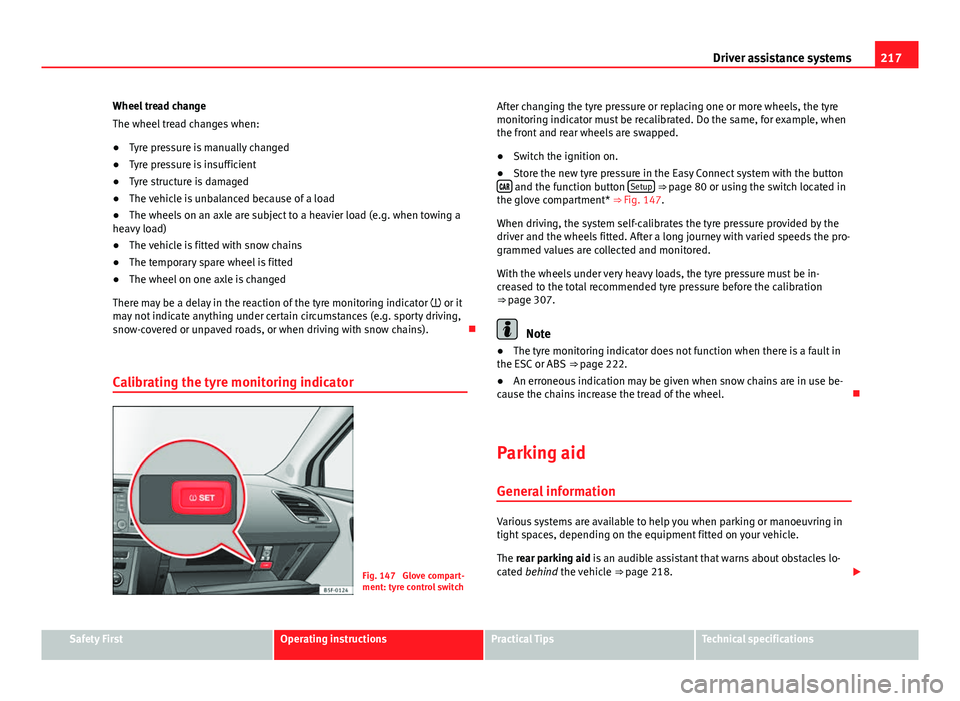
Fig. 147 Glove compart-
ment: tyre control switch After changing the tyre pressure or replacing one or more wheels, the tyre
monitoring indicator must be recalibrated. Do the same, for example, when
the front and rear wheels are swapped.
●
Switch the ignition on.
● Store the new tyre pressure in the Easy Connect system with the button
and the function button Setup ⇒ page 80 or using the switch located in
the glove compartment* ⇒ Fig. 147.
When driving, the system self-calibrates the tyre pressure provided by the
driver and the wheels fitted. After a long journey with varied speeds the pro-
grammed values are collected and monitored.
With the wheels under very heavy loads, the tyre pressure must be in-
creased to the total recommended tyre pressure before the calibration
⇒ page 307.
Note
● The tyre monitoring indicator does not function when there is a fault in
the ESC or ABS ⇒ page 222.
● An erroneous indication may be given when snow chains are in use be-
cause the chains increase the tread of the wheel.
Parking aid General information
Various systems are available to help you when parking or manoeuvring in
tight spaces, depending on the equipment fitted on your vehicle.
The rear parking aid is an audible assistant that warns about obstacles lo-
cated behind the vehicle ⇒ page 218.
Safety FirstOperating instructionsPractical TipsTechnical specifications
Page 220 of 339
218Driver assistance systems
During parking, the parking system plus assists you visually and audibly
about obstacles detected in front and behind the vehicle ⇒ page 219.
WARNING
● Always pay attention (also when looking straight ahead) to traffic and
the vehicle surroundings. The assistance systems are not a replacement
for driver awareness. When inserting or removing the vehicle from a park-
ing space, or when performing similar manoeuvres the driver always as-
sumes the responsibility.
● Take into account that the system is not always in conditions to rec-
ognise or represent certain surfaces, such as dress fabric: Risk of causing
an accident!
● The sensors and cameras have blind spots, making the detection of
people and objects impossible. Pay special attention to children and ani-
mals: Risk of causing an accident!
● Always keep visual control of the vehicle surroundings: use the rear
vision mirrors for additional help.
CAUTION
● Under certain circumstances, the system does not detect or display cer-
tain objects:
–Objects such as snow chains, trailer draw bars, bars or fences
– Objects that are located above the sensors, such as protrusions in a
wall.
– Objects with certain surfaces or structures, such as wire mesh fences
or powder snow.
● When the vehicle approaches a low obstacle, it could disappear from
the angle of measurement. In this case, take into account that the system
will no longer warn about this obstacle.
● The knocks or damage on the radiator grille, bumper, wheel arch and ve-
hicle underbody can adjust the orientation of the sensors. This can affect
the parking aid function. Have the function checked by a specialised work-
shop.
Note
● In certain situations, the system can give a warning even though there is
no obstacle in the detected area, e.g:
–for roads with certain surfaces, or with long grass
– for external ultrasound sources, such as cleaning vehicles
– In downpours, intense snow or dense exhaust gases
● In order to familiarise yourself with the system, it is advised that you
practice parking in an area or car park that is free from traffic. There must be
good weather and light conditions.
● The volume and tone of the warnings can be modified, in addition to the
indications ⇒ page 221.
● In vehicles without a driver information system, these parameters can be
modified in a SEAT Official Service or in a specialised workshop.
● Please observe information on towing a trailer ⇒ page 221.
● The display on the Easy Connect screen shows a slight time delay.
● To ensure that the parking aid works properly, the sensors must be kept
clean and free of ice and snow.
Rear parking aid*
The rear parking aid is an audible assistant. Description
There are sensors integrated in the rear bumper. When the sensors detect
an obstacle, you are alerted by audible warnings.
Make sure that the sensors are not covered by adhesives, residues and the
like, given that this could affect the system operation. Cleaning instructions
⇒ page 239.
The approximate measurement range of the sensors is:
Page 221 of 339
219
Driver assistance systems
rearside0.90 mcentre1.60 m
As you approach the obstacle, the time interval between the audible warn-
ings will be reduced. When you reach around 0.30 m the warning will be
constant: Do not continue to move forward (or backward) ⇒
in General
information on page 218, ⇒ in General information on page 218 !
If you maintain separation from the obstacle, the volume of the warning be-
gins to reduce after four seconds (does not affect the tone of the constant
warning).
Activate
When engaging reverse gear, the parking aid is automatically switched on.
This is confirmed with a short warning.
Parking system plus*
Parking system plus assists you audibly and visually when
parking.
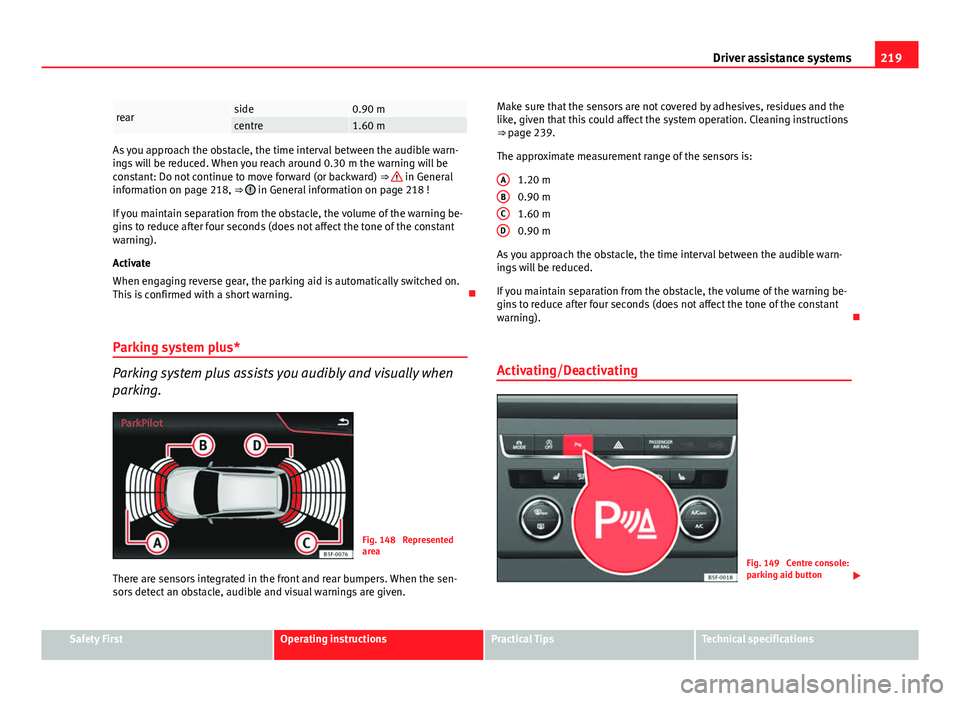
Fig. 148 Represented
area
There are sensors integrated in the front and rear bumpers. When the sen-
sors detect an obstacle, audible and visual warnings are given. Make sure that the sensors are not covered by adhesives, residues and the
like, given that this could affect the system operation. Cleaning instructions
⇒ page 239.
The approximate measurement range of the sensors is:
1.20 m
0.90 m
1.60 m
0.90 m
As you approach the obstacle, the time interval between the audible warn-
ings will be reduced.
If you maintain separation from the obstacle, the volume of the warning be-
gins to reduce after four seconds (does not affect the tone of the constant
warning).
Activating/Deactivating
Fig. 149 Centre console:
parking aid button
A
BCD
Safety FirstOperating instructionsPractical TipsTechnical specifications
Page 222 of 339
220Driver assistance systems
Switching on
–Engage reverse gear or
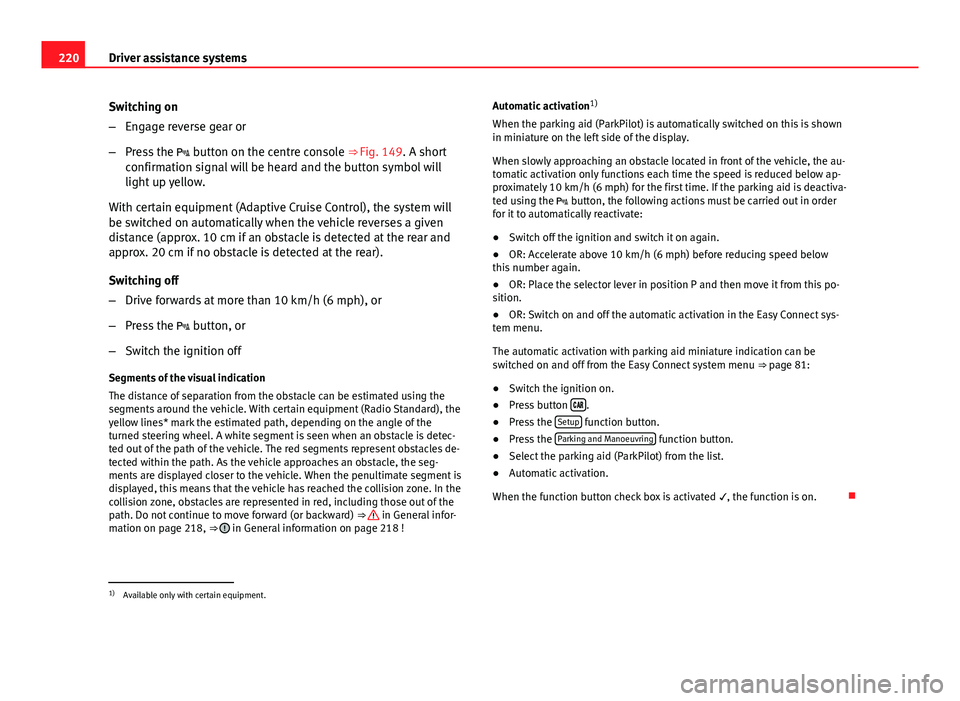
– Press the button on the centre console ⇒ Fig. 149. A short
confirmation signal will be heard and the button symbol will
light up yellow.
With certain equipment (Adaptive Cruise Control), the system will
be switched on automatically when the vehicle reverses a given
distance (approx. 10 cm if an obstacle is detected at the rear and
approx. 20 cm if no obstacle is detected at the rear).
Switching off
– Drive forwards at more than 10 km/h (6 mph), or
– Press the button, or
– Switch the ignition off
Segments of the visual indication
The distance of separation from the obstacle can be estimated using the
segments around the vehicle. With certain equipment (Radio Standard), the
yellow lines* mark the estimated path, depending on the angle of the
turned steering wheel. A white segment is seen when an obstacle is detec-
ted out of the path of the vehicle. The red segments represent obstacles de-
tected within the path. As the vehicle approaches an obstacle, the seg-
ments are displayed closer to the vehicle. When the penultimate segment is
displayed, this means that the vehicle has reached the collision zone. In the
collision zone, obstacles are represented in red, including those out of the
path. Do not continue to move forward (or backward) ⇒
in General infor-
mation on page 218, ⇒ in General information on page 218 ! Automatic activation
1)
When the parking aid (ParkPilot) is automatically switched on this is shown
in miniature on the left side of the display.
When slowly approaching an obstacle located in front of the vehicle, the au-
tomatic activation only functions each time the speed is reduced below ap-
proximately 10 km/h (6 mph) for the first time. If the parking aid is deactiva-
ted using the button, the following actions must be carried out in order
for it to automatically reactivate:
● Switch off the ignition and switch it on again.
● OR: Accelerate above 10 km/h (6 mph) before reducing speed below
this number again.
● OR: Place the selector lever in position P and then move it from this po-
sition.
● OR: Switch on and off the automatic activation in the Easy Connect sys-
tem menu.
The automatic activation with parking aid miniature indication can be
switched on and off from the Easy Connect system menu ⇒ page 81:
● Switch the ignition on.
● Press button
.
● Press the Setup function button.
● Press the Parking and Manoeuvring function button.
● Select the parking aid (ParkPilot) from the list.
● Automatic activation.
When the function button check box is activated , the function is on.
1)
Available only with certain equipment.
Page 223 of 339
221
Driver assistance systems
Adjusting the display and audible warnings
The settings for the display and audible warnings are con-
trolled via the Easy Connect*.
Requirements: the parking aid must be switched on.
– Select: button CAR
> control button Car* Systems > Driver assis-
tant > Parking aid ⇒ page 81.
Automatic activation 1)
on – activates the Automatic activation option ⇒ page 220
off – deactivates the Automatic activation option ⇒ page 220.
Front volume
Volume in the front and rear area.
Front sound settings
Frequency (tone) of the sound in the front area.
Rear volume
Volume in the rear area
Rear sound settings
Frequency (tone) of the sound in the rear area.
Adjust volume
With the parking aid switched on, the active audio/video source volume will
be reduced to the intensity of the selected setting.
You will hear a short test tone from the corresponding speaker each time
you make a new setting. Error messages
When the parking aid is activated or when switching it on, if a continuous
warning can be heard over several seconds (additionally, in the case of
Parking system plus the LED of the
button flashes), there is a fault in the
system. If the fault does not disappear before switching off the ignition, the
next time the parking aid is switched on by engaging reverse gear the fault
will only be indicated with the flashing LED on the button.
Parking system plus*
If there is a fault in a sensor, the symbol is displayed on the Easy Con-
nect display in front of/behind the vehicle. If a rear sensor is faulty, only the
obstacles in the areas A
and B are displayed ⇒ Fig. 148. If a front sensor
is faulty, only the obstacles in the areas C and D are displayed.
Have the fault corrected by a specialised workshop without delay.
Towing bracket
If the trailer power socket is occupied, the rear parking aid sensors will not
activate when reverse gear is engaged, or when the button is pressed.
This function may not be covered under warranty if the towing bracket is not
factory-fitted. This causes the following limitations:
Parking system plus*
There will be no warning about the presence of obstacles in the rear area.
The monitoring in the front area remains active. The optical display changes
to towing mode.
1)
available only with certain equipment - Radio Standard
Safety FirstOperating instructionsPractical TipsTechnical specifications
Page 227 of 339
225
Intelligent technology
Corrosion
There may be a tendency for corrosion to form on the discs and dirt to build
up on the brake pads if the vehicle is used infrequently or the brakes are
not used very often.
If the brakes are not used frequently, or if rust has formed on the disks, it is
advisable to clean off the pads and disks by braking firmly a few times at a
moderately high speed ⇒
.
Fault in the brake system
If the brake pedal travel should ever increase suddenly, this may mean that
one of the two brake circuits has failed. Drive immediately to the nearest
specialised workshop and have the fault repaired. Drive there slowly and re-
member that you will have to apply more pressure on the brake pedal and
allow for longer stopping distances.
Low brake fluid level
Malfunctions can occur in the brake system if the brake fluid level is too
low. The brake fluid level is monitored electronically.
Brake servo
The brake servo increases the pressure you apply to the brake pedal. It
works only when the engine is running.
WARNING
● Apply the brakes heavily to clean the brake system only in a suitable
traffic situation. Do not put other road users in danger: risk of causing an
accident.
● Ensure the vehicle does not move while in neutral, when the engine is
stopped. Failure to do so could result in an accident.
CAUTION
● Never let the brakes “drag” by leaving your foot on the pedal when it is
not necessary to brake. This overheats the brakes, resulting in longer stop-
ping distances and greater wear.
● Before driving down a long, steep gradient, it is advisable to reduce
speed and select a lower gear. This makes use of engine braking and re-
lieves the brakes. If you still have to use the brakes, it is better to brake
firmly at intervals than to apply the brakes continuously.
Note
● If the brake servo is out of action due to a malfunction, or if the car has
to be towed, you will have to press the brake pedal considerably harder to
make up for the lack of servo assistance.
● If you wish to equip the vehicle with accessories such as a front spoiler
or wheel covers, it is important that the flow of air to the front wheels is not
obstructed, otherwise the brakes can overheat.
Electro-mechanical steering
Electro-mechanical power steering assists the driver when
steering.
Electro-mechanical power steering adapts electronically to the speed of the
car, torque and turning angle.
If the power steering should fail at any time or the engine is switched off (for
instance when being towed), the car can still be steered. However, more ef-
fort than normal will be required to turn the steering wheel.
Driver warning lamps and messages
(in red) Faulty steering! To park the vehicle
Safety FirstOperating instructionsPractical TipsTechnical specifications
Page 228 of 339
226Intelligent technology
If the warning lamp remains on and the driver indication appears, the power
steering could be faulty.
Do not continue driving. Seek specialist assistance. (in yellow) Steering: System fault! You may continue driving.
If the warning lamp comes on, the steering could react with more difficultly
or more sensitivity than normal. In addition, when driving in a straight line
the steering wheel may be off-centre.
Drive slowly to a specialised workshop and have the fault repaired. (in yellow) Steering lock: fault! Go to an Official Service
The electronic steering lock is malfunctioning.
Go to a specialised workshop as soon as possible and have the fault re-
paired.
WARNING
Take it immediately to a specialised workshop and have the fault re-
paired: risk of accident!
Note
If a red or yellow warning lamp come on briefly, you can continue driv-
ing.
Progressive steering
Depending on the vehicle's equipment, the progressive steering can adapt
steering hardness to the driving conditions. Progressive steering only works
when the engine is running. In city traffic
there is no need to turn the wheel so much when parking, ma-
noeuvring or in tight turns.
On the road or on motorways, the progressive steering transmits, e.g., on
bends, a sportier, more direct and perceptibly more dynamic sensation to
the steering wheel
Power Management This system helps to ensure reliable starting
The power management controls the distribution of electri-
cal energy and thus helps to ensure that there is always
enough power available to start the engine.
If a vehicle with a conventional electrical system is left parked for a long
time, the battery will gradually lose its charge because certain electrical
equipment (such as the electronic gearbox lock) continues to draw current
even when the ignition is off. In some cases there may not be enough power
available to start the engine.
Your vehicle is equipped with an intelligent power management system to
control the distribution of electrical energy. This significantly improves relia-
bility when starting the engine, and also prolongs the useful life of the bat-
tery.
The main functions incorporated in the power management system are bat-
tery diagnosis , residual current management and dynamic power manage-
ment.