tow Seat Leon SC 2013 User Guide
[x] Cancel search | Manufacturer: SEAT, Model Year: 2013, Model line: Leon SC, Model: Seat Leon SC 2013Pages: 339, PDF Size: 4.8 MB
Page 124 of 339
122Lights and visibility
Windscreen wiper functions
Windscreen wiper performance in different situations:If the vehicle is at a stand-
still:The activated position provisionally changes
to the previous position.
During the automatic wipe:
The air conditioner comes on for approxi-
mately 30 seconds in air recirculation mode
to prevent the smell of the windscreen wash-
er fluid entering the inside the vehicle.
For the interval wipe:The intervals between wipes vary according
to the speed of the vehicle. The higher the
vehicle speed the shorter the intervals.
Heated windscreen washer jets
The heating only thaws the frozen jets, it does not thaw the water in the
washer hoses. The heated windscreen washer jets automatically adjust the
heat depending on the ambient temperature, when the ignition is switched
on.
Headlight wash/wipe system
The headlight washers/wipers clean the headlight lenses.
After the ignition is switched on, the first and every fifth time the wind-
screen washer is switched on, the headlights are also washed. Therefore,
the windscreen wiper lever should be pulled towards the steering wheel
when the dipped beam or main beam are on. Any incrusted dirt (such as in-
sects) should be cleaned regularly (e.g. when refuelling).
To ensure the headlight washers work correctly in winter, any snow which
has got into the bumper jet supports should be cleaned away. If necessary,
remove snow with an anti-icing spray.
Note
The wiper will try to wipe away any obstacles that are on the windscreen.
The wiper will stop moving if the obstacle blocks its path. Remove the ob-
stacle and switch the wiper back on again.
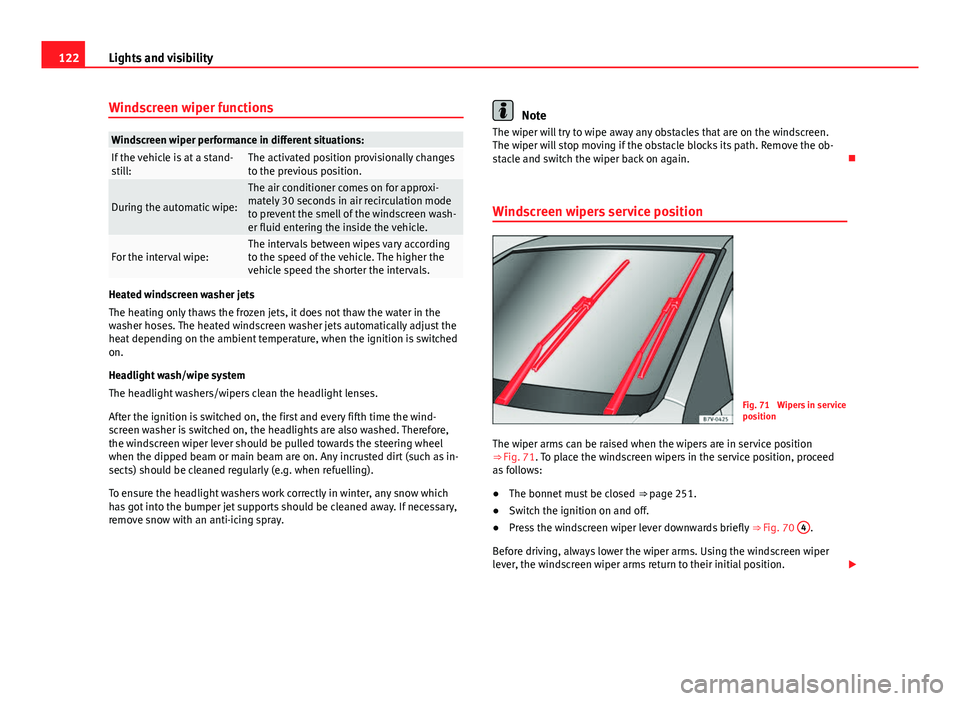
Windscreen wipers service position
Fig. 71 Wipers in service
position
The wiper arms can be raised when the wipers are in service position
⇒ Fig. 71. To place the windscreen wipers in the service position, proceed
as follows:
● The bonnet must be closed ⇒ page 251.
● Switch the ignition on and off.
● Press the windscreen wiper lever downwards briefly ⇒ Fig. 70 4
.
Before driving, always lower the wiper arms. Using the windscreen wiper
lever, the windscreen wiper arms return to their initial position.
Page 129 of 339
127
Lights and visibility
Interior rear vision mirror with manual setting for anti-dazzle
position
– Position the small lever of the lower edge of the mirror to face
towards the rear.
Anti-dazzle rear vision mirror with automatic setting*
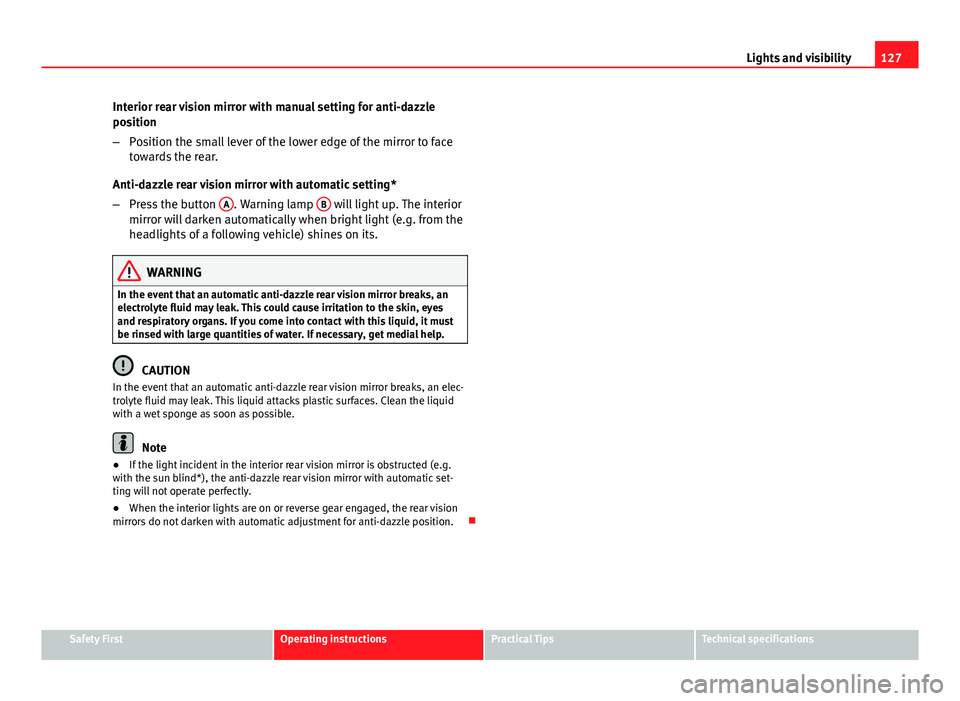
– Press the button A
. Warning lamp B will light up. The interior
mirror will darken automatically when bright light (e.g. from the
headlights of a following vehicle) shines on its.
WARNING
In the event that an automatic anti-dazzle rear vision mirror breaks, an
electrolyte fluid may leak. This could cause irritation to the skin, eyes
and respiratory organs. If you come into contact with this liquid, it must
be rinsed with large quantities of water. If necessary, get medial help.
CAUTION
In the event that an automatic anti-dazzle rear vision mirror breaks, an elec-
trolyte fluid may leak. This liquid attacks plastic surfaces. Clean the liquid
with a wet sponge as soon as possible.
Note
● If the light incident in the interior rear vision mirror is obstructed (e.g.
with the sun blind*), the anti-dazzle rear vision mirror with automatic set-
ting will not operate perfectly.
● When the interior lights are on or reverse gear engaged, the rear vision
mirrors do not darken with automatic adjustment for anti-dazzle position.
Safety FirstOperating instructionsPractical TipsTechnical specifications
Page 145 of 339
143
Seats and storage
CAUTION
Incorrect handling of the net partition may cause damage.
● Do not “release” the partition net on lowering it; otherwise the net and
other parts of the vehicle might be damaged. Roll down the net partition by
hand.
Applies to the model: LEON ST
Use of the net partition with the rear seat backrests folded
down
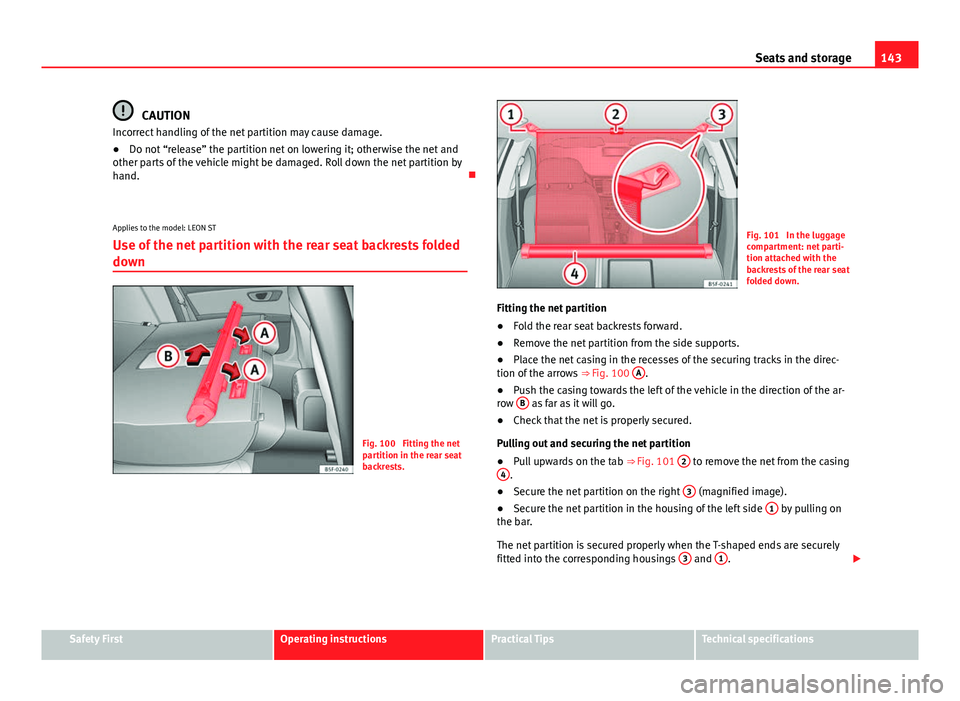
Fig. 100 Fitting the net
partition in the rear seat
backrests.
Fig. 101 In the luggage
compartment: net parti-
tion attached with the
backrests of the rear seat
folded down.
Fitting the net partition
● Fold the rear seat backrests forward.
● Remove the net partition from the side supports.
● Place the net casing in the recesses of the securing tracks in the direc-
tion of the arrows ⇒ Fig. 100 A
.
● Push the casing towards the left of the vehicle in the direction of the ar-
row B
as far as it will go.
● Check that the net is properly secured.
Pulling out and securing the net partition
● Pull upwards on the tab
⇒ Fig. 101 2
to remove the net from the casing
4.
● Secure the net partition on the right 3 (magnified image).
● Secure the net partition in the housing of the left side 1 by pulling on
the bar.
The net partition is secured properly when the T-shaped ends are securely
fitted into the corresponding housings 3
and 1.
Safety FirstOperating instructionsPractical TipsTechnical specifications
Page 149 of 339
147
Seats and storage
The retaining hooks have been designed to hold light shopping bags.
At the front and rear of the luggage compartment there are fastening rings
for securing luggage ⇒ Fig. 104, ⇒ Fig. 105.
WARNING
Never use retaining hooks as fastening rings. In the event of sudden
braking or an accident, the hooks could break.
CAUTION
Each hook is designed for a maximum load of 2.5 kg.
Net bag*
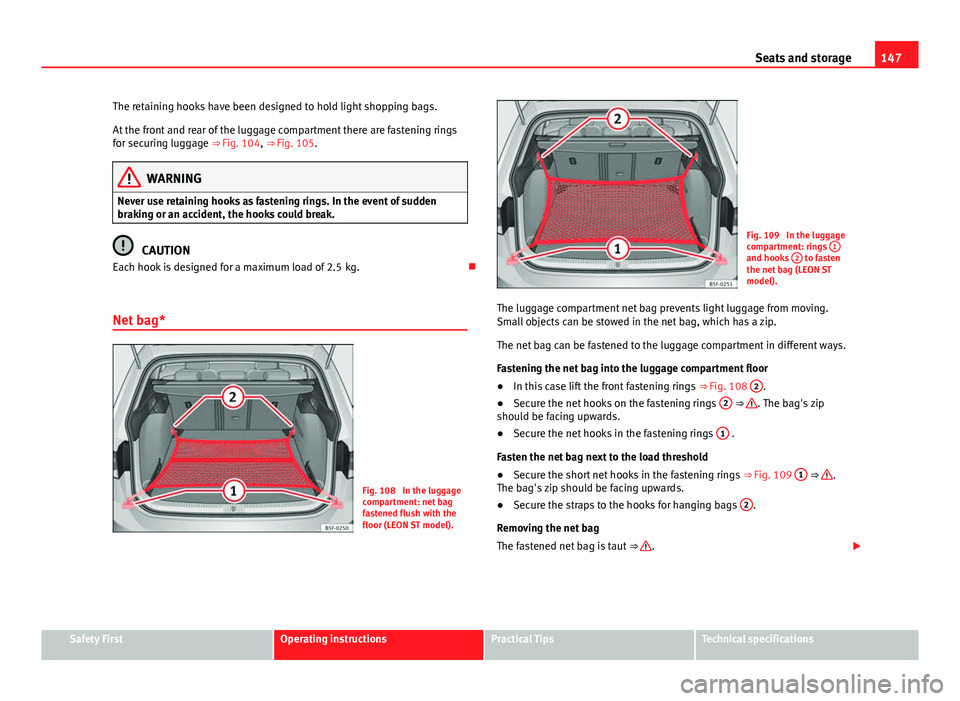
Fig. 108 In the luggage
compartment: net bag
fastened flush with the
floor (LEON ST model).
Fig. 109 In the luggage
compartment: rings 1
and hooks 2 to fasten
the net bag (LEON ST
model).
The luggage compartment net bag prevents light luggage from moving.
Small objects can be stowed in the net bag, which has a zip.
The net bag can be fastened to the luggage compartment in different ways.
Fastening the net bag into the luggage compartment floor
● In this case lift the front fastening rings
⇒ Fig. 108 2
.
● Secure the net hooks on the fastening rings 2
⇒ . The bag's zip
should be facing upwards.
● Secure the net hooks in the fastening rings 1
.
Fasten the net bag next to the load threshold
● Secure the short net hooks in the fastening rings
⇒ Fig. 109 1
⇒ .
The bag's zip should be facing upwards.
● Secure the straps to the hooks for hanging bags 2
.
Removing the net bag
The fastened net bag is taut ⇒
.
Safety FirstOperating instructionsPractical TipsTechnical specifications
Page 157 of 339
155
Air conditioning
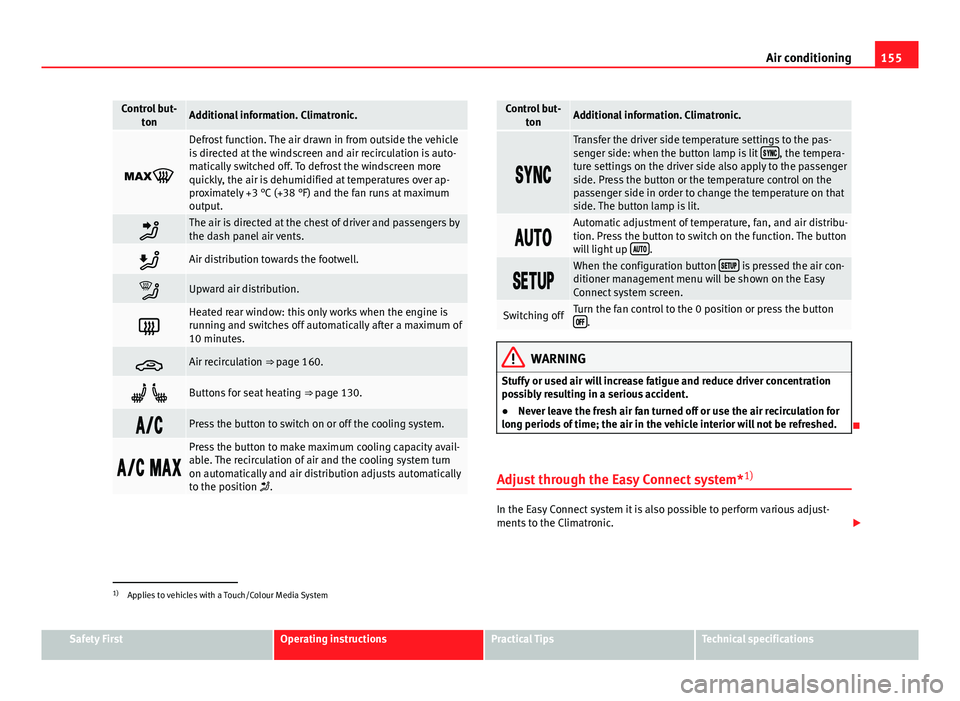
Control but-
tonAdditional information. Climatronic.
Defrost function. The air drawn in from outside the vehicle
is directed at the windscreen and air recirculation is auto-
matically switched off. To defrost the windscreen more
quickly, the air is dehumidified at temperatures over ap-
proximately +3 °C (+38 °F) and the fan runs at maximum
output.
The air is directed at the chest of driver and passengers by
the dash panel air vents.
Air distribution towards the footwell.
Upward air distribution.
Heated rear window: this only works when the engine is
running and switches off automatically after a maximum of
10 minutes.
Air recirculation ⇒ page 160.
Buttons for seat heating ⇒ page 130.
Press the button to switch on or off the cooling system.
Press the button to make maximum cooling capacity avail-
able. The recirculation of air and the cooling system turn
on automatically and air distribution adjusts automatically
to the position .
Control but-
tonAdditional information. Climatronic.
Transfer the driver side temperature settings to the pas-
senger side: when the button lamp is lit , the tempera-
ture settings on the driver side also apply to the passenger
side. Press the button or the temperature control on the
passenger side in order to change the temperature on that
side. The button lamp is lit.
Automatic adjustment of temperature, fan, and air distribu-
tion. Press the button to switch on the function. The button
will light up
.
When the configuration button is pressed the air con-
ditioner management menu will be shown on the Easy
Connect system screen.
Switching offTurn the fan control to the 0 position or press the button .
WARNING
Stuffy or used air will increase fatigue and reduce driver concentration
possibly resulting in a serious accident.
● Never leave the fresh air fan turned off or use the air recirculation for
long periods of time; the air in the vehicle interior will not be refreshed.
Adjust through the Easy Connect system* 1)
In the Easy Connect system it is also possible to perform various adjust-
ments to the Climatronic.
1)
Applies to vehicles with a Touch/Colour Media System
Safety FirstOperating instructionsPractical TipsTechnical specifications
Page 159 of 339
157
Air conditioning
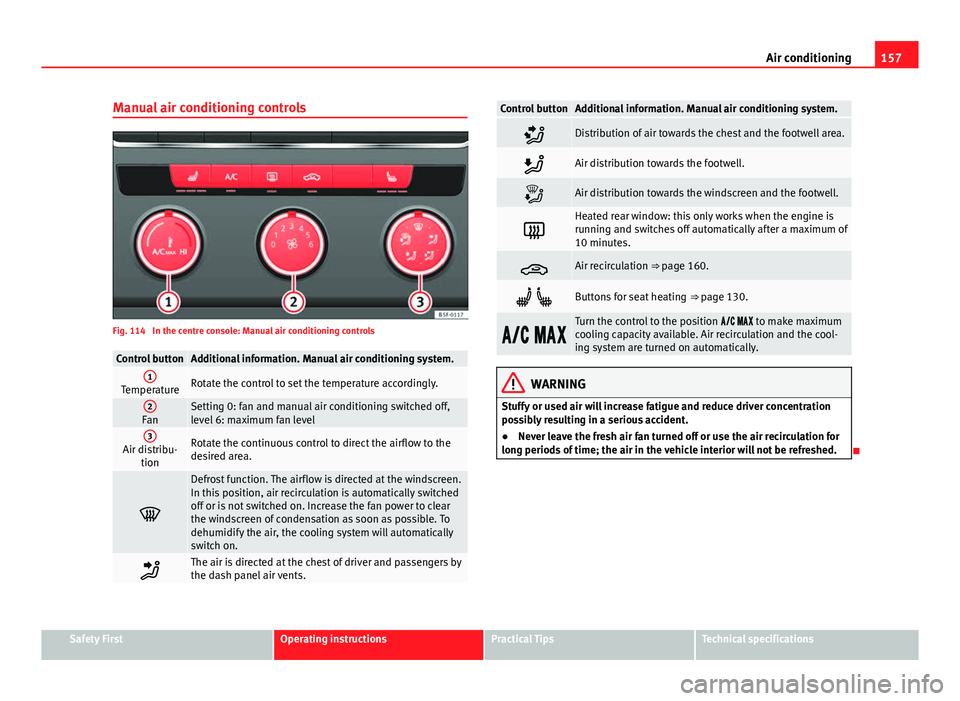
Manual air conditioning controls
Fig. 114 In the centre console: Manual air conditioning controls
Control buttonAdditional information. Manual air conditioning system.1TemperatureRotate the control to set the temperature accordingly.
2FanSetting 0: fan and manual air conditioning switched off,
level 6: maximum fan level
3Air distribu- tionRotate the continuous control to direct the airflow to the
desired area.
Defrost function. The airflow is directed at the windscreen.
In this position, air recirculation is automatically switched
off or is not switched on. Increase the fan power to clear
the windscreen of condensation as soon as possible. To
dehumidify the air, the cooling system will automatically
switch on.
The air is directed at the chest of driver and passengers by
the dash panel air vents.
Control buttonAdditional information. Manual air conditioning system.
Distribution of air towards the chest and the footwell area.
Air distribution towards the footwell.
Air distribution towards the windscreen and the footwell.
Heated rear window: this only works when the engine is
running and switches off automatically after a maximum of
10 minutes.
Air recirculation ⇒ page 160.
Buttons for seat heating ⇒ page 130.
Turn the control to the position to make maximum
cooling capacity available. Air recirculation and the cool-
ing system are turned on automatically.
WARNING
Stuffy or used air will increase fatigue and reduce driver concentration
possibly resulting in a serious accident.
● Never leave the fresh air fan turned off or use the air recirculation for
long periods of time; the air in the vehicle interior will not be refreshed.
Safety FirstOperating instructionsPractical TipsTechnical specifications
Page 160 of 339
158Air conditioning
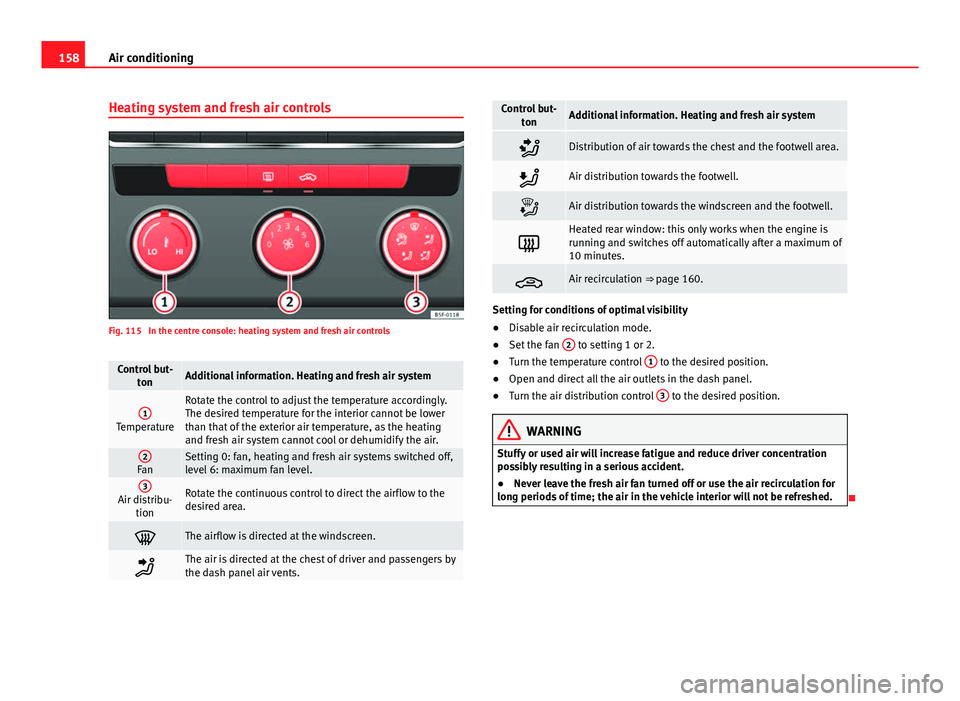
Heating system and fresh air controls
Fig. 115 In the centre console: heating system and fresh air controls
Control but-
tonAdditional information. Heating and fresh air system
1Temperature
Rotate the control to adjust the temperature accordingly.
The desired temperature for the interior cannot be lower
than that of the exterior air temperature, as the heating
and fresh air system cannot cool or dehumidify the air.
2FanSetting 0: fan, heating and fresh air systems switched off,
level 6: maximum fan level.
3Air distribu-tionRotate the continuous control to direct the airflow to the
desired area.
The airflow is directed at the windscreen.
The air is directed at the chest of driver and passengers by
the dash panel air vents.
Control but- tonAdditional information. Heating and fresh air system
Distribution of air towards the chest and the footwell area.
Air distribution towards the footwell.
Air distribution towards the windscreen and the footwell.
Heated rear window: this only works when the engine is
running and switches off automatically after a maximum of
10 minutes.
Air recirculation ⇒ page 160.
Setting for conditions of optimal visibility
●Disable air recirculation mode.
● Set the fan 2
to setting 1 or 2.
● Turn the temperature control 1 to the desired position.
● Open and direct all the air outlets in the dash panel.
● Turn the air distribution control 3
to the desired position.
WARNING
Stuffy or used air will increase fatigue and reduce driver concentration
possibly resulting in a serious accident.
● Never leave the fresh air fan turned off or use the air recirculation for
long periods of time; the air in the vehicle interior will not be refreshed.
Page 169 of 339
167
Driving
Always apply the handbrake as far as it will go in order to prevent yourself
from driving with the handbrake applied by mistake ⇒
.
The handbrake warning lamp lights up when the handbrake is applied
and the ignition switched on. The warning lamp turns off when the hand-
brake is released.
If you drive faster than 6 km/h (4 mph) with the handbrake on, the following
message* will appear on the instrument panel display: HANDBRAKE ON. You
will also hear an audible warning.
WARNING
● Never use the handbrake to stop the vehicle when it is in motion. The
braking distance is considerably longer, because braking is only applied
to the rear wheels. Risk of accident!
● If the handbrake is only partially released, this will cause the rear
brakes to overheat, which can impair the function of the brake system
and could lead to an accident. This also causes premature wear on the
rear brake pads.
CAUTION
Always apply the handbrake before you leave the vehicle. The first gear
should also be selected.
Parking
The handbrake should always be firmly applied when the
vehicle is parked.
Always note the following points when parking the vehicle:
– Use the brake pedal to stop the vehicle. –
Apply the handbrake.
– Select first gear.
– Switch the engine off and remove the key from the ignition. Turn
the steering wheel slightly to engage the steering lock.
– Always take you keys with you when you leave the vehicle ⇒
.
Additional notes on parking the vehicle on gradients:
Turn the steering wheel so that the vehicle rolls against the kerb if it started
to roll.
● If the vehicle is parked facing downhill, turn the front wheels so that
they point towards the kerb .
● If the vehicle is parked facing uphill, turn the front wheels so that they
point away from the kerb .
● Secure the vehicle as normal by applying the handbrake firmly and se-
lecting first gear.
WARNING
● Take measures to reduce the risk of injury when you leave your vehi-
cle unattended.
● Never park where the hot exhaust system could ignite inflammable
materials, such as dry grass, low bushes, spilt fuel etc.
● Never allow vehicle occupants to remain in the vehicle when it is
locked. They would be unable to open the vehicle from the inside, and
could become trapped in the vehicle in an emergency. In the event of an
emergency, locked doors will delay assistance to vehicle occupants.
● Never leave children alone in the vehicle. They could set the vehicle
in motion, for example, by releasing the handbrake or the gearbox lever.
● Depending on weather conditions, it may become extremely hot or
cold inside the vehicle. This can be fatal.
Safety FirstOperating instructionsPractical TipsTechnical specifications
Page 171 of 339
169
Driving
countries with general speed limits, or if a particular speed should not be
exceeded when winter tyres are fitted etc.
Note
● Please bear in mind that, even with the speed warning function, it is still
important to keep an eye on the vehicle speed with the speedometer and to
observe the legal speed limits.
● The speed limit warning function in the version for several countries
warns you at a speed of 120 km/h (80 mph). This is a factory-set speed lim-
it.
Setting speed limit warning
You can use the radio or the Easy Connect* to set, alter or
cancel the speed limit warning.
Vehicles with radio
– Select: SETUP
button > control button
Driver assistant > Speed
warning.
Vehicles with Easy Connect
– Select: Systems control button or Vehicle systems > Driver assis-
tant > Speed warning.
The warning limit can be set from 30 to 240 km/h (20 to 150 mph). The ad-
justment is done in 10 km/h (mph) intervals. Start-Stop system*
Description and operation
The Start-Stop system helps save fuel and reduce CO 2 emissions.
In Start-Stop mode, the engine will automatically switch off when the vehi-
cle stops, when stopping at traffic lights for example. The ignition remains
switched on during the stopping phase. The engine automatically switches
back on when required.
As soon as the ignition is switched on, the Start-Stop function is automati-
cally activated.
Basic requirements for the Start-Stop mode
● The driver door must be closed.
● The driver must have their seat belt fastened.
● The bonnet must be closed.
● The vehicle must have travelled at more than 4 km/h since the last stop.
● The vehicle cannot be towing a trailer.
WARNING
● Never switch the engine off until the vehicle is stationary. The brake
servo and power steering functions will not be completely covered under
warranty. More force may also be needed to turn the steering wheel or to
brake. As you cannot steer and brake in the normal manner, there is a
greater risk of accidents and serious injury.
● Never remove the key from the ignition if the vehicle is in motion.
Otherwise, the steering could lock making it impossible to steer the vehi-
cle.
Safety FirstOperating instructionsPractical TipsTechnical specifications
Page 179 of 339
177
Driving
Moving off uphill in vehicles with Hill start assistant*
– Once you have engaged a gear, release the footbrake and press
the accelerator ⇒ page 168, Hill driving assistant*.
Driving down hills: In some situations (on mountain roads or when towing a
trailer or caravan) it can be advantageous to switch temporarily to the man-
ual gearbox programme so that the gear ratios can be selected manually to
suit the driving conditions ⇒
.
On level ground it is sufficient to move the selector lever to position P. On
slopes, first engage the parking brake and then put the selection lever into
the P position. This avoids overloading the locking mechanism and it will be
easier to move the selector lever from position P.
WARNING
● As a driver you should never leave your vehicle if the engine is run-
ning and a gear is engaged. If you have to leave your vehicle while the
engine is running, you must apply the handbrake and engage the parking
lock P.
● If the engine is running and a gear is engaged (D/S or R) or the vehi-
cle is in tiptronic mode, you will need to hold the car with the footbrake.
Otherwise, the car will creep forwards as the power transmission is not
fully interrupted even when the engine is idling.
● Take care not to accidentally press the accelerator pedal when the ve-
hicle is stopped. The vehicle could otherwise start moving immediately
(in some cases even if the parking brake is engaged) resulting in the risk
of an accident.
● While you are selecting a gear and the vehicle is stopped with the en-
gine running, do not accelerate. Failure to do so could result in an acci-
dent.
● Never move the selector lever to R or P when driving: this could result
in an accident!
WARNING (Continued)
● Before you drive down a steep gradient, reduce your speed and use
tiptronic to select a low gear.
● Never allow the brake to rub and do not use the brake pedal too often
or for long periods. Constant braking causes overheating in the brakes.
This could significantly reduce braking power, increase braking distance
or even result in the total failure of the brake system.
● To avoid rolling back on gradients always hold the vehicle with the
footbrake or handbrake if you have to stop.
CAUTION
● If you stop the vehicle on a gradient, do not attempt to stop it from roll-
ing by depressing the accelerator when a gear has been selected. This
could cause overheating and damage the automatic gearbox. Apply the
handbrake firmly or press the brake pedal in order to prevent the vehicle
from rolling back.
● If you allow the car to roll with the selector lever in position N with the
engine switched off, the automatic gearbox will be damaged as it will not be
lubricated.
● In certain driving situations or traffic conditions, such as frequently
starting, prolonged “creeping” of the vehicle or traffic jams with continuous
stoppages, the gearbox could overheat causing damage! If the warning
lamp lights up, stop the vehicle as soon as possible and wait for the
gearbox to cool ⇒ page 181.
● In certain driving situations or traffic conditions, such as frequently
starting, prolonged “creeping” of the vehicle or traffic jams with continuous
stoppages, the gearbox could overheat causing damage! If the warning
lamp lights up, stop the vehicle as soon as possible and wait for the
gearbox to cool ⇒ page 182.
Safety FirstOperating instructionsPractical TipsTechnical specifications