tow Seat Leon SC 2013 Owner's Guide
[x] Cancel search | Manufacturer: SEAT, Model Year: 2013, Model line: Leon SC, Model: Seat Leon SC 2013Pages: 339, PDF Size: 4.8 MB
Page 182 of 339
180Driving
flash slowly depending on whether or not the vehicle has a driver
information system* 1)
.
– When the engine is running, switch off the traction control
(ASR) 1)
2)
.
– Move the selector lever to position “S” or tiptronic, or select the
driving mode Sport from the SEAT Drive Mode* ⇒ page 211.
– Press the brake pedal firmly with your left foot and hold it down
for at least one second.
– With your right foot, press the accelerator down to the full throt-
tle or kick-down position. The engine speed will stabilise at ap-
prox. 3200 rpm (petrol engine) or approx. 2000 rpm (diesel en-
gine).
– Take your left foot off the brake pedal.
WARNING
● Always adapt your driving style to the traffic conditions.
● Only use the “Launch control programme” when road and traffic con-
ditions permit, and make sure the way in which you drive and accelerate
the vehicle does not inconvenience or endanger other road users.
WARNING (Continued)
● Make sure that the ESC remains switched on. Please note that when
the ASR and ESC are deactivated, the wheels may start to spin, causing
the vehicle to lose grip. Risk of accident!
● After putting the vehicle into gear, the “sport” mode of the ESC
should be deactivated again by briefly pressing the
OFF
button.
Note
● After using the “Launch control programme”, the gearbox temperature
may have increased considerably. In this case, the programme could be dis-
abled for several minutes. The programme can be used again after the cool-
ing phase.
● Accelerating with the “Launch control programme” places a heavy load
on all parts of the vehicle. This can result in increased wear and tear.
Inertia mode
The inertia mode enables the kinetic energy of the vehicle to be
harnessed enabling certain stretches to be driven without using
the accelerator. This enables fuel to be saved. Use the inertia mode
to “let the vehicle roll” before, for example, arriving in a town.
Switching on inertia mode
Important: selector lever must be in position D, gradients below
12 %.
1)
On vehicles with the driver information system, the ESC lamp lights up permanently and
the corresponding text message Stability control deactivated (temporary) appears on the in-
strument panel to indicate the deactivation status.
2) Vehicles without driver information system: the warning lamp flashes slowly/Vehicles with
driver information system: the warning lamp stays on.
Page 185 of 339
183
Driving
certain degree of practical skill. We therefore advise you to obtain
professional assistance.
A screwdriver will be needed to carry out the manual release. Use
the flat part of the screwdriver blade ⇒ page 274.
Removing the cover from the selector lever
– Apply the handbrake ⇒
to ensure that the car does not
move.
– Carefully pull the corners of the selector lever boot and fold up
the selector lever boot (inside out) by hand.
Releasing the selector lever
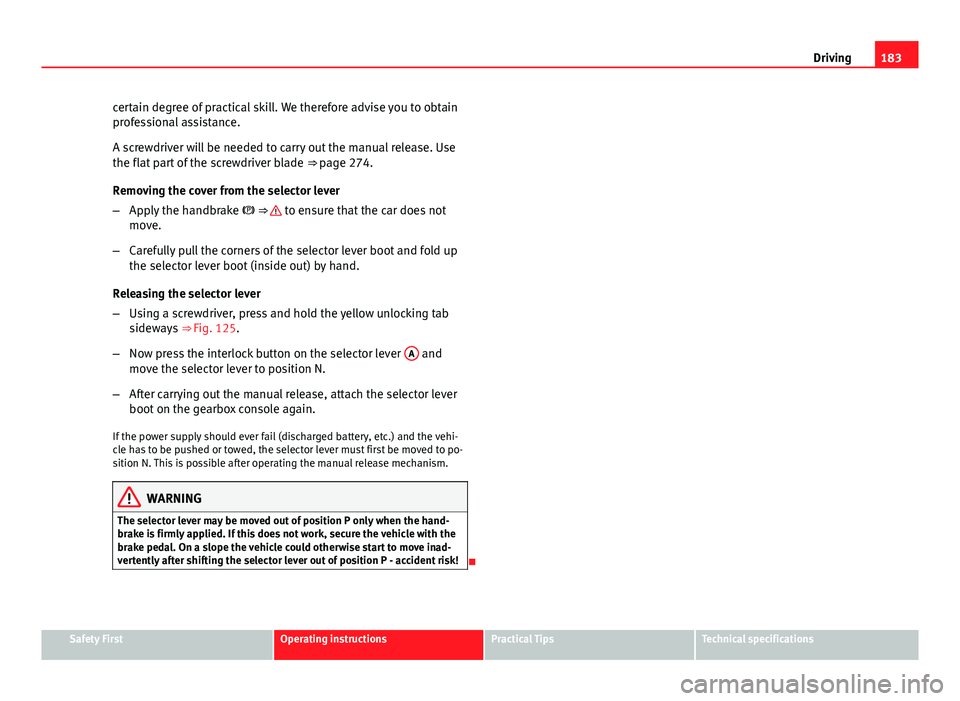
– Using a screwdriver, press and hold the yellow unlocking tab
sideways ⇒ Fig. 125.
– Now press the interlock button on the selector lever A
and
move the selector lever to position N.
– After carrying out the manual release, attach the selector lever
boot on the gearbox console again.
If the power supply should ever fail (discharged battery, etc.) and the vehi-
cle has to be pushed or towed, the selector lever must first be moved to po-
sition N. This is possible after operating the manual release mechanism.
WARNING
The selector lever may be moved out of position P only when the hand-
brake is firmly applied. If this does not work, secure the vehicle with the
brake pedal. On a slope the vehicle could otherwise start to move inad-
vertently after shifting the selector lever out of position P - accident risk!
Safety FirstOperating instructionsPractical TipsTechnical specifications
Page 202 of 339
200Driver assistance systems
Overtaking
When the turn signal comes on before overtaking, the ACC accelerates the
vehicle automatically and thus reduces the distance between it and the ve-
hicle ahead.
When you move into the overtaking lane, if the ACC does not detect any ve-
hicle in front it accelerates until it reaches the stored speed and keeps it
constant.
The acceleration can be interrupted at any time by stepping on the brake
pedal or pulling back on the lever ⇒ page 193.
Driving through a bend
On entering or coming out of a bend, the radar sensor may no longer detect
the vehicle ahead of it or may react before a vehicle in the adjacent lane
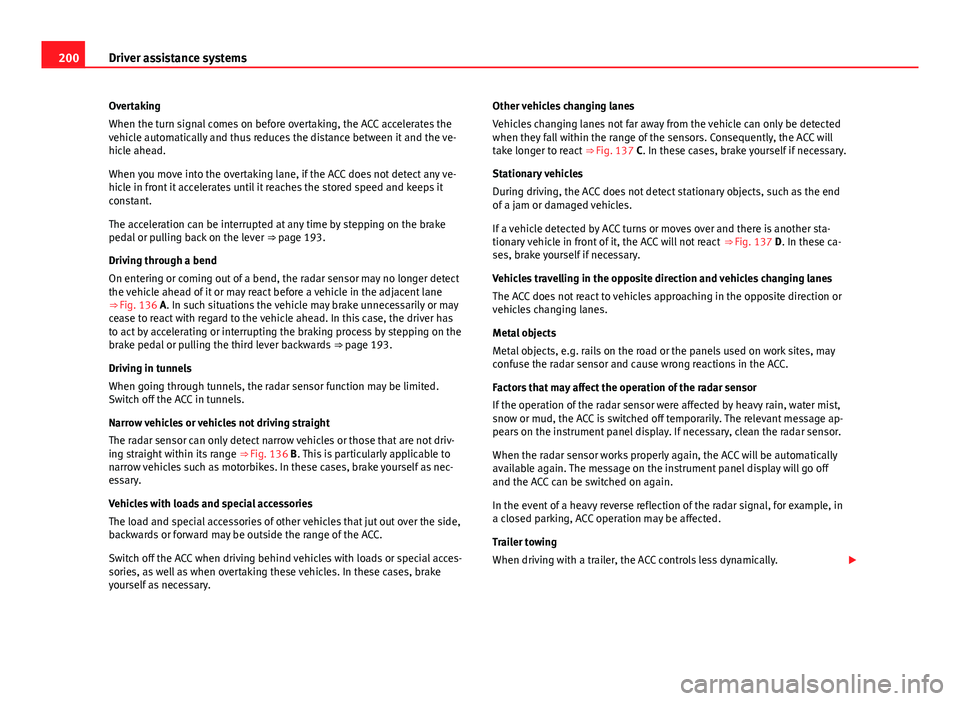
⇒ Fig. 136 A. In such situations the vehicle may brake unnecessarily or may
cease to react with regard to the vehicle ahead. In this case, the driver has
to act by accelerating or interrupting the braking process by stepping on the
brake pedal or pulling the third lever backwards ⇒ page 193.
Driving in tunnels
When going through tunnels, the radar sensor function may be limited.
Switch off the ACC in tunnels.
Narrow vehicles or vehicles not driving straight
The radar sensor can only detect narrow vehicles or those that are not driv-
ing straight within its range ⇒ Fig. 136 B. This is particularly applicable to
narrow vehicles such as motorbikes. In these cases, brake yourself as nec-
essary.
Vehicles with loads and special accessories
The load and special accessories of other vehicles that jut out over the side,
backwards or forward may be outside the range of the ACC.
Switch off the ACC when driving behind vehicles with loads or special acces-
sories, as well as when overtaking these vehicles. In these cases, brake
yourself as necessary. Other vehicles changing lanes
Vehicles changing lanes not far away from the vehicle can only be detected
when they fall within the range of the sensors. Consequently, the ACC will
take longer to react
⇒ Fig. 137 C. In these cases, brake yourself if necessary.
Stationary vehicles
During driving, the ACC does not detect stationary objects, such as the end
of a jam or damaged vehicles.
If a vehicle detected by ACC turns or moves over and there is another sta-
tionary vehicle in front of it, the ACC will not react ⇒ Fig. 137 D. In these ca-
ses, brake yourself if necessary.
Vehicles travelling in the opposite direction and vehicles changing lanes
The ACC does not react to vehicles approaching in the opposite direction or
vehicles changing lanes.
Metal objects
Metal objects, e.g. rails on the road or the panels used on work sites, may
confuse the radar sensor and cause wrong reactions in the ACC.
Factors that may affect the operation of the radar sensor
If the operation of the radar sensor were affected by heavy rain, water mist,
snow or mud, the ACC is switched off temporarily. The relevant message ap-
pears on the instrument panel display. If necessary, clean the radar sensor.
When the radar sensor works properly again, the ACC will be automatically
available again. The message on the instrument panel display will go off
and the ACC can be switched on again.
In the event of a heavy reverse reflection of the radar signal, for example, in
a closed parking, ACC operation may be affected.
Trailer towing
When driving with a trailer, the ACC controls less dynamically.
Page 207 of 339
205
Driver assistance systems
● A radar sensor repair requires specialist knowledge and special tools.
SEAT recommends visiting a SEAT dealership for this.
● Snow should be removed with a brush, while ice should be removed
with a solvent-free anti-ice aerosol.
Handling the Front Assist Monitoring system
The Front Assist Monitoring system is activated whenever the ignition is
switched on.
When the Front Assist is switched off, so are the pre-warning function and
distance warning.
SEAT recommends that the Front Assist always be activated. Exceptions
⇒ page 205, Temporarily switching off the Front Assist Monitoring System
in the following situations.
Switching the Front Assist warning system on and off
With the ignition on, the Front Assist can be switched on and off as follows:
● Select the corresponding menu option using the button for the driver as-
sist systems ⇒ page 75.
● OR: switch the Easy Connect system on or off using the button
and
the function buttons and Driver Assist ⇒ page 80
Switching the pre-warning function on or off
The pre-warning function can be switched on or off on the Easy Connect sys-
tem using the button
and the function buttons and Driver Assist⇒
page 80.
The system maintains the setting the next time the ignition is switched on.
SEAT recommends that the pre-warning function always be switched on. Switching distance warning on or off
If the safety distance with the vehicle ahead is exceeded, the instrument
panel display shows the relevant warning. In such an eventuality, increase
the safety distance
⇒ table on page 203.
The distance warning can be switched on or off on the Easy Connect system
using the button
and the function buttons and Driver Assist⇒ page 80.
The system maintains the setting the next time the ignition is switched on.
SEAT recommends that the distance warning always be switched on.
Temporarily switching off the Front Assist Monitoring
System in the following situations
The Front Assist Monitoring System should be switched off in the following
situations due to the system's limitations ⇒ :
● When the vehicle is being towed.
● When the vehicle is on a roller test bed.
● When the radar sensor is damaged.
● If the radar sensor takes a big knock, for example, in a rear-end colli-
sion.
● If it intervenes several times unnecessarily.
● If the radar sensor is covered temporarily by an accessory such as an ad-
ditional headlight or the like.
● When the vehicle is to be loaded on a lorry, a ferry or train.
Safety FirstOperating instructionsPractical TipsTechnical specifications
Page 215 of 339
213
Driver assistance systems
● Your speed and driving style must always be adjusted to visibility,
weather, and traffic conditions.
● The eco mode is not available when towing a trailer.
Tiredness detection (break
recommendation)* Introduction
The Tiredness detection informs the driver when their driving behaviour
shows signs of fatigue.
Additional information and warnings:
● Easy Connect system ⇒ page 79
● Accessories, change a part, repairs and adjustments (information stored
in the control units) ⇒ page 272
WARNING
Do not let the comfort afforded by the Tiredness detection system tempt
you into taking any risks when driving. Take regular breaks, sufficient in
length when making long journeys.
● The driver always assumes the responsibility of driving to their full
capacity.
● Never drive if you are tired.
● The system does not detect the tiredness of the driver in all circum-
stances. Consult the information in the section ⇒ page 214, System limi-
tations.
WARNING (Continued)
● In some situations the system may incorrectly interpret an intended
driving manoeuvre as driver tiredness.
● No warning is given in the event of the effect called microsleep!
● Please observe the indications on the instrument panel and act as is
necessary.
Note
● Tiredness detection has been developed for driving on motorways and
well paved roads only.
● If there is a fault in the system, have it checked by a specialised work-
shop.
Function and operation
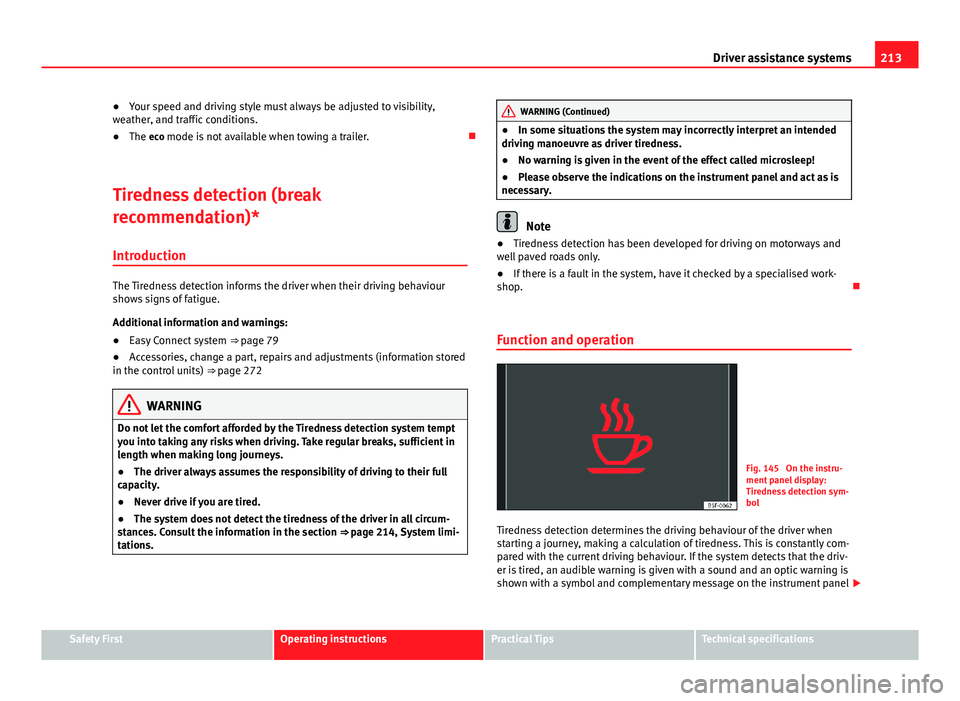
Fig. 145 On the instru-
ment panel display:
Tiredness detection sym-
bol
Tiredness detection determines the driving behaviour of the driver when
starting a journey, making a calculation of tiredness. This is constantly com-
pared with the current driving behaviour. If the system detects that the driv-
er is tired, an audible warning is given with a sound and an optic warning is
shown with a symbol and complementary message on the instrument panel
Safety FirstOperating instructionsPractical TipsTechnical specifications
Page 219 of 339
217
Driver assistance systems
Wheel tread change
The wheel tread changes when:
● Tyre pressure is manually changed
● Tyre pressure is insufficient
● Tyre structure is damaged
● The vehicle is unbalanced because of a load
● The wheels on an axle are subject to a heavier load (e.g. when towing a
heavy load)
● The vehicle is fitted with snow chains
● The temporary spare wheel is fitted
● The wheel on one axle is changed
There may be a delay in the reaction of the tyre monitoring indicator or it
may not indicate anything under certain circumstances (e.g. sporty driving,
snow-covered or unpaved roads, or when driving with snow chains).
Calibrating the tyre monitoring indicator
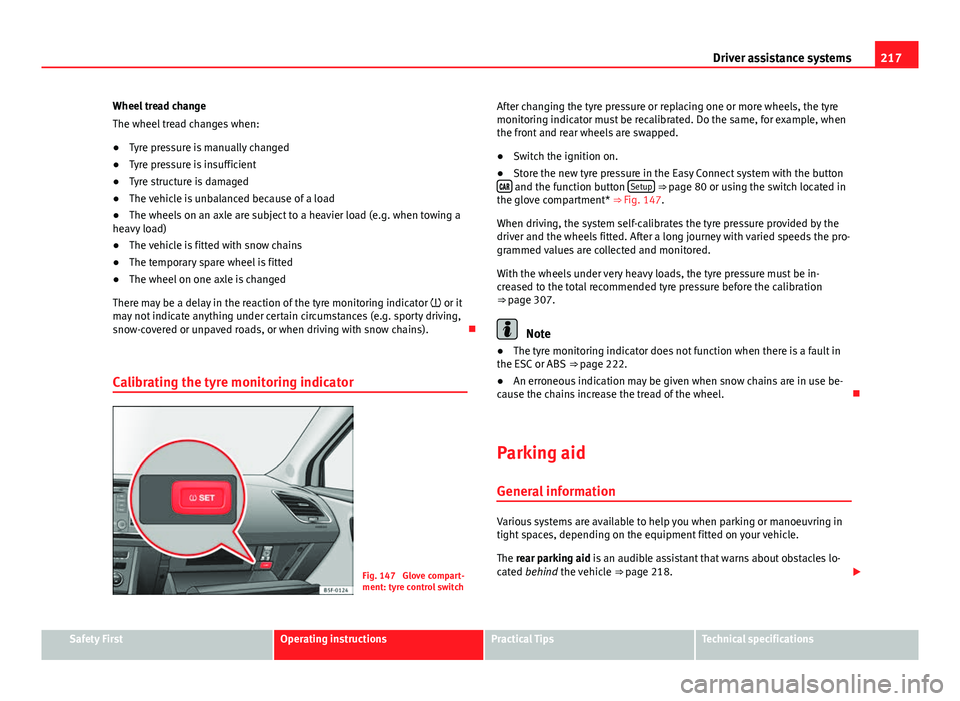
Fig. 147 Glove compart-
ment: tyre control switch After changing the tyre pressure or replacing one or more wheels, the tyre
monitoring indicator must be recalibrated. Do the same, for example, when
the front and rear wheels are swapped.
●
Switch the ignition on.
● Store the new tyre pressure in the Easy Connect system with the button
and the function button Setup ⇒ page 80 or using the switch located in
the glove compartment* ⇒ Fig. 147.
When driving, the system self-calibrates the tyre pressure provided by the
driver and the wheels fitted. After a long journey with varied speeds the pro-
grammed values are collected and monitored.
With the wheels under very heavy loads, the tyre pressure must be in-
creased to the total recommended tyre pressure before the calibration
⇒ page 307.
Note
● The tyre monitoring indicator does not function when there is a fault in
the ESC or ABS ⇒ page 222.
● An erroneous indication may be given when snow chains are in use be-
cause the chains increase the tread of the wheel.
Parking aid General information
Various systems are available to help you when parking or manoeuvring in
tight spaces, depending on the equipment fitted on your vehicle.
The rear parking aid is an audible assistant that warns about obstacles lo-
cated behind the vehicle ⇒ page 218.
Safety FirstOperating instructionsPractical TipsTechnical specifications
Page 220 of 339
218Driver assistance systems
During parking, the parking system plus assists you visually and audibly
about obstacles detected in front and behind the vehicle ⇒ page 219.
WARNING
● Always pay attention (also when looking straight ahead) to traffic and
the vehicle surroundings. The assistance systems are not a replacement
for driver awareness. When inserting or removing the vehicle from a park-
ing space, or when performing similar manoeuvres the driver always as-
sumes the responsibility.
● Take into account that the system is not always in conditions to rec-
ognise or represent certain surfaces, such as dress fabric: Risk of causing
an accident!
● The sensors and cameras have blind spots, making the detection of
people and objects impossible. Pay special attention to children and ani-
mals: Risk of causing an accident!
● Always keep visual control of the vehicle surroundings: use the rear
vision mirrors for additional help.
CAUTION
● Under certain circumstances, the system does not detect or display cer-
tain objects:
–Objects such as snow chains, trailer draw bars, bars or fences
– Objects that are located above the sensors, such as protrusions in a
wall.
– Objects with certain surfaces or structures, such as wire mesh fences
or powder snow.
● When the vehicle approaches a low obstacle, it could disappear from
the angle of measurement. In this case, take into account that the system
will no longer warn about this obstacle.
● The knocks or damage on the radiator grille, bumper, wheel arch and ve-
hicle underbody can adjust the orientation of the sensors. This can affect
the parking aid function. Have the function checked by a specialised work-
shop.
Note
● In certain situations, the system can give a warning even though there is
no obstacle in the detected area, e.g:
–for roads with certain surfaces, or with long grass
– for external ultrasound sources, such as cleaning vehicles
– In downpours, intense snow or dense exhaust gases
● In order to familiarise yourself with the system, it is advised that you
practice parking in an area or car park that is free from traffic. There must be
good weather and light conditions.
● The volume and tone of the warnings can be modified, in addition to the
indications ⇒ page 221.
● In vehicles without a driver information system, these parameters can be
modified in a SEAT Official Service or in a specialised workshop.
● Please observe information on towing a trailer ⇒ page 221.
● The display on the Easy Connect screen shows a slight time delay.
● To ensure that the parking aid works properly, the sensors must be kept
clean and free of ice and snow.
Rear parking aid*
The rear parking aid is an audible assistant. Description
There are sensors integrated in the rear bumper. When the sensors detect
an obstacle, you are alerted by audible warnings.
Make sure that the sensors are not covered by adhesives, residues and the
like, given that this could affect the system operation. Cleaning instructions
⇒ page 239.
The approximate measurement range of the sensors is:
Page 223 of 339
221
Driver assistance systems
Adjusting the display and audible warnings
The settings for the display and audible warnings are con-
trolled via the Easy Connect*.
Requirements: the parking aid must be switched on.
– Select: button CAR
> control button Car* Systems > Driver assis-
tant > Parking aid ⇒ page 81.
Automatic activation 1)
on – activates the Automatic activation option ⇒ page 220
off – deactivates the Automatic activation option ⇒ page 220.
Front volume
Volume in the front and rear area.
Front sound settings
Frequency (tone) of the sound in the front area.
Rear volume
Volume in the rear area
Rear sound settings
Frequency (tone) of the sound in the rear area.
Adjust volume
With the parking aid switched on, the active audio/video source volume will
be reduced to the intensity of the selected setting.
You will hear a short test tone from the corresponding speaker each time
you make a new setting. Error messages
When the parking aid is activated or when switching it on, if a continuous
warning can be heard over several seconds (additionally, in the case of
Parking system plus the LED of the
button flashes), there is a fault in the
system. If the fault does not disappear before switching off the ignition, the
next time the parking aid is switched on by engaging reverse gear the fault
will only be indicated with the flashing LED on the button.
Parking system plus*
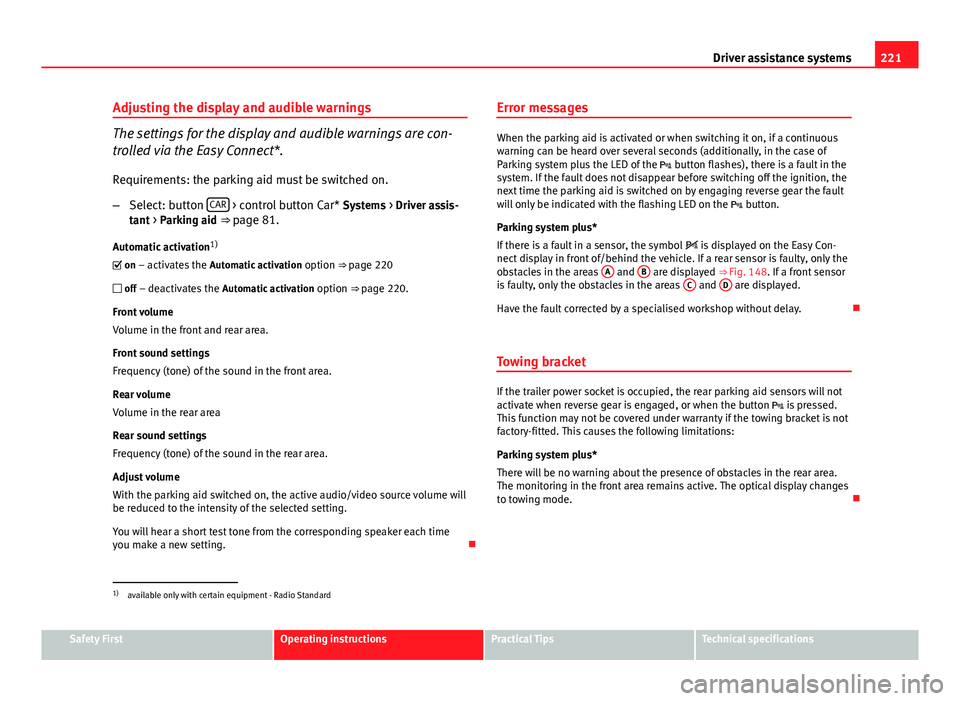
If there is a fault in a sensor, the symbol is displayed on the Easy Con-
nect display in front of/behind the vehicle. If a rear sensor is faulty, only the
obstacles in the areas A
and B are displayed ⇒ Fig. 148. If a front sensor
is faulty, only the obstacles in the areas C and D are displayed.
Have the fault corrected by a specialised workshop without delay.
Towing bracket
If the trailer power socket is occupied, the rear parking aid sensors will not
activate when reverse gear is engaged, or when the button is pressed.
This function may not be covered under warranty if the towing bracket is not
factory-fitted. This causes the following limitations:
Parking system plus*
There will be no warning about the presence of obstacles in the rear area.
The monitoring in the front area remains active. The optical display changes
to towing mode.
1)
available only with certain equipment - Radio Standard
Safety FirstOperating instructionsPractical TipsTechnical specifications
Page 224 of 339
222Intelligent technology
Practical Tips
Intelligent technology
Electronic Stability Control (ESC)
Description
The ESC helps to improve safety. It reduces the tendency to skid and im-
proves the stability and roadholding of the vehicle. The ESC detects critical
handling situations, such as vehicle understeer or oversteer, or wheelspin
on the driving wheels. It stabilises the vehicle by braking individual wheels
or by reducing the engine torque. The warning lamp will flash on the instru-
ment panel when the ESC is intervening .
ESC includes the Anti-lock brake system (ABS), the brake assist system, the
traction control system (ASR), electronic differential lock (EDL), electronic
self-locking*, selective torque control* and tractor-trailer sway mitigation*.
ESC also helps stabilise the vehicle by changing the torque.
Anti-lock brake system (ABS)
ABS prevents the wheels from locking up under braking until the vehicle
has reached a virtual standstill. You can continue to steer the vehicle even
when the brakes are on full. Keep your foot on the brake pedal and do not
pump the brakes. You will feel the brake pedal pulsate while the ABS is
working.
Brake assist system
The brake assist system can reduce the required braking distance. The brak-
ing force is automatically boosted if you press the brake pedal quickly in an
emergency. You must keep pressing the brake pedal until the danger has
passed. Traction control system (ASR)
In the event of wheelspin, the traction control system reduces the engine
torque to match the amount of grip available. This helps the car to start
moving, accelerate or climb a gradient.
Electronic differential lock (EDL)
When the EDL detects wheelspin, it brakes the spinning wheel and directs
the power to the other driven wheel. This function is available up to a speed
of around 100 km/h, 62 mph).
To prevent the disc brake of the braked wheel from overheating, the EDL
cuts out automatically if subjected to excessive loads. The vehicle can still
be driven. The EDL will switch on again automatically when the brake has
cooled down.
Tractor-trailer sway mitigation*
If the vehicle is pulling a trailer, it will control the following: Tractor-trailers
tend to sway. When the swaying of the trailer is felt by the vehicle and de-
tected by the ESC, it will automatically brake the towing vehicle within the
limits of the system and mitigate the sway. Tractor-trailer sway mitigation is
not available in all countries.
Electronic self-locking*/Selective torque control*
When driving around bends, an electronic self-locking intervenes. The front
wheel on the inside of the curve, or the two inside wheels, respectively, are
selectively braked as required. This minimises the traction of the front
wheels, allowing you to take bends with greater precision and neutrality. In
certain circumstances, where roads are wet or snow-covered, the respective
system may not intervene.
Page 227 of 339
225
Intelligent technology
Corrosion
There may be a tendency for corrosion to form on the discs and dirt to build
up on the brake pads if the vehicle is used infrequently or the brakes are
not used very often.
If the brakes are not used frequently, or if rust has formed on the disks, it is
advisable to clean off the pads and disks by braking firmly a few times at a
moderately high speed ⇒
.
Fault in the brake system
If the brake pedal travel should ever increase suddenly, this may mean that
one of the two brake circuits has failed. Drive immediately to the nearest
specialised workshop and have the fault repaired. Drive there slowly and re-
member that you will have to apply more pressure on the brake pedal and
allow for longer stopping distances.
Low brake fluid level
Malfunctions can occur in the brake system if the brake fluid level is too
low. The brake fluid level is monitored electronically.
Brake servo
The brake servo increases the pressure you apply to the brake pedal. It
works only when the engine is running.
WARNING
● Apply the brakes heavily to clean the brake system only in a suitable
traffic situation. Do not put other road users in danger: risk of causing an
accident.
● Ensure the vehicle does not move while in neutral, when the engine is
stopped. Failure to do so could result in an accident.
CAUTION
● Never let the brakes “drag” by leaving your foot on the pedal when it is
not necessary to brake. This overheats the brakes, resulting in longer stop-
ping distances and greater wear.
● Before driving down a long, steep gradient, it is advisable to reduce
speed and select a lower gear. This makes use of engine braking and re-
lieves the brakes. If you still have to use the brakes, it is better to brake
firmly at intervals than to apply the brakes continuously.
Note
● If the brake servo is out of action due to a malfunction, or if the car has
to be towed, you will have to press the brake pedal considerably harder to
make up for the lack of servo assistance.
● If you wish to equip the vehicle with accessories such as a front spoiler
or wheel covers, it is important that the flow of air to the front wheels is not
obstructed, otherwise the brakes can overheat.
Electro-mechanical steering
Electro-mechanical power steering assists the driver when
steering.
Electro-mechanical power steering adapts electronically to the speed of the
car, torque and turning angle.
If the power steering should fail at any time or the engine is switched off (for
instance when being towed), the car can still be steered. However, more ef-
fort than normal will be required to turn the steering wheel.
Driver warning lamps and messages
(in red) Faulty steering! To park the vehicle
Safety FirstOperating instructionsPractical TipsTechnical specifications