brake light Seat Leon SC 2013 Owner's Guide
[x] Cancel search | Manufacturer: SEAT, Model Year: 2013, Model line: Leon SC, Model: Seat Leon SC 2013Pages: 339, PDF Size: 4.8 MB
Page 191 of 339
189
Driver assistance systems
Adaptive cruise control (ACC)*
Introduction
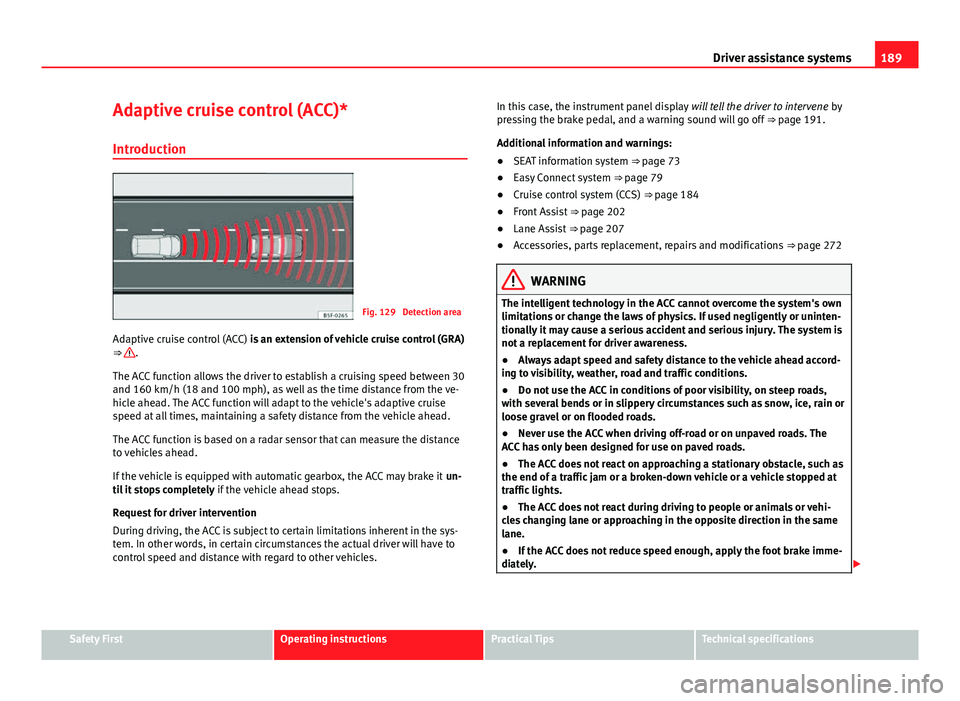
Fig. 129 Detection area
Adaptive cruise control (ACC) is an extension of vehicle cruise control (GRA)
⇒
.
The ACC function allows the driver to establish a cruising speed between 30
and 160 km/h (18 and 100 mph), as well as the time distance from the ve-
hicle ahead. The ACC function will adapt to the vehicle's adaptive cruise
speed at all times, maintaining a safety distance from the vehicle ahead.
The ACC function is based on a radar sensor that can measure the distance
to vehicles ahead.
If the vehicle is equipped with automatic gearbox, the ACC may brake it un-
til it stops completely if the vehicle ahead stops.
Request for driver intervention
During driving, the ACC is subject to certain limitations inherent in the sys-
tem. In other words, in certain circumstances the actual driver will have to
control speed and distance with regard to other vehicles. In this case, the instrument panel display
will tell the driver to intervene by
pressing the brake pedal, and a warning sound will go off ⇒ page 191.
Additional information and warnings:
● SEAT information system ⇒ page 73
● Easy Connect system ⇒ page 79
● Cruise control system (CCS) ⇒ page 184
● Front Assist ⇒ page 202
● Lane Assist ⇒ page 207
● Accessories, parts replacement, repairs and modifications ⇒ page 272
WARNING
The intelligent technology in the ACC cannot overcome the system's own
limitations or change the laws of physics. If used negligently or uninten-
tionally it may cause a serious accident and serious injury. The system is
not a replacement for driver awareness.
● Always adapt speed and safety distance to the vehicle ahead accord-
ing to visibility, weather, road and traffic conditions.
● Do not use the ACC in conditions of poor visibility, on steep roads,
with several bends or in slippery circumstances such as snow, ice, rain or
loose gravel or on flooded roads.
● Never use the ACC when driving off-road or on unpaved roads. The
ACC has only been designed for use on paved roads.
● The ACC does not react on approaching a stationary obstacle, such as
the end of a traffic jam or a broken-down vehicle or a vehicle stopped at
traffic lights.
● The ACC does not react during driving to people or animals or vehi-
cles changing lane or approaching in the opposite direction in the same
lane.
● If the ACC does not reduce speed enough, apply the foot brake imme-
diately.
Safety FirstOperating instructionsPractical TipsTechnical specifications
Page 193 of 339
191
Driver assistance systems
Warning and control lamps
Lights upPossible cause ⇒ Solution
A speed reduction by the ACC to
maintain distance with the ve-
hicle ahead is not enough.Brake! Use the foot brake!
Driver intervention necessary:
The ACC is not currently availa-
blea)
.
With the vehicle stationary,
switch the engine off and back
on again. Check the radar sen-
sor visually (in case it is dirty,
has ice or has been knocked).
If it is still unavailable, refer to
a specialised workshop to
have the system inspected.
The ACC is active. No vehicle is
detected ahead. The set speed
remains constant.–
If the symbol is white: the ACC
is active. A vehicle in front has
been detected. The ACC adjusts
the speed and the distance
from the vehicle ahead.
–If the symbol is grey: the ACC is
not active. The system is
switched on, but it is not con-
trolling.
The ACC is active.–
a) The symbol is in colour on the instrument panel with colour display.
Some warning and control lamps will light up briefly when the ignition is
switched on to check certain functions. They will switch off after a few sec-
onds.
WARNING
Failure to heed the warning lamps when they light up and the corre-
sponding messages may result in damage to the vehicle and serious in-
jury.
● Never ignore the warning lamps or messages.
CAUTION
Failure to heed the control lamps when they light up and the corresponding
messages may result in damage to the vehicle.
Note
When the ACC is connected, the instrument panel display messages may be
hidden by messages pertaining to other functions, such as an incoming
call.
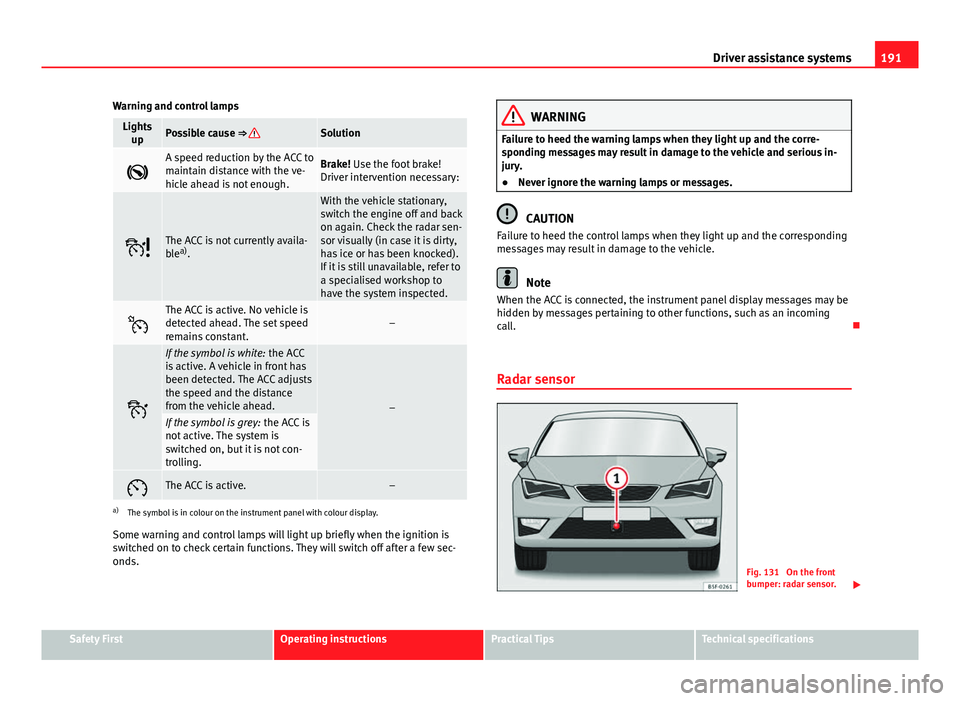
Radar sensor
Fig. 131 On the front
bumper: radar sensor.
Safety FirstOperating instructionsPractical TipsTechnical specifications
Page 196 of 339
194Driver assistance systems
Programming speed and switching on control
● To store the current speed press the button SET
⇒ Fig. 133.
● Automatic gearbox: to switch on stationary vehicle control, step on the
brake pedal.
Switching off the adaptive cruise control
● Move the lever to position 0
until it engages. The text
ACC: off will be
displayed.
Altering speed
● To increase or decrease speed, gradually briefly press the lever up/down
⇒ Fig. 133.
Any change in the stored speed is shown on the bottom left of the instru-
ment panel display.
Adjusting the distance level
The distance according to the speed of the vehicle in front can be adjusted
to 5 levels on the Easy Connect system ⇒ page 80.
When the road is wet a greater distance from the vehicle in front should be
selected than when the road is dry.
The following distances can be preselected:
● Very short
● Short
● Media
● Long
● Very long
The Easy Connect system can be used to adjust the level of distance appli-
cable when the ACC is switched on by means of the button
and the func-
tion buttons and Driver Assistance ⇒ page 80. Setting the driving programme
In vehicles with driving mode selection (SEAT Drive Mode), the profile selec-
ted may influence acceleration behaviour
⇒ page 211.
The following driving programmes can be selected:
● Normal
● Sport
● Eco
In vehicles without SEAT Drive Mode, acceleration behaviour can be influ-
enced by selecting a driving programme on the Easy Connect system using
button
and the function buttons and Driver Assistance ⇒ page 80.
The following conditions may cause the ACC not to react:
● If the accelerator is pressed down.
● If there is no gear selected
● If the ESC is controlling.
● If the driver unbuckles his/her seat belt.
● If several brake lights on the vehicle or trailer have electrical faults.
● If the vehicle is reversing.
● If you are driving at a speed above approx. 160 km/h (100 mph).
WARNING
There is danger of a rear-end collision if the minimum distance from the
vehicle ahead is exceeded and the speed difference between both vehi-
cles is so great that speed reduction by the ACC is insufficient. In this
case, brake immediately with the brake pedal.
● The ACC might not detect all situations correctly.
Page 205 of 339
203
Driver assistance systems
WARNING (Continued)
● In complex driving conditions, the Front Assist may unnecessarily
warn and act unintentionally on the brakes, such as, for example, in the
case of traffic islands.
● If the operation of the Front Assist is impaired, for example, because
of dirt or because the radar sensor has lost its setting, the system may
issue unnecessary warnings and act inappropriately on the brakes.
● The ACC does not react during driving to people or animals or vehi-
cles changing lane or approaching in the opposite direction in the same
lane.
● The driver must always be ready to take control of the vehicle again.
Note
● When the Front Assist causes a braking, the brake pedal is “harder”.
● Automatic interventions in the Front Assist braking may be interrupted
by pressing the clutch pedal, accelerator or moving the steering wheel.
● If the Front Assist does not work as described in this chapter (e.g. if it
intervenes several times unnecessarily), switch it off. Have the system
checked by a specialised workshop. SEAT recommends visiting a SEAT deal-
ership. Warning lamps and messages on the display
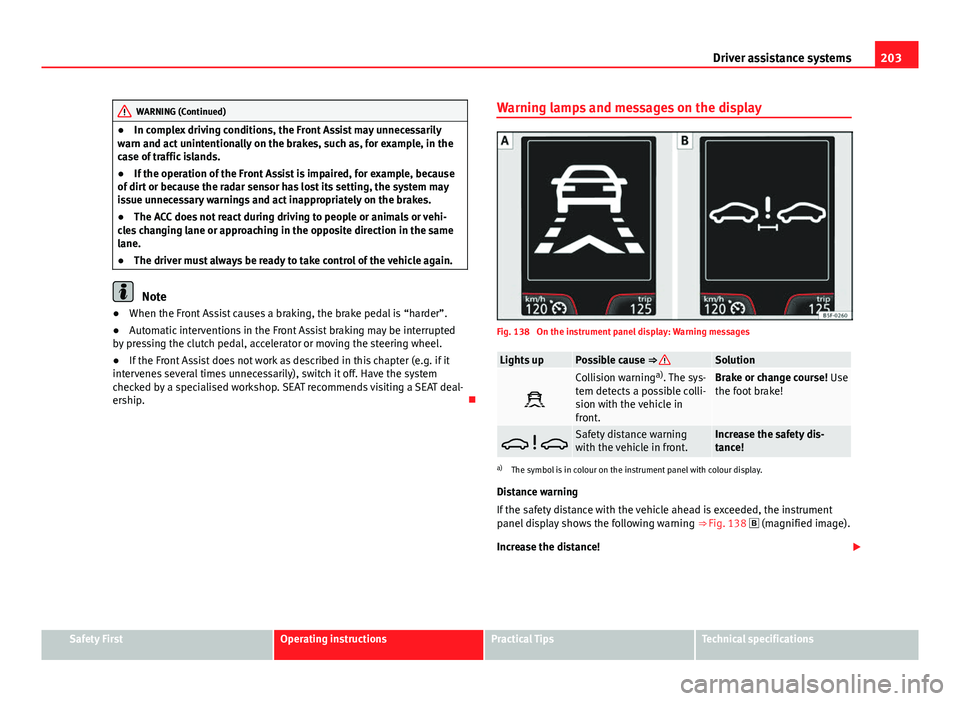
Fig. 138 On the instrument panel display: Warning messages
Lights upPossible cause ⇒ Solution
Collision warning
a)
. The sys-
tem detects a possible colli-
sion with the vehicle in
front.Brake or change course! Use
the foot brake!
Safety distance warning
with the vehicle in front.Increase the safety dis-
tance!
a) The symbol is in colour on the instrument panel with colour display.
Distance warning
If the safety distance with the vehicle ahead is exceeded, the instrument
panel display shows the following warning ⇒ Fig. 138
(magnified image).
Increase the distance!
Safety FirstOperating instructionsPractical TipsTechnical specifications
Page 208 of 339
206Driver assistance systems
WARNING
If the Front Assist is not switched off in the aforementioned situations,
accidents and serious injuries may be caused.
● Switch off the Front Assist in critical situations.
System limitations
The Front Assist Monitoring System has certain physical limitations inherent
in the system. Thus, for example, in certain circumstances some system re-
actions may be inappropriate or occur with delays as far as the driver is con-
cerned. Therefore, be on the lookout in case you have to intervene.
The following conditions may lead the Front Assist Monitoring System not
to react or react too late:
● When taking tight bends.
● If you step on the accelerator too hard
● If the Front Assist is switched off or damaged.
● If the ASR has been manually disconnected.
● If the ESC is controlling.
● If several brake lights on the vehicle or trailer have electrical faults.
● If the radar sensor is dirty or covered.
● If there are metal objects, e.g., rails on the road or the panels used on
work sites.
● If the vehicle is reversing.
● If the vehicle over-accelerates.
● In snow or heavy rain.
● In the case of narrow vehicles such as motorbikes.
● In the case of vehicles not driving straight.
● In the case of vehicles changing lanes. ●
In the case of vehicles approaching each other in the opposite direction.
● Loads and special accessories in other vehicles jutting out over the
sides, front or rear.
City emergency braking function
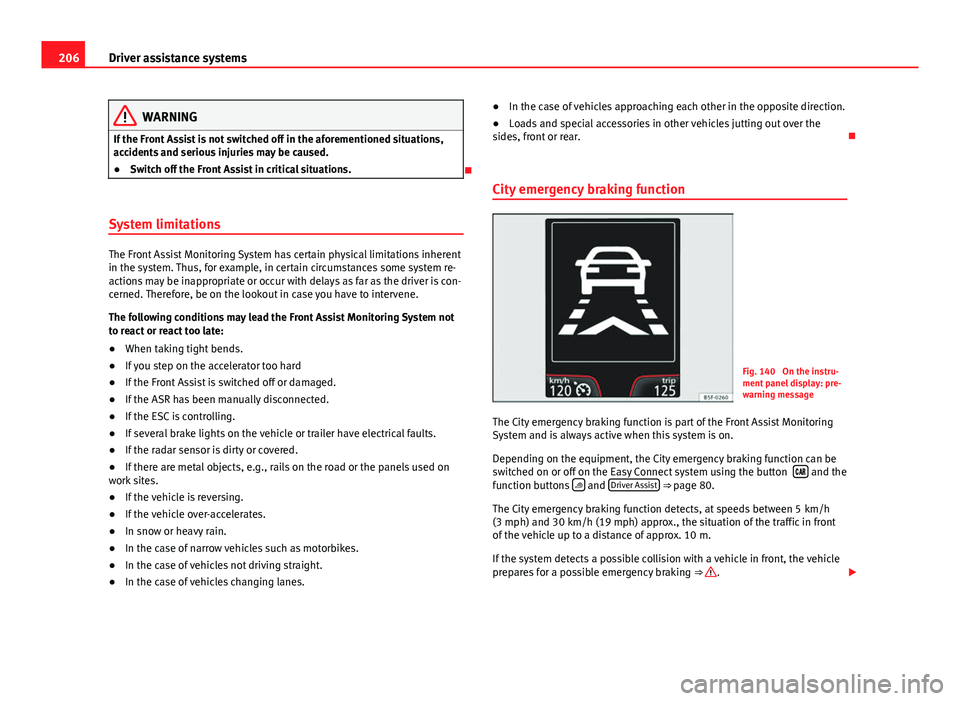
Fig. 140 On the instru-
ment panel display: pre-
warning message
The City emergency braking function is part of the Front Assist Monitoring
System and is always active when this system is on.
Depending on the equipment, the City emergency braking function can be
switched on or off on the Easy Connect system using the button
and the
function buttons and Driver Assist ⇒ page 80.
The City emergency braking function detects, at speeds between 5 km/h
(3 mph) and 30 km/h (19 mph) approx., the situation of the traffic in front
of the vehicle up to a distance of approx. 10 m.
If the system detects a possible collision with a vehicle in front, the vehicle
prepares for a possible emergency braking ⇒
.
Page 225 of 339
223
Intelligent technology
Multi-collision brake
In an accident, the multi-collision brake can help the driver by braking to
avoid the risk of skidding during the accident, which could lead to further
collisions.
The multi-collision brake works for front, side or rear accidents, when the
airbag control unit records its activation level and the accident takes place
at a speed of over 10 km/h (6 mph). The ESC automatically brakes the vehi-
cle, as long as the accident has not damaged the ESC, the brake hydraulics
or the on-board network.
The following actions control automatic braking during the accident:
● When the driver presses the accelerator. The automatic braking does not
take place.
● When the braking pressure through pressing the brake pedal is greater
than the system’s braking pressure. The vehicle will brake manually.
● Multi-collision braking will not be available if ESC is malfunctioning.
WARNING
● The ESC, ABS, ASR, EDL, electronic self-locking differential or selec-
tive torque control systems cannot exceed the limits imposed by the laws
of physics. Always bear this in mind, especially on wet or slippery roads.
If you notice the systems cutting in, you should reduce your speed imme-
diately to suit the road and traffic conditions. Do not be encouraged to
take risks by the presence of more safety systems. If you do, an accident
may occur.
● Please remember that the accident risk always increases if you drive
fast, especially in corners or on a slippery road, or if you follow too close
behind the vehicle in front of you. The ESC, ABS, brake assist, EDL, elec-
tronic self-locking and selective torque control systems cannot prevent
accidents: risk of accidents!
● Accelerate with caution on slippery surfaces (for example, icy or
snow-covered). Despite the control systems, the driven wheels could
spin, affecting the stability of the vehicle: risk of accident!
Note
● The ABS and ASR will only operate correctly if the four wheels have iden-
tical tyres. Any differences in the rolling radius of the tyres can cause the
system to reduce engine power when this is not desired.
● The regulating processes of the systems can make noises when they in-
tervene.
● If the warning lamp lights up, or alternatively, there could be a
fault ⇒ page 69.
Switching on/off the ESC and ASR
The ESC is switched on automatically when the engine is
started. The ESC cannot be deactivated. ESC in “Sport Mode”
Sport mode is activated through the Easy Connect system menu ⇒ page 79.
The ability of the ESC to stabilise the vehicle is limited; the traction control
system (ASR) becomes disabled ⇒
.
The control lamp will light up. For vehicles with a driver information sys-
tem*, the driver will be shown the electronic stability control (ESC) option:
sport. Warning! Limited stability .
In the following exceptional circumstances enabling the ESC Sport mode to
improve the traction of the wheels is tenable:
● “Swing” the vehicle to unblock it.
● Driving in deep snow or on loose surfaces.
Disable ESC Sport mode
Through the Easy Connect system ⇒ page 79. The warning lamp will
switch off. For vehicles with a driver information system*, the driver will be
shown the electronic stability control (ESC) option: on .
Safety FirstOperating instructionsPractical TipsTechnical specifications
Page 226 of 339
224Intelligent technology
Disable ASR
ASR mode is deactivated ⇒ page 79 through the Easy Connect system
menu. The traction control system will be disabled.
The control lamp will light up. For vehicles with a driver information sys-
tem* the driver will be informed that ASR is disabled.
In the following exceptional circumstances enabling the ESC Sport mode to
improve the traction of the wheels is tenable:
● “Swing” the vehicle to unblock it.
● Driving in deep snow or on loose surfaces.
Activate ASR
ASR mode is activated ⇒ page 79 through the Easy Connect system menu.
The traction control system will be enabled.
The control lamp switches off. For vehicles with a driver information sys-
tem* the driver will be informed that ASR is enabled.
WARNING
You should switch on the ESC Sport mode only if the traffic conditions
and your driving ability allow you to do so safely: risk of skidding!
● With ESC in Sport mode, the stabilising function will be limited to al-
low for a sportier drive. The driving wheels could spin and the vehicle
could skid.
Note
If the ASR is disconnected or the ESC’s Sport mode is selected, cruise con-
trol* will be switched off. Brakes
New brake pads
For the first 400 km (250 miles), new brake pads have not yet reached their
maximum braking capacity, and need to be “run in” first. However, you can
compensate for the slightly reduced braking effect by applying more pres-
sure on the brake pedal. Avoid overloading the brakes while running them
in.
Wear
The rate of wear on the
brake pads depends a great deal on how you drive
and the conditions in which the vehicle is operated. This is a particular
problem in urban traffic and short stretches, or with very sporty driving.
Depending on the speed, the braking force, and the environmental condi-
tions (for example, the temperature, air humidity, etc.) noises may be pro-
duced on braking.
Wet roads or road salt
In certain situations (for example, on driving through flooded areas, in se-
vere downpours or after washing the vehicle) the braking action could be
delayed if the discs and pads are damp, or frozen in winter. In this case the
brakes should be dried by pressing the brake pedal several times.
At high speed and with the windscreen wipers activated, the brake pads will
briefly touch the brake discs. This takes place, although unnoticeable to the
driver, at regular intervals to improve the response time of the brakes when
they are wet.
The effectiveness of the brakes can also be temporarily reduced if the vehi-
cle is driven for some distance without using the brakes when there is a lot
of salt on the road in winter. The layer of salt that accumulates on the discs
and pads can be removed by gently applying the brakes a few times.
Page 232 of 339
230Driving and the environment
Driving and the environment
Running in the engine
A new vehicle should be run in over a distance of 1500 km (1000 miles). For
the first 1000 km (600 miles) the engine speed should not exceed 2/3 of
the maximum permissible engine speed. In doing so, do not accelerate at
full throttle and do not drive with a trailer! From 1000 to 1500 km (600 to
1000 miles) you can gradually increase the engine rpm and road speed.
During its first few hours of running, the internal friction in the engine is
greater than later on when all the moving parts have bedded down.
How the vehicle is driven for the first 1500 km (1000 miles) influences the
future engine performance. Subsequently, also drive at a moderate rate, es-
pecially when the engine is still cold: this will lead to less engine wear and
tear and will prolong its useful life.
You should also avoid driving with the engine speed too low. Change down
to a lower gear when the engine no longer runs “smoothly”. If the engine
revs too much, cut fuel injection to protect the engine.
Driving through flooded roads
To prevent damage to the vehicle when driving through water, for example,
along a flooded road, please observe the following:
● The water should never come above the lower edge of the bodywork.
● Drive at pedestrian speed.
WARNING
After driving through water, mud, sludge, etc., the braking effect can be
delayed slightly due to moisture build-up on the discs and brake pads.
Applying the brakes carefully several times will remove the moisture and
restore the full braking effect.
CAUTION
● Driving through flooded areas may severely damage vehicle compo-
nents such as the engine, transmission, running gear or electrical system.
● Whenever driving through water, the Start-Stop system* must be switch-
ed off ⇒ page 169.
Note
● Check the depth of the water before entering the flooded zone.
● Do not stop in the water, drive in reverse, or stop the engine in any sit-
uation.
● Note that vehicles travelling in the opposite direction may splash water
that could exceed the maximum permitted water height for your vehicle.
● Avoid driving through salt water (corrosion).
Installation of exhaust gas filtration systems
Catalytic converter
Applies to vehicles with petrol engine: The vehicle must only be used with
unleaded petrol, otherwise the catalytic converter will be irreparably dam-
aged.
Page 233 of 339
231
Driving and the environment
Never drive until the tank is empty; an irregular supply of fuel can cause
faulty combustion. In these cases, unburned fuel reaches the exhaust sys-
tem, which can overheat and damage the catalytic converter.
Diesel particulate filter
Applies to vehicles with diesel engine: The diesel particulate filter can filter
out almost all soot particles contained in the exhaust gas. In normal driving
conditions the filter is self-cleaning. The Diesel particulate filter is cleaned
automatically without need for indication by the warning lamp . This may
be noticed because the engine idle speed increases and an odour may be
detected.
If automatic filter purification cannot be carried out (because only short
trips are taken, for example), soot will accumulate on the filter and the Die-
sel particulate filter warning lamp will switch on.
Facilitate the automatic filter cleaning process by driving in the following
manner: Drive for approximately 15 minutes at a minimum speed of 60 km/
h (40 mph) in 4th or 5th gear (automatic gearbox: gear S). Maintain the en-
gine speed at approx. 2000 rpm. The rise in temperature causes the soot on
the filter to burn. On completion of the cleaning the warning lamp will
switch off. If the warning lamp does not switch off, go immediately to a spe-
cialised workshop to rectify the problem.
WARNING
● Because of the high temperatures which can occur in the exhaust gas
control system (catalytic converter or diesel particulate filter), do not
park the vehicle where the exhaust can come into contact with flamma-
ble materials under the car (e.g. on grass or at the forest edge). Fire haz-
ard!
● Do not apply wax underneath the vehicle around the area of the ex-
haust system: Fire hazard!
Economic and ecological driving
Fuel consumption, environmental pollution and wear to the engine, brakes
and tyres depends largely on driving style. Fuel consumption can be re-
duced by 10-15% with an economical driving style and proper anticipation
of traffic conditions. The following section gives you some tips on lessening
the impact on the environment and reducing your operating costs at the
same time.
Foresight when driving
Acceleration causes the vehicle to consume more fuel. If you think ahead
when driving, you will need to brake less and thus accelerate less. Wherever
possible, let the car roll slowly to a stop, with a
gear engaged (for instance
when you can see that the next traffic lights are red). This takes advantage
of the engine braking effect, reducing wear on the brakes and tyres. Emis-
sions and fuel consumption will drop to zero due to the overrun fuel cut-off.
Changing gear to save energy
An effective way of saving is to change in advance to a higher gear. Running
the engine at high rpm in the lower gears uses an unnecessary amount of
fuel.
Manual gearbox : shift up from first to second gear as soon as possible. In
any case, we recommend that you change to a higher gear upon reaching
2000 rpm or so. Choosing the right gear enables fuel savings. Select the
highest possible gear appropriate for the driving situation (the engine
should continue functioning with cyclical regularity).
Automatic gearbox : accelerate gradually and without reaching the “kick-
down” position.
Avoid driving at high speed
Avoid travelling at top speed, whenever possible. Fuel consumption, emis-
sion of harmful gases and noise pollution multiply disproportionately as
speed is increased. Driving at moderate speeds will help to save fuel.
Safety FirstOperating instructionsPractical TipsTechnical specifications
Page 237 of 339
235
Trailer
Note
● Towing a trailer places additional demands on the vehicle. We recom-
mend additional services between the normal inspection intervals if the ve-
hicle is used frequently for towing a trailer.
● Find out whether special regulations apply to towing a trailer in your
country.
Ball coupling of towing bracket*
The ball coupling is provided with instructions on fitting and removing the
ball coupling of the towing bracket.
WARNING
The towing bracket ball coupling must be stored securely in the luggage
compartment to prevent them being flung through the vehicle and caus-
ing injury.
Note
● By law, the ball coupling must be removed if a trailer is not being towed
if it obscures the number plate.
Driving tips
Driving with a trailer always requires extra care. Weight distribution
The weight distribution of a loaded trailer with an unladen vehicle is very
unfavourable. However, if this cannot be avoided, drive extra slowly to allow
for the unbalanced weight distribution. Speed
The stability of the vehicle and trailer is reduced with increasing speed. For
this reason, it is advisable not to drive at the maximum permissible speed
in an unfavourable road, weather or wind conditions. This applies especially
when driving downhill.
You should always reduce speed immediately if the trailer shows the slight-
est sign of
snaking. Never try to stop the “snaking” by increasing speed.
Always brake in due course. If the trailer has an overrun brake, apply the
brakes gently at first and then, firmly. This will prevent the jerking that can
be caused by locking of trailer wheels. Select a low gear in due course be-
fore going down a steep downhill. This enables you to use the engine brak-
ing to slow down the vehicle.
Reheating
At very high temperatures and during prolonged slopes, driving in a low
gear and high engine speed, always monitor the coolant temperature gauge
⇒ page 69.
Electronic Stability Control*
The ESC* system helps to stabilise the trailer in case of skidding or rocking.
Safety FirstOperating instructionsPractical TipsTechnical specifications