light Seat Leon SC 2013 Manual Online
[x] Cancel search | Manufacturer: SEAT, Model Year: 2013, Model line: Leon SC, Model: Seat Leon SC 2013Pages: 339, PDF Size: 4.8 MB
Page 211 of 339
209
Driver assistance systems
Indication on the display and warning lamps
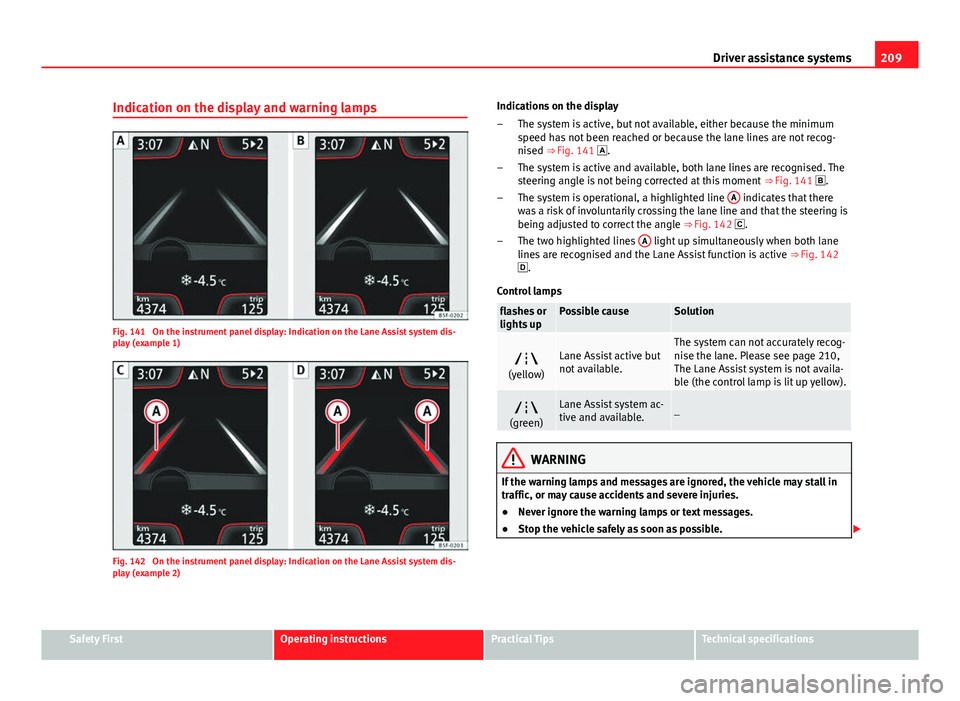
Fig. 141 On the instrument panel display: Indication on the Lane Assist system dis-
play (example 1)
Fig. 142 On the instrument panel display: Indication on the Lane Assist system dis-
play (example 2) Indications on the display
The system is active, but not available, either because the minimum
speed has not been reached or because the lane lines are not recog-
nised ⇒ Fig. 141 .
The system is active and available, both lane lines are recognised. The
steering angle is not being corrected at this moment ⇒ Fig. 141 .
The system is operational, a highlighted line A
indicates that there
was a risk of involuntarily crossing the lane line and that the steering is
being adjusted to correct the angle ⇒ Fig. 142 .
The two highlighted lines A
light up simultaneously when both lane
lines are recognised and the Lane Assist function is active ⇒ Fig. 142
.
Control lamps
flashes or
lights upPossible causeSolution
(yellow)Lane Assist active but
not available.The system can not accurately recog-
nise the lane. Please see page 210,
The Lane Assist system is not availa-
ble (the control lamp is lit up yellow).
(green)Lane Assist system ac-
tive and available._
WARNING
If the warning lamps and messages are ignored, the vehicle may stall in
traffic, or may cause accidents and severe injuries.
● Never ignore the warning lamps or text messages.
● Stop the vehicle safely as soon as possible.
–
–
–
–
Safety FirstOperating instructionsPractical TipsTechnical specifications
Page 214 of 339
212Driver assistance systems
If the DCC has a fault, the instrument panel display shows the message
Fault: Damping control.
Steering
Power steering becomes more robust in sport mode to enable a more sporty
driving style.
Air conditioning
In vehicles with Climatronic, this can operate in eco mode, especially re-
stricting fuel consumption.
Ambient lighting
The ambient lighting guides located in the interior front door panels of the
Leon FR change colour from white to red when sport mode is activated.
Setting driving mode
You can select from Normal, Sport, Eco and Individual.
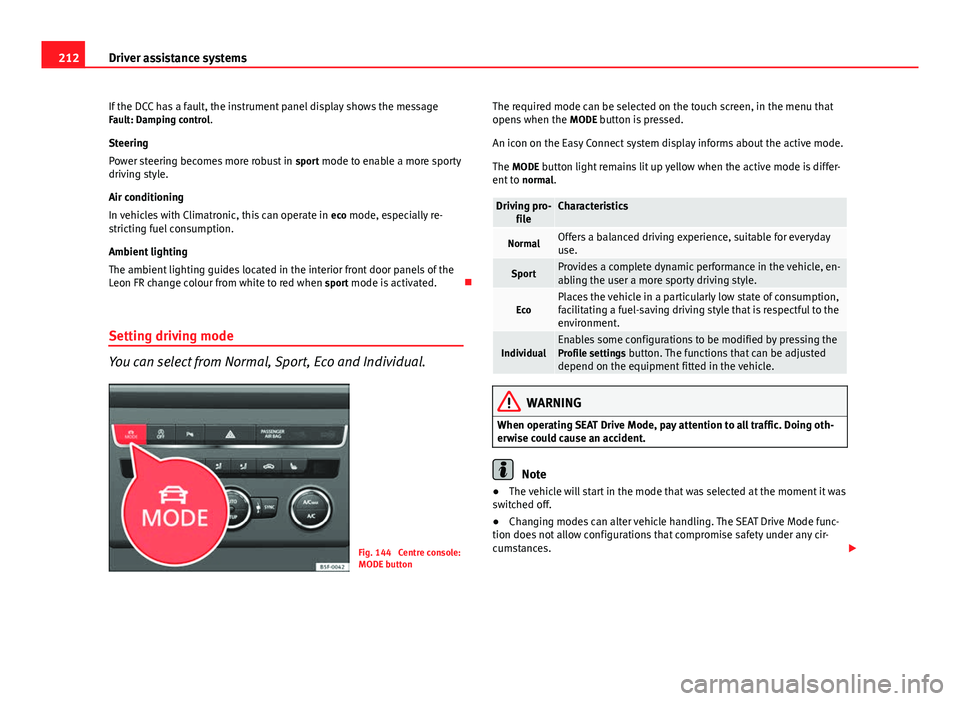
Fig. 144 Centre console:
MODE button The required mode can be selected on the touch screen, in the menu that
opens when the
MODE button is pressed.
An icon on the Easy Connect system display informs about the active mode.
The MODE button light remains lit up yellow when the active mode is differ- ent to normal.
Driving pro-
fileCharacteristics
NormalOffers a balanced driving experience, suitable for everyday
use.
SportProvides a complete dynamic performance in the vehicle, en-
abling the user a more sporty driving style.
EcoPlaces the vehicle in a particularly low state of consumption,
facilitating a fuel-saving driving style that is respectful to the
environment.
IndividualEnables some configurations to be modified by pressing the
Profile settings button. The functions that can be adjusted
depend on the equipment fitted in the vehicle.
WARNING
When operating SEAT Drive Mode, pay attention to all traffic. Doing oth-
erwise could cause an accident.
Note
● The vehicle will start in the mode that was selected at the moment it was
switched off.
● Changing modes can alter vehicle handling. The SEAT Drive Mode func-
tion does not allow configurations that compromise safety under any cir-
cumstances.
Page 217 of 339
215
Driver assistance systems
For the sake of the environment
Under-inflated tyres lead to increased fuel consumption and tyre wear.
Note
● Driving for the first time with new tyres at a high speed can cause them
to slightly expand, which could then produce an air pressure warning.
● Only replace used tyres with those authorised by SEAT for the corre-
sponding type vehicle.
● Do not only rely on the tyre monitoring system. Regularly check your
tyres to ensure that the tyre pressure is correct and that the tyres are not
damaged due to puncture, cuts, tears and impacts/dents. Remove objects
from the tyres only when they have not pierced the tyres.
Tyre monitor indicator warning lamp
lights upPossible causeSolution
The pressure in one or more
tyres has clearly reduced in
comparison to the tyre pres-
sure set by the driver or the
tyre has structural damage.
Additionally, an audible warn-
ing can be heard and a text
message can be seen on the
instrument panel display. Stop the vehicle! Reduce
speed immediately! Stop the
vehicle safely as soon as pos-
sible. Avoid sudden manoeu-
vres and braking! Check all
tyres and pressures. Replace
any damaged tyres.
flashesPossible causeSolution
System malfunction. The con-
trol lamp flashes for about one
minute and then lights up per-
manently.
If the tyre pressure is correct,
switch the ignition off and on
again. If the control lamp re-
mains lit up, the tyre monitor-
ing indicator can be calibra-
ted. Have the system reviewed
by a specialised workshop.
Several warning and control lamps light up for a few seconds when the igni-
tion is switched on while the function is verified. They will switch off after a
few seconds.
WARNING
When the tyres are inflated at different pressures or at a pressure that is
too low then a tyre may be damaged resulting in a loss of control of the
vehicle and a serious or fatal accident.
● If the warning lamp lights up, stop immediately and check the
tyres.
● If the tyres are inflated at different pressures or if a tyre pressure is
too low, this will increase tyre wear, negatively affecting vehicle stability
and increasing braking distances.
● If tyres are inflated at different pressures or a tyre pressure is too low,
a tyre may be damaged and burst resulting in a loss of control of the ve-
hicle.
● The driver is responsible for ensuring that all of the vehicle tyres are
correctly inflated to the right pressure. The recommended tyre pressure
is indicated on the label ⇒ page 307.
● The tyre monitoring system can only operate correctly if all of the
tyres are inflated to the correct pressure when cold.
Safety FirstOperating instructionsPractical TipsTechnical specifications
Page 220 of 339
218Driver assistance systems
During parking, the parking system plus assists you visually and audibly
about obstacles detected in front and behind the vehicle ⇒ page 219.
WARNING
● Always pay attention (also when looking straight ahead) to traffic and
the vehicle surroundings. The assistance systems are not a replacement
for driver awareness. When inserting or removing the vehicle from a park-
ing space, or when performing similar manoeuvres the driver always as-
sumes the responsibility.
● Take into account that the system is not always in conditions to rec-
ognise or represent certain surfaces, such as dress fabric: Risk of causing
an accident!
● The sensors and cameras have blind spots, making the detection of
people and objects impossible. Pay special attention to children and ani-
mals: Risk of causing an accident!
● Always keep visual control of the vehicle surroundings: use the rear
vision mirrors for additional help.
CAUTION
● Under certain circumstances, the system does not detect or display cer-
tain objects:
–Objects such as snow chains, trailer draw bars, bars or fences
– Objects that are located above the sensors, such as protrusions in a
wall.
– Objects with certain surfaces or structures, such as wire mesh fences
or powder snow.
● When the vehicle approaches a low obstacle, it could disappear from
the angle of measurement. In this case, take into account that the system
will no longer warn about this obstacle.
● The knocks or damage on the radiator grille, bumper, wheel arch and ve-
hicle underbody can adjust the orientation of the sensors. This can affect
the parking aid function. Have the function checked by a specialised work-
shop.
Note
● In certain situations, the system can give a warning even though there is
no obstacle in the detected area, e.g:
–for roads with certain surfaces, or with long grass
– for external ultrasound sources, such as cleaning vehicles
– In downpours, intense snow or dense exhaust gases
● In order to familiarise yourself with the system, it is advised that you
practice parking in an area or car park that is free from traffic. There must be
good weather and light conditions.
● The volume and tone of the warnings can be modified, in addition to the
indications ⇒ page 221.
● In vehicles without a driver information system, these parameters can be
modified in a SEAT Official Service or in a specialised workshop.
● Please observe information on towing a trailer ⇒ page 221.
● The display on the Easy Connect screen shows a slight time delay.
● To ensure that the parking aid works properly, the sensors must be kept
clean and free of ice and snow.
Rear parking aid*
The rear parking aid is an audible assistant. Description
There are sensors integrated in the rear bumper. When the sensors detect
an obstacle, you are alerted by audible warnings.
Make sure that the sensors are not covered by adhesives, residues and the
like, given that this could affect the system operation. Cleaning instructions
⇒ page 239.
The approximate measurement range of the sensors is:
Page 222 of 339
220Driver assistance systems
Switching on
–Engage reverse gear or
– Press the button on the centre console ⇒ Fig. 149. A short
confirmation signal will be heard and the button symbol will
light up yellow.
With certain equipment (Adaptive Cruise Control), the system will
be switched on automatically when the vehicle reverses a given
distance (approx. 10 cm if an obstacle is detected at the rear and
approx. 20 cm if no obstacle is detected at the rear).
Switching off
– Drive forwards at more than 10 km/h (6 mph), or
– Press the button, or
– Switch the ignition off
Segments of the visual indication
The distance of separation from the obstacle can be estimated using the
segments around the vehicle. With certain equipment (Radio Standard), the
yellow lines* mark the estimated path, depending on the angle of the
turned steering wheel. A white segment is seen when an obstacle is detec-
ted out of the path of the vehicle. The red segments represent obstacles de-
tected within the path. As the vehicle approaches an obstacle, the seg-
ments are displayed closer to the vehicle. When the penultimate segment is
displayed, this means that the vehicle has reached the collision zone. In the
collision zone, obstacles are represented in red, including those out of the
path. Do not continue to move forward (or backward) ⇒
in General infor-
mation on page 218, ⇒ in General information on page 218 ! Automatic activation
1)
When the parking aid (ParkPilot) is automatically switched on this is shown
in miniature on the left side of the display.
When slowly approaching an obstacle located in front of the vehicle, the au-
tomatic activation only functions each time the speed is reduced below ap-
proximately 10 km/h (6 mph) for the first time. If the parking aid is deactiva-
ted using the button, the following actions must be carried out in order
for it to automatically reactivate:
● Switch off the ignition and switch it on again.
● OR: Accelerate above 10 km/h (6 mph) before reducing speed below
this number again.
● OR: Place the selector lever in position P and then move it from this po-
sition.
● OR: Switch on and off the automatic activation in the Easy Connect sys-
tem menu.
The automatic activation with parking aid miniature indication can be
switched on and off from the Easy Connect system menu ⇒ page 81:
● Switch the ignition on.
● Press button
.
● Press the Setup function button.
● Press the Parking and Manoeuvring function button.
● Select the parking aid (ParkPilot) from the list.
● Automatic activation.
When the function button check box is activated , the function is on.
1)
Available only with certain equipment.
Page 225 of 339
223
Intelligent technology
Multi-collision brake
In an accident, the multi-collision brake can help the driver by braking to
avoid the risk of skidding during the accident, which could lead to further
collisions.
The multi-collision brake works for front, side or rear accidents, when the
airbag control unit records its activation level and the accident takes place
at a speed of over 10 km/h (6 mph). The ESC automatically brakes the vehi-
cle, as long as the accident has not damaged the ESC, the brake hydraulics
or the on-board network.
The following actions control automatic braking during the accident:
● When the driver presses the accelerator. The automatic braking does not
take place.
● When the braking pressure through pressing the brake pedal is greater
than the system’s braking pressure. The vehicle will brake manually.
● Multi-collision braking will not be available if ESC is malfunctioning.
WARNING
● The ESC, ABS, ASR, EDL, electronic self-locking differential or selec-
tive torque control systems cannot exceed the limits imposed by the laws
of physics. Always bear this in mind, especially on wet or slippery roads.
If you notice the systems cutting in, you should reduce your speed imme-
diately to suit the road and traffic conditions. Do not be encouraged to
take risks by the presence of more safety systems. If you do, an accident
may occur.
● Please remember that the accident risk always increases if you drive
fast, especially in corners or on a slippery road, or if you follow too close
behind the vehicle in front of you. The ESC, ABS, brake assist, EDL, elec-
tronic self-locking and selective torque control systems cannot prevent
accidents: risk of accidents!
● Accelerate with caution on slippery surfaces (for example, icy or
snow-covered). Despite the control systems, the driven wheels could
spin, affecting the stability of the vehicle: risk of accident!
Note
● The ABS and ASR will only operate correctly if the four wheels have iden-
tical tyres. Any differences in the rolling radius of the tyres can cause the
system to reduce engine power when this is not desired.
● The regulating processes of the systems can make noises when they in-
tervene.
● If the warning lamp lights up, or alternatively, there could be a
fault ⇒ page 69.
Switching on/off the ESC and ASR
The ESC is switched on automatically when the engine is
started. The ESC cannot be deactivated. ESC in “Sport Mode”
Sport mode is activated through the Easy Connect system menu ⇒ page 79.
The ability of the ESC to stabilise the vehicle is limited; the traction control
system (ASR) becomes disabled ⇒
.
The control lamp will light up. For vehicles with a driver information sys-
tem*, the driver will be shown the electronic stability control (ESC) option:
sport. Warning! Limited stability .
In the following exceptional circumstances enabling the ESC Sport mode to
improve the traction of the wheels is tenable:
● “Swing” the vehicle to unblock it.
● Driving in deep snow or on loose surfaces.
Disable ESC Sport mode
Through the Easy Connect system ⇒ page 79. The warning lamp will
switch off. For vehicles with a driver information system*, the driver will be
shown the electronic stability control (ESC) option: on .
Safety FirstOperating instructionsPractical TipsTechnical specifications
Page 226 of 339
224Intelligent technology
Disable ASR
ASR mode is deactivated ⇒ page 79 through the Easy Connect system
menu. The traction control system will be disabled.
The control lamp will light up. For vehicles with a driver information sys-
tem* the driver will be informed that ASR is disabled.
In the following exceptional circumstances enabling the ESC Sport mode to
improve the traction of the wheels is tenable:
● “Swing” the vehicle to unblock it.
● Driving in deep snow or on loose surfaces.
Activate ASR
ASR mode is activated ⇒ page 79 through the Easy Connect system menu.
The traction control system will be enabled.
The control lamp switches off. For vehicles with a driver information sys-
tem* the driver will be informed that ASR is enabled.
WARNING
You should switch on the ESC Sport mode only if the traffic conditions
and your driving ability allow you to do so safely: risk of skidding!
● With ESC in Sport mode, the stabilising function will be limited to al-
low for a sportier drive. The driving wheels could spin and the vehicle
could skid.
Note
If the ASR is disconnected or the ESC’s Sport mode is selected, cruise con-
trol* will be switched off. Brakes
New brake pads
For the first 400 km (250 miles), new brake pads have not yet reached their
maximum braking capacity, and need to be “run in” first. However, you can
compensate for the slightly reduced braking effect by applying more pres-
sure on the brake pedal. Avoid overloading the brakes while running them
in.
Wear
The rate of wear on the
brake pads depends a great deal on how you drive
and the conditions in which the vehicle is operated. This is a particular
problem in urban traffic and short stretches, or with very sporty driving.
Depending on the speed, the braking force, and the environmental condi-
tions (for example, the temperature, air humidity, etc.) noises may be pro-
duced on braking.
Wet roads or road salt
In certain situations (for example, on driving through flooded areas, in se-
vere downpours or after washing the vehicle) the braking action could be
delayed if the discs and pads are damp, or frozen in winter. In this case the
brakes should be dried by pressing the brake pedal several times.
At high speed and with the windscreen wipers activated, the brake pads will
briefly touch the brake discs. This takes place, although unnoticeable to the
driver, at regular intervals to improve the response time of the brakes when
they are wet.
The effectiveness of the brakes can also be temporarily reduced if the vehi-
cle is driven for some distance without using the brakes when there is a lot
of salt on the road in winter. The layer of salt that accumulates on the discs
and pads can be removed by gently applying the brakes a few times.
Page 230 of 339
228Intelligent technology
To restore the necessary energy balance, the system will then temporarily
shut off the electrical components that are using a lot of power, or reduce
the current they are consuming. Heating systems in particular use a large
amount of electrical power. If you notice, for instance, that the seat heating*
or the heated rear window is not working, they may have been temporarily
switched off or regulated to a lower heat output. These systems will be
available again as soon as sufficient electrical power is available.
You may also notice that the engine runs at a slightly faster idling speed.
This is quite normal, and no cause for concern. The increased idling speed
allows the alternator to meet the greater power requirement and charge the
battery at the same time.
Information recorded in the control units
Your vehicle is fitted at the factory with a series of electronic control units
responsible for the engine and gearbox management. In addition, the con-
trol units supervise the correct performance of the exhaust gas system and
the airbag systems.
Therefore, while the vehicle is being driven, these electronic control units
are continuously analysing the vehicle data. In the event of faults or devia-
tions from the theoretical values, only this data is stored. Generally, the in-
strument panel warning lamps indicate whether there are any malfunctions.
This data can only be read and analysed using special equipment.
The storing of the data allows specialised workshops to detect and repair
faults. Stored data may include:
● Important data about the engine and gearbox
● Speed
● Direction of travel ●
Braking force
● Seat belt check
The vehicle control units never record conversations held by passengers in
the vehicle.
If the control unit records an accident with airbag activation, the system
may automatically send a signal. This will depend on the network operator.
Normally, transmission is only possible in areas with sufficient coverage.
Event Data Recorder
The vehicle is not fitted with an event data recorder.
An event data recorder temporarily stores the vehicle information. There-
fore, in the event of accident, it is possible to obtain detailed information
about how the accident occurred. For example, in vehicles with airbag sys-
tems, data relating to speed of impact, seat belt status, seat positions and
airbag activation times may be stored. The volume of data depends on the
manufacturer.
Event data recorders can only be mounted with authorisation from the vehi-
cle owner and, in some countries, they are governed by local legislation.
Reprogramming control units
On the whole, all the data required for the component management is stor-
ed in the control units. The programming of certain convenience functions,
such as the turn signal convenience mode, individual door opening and dis-
play indications can be modified using special equipment at the workshop.
If the convenience functions are reprogrammed, the Instruction Manual in-
formation and descriptions will not coincide with the modified functions.
Therefore, SEAT recommends that any changes are recorded in the “Other
workshop notes section” of the Service Plan.
You can find out about possible reprogramming at your SEAT Official Serv-
ice.
Page 232 of 339
230Driving and the environment
Driving and the environment
Running in the engine
A new vehicle should be run in over a distance of 1500 km (1000 miles). For
the first 1000 km (600 miles) the engine speed should not exceed 2/3 of
the maximum permissible engine speed. In doing so, do not accelerate at
full throttle and do not drive with a trailer! From 1000 to 1500 km (600 to
1000 miles) you can gradually increase the engine rpm and road speed.
During its first few hours of running, the internal friction in the engine is
greater than later on when all the moving parts have bedded down.
How the vehicle is driven for the first 1500 km (1000 miles) influences the
future engine performance. Subsequently, also drive at a moderate rate, es-
pecially when the engine is still cold: this will lead to less engine wear and
tear and will prolong its useful life.
You should also avoid driving with the engine speed too low. Change down
to a lower gear when the engine no longer runs “smoothly”. If the engine
revs too much, cut fuel injection to protect the engine.
Driving through flooded roads
To prevent damage to the vehicle when driving through water, for example,
along a flooded road, please observe the following:
● The water should never come above the lower edge of the bodywork.
● Drive at pedestrian speed.
WARNING
After driving through water, mud, sludge, etc., the braking effect can be
delayed slightly due to moisture build-up on the discs and brake pads.
Applying the brakes carefully several times will remove the moisture and
restore the full braking effect.
CAUTION
● Driving through flooded areas may severely damage vehicle compo-
nents such as the engine, transmission, running gear or electrical system.
● Whenever driving through water, the Start-Stop system* must be switch-
ed off ⇒ page 169.
Note
● Check the depth of the water before entering the flooded zone.
● Do not stop in the water, drive in reverse, or stop the engine in any sit-
uation.
● Note that vehicles travelling in the opposite direction may splash water
that could exceed the maximum permitted water height for your vehicle.
● Avoid driving through salt water (corrosion).
Installation of exhaust gas filtration systems
Catalytic converter
Applies to vehicles with petrol engine: The vehicle must only be used with
unleaded petrol, otherwise the catalytic converter will be irreparably dam-
aged.
Page 233 of 339
231
Driving and the environment
Never drive until the tank is empty; an irregular supply of fuel can cause
faulty combustion. In these cases, unburned fuel reaches the exhaust sys-
tem, which can overheat and damage the catalytic converter.
Diesel particulate filter
Applies to vehicles with diesel engine: The diesel particulate filter can filter
out almost all soot particles contained in the exhaust gas. In normal driving
conditions the filter is self-cleaning. The Diesel particulate filter is cleaned
automatically without need for indication by the warning lamp . This may
be noticed because the engine idle speed increases and an odour may be
detected.
If automatic filter purification cannot be carried out (because only short
trips are taken, for example), soot will accumulate on the filter and the Die-
sel particulate filter warning lamp will switch on.
Facilitate the automatic filter cleaning process by driving in the following
manner: Drive for approximately 15 minutes at a minimum speed of 60 km/
h (40 mph) in 4th or 5th gear (automatic gearbox: gear S). Maintain the en-
gine speed at approx. 2000 rpm. The rise in temperature causes the soot on
the filter to burn. On completion of the cleaning the warning lamp will
switch off. If the warning lamp does not switch off, go immediately to a spe-
cialised workshop to rectify the problem.
WARNING
● Because of the high temperatures which can occur in the exhaust gas
control system (catalytic converter or diesel particulate filter), do not
park the vehicle where the exhaust can come into contact with flamma-
ble materials under the car (e.g. on grass or at the forest edge). Fire haz-
ard!
● Do not apply wax underneath the vehicle around the area of the ex-
haust system: Fire hazard!
Economic and ecological driving
Fuel consumption, environmental pollution and wear to the engine, brakes
and tyres depends largely on driving style. Fuel consumption can be re-
duced by 10-15% with an economical driving style and proper anticipation
of traffic conditions. The following section gives you some tips on lessening
the impact on the environment and reducing your operating costs at the
same time.
Foresight when driving
Acceleration causes the vehicle to consume more fuel. If you think ahead
when driving, you will need to brake less and thus accelerate less. Wherever
possible, let the car roll slowly to a stop, with a
gear engaged (for instance
when you can see that the next traffic lights are red). This takes advantage
of the engine braking effect, reducing wear on the brakes and tyres. Emis-
sions and fuel consumption will drop to zero due to the overrun fuel cut-off.
Changing gear to save energy
An effective way of saving is to change in advance to a higher gear. Running
the engine at high rpm in the lower gears uses an unnecessary amount of
fuel.
Manual gearbox : shift up from first to second gear as soon as possible. In
any case, we recommend that you change to a higher gear upon reaching
2000 rpm or so. Choosing the right gear enables fuel savings. Select the
highest possible gear appropriate for the driving situation (the engine
should continue functioning with cyclical regularity).
Automatic gearbox : accelerate gradually and without reaching the “kick-
down” position.
Avoid driving at high speed
Avoid travelling at top speed, whenever possible. Fuel consumption, emis-
sion of harmful gases and noise pollution multiply disproportionately as
speed is increased. Driving at moderate speeds will help to save fuel.
Safety FirstOperating instructionsPractical TipsTechnical specifications