park assist Seat Leon SC 2014 User Guide
[x] Cancel search | Manufacturer: SEAT, Model Year: 2014, Model line: Leon SC, Model: Seat Leon SC 2014Pages: 284, PDF Size: 5.85 MB
Page 160 of 284
Operation
ACC: currently not available. No sensor
v i
sion
ACC and Front Assist: currently not
available. No sensor vision
This message will be displayed to the driver if
the radar sensor's vision is impaired due, for
example, to leaves, snow, heavy fog or dirt.
Clean the sensor.
ACC: currently not available. Gradient too
st
eep
The maximum road slope has been excee-
ded, hence safe ACC operation cannot be
guaranteed. The ACC cannot be switched on.
ACC: only available in D, S or M
Select the D/S or M position on the selector
lever.
ACC: parking brake applied
The ACC is deactivated if the parking brake is
applied. The ACC is available once again after
the parking brake is released.
ACC: currently not available. Intervention
of stability control
The message for the driver is displayed when
the electronic stability control (ESC) inter-
venes. In this case, the ACC is automatically
switched off. ACC: Take action!
The message for the driver is displayed if,
when the vehicle starts up on a hill with a
mild slope, the vehicle rolls back even al-
though the ACC is activated. Apply the brake
to stop the vehicle from moving/colliding
with another vehicle.
ACC: speed limit
The mes
sage for the driver is displayed if, in
vehicles with manual gearbox, the current
speed is too low for the ACC mode.
The speed to be stored must be at least 30
km/h. The cruise control system switches off
if the speed falls below 20 km/h.
ACC: available as of the 2nd gear
The ACC is operational as of the 2nd gear
(manual gearbox).
ACC: engine speed
The message for the driver is displayed if,
when the AAC accelerates or brakes, the driv-
er does not shift up or down a gear in time,
which means exceeding or not reaching the
permissible engine speed. The AAC switches
itself off. A buzzer warning is heard.
ACC: clutch pressed
Vehicles with a manual gearbox: pressing the
clutch pedal for longer abandons control
mode.
Three white dots appear if a setting made
with the control lever cannot be performed.
For example, if when the vehicle is stationary
the ACC cannot be activated because the
driver is not wearing the seat belt.
Door open
Vehicles with automatic gearbox: the ACC
cannot be activated with the vehicle station-
ary and the door open.
Deactivating the Adaptive Cruise
Control ACC temporarily in certain
situations In the following situations the Adaptive
Cruise Control (ACC) should be deactivated
due to the system's limitations
››› :
● When changing lanes, on tight bends and
roundabouts, in acceleration and decelera-
tion lanes on motorways or in sections with
road works to prevent involuntary accelera-
tion to reach the programmed speed.
● When going through a tunnel, as operation
could be affected.
● On roads with several lanes, when other ve-
hicles are driving more slowly in the overtak-
ing lane. In this case, slower vehicles will be
overtaken on the right.
158
Page 163 of 284
Driver assistance systems
Factors that may affect how the radar sensor
operates
If laser sensor operation is impaired, due to
heavy rain, spray, snow or mud, the ACC is
deactivated temporarily. The relevant text
message will appear in the dash panel dis-
play. If necessary, clean the radar sensor.
When the radar sensor begins to operate
properly again, the ACC will automatically be
available again. The message on the instru-
ment panel screen will switch off and the ACC
will be reactivated again.
ACC operation may be affected by a strong ra-
dar reverse reflection, for example in a closed
car park.
Trailer towing
When driving with trailer the ACC controls
less dynamically.
Overheated brakes
If the brakes overheat, for example after
abrupt braking or in long and steep slopes,
the ACC may be deactivated temporarily. The
relevant text message will appear in the dash
panel display. In this case, adaptive cruise
control cannot be activated.
Adaptive cruise control can be reactivated
once brake temperature has cooled suffi-
ciently. The message will disappear from the
instrument panel display. If the message ACC
not available remains on for quite a long time it means that there is a fault. Contact a speci-
alised workshop. SEAT recommends visiting
a SEAT dealership.
WARNING
If the message ACC ready to start appears on
the instrument panel display and the vehicle
in front starts up, the vehicle will start up au-
tomatically. In this case the radar sensor may
not detect obstacles on the road. This could
cause an accident and serious injuries.
● Before driving off, check that the road is
clear. If necessary, apply the brake. Monitoring system Front
Assist*
Introduction The Front Assist Monitoring system helps to
prevent rear collisions.
The Front Assist can warn the driver of colli-
sion hazards, prepare the vehicle for emer-
gency braking in case of danger, assist the
driver on braking and cause automatic brak-
ing.
The Front Assist is not a replacement for
driver awareness.Distance warning
If the system detects that safety is endan-
gered by the proximity of the vehicle in front,
it may warn the driver by means of a message
on the instrument panel when driving at a
speed of between approximately 60 km/h
(37 mph) and 210 km/h (130 mph)
››› Fig. 158 .
The w arnin
g moment varies depending on
the traffic situation and driver behaviour.
Pre-warning
If the system detects a possible collision with
the vehicle in front, it may warn the driver by
means of an audible warning and an indica-
tion on the instrument panel when driving at
a speed of between approximately 30 km/h
(18 mph) and 210 km/h (130 mph)
››› Fig. 158.
The warnin
g moment varies depending on
the traffic situation and driver behaviour. At
the same time, the vehicle will prepare for a
possible emergency braking ››› .
Critical warning
If the driver fails to react to the pre-warning,
the system may actively intervene in the
brakes when driving at a speed of between
approximately 30 km/h (18 mph) and
210 km/h (130 mph), generating a brief jolt
to warn of the imminent collision. »
161
Technical specifications
Advice
Operation
Safety
The essentials
Page 165 of 284
Driver assistance systems
Radar sensor Fig. 159
On the front bumper: radar sensor. A radar sensor is installed on the front bump-
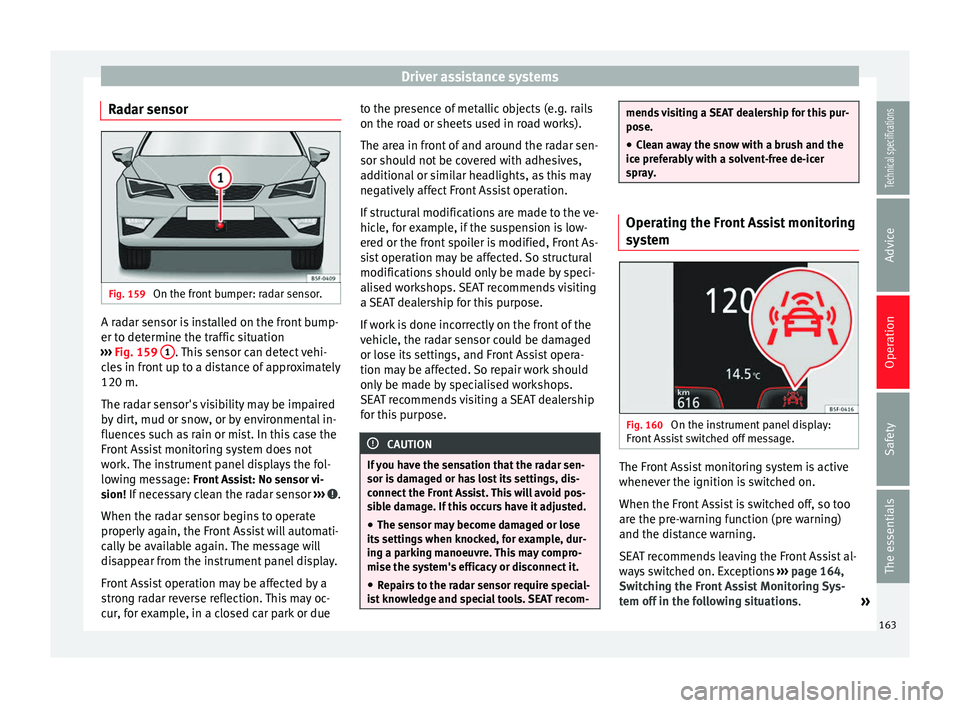
er to determine the traffic situation
››› Fig. 159 1 . This sensor can detect vehi-
cles in front up to a distance of approximately
120 m.
The radar sensor's visibility may be impaired
by dirt, mud or snow, or by environmental in-
fluences such as rain or mist. In this case the
Front Assist monitoring system does not
work. The instrument panel displays the fol-
lowing message: Front Assist: No sensor vi- sion! If necessary clean the radar sensor ››› .
When the radar sensor begins to operate
properly again, the Front Assist will automati-
cally be available again. The message will
disappear from the instrument panel display.
Front Assist operation may be affected by a
strong radar reverse reflection. This may oc-
cur, for example, in a closed car park or due to the presence of metallic objects (e.g. rails
on the road or sheets used in road works).
The area in front of and around the radar sen-
sor should not be covered with adhesives,
additional or similar headlights, as this may
negatively affect Front Assist operation.
If structural modifications are made to the ve-
hicle, for example, if the suspension is low-
ered or the front spoiler is modified, Front As-
sist operation may be affected. So structural
modifications should only be made by speci-
alised workshops. SEAT recommends visiting
a SEAT dealership for this purpose.
If work is done incorrectly on the front of the
vehicle, the radar sensor could be damaged
or lose its settings, and Front Assist opera-
tion may be affected. So repair work should
only be made by specialised workshops.
SEAT recommends visiting a SEAT dealership
for this purpose.
CAUTION
If you have the sensation that the radar sen-
sor is damaged or has lost its settings, dis-
connect the Front Assist. This will avoid pos-
sible damage. If this occurs have it adjusted. ● The sensor may become damaged or lose
its settings when knocked, for example, dur-
ing a parking manoeuvre. This may compro-
mise the system's efficacy or disconnect it.
● Repairs to the radar sensor require special-
ist knowledge and special tools. SEAT recom- mends visiting a SEAT dealership for this pur-
pose.
● Clean away the snow with a brush and the
ice preferably with a solvent-free de-icer
spray. Operating the Front Assist monitoring
system
Fig. 160
On the instrument panel display:
Front Assist switched off message. The Front Assist monitoring system is active
whenever the ignition is switched on.
When the Front Assist is switched off, so too
are the pre-warning function (pre warning)
and the distance warning.
SEAT recommends leaving the Front Assist al-
ways switched on. Exceptions
››› page 164,
Switching the Front Assist Monitoring Sys-
tem off in the following situations .
»
163Technical specifications
Advice
Operation
Safety
The essentials
Page 175 of 284
Driver assistance systems
conditions can limit the Tiredness detection
or prevent it from functioning.
● At speeds below 65 km/h (40 mph)
● At speeds above 200 km/h (125 mph)
● When cornering
● On roads in poor condition
● In unfavourable weather conditions
● When a sporty driving style is employed
● In the event of a serious distraction to the
driver
Tiredness detection will be restored when the
vehicle is stopped for more than 15 minutes,
when the ignition is switched off or when the
driver has unbuckled their seat belt and
opened the door.
In the event of slow driving during a long pe-
riod of time (below 65 km/h (40 mph) the
system automatically re-establishes the tired-
ness calculation. When driving at a faster
speed the driving behaviour will be recalcula-
ted.
Parking aid
General information Various systems are available to help you
when parking or manoeuvring in tight spaces, depending on the equipment fitted
on your vehicle.
The
rear parking aid
is an audible assistant
th
at warns about obstacles located behind
the vehicle ››› page 174.
Durin
g parking, the
parking system plus as-
sists you visually and audibly about obsta-
cles detected in front and behind
the vehicle
››› page 174. WARNING
● Always pay attention, also when looking
straight ahead, to traffic and the vehicle sur-
roundings. The assistance systems are not a
replacement for driver awareness. When in-
serting or removing the vehicle from a park-
ing space, or when performing similar ma-
noeuvres the driver always assumes the re-
sponsibility.
● Take into account that the system is not al-
ways in conditions to recognise or represent
certain surfaces, such as dress fabric: Risk of
causing an accident!
● The sensors and cameras have blind spots,
making the detection of people and objects
impossible. Pay special attention to children
and animals: Risk of causing an accident!
● Always keep visual control of the vehicle
surroundings: use the rear vision mirrors for
additional help. CAUTION
● Under certain circumstances, the system
does not detect or display certain objects:
– Objects such as snow chains, trailer draw
bars, bars or fences.
– Objects that are located above the sen-
sors, such as protrusions in a wall.
– Objects with certain surfaces or struc-
tures, such as wire mesh fences or pow-
der snow.
● Please note that low obstacles detected by
the system may no longer be registered by
the sensors as the car moves closer, so the
system will not give any further warning. In
certain circumstances, objects such as high kerbs that could damage the bottom of the
vehicle are not detected either.
● If the first warning from the Park Pilot is ig-
nored, the vehicle could suffer considerable
damage.
● The knocks or damage on the radiator
grille, bumper, wheel arch and vehicle under-
body can adjust the orientation of the sen-
sors. This can affect the parking aid function.
Have the function checked by a specialised
workshop. Note
● In certain situations, the system can give a
warning even though there is no obstacle in
the detected area, e.g: » 173
Technical specifications
Advice
Operation
Safety
The essentials
Page 176 of 284
Operation
–
for roads with certain surfaces, or with
long grass,
– for external ultrasound sources, such as
cleaning vehicles,
– In downpours, intense snow or dense ex-
haust gases
● In order to familiarise yourself with the sys-
tem, it is advised that you practice parking in
an area or car park that is free from traffic.
There must be good weather and light condi-
tions.
● The volume and tone of the warnings can
be modified, in addition to the indications
››› page 176.
● In v
ehicles without a driver information
sys
tem, these parameters can be modified in
a SEAT Official Service or in a specialised
workshop.
● Please observe information on towing a
trailer ››› page 177.
● The dis
play on the Easy Connect screen
shows a slight time delay.
● To ensure that the parking aid works prop-
erly, the sensors must be kept clean and free
of ice and snow. Rear parking aid*
The rear parking aid is an audible assistant. Description
There are sensors integrated in the rear
bumper. When the sensors detect an obsta-
cle, you are alerted by audible warnings.
Make sure that the sensors are not covered
by adhesives, residues and the like, given
that this could affect the system operation.
Cleaning instructions
››› page 185.
The approximate measurement range of the
sensors is:
rearside0.90 m
centre1.60 m As you approach the obstacle, the time inter-
val between the audible warnings will be re-
duced. When you reach around 0.30 m the
warning will be constant: Do not continue to
move forward (or backward)
››› in General
information on page 173 , ›
›
› in General in-
formation on page 173 !
If you maintain separation from the obstacle,
the volume of the warning begins to reduce
after four seconds (does not affect the tone
of the constant warning).
Activate
When engaging reverse gear, the parking aid
is automatically switched on. This is con-
firmed with a short warning. Parking system plus*
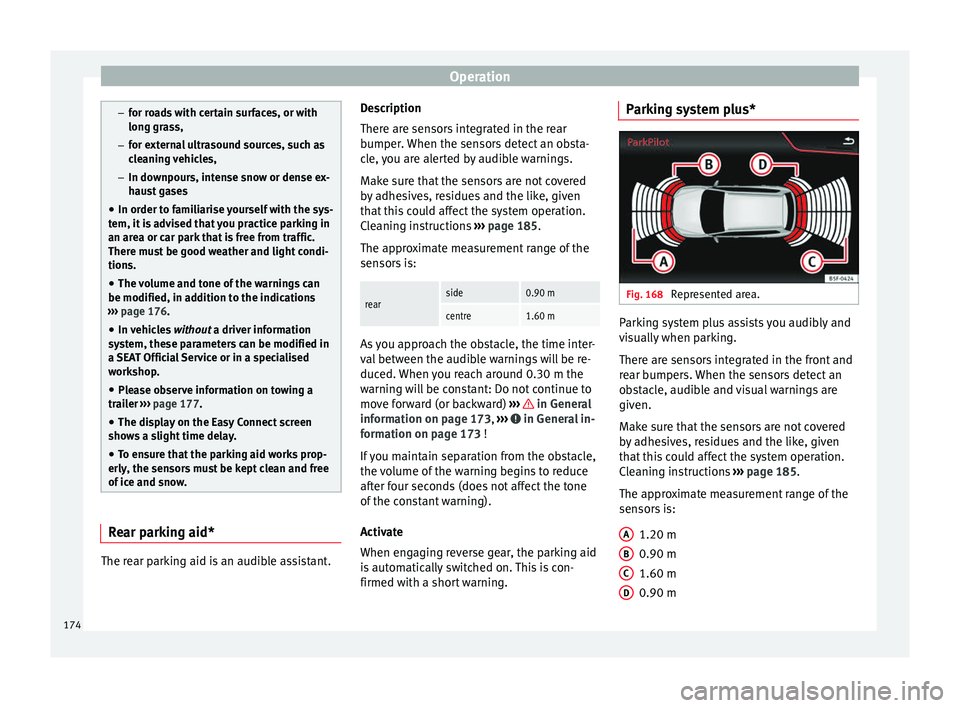
Fig. 168
Represented area. Parking system plus assists you audibly and
visually when parking.
There are sensors integrated in the front and
rear bumpers. When the sensors detect an
obstacle, audible and visual warnings are
given.
Make sure that the sensors are not covered
by adhesives, residues and the like, given
that this could affect the system operation.
Cleaning instructions
››› page 185.
The approximate measurement range of the
sensors is:
1.20 m
0.90 m
1.60 m
0.90 m
A B
C
D
174
Page 177 of 284
Driver assistance systems
As you approach the obstacle, the time inter-
val between the audible warnings will be re-
duced.
If you maintain separation from the obstacle,
the volume of the warning begins to reduce
after four seconds (does not affect the tone
of the constant warning).
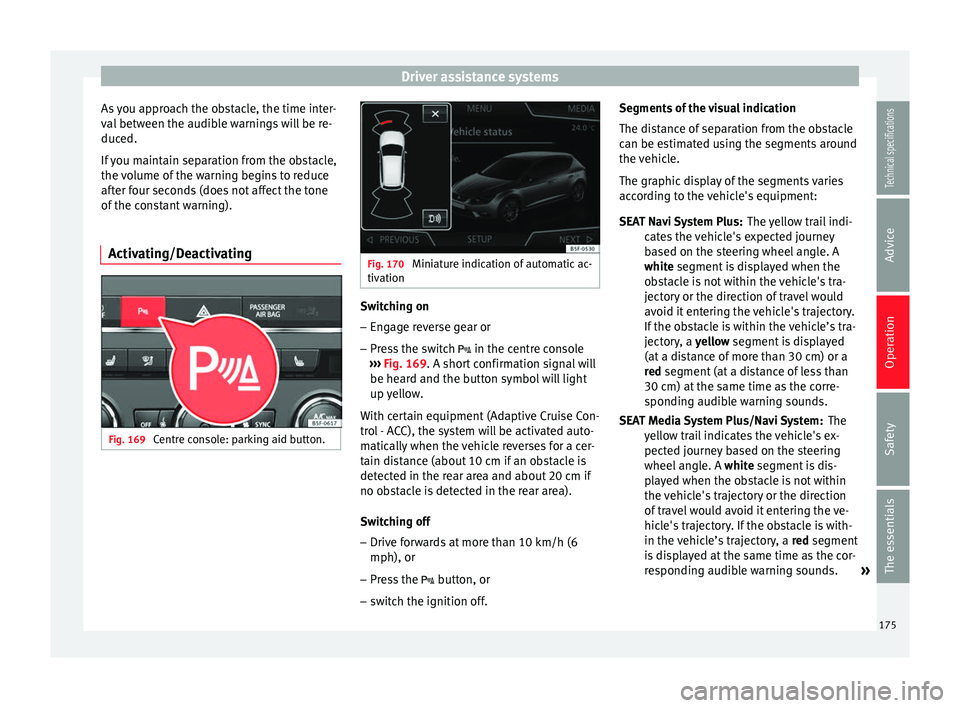
Activating/Deactivating Fig. 169
Centre console: parking aid button. Fig. 170
Miniature indication of automatic ac-
tivation Switching on
– Engage reverse gear or
– Press the switch in the centre console
››› Fig. 169 . A short confirmation signal will
be he ar
d and the button symbol will light
up yellow.
With certain equipment (Adaptive Cruise Con-
trol - ACC), the system will be activated auto-
matically when the vehicle reverses for a cer-
tain distance (about 10 cm if an obstacle is
detected in the rear area and about 20 cm if
no obstacle is detected in the rear area).
Switching off
– Drive forwards at more than 10 km/h (6
mph), or
– Press the button, or
– switch the ignition off. Segments of the visual indication
The distance of separation from the obstacle
can be estimated using the segments around
the vehicle.
The graphic display of the segments varies
according to the vehicle's equipment:
The yellow trail indi-
cates the vehicle's expected journey
based on the steering wheel angle. A
white
segment is displayed when the
obstacle is not within the vehicle's tra-
jectory or the direction of travel would
avoid it entering the vehicle's trajectory.
If the obstacle is within the vehicle’s tra-
jectory, a yellow segment is displayed
(at
a distance of more than 30 cm) or a
red
segment (at a distance of less than
30 cm) at the same time as the corre-
sponding audible warning sounds.
The
yellow trail indicates the vehicle's ex-
pected journey based on the steering
wheel angle. A white segment is dis-
pl
ayed when the obstacle is not within
the vehicle's trajectory or the direction
of travel would avoid it entering the ve-
hicle's trajectory. If the obstacle is with-
in the vehicle’s trajectory, a red
segment
is displayed at the same time as the cor-
responding audible warning sounds. »
SEAT Navi System Plus:
SEAT Media System Plus/Navi System:
175
Technical specifications
Advice
Operation
Safety
The essentials
Page 192 of 284
Advice
The retract function may not operate properly
in very dirty belts. Make sure that the inertia
reel seat belts are completely dry before al-
lowing them to retract. CAUTION
● Do not remove the seat belts from the vehi-
cle to clean them.
● Do not use chemical cleaning agents on the
seat belts, as this can damage the webbing.
Ensure that the seat belts do not come into
contact with corrosive fluids.
● If you find any damage to the belt webbing,
belt fittings, the belt retractor or the buckle,
the belt in question must be replaced by a
specialised workshop. Intelligent technology
Electro-mechanical steering Electro-mechanical power steering assists
the driver when steering.
Electro-mechanical power steering adapts
electronically to the speed of the car, torque
and t
urnin
g angle.
If the power steering should fail at any time
or the engine is switched off (for instance
when being towed), the car can still be
steered. However, more effort than normal
will be required to turn the steering wheel.
Driver warning lamps and messages (in red) Faulty steering! To park the vehicle
If the warning lamp remains on and the driver
indication appears, the power steering could
be faulty.
Do not continue driving. Seek specialist as-
s
istance.
(in yellow) Steering: System fault! You
may continue driving.
If the warning lamp comes on, the steering
could react with more difficultly or more sen-
sitivity than normal. In addition, when driving
in a straight line the steering wheel may be
off-centre. Drive slowly to a specialised workshop and
have the fault repaired.
(in yellow) Steering lock: fault! Go to an
Official Service
The electronic steering lock is malfunction-
ing.
Go to a specialised workshop as soon as
possible and have the fault repaired. WARNING
Take it immediately to a specialised work-
shop and have the fault repaired: risk of acci-
dent! Note
If the lamp (in red) or else (in y
ellow)
lights up briefly, you may continue driving. Progressive steering
Depending on the vehicle equipment, the
progressive steering can adapt steering hard-
ness to the current driving situation. The
power steering only works when the engine
is running.
In
city traffic
y
ou do not need to turn so much
on p
arking, manoeuvring or in very tight
turns.
On the
road or on the motorway, progressive
steering transmits, for example, in bends, a
190
Page 199 of 284
Checking and refilling levels
Liquefied natural gas (LNG) is the result of
heavy cooling of natural gas. Therefore its
volume is considerably reduced compared
with compressed natural gas (CNG). In vehi-
cles with a natural gas engine, liquefied nat-
ural gas cannot be directly refilled, as the gas
would expand excessively in the vehicle gas
tank.
Therefore, vehicles with a natural gas engine
must only be refuelled using compressed
natural gas ››› .
Natural gas quality and consumption
Natural gas is divided into the groups H and
L depending on its quality.
Gas type H has a superior heating power and
inferior nitrogen and carbon dioxide content
than type L. The higher the heating power of
the natural gas, the lower the consumption
will be.
However, the heating power and the propor-
tion of nitrogen and carbon dioxide can fluc-
tuate within the quality groups. Therefore, ve-
hicle consumption can also vary when using
a single type of gas only.
The engine management automatically
adapts to the natural gas used according to
its quality. Therefore, different quality gases
can be mixed in the tank, without the need
for comprehensive draining before applying a
different quality gas. Updated information relating to natural gas
quality is displayed on the instrument panel
››› page 72 .
Nat ur
al gas and safety
If you can smell gas or suspect that there is a
leak ››› :
● Stop the vehicle immediately.
● Switch the ignition off.
● Open the doors to appropriately ventilate
the vehicle.
● Extinguish cigarettes immediately.
● Move away from the vehicle or switch off
objects that may cause sparks or a fire.
● If you continue to smell gas, do not contin-
ue driving!
● Seek specialist assistance. Have the fault
repaired. WARNING
Failure to act when you can smell gas in the
vehicle or when refuelling can cause serious
injuries.
● Carry out the necessary operations.
● Leave the danger zone.
● If necessary, warn the emergency services. WARNING
The vehicle is not prepared to use liquefied
natural gas (LNG) and this fuel must not be
added under any circumstances. Liquefied
natural gas can cause the natural gas tank to
explode, resulting in serious injury. Note
Have the natural gas system checked regular-
ly by a specialised workshop, according to
the Maintenance Programme. 197
Technical specifications
Advice
Operation
Safety
The essentials
Page 223 of 284
Emergencies
TMS (Tyre Mobility System)* Read the additional information carefully
››› page 33
The Anti-puncture kit* (Tyre Mobility System)
will reliably seal punctures caused by the
penetration of a foreign body of up to about
4 mm in diameter. Do not remove foreign ob-
j
ects, e.g. screws or nails, from the tyre.
After inserting the sealant residue in the tyre,
you must again check the tyre pressure about
10 minutes after starting the engine.
You should only use the tire mobility set if
the vehicle is parked in a safe place, you are
familiar with the procedure and you have the
necessary tire mobility set! Otherwise, you
should seek professional assistance.
The tyre sealant must not be used in the
following cases:
● If the wheel rim has been damaged.
● In outside temperatures below -20°C (-4°F).
● In the event of cuts or perforations in the
tyre greater than 4 mm.
● If you have been driving with very low pres-
sure or a completely flat tyre.
● If the sealant bottle has passed its use by
date. WARNING
Using the tyre mobility system can be dan-
gerous, especially when filling the tyre at the
roadside. Please observe the following rules
to minimise the risk of injury:
● Stop the vehicle safely as soon as possible.
Park it at a safe distance from surrounding
traffic to fill the tyre.
● Ensure the ground on which you park is flat
and solid.
● All passengers and particularly children
must keep a safe distance from the work area.
● Turn on the hazard warning lights to warn
other road users.
● Use the tyre mobility system only if you are
familiar with the necessary procedures. Oth-
erwise, you should seek professional assis-
tance.
● The tyre mobility set is intended for tempo-
rary emergency use only until you can reach
the nearest specialised workshop.
● Replace the repaired tyre with the tire mo-
bility set as soon as possible.
● The sealant is a health hazard and must be
cleaned immediately if it comes into contact
with the skin.
● Always keep the tire mobility set out of the
reach of small children.
● Never use an equivalent jack, even if it has
been approved for your vehicle.
● Always stop the engine, apply the hand-
brake lever firmly and engage gear if using a manual gearbox, in order to reduce the risk of
vehicle involuntary movement.
WARNING
A tyre filled with sealant does not have the
same performance properties as a conven-
tional tyre.
● Never drive faster than 80 km/h (50 mph).
● Avoid heavy acceleration, hard braking and
fast cornering.
● Drive for only 10 minutes at a maximum
speed of 80 km/h (50 mph) and then check
the tyre. For the sake of the environment
Dispose of used or expired sealant observing
any legal requirements. Note
A new bottle of sealant can be purchased at
SEAT dealerships. Note
Take into account the separate instruction
manual of the tyre mobility set* manufactur-
er. 221
Technical specifications
Advice
Operation
Safety
The essentials
Page 226 of 284
Advice
8. Start the engine of the vehicle with the flat battery and wait 2 or 3 minutes until the
engine is “running”.
Removing the jump leads
9. Before you remove the jump leads, switch off the dipped beam headlights (if they
are switched on).
10.Turn on the heater blower and heated rear window in the vehicle with the flat battery.
This helps minimise voltage peaks which
are generated when the leads are discon-
nected.
11. When the engine is running, disconnect
the l e
ads in reverse order to the details
given above.
Connect the battery clamps so they have
good metal-to-metal contact with the battery
terminals.
If the engine fails to start, switch off the start-
er after about 10 seconds and try again after
about 1 minute. WARNING
● Please note the safety warnings referring to
working in the engine compartment
››› page 198.
● The b att
ery providing assistance must have
the same voltage as the flat battery (12V) and
approximately the same capacity (see imprint on battery). Failure to comply could result in
an explosion.
●
Never use jump leads when one of the bat-
teries is frozen. Danger of explosion! Even af-
ter the battery has thawed, battery acid could
leak and cause chemical burns. If a battery
freezes, it should be replaced.
● Keep sparks, flames and lighted cigarettes
away from batteries, danger of explosion.
Failure to comply could result in an explo-
sion.
● Observe the instructions provided by the
manufacturer of the jump leads.
● Do not connect the negative cable from the
other vehicle directly to the negative terminal
of the flat battery. The gas emitted from the
battery could be ignited by sparks. Danger of
explosion.
● Do not attach the negative cable from the
other vehicle to parts of the fuel system or to
the brake line.
● The non-insulated parts of the battery
clamps must not be allowed to touch. The
jump lead attached to the positive battery
terminal must not touch metal parts of the ve-
hicle, this can cause a short circuit.
● Position the leads in such a way that they
cannot come into contact with any moving
parts in the engine compartment.
● Do not lean on the batteries. This could re-
sult in chemical burns. Note
The vehicles must not touch each other, oth-
erwise electricity could flow as soon as the
positive terminals are connected. Towing and tow-starting the
vehicle
General information Read the additional information carefully
››› page 35
Points to observe when tow-starting or tow-
ing away
If you use a tow rope:
Notes for the driver of the towing vehicle
– The tow rope must be taut before you drive
off.
– Release the clutch very carefully when start-
ing the vehicle (manual gearbox), or accel-
erate gently (automatic gearbox).
Driving style
Towing requires some experience, especially
when using a tow rope
. Both drivers should
be f
amiliar with the technique required for
towing. Inexperienced drivers should not at-
tempt to tow.
224