air condition Seat Leon SC 2014 Owner's Guide
[x] Cancel search | Manufacturer: SEAT, Model Year: 2014, Model line: Leon SC, Model: Seat Leon SC 2014Pages: 284, PDF Size: 5.85 MB
Page 152 of 284
Operation
Note
The system is automatically switched on each
time the engine is deliberately stopped dur-
ing a stopping phase. The engine will start
automatically. Driver messages on the instrument
panel display
Start-Stop system deactivated. Start the
engine manually
This driver message is displayed when cer-
tain conditions are not met during the stop-
ping phase and the Start-Stop system cannot
restart the engine. The engine must be star-
ted manually.
Start-Stop system: Fault! Function not available
There is a fault in the Start-Stop system. Take
the vehicle to a workshop to have the fault
repaired.
Cruise control system (CCS)* How it works The cruise control system (CCS) is able to
maintain the set speed from 20 km/h (15
mph). The CSS only reduces vehicle speed by ceas-
ing to accelerate, not by actively braking the
vehicle
››› .
WARNING
Use of the cruise control could cause acci-
dents and severe injuries if it is not possible
to drive at a constant speed maintaining the
safety distance.
● Do not use the cruise control in heavy traf-
fic, if the distance from the vehicle in front is
insufficient, on steep roads, with several
bends or in slippery circumstances (snow,
ice, rain or loose gravel), or on flooded roads.
● Never use the CCS when driving off-road or
on unpaved roads.
● Always adapt your speed and the distance
to the vehicles ahead in line with visibility,
weather conditions, the condition of the road
and the traffic situation.
● To avoid unexpected operation of the cruise
control system, turn it off every time you fin-
ish using it.
● It is dangerous to use a set speed which is
too high for the prevailing road, traffic or
weather conditions.
● When travelling down hills, the CCS cannot
maintain a constant speed. The vehicle tends
to accelerate under its own weight. Select a
lower gear or use the foot brake to slow the
vehicle. Warning and control lamp
Fig. 148
Instrument panel display: CCS status
indications Control lamp
When the warning lamp is lit, cruise con-
trol is active.
Several warning and control lamps light up
for a few seconds when the ignition is switch-
ed on, signalling that the function is being
verified. They will switch off after a few sec-
onds.
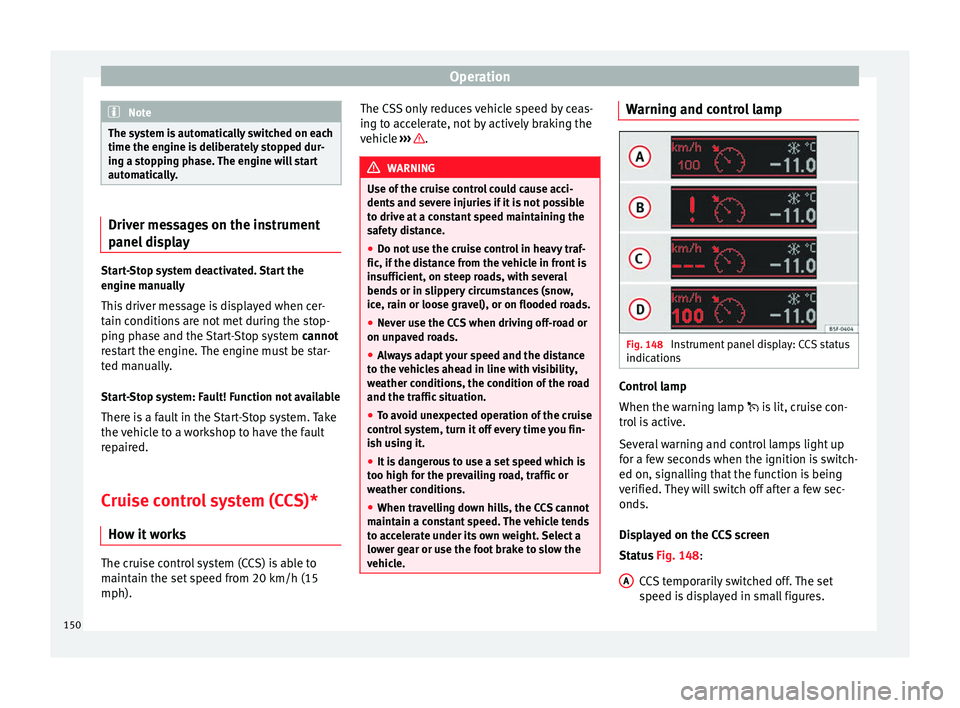
Displayed on the CCS screen
Status
Fig. 148:
CCS temporarily switched off. The set
speed is displayed in small figures.
A 150
Page 154 of 284
Operation
WARNING
The intelligent technology in the ACC cannot
overcome the system's inherent limitations
or change the laws of physics. If used negli-
gently or involuntarily, it may cause serious
accidents and injuries. The system is not a re-
placement for driver awareness.
● Adapt your speed and safe distance to the
vehicle in front of you at all times to suit visi-
bility, weather, road and traffic conditions.
● Do not use the ACC when visibility is bad,
on steep roads, with several bends or in slip-
pery circumstances such as snow, ice, rain or
loose gravel, or on flooded roads.
● Never use the ACC when driving off-road or
on unpaved roads. The ACC has been de-
signed for use on paved roads only.
● The ACC does not react on approaching a
fixed obstacle, such as the tail of a traffic
jam, a damaged vehicle or a vehicle stopped
at the traffic lights.
● The ACC does not react to people or animal
or vehicles crossing your path or which ap-
proach you head-on in the same lane.
● If the ACC does not reduce speed sufficient-
ly, brake the vehicle immediately by applying
the pedal.
● If you are driving using the spare wheel,
the ACC system could automatically switch
off during the journey. Switch off the system
when starting off. ●
If the vehicle continues to move involuntar-
ily after a driver intervention prompt, brake
the vehicle by applying the pedal.
● If the dash panel displays a driver interven-
tion prompt, adjust the distance yourself.
● The driv er shou
ld be ready to accelerate or
brake by him/herself at all times. CAUTION
If you have the sensation that the radar sen-
sor is damaged, disconnect the ACC. This will
avoid possible damage. If this occurs have it
adjusted. ● Repairs to the radar sensor require special-
ist knowledge and special tools. SEAT recom-
mends visiting a SEAT dealership for this pur-
pose. Note
● If the ACC system does not work as descri-
bed in this chapter, do not use it until it has
been checked by a specialised workshop.
SEAT recommends visiting a SEAT dealership
for this purpose.
● Maximum speed with the ACC activated is
limited to 160 km/h (100 mph).
● When the ACC is switched on, strange
noises may be heard during automatic brak-
ing cause by the braking system. Messages on display, control and
warning lamps
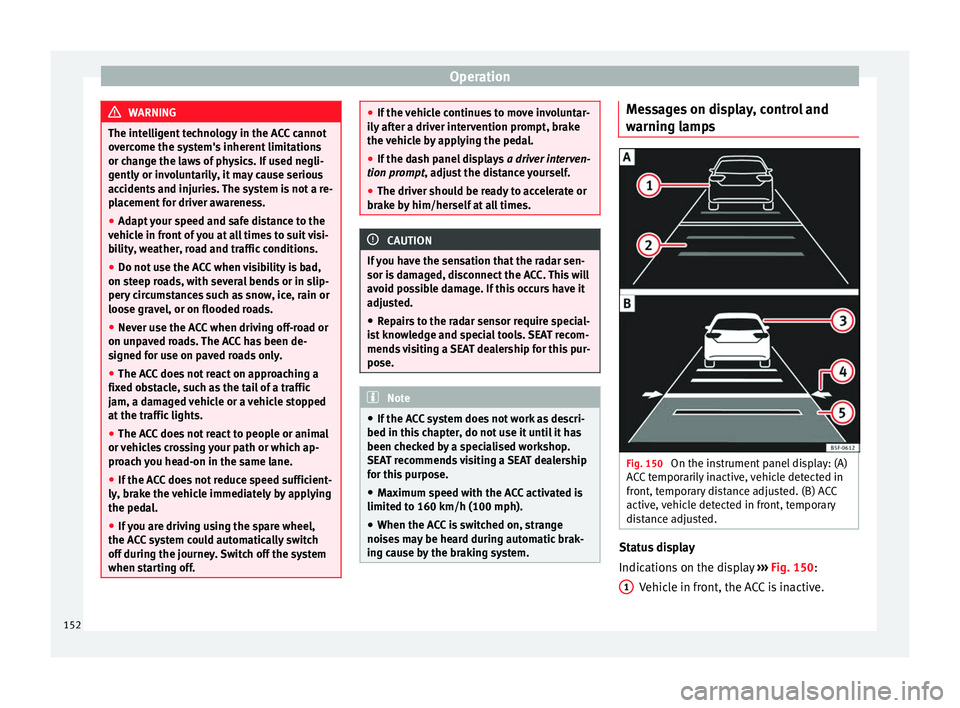
Fig. 150
On the instrument panel display: (A)
ACC temporarily inactive, vehicle detected in
front, temporary distance adjusted. (B) ACC
active, vehicle detected in front, temporary
distance adjusted. Status display
Indications on the display
››› Fig. 150 :
V ehic
le in front, the ACC is inactive.
1 152
Page 159 of 284
Driver assistance systems
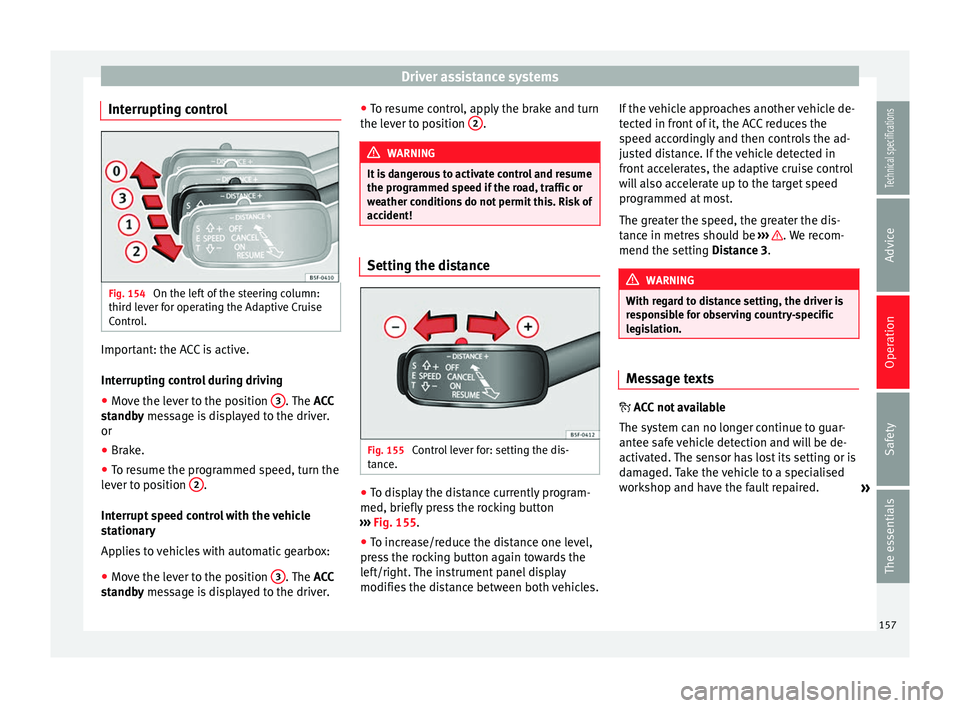
Interrupting control Fig. 154
On the left of the steering column:
third lever for operating the Adaptive Cruise
Control. Important: the ACC is active.
Interrupting control during driving
● Move the lever to the position 3 . The
ACC
standby message is displayed to the driver.
or
● Br ak
e.
● To resume the programmed speed, turn the
lever to position 2 .
Interrupt speed control with the vehicle
stationary
Applies to vehicles with automatic gearbox:
● Move the lever to the position 3 . The
ACC
standby message is displayed to the driver. ●
To r
esume control, apply the brake and turn
the lever to position 2 .
WARNING
It is dangerous to activate control and resume
the programmed speed if the road, traffic or
weather conditions do not permit this. Risk of
accident! Setting the distance
Fig. 155
Control lever for: setting the dis-
tance. ●
To display the distance currently program-
med, briefly press the rocking button
››› Fig. 155
.
● To inc
rease/reduce the distance one level,
press the rocking button again towards the
left/right. The instrument panel display
modifies the distance between both vehicles. If the vehicle approaches another vehicle de-
tected in front of it, the ACC reduces the
speed accordingly and then controls the ad-
justed distance. If the vehicle detected in
front accelerates, the adaptive cruise control
will also accelerate up to the target speed
programmed at most.
The greater the speed, the greater the dis-
tance in metres should be
››› . We recom-
mend the setting Distance 3
. WARNING
With regard to distance setting, the driver is
responsible for observing country-specific
legislation. Message texts
ACC not available
The system can no longer continue to guar-
antee safe vehicle detection and will be de-
activated. The sensor has lost its setting or is
damaged. Take the vehicle to a specialised
workshop and have the fault repaired.
»
157
Technical specifications
Advice
Operation
Safety
The essentials
Page 164 of 284
Operation
Automatic braking
If the driver also fails to react to the pre-warn-
ing, the system may brake the vehicle auto-
matically, by progressively increasing braking
effect driving at a speed of between approxi-
mately 5 km/h (3 mph) and 210 km/h
(130 mph). By reducing speed in case of a
possible collision, the system may contribute
to reducing the consequences of an accident.
Front assist
If the Front Assist notices that the driver is
not braking sufficiently in case of a collision
hazard, the system can increase braking ef-
fect and thus avert the collision when driving
at a speed of between approximately 5 km/h
(3 mph) and 210 km/h (130 mph). Front as-
sist only acts while the brake pedal is press-
ed down hard. WARNING
The intelligent technology in the Front Assist
cannot change the laws of physics. The driver
is always responsible for braking in time. If
the Front Assist issues a warning, then, de-
pending on the traffic circumstances, you
must brake immediately or dodge the obsta-
cle.
● Adapt your speed and safe distance to the
vehicle in front of you at all times to suit visi-
bility, weather, road and traffic conditions.
● The Front Assist alone cannot avoid acci-
dents and serious injuries. ●
In complex driving situations, the Front As-
sist may issue unnecessary warnings and in-
tervene unnecessarily in braking, such as in
traffic islands.
● If the operation of the Front Assist is im-
paired, for example, by dirt or because the ra-
dar sensor has lost its settings, the system
may issue unnecessary warnings and inter-
vene inopportunely in the braking.
● During driving, the Front Assist does not re-
act to people or animals or vehicles crossing
your path or which approach you head-on in
the same lane.
● The driver must always be ready to take
over the control of the vehicle. Note
● When the Front Assist causes a braking,
the brake pedal is “harder”.
● Automatic interventions by the Front Assist
on the brakes may be interrupted by pressing
the clutch, accelerator or moving the wheel.
● If the Front Assist does not work as descri-
bed in this chapter (e.g. in intervenes several
times unnecessarily), switch it off. Have the
system checked by a specialised workshop.
SEAT recommends visiting a SEAT dealership. On-screen warning lamps and
messages
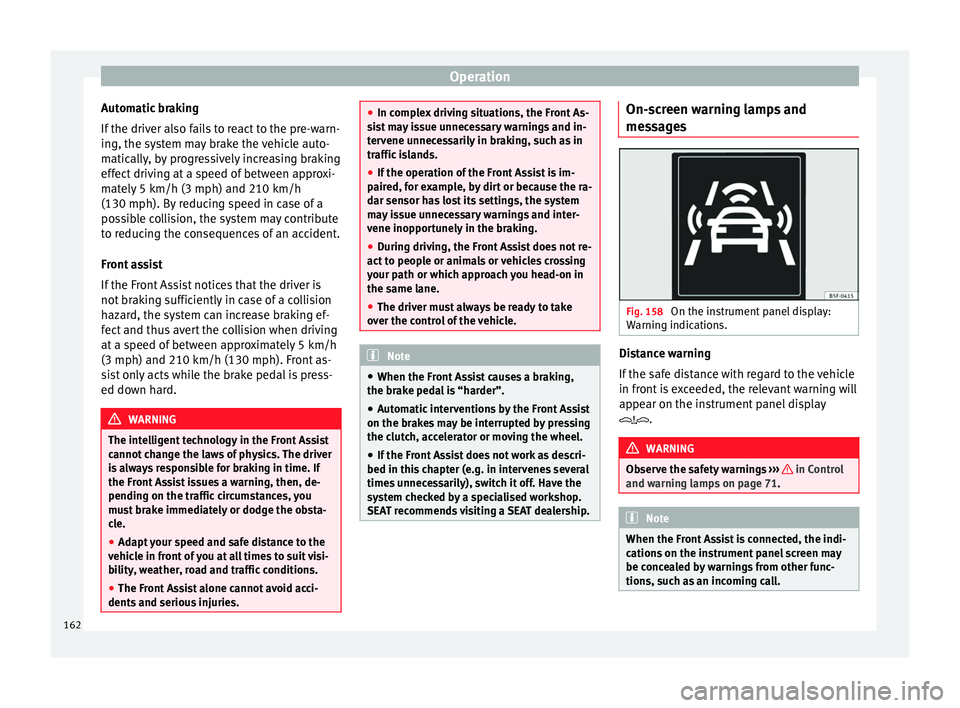
Fig. 158
On the instrument panel display:
Warning indications. Distance warning
If the safe distance with regard to the vehicle
in front is exceeded, the relevant warning will
appear on the instrument panel display
.
WARNING
Observe the safety warnings ››› in Control
and warning lamps on page 71. Note
When the Front Assist is connected, the indi-
cations on the instrument panel screen may
be concealed by warnings from other func-
tions, such as an incoming call. 162
Page 168 of 284
Operation
in braking, such as in work areas or if there
are metal rails.
●
If the operation of the City Emergency brak-
ing function is impaired, for example, by dirt
or because the radar sensor has lost its set-
tings, the system may issue unnecessary
warnings and intervene inopportunely in the
braking.
● During driving, the City Emergency braking
function does not react to people or animals
or vehicles crossing your path or which ap-
proach you head-on in the same lane. Note
● When the City Emergency braking function
causes a braking, the brake pedal is “hard-
er”.
● Automatic interventions on the brakes by
the City Emergency braking function may be
interrupted by pressing the clutch, accelera-
tor or moving the wheel.
● The City Emergency braking function can
brake the vehicle until it stops completely.
However, the brake system does not halt the
vehicle permanently. Use the foot brake!
● If several inopportune intervenes occur,
switch off the Front Assist and with it the City
Emergency braking function. Take it to a spe-
cialised workshop, SEAT recommends visiting
a SEAT dealership.
● If numerous unnecessary interventions oc-
cur, the City Emergency braking function may
switch off automatically. Lane Assist system*
Introduction WARNING
The intelligent technology in the Lane Assist
system cannot change the limits imposed by
the laws of physics and by the very nature of
the system. Careless or uncontrolled use of
the Lane Assist system may cause accidents
and injury. The system is not a replacement
for driver awareness.
● Always adapt your speed and the distance
to the vehicles ahead in line with visibility,
weather conditions, the condition of the road
and the traffic situation.
● Always keep your hands on the steering
wheel so it can be turned at any time.
● The Lane Assist system does not detect all
road markings. The road surfaces, road struc-
tures or objects in poor condition can be in-
correctly detected as road markings under
certain circumstances by the Lane Assist sys-
tem. In such situations, switch the Lane As-
sist system off immediately.
● Please observe the indications on the in-
strument panel and act as is necessary.
● Always pay attention to the vehicle's sur-
roundings.
● When the area of vision of the camera be-
comes dirty, covered or is damaged, the Lane
Assist system function can be affected. CAUTION
In order to avoid influencing the operation of
the system, the following points must be tak-
en into account:
● Regularly clean the area of vision of the
camera and keep it in a clean state, without
snow or ice.
● Do not cover the area of vision of the cam-
era.
● Check that the area of vision of the wind-
screen camera is not damaged. Note
● The Lane Assist system has been exclusive-
ly developed for driving on paved roads only.
● If the Lane Assist system does not work as
described in this chapter, do not use it and
contact a specialised workshop.
● If there is a fault in the system, have it
checked by a specialised workshop. 166
Page 171 of 284
Driver assistance systems
Switching off the Lane Assist system
in the following situations Due to the limits of the Lane Assist system,
switch it off in the following situations:
● When more attention is required of the
driver
● When driving in a sporty style
● In unfavourable weather conditions
● On roads in poor condition
● In areas of road works Note
The Lane Assist system deactivates when
driving below 60 km/h (40 mph). SEAT driving modes (SEAT Drive
Profile)*
Introduction SEAT Drive Profile enables the driver to
choose between four profiles or modes,
Nor-
mal , Sport
, Eco
and Individual
, that modify the
behaviour of various vehicle functions, pro-
viding different driving experiences. In the FR and X-PERIENCE models equipped
with dynamic chassis control and Navi Sys-
tem Plus, the
Comfort profile is also availa-
b l
e.
In the Leon Cupra model the four profiles are Comfort, Sport, Cupra and Individual.
The Individual profile can be configured ac-
cor
ding to personal preferences. The other
profiles are fixed.
Description Depending on the equipment fitted in the ve-
hicle, SEAT Drive Profile can operate on the
following functions:
Engine
Depending on the profile selected, the en-
gine responds more spontaneously or more
in harmony with the movements of the accel-
erator. Additionally, when
Eco
mode is selec-
ted, the Start-stop function is automatically
activated.
In vehicles with automatic transmission, the
gear change points are modified to position
them in lower or higher engine speed ranges.
Additionally, the Eco1)
mode activates the In- ertia function, enabling consumption to be
further reduced.
In manual gearbox vehicles,
Eco1)
mode cau-
ses the gear change recommendation indica-
tions that appear on the instrument panel to
vary, facilitating more efficient driving.
Dynamic chassis control (DCC)
DCC continuously adapts the shock absorb-
ers to the condition of the road and current
driving conditions, according to the pre-set
programme.
In the event of a fault in the DCC, the follow-
ing message is displayed on the instrument
screen Fault: damping setting.
Address
Power steering becomes more robust in Sport
mode to enable a sportier driving style. In the
Leon Cupra the power steering becomes
more robust in Cupra mode.
Air conditioning
In vehicles with Climatronic, this can operate
in eco 1)
mode, especially restricting fuel con-
sumption. »1)
In the Leon Cupra model, Eco mode is selected
through the Individual profile.
169
Technical specifications
Advice
Operation
Safety
The essentials
Page 188 of 284
Advice
Carbon components The carbon parts on your vehicle have a pain-
ted surface. They do not need any special
care and are cleaned just like any other pain-
ted part
››› page 183.
P aint
damage Minor damage to the paint, such as scratches
or stone chips, should be touched up without
delay
before the metal starts to corrode. Suit-
ab l
e touch-up brushes or sprays for your car
can be obtained from a SEAT Official Service.
The number of the original paint finish on the
vehicle is given on the data sticker
››› page 241
.
If corrosion is already visible it must be thor-
oughly removed by a specialised workshop.
Windows Clear vision is an essential safety factor.
The windscreen must not be cleaned with in-
sect remover or wax, otherwise the wind-
screen wipers will not function properly (jud-
dering).
Traces of rubber, oil, grease or silicone can
be removed with a
window cleaning solution
or a silicone remover. Wax residue can only be remo
ved with a special cleaner. Your SEAT
Official Service will be able to provide you
with more detailed information.
The windows should also be cleaned on the
inside at regular intervals.
Use a separate cloth or chamois to dry the
windows. Cloths used for waxing and polish-
ing contain residues that will cause smears
on the glass. WARNING
Do not use water-repellent coatings on the
windscreen. In bad visibility conditions (e.g.
in the rain, dark or with a low sun), these
coatings may cause dazzle: risk of accident!
Such coatings can also cause the windscreen
wiper blades to make noise. CAUTION
● Remove snow and ice from windows and ex-
terior mirrors with a plastic scraper only. To
avoid scratches caused by dirt on the glass,
the scraper should only be pushed in one di-
rection and not moved to and fro.
● The heating element for the rear window is
located on the inner side of the window. To
avoid damaging them, do not apply stickers
to these heating elements.
● Never use warm or hot water to remove
snow and ice from windows and mirrors. This
could cause the glass to crack! Wheels
The wheels require regular attention to pre-
serve their appearance. It is important to re-
move road salt and brake dust by washing
the wheels at regular intervals, otherwise the
finish will be impaired.
After washing, the wheels should only be
cleaned with an "acid-free" cleaning agent
for alloy wheels. This is available from SEAT
Official Services and specialist retailers. Nev-
er leave the cleaning agent on the rims for
any longer than specified in the instructions
before rinsing it off. If the wheel cleaner fluid
contains acid it can attack the surfaces of the
wheel bolts.
Car polish or other abrasive agents should
not be used for maintaining the rims. If the
protective coating is damaged, e.g. by flying
stones, the damaged area should be re-
paired immediately.
WARNING
Please note when cleaning the wheels that
water, ice and road salt can impair the effec-
tiveness of the brakes; this can cause an acci-
dent. Exhaust tail pipe
It is important to remove road salt and brake
dust by washing the wheels at regular
186
Page 207 of 284
Checking and refilling levels
Check the water level in the windscreen
washer reservoir regularly and top up as re-
quired.
The container for the windscreen washer con-
tains the cleaning fluid for the windscreen,
the rear window and the headlight washer
system*.
● Open the bonnet ››› page 198.
● The windscreen washer reservoir is marked
with the symbol on the cap.
● Chec k
there is enough windscreen water in
the reservoir.
Recommended windscreen wipers
● For the hottest seasons we recommend
summer G 052 184 A1 for clear glass. Propor-
tions of the mixture in the washer fluid tank:
1:100 (1 part concentrate per 100 parts wa-
ter).
● All year round, G 052 164 A2 for clear
glass. Approximate proportion of the winter
mixture, up to -18°C (0°F): 1:2 (1 part con-
centrate per 2 parts water); otherwise, a 1:4
proportion of mixture in the washer fluid
tank.
Top-up quantities
The reservoir holds approximately 3 litres in
versions without headlight washer and 5 li-
tres in versions with headlight washer. WARNING
If the water from the windscreen washer does
not contain enough anti-freeze, it may freeze
on the windscreen and rear window, reducing
forward and rear visibility.
● In winter, ensure the windscreen washer
contains enough anti-freeze.
● In cold conditions, you should not use the
windscreen washer system unless you have
warmed the windscreen with the ventilation
system. The antifreeze could freeze on the
windscreen and reduce visibility. WARNING
Never mix an unsuitable antifreeze or other
similar additives with the windscreen washer
water. A greasy layer may be formed on the
windscreen which will impair visibility.
● Use clean water with a window cleaner rec-
ommended by SEAT.
● If necessary, add a suitable antifreeze to
the water in the reservoir. CAUTION
● Do not mix cleaning products recommen-
ded by SEAT with other products. This could
lead to flocculation and may block the wind-
screen washer jets.
● When topping up service fluids, make abso-
lutely certain that you fill the fluids into the
correct reservoirs. Using the wrong fluids could cause serious malfunctions and engine
damage!
● Not having windscreen wiper fluid reduces
visibility through the windscreen, and leads
to loss of visibility in headlights in models
with headlight washer. Battery
General information The battery is located in the engine compart-
ment and is almost
maintenance-free. It is
checked as part of the Inspection Service.
Nevertheless, check the terminals are clean
and have the correct tightening torque, espe-
cially in summer and winter.
Disconnecting the battery
The battery should only be disconnected in
exceptional cases. When the battery is dis-
connected, some of the vehicle's functions
are “lost” ( ››› table on page 206). These
functions will require resetting after the bat-
tery is reconnected.
Deactivate the anti-theft alarm* before you
disconnect the battery Otherwise the alarm
will be triggered. »
205
Technical specifications
Advice
Operation
Safety
The essentials
Page 208 of 284
AdviceFunctionReprogramming
One-touch function of
the electric windows›››
page 92, One-touch
opening and closing*.
Remote control key
If the vehicle does not re-
spond to the key, they
should be synchronised
››› page 87.
Digital clock››› page 68.
ESC warning lampAfter driving for a few me-
tres, the warning lamp goes
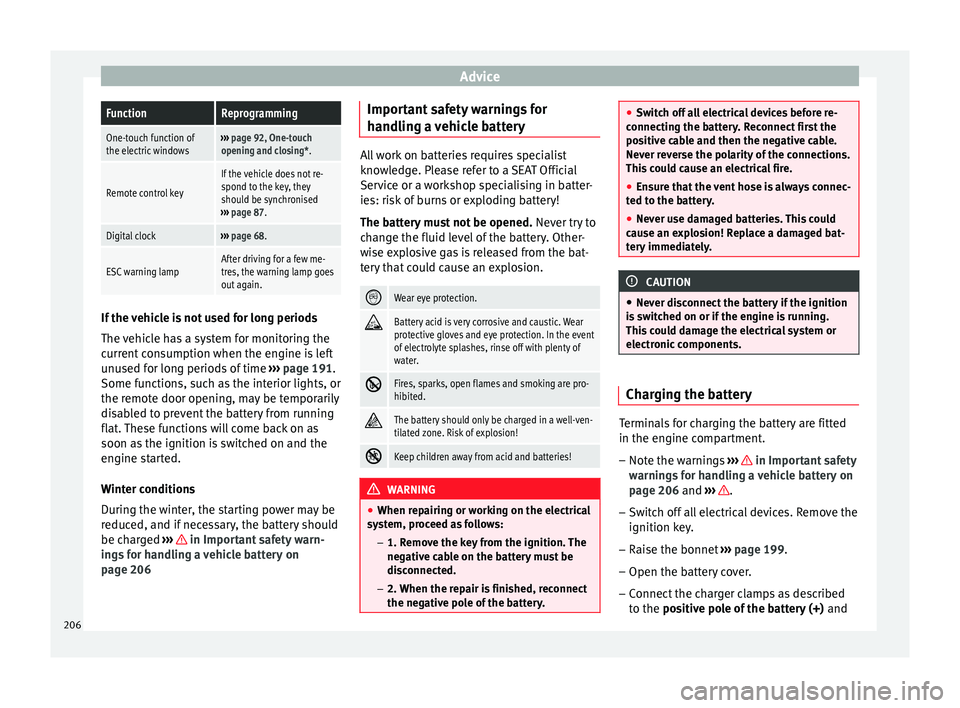
out again. If the vehicle is not used for long periods
The vehicle has a system for monitoring the
current consumption when the engine is left
unused for long periods of time
››› page 191.
Some functions, such as the interior lights, or
the remote door opening, may be temporarily
disabled to prevent the battery from running
flat. These functions will come back on as
soon as the ignition is switched on and the
engine started.
Winter conditions
During the winter, the starting power may be
reduced, and if necessary, the battery should
be charged ››› in Important safety warn-
ings for handling a vehicle battery on
page 206 Important safety warnings for
handling a vehicle battery All work on batteries requires specialist
knowledge. Please refer to a SEAT Official
Service or a workshop specialising in batter-
ies: risk of burns or exploding battery!
The battery must not be opened.
Never try to
change the fluid level of the battery. Other-
wise explosive gas is released from the bat-
tery that could cause an explosion.
Wear eye protection.
Battery acid is very corrosive and caustic. Wear
protective gloves and eye protection. In the event
of electrolyte splashes, rinse off with plenty of
water.
Fires, sparks, open flames and smoking are pro-
hibited.
The battery should only be charged in a well-ven-
tilated zone. Risk of explosion!
Keep children away from acid and batteries!
WARNING
● When repairing or working on the electrical
system, proceed as follows:
–1. Remove the key from the ignition. The
negative cable on the battery must be
disconnected.
– 2. When the repair is finished, reconnect
the negative pole of the battery. ●
Switch off all electrical devices before re-
connecting the battery. Reconnect first the
positive cable and then the negative cable.
Never reverse the polarity of the connections.
This could cause an electrical fire.
● Ensure that the vent hose is always connec-
ted to the battery.
● Never use damaged batteries. This could
cause an explosion! Replace a damaged bat-
tery immediately. CAUTION
● Never disconnect the battery if the ignition
is switched on or if the engine is running.
This could damage the electrical system or
electronic components. Charging the battery
Terminals for charging the battery are fitted
in the engine compartment.
–
Note the warnings ››› in Important safety
warnings for handling a vehicle battery on
page 206 and
›
›› .
– Switch off all electrical devices. Remove the
ignition key.
– Raise the bonnet ››› page 199.
– Open the battery cover.
– Connect the charger clamps as described
to the positive pole of the battery (+)
and
206
Page 211 of 284
Wheels
Depending on the vehicle, tyre pressure can
be adjusted (“comfort” tyre pressure) to in-
crease driving comfort. When driving with
comfort tyre pressure fuel consumption may
increase slightly.
The tyre pressure must be adjusted according
to the load the vehicle is carrying. If the vehi-
cle is going to carry the maximum load, the
tyre pressure should be increased to maxi-
mum value indicated on the sticker on the in-
side of the fuel tank flap.
Do not forget the spare wheel when checking
the tyre pressures: Keep this spare wheel in-
flated to the highest pressure required for the
road wheels.
In the case of a minimised temporary spare
wheel (125/70 R16 or 125/70 R18) inflate to
a pressure of 4.2 bar as indicated on the tyre
pressure label on the fuel tank flap.
Driving style
Fast cornering, heavy acceleration and hard
braking (squealing tyres) all increase tyre
wear.
Wheel balance
The wheels on new vehicles are balanced.
However, certain circumstances may lead to
imbalance (run-out), which is detected as vi-
brations in the steering wheel. Unbalanced wheels should be rebalanced, as
they otherwise cause excessive wear on
steering, suspension and tyres. A wheel must
also be rebalanced when a new tyre is fitted
or if a tyre is repaired.
Incorrect wheel alignment
Incorrect wheel alignment causes excessive
tyre wear, impairing the safety of the vehicle.
If you notice excessive tyre wear, you should
check wheel alignment at a SEAT Official
Service.
WARNING
● Always adapt the tyre pressure accordingly
when the vehicle load changes.
● A tyre with low air pressure has to flex a lot
more when the vehicle is heavily loaded or at
high speeds, therefore causing overheating
to occur. Under these conditions, the tyre
bead may be released or the tyre may burst.
Risk of accident! For the sake of the environment
Under-inflated tyres will increase fuel con-
sumption. Wear indicators
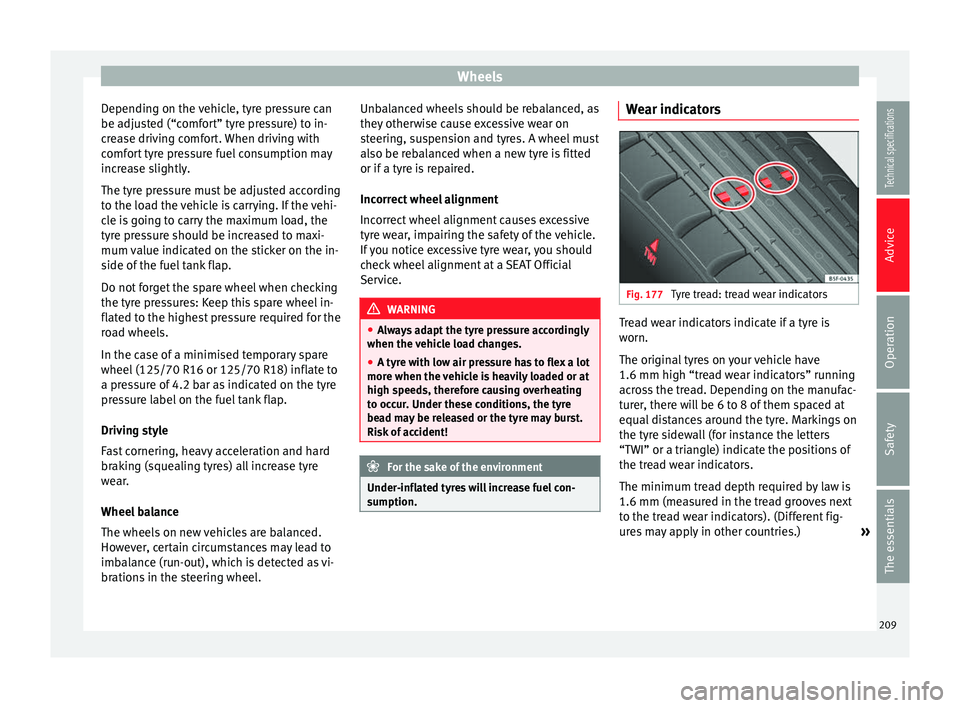
Fig. 177
Tyre tread: tread wear indicators Tread wear indicators indicate if a tyre is
worn.
The original tyres on your vehicle have
1.6 mm high “tread wear indicators” running
across the tread. Depending on the manufac-
turer, there will be 6 to 8 of them spaced at
equal distances around the tyre. Markings on
the tyre sidewall (for instance the letters
“TWI” or a triangle) indicate the positions of
the tread wear indicators.
The minimum tread depth required by law is
1.6 mm (measured in the tread grooves next
to the tread wear indicators). (Different fig-
ures may apply in other countries.)
»
209Technical specifications
Advice
Operation
Safety
The essentials