child seat Seat Leon SC 2017 Owner's Guide
[x] Cancel search | Manufacturer: SEAT, Model Year: 2017, Model line: Leon SC, Model: Seat Leon SC 2017Pages: 332, PDF Size: 7.25 MB
Page 156 of 332
Operation
should not be possible to remove the head
r e
s
traint from the backrest.
– Move the backrest until it engages properly
›››
.
WARNING
● Ple a
se observe the general notes
››› page 78.
● Remove the rear head restraints only when
it is
necessary for the placement of a child
seat ››› page 91. After removing a child seat,
remount the head restraint immediately.
Travelling with the head restraints removed
or improperly adjusted increases the risk of
severe injuries. Seat functions
Intr oduction WARNING
Inappropriate use of the seat functions can
cau se sev
ere injuries.
● Assume the proper sitting position before
your trip and rem
ain in it throughout. This al-
so applies to the other occupants.
● Always keep hands, fingers, feet and other
part
s of the body away from the operating ra-
dius and the adjustment of seats. Seat heating
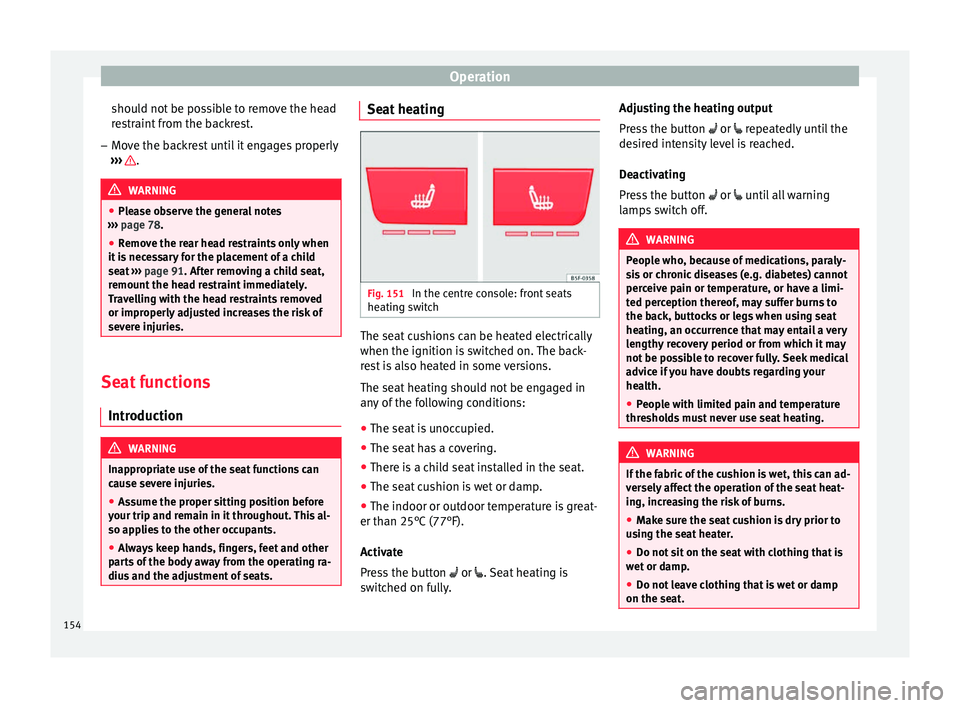
Fig. 151
In the centre console: front seats
he atin
g sw
itch The seat cushions can be heated electrically
when the ignition i
s
sw
itched on. The back-
rest is also heated in some versions.
The seat heating should not be engaged in
any of the following conditions:
● The seat is unoccupied.
● The seat has a covering.
● There is a child seat installed in the seat.
● The seat cushion is wet or damp.
● The indoor or outdoor temperature is great-
er than 25°C (77°F).
A
ctivate
Press the button or . Seat heating is
switched on fully. Adjusting the heating output
Pres
s the button or repeatedly until the
desired intensity level is reached.
Deactivating
Press the button or until all warning
lamps switch off. WARNING
People who, because of medications, paraly-
si s
or chronic diseases (e.g. diabetes) cannot
perceive pain or temperature, or have a limi-
ted perception thereof, may suffer burns to
the back, buttocks or legs when using seat
heating, an occurrence that may entail a very
lengthy recovery period or from which it may
not be possible to recover fully. Seek medical
advice if you have doubts regarding your
health.
● People with limited pain and temperature
thresho
lds must never use seat heating. WARNING
If the fabric of the cushion is wet, this can ad-
ver sely
affect the operation of the seat heat-
ing, increasing the risk of burns.
● Make sure the seat cushion is dry prior to
usin
g the seat heater.
● Do not sit on the seat with clothing that is
wet or d
amp.
● Do not leave clothing that is wet or damp
on the seat. 154
Page 157 of 332
Seats and head restraints
●
Do not s pi
ll liquid on the seat. CAUTION
● To av oid d
amaging the heating elements of
the seat heaters, please do not kneel on the
seat or apply sharp pressure to a single point
on the seat cushion or backrest.
● Liquids, sharps objects and insulating ma-
teria
ls (e.g. covers or child seats) can damage
the seat heating.
● In the event of smells, switch off the seat
heating immedi
ately and have it inspected by
a specialised workshop. For the sake of the environment
The seat heating should remain on only when
needed. Otherw i
se, it is an unnecessary fuel
waste. Front centre armrest
The centre armrest can be adjusted to various
l
ev
el
s.
Adjusting the centre armrest – To adjust the tilt, lift the armrest from the
star
ting position so that it is engaged.
– To return the armrest to the starting posi-
tion, remov
e the armrest from the upper
fixed position and lower it. The armrest can be moved backwards and
forw
ards.
Folding down the passenger seat
back
rest* 3 Applies to the model: LEON / LEON ST
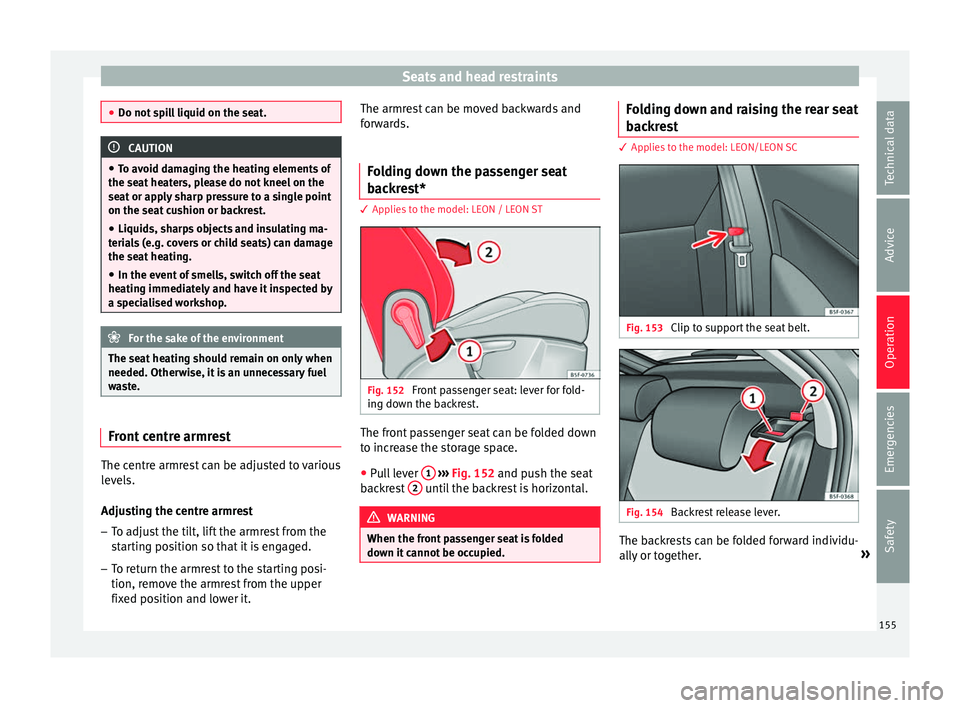
Fig. 152
Front passenger seat: lever for fold-
in g do
wn the b
ackrest. The front passenger seat can be folded down
t
o inc
r
ease the storage space.
● Pull lever 1
› ›
› Fig. 152
and push the seat
backrest 2 until the backrest is horizontal.
WARNING
When the front passenger seat is folded
down it c
annot be occupied. Folding down and raising the rear seat
b
ac
k
rest 3 Applies to the model: LEON/LEON SC
Fig. 153
Clip to support the seat belt. Fig. 154
Backrest release lever. The backrests can be folded forward individu-
al
ly
or t
ogether. »
155
Technical data
Advice
Operation
Emergencies
Safety
Page 158 of 332
Operation
Folding the backrest forwards
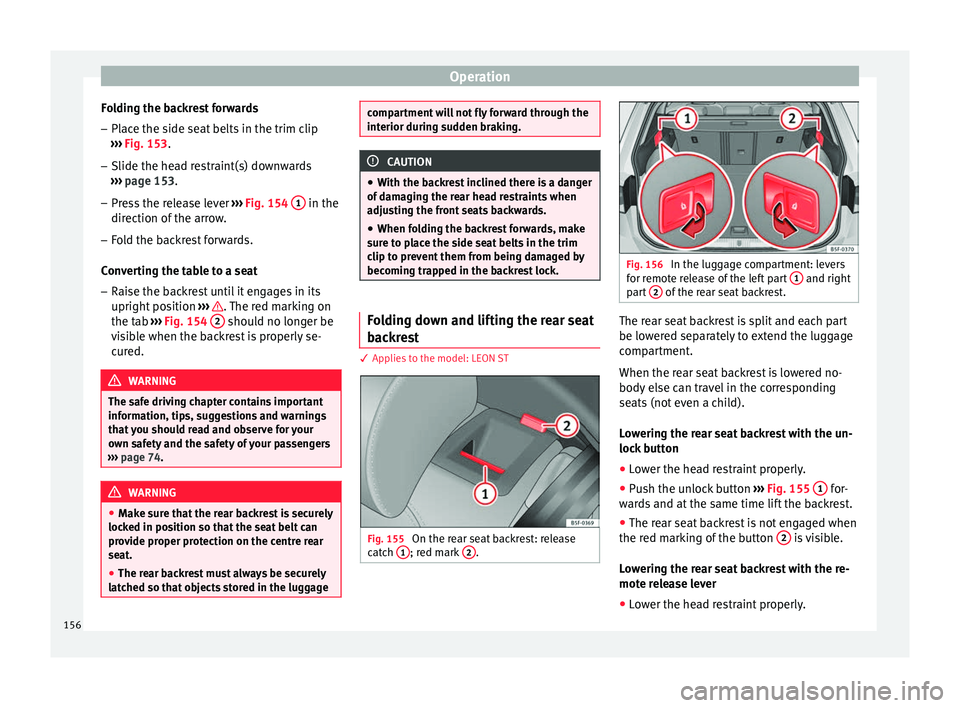
– Place the side seat belts in the trim clip
› ›
›
Fig. 153.
– Slide the head restraint(s) downwards
›››
page 153.
– Press the release lever ›››
Fig. 154 1 in the
dir ection of
the arr
ow.
– Fold the backrest forwards.
Conv
erting the table to a seat
– Raise the backrest until it engages in its
upright pos
ition ››› . The red marking on
the t ab
›
›
› Fig. 154 2 should no longer be
v i
s
ible when the backrest is properly se-
cured. WARNING
The safe driving chapter contains important
inform ation, tip
s, suggestions and warnings
that you should read and observe for your
own safety and the safety of your passengers
››› page 74. WARNING
● Mak e s
ure that the rear backrest is securely
locked in position so that the seat belt can
provide proper protection on the centre rear
seat.
● The rear backrest must always be securely
latc
hed so that objects stored in the luggage compartment will not fly forward through the
interior durin
g s
udden braking. CAUTION
● With the b ac
krest inclined there is a danger
of damaging the rear head restraints when
adjusting the front seats backwards.
● When folding the backrest forwards, make
sure t
o place the side seat belts in the trim
clip to prevent them from being damaged by
becoming trapped in the backrest lock. Folding down and lifting the rear seat
b
ac
k
rest 3 App
lies to the model: LEON ST Fig. 155
On the rear seat backrest: release
c at
c
h 1 ; red mark
2 . Fig. 156
In the luggage compartment: levers
for r emot
e release of the left part 1 and right
par t
2 of the rear seat backrest.
The rear seat backrest is split and each part
be lo
w
er
ed separately to extend the luggage
compartment.
When the rear seat backrest is lowered no-
body else can travel in the corresponding
seats (not even a child).
Lowering the rear seat backrest with the un-
lock button
● Lower the head restraint properly.
● Push the unlock button ›››
Fig. 155 1 for-
w ar
d
s and at the same time lift the backrest.
● The rear seat backrest is not engaged when
the red mark
ing of the button 2 is visible.
L o
w
ering the rear seat backrest with the re-
mote release lever
● Lower the head restraint properly.
156
Page 159 of 332

Transport and practical equipment
● Open the r e
ar lid.
● P
ull the remote release lever of the left part
›››
Fig. 156 1 or right part
2 of the backrest
in the dir ection of
the arr
ow. The released
part of the rear seat backrest is folded auto-
matically down and forwards.
● If this occurs, close the rear lid.
The rear se
at backrest is not engaged when
the red marking of the button ››› Fig. 155 2 is visible.
F
o
l
ding up the rear seat backrest
● Lift the backrest and press it firmly into the
lock u
ntil it engages ››› .
● It should not be possible to see the red
m ark
of
the unlock button 2 .
● The backrest must be properly engaged. WARNING
Serious injuries can be caused if the rear seat
bac k
rest is lowered or lifted without due care
and attention.
● Never lower or lift the rear seat backrest
while driv
ing.
● Do no trap or damage the seat belt when
rais
ing the rear seat backrest.
● When lowering or lifting the rear seat back-
res
t, keep your hands, fingers, feet and other
body parts out of its path.
● For the rear seat belts to offer the necessa-
ry pr
otection all the parts of the rear backrest must be properly engaged. This is particular-
ly impor
t
ant in the case of the centre rear
seat. If someone is seated in a seat whose
backrest is not properly engaged they will fly
forward, along with the backrest, during an
accident or a sudden driving or braking ma-
noeuvre.
● A red signal on the button 2 warns that
the bac k
rest is not engaged. Always check
that the red marking is not visible when the
backrest is in the upright position.
● When the rear seat backrest is lowered or is
not properly
engaged nobody else can travel
in the corresponding seats (not even a child). CAUTION
Serious damage can be caused to the vehicle
and other ob j
ects if the rear seat backrest is
lowered or lifted without due care and atten-
tion.
● Before lowering the rear seat backrest, al-
way
s adjust the front seats so that neither
the head restraints nor the cushions of the
rear backrest can hit them. Transport and practical
equipment
St or
ag
e compartments
Storage areas under the front seats* Fig. 157
Storage compartment under the
fr ont
se
ats. There is a storage compartment with a cover
u
nder e
ac
h front seat.
The drawer* is opened by pulling on the han-
dle of the cover ››› Fig. 157.
To close the drawer, press the cover until it
locks into position. WARNING
● The dra w
ers will hold a maximum weight of
1.5 kg. » 157
Technical data
Advice
Operation
Emergencies
Safety
Page 162 of 332

Operation
Fig. 162
Detailed view of the side trim in the
lugg ag
e compartment: 12-volt power socket
(applies only to the LEON ST model). In the centre console
– Remove the connector located in the centre
con
so
le from the power socket ››› Fig. 161
.
– Insert the plug of the electrical appliance
into the pow
er socket.
In the luggage compartment (applies only to
the LEON ST model) – Lift the power socket cover ›››
Fig. 162.
– Insert the plug of the electrical appliance
into the pow
er socket.
Electrical equipment can be connected to the
12 volt power socket. The appliances connec-
ted to each power socket must not exceed a
power rating of 120 Watt. USB power sockets
Depending on the equipment
and the coun-
try, the vehicle may also have USB connec-
tions exclusively for charging or as a power
socket.
These USB ports are located at the rear of the
console, between the front seats ››› Fig. 161
. These connectors can work at a maximum
power of up to 10.5 W per port.
They are not intended for file playback. WARNING
The power socket works only when the igni-
tion is on. Impr
oper use may cause serious
injury or even fire. Children should therefore
not be left in the vehicle unattended if the
button is also left behind. Otherwise there is
a possibility that they may be injured. CAUTION
Always use the correct type of plugs to avoid
dam agin
g the sockets. Note
● The use of el
ectrical appliances with the
engine switched off will cause a battery dis-
charge.
● Should the connected appliance overheat,
immediately
switch it off and disconnect it
from the socket. ●
Bef or
e switching the ignition on or off, un-
plug the appliances from the USB ports to
protect them from any damage caused by
fluctuations in voltage. Storing objects
Lo a
ding the luggage compartment All luggage and other loose objects must be
saf
ely
secured in the luggage compartment.
Unsecured objects which shift back and forth
could impair the driving safety or driving
characteristics of the vehicle by shifting the
centre of gravity.
– Distribute the load evenly in the luggage
comp ar
tment.
– Place heavy objects as far forward as possi-
ble in the lug
gage compartment.
– Place the heavy objects first.
– Secure heavy objects to the fitted fastening
rings
››› page 167. WARNING
● Loo se lug
gage and other objects in the lug-
gage compartment could cause serious inju-
ries.
● Always stow objects in the luggage com-
partment
and secure them on the fastening
rings. 160
Page 169 of 332

Transport and practical equipment
Fastening rings* Fig. 177
In the luggage compartment: fasten-
in g rin
g
s (LEON/LEON SC model except ver-
sions with spare wheel and CNG). Fig. 178
In the luggage compartment: fasten-
in g rin
g
s (LEON ST model). In the front and rear part of the luggage com-
p
ar
tment
there are fastening rings to secure
the luggage ››› Fig. 178.
In order to use the fastening rings, they must
be lifted beforehand 1)
. WARNING
If unsuitable or damaged belts or retaining
str ap
s are used, they could break in the event
of braking or an accident. Objects could then
be launched across the passenger compart-
ment and cause serious or fatal injuries.
● Always use belts or retaining straps that
are suit
able and in a good condition.
● Belts and retaining straps should be se-
curely
fastened to the fastening rings.
● Objects in the luggage compartment that
are un
secured could move suddenly and mod-
ify the handling of the vehicle.
● Secure all objects, little and large.
● Never exceed the maximum tensile load of
the fas
tening ring when securing objects.
● Never secure a child seat to the fastening
rings. Note
● The max imum t
ensile load that the fasten-
ing rings can support is 3.5 kN. ●
Belt s
and securing systems for the appro-
priate load can be obtained from specialised
dealerships. SEAT recommends visiting a
SEAT dealership for this.
● The fastening rings are rendered unusable
for v
ersions with spare wheel and CNG. 1)
Valid only for the LEON ST model.
167Technical data
Advice
Operation
Emergencies
Safety
Page 183 of 332

Driving
● The en gine t
urn
s off automatically.
Engine restart feature
If no valid key is detected inside the vehicle
after the engine stops, you will only have 5
seconds to restart it. A warning will display
on the dash panel screen.
After this interval, it will not be possible to
start the engine without a valid key inside
the vehicle.
Automatic deactivation of the ignition on ve-
hicles with the Start-Stop system
The ignition is switched off automatically
when the vehicle is stopped and the auto-
matic engine shutdown is active, if: ● The driver's seat belt is not fastened,
● the driver does not step on any pedal,
● the driver door is opened.
After aut
omatically turning off the ignition, if
the dipped beam is on, the side light re-
mains on for approx. 30 minutes (if the bat-
tery is sufficiently charged). If the driver locks
the vehicle or manually turns off the light, the
side light goes out. WARNING
Any accidental movement of the vehicle could
re s
ult in serious injury. ●
When swit c
hing on the ignition, do not
press the brake or clutch pedal, otherwise
the engine could start immediately. WARNING
If vehicle keys are used negligently or with-
out due c ar
e, this may cause accidents and
serious injury.
● Never leave any key inside the vehicle
when exitin
g. Otherwise, a child or unauthor-
ised person could lock the vehicle, start the
engine or connect the ignition and, in this
way, operate electronic equipment (e.g. the
windows). Note
● Bef or
e leaving the vehicle, always discon-
nect the ignition manually and, if appropri-
ate, take into account the instructions on the
screen of the dash panel.
● If the vehicle is stationary for a long time
with the ignition on, the v
ehicle battery
might be discharged and it might not be pos-
sible to start the engine.
● In diesel vehicles, there may be a delay in
the engine st
arting if it requires preheating.
● If during the STOP phase you press the
STAR
T ENGINE STOP button, the ignition is
swit c
hed off and the button flashes.
● If the indication “Start-Stop system deacti-
vated:
Start the engine manually” is dis-
played on the dash panel display, the START ENGINE STOP button will blink. Starting the engine
3 Valid for vehicles: with starter button
StepStarting the engine with the starter
button
››› page 180.
1.Press and hold the brake pedal until step 5
is performed.
1a.In vehicles with a manual gearbox: press
and hold the clutch down until the engine
starts.
2.Put the gearbox lever in neutral or the selec-
tor lever in position P or N.
3.
Briefly press the starter button ››› Fig. 192
without pressing the accelerator. For the en-
gine to start there must be a valid key in the
vehicle.
After starting the engine, the light of the START ENGINE STOP
button changes to a fixed
light indicating that the engine has started.
4.
If the engine does not start, stop and wait for
approx. 1 minute before trying again. If nec-
essary, perform an emergency start
››› page 180.
5.Disconnect the parking brake when you are
about to start driving ››› page 183. WARNING
Never leave the vehicle with the engine run-
ning, e s
pecially if a gear or gear range is en-
gaged. The vehicle could then suddenly move
or something strange could happen that
would cause damage, fire or serious injury. » 181
Technical data
Advice
Operation
Emergencies
Safety
Page 239 of 332

Driver assistance systems
● When c ornerin
g
● On r
oads in poor condition
● In unfavourable weather conditions
● When a sporty driving style is employed
● In the event of a serious distraction to the
driver
Fatigue det
ection will be restored when the
vehicle is stopped for more than 15 minutes,
when the ignition is switched off or when the
driver has unbuckled their seat belt and
opened the door.
In the event of slow driving during a long pe-
riod of time (below 65 km/h, 40 mph) the
system automatically re-establishes the tired-
ness calculation. When driving at a faster
speed the driving behaviour will be recalcula-
ted.
Parking aid
Relat
ed video Fig. 224
Safety General information
Assorted assistance systems – which vary
depending on the equipment
fitt
ed in the car
– will help you when parking or manoeu-
vring.
The rear parking aid is an audible assistant
that warns about obstacles located behind
the vehicle ››› page 238.
During parking, Parking System Plus assists
the driver by visually and audibly warning
them about obstacles detected in front and
behind the vehicle ››› page 239. WARNING
● Alw a
ys pay attention, also when looking
straight ahead, to traffic and the vehicle sur-
roundings. The assistance systems are not a
replacement for driver awareness. When in-
serting or removing the vehicle from a park-
ing space, or when performing similar ma-
noeuvres the driver always assumes the re-
sponsibility.
● Adapt your speed and driving style at all
times t
o suit visibility, weather, road and traf-
fic conditions.
● The ultrasound sensors have blind spots in
which ob
stacles and people are not regis-
tered. Pay special attention to children and
animals.
● Always keep visual control of the vehicle
surrou
ndings: use the mirrors for additional
help. CAUTION
Parking Aid functions may be negatively af-
fect ed b
y different factors that may lead to
damage to the vehicle or its immediate sur-
rounds:
● Under certain circumstances, the system
does not
detect or display certain objects:
– Objects such as chains, trailer draw bars,
fences, posts and thin trees.
– Objects that are located above the sen-
sors, such as protrusions in a wall.
– Objects with certain surfaces or struc-
tures, such as wire mesh fences or pow-
der snow.
● Certain surfaces of objects and garments
do not refl
ect the ultrasound sensors' sig-
nals. The system cannot detect, at least cor-
rectly, these objects or people wearing such
clothes.
● Ultrasound sensor signals may be affected
by e
xternal sound sources. In certain circum-
stances this may prevent them from detect-
ing people or objects.
● Please note that low obstacles detected by
the syst
em may no longer be registered by
the sensors as the car moves closer, so the
system will not give any further warning. In
certain circumstances, objects such as high
kerbs that could damage the bottom of the
vehicle are not detected either.
● If the first warning from the ParkPilot is ig-
nored, the v
ehicle could suffer considerable
damage. » 237
Technical data
Advice
Operation
Emergencies
Safety
Page 259 of 332

Care and maintenance
A SEAT Official Service and specialised work-
shop w i
l
l be able to inform you about options
for installing and operating radio transmitters
with a higher transmitting power.
Mobile radio transmitters
Commercial mobile telephones or radio
equipment might interfere with the electron-
ics of your vehicle and cause malfunctions.
This may be due to:
● No external aerial.
● External aerial incorrectly installed.
● Transmitting power more than 10 W.
You mus
t, therefore, do not operate portable
mobile telephones or radio equipment inside
the vehicle without a properly installed exter-
nal aerial ››› .
Pl e
a
se note also that the maximum range of
the equipment can only be achieved with an
external aerial.
Business equipment
Retrofit installation of business or private
equipment in the vehicle is permitted, provi-
ded the equipment cannot interfere with the
driver's immediate control of the vehicle and
that any such equipment carries the mark.
Any retrofit equipment that could influence
the driver's control of the vehicle must have a
type approval for your vehicle and must carry
the e mark. WARNING
Mobile telephones or radio equipment which
is oper
ated inside the vehicle without a prop-
erly installed external aerial can create exces-
sive magnetic fields that could cause a health
hazard. Note
● The pos t
erior fitting of electric and elec-
tronic equipment in this vehicle affects its li-
cence and could lead to the withdrawal of the
vehicle registration document under certain
circumstances.
● Please use the mobile telephone/radio op-
erating in
structions. Care and cleaning
Gener a
l
information Regular and careful care helps to
maint
ain
the
value of the vehicle. This may also be one
of the requirements for upholding any war-
ranty claims in the event of corrosion or paint
defects.
SEAT Official Services and specialist retailers
carry stocks of suitable car care materials.
Please follow the instructions for use on the
packaging. WARNING
● Cle
aning products and other materials used
for car care can be damaging to your health if
misused.
● Always keep care products in a safe place,
out of the r
each of children. Failure to comply
could result in poisoning. For the sake of the environment
● If po s
sible, use environmentally friendly
products.
● The remains of car care products should not
be dispo
sed of with ordinary household
waste. Vehicle exterior care
W a
shin
g the vehicle The longer substances such as insects, bird
dr
op
pin
gs, resinous tree sap, road dirt, in-
dustrial deposits, tar, soot or road salt and
other aggressive materials remain on the ve-
hicle, the more damage they do to the paint-
work. High temperatures (for instance due to
strong sunlight) further intensify the corro-
sive effect.
After the period when salt is put on the roads
it is important to have the underside of the
vehicle washed thoroughly. »
257
Technical data
Advice
Operation
Emergencies
Safety
Page 264 of 332
Advice
A spirit-based cleaner can be used to remove
gr e
a
se, oil, lipstick or ball point pen. Then
dab the dissolved grease or colour particles
off with an absorbent cloth or similar. You
may also have to treat the stain once more
using washing paste and water.
If the covers or textile trim panels are badly
soiled we recommend that you have them
cleaned by a professional cleaning company
with a shampoo and spray. Note
Open Velcro fasteners on clothes can damage
the seat upho
lstery. Make sure they are
closed. Natural leather
General information
Our r
an
g
e of leathers is large. The main type
used is particularly nappa in various forms,
that is, leather with a smooth surface in dif-
ferent colours.
The amount of dye used determines the ap-
pearance and properties of leather. If the
leather is left in a more natural state, it re-
tains its typical natural napped appearance
and confers excellent all-weather properties
to the seats. Fine veins, healed scars, insect
bites, wrinkles and a subtle variation in shad- ing remain visible; these are the characteris-
tic fe
atures of genuine natural leather.
Natural napped leather does not have a pro-
tective surface coating of dye. It is therefore
somewhat more prone to damage. This
should be borne in mind if children or pets
often travel in the car, or if there are other
factors that could lead to damage.
Types of leather with a coloured surface coat-
ing are likely to be more resistant to damage.
This has a great advantage for day-to-day
use. However, this means that the typical
natural characteristics of the surface are less
apparent, though this does not affect quality.
Cleaning and care
Due to the natural properties of the specially
selected hides employed, the finished leath-
er has a certain sensitivity to grease and dirt,
etc. so a degree of care is required in every-
day use and when looking after the leather.
Dark clothing (especially if damp or incorrect-
ly dyed) may stain leather upholstery on the
seats. Dust and grit in the pores and seams
can scratch and damage the surface. There-
fore leather should be cleaned at regular in-
tervals, depending on the actual amount of
use. When they have been in use for a certain
time, your car seats will acquire a typical and
unmistakable patina. This is characteristic for
leather as a natural product and is a sign of
genuine quality. To maintain the value of natural leather you
should not
e the following points: CAUTION
● Av oid e
xposing leather to direct sunlight
for long periods, otherwise it may tend to
lose some of its colour. If the car is left for a
prolonged period in the bright sun, it is best
to cover the leather.
● Sharp-edged objects on clothing, such as
belts, z
ip fasteners, rivets or similar, can also
leave permanent scratches and rough marks
on the surface of the leather. Note
● Use a s uit
able impregnating cream with ul-
tra-violet protection at regular intervals and
after cleaning. The cream nourishes and
moisturises the leather, keeps it supple and
able to breathe. A protective film will also
form.
● Clean the leather every 2 to 3 months and
remov
e fresh dirt as soon as possible.
● Remove stains from fresh ball-pen and oth-
er inks, lips
tick, shoe cream and similar
stains as soon as possible.
● Preserve the colour of the leather. A special
colour
ed cream will renew the colour of the
leather when required and will eliminate dif-
ferences in colour. 262