park assist Seat Leon SC 2017 Owner's manual
[x] Cancel search | Manufacturer: SEAT, Model Year: 2017, Model line: Leon SC, Model: Seat Leon SC 2017Pages: 332, PDF Size: 7.25 MB
Page 4 of 332
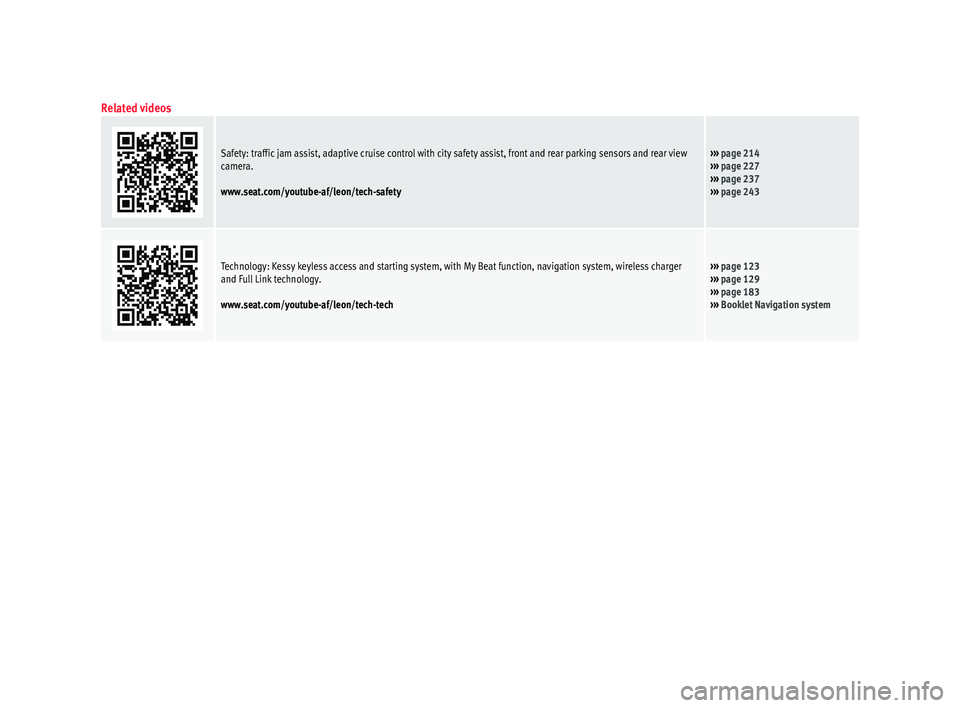
Related videos
Safety: traffic jam assist, adaptive cruise control with city safety assist, front and rear parking sensors and rear view
camera.
www.seat.com/youtube-af/leon/tech-safety››› page 214
››› page 227
››› page 237
››› page 243
Technology: Kessy keyless access and starting system, with My Beat function, navigation system, wireless charger
and Full Link technology.
www.seat.com/youtube-af/leon/tech-tech››› page 123
››› page 129
››› page 183
››› Booklet Navigation system
Page 5 of 332
Frequently Asked Ques-
tion
sBefore driving
How do you adjust the seat?
››› page 19
How do you adjust the steering wheel? ››› page 21
How do you adjust the exterior mirrors? ››› page 21
How do you turn on the exterior lights? ››› page 30
How does the automatic gearbox selector lever work?
››› page 50
How do you refuel? ››› page 58
How do you activate the windscreen wipers and wind-
screen washer system? ››› page 32
Emergency situations
A warning lamp lights up or flashes. What does this
mean? ››› page 47
How do you open the bonnet? ››› page 17
How do you perform a jump start? ››› page 70
Where is the vehicle tool kit located? ››› page 66
How do you repair a tyre with the anti-puncture kit?
››› page 65
How do you change a wheel? ››› page 66
How do you change a fuse? ››› page 63
How do you change a light? ››› page 64
How do you tow a vehicle? ››› page 69
Useful tips
How do you set the time? ››› page 115
When should the vehicle inspection should be per-
formed? ››› page 44
What functions do the buttons/thumbwheels on the
steering wheel perform? ››› page 121
How do you remove the luggage compartment cover?
››› page 169
How do you drive in an economical and environmental-
ly-friendly way? ››› page 200
How do you check and top up the engine oil?
››› page 59
How do you check and top up the engine coolant?
››› page 60
How do you top up the windscreen washer fluid?
››› page 61
How do you check and top up the brake fluid?
››› page 61
How do you check and adjust tyre pressure values?
››› page 280
Vehicle washing tips ››› page 257
Functions of interest
Easy Connect, CAR menu ››› page 33
How does the START-STOP system work? ››› page 205
What parking assistants are available? ››› page 237
How does the rear assist work? ››› page 243
How does the adaptive cruise control work?
››› page 214
How can the SEAT driving mode be adjusted?
››› page 230
How does the lane departure warning system work?
››› page 224
How does tyre pressure monitoring work? ››› page 284
How do you open the vehicle without a key (Keyless Ac-
cess)? ››› page 129
Interior lighting and ambient light ››› page 147
Page 8 of 332
Table of Contents
Automatic gearbox/DSG automatic gear-
bo x*
. . . . . . . . . . . . . . . . . . . . . . . . . . . . . . . . . . . 191
Ad
dress . . . . . . . . . . . . . . . . . . . . . . . . . . . . . . . . 198
Run-in and economical driving . . . . . . . . . . . . . 199
Power management . . . . . . . . . . . . . . . . . . . . . . 201
Engine management and emission control sys-
tem . . . . . . . . . . . . . . . . . . . . . . . . . . . . . . . . . . . 202
Driv
ing tips . . . . . . . . . . . . . . . . . . . . . . . . . . . . . 204
Driver assistance systems . . . . . . . . . . . . . . . . . 205
Start-Stop System* . . . . . . . . . . . . . . . . . . . . . . . 205
Auto Hold Function* . . . . . . . . . . . . . . . . . . . . . . 208
Cruise control system (CCS)* . . . . . . . . . . . . . . . 209
Emergency brake assist system (Front As-
sis
t)* . . . . . . . . . . . . . . . . . . . . . . . . . . . . . . . . . . 210
Adaptive Cruise Control ACC* . . . . . . . . . . . . . . 214
Lane Assist system* . . . . . . . . . . . . . . . . . . . . . . 224
Traffic Jam Assist . . . . . . . . . . . . . . . . . . . . . . . . 227
Emergency Assist . . . . . . . . . . . . . . . . . . . . . . . . 228
SEAT Drive Profile* . . . . . . . . . . . . . . . . . . . . . . . 230
Traffic sign detection system* . . . . . . . . . . . . . . 233
Fatigue detection (break recommendation)* . . 236
Parking aid . . . . . . . . . . . . . . . . . . . . . . . . . . . . . 237
Rear Assist “Rear View Camera”* . . . . . . . . . . . 243
Towing bracket device . . . . . . . . . . . . . . . . . . . . 246
Towing bracket device* . . . . . . . . . . . . . . . . . . . 246
Trailer towing . . . . . . . . . . . . . . . . . . . . . . . . . . . 251
Advice . . . . . . . . . . . . . . . . . . . . . . . . . . . . . . . . 256
Care and maintenance . . . . . . . . . . . . . . . . . . . . 256
Accessories and modifications to the vehi-
cle
. . . . . . . . . . . . . . . . . . . . . . . . . . . . . . . . . . . . 256
Care and cleaning . . . . . . . . . . . . . . . . . . . . . . . 257
Vehicle exterior care . . . . . . . . . . . . . . . . . . . . . . 257
Caring for the vehicle interior . . . . . . . . . . . . . . 261
Checking and refilling levels . . . . . . . . . . . . . . . 264
Filling the tank . . . . . . . . . . . . . . . . . . . . . . . . . . 264
Fuel . . . . . . . . . . . . . . . . . . . . . . . . . . . . . . . . . . . 266
Engine compartment . . . . . . . . . . . . . . . . . . . . . 270 Engine oil . . . . . . . . . . . . . . . . . . . . . . . . . . . . . . 272
Cooling system . . . . . . . . . . . . . . . . . . . . . . . . . . 274
Brake fluid . . . . . . . . . . . . . . . . . . . . . . . . . . . . . 275
Windscreen washer reservoir . . . . . . . . . . . . . . 276
Battery . . . . . . . . . . . . . . . . . . . . . . . . . . . . . . . . . 277
Wheels
. . . . . . . . . . . . . . . . . . . . . . . . . . . . . . . . 279
Wheels and tyres . . . . . . . . . . . . . . . . . . . . . . . . 279
Tyre monitoring systems . . . . . . . . . . . . . . . . . . 283
Temporary spare wheel . . . . . . . . . . . . . . . . . . . 286
Winter service . . . . . . . . . . . . . . . . . . . . . . . . . . . 287
Technical data . . . . . . . . . . . . . . . . . . . . . . . . 289
Technical specifications . . . . . . . . . . . . . . . . . . 289
Important . . . . . . . . . . . . . . . . . . . . . . . . . . . . . . 289
Vehicle identification data . . . . . . . . . . . . . . . . . 289
Fuel consumption data . . . . . . . . . . . . . . . . . . . 290
Trailer mode . . . . . . . . . . . . . . . . . . . . . . . . . . . . 290
Wheels . . . . . . . . . . . . . . . . . . . . . . . . . . . . . . . . 291
Engine data . . . . . . . . . . . . . . . . . . . . . . . . . . . . . 292
Dimensions . . . . . . . . . . . . . . . . . . . . . . . . . . . . . 313
Index . . . . . . . . . . . . . . . . . . . . . . . . . . . . . . . . . 315
6
Page 36 of 332
The essentialsMenuSubmenuPossible settingDescription
Lights
Light assistDynamic Light Assist, Light Assist, motorway function, turning-on time, headlamp
range adjustment, automatic lights when raining, one-touch signalling, travel mode.›››
page 140
Vehicle interior lightingBrightness of instrument panel and controls››› page 147
Coming Home/Leaving Home functionSwitch-on time of the “Coming home” and “Leaving home” functions››› page 143
››› page 144
Driver assistance
ACC (adaptive cruise control)Activation and deactivation: default distance level, driving profiles.››› page 214
Front Assist (emergency brake as-
sist system)Activation and deactivation: Front Assist, advance warning, distance warning display››› page 210
Lane Assist (system warning you if
you leave the lane)Activation and deactivation of lane departure warning, adaptive lane guidance››› page 224
Detection of traffic signsDisplay on the instrument panel, activation and deactivation of the speed warning››› page 233
TrailerTrailer recognition (display of traffic signs for vehicles with trailer), use to calculate
the route, maximum speed for trailer››› page 246
Fatigue detectionActivation and deactivation››› page 236
Parking and ma-
noeuvring
ParkPilotAutomatic activation, front volume, front sound treble, rear volume, rear sound tre-
ble, adjust Infotainment volume››› page 237
Auto HoldSwitching on and off when starting off››› page 208
Electric parking brakeSwitching on and off automatically››› page 183
Braking while manoeuvring functionSwitching on and off››› page 242
Displaying the parking spaceSwitching on and off
Ambient lighting–Switching on and off, selecting brightness, colour, area or total››› page 147 34
Page 37 of 332
The essentialsMenuSubmenuPossible settingDescription
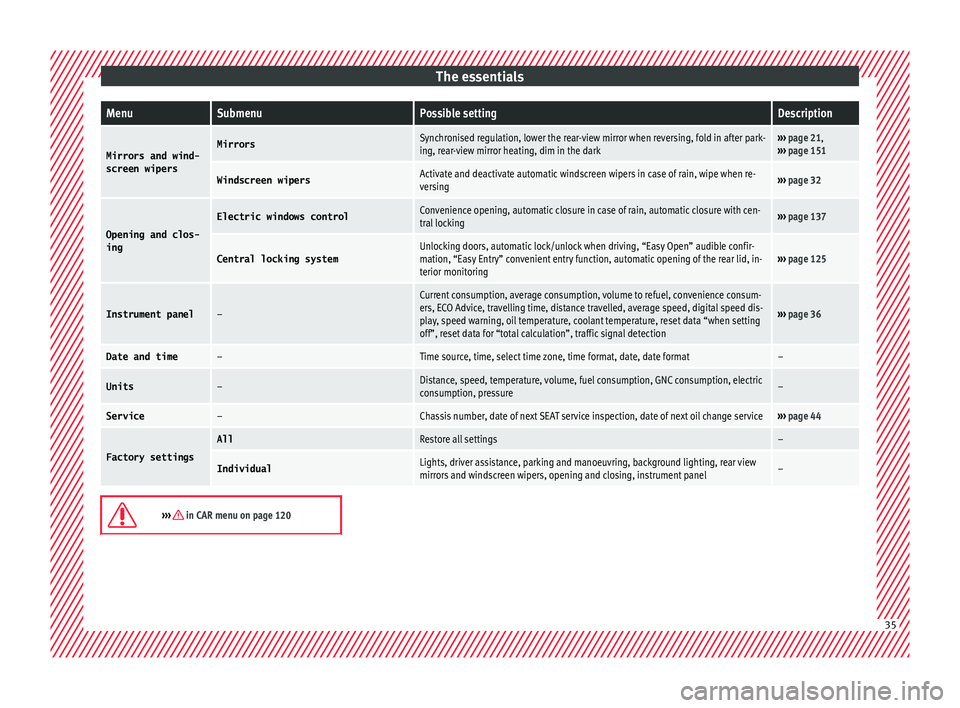
Mirrors and wind-
screen wipersMirrorsSynchronised regulation, lower the rear-view mirror when reversing, fold in after park-
ing, rear-view mirror heating, dim in the dark››› page 21,
››› page 151
Windscreen wipersActivate and deactivate automatic windscreen wipers in case of rain, wipe when re-
versing››› page 32
Opening and clos-
ing
Electric windows controlConvenience opening, automatic closure in case of rain, automatic closure with cen-
tral locking››› page 137
Central locking systemUnlocking doors, automatic lock/unlock when driving, “Easy Open” audible confir-
mation, “Easy Entry” convenient entry function, automatic opening of the rear lid, in-
terior monitoring››› page 125
Instrument panel–
Current consumption, average consumption, volume to refuel, convenience consum-
ers, ECO Advice, travelling time, distance travelled, average speed, digital speed dis-
play, speed warning, oil temperature, coolant temperature, reset data “when setting
off”, reset data for “total calculation”, traffic signal detection
››› page 36
Date and time–Time source, time, select time zone, time format, date, date format–
Units–Distance, speed, temperature, volume, fuel consumption, GNC consumption, electric
consumption, pressure–
Service–Chassis number, date of next SEAT service inspection, date of next oil change service››› page 44
Factory settings
AllRestore all settings–
IndividualLights, driver assistance, parking and manoeuvring, background lighting, rear view
mirrors and windscreen wipers, opening and closing, instrument panel–
››› in CAR menu on page 120
35
Page 74 of 332

The essentials
Make sure the battery clamps have sufficient
met al-t
o-met
al contact with the battery termi-
nals.
If the engine fails to start after about 10 sec-
onds, switch off the starter and try again after
about 1 minute. WARNING
● Ple a
se note the safety warnings referring to
working in the engine compartment
››› page 270.
● The battery providing assistance must have
the same v
oltage as the flat battery (12V) and
approximately the same capacity (see imprint
on battery). Failure to comply could result in
an explosion.
● Never use jump leads when one of the bat-
teries
is frozen. Danger of explosion! Even af-
ter the battery has thawed, battery acid could
leak and cause chemical burns. If a battery
freezes, it should be replaced.
● Keep sparks, flames and lighted cigarettes
awa
y from batteries, danger of explosion.
Failure to comply could result in an explo-
sion.
● Observe the instructions provided by the
manufact
urer of the jump leads.
● Do not connect the negative cable from the
other vehic
le directly to the negative terminal
of the flat battery. The gas emitted from the
battery could be ignited by sparks. Danger of
explosion. ●
Never att ac
h the negative cable to fuel sys-
tem components or the brake lines in the oth-
er vehicle.
● The non-insulated parts of the battery
clamp
s must not be allowed to touch. The
jump lead attached to the positive battery
terminal must not touch metal parts of the ve-
hicle, this can cause a short circuit.
● Position the leads in such a way that they
cannot c
ome into contact with any moving
parts in the engine compartment.
● Do not lean on the batteries. This could re-
sult
in chemical burns. Note
The vehicles must not touch each other, oth-
erw i
se electricity could flow as soon as the
positive terminals are connected. Changing the wiper blades
W ind
s
creen wipers service position Fig. 81
Wipers in service position. The wiper arms can be raised when the wip-
er
s
ar
e in service position ››› Fig. 81.
● Close the bonnet ›››
page 270.
● Switch the ignition on and off.
● Press the windscreen wiper lever down-
ward
s briefly 4
› ›
› page 32.
Before driving, always lower the wiper arms.
Using the windscreen wiper lever, the wind-
screen wiper arms return to their initial posi-
tion.
››› page 97 72
Page 96 of 332
Safety
Event Data Recorder D e
s
cription and operation Your vehicle has an event data recorder
(EDR).
The EDR’s f
u
nction is to record data in the
event of a mild or serious accident. These da-
ta are used to support the analysis of how
different vehicle systems behaved.
The EDR records, over a reduced time range
(normally 10 seconds or less), dynamic driv-
ing data and data from the restraint systems,
such as:
● How different vehicle systems worked.
● Whether the driver and the occupants were
we arin
g their seatbelts.
● How hard the acceleration or brake pedal
was
pressed.
● Vehicle speed.
These dat
a will provide a better understand-
ing of the circumstances of the accident.
Data from the driving assist systems are also
recorded. This includes data such as whether
the systems were inactive or active and if
such action had an impact on the vehicle’s
dynamic behaviour, changing its path in the
aforementioned situations, accelerating or
decelerating the vehicle. Depending on vehicle equipment, this in-
cludes
data from systems such as:
● Adaptive Cruise Control (ACC)
● Emergency brake assist system (Front As-
sis
t).
● Park Pilot system
● Lane Assist
The EDR data ar
e only recorded in specific ac-
cident situations. No data are recorded in
normal driving conditions.
No audio or video data inside or around the
vehicle are recorded. Under no circumstances
are personal data such as name, age, or gen-
der recorded. Nevertheless, third parties
(such as criminal proceedings authorities)
may relate the contents of the EDR data to
other data sources and create a personal ref-
erence in the context of an accident investi-
gation.
In order to read the EDR data it is necessary
to access (if legally permitted to do so) the
vehicle's ODB (“On-Board-Diagnose”) inter-
face while the vehicle is switched on.
SEAT will not have access to EDR data unless
the owner (or, in “Leasing” cases, the lessee
or hirer) gives their consent. There may be ex-
ceptions to this, depending on legal or con-
tractual provisions.
Due to legal requirements in safety-related
products, SEAT may use the EDR data for field research and in order to improve vehicle sys-
tem quality. An
y data used for the purposes
of research will be treated anonymously (in
other words, no reference will be made to the
vehicle, their owner or the lessee/hirer).
94
Page 97 of 332
Self-help
Emergencies
Self -help
V ehic
le tool kit, anti-puncture kit* The tools and anti-puncture kit* are stored
under the floor p
anel
in the luggage compart-
ment.
To access the vehicle tools:
– Lift up the floor surface by the plastic han-
dle u nti
l it is fastened to the tabs on both
sides.
Depending on the vehicle equipment, the an-
ti-puncture kit* is located under the floor
panel in the luggage compartment.
The tool kit includes:
● Jack*
● Wire hook for pulling off the wheel cov-
er*/wheel bolt
cap clip.
● Box spanner for wheel bolts*
● Towline anchorage
● Adapter for the anti-theft wheel bolts*
● Towing bracket device
Some of the items
listed are only provided in
certain model versions, or are optional ex-
tras. Note
The jack does not generally require any main-
ten anc
e. If required, it should be greased us-
ing universal type grease. Tyre repair
TMS (T
yre Mobility System)* Read the additional information carefully
›› ›
page 65
The Anti-puncture kit* (Tyre Mobility System)
will reliably seal punctures caused by the
penetration of a foreign body of up to about
4 mm in diameter. Do not remove foreign ob-
jects, e.g. screws or nails, from the tyre.
After inserting the sealant residue in the tyre,
you must again check the tyre pressure about
10 minutes after starting the engine.
You should only use the tyre mobility set if
the vehicle is parked in a safe place, you are
familiar with the procedure and you have the
necessary tyre mobility set! Otherwise, you
should seek professional assistance.
Do not use the tyre sealant in the following
cases:
● If the wheel rim has been damaged.
● In outside temperatures below -20°C (-4°F). ●
In the ev ent
of
cuts or perforations in the
tyre greater than 4 mm.
● If you have been driving with very low pres-
sure or a c
ompletely flat tyre.
● If the sealant bottle has passed its use by
date. WARNING
Using the tyre mobility system can be dan-
ger ou
s, especially when filling the tyre at the
roadside. Please observe the following rules
to minimise the risk of injury:
● Stop the vehicle safely as soon as possible.
Park it
at a safe distance from surrounding
traffic to fill the tyre.
● Ensure the ground on which you park is flat
and solid.
● Al
l passengers and particularly children
must
keep a safe distance from the work area.
● Turn on the hazard warning lights to warn
other roa
d users.
● Use the tyre mobility system only if you are
famili
ar with the necessary procedures. Oth-
erwise, you should seek professional assis-
tance.
● The tyre mobility set is intended for tempo-
rary
emergency use only until you can reach
the nearest specialised workshop.
● Replace the repaired tyre with the tyre mo-
bility
set as soon as possible. » 95
Technical data
Advice
Operation
Emergencies
Safety
Page 122 of 332
Operation
Introduction to the Easy
C onnect
sy
stem*
System settings (CAR)* CAR menu Read the additional information carefully
›› ›
page 33
To select the settings menus, depending on
the version, either press the Easy Connect
button and the SETTINGS
fu
nction b
ut-
ton, OR press the button, then Vehicle
and then the SETTINGS function button.
The actual number of menus available and
the name of the various options in these me-
nus will depend on the vehicle’s electronics
and equipment.
When the function button check box is activa-
ted , the function is active.
Pressing the menu button will always take
y ou t
o the l
ast menu used.
Any changes made using the settings menus
are automatically saved on closing those me-
nus.
Menu Vehicle set-
tingsPage
ESC system››› page 187
Menu Vehicle set-
tingsPage
Tyres››› page 283
Driver assistance››› table on page 33
Parking and manoeuvring››› page 237
Vehicle lights››› table on page 33
Mirrors and windscreen wipers››› table on page 33
Opening and closing››› table on page 33
Multifunction display››› table on page 33
Date and time››› table on page 33
Units››› table on page 33
Service››› page 115
Factory settings››› table on page 33 WARNING
Any distraction may lead to an accident, with
the risk of
injury. Operating the Easy Connect
system while driving could distract you from
traffic. 120
Page 138 of 332

Operation
●
Alw a
ys close the rear lid properly. Risk of
accident or injury.
● The rear lid must not be opened when the
rever
se or rear fog lights are lit. This may
damage the tail lights.
● Do not close the rear lid by pushing it down
with y
our hand on the rear window. The glass
could smash. Risk of injury!
● Ensure the rear lid is locked after closing it.
If not, it m
ay open unexpectedly while driv-
ing.
● Closing the rear lid without observing and
ensurin
g it is clear could cause serious injury
to you and to third parties. Make sure that no
one is in the path of the rear lid.
● Never drive with the rear lid open or half-
closed, e
xhaust gases may penetrate into the
interior of the vehicle. Danger of poisoning!
● If you only open the rear lid, do not leave
the key in
side. The vehicle cannot be opened
if the key is left inside. Controls for the windows
Openin g and c
lo
sing of the electric
windows* Fig. 140
Detail of the driver door: controls for
the w indo
w
s (5-door vehicle with front and
rear electric windows). Read the additional information carefully
› ›
›
page 18
The front and rear electric windows can be
operated by using the controls on the driver
door. The other doors each have a switch for
their own window.
Always close the windows fully if you park
the vehicle or leave it unattended ››› .
Y ou c
an u
se the electric windows for approx.
10 minutes after switching off the ignition if
neither the driver door nor the front passen-
ger door has been opened and the key has
not been removed from the ignition. Safety switch
* (only in 5-door
vehicles)
The safety switch ››› Fig. 140 5 on the driver
door c an be u
sed t
o disable the electric win-
dow buttons on the rear doors.
● Safety switch not pressed : button
s on rear
doors are activated.
● Safety switch pressed : button
s on rear
doors are deactivated.
The safety control symbol lights up in yel-
low if the buttons on the rear doors are
switched off. WARNING
Observe the safety warnings ›››
in Intro-
duction on pag e 97
.
● Incorrect use of the electric windows can
res
ult in injury.
● Never close the rear lid without observing
and ensurin
g it is clear, to do otherwise could
cause serious injury to you and third parties.
Make sure that no one is in the path of a win-
dow.
● The engine may accidentally be started and
be out of c
ontrol.
● If the ignition is switched on, the electric
equipment cou
ld be activated with risk of in-
jury, for example, in the electric windows.
● The doors can be locked using the remote
contro
l key. This could become an obstacle
for assistance in an emergency situation. 136