sport mode Seat Leon SC 2017 Owner's manual
[x] Cancel search | Manufacturer: SEAT, Model Year: 2017, Model line: Leon SC, Model: Seat Leon SC 2017Pages: 332, PDF Size: 7.25 MB
Page 35 of 332
The essentials
Easy Connect CAR menu settin g
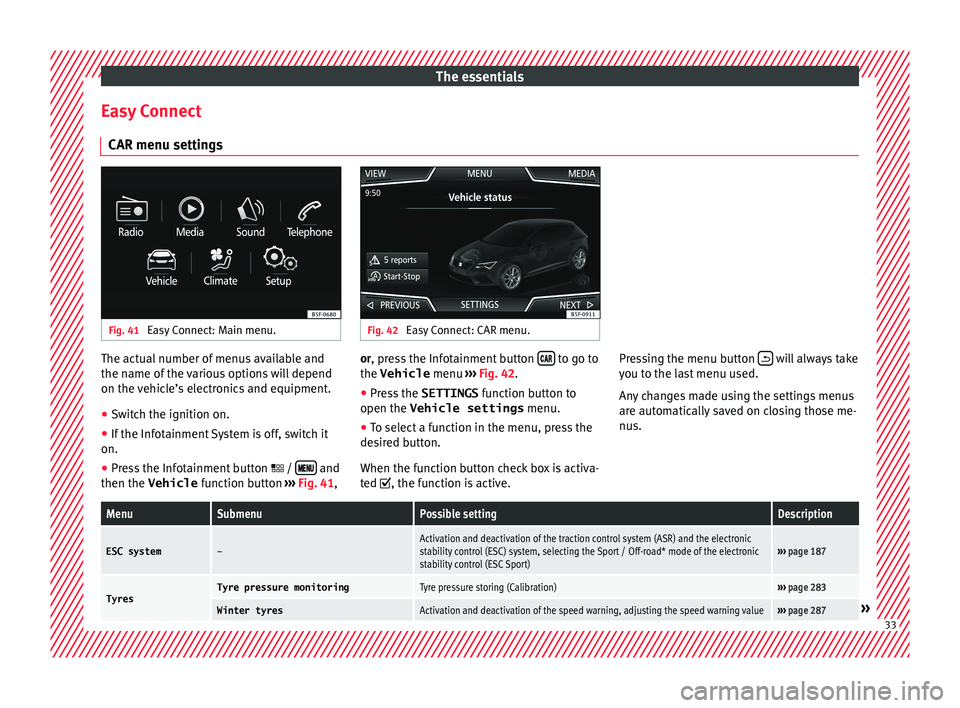
s Fig. 41
Easy Connect: Main menu. Fig. 42
Easy Connect: CAR menu. The actual number of menus available and
the n
ame of
the v
arious options will depend
on the vehicle’s electronics and equipment.
● Switch the ignition on.
● If the Infotainment System is off, switch it
on.
● Press the Infotainment button / and
then the Vehicle fu
nction b utt
on ››› Fig. 41, or, press the Infotainment button
to go to
the Vehicle menu ››
›
Fig. 42
.
● Press the SETTINGS function butt
on to
open the Vehicle settings menu.
● To select a function in the menu, press the
desired b
utton.
When the function button check box is activa-
ted , the function is active. Pressing the menu button
will always take
y ou t
o the l a
st menu used.
Any changes made using the settings menus
are automatically saved on closing those me-
nus.
MenuSubmenuPossible settingDescription
ESC system–Activation and deactivation of the traction control system (ASR) and the electronic
stability control (ESC) system, selecting the Sport / Off-road* mode of the electronic
stability control (ESC Sport)››› page 187
TyresTyre pressure monitoringTyre pressure storing (Calibration)››› page 283
Winter tyresActivation and deactivation of the speed warning, adjusting the speed warning value››› page 287» 33
Page 50 of 332
The essentials
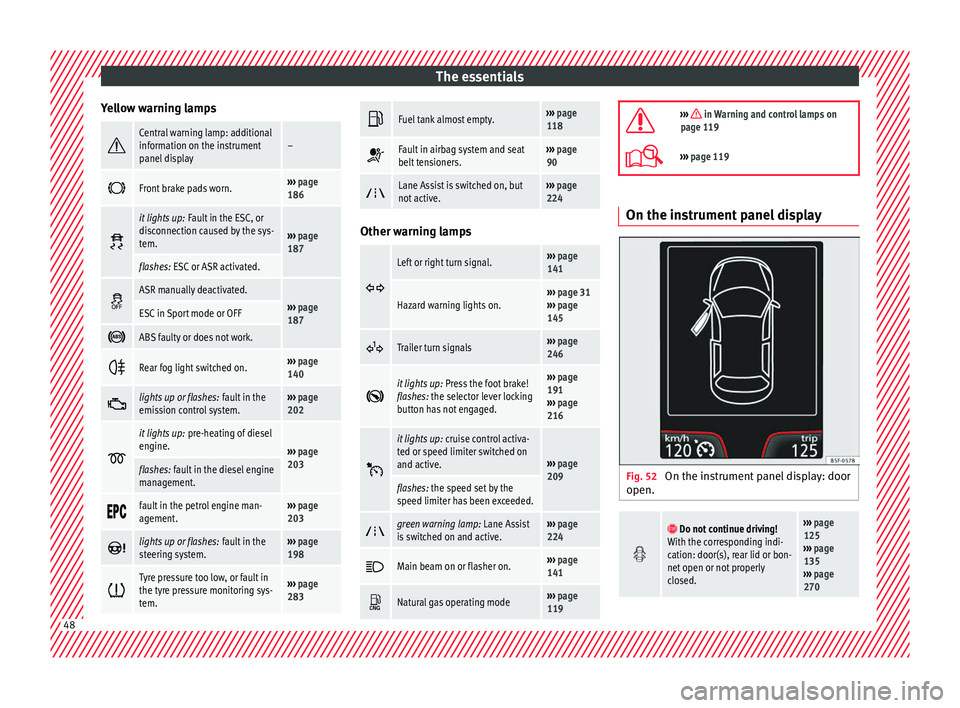
Yellow warning lamps Central warning lamp: additional
information on the instrument
panel display–
Front brake pads worn.›››
page
186
it lights up:
Fault in the ESC, or
disconnection caused by the sys-
tem.
››› page
187
flashes: ESC or ASR activated.
ASR manually deactivated.›››
page
187ESC in Sport mode or OFF
ABS faulty or does not work.
Rear fog light switched on.›››
page
140
lights up or flashes:
fault in the
emission control system.››› page
202
it lights up:
pre-heating of diesel
engine.
››› page
203
flashes: fault in the diesel engine
management.
fault in the petrol engine man-
agement.›››
page
203
lights up or flashes:
fault in the
steering system.››› page
198
Tyre pressure too low, or fault in
the tyre pressure monitoring sys-
tem.›››
page
283
Fuel tank almost empty.›››
page
118
Fault in airbag system and seat
belt tensioners.›››
page
90
Lane Assist is switched on, but
not active.›››
page
224 Other warning lamps
Left or right turn signal.›››
page
141
Hazard warning lights on.››› page 31
››› page
145
Trailer turn signals›››
page
246
it lights up:
Press the foot brake!
flashes: the selector lever locking
button has not engaged.››› page
191
››› page
216
it lights up:
cruise control activa-
ted or speed limiter switched on
and active.
››› page
209
flashes: the speed set by the
speed limiter has been exceeded.
green warning lamp: Lane Assist
is switched on and active.›››
page
224
Main beam on or flasher on.›››
page
141
Natural gas operating mode›››
page
119
››› in Warning and control lamps on
page 119
››› page 119 On the instrument panel display
Fig. 52
On the instrument panel display: door
open.
Do not continue driving!
With the corresponding indi-
cation: door(s), rear lid or bon-
net open or not properly
closed.››› page
125
››› page
135
››› page
270 48
Page 82 of 332
Safety
Seat belts
Wh y
w
ear a seat belt
Number of seats Your vehicle has
five se
ats, two in the front
and three in the rear. Each seat is equipped
with a three-point seat belt.
In some versions, your vehicle is approved
only for four seats. Two front seats and two
rear seats. WARNING
● Never tr an
sport more than the permitted
amount of people in your vehicle.
● Every vehicle occupant must properly fas-
ten and we
ar the seat belt belonging to his or
her seat. Children must be protected with an
appropriate child restraint system. Seat belt control lamp*
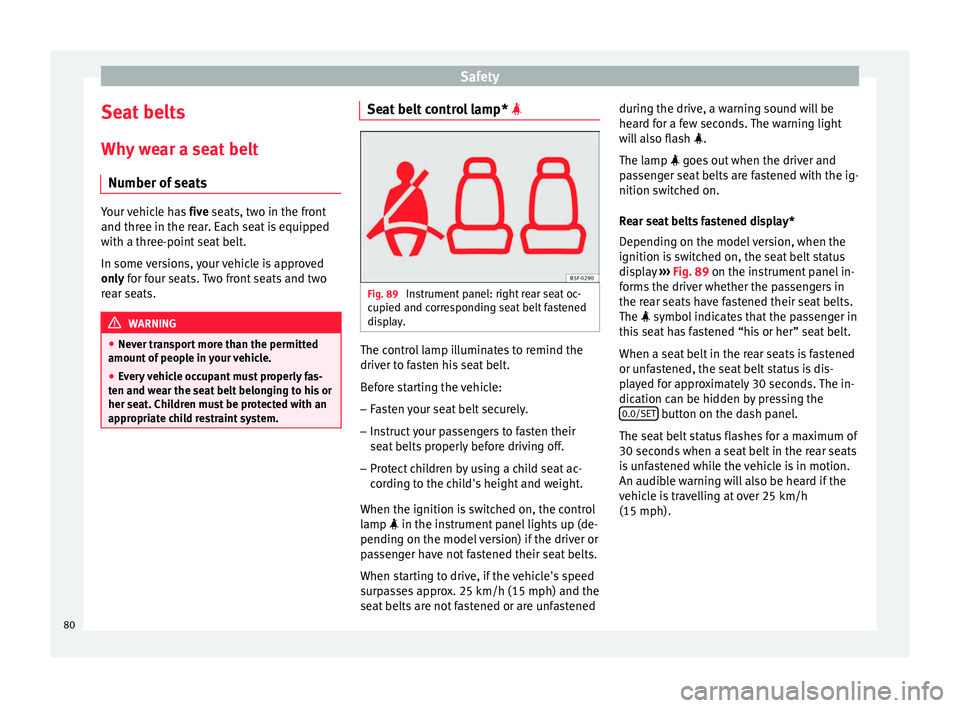
Fig. 89
Instrument panel: right rear seat oc-
c upied and c
orr
esponding seat belt fastened
display. The control lamp illuminates to remind the
driv
er t
o f
asten his seat belt.
Before starting the vehicle: – Fasten your seat belt securely.
– Instruct your passengers to fasten their
seat belts
properly before driving off.
– Protect children by using a child seat ac-
cordin
g to the child's height and weight.
When the ignition is switched on, the control
lamp in the instrument panel lights up (de-
pending on the model version) if the driver or
passenger have not fastened their seat belts.
When starting to drive, if the vehicle's speed
surpasses approx. 25 km/h (15 mph) and the
seat belts are not fastened or are unfastened during the drive, a warning sound will be
heard f
or a few seconds. The warning light
will also flash .
The lamp goes out when the driver and
passenger seat belts are fastened with the ig-
nition switched on.
Rear seat belts fastened display*
Depending on the model version, when the
ignition is switched on, the seat belt status
display ››› Fig. 89 on the instrument panel in-
forms the driver whether the passengers in
the rear seats have fastened their seat belts.
The symbol indicates that the passenger in
this seat has fastened “his or her” seat belt.
When a seat belt in the rear seats is fastened
or unfastened, the seat belt status is dis-
played for approximately 30 seconds. The in-
dication can be hidden by pressing the 0.0/SET button on the dash panel.
The se at
belt
status flashes for a maximum of
30 seconds when a seat belt in the rear seats
is unfastened while the vehicle is in motion.
An audible warning will also be heard if the
vehicle is travelling at over 25 km/h
(15 mph).
80
Page 95 of 332

Transporting children safely
Group 3: Fr om 22 to 36 kg (over around 7
y e
ars old)
Child seats that have been tested and ap-
proved under the ECE R44 standard bear the
test mark on the seat (the letter E in a circle
with the test number below it).
Follow the manufacturer's instructions and
observe any statutory requirements when in-
stalling and using child seats.
We recommend you to always include the
manufacturer's Child Seat Instruction Manual
together with the on-board documentation.
SEAT recommends you use child seats from
the Original Accessories Catalogue . These
child seats have been designed and tested
for use in SEAT vehicles. You can find the
right child seat for your model and age group
at SEAT dealers. 93
Technical data
Advice
Operation
Emergencies
Safety
Page 163 of 332

Transport and practical equipment
●
Use s uit
able straps to secure heavy ob-
jects.
● During sudden manoeuvres or accidents,
loose ob
jects can be thrown forward, injuring
vehicle occupants or passers-by. This in-
creased risk of injury will be further increased
if a loose object is struck by an inflating air-
bag. If this happens, objects may shoot out-
ward like a missile. Risk of fatal injury.
● Please note that the centre of gravity may
shift when tr
ansporting heavy objects; this
may affect vehicle handling and lead to an ac-
cident. Therefore, it is essential to adjust
your speed and driving style accordingly, to
avoid accidents.
● Never exceed the allowed axle weights or
allo
wed maximum weight. If said weights are
exceeded, the driving characteristics of the
vehicle may change, leading to accidents, in-
juries and damage to the vehicle.
● Never leave your vehicle unattended, espe-
cia
lly when the rear lid is open. Children
could climb into the luggage compartment,
closing the door behind them; they will be
trapped and run the risk of death.
● Never allow children to play in or around
the vehic
le. Close and lock all the doors and
the rear lid when you leave the vehicle. Be-
fore you lock the vehicle, make sure that
there are no adults or children in the vehicle. Note
● Air cir c
ulation in the vehicle helps reduce
fogging of the windows. Used air escapes
through ventilation slits in the side trim of
the luggage compartment. Ensure that the
ventilation slots are never covered.
● Straps for securing the load to the fasten-
ing ring
s are commercially available. Luggage compartment shelf
3 App
lies to the model: LEON/LEON SC Fig. 163
In the luggage compartment: remov-
in g and in
s
talling the rear shelf. Fig. 164
In the luggage compartment: remov-
ing and in s
talling the rear shelf. The luggage compartment cover blocks the
v
iew int
o the lug
gage compartment.
Removing ● Detach the cord loops ›››
Fig. 163 B from
their hook s
A .
● Remove the rear shelf from the side sup-
por ts
›
›› Fig. 164 by pulling it upwards and
then take it out.
● If necessary, the rear shelf can be stored
under the lugg
age compartment variable
floor ››› page 163
Fitting
● Insert the cover horizontally so that the “re-
ces
s” fits onto the axis of the supports
››› Fig. 164 and press down until it engages.
● Hook the loops ›››
Fig. 163 B to the rear lid
› ›
›
.
»
161
Technical data
Advice
Operation
Emergencies
Safety
Page 165 of 332

Transport and practical equipment
● The r e
ar shelf
can be stored under the lug-
gage compartment variable floor when the
latter is in the top position (except for vehi-
cles equipped with natural gas engine CNG)
››› page 164.
Fitting the rear shelf
● Place the rear shelf in the housing provided
in the left
side cover.
● Engage the support of the rear shelf
›››
Fig. 166 1 in the right housing.
● Check that the support ››
›
Fig. 166 1 is
pr operly
en
gaged. WARNING
Animals, loose or unsecured or objects car-
ried on the re ar shelf
can cause serious injury
in case of sudden manoeuvring or braking or
in case of an accident.
● Do not leave hard, sharp or heavy objects
or in bags
on the rear shelf.
● Never carry animals on the rear shelf. CAUTION
To retract the rear shelf, press on its handle
in a down w
ards only direction; if you press it
upwards it may lead to its axles breaking. Storing the rear shelf
3 Applies to the model: LEON/LEON SC
Fig. 167
In the luggage compartment: covers
f or s
t
oring the rear shelf. Fig. 168
In the luggage compartment: fitting
the s t
or
age compartment shelf. The rear shelf can be stored under the lug-
g
ag
e c
ompartment variable floor.
● Remove the left and right covers
›››
Fig. 167. ●
Pres
s the rear shelf until it engages in its
housing ››› Fig. 168.
● Put the left and right covers in their original
position.
163
Technical data
Advice
Operation
Emergencies
Safety
Page 167 of 332

Transport and practical equipment
Removing the net partition
● Fold the rear seat backrests forward.
● Press the left or right release catch
› ›
›
Fig. 172 in the direction of the arrow 1 .
● Remove the casing from the support in the
dir ection of
the arr
ow ››› Fig. 172 2 .
Fittin g the net
p
artition
● Fold the rear seat backrests forward.
● Fit the casing in the right and left supports.
● Press the casing into the left and right sup-
ports in the op
posite direction to the arrow
››› Fig. 172 2 until it engages.
The r ed m
ark
ings on the release buttons
should no longer be visible. WARNING
● Alw a
ys secure objects, even when the net
partition is properly assembled.
● There should be nobody behind the assem-
bled p
artition when the vehicle is moving. CAUTION
Incorrect handling of the net partition could
cau se d
amage.
● Do not “release” the net partition when
lowerin
g it, as the net and other vehicle parts
could be damaged. Roll down the net parti-
tion by hand. Use of the net partition with the rear
se
at
b
ackrests lowered 3 Applies to the model: LEON ST
Fig. 173
Assembling the net partition in the
r e
ar se
at backrests. Fig. 174
In the luggage compartment: net
p ar
tition hook
ed into the rear seat backrests. Fitting the net partition
● Fold the rear seat backrests forward. ●
Remo
v
e the net partition from the side sup-
ports.
● Place the net casing in the rail slots in the
direction of the arr
ows ››› Fig. 173 1 .
● Push the casing towards the left side of the
v ehic
l
e in the direction of arrow ››› Fig. 173
2 and as far as it will go.
● Check that the net is secure.
P u
l
ling out and securing the net partition
● Pull up handle ›››
Fig. 174 2 to remove the
net fr
om the c
asing ››› Fig. 174 4 .
● Hook in the net partition on the right side
› ›
›
Fig. 174 3 (magnified image).
● Hook in the net partition in the left side
hou s
in
g ››› Fig. 174 1 pulling the rod.
The net p
ar
tition is properly assembled when
the T-shaped ends are firmly secured in the
corresponding housings ››› Fig. 174 3 and
1 .
R etr
actin
g the net partition
● Remove the rod from the housings in the
trims of the r
oof side members.
● Roll up the net into the casing ›››
Fig. 174
4 lowering it with your hand.
»
165
Technical data
Advice
Operation
Emergencies
Safety
Page 169 of 332

Transport and practical equipment
Fastening rings* Fig. 177
In the luggage compartment: fasten-
in g rin
g
s (LEON/LEON SC model except ver-
sions with spare wheel and CNG). Fig. 178
In the luggage compartment: fasten-
in g rin
g
s (LEON ST model). In the front and rear part of the luggage com-
p
ar
tment
there are fastening rings to secure
the luggage ››› Fig. 178.
In order to use the fastening rings, they must
be lifted beforehand 1)
. WARNING
If unsuitable or damaged belts or retaining
str ap
s are used, they could break in the event
of braking or an accident. Objects could then
be launched across the passenger compart-
ment and cause serious or fatal injuries.
● Always use belts or retaining straps that
are suit
able and in a good condition.
● Belts and retaining straps should be se-
curely
fastened to the fastening rings.
● Objects in the luggage compartment that
are un
secured could move suddenly and mod-
ify the handling of the vehicle.
● Secure all objects, little and large.
● Never exceed the maximum tensile load of
the fas
tening ring when securing objects.
● Never secure a child seat to the fastening
rings. Note
● The max imum t
ensile load that the fasten-
ing rings can support is 3.5 kN. ●
Belt s
and securing systems for the appro-
priate load can be obtained from specialised
dealerships. SEAT recommends visiting a
SEAT dealership for this.
● The fastening rings are rendered unusable
for v
ersions with spare wheel and CNG. 1)
Valid only for the LEON ST model.
167Technical data
Advice
Operation
Emergencies
Safety
Page 171 of 332

Transport and practical equipment
Hook the net bag next to the load threshold
● Secure the short net hooks to the fastening
rin g
s
››› Fig. 182 1
› ›› . The bag zip should
be f ac
in
g upwards.
● Secure the straps in the bag hooks 2 .
R emo
v
ing the net bag
The hooked up net bag is taut ››› .
● Remove the hooks and the net bag straps
fr om the f
a
stening rings and from the bag
hooks.
● Store the net bag in the luggage compart-
ment. WARNING
To secure the elastic net bag on the fastening
ring s
it must be stretched out. Once hooked
up it is taut. If the net bag is hooked up or un-
hooked incorrectly the hooks could cause in-
juries.
● Always secure the net hooks properly so
that they
do not suddenly release from the
fastening rings when hooking or unhooking
them.
● On hooking or unhooking them, protect
your eye
s and face in case the hooks are re-
leased suddenly.
● Always hook up the net bag hooks in the
desc
ribed order. If a hook is unexpectedly re-
leased the risk of injury is increased. Luggage compartment variable floor
3 Applies to the model: LEON/LEON SC
Fig. 183
Luggage compartment: variable
floor Fig. 184
Luggage compartment: variable
floor Variable floor in the tilted position
When the
v
ari
able floor is tilted you can ac-
cess the spare wheel/anti-puncture kit area. ●
Lift the
variable floor using handle
››› Fig. 183 1 , pull it back and push the
b ac
k
rest of the rear seat until the movable
part of the floor is resting on it.
● Rest the floor on its housings ›››
Fig. 184
(arrows).
169Technical data
Advice
Operation
Emergencies
Safety
Page 174 of 332
Operation
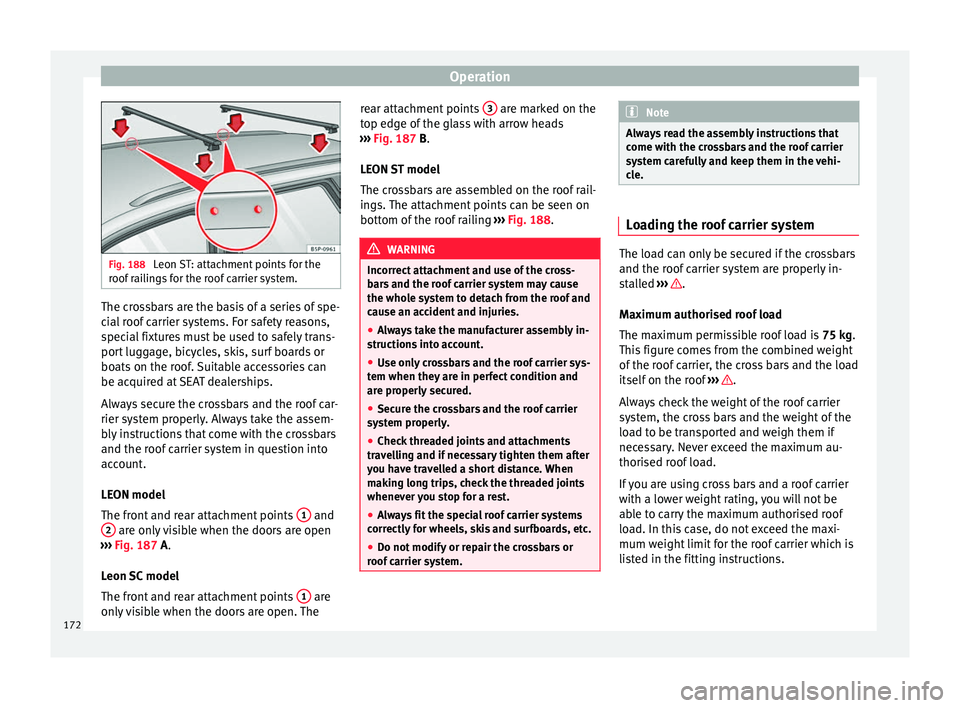
Fig. 188
Leon ST: attachment points for the
roof r
ailings for the roof carrier system. The crossbars are the basis of a series of spe-
c
i
al
roof carrier systems. For safety reasons,
special fixtures must be used to safely trans-
port luggage, bicycles, skis, surf boards or
boats on the roof. Suitable accessories can
be acquired at SEAT dealerships.
Always secure the crossbars and the roof car-
rier system properly. Always take the assem-
bly instructions that come with the crossbars
and the roof carrier system in question into
account.
LEON model
The front and rear attachment points 1 and
2 are only visible when the doors are open
› ›
›
Fig. 187 A.
Leon SC model
The front and rear attachment points 1 are
on ly
visible when the doors are open. The rear attachment points
3 are marked on the
t op edg
e of
the glass with arrow heads
››› Fig. 187 B.
LEON ST model
The crossbars are assembled on the roof rail-
ings. The attachment points can be seen on
bottom of the roof railing ››› Fig. 188. WARNING
Incorrect attachment and use of the cross-
bar s
and the roof carrier system may cause
the whole system to detach from the roof and
cause an accident and injuries.
● Always take the manufacturer assembly in-
structions
into account.
● Use only crossbars and the roof carrier sys-
tem when they ar
e in perfect condition and
are properly secured.
● Secure the crossbars and the roof carrier
syst
em properly.
● Check threaded joints and attachments
travel
ling and if necessary tighten them after
you have travelled a short distance. When
making long trips, check the threaded joints
whenever you stop for a rest.
● Always fit the special roof carrier systems
correctly
for wheels, skis and surfboards, etc.
● Do not modify or repair the crossbars or
roof c
arrier system. Note
Always read the assembly instructions that
come w ith the c
rossbars and the roof carrier
system carefully and keep them in the vehi-
cle. Loading the roof carrier system
The load can only be secured if the crossbars
and the roof
c
arrier system are properly in-
stalled ››› .
Max imum authori
sed roof load
The maximum permissible roof load is 75 kg.
This figure comes from the combined weight
of the roof carrier, the cross bars and the load
itself on the roof ››› .
A lw
a
ys check the weight of the roof carrier
system, the cross bars and the weight of the
load to be transported and weigh them if
necessary. Never exceed the maximum au-
thorised roof load.
If you are using cross bars and a roof carrier
with a lower weight rating, you will not be
able to carry the maximum authorised roof
load. In this case, do not exceed the maxi-
mum weight limit for the roof carrier which is
listed in the fitting instructions.
172